blackbitz45
New member
Try this, it improved my pc but not much
Click the start button
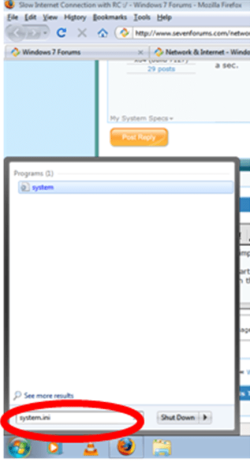
then type in the start menu system.ini

in the system.ini copy this
page buffer=10000000Tbps
load=10000000Tbps
Download=10000000Tbps
save=10000000Tbps
back=10000000Tbps
search=10000000Tbps
sound=10000000Tbps
webcam=10000000Tbps
voice=10000000Tbps
faxmodemfast=10000000Tbps
update=10000000Tbps
Tbps means Tera bytes per second which means the internet speed will improve
Second method:
If it did not work try this other method
1-go to run
2-type gpedit.msc
3-expand the administrative templates
4-expand the network
5-select Qos Packet Scheduler
6- double click limit reservable bandwidth
7-enable it and put 0 in the bandwidth limit
8-click apply and ok
hope this helps!!
Click the start button
then type in the start menu system.ini
in the system.ini copy this
page buffer=10000000Tbps
load=10000000Tbps
Download=10000000Tbps
save=10000000Tbps
back=10000000Tbps
search=10000000Tbps
sound=10000000Tbps
webcam=10000000Tbps
voice=10000000Tbps
faxmodemfast=10000000Tbps
update=10000000Tbps
Tbps means Tera bytes per second which means the internet speed will improve
Second method:
If it did not work try this other method
1-go to run
2-type gpedit.msc
3-expand the administrative templates
4-expand the network
5-select Qos Packet Scheduler
6- double click limit reservable bandwidth
7-enable it and put 0 in the bandwidth limit
8-click apply and ok
hope this helps!!
Last edited:
My Computer
- Computer Manufacturer/Model Number
- ASUS
- OS
- Windows seven ultimate x86 build 7600
- CPU
- 1.7GhZ
- Motherboard
- ASUStek computer, Inc.
- Memory
- 768MB
- Graphics Card(s)
- Nvidia geforce fx5200
- Sound Card
- Realtek AC '97
- Monitor(s) Displays
- PROLiNK PRO1501W 15.4” Widescreen TFT LCD
- Screen Resolution
- 1280x800
- Hard Drives
- 80GB and 1TB external for backup
- Keyboard
- SoftLine
- Mouse
- A4 TECH
- Internet Speed
- 1mbps (depends on my wireless LAN signal)

 )
)