Media Center- Setup Movie Library

How to Setup a Media Center Movie Library in Windows 7

   Information
This tutorial will show how to manage your movie library in Media Center, including poster images & full synopsis information.
   Note
Windows Media Center is not available in Windows 7 Starter and Windows 7 Home Basic editions.


The N and KN editions of Windows 7 have all the features that normally come with each individual Windows 7 edition, except for Windows Media Player 12 and related programs, such as Windows Media Center or Windows DVD Maker.

The N editions of Windows 7 allow you to choose your own media player and software required to manage and play CDs, DVDs, and other digital media files. If you choose to use Windows Media Player 12, downloading it, along with related software, is free. Download Media Feature Pack for Windows 7 N with Service Pack 1 and Windows 7 KN with Service Pack 1 (KB968211) from Official Microsoft Download Center

Examples: With & without poster information.
7 Example Media Center (Movies without posters).PNG8 Example Media Center (Movies with posters).png

Before you start:
NOTE: Special thanks to DemonSeed for the file2folder batch file. 1. Click on the Download button below to download the file2folder.zip file and extract the file2folder.bat file to the drive containing your movie files (e.g. G:\MOVIES). Run the file which will create directories based on the movie file name (e.g. Babylon A.D.avi will have the directory Babylon A.D created) and the movie file moved to the directory.

2. Search for & download a file for the movie you would like as a poster and save it in the movie folder and name it folder.jpg. Do this for each movie.
   Warning
I would advise at least 2GB of memory as due to the size of the folder.jpg files there is a lot of memory used. You could (like me) resize all folder.jpg files to a width of 300 pixels & maintain aspect ratio.


Here's How: 1. Run Media Center and navigate to Movies 1 Media Center (Start Page).PNG
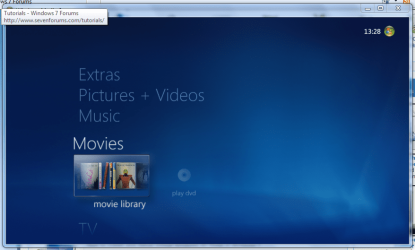
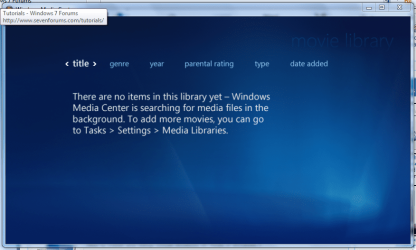
2. Open movie library, you should notice no movies shown 2 Media Center (Movie Library - Empty).PNG
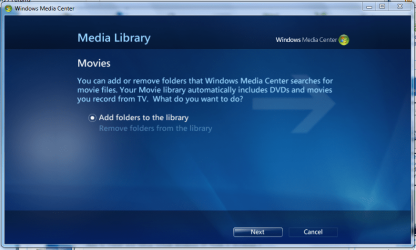
3. Right-Click within the inner (empty area) and select Manage Library, you will be shown the 'Add folders' wizard. Select 'Add folders to the library' and click next 3 Media Center (Add folder to library).PNG
4. Select the location where your drive with the videos is stored, and click on next. 4 Media Center (Folder Selection 1).PNG
5. Navigate to the folder where your videos are stored (e.g. G:\MOVIES), and click next. 5 Media Center (Select Folder).PNG
6. On the final screen select 'Yes, use these locations' and click finish 6 Media Center (Finish Selection).PNG


Now your folder is added, Media Center will show the Video folders (with posters if you downloaded an image file for each movie).

   Note
If you wish to include metadata you will need to download Yammm. The meta data will download the DVDID.XML file which will allow for Media Center to download full synopsis information for each movie
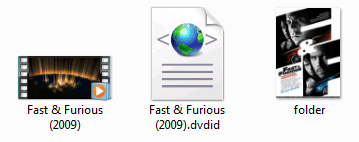

Example folder view.PNG

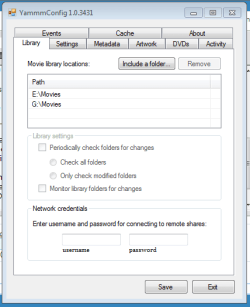
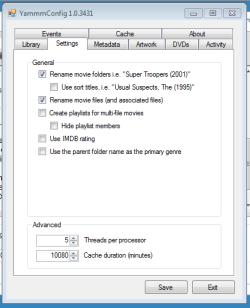
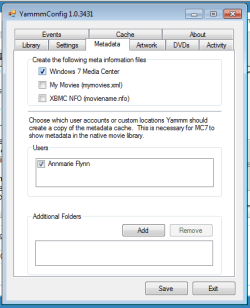
Recommended Yammm settings
1 yammm paths.PNG2 yammm settings.PNG
3 yammm metadata.PNG
   Note
These setting will automatically rename folders/files, download folder.jpg & DVDID.XML files for Media Center to read from.


Update

The Yammm application has been updated to include Image Resizing
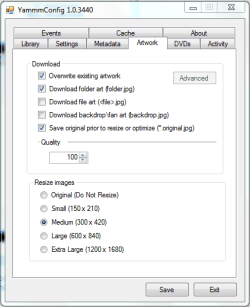
Yammm (Artwork).PNG

This will allow Media Center to use less memory when rendering folder images.

   Tip
It's recommended that you use a setting of 92 Quality & 300x420 medium size as this will greatly reduce the amount of memory used by 7MC when viewing a large movie library


Update 2: More Synopsis

I thought i'd include an example of how the DVDID.XML file works.

1, Full synopsis information Movie Library (Full Synopsis).PNG
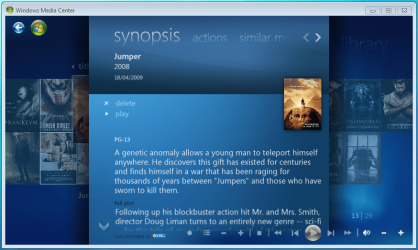
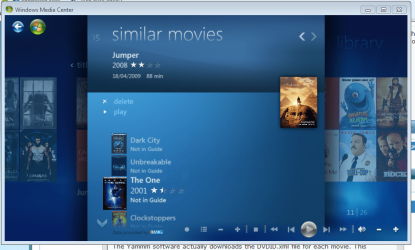
2, Similar Movies shown, with posters Movie Library (Similar Movies).PNG
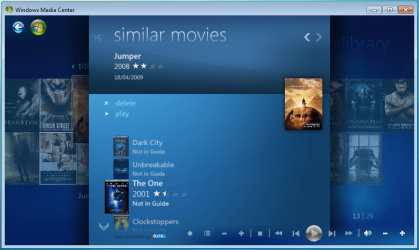
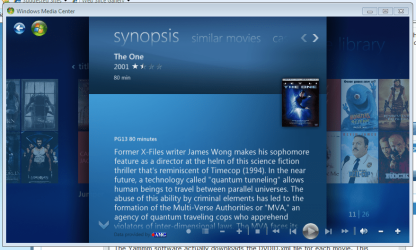
3, Click the similar movie to get full details of that movie Movie Library (Similar Movies - Synopsis).PNG
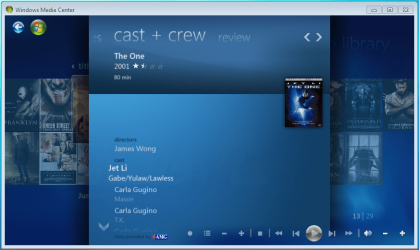
4, Cast & Crew information Movie Library (Cast & Crew).PNG
5, Click on a name to see a fimography (film list) relating to that actor/director Movie Library (Cast & Crew - Filmography).PNG

Enjoy
 

Attachments

  • file2folder.zip
    file2folder.zip
    230 bytes · Views: 22,835
  • synopsis.PNG
    synopsis.PNG
    127.1 KB · Views: 85
  • similar movies.PNG
    similar movies.PNG
    131.5 KB · Views: 66
  • similar movies detail.PNG
    similar movies detail.PNG
    140 KB · Views: 60
Last edited by a moderator:
It worked! Yay!

So that number is the same as the number in the imdb url for each particular movie? That's a handy trick to know.

Thanks for the help!

Yes it is.
 

My Computer My Computer

At a glance

6x W2K8 R2 (x64), 6x W7 7600 (x64), 2x Gentoo...Core2 Duo E8400 3.0GhzCorsair DDR-800 4GB RAMEVGA NVidia GeForce GT240
Computer Manufacturer/Model Number
My HTPC
OS
6x W2K8 R2 (x64), 6x W7 7600 (x64), 2x Gentoo (x64), 1x Ubuntu 9.04 (x64), 1x pfSense (FreeBSD)
CPU
Core2 Duo E8400 3.0Ghz
Motherboard
ASUS P5E-VM
Memory
Corsair DDR-800 4GB RAM
Graphics Card(s)
EVGA NVidia GeForce GT240
Screen Resolution
1080p
Hard Drives
OCZ Vertex 60GB (C:\D: System\Apps)
WD 1TB x1 (G: Temp\Recorded TV)
WD 2TB x8 (On Server)
PSU
Corsair HX520w
Case
Antec Fusion Max
Cooling
Passive Thermalright HR-1 CPU Heatsink w/ Nexus Fan
hi, i've just stumbled across this ace tutorial but can't seem to get it working!? im not interested in yammm at the moment but i just want to have the cover art in each folder displayed in windows 7 media player.. i;ve downloaded the file2folder download, extracted it to my movies and run it which put the movie files into their own folder... i then searched google for a pic of my movies and right clicked on them, save as folder.jpg, then i copied it into the movie folder i wanted. when i started media center still no cover art?! anything im doing wrong? thanks
 

My Computer My Computer

At a glance

Windows 7 Home premium 64bit
OS
Windows 7 Home premium 64bit
hi, i've just stumbled across this ace tutorial but can't seem to get it working!? im not interested in yammm at the moment but i just want to have the cover art in each folder displayed in windows 7 media player.. i;ve downloaded the file2folder download, extracted it to my movies and run it which put the movie files into their own folder... i then searched google for a pic of my movies and right clicked on them, save as folder.jpg, then i copied it into the movie folder i wanted. when i started media center still no cover art?! anything im doing wrong? thanks

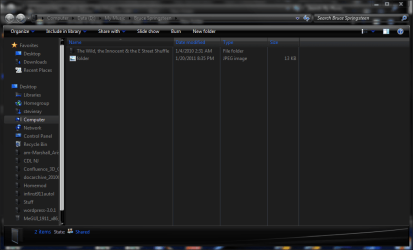
Hmmm... what you describe sounds right. Does a typical album folder look like this? (Notice it is named folder, and its type is jpg... it's not folder.jpg with a type of file folder.
 

Attachments

  • typical album folder.PNG
    typical album folder.PNG
    40.5 KB · Views: 220

My Computer My Computer

At a glance

windows 7 x64 Home Premiumintel q6600g.skill 8gb ddr2 1066 (pc2 8500)evga geforce 9800 gtx 512 mb
Computer Manufacturer/Model Number
me / #1
OS
windows 7 x64 Home Premium
CPU
intel q6600
Motherboard
gigbyte ga ep45 ud3l
Memory
g.skill 8gb ddr2 1066 (pc2 8500)
Graphics Card(s)
evga geforce 9800 gtx 512 mb
Screen Resolution
1680 x 1050
Hard Drives
wd caviar black 500 gb
wd caviar black 1tb
wd elements 1tb external hd x2
PSU
raidmax 500w
Case
smilodon (yes, t'was the pretty blue lites that got me!)
hi, i've just stumbled across this ace tutorial but can't seem to get it working!? im not interested in yammm at the moment but i just want to have the cover art in each folder displayed in windows 7 media player.. i;ve downloaded the file2folder download, extracted it to my movies and run it which put the movie files into their own folder... i then searched google for a pic of my movies and right clicked on them, save as folder.jpg, then i copied it into the movie folder i wanted. when i started media center still no cover art?! anything im doing wrong? thanks

Hmmm... what you describe sounds right. Does a typical album folder look like this? (Notice it is named folder, and its type is jpg... it's not folder.jpg with a type of file folder.
I had this problem before, I can't quite remember what i did to fix it. I'll brain storm for a bit and see what I can remember. I still have some issues with it. Some folders display a graphic, some don't.
 

My Computer My Computer

At a glance

Windows 8 64bit ProfessionalIntel Q9400 Quad Core 2.66GhzG.Skill 4GB DDR3-1600NVidia GeForce 560GTX
Computer type
PC/Desktop
Computer Manufacturer/Model Number
Custom Built
OS
Windows 8 64bit Professional
CPU
Intel Q9400 Quad Core 2.66Ghz
Motherboard
Gigabyte
Memory
G.Skill 4GB DDR3-1600
Graphics Card(s)
NVidia GeForce 560GTX
Sound Card
On-board
Monitor(s) Displays
24" LCD
Screen Resolution
1920x1080
Hard Drives
160GB WD
WD Caviar Black 640GB
WD 500GB
WD 1TB
WD 1TB
PSU
Cooler Master 1300W Silent Pro
Case
Sunbeam Transformer Black
Cooling
Fans
Keyboard
Logitech G15 (Original Screen + 18G Keys)
Mouse
Logitech MX518
Internet Speed
10mbit up/down Fiber Optic
Browser
FireFox / Chrome
Other Info
SF is amazing!
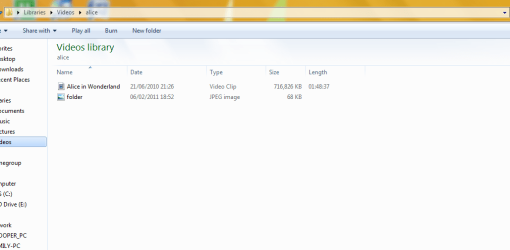
i think i've got it right.. can you just check?


.....on a side note, is that windows 7 in your screenshot..how did you get it with a black theme?
 

Attachments

  • Capture.PNG
    Capture.PNG
    23.4 KB · Views: 197

My Computer My Computer

At a glance

Windows 7 Home premium 64bit
OS
Windows 7 Home premium 64bit

My Computer My Computer

At a glance

windows 7 x64 Home Premiumintel q6600g.skill 8gb ddr2 1066 (pc2 8500)evga geforce 9800 gtx 512 mb
Computer Manufacturer/Model Number
me / #1
OS
windows 7 x64 Home Premium
CPU
intel q6600
Motherboard
gigbyte ga ep45 ud3l
Memory
g.skill 8gb ddr2 1066 (pc2 8500)
Graphics Card(s)
evga geforce 9800 gtx 512 mb
Screen Resolution
1680 x 1050
Hard Drives
wd caviar black 500 gb
wd caviar black 1tb
wd elements 1tb external hd x2
PSU
raidmax 500w
Case
smilodon (yes, t'was the pretty blue lites that got me!)
hi, i've just stumbled across this ace tutorial but can't seem to get it working!? im not interested in yammm at the moment but i just want to have the cover art in each folder displayed in windows 7 media player.. i;ve downloaded the file2folder download, extracted it to my movies and run it which put the movie files into their own folder... i then searched google for a pic of my movies and right clicked on them, save as folder.jpg, then i copied it into the movie folder i wanted. when i started media center still no cover art?! anything im doing wrong? thanks

Hi, welcome to the forums :)

Glad you like the tutorial :D

You may want to re-try steps 3 thru 6 and making sure that you add the My Videos folder to the library. Just tested it and it works, without Yammm and downloading the movie poster as you've described above.


OS
 

My Computer My Computer

At a glance

Windows 7 Ultimate x64AMD Sempron Dual Core3GBNVIDIA GeForce 6150SE nForce 430
Computer Manufacturer/Model Number
Compaq Desktop
OS
Windows 7 Ultimate x64
CPU
AMD Sempron Dual Core
Memory
3GB
Graphics Card(s)
NVIDIA GeForce 6150SE nForce 430
Screen Resolution
1024x768
Hard Drives
150GB Sata
Yammm Issue

Hi,
I've just installed Yammm and it's done what its meant to do, however i've put some new movies in the folder WMC looks in and none of them seem to be appearing! Anyone got any ideas why this might happen?

The movie folder has been renamed and populated with the XML file just like all the others.
 

My Computer My Computer

At a glance

Windows 7
OS
Windows 7
Hi,
I've just installed Yammm and it's done what its meant to do, however i've put some new movies in the folder WMC looks in and none of them seem to be appearing! Anyone got any ideas why this might happen?

The movie folder has been renamed and populated with the XML file just like all the others.

Hi, welcome to the forums :)

It could be that WMC is taking it's sweet time refreshing your movie library. Try exiting then re-starting WMC
 

My Computer My Computer

At a glance

Windows 7 Ultimate x64AMD Sempron Dual Core3GBNVIDIA GeForce 6150SE nForce 430
Computer Manufacturer/Model Number
Compaq Desktop
OS
Windows 7 Ultimate x64
CPU
AMD Sempron Dual Core
Memory
3GB
Graphics Card(s)
NVIDIA GeForce 6150SE nForce 430
Screen Resolution
1024x768
Hard Drives
150GB Sata
Sorry for the slow reply! You were completely right, it didnt show up even after a reboot at first, but eventually everything appeared! I'll just have to be a bit more patient with it sometimes :o
 

My Computer My Computer

At a glance

Windows 7
OS
Windows 7
Great tutorial. Media Center is looking much better now.
 

My Computer My Computer

At a glance

Windows 7 Home Premium 64-bitPentium(R) Dual-Core CPU T4200 @ 2.00GHz (2 C...4 GBMobile Intel(R) 4 Series Express Chipset Family
Computer Manufacturer/Model Number
Dell Inspiron 1440
OS
Windows 7 Home Premium 64-bit
CPU
Pentium(R) Dual-Core CPU T4200 @ 2.00GHz (2 CPUs), ~2.0 GHz
Memory
4 GB
Graphics Card(s)
Mobile Intel(R) 4 Series Express Chipset Family
Monitor(s) Displays
Generic PnP Monitor
Screen Resolution
1366 x 768 (60Hz)
Keyboard
Dell Integrated Laptop Keyboard
Mouse
Microsoft Wireless Notebook Optical Mouse 3000
Internet Speed
1.4 Mbps....
hey guys, quick question and hopefully a quicker solution. I have Yammm installed on my win 7 x64 machine...runs fine with MC. It doesn't however play nice with the 2 other win 7 machines and the xbox 360 running MCE. The metadata is not showing up on the networked machines...ie..xbox and 2 non local machines. Cover art and movies are perfect and show and play no prob, but I don't receive any plot synopsis or casting roles. Any help with this issue is thanked in advance.

YAK
 

My Computer My Computer

At a glance

windows 7 enterprise x64Intel Core i7 920 OC 4.0G-skill 12Gb 1600EVGA 450
Computer Manufacturer/Model Number
Custom
OS
windows 7 enterprise x64
CPU
Intel Core i7 920 OC 4.0
Motherboard
EVGA x58
Memory
G-skill 12Gb 1600
Graphics Card(s)
EVGA 450
Monitor(s) Displays
24" LG
Hard Drives
1TB WD Cavier Black
PSU
Antec 1000W
Case
Antec 1200
Great guide guys,

I just have a couple of small issues: -

1). How can I get 3d blu-ray .iso's to display in the library. Yammm works fine but they do not display in library.

2). Tv Shows - How do you get a series/season folder with episodes within to display in library?. Also I don't seem to be able to get episode information?.

3). file2folder works great except that it put the script/app in its own folder everytime. Is there a way to stop this from happening?.

apart from these small issues, I am wrapped with how it all looks.
 

My Computer My Computer

At a glance

Windows 7 Professional 64 bitCore i3 2100Corsair Vengance Blue 8GBZotac Geforce GT430 Zone Edition
OS
Windows 7 Professional 64 bit
CPU
Core i3 2100
Motherboard
Asrock H67M-ITX/HT
Memory
Corsair Vengance Blue 8GB
Graphics Card(s)
Zotac Geforce GT430 Zone Edition
Monitor(s) Displays
Panasonic TH-P58X20A
Hard Drives
Corsair Force 60GB SSD
WD Green 2TB
PSU
Silverstone 400W Fanless
Case
Silverstone LC17
Cooling
Scythe Shuriken Low Profile Rev B
Hi,

Sorry for the late reply :o

I can help for step 2 but that's it ;)

Yammm currently does not currently have full TV Series support. It should have TV support in v2 onwards if I remember rightly.

We currently will have to wait and see when the new version becomes available :)


OS
 

My Computer My Computer

At a glance

Windows 7 Ultimate x64AMD Sempron Dual Core3GBNVIDIA GeForce 6150SE nForce 430
Computer Manufacturer/Model Number
Compaq Desktop
OS
Windows 7 Ultimate x64
CPU
AMD Sempron Dual Core
Memory
3GB
Graphics Card(s)
NVIDIA GeForce 6150SE nForce 430
Screen Resolution
1024x768
Hard Drives
150GB Sata
Media Center noob screwed it up?

I ran the batch file and now neither my Media center workstation or server (both 7 Pro, 64) can find any movie files at all. I have gone to manage libararies and selected the folder and you can see all the movies as before.. but nothing now... on both computers. "There are no items in this library yet" and that is after a long time of looking... and it used to find them immediately.

Dang
bonk.gif


Thanks in advance for any help!

Velo
 

My Computer My Computer

At a glance

7 64 Pro
OS
7 64 Pro
hey guys, quick question and hopefully a quicker solution. I have Yammm installed on my win 7 x64 machine...runs fine with MC. It doesn't however play nice with the 2 other win 7 machines and the xbox 360 running MCE. The metadata is not showing up on the networked machines...ie..xbox and 2 non local machines. Cover art and movies are perfect and show and play no prob, but I don't receive any plot synopsis or casting roles. Any help with this issue is thanked in advance.

YAK

I'm having the same deal. No Cast & Crew information. My setup is a bit complex as I have my videos on my Windows Home Server, and Windows Media Center is playing them remotely so have to copy some things around to get all the data, thru my XBOX extender, however I do not see any Cast & Crew info in the XML file so do not believe this is being pulled for WMC but would like to here from the experts if something is not configured right or something else other than what I'm familiar with drives the cast and crew.

Thanks.

JR
 

My Computer My Computer

At a glance

Win7
OS
Win7
hey need some help

hey guys im new to the site and new to windows 7 read the tutorial and followed it to the letter im having a few minor difficulties and have a few questions to ask if you can help me out that would be great

my first question is does media centre and/or windows 7 have a file limit by this i mean in xp folders had limit on the amount of files it could have in it. if you had too many it went a bit skittish lol so this is concerning me a bit as i have 1tb hard disc and im just putting films directly into it should i be seperating them into folders?

my second question is that i use my xbox as a media extender theres alot of improvement on the windows 7 version compared to vista but now that iv got about 64 films in there with there metadata thanks to yammm its starting to go sluggish and the posters will display then it will kind of refresh and they will disapear refresh and if not all, some will come back and then it will repeat this one more time is there anything i can do?

my third question is it looks great i love it but i have noticed that e.g. fast and the furious films dont go in order due to there names so the appear as No2, No4, No3, no5 then the first movie same with many other film sets is there a way to fix this?

and my last question is that have two compete series of firefly and seaquest i know im a big geek but childhood nostalgia won my heart rofl is there anywat to make them appear somewhere that looks good because im not sure if id want the in the movie library and in the my films the wont look good is there any way to get the into the tvseries bit or somewhere presented by pics all these files are .avi?

sorry for the big long post for my first one its just because im so excited that windows media centre7 does this and vistas one didnt thankyou very much for any help you can give me :)
 

My Computer My Computer

At a glance

windows 7 ultimate 64bitAMD PhenomII x4 975 processor 3.60GHzKingston HyperX Genesis DDR3 1600MHz CL9 8GB ...Nvidia 9800 GT
OS
windows 7 ultimate 64bit
CPU
AMD PhenomII x4 975 processor 3.60GHz
Motherboard
Asus M5A78L LE
Memory
Kingston HyperX Genesis DDR3 1600MHz CL9 8GB DIMM Memory Mod
Graphics Card(s)
Nvidia 9800 GT

My Computer My Computer

At a glance

Microsoft Windows 7 Home Premium 64-bit 7600IIx4 amd athelon 635 processor2x2gbati radeon HD 5450
Computer Manufacturer/Model Number
Hewlett packard/p6512uk
OS
Microsoft Windows 7 Home Premium 64-bit 7600
CPU
IIx4 amd athelon 635 processor
Motherboard
FOXCONN 2AA9
Memory
2x2gb
Graphics Card(s)
ati radeon HD 5450
Sound Card
(1) Realtek High Definition Audio (2) AMD High Definition
Monitor(s) Displays
samsung lcd tv 32"
Screen Resolution
1360x 768
Hard Drives
(1) WDC WD10 01FAES-60Z2A0 SATA Disk Device (2) Maxtor OneTouch USB Device (3) ST310003 33AS USB Device (4) WD My Book 1111 USB Device
PSU
?
Cooling
air!
Keyboard
wireless hp
Mouse
wireless Hp,optical
Internet Speed
1.10mb/s
Antivirus
MSE
Browser
Firefox
is it the movie files i rename and will i need to rename the metadata yammm added or do i rename the folder there in?
 

My Computer My Computer

At a glance

windows 7 ultimate 64bitAMD PhenomII x4 975 processor 3.60GHzKingston HyperX Genesis DDR3 1600MHz CL9 8GB ...Nvidia 9800 GT
OS
windows 7 ultimate 64bit
CPU
AMD PhenomII x4 975 processor 3.60GHz
Motherboard
Asus M5A78L LE
Memory
Kingston HyperX Genesis DDR3 1600MHz CL9 8GB DIMM Memory Mod
Graphics Card(s)
Nvidia 9800 GT
no i think you just need to name the movie files, im guessing thats what media center reads. it does in media browser.
 

My Computer My Computer

At a glance

Microsoft Windows 7 Home Premium 64-bit 7600IIx4 amd athelon 635 processor2x2gbati radeon HD 5450
Computer Manufacturer/Model Number
Hewlett packard/p6512uk
OS
Microsoft Windows 7 Home Premium 64-bit 7600
CPU
IIx4 amd athelon 635 processor
Motherboard
FOXCONN 2AA9
Memory
2x2gb
Graphics Card(s)
ati radeon HD 5450
Sound Card
(1) Realtek High Definition Audio (2) AMD High Definition
Monitor(s) Displays
samsung lcd tv 32"
Screen Resolution
1360x 768
Hard Drives
(1) WDC WD10 01FAES-60Z2A0 SATA Disk Device (2) Maxtor OneTouch USB Device (3) ST310003 33AS USB Device (4) WD My Book 1111 USB Device
PSU
?
Cooling
air!
Keyboard
wireless hp
Mouse
wireless Hp,optical
Internet Speed
1.10mb/s
Antivirus
MSE
Browser
Firefox
Back
Top