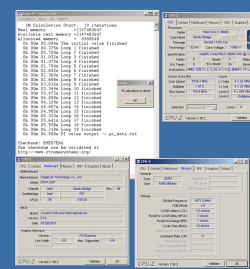
i7 2600K @ 5Ghz!

society misfit

New member
Pro User
Local time
8:40 PM
Messages
195
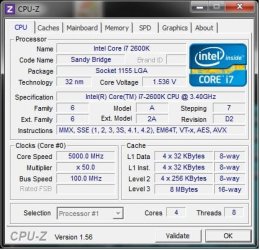
I’m posting this here instead of the sticky ‘Post Your Overclock’ cause I did not run Prime due to the temperatures I was reaching. So I feel this is not a legit OC. But I did run a stable 30min stress test in AIDA64. Being unfamiliar with Intel, reaching 91+ Celsius scared me enough to back out. However with a better cooler I’m confident that this machine can reach 5GHz+. Apart from setting the DRAM frequencies, everything was done within Asus AI Suite 2 that came bundled with the motherboard.

Previous I could not get past 4.73GHz without BSOD but that was with tweaking the BCLK and multiplier together. Keeping the BCLK to default 100MHz I was able to set the multiplier to 48 no problem on default voltages and run stable with high but respectable temps. Increasing the multiplier any more I could boot into Windows but would BSOD under stress with default voltages.
Tweaking the voltages I was able to set the multiplier to 50 and run what I feel is stable but a HOT 5GHz! Here’s my settings based on a Asus P8P67 Deluxe board.

BCLK = 100MHz
Multiplier = 50X
DRAM was set to 1600MHz @ 1.6V
VCore set 1.37V but throttled up to 1.53V
DIGI+ VRM:
Load Line Calibration = Ultra High
CPU Current Capability = Auto
VRM Frequency = 380Khz
Phase Control = Extreme
Duty Control = Extreme

I’m in the market for a new cooler (advice would be appreciated) so stay tuned!
 

Attachments
  • 5GHz.jpg
    5GHz.jpg
    40.6 KB · Views: 161

My Computer My Computer

Computer type
PC/Desktop
Computer Manufacturer/Model Number
Misfits Machine!
OS
Windows 7 Professional
CPU
Intel i7 4790K
Motherboard
ASUS Maximus VII Hero
Memory
32 GB G.SKILL TridentX F3-2400C10D-GTX
Graphics Card(s)
EVGA GeForce GTX 980 Superclocked X2 SLI
Sound Card
Teac UD-501 External USB DAC/Bryston BHA-1 Headphone Amp
Monitor(s) Displays
BenQ BL3200PT
Screen Resolution
2560x1440
Hard Drives
Samsung 850 Pro Series 256GB SSD
Western Digital Red 3TB
PSU
Corsair RM Series Gold 1000W
Case
Corsair Carbide Series Air 540
Cooling
Corsair Hydro Series H110
Keyboard
Corsair Vengeance K70 - Cherry MX Red/Razer Orbweaver Elite
Mouse
Razer DeathAdder Chroma
As I said in the other thread.

Christ.
 

My Computer My Computer

Computer type
PC/Desktop
Computer Manufacturer/Model Number
Custom Built
OS
Windows 8.1 Pro x64
CPU
Intel Core i7 4790k
Motherboard
MSI Z97S Krait Edition
Memory
8GB Corsair Dominator 1600MHz
Graphics Card(s)
MSI TwinFrozr GeForce GTX770
Sound Card
ASUS Xonar DX/XD 7.1
Monitor(s) Displays
Dell 24" S2409W + Dell 20" E207WFP
Screen Resolution
1920x1080 + 1680x1050
Hard Drives
1x 120GB OCZ Agility 3, 1x 750GB Western Digital Caviar Black, 1x 1TB Western Digital Caviar Blue
PSU
Corsair HX850 modular
Case
Fractal Design Define R4
Cooling
Corsair H60 w/ twin Corsair SP120 fans
Keyboard
Logitech G510S Keyboard
Mouse
Logitech G500S Laser Mouse
Internet Speed
40Mbps
Antivirus
Microsoft Security Essentials
Browser
Google Chrome
Other Info
LG Blu-Ray player
nice man. looks a good chip you have. there is some golden chips out there.. 1 is this OC from 1day. lol check this out..
 

Attachments

  • 20100109215712.png
    20100109215712.png
    96.3 KB · Views: 1,190

My Computer My Computer

Computer Manufacturer/Model Number
Goonie Build 8 2010
OS
Windows 7 64bit Ultimate SP1, VMware Windows 7 64bit Ultimate SP1
CPU
Intel Core i7 920 @ 3.8 or 4.2 when i need it
Motherboard
Gigabyte GA-X58-UD5
Memory
Corsair XMS3 12GB DDR3 1600 1.5v
Graphics Card(s)
MSI GeForce GTX 560Ti OC Twin FrozR II
Sound Card
7.1 HD
Monitor(s) Displays
2x BenQ 24 LED 1080p + LG 50PK590 1080p
Screen Resolution
3840 x 1080p
Hard Drives
Intel X25-M 80GB OS/
Intel X25-M 160GB
Data Robotics Drobo V2 8TB
PSU
Corsair AX 750W ATX Modular
Case
Antec Fusion Remote Max
Cooling
Noctua NH D14
Keyboard
Logitech
Mouse
Logitech
Internet Speed
15Mbs Down 1.3Mbs Up
Other Info
Hauppauge HD PVR/
Pioneer 1017-k - 7.1 THX/
Xbox 360 250 Slim
SkyHD/LG 50PK590 TV
That's pretty amazing. Remember when 4Ghz was the golden "Wow moment".

5Ghz... from a desktop, residential computer, simply amazing.

Has anyone else found that the software that comes with motherboards that allows you to overclock, almost always jumps the voltage too high, and thus increases the temperatures abnormally, compared to manually overclocking?

I'm guessing that it's "safety" on their part, almost guaranteeing a stable OC, but seems a bit overkill. You could probably get some lower temps by manually copying the settings from the software (Into the BIOS) and then slowly creeping up the voltage.
 

My Computer My Computer

OS
Windows 7 Home Premium 64-Bit
That's pretty amazing. Remember when 4Ghz was the golden "Wow moment".

5Ghz... from a desktop, residential computer, simply amazing.

Has anyone else found that the software that comes with motherboards that allows you to overclock, almost always jumps the voltage too high, and thus increases the temperatures abnormally, compared to manually overclocking?

I'm guessing that it's "safety" on their part, almost guaranteeing a stable OC, but seems a bit overkill. You could probably get some lower temps by manually copying the settings from the software (Into the BIOS) and then slowly creeping up the voltage.
This is exactly why overclockers hate overclocking programs...

~Lordbob
 

My Computer My Computer

Computer Manufacturer/Model Number
Hera
OS
Windows 7 Ultimate x64, Mint 9
CPU
Intel i5-2500k
Motherboard
ASUS P8P67 Pro
Memory
2x 4Gb Corsair VENGEANCE DDR3-1600
Graphics Card(s)
NVidia GeForce N260GTX Twin Frozr
Sound Card
Realtek HD OnBoard Audio
Monitor(s) Displays
ASUS 24" Monitor
Screen Resolution
1920x1080
Hard Drives
G.SKILL Phoenix Series 60GB SATA II MLC Internal Solid State Drive (SSD)
SAMSUNG Spinpoint F3R 1TB 7200 RPM 32MB Cache SATA II
PSU
Cooler Master Real Power Pro 750W
Case
Cooler Master Haf 932
Cooling
Fans
Keyboard
Razer Tarantula
Mouse
Razer Lachesis
Internet Speed
not fast enough
The newer Turbo V software that came with the board is a lot better than previous versions. Yes if you click on the “Auto Overclock” button it sets everything very high. But using that function I could not get past 4.7GHz. To reach that magic 5GHz I manually changed the voltages along with various other settings using the Turbo V software. You can make the changes within the software, and if you didn’t crash (or BSOD) right away it allowed you to stress test without having to reboot. I found it very helpful.

I’m currently running at 4.8Ghz 24/7 with very respectable temps. Haven’t had the time to toy around at 5GHz but will do once I pick up a better cooler.
 

My Computer My Computer

Computer type
PC/Desktop
Computer Manufacturer/Model Number
Misfits Machine!
OS
Windows 7 Professional
CPU
Intel i7 4790K
Motherboard
ASUS Maximus VII Hero
Memory
32 GB G.SKILL TridentX F3-2400C10D-GTX
Graphics Card(s)
EVGA GeForce GTX 980 Superclocked X2 SLI
Sound Card
Teac UD-501 External USB DAC/Bryston BHA-1 Headphone Amp
Monitor(s) Displays
BenQ BL3200PT
Screen Resolution
2560x1440
Hard Drives
Samsung 850 Pro Series 256GB SSD
Western Digital Red 3TB
PSU
Corsair RM Series Gold 1000W
Case
Corsair Carbide Series Air 540
Cooling
Corsair Hydro Series H110
Keyboard
Corsair Vengeance K70 - Cherry MX Red/Razer Orbweaver Elite
Mouse
Razer DeathAdder Chroma
You better turn this Sandy Bridge back in and wait until they have fixed it.
 

My Computer My Computer

Computer Manufacturer/Model Number
HP, Dell, Gateway, Toshiba - 4 laptops and 2 desktops
OS
Vista, Windows7, Mint Mate, Zorin, Windows 8
CPU
from 1.6GHz Duo to i7
Monitor(s) Displays
2x HP w2207
Hard Drives
5x HDD, 7x SSD, 12x Externals
Keyboard
with trackball - no mices
Mouse
Trackball mice
Internet Speed
DSL 6000
Hmm, how about a Corsair H70? or if you don't want watercooling, you could use a Noctua NH-D14 :D those would be my #1 choices
 

My Computer My Computer

Computer type
PC/Desktop
OS
Windows
You better turn this Sandy Bridge back in and wait until they have fixed it.
It is the chip for the SATAII controllers that is bad, not the CPU.

~Lordbob
 

My Computer My Computer

Computer Manufacturer/Model Number
Hera
OS
Windows 7 Ultimate x64, Mint 9
CPU
Intel i5-2500k
Motherboard
ASUS P8P67 Pro
Memory
2x 4Gb Corsair VENGEANCE DDR3-1600
Graphics Card(s)
NVidia GeForce N260GTX Twin Frozr
Sound Card
Realtek HD OnBoard Audio
Monitor(s) Displays
ASUS 24" Monitor
Screen Resolution
1920x1080
Hard Drives
G.SKILL Phoenix Series 60GB SATA II MLC Internal Solid State Drive (SSD)
SAMSUNG Spinpoint F3R 1TB 7200 RPM 32MB Cache SATA II
PSU
Cooler Master Real Power Pro 750W
Case
Cooler Master Haf 932
Cooling
Fans
Keyboard
Razer Tarantula
Mouse
Razer Lachesis
Internet Speed
not fast enough
You better turn this Sandy Bridge back in and wait until they have fixed it.
It is the chip for the SATAII controllers that is bad, not the CPU.

~Lordbob

This. i've seen people confused about that issue, as long as you keep your devices away from the SATA II ports, you're fine, plus...

Most end-users don't have more than 4 SATA devices (4 being the SATA III ports on the motherboard) so they wouldn't be that much compromised.

I have 2 HDDs and 2 DVD-Drives (and i only use one, i'm thinking about removing it) i mean, i'd rather have all my HDDs (in case that some users have 4) on the SATA III ports and leave the DVD-Drive(s) on the SATA II, since it's not used often :)
 

My Computer My Computer

Computer type
PC/Desktop
OS
Windows
You guys are funny. Who wants to pay a lot of money for a defunct CPU - Sata controller, Northbridge, or whatever. Who knows what else is wrong with it. They are only telling us what they want to tell us. And in 32nm technology, there are a lot of opportunities for problems. Let the thing settle down.
 

My Computer My Computer

Computer Manufacturer/Model Number
HP, Dell, Gateway, Toshiba - 4 laptops and 2 desktops
OS
Vista, Windows7, Mint Mate, Zorin, Windows 8
CPU
from 1.6GHz Duo to i7
Monitor(s) Displays
2x HP w2207
Hard Drives
5x HDD, 7x SSD, 12x Externals
Keyboard
with trackball - no mices
Mouse
Trackball mice
Internet Speed
DSL 6000
You better turn this Sandy Bridge back in and wait until they have fixed it.
It is the chip for the SATAII controllers that is bad, not the CPU.

~Lordbob

This. i've seen people confused about that issue, as long as you keep your devices away from the SATA II ports, you're fine, plus...

Most end-users don't have more than 4 SATA devices (4 being the SATA III ports on the motherboard) so they wouldn't be that much compromised.

I have 2 HDDs and 2 DVD-Drives (and i only use one, i'm thinking about removing it) i mean, i'd rather have all my HDDs (in case that some users have 4) on the SATA III ports and leave the DVD-Drive(s) on the SATA II, since it's not used often :)
To be honest, I am not too concerned about it (until I get a replacement) as the fail rate was so low and over a much longer period of time.
My harddrives should be just fine until I get a replacement motherboard.

~Lordbob
 

My Computer My Computer

Computer Manufacturer/Model Number
Hera
OS
Windows 7 Ultimate x64, Mint 9
CPU
Intel i5-2500k
Motherboard
ASUS P8P67 Pro
Memory
2x 4Gb Corsair VENGEANCE DDR3-1600
Graphics Card(s)
NVidia GeForce N260GTX Twin Frozr
Sound Card
Realtek HD OnBoard Audio
Monitor(s) Displays
ASUS 24" Monitor
Screen Resolution
1920x1080
Hard Drives
G.SKILL Phoenix Series 60GB SATA II MLC Internal Solid State Drive (SSD)
SAMSUNG Spinpoint F3R 1TB 7200 RPM 32MB Cache SATA II
PSU
Cooler Master Real Power Pro 750W
Case
Cooler Master Haf 932
Cooling
Fans
Keyboard
Razer Tarantula
Mouse
Razer Lachesis
Internet Speed
not fast enough
Hmm, how about a Corsair H70? or if you don't want watercooling, you could use a Noctua NH-D14 :D those would be my #1 choices

I’ve been eyeing the H70. Even shopped around for replacement fans in case the stocks ones are too loud! But both Corsair and Antec will be coming out with newer versions of the “All In One” water cooling very soon. And as for the Noctua NH-D14…I’d be all over that if it weren’t for the tall heatsinks on my memory. It may just fit but I don’t want to take that chance. Plus I like to have a little room to play!

As for the Sandy Bridge fault. I’m not worried at all. So far (from what I’ve read) they have only been able to recreate the failure within a lab environment. With the amount of SB boards that are out there I’ve yet to hear or read about someone coming forth and saying that their SATA II ports actually failed. Besides I’ve got all my “stuff” plugged into the SATA III ports.
 

My Computer My Computer

Computer type
PC/Desktop
Computer Manufacturer/Model Number
Misfits Machine!
OS
Windows 7 Professional
CPU
Intel i7 4790K
Motherboard
ASUS Maximus VII Hero
Memory
32 GB G.SKILL TridentX F3-2400C10D-GTX
Graphics Card(s)
EVGA GeForce GTX 980 Superclocked X2 SLI
Sound Card
Teac UD-501 External USB DAC/Bryston BHA-1 Headphone Amp
Monitor(s) Displays
BenQ BL3200PT
Screen Resolution
2560x1440
Hard Drives
Samsung 850 Pro Series 256GB SSD
Western Digital Red 3TB
PSU
Corsair RM Series Gold 1000W
Case
Corsair Carbide Series Air 540
Cooling
Corsair Hydro Series H110
Keyboard
Corsair Vengeance K70 - Cherry MX Red/Razer Orbweaver Elite
Mouse
Razer DeathAdder Chroma
Hmm, how about a Corsair H70? or if you don't want watercooling, you could use a Noctua NH-D14 :D those would be my #1 choices

I’ve been eyeing the H70. Even shopped around for replacement fans in case the stocks ones are too loud! But both Corsair and Antec will be coming out with newer versions of the “All In One” water cooling very soon. And as for the Noctua NH-D14…I’d be all over that if it weren’t for the tall heatsinks on my memory. It may just fit but I don’t want to take that chance. Plus I like to have a little room to play!

As for the Sandy Bridge fault. I’m not worried at all. So far (from what I’ve read) they have only been able to recreate the failure within a lab environment. With the amount of SB boards that are out there I’ve yet to hear or read about someone coming forth and saying that their SATA II ports actually failed. Besides I’ve got all my “stuff” plugged into the SATA III ports.
Or better yet a full water cooling setup ;)

Also, see my post in the news thread for motherboard manufacturers response.

~Lordbob
 

My Computer My Computer

Computer Manufacturer/Model Number
Hera
OS
Windows 7 Ultimate x64, Mint 9
CPU
Intel i5-2500k
Motherboard
ASUS P8P67 Pro
Memory
2x 4Gb Corsair VENGEANCE DDR3-1600
Graphics Card(s)
NVidia GeForce N260GTX Twin Frozr
Sound Card
Realtek HD OnBoard Audio
Monitor(s) Displays
ASUS 24" Monitor
Screen Resolution
1920x1080
Hard Drives
G.SKILL Phoenix Series 60GB SATA II MLC Internal Solid State Drive (SSD)
SAMSUNG Spinpoint F3R 1TB 7200 RPM 32MB Cache SATA II
PSU
Cooler Master Real Power Pro 750W
Case
Cooler Master Haf 932
Cooling
Fans
Keyboard
Razer Tarantula
Mouse
Razer Lachesis
Internet Speed
not fast enough
A complete water cooling set up has crossed my mind as well.

BTW, how did you make out overclocking that i5?
 

My Computer My Computer

Computer type
PC/Desktop
Computer Manufacturer/Model Number
Misfits Machine!
OS
Windows 7 Professional
CPU
Intel i7 4790K
Motherboard
ASUS Maximus VII Hero
Memory
32 GB G.SKILL TridentX F3-2400C10D-GTX
Graphics Card(s)
EVGA GeForce GTX 980 Superclocked X2 SLI
Sound Card
Teac UD-501 External USB DAC/Bryston BHA-1 Headphone Amp
Monitor(s) Displays
BenQ BL3200PT
Screen Resolution
2560x1440
Hard Drives
Samsung 850 Pro Series 256GB SSD
Western Digital Red 3TB
PSU
Corsair RM Series Gold 1000W
Case
Corsair Carbide Series Air 540
Cooling
Corsair Hydro Series H110
Keyboard
Corsair Vengeance K70 - Cherry MX Red/Razer Orbweaver Elite
Mouse
Razer DeathAdder Chroma
You guys are funny. Who wants to pay a lot of money for a defunct CPU - Sata controller, Northbridge, or whatever. Who knows what else is wrong with it. They are only telling us what they want to tell us. And in 32nm technology, there are a lot of opportunities for problems. Let the thing settle down.

Well I know a few people on this forum who bought the mobo before the problem was discovered. And then every vendor/Intel are offering a straight swap for one of the new revision mobos when they're available, and I know places are offering the swap if they're purchased now, so it's not really much of loss, and I doubt anyone will run in to the problem before the new revisions are released. OEMs and Intel found it had a 5% fail rate over extreme usage.
 

My Computer My Computer

Computer type
PC/Desktop
Computer Manufacturer/Model Number
Custom Built
OS
Windows 8.1 Pro x64
CPU
Intel Core i7 4790k
Motherboard
MSI Z97S Krait Edition
Memory
8GB Corsair Dominator 1600MHz
Graphics Card(s)
MSI TwinFrozr GeForce GTX770
Sound Card
ASUS Xonar DX/XD 7.1
Monitor(s) Displays
Dell 24" S2409W + Dell 20" E207WFP
Screen Resolution
1920x1080 + 1680x1050
Hard Drives
1x 120GB OCZ Agility 3, 1x 750GB Western Digital Caviar Black, 1x 1TB Western Digital Caviar Blue
PSU
Corsair HX850 modular
Case
Fractal Design Define R4
Cooling
Corsair H60 w/ twin Corsair SP120 fans
Keyboard
Logitech G510S Keyboard
Mouse
Logitech G500S Laser Mouse
Internet Speed
40Mbps
Antivirus
Microsoft Security Essentials
Browser
Google Chrome
Other Info
LG Blu-Ray player
A complete water cooling set up has crossed my mind as well.

BTW, how did you make out overclocking that i5?
4.5GHz stable at 1.35V or so.

~Lordbob
 

My Computer My Computer

Computer Manufacturer/Model Number
Hera
OS
Windows 7 Ultimate x64, Mint 9
CPU
Intel i5-2500k
Motherboard
ASUS P8P67 Pro
Memory
2x 4Gb Corsair VENGEANCE DDR3-1600
Graphics Card(s)
NVidia GeForce N260GTX Twin Frozr
Sound Card
Realtek HD OnBoard Audio
Monitor(s) Displays
ASUS 24" Monitor
Screen Resolution
1920x1080
Hard Drives
G.SKILL Phoenix Series 60GB SATA II MLC Internal Solid State Drive (SSD)
SAMSUNG Spinpoint F3R 1TB 7200 RPM 32MB Cache SATA II
PSU
Cooler Master Real Power Pro 750W
Case
Cooler Master Haf 932
Cooling
Fans
Keyboard
Razer Tarantula
Mouse
Razer Lachesis
Internet Speed
not fast enough

My Computer My Computer

Computer type
PC/Desktop
Computer Manufacturer/Model Number
Misfits Machine!
OS
Windows 7 Professional
CPU
Intel i7 4790K
Motherboard
ASUS Maximus VII Hero
Memory
32 GB G.SKILL TridentX F3-2400C10D-GTX
Graphics Card(s)
EVGA GeForce GTX 980 Superclocked X2 SLI
Sound Card
Teac UD-501 External USB DAC/Bryston BHA-1 Headphone Amp
Monitor(s) Displays
BenQ BL3200PT
Screen Resolution
2560x1440
Hard Drives
Samsung 850 Pro Series 256GB SSD
Western Digital Red 3TB
PSU
Corsair RM Series Gold 1000W
Case
Corsair Carbide Series Air 540
Cooling
Corsair Hydro Series H110
Keyboard
Corsair Vengeance K70 - Cherry MX Red/Razer Orbweaver Elite
Mouse
Razer DeathAdder Chroma

My Computer My Computer

Computer Manufacturer/Model Number
Hera
OS
Windows 7 Ultimate x64, Mint 9
CPU
Intel i5-2500k
Motherboard
ASUS P8P67 Pro
Memory
2x 4Gb Corsair VENGEANCE DDR3-1600
Graphics Card(s)
NVidia GeForce N260GTX Twin Frozr
Sound Card
Realtek HD OnBoard Audio
Monitor(s) Displays
ASUS 24" Monitor
Screen Resolution
1920x1080
Hard Drives
G.SKILL Phoenix Series 60GB SATA II MLC Internal Solid State Drive (SSD)
SAMSUNG Spinpoint F3R 1TB 7200 RPM 32MB Cache SATA II
PSU
Cooler Master Real Power Pro 750W
Case
Cooler Master Haf 932
Cooling
Fans
Keyboard
Razer Tarantula
Mouse
Razer Lachesis
Internet Speed
not fast enough
That makes two of us! But they sound impressive so I’d thought they must do something. Try the settings I posted at the beginning of this thread. But first, go into the BIOS and save your current setting under the profile manager. That way you can go back without any trouble. You can adjust the DIGI+ and VRM in either the BIOS or within the Asus software. Doesn’t make any difference. Once the DIGI+ and VRM are set, save that as a separate profile within the BIOS. This is so you do not have to set those up again if you crash. After that go into the TurboV and try increasing the multiplier 100MHz at a time. After ever 100 MHz increase, do a quick stress test (I used AIDA64) for about 2 or 3min to see where your temps end up at and if it will crash under load. I found that that it would crash seconds within the CPU throttling up to 100%. If you crash it will just revert back to the profile you saved. If you don’t crash the test and you are comfortable with your temperatures, increase again 100MHz. When you crash, take note of the multiplier and either go back 100Mhz and be happy, or increase the VCore by .5 and test again. Once you find a clock you are happy with then you can tear it apart with Prime.

I bet with your VCore set the way it is, by just adjusting the DIGI and VRM you can get another 200MHz out of that i5.
 

My Computer My Computer

Computer type
PC/Desktop
Computer Manufacturer/Model Number
Misfits Machine!
OS
Windows 7 Professional
CPU
Intel i7 4790K
Motherboard
ASUS Maximus VII Hero
Memory
32 GB G.SKILL TridentX F3-2400C10D-GTX
Graphics Card(s)
EVGA GeForce GTX 980 Superclocked X2 SLI
Sound Card
Teac UD-501 External USB DAC/Bryston BHA-1 Headphone Amp
Monitor(s) Displays
BenQ BL3200PT
Screen Resolution
2560x1440
Hard Drives
Samsung 850 Pro Series 256GB SSD
Western Digital Red 3TB
PSU
Corsair RM Series Gold 1000W
Case
Corsair Carbide Series Air 540
Cooling
Corsair Hydro Series H110
Keyboard
Corsair Vengeance K70 - Cherry MX Red/Razer Orbweaver Elite
Mouse
Razer DeathAdder Chroma
Back
Top