
Startup Repair (or image restore) after Partition Problem

Disk 1
HP (C: ) is the vista drive that came with the PC. Currently up and running fine. Machine boots into this drive on start. (D: ) is self explanatory - stupid "recovery" partition from HP instead of OS disks.

Disk 0
Brand new WD Black 1Tb drive.
(E: ) partition created during Win7 install. This is the partition I moved "to the left" 100Mb (see original post). Holds win7 OS and if marked active would be the first to boot.
The rest of the disk is unallocated and will become a data "drive" with a letter as soon as I iron out the problems with the Win7 startup.


Question:
Since I did make a system image via win7 backup and restore (fit on one DVD) just prior to all problems (BEFORE I moved the E: partition to the left) should I just restore that image to Disk 0? Will the image still work? I'm asking because I wonder if, after the partition move and the rest of the problems I've had since - repeated startup repairs - do I still have a "nice clean install of Win7" or have I corrupted it in someway that will come back to bite me later? Would I be better off going back to that image (as opposed to reinstall of win7 so to avoid activation issues).

Thank you.
 

Attachments
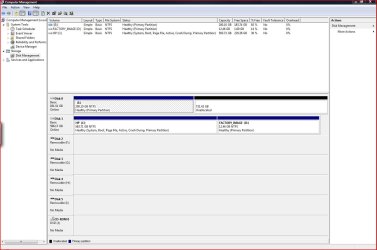
  • Jen's PC Disk Management 1-3-2011.JPG
    Jen's PC Disk Management 1-3-2011.JPG
    114.2 KB · Views: 13

My Computer My Computer

At a glance

Win7 Home Premium SP1 32bitcore 2 quad
Computer Manufacturer/Model Number
HP Pavilion
OS
Win7 Home Premium SP1 32bit
CPU
core 2 quad
Hard Drives
WD Black 1Tb
Being on a separate HDD from Vista, if the E: partition was Active this disk management would show that so it must not be so.

If you were to disconnect Disk 1 and set Disk 0 as the second boot device after the CD/DVD drive and use Option Two #1 in this tutorial using diskpart to mark it active and do the startup repairs that should sort the issue.


Startup Repair - Run 3 Separate Times

DISKPART : At PC Startup
 

My Computer My Computer

At a glance

W 7 64-bit UltimateIntel Q9550 Yorkfield8GB Dominator 8500C5DATI : XFX 5870
Computer Manufacturer/Model Number
* BFK Customs *
OS
W 7 64-bit Ultimate
CPU
Intel Q9550 Yorkfield
Motherboard
ASUS P5Q Pro
Memory
8GB Dominator 8500C5D
Graphics Card(s)
ATI : XFX 5870
Sound Card
Realtek HD Audio 7-1
Monitor(s) Displays
1x 47" LCD HDMI & 3x 26" LCD HDMI
Screen Resolution
1920x1080P & 1920x1200
Hard Drives
1x 80GB Intel X25-M G2 SSD : 1x 500GB & 1x 640GB WD Caviar Black(s)
PSU
Corsair 620HX
Case
Cooler Master RC-690
Cooling
Tuniq Tower 120, 2x 140mm and 3x 120mm case fans
Keyboard
Microsoft 500
Mouse
Razer Diamondback 3G
Internet Speed
14 Mb/s
Other Info
1x Koutech 3Gb/s SATA HDD Hot Swap Rack
In this configuration, can I boot to the PW cd and run the Rebuild MBR on the Windows 7 drive/partition

Yes.
 

My Computers My Computers

  • At a glance

    7 X64i5 84002x8gb 3200mhz
    Computer type
    PC/Desktop
    OS
    7 X64
    CPU
    i5 8400
    Motherboard
    gigabyte b365m ds3h
    Memory
    2x8gb 3200mhz
    Hard Drives
    various
    PSU
    pure power 11 400w cm
    Case
    Coolermaster
    Cooling
    cryorig m9i
  • At a glance

    7x64g54008gb ddr4 2400
    Computer type
    PC/Desktop
    OS
    7x64
    CPU
    g5400
    Motherboard
    ga b365m ds3h
    Memory
    8gb ddr4 2400
    PSU
    xfx pro 450w
Question:
Since I did make a system image via win7 backup and restore (fit on one DVD) just prior to all problems (BEFORE I moved the E: partition to the left) should I just restore that image to Disk 0?
Images normally take multiple DVDs to make. You're not confusing this with a system repair disk?
 

My Computer My Computer

At a glance

Windows 7x64 Home Premium SP1Intel i7 2600kG.Skill Ripjaws (DDR3-1600) 2x4GBNvidia GeForce GTS 450; Intel HD Graphics 300...
Computer type
PC/Desktop
Computer Manufacturer/Model Number
Own build
OS
Windows 7x64 Home Premium SP1
CPU
Intel i7 2600k
Motherboard
ASUS P8Z68 Deluxe
Memory
G.Skill Ripjaws (DDR3-1600) 2x4GB
Graphics Card(s)
Nvidia GeForce GTS 450; Intel HD Graphics 3000(GT2+)
Monitor(s) Displays
Dell Ultrasharp IPS panel U2311H, Samsung SyncMaster P2350
Screen Resolution
1920x1080
Hard Drives
Samsung 850 Pro SSD 256GB, Samsung SSD 840 120GB, Seagates 1TB Barracuda ST31000528AS x2
PSU
Seasonic M12II 520W
Case
Lian Li Lancool PC-K60
Cooling
Case: 1x120mm, 3x140mm CPU: Hyper 212+
Keyboard
Logitech MK520 (wireless)
Mouse
Logitech MK520
Internet Speed
6-7 Mbps
Antivirus
Norton Security Premium, Malwarebytes on 2 (MSE on 3rd PC)
Browser
FireFox
Other Info
Audio: Logitech Z523 2.1
In this configuration, can I boot to the PW cd and run the Rebuild MBR on the Windows 7 drive/partition

Yes.


I tried this in a couple separate simulations in VirtualBox earlier today neither one would boot at all after; first one was with the SysResv deleted and the Windows partition not marked active and it failed; the second was with the Windows partition marked active and that failed also.

I'd be curious to know if it works for the OP in he tries it.
 

My Computer My Computer

At a glance

W 7 64-bit UltimateIntel Q9550 Yorkfield8GB Dominator 8500C5DATI : XFX 5870
Computer Manufacturer/Model Number
* BFK Customs *
OS
W 7 64-bit Ultimate
CPU
Intel Q9550 Yorkfield
Motherboard
ASUS P5Q Pro
Memory
8GB Dominator 8500C5D
Graphics Card(s)
ATI : XFX 5870
Sound Card
Realtek HD Audio 7-1
Monitor(s) Displays
1x 47" LCD HDMI & 3x 26" LCD HDMI
Screen Resolution
1920x1080P & 1920x1200
Hard Drives
1x 80GB Intel X25-M G2 SSD : 1x 500GB & 1x 640GB WD Caviar Black(s)
PSU
Corsair 620HX
Case
Cooler Master RC-690
Cooling
Tuniq Tower 120, 2x 140mm and 3x 120mm case fans
Keyboard
Microsoft 500
Mouse
Razer Diamondback 3G
Internet Speed
14 Mb/s
Other Info
1x Koutech 3Gb/s SATA HDD Hot Swap Rack
Si what is the exact script which PW Rebuild MBR utility runs, do you know?
 
Back
Top