I'm having very slow startup times with my Win 7 64 bit system (it has been happening since before installing SP1). It takes 2 to 3 minutes to startup and I see the Ethernet link initialization taking up most of the this. The link icon will have the "circle" wait symbol on it for over 1 minute before the link comes active and while it's on "wait" nothing else appears to be initializing as Microsoft Security Essentials icon stays red and none (two) of the sidebar comes up (I have a weather and the "All CPU" meter).
I have a separate hard drive on this PC with Vista 32 bit and it does not have the excessing startup time with Vista - the Ethernet link activates almost immediately.
I'm using a Linksys router but it's not the router as I've connected the RJ45 directly to the cable modem and it acts the same.
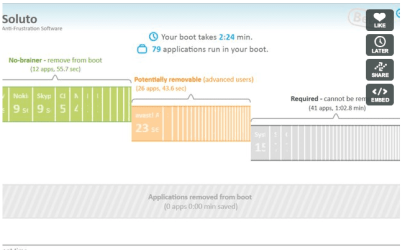
Whether it's the link activation that is causing the delay or some other process?? I have a relatively vanilla system and not much is in the startup. I've disabled some start up items in msconfig and that didn't help anything. I've reinstalled the Intel NIC drivers and also let Windows install drivers for the NIC and that didn't help.
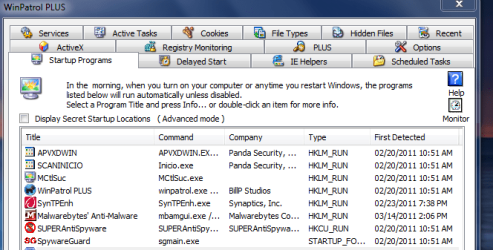
In the notification area, I have Volume Control, Network Connection, Microsoft Security Essentials, Win Patrol, Epson Event Manager, Malwarebytes and "safely remove hardware" icon (because of an iLock key). I've disabled Win Patrol, Epson Event Manager, Malwarebytes and MIcrosoft Security Essentials in startup and it didn't make any difference. Actually all of these items have been installed for quite a while - before I noticed the slow startup.
I don't want to do a complete reinstall unless absolutely needed. Too much of a hassle.
If I start in Safe Mode with networking, the network link takes the same amount of time to become active.
I have a separate hard drive on this PC with Vista 32 bit and it does not have the excessing startup time with Vista - the Ethernet link activates almost immediately.
I'm using a Linksys router but it's not the router as I've connected the RJ45 directly to the cable modem and it acts the same.
Whether it's the link activation that is causing the delay or some other process?? I have a relatively vanilla system and not much is in the startup. I've disabled some start up items in msconfig and that didn't help anything. I've reinstalled the Intel NIC drivers and also let Windows install drivers for the NIC and that didn't help.
In the notification area, I have Volume Control, Network Connection, Microsoft Security Essentials, Win Patrol, Epson Event Manager, Malwarebytes and "safely remove hardware" icon (because of an iLock key). I've disabled Win Patrol, Epson Event Manager, Malwarebytes and MIcrosoft Security Essentials in startup and it didn't make any difference. Actually all of these items have been installed for quite a while - before I noticed the slow startup.
I don't want to do a complete reinstall unless absolutely needed. Too much of a hassle.
If I start in Safe Mode with networking, the network link takes the same amount of time to become active.
My Computer
- Computer type
- PC/Desktop
- Computer Manufacturer/Model Number
- My Own Build
- OS
- Windows 10 64 bit
- CPU
- Intel i7 6700K
- Motherboard
- ASUS ROG Maximus VIII Hero
- Memory
- 16GB Corsair Dominator
- Graphics Card(s)
- Intel CPU Graphics
- Sound Card
- RealTek
- Monitor(s) Displays
- 27" Dell S2719dgf
- Screen Resolution
- 2560X1440
- Hard Drives
- 1 TB Samsung 850 EVO SSD for Win 10 Pro
500GB Samsung 850 EVO SSD for Win 10 Insider
2 TB drive for backup
- PSU
- EVGA Supernova 750G2
- Case
- BeQuiet Silent Base 600
- Cooling
- Deepcool Captain 120EX
- Keyboard
- Microsoft Wireless 2000
- Mouse
- Microsoft wireless
- Internet Speed
- 100 MB/sec (Cable)
- Antivirus
- Microsoft Defender and Malwarebytes
- Browser
- Edge/Firefox
- Other Info
- Cakewalk (Sonar) by BandLab and Studio One 4.1 Pro recording studio software. MOTU 896Mk3 Hybrid recording interface, Frontier Tranzport wireless control unit, Behringer X-Touch Control Surface.
Five USB connected optical drives for CD Audio production using Nero BurningROM