
Very slow Win 7 Initialization - 2 to 3 min

fireberd

Beach Observer
Guru
Gold Member
VIP
Local time
5:37 AM
Messages
8,135
Location
Inverness, FL
I'm having very slow startup times with my Win 7 64 bit system (it has been happening since before installing SP1). It takes 2 to 3 minutes to startup and I see the Ethernet link initialization taking up most of the this. The link icon will have the "circle" wait symbol on it for over 1 minute before the link comes active and while it's on "wait" nothing else appears to be initializing as Microsoft Security Essentials icon stays red and none (two) of the sidebar comes up (I have a weather and the "All CPU" meter).

I have a separate hard drive on this PC with Vista 32 bit and it does not have the excessing startup time with Vista - the Ethernet link activates almost immediately.

I'm using a Linksys router but it's not the router as I've connected the RJ45 directly to the cable modem and it acts the same.

Whether it's the link activation that is causing the delay or some other process?? I have a relatively vanilla system and not much is in the startup. I've disabled some start up items in msconfig and that didn't help anything. I've reinstalled the Intel NIC drivers and also let Windows install drivers for the NIC and that didn't help.

In the notification area, I have Volume Control, Network Connection, Microsoft Security Essentials, Win Patrol, Epson Event Manager, Malwarebytes and "safely remove hardware" icon (because of an iLock key). I've disabled Win Patrol, Epson Event Manager, Malwarebytes and MIcrosoft Security Essentials in startup and it didn't make any difference. Actually all of these items have been installed for quite a while - before I noticed the slow startup.

I don't want to do a complete reinstall unless absolutely needed. Too much of a hassle.

If I start in Safe Mode with networking, the network link takes the same amount of time to become active.
 

My Computer My Computer

Computer type
PC/Desktop
Computer Manufacturer/Model Number
My Own Build
OS
Windows 10 64 bit
CPU
Intel i7 6700K
Motherboard
ASUS ROG Maximus VIII Hero
Memory
16GB Corsair Dominator
Graphics Card(s)
Intel CPU Graphics
Sound Card
RealTek
Monitor(s) Displays
27" Dell S2719dgf
Screen Resolution
2560X1440
Hard Drives
1 TB Samsung 850 EVO SSD for Win 10 Pro
500GB Samsung 850 EVO SSD for Win 10 Insider
2 TB drive for backup
PSU
EVGA Supernova 750G2
Case
BeQuiet Silent Base 600
Cooling
Deepcool Captain 120EX
Keyboard
Microsoft Wireless 2000
Mouse
Microsoft wireless
Internet Speed
100 MB/sec (Cable)
Antivirus
Microsoft Defender and Malwarebytes
Browser
Edge/Firefox
Other Info
Cakewalk (Sonar) by BandLab and Studio One 4.1 Pro recording studio software. MOTU 896Mk3 Hybrid recording interface, Frontier Tranzport wireless control unit, Behringer X-Touch Control Surface.
Five USB connected optical drives for CD Audio production using Nero BurningROM
Hi Fireberd,

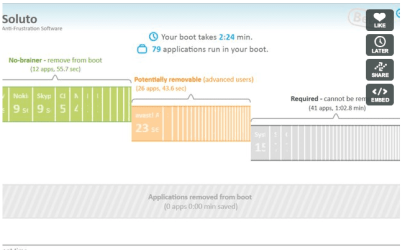
Install and Run free Soluto.

Once you reboot after installation, it presents a very easily understood graphic showing all the components that load during boot, as well as how long each one takes (example shown in image below).

This might help find out what is causing your long startup time.

See this video to see how it works - its pretty neat:

http://vimeo.com/11952424

Regards,
Golden
 

Attachments

  • Capture.PNG
    Capture.PNG
    37.6 KB · Views: 209

My Computer My Computer

Computer type
PC/Desktop
Computer Manufacturer/Model Number
Golden Mk. I.4
OS
Windows 10 Pro x64 ; Xubuntu x64
CPU
Intel i7 860 @ 2.80 GHz O/C'ed to 4.0GHz
Motherboard
Gigabyte P55A-UD3R Rev.1. Award BIOS F13
Memory
16GB Corsair Vengance DDR3 @ 661 MHz Dual Channel (9-9-9-24)
Graphics Card(s)
EVGA NVidia GTX 560 1024MB
Sound Card
Realtek Integrated
Monitor(s) Displays
Dual Samsung SyncMaster 2494HS
Screen Resolution
1920*1080 and 1920*1080
Hard Drives
1*Samsung 840 EVO 120GB SSD;
1*OCZ Vertex 2 60GB SSD;
2*Samsung F3 SpinPoint 1TB in RAID0;
1*Samsung F1 SpinPoint 1TB;
2*Western Digital 1TB External USB 3.0
1*Western Digital 500GB External USB 3.0
1*Seagate 500GB External USB 2.0
PSU
Thermaltake ToughPower QFan 750W
Case
Thermaltake Element S VK60001W2Z
Cooling
Corsair H60 Water Cooling, 2*230mm and 2*80mm case fans
Keyboard
Logitech G110
Mouse
Logitech MX518
Thanks, I'll give it a try.
 

My Computer My Computer

Computer type
PC/Desktop
Computer Manufacturer/Model Number
My Own Build
OS
Windows 10 64 bit
CPU
Intel i7 6700K
Motherboard
ASUS ROG Maximus VIII Hero
Memory
16GB Corsair Dominator
Graphics Card(s)
Intel CPU Graphics
Sound Card
RealTek
Monitor(s) Displays
27" Dell S2719dgf
Screen Resolution
2560X1440
Hard Drives
1 TB Samsung 850 EVO SSD for Win 10 Pro
500GB Samsung 850 EVO SSD for Win 10 Insider
2 TB drive for backup
PSU
EVGA Supernova 750G2
Case
BeQuiet Silent Base 600
Cooling
Deepcool Captain 120EX
Keyboard
Microsoft Wireless 2000
Mouse
Microsoft wireless
Internet Speed
100 MB/sec (Cable)
Antivirus
Microsoft Defender and Malwarebytes
Browser
Edge/Firefox
Other Info
Cakewalk (Sonar) by BandLab and Studio One 4.1 Pro recording studio software. MOTU 896Mk3 Hybrid recording interface, Frontier Tranzport wireless control unit, Behringer X-Touch Control Surface.
Five USB connected optical drives for CD Audio production using Nero BurningROM
If Soluto doesn't make the problem apparent then use the tool which the Pro's use to trace boot hangs: Trace Windows 7 boot/shutdown/hibernate/standby/resume issues - MSFN Forum

Our own Cluberti who also runs MSFN can help you interpret the charts if the tutorial isn't enough. In one recent case I learned, for example, that a Dell laptop was hanging for 2 minutes due to heavy fragmentation of System Files, after which it remained a full minute startup due to old slow HD.
 
Thanks I'll give this a shot. Soluto didn't show me anything I didn't already know. I'm still seeing the long network connection time, that is on a separate PC with Vista 32 bit that is wire connected to the router and with this same PC hardware when booted with Vista 32 bit.
 

My Computer My Computer

Computer type
PC/Desktop
Computer Manufacturer/Model Number
My Own Build
OS
Windows 10 64 bit
CPU
Intel i7 6700K
Motherboard
ASUS ROG Maximus VIII Hero
Memory
16GB Corsair Dominator
Graphics Card(s)
Intel CPU Graphics
Sound Card
RealTek
Monitor(s) Displays
27" Dell S2719dgf
Screen Resolution
2560X1440
Hard Drives
1 TB Samsung 850 EVO SSD for Win 10 Pro
500GB Samsung 850 EVO SSD for Win 10 Insider
2 TB drive for backup
PSU
EVGA Supernova 750G2
Case
BeQuiet Silent Base 600
Cooling
Deepcool Captain 120EX
Keyboard
Microsoft Wireless 2000
Mouse
Microsoft wireless
Internet Speed
100 MB/sec (Cable)
Antivirus
Microsoft Defender and Malwarebytes
Browser
Edge/Firefox
Other Info
Cakewalk (Sonar) by BandLab and Studio One 4.1 Pro recording studio software. MOTU 896Mk3 Hybrid recording interface, Frontier Tranzport wireless control unit, Behringer X-Touch Control Surface.
Five USB connected optical drives for CD Audio production using Nero BurningROM
Try giving your network adapter a fixed network address, e.g. 192.168.0.2 via Device Manager>Network Adapters> Properties for your adapter. You can find out what your PC is currently automatically setting itself up as (perhaps slowly) by typing ipconfig into a DOS prompt - use that number.
 

My Computer My Computer

OS
Windows 7
I installed the SDK and ran a boot trace. Funny thing with the boot trace active the startup looked "normal". But, I rebooted and without the boot trace it was back to an extended boot time with the network on the 64 bit system, but not the Vista 32 bit systems.

I'll try the fixed address but I don't think that is the problem, since this same hardware works OK (normal startup and no real delay on network) on Vista 32 bit.
 

My Computer My Computer

Computer type
PC/Desktop
Computer Manufacturer/Model Number
My Own Build
OS
Windows 10 64 bit
CPU
Intel i7 6700K
Motherboard
ASUS ROG Maximus VIII Hero
Memory
16GB Corsair Dominator
Graphics Card(s)
Intel CPU Graphics
Sound Card
RealTek
Monitor(s) Displays
27" Dell S2719dgf
Screen Resolution
2560X1440
Hard Drives
1 TB Samsung 850 EVO SSD for Win 10 Pro
500GB Samsung 850 EVO SSD for Win 10 Insider
2 TB drive for backup
PSU
EVGA Supernova 750G2
Case
BeQuiet Silent Base 600
Cooling
Deepcool Captain 120EX
Keyboard
Microsoft Wireless 2000
Mouse
Microsoft wireless
Internet Speed
100 MB/sec (Cable)
Antivirus
Microsoft Defender and Malwarebytes
Browser
Edge/Firefox
Other Info
Cakewalk (Sonar) by BandLab and Studio One 4.1 Pro recording studio software. MOTU 896Mk3 Hybrid recording interface, Frontier Tranzport wireless control unit, Behringer X-Touch Control Surface.
Five USB connected optical drives for CD Audio production using Nero BurningROM
The fixed address made no difference. It has to be something related to the startup sequence and what is loaded when. As I noted when running the boot trace it started "normal" including the sidebar CPU Usuage monitor before the network. A "normal" startup it has to wait for the network before other items startup.

Fortunately I normally startup in the morning, at a set time before I get up, and it's left on all day
 

My Computer My Computer

Computer type
PC/Desktop
Computer Manufacturer/Model Number
My Own Build
OS
Windows 10 64 bit
CPU
Intel i7 6700K
Motherboard
ASUS ROG Maximus VIII Hero
Memory
16GB Corsair Dominator
Graphics Card(s)
Intel CPU Graphics
Sound Card
RealTek
Monitor(s) Displays
27" Dell S2719dgf
Screen Resolution
2560X1440
Hard Drives
1 TB Samsung 850 EVO SSD for Win 10 Pro
500GB Samsung 850 EVO SSD for Win 10 Insider
2 TB drive for backup
PSU
EVGA Supernova 750G2
Case
BeQuiet Silent Base 600
Cooling
Deepcool Captain 120EX
Keyboard
Microsoft Wireless 2000
Mouse
Microsoft wireless
Internet Speed
100 MB/sec (Cable)
Antivirus
Microsoft Defender and Malwarebytes
Browser
Edge/Firefox
Other Info
Cakewalk (Sonar) by BandLab and Studio One 4.1 Pro recording studio software. MOTU 896Mk3 Hybrid recording interface, Frontier Tranzport wireless control unit, Behringer X-Touch Control Surface.
Five USB connected optical drives for CD Audio production using Nero BurningROM
I'd next run through these troubleshooting tips to see if anything becomes apparent.

In particular see if any issues are cued at the top of the Advanced Tools page referenced in the list, and check the logs listed for clues.
 
I didn't see anything in the thread you referenced. Many of the items have either been previously checked or do not apply.
 

My Computer My Computer

Computer type
PC/Desktop
Computer Manufacturer/Model Number
My Own Build
OS
Windows 10 64 bit
CPU
Intel i7 6700K
Motherboard
ASUS ROG Maximus VIII Hero
Memory
16GB Corsair Dominator
Graphics Card(s)
Intel CPU Graphics
Sound Card
RealTek
Monitor(s) Displays
27" Dell S2719dgf
Screen Resolution
2560X1440
Hard Drives
1 TB Samsung 850 EVO SSD for Win 10 Pro
500GB Samsung 850 EVO SSD for Win 10 Insider
2 TB drive for backup
PSU
EVGA Supernova 750G2
Case
BeQuiet Silent Base 600
Cooling
Deepcool Captain 120EX
Keyboard
Microsoft Wireless 2000
Mouse
Microsoft wireless
Internet Speed
100 MB/sec (Cable)
Antivirus
Microsoft Defender and Malwarebytes
Browser
Edge/Firefox
Other Info
Cakewalk (Sonar) by BandLab and Studio One 4.1 Pro recording studio software. MOTU 896Mk3 Hybrid recording interface, Frontier Tranzport wireless control unit, Behringer X-Touch Control Surface.
Five USB connected optical drives for CD Audio production using Nero BurningROM
Those are standard troubleshooting steps that can often help in cases like these.

More specifically, have you updated your Ethernet driver or tried another to see if anything changes? I would also uninstall it and restart to reinstall it.

I think since it seems to relate to SP1 install I would also consider slipstreaming SP1 into the install disk to run a http://www.sevenforums.com/tutorials/3413-repair-install.html?ltr=R.
 
I didn't see anything in the thread you referenced. Many of the items have either been previously checked or do not apply.

Dear fireberd,
Hello there! 1) Kindly consider uninstalling sp1, though you say the prob.existed much before and 2) can you kindly list out the items at startup.

SP1 slowed my bootup time too, but only by seconds from 70 seconds to 92 seconds, but i am not complaining!

I congratulate you for providing such an excellent and detailed system specs!

regards,
Sreedhav
 

My Computer My Computer

Computer Manufacturer/Model Number
Sony Vaio C series VPCCB35FN laptop
OS
MS Windows 7 Home Premium 64-bit SP1
CPU
IntelCore [email protected]; Sandy Bridge 32nm Tech.
Motherboard
Sony Vaio Version:C609NJYJ
Memory
4096Mb RAM; Single ChannelDDR3@665MHz; DRAM Freq:662MHz
Graphics Card(s)
AMD Radeon HD 6630M; GPU:Whistler;BIOS Core&mem Clock:123.36
Sound Card
REALTEK High Definition Audio Device; INTEL Display Card
Monitor(s) Displays
Generic PnP Intel HD;Resolution:1920*1040 Pixels; BPP:32bits
Screen Resolution
Current Resolution:1920*1080 Pixels; Monitor Frequency:60Hz
Hard Drives
Internal HD:TOSHIBA MK5061GSY; Real Size:488 GB;NTFS; 3 Partitions; SATA; HEADS:16

External HDD: WD Elements 1023 PORTABLE; Estimated Size: 1TB; NTFS; 3 Partitions
Cooling
Lateral Exhaust with a Cooling Pad Placed Beneath.
Keyboard
Logitech Bluetooth+ Generic Integrated K-B
Mouse
Logitech Bluetooth
Internet Speed
2MBPS
Other Info
1)Trend Micro Titanium Maximum Security Suite Version:3
2)SAS-PRO

3)MBAM--PRO


4)WATERFOX+IE9 +WOT+LINKEXTEND+ DRWEBCUREIT LINK CHECKER

5)SPYWAREBLASTER

6) WINPATROL PLUS

7) SANDBOXIE and
8) A BIT OF COMMON SENSE.
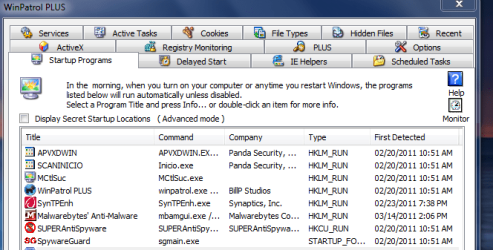
These are a list of the start-up items on my laptop from which i am typing now! You mentioned that you keep the system " on " the rest of the day. Does your system hibernate or sleep or is awake the whole day? Kindly look for anything "yellow" in Device Manager,especially under NETWORK ADAPTERS!

Regards,
Sreedhav
 

Attachments

  • START-UP PROGRAMS.png
    START-UP PROGRAMS.png
    25.4 KB · Views: 51

My Computer My Computer

Computer Manufacturer/Model Number
Sony Vaio C series VPCCB35FN laptop
OS
MS Windows 7 Home Premium 64-bit SP1
CPU
IntelCore [email protected]; Sandy Bridge 32nm Tech.
Motherboard
Sony Vaio Version:C609NJYJ
Memory
4096Mb RAM; Single ChannelDDR3@665MHz; DRAM Freq:662MHz
Graphics Card(s)
AMD Radeon HD 6630M; GPU:Whistler;BIOS Core&mem Clock:123.36
Sound Card
REALTEK High Definition Audio Device; INTEL Display Card
Monitor(s) Displays
Generic PnP Intel HD;Resolution:1920*1040 Pixels; BPP:32bits
Screen Resolution
Current Resolution:1920*1080 Pixels; Monitor Frequency:60Hz
Hard Drives
Internal HD:TOSHIBA MK5061GSY; Real Size:488 GB;NTFS; 3 Partitions; SATA; HEADS:16

External HDD: WD Elements 1023 PORTABLE; Estimated Size: 1TB; NTFS; 3 Partitions
Cooling
Lateral Exhaust with a Cooling Pad Placed Beneath.
Keyboard
Logitech Bluetooth+ Generic Integrated K-B
Mouse
Logitech Bluetooth
Internet Speed
2MBPS
Other Info
1)Trend Micro Titanium Maximum Security Suite Version:3
2)SAS-PRO

3)MBAM--PRO


4)WATERFOX+IE9 +WOT+LINKEXTEND+ DRWEBCUREIT LINK CHECKER

5)SPYWAREBLASTER

6) WINPATROL PLUS

7) SANDBOXIE and
8) A BIT OF COMMON SENSE.
First, the problem has been around for at least several months BEFORE SP1 so SP1 is not the problem, actually I was hoping SP1 would fix it. I'm just now getting around to trying to resolve the issue due to other commitments I couldn't spend any time with it. As I previously noted, it's been uninstalled/reinstalled and different drivers tried. I do not use standby/hibernate - when it's powered on, it's "on" as I also use this system for my recording studio (Sonar) and standby, etc is a "no no". Also it's not a disc defrag or chkdsk issue as I've run both.

Also, as previously noted it does the same thing if it's started in Safe Mode with Networking. As this doesn't load all the drivers, and modules it eliminates a lot of the startup items.
 

My Computer My Computer

Computer type
PC/Desktop
Computer Manufacturer/Model Number
My Own Build
OS
Windows 10 64 bit
CPU
Intel i7 6700K
Motherboard
ASUS ROG Maximus VIII Hero
Memory
16GB Corsair Dominator
Graphics Card(s)
Intel CPU Graphics
Sound Card
RealTek
Monitor(s) Displays
27" Dell S2719dgf
Screen Resolution
2560X1440
Hard Drives
1 TB Samsung 850 EVO SSD for Win 10 Pro
500GB Samsung 850 EVO SSD for Win 10 Insider
2 TB drive for backup
PSU
EVGA Supernova 750G2
Case
BeQuiet Silent Base 600
Cooling
Deepcool Captain 120EX
Keyboard
Microsoft Wireless 2000
Mouse
Microsoft wireless
Internet Speed
100 MB/sec (Cable)
Antivirus
Microsoft Defender and Malwarebytes
Browser
Edge/Firefox
Other Info
Cakewalk (Sonar) by BandLab and Studio One 4.1 Pro recording studio software. MOTU 896Mk3 Hybrid recording interface, Frontier Tranzport wireless control unit, Behringer X-Touch Control Surface.
Five USB connected optical drives for CD Audio production using Nero BurningROM
Unfortunately I do not have a solution to your problem but I believe I am experiencing the same issue.

I have 4 newish i5 Toshiba Satellite Pro L500's, all running Windows 7 64 bit (SP1), that have this issue. They are connecting via ethernet to a Windows Domain (SBS 2003 DC).

I don't suppose you have had any luck finding a solution?

I will post here if I find one.
 

My Computer My Computer

OS
Windows 7 Pro 32 bit
Thanks so much this helped to speed up my System on boot. Even the most beefed up system can still be slowed down by to much stuff loading/running in the background.

RitualJman
 

My Computer My Computer

Computer type
PC/Desktop
Computer Manufacturer/Model Number
Custom Build
OS
Windows 7 Pro 64-bit
CPU
AMD BullDozer FX-4100 3.6GHz Overclocked to 4.51GHz
Motherboard
Asus SaberTooth 990FX
Memory
16GB G.Skill DDR3
Graphics Card(s)
Sapphire Radeon HD 6770 Video Card - 1024MB, GDDR5
Sound Card
Creative Labs SB X-FI Titanium Fatal1ty Champ PCIe
Monitor(s) Displays
Viewsonic VX2025VM & Acer P191w
Screen Resolution
Viewsonic VX2025VM 1680x1050 & Acer P191w 1440X900
Hard Drives
Crucial M100 512GB SSD
Seagate 2TB
PSU
CORSAIR 860W 80 PLUS PLATINUM Certified Full Modular Active
Case
NZXT Phantom 410
Cooling
CoolerMaster Siedon 240XL Water Cooling
Keyboard
Logitech G510 Gaming Keyboard
Mouse
Razer Abyssus Gaming Mouse
Internet Speed
Ping: 4Ms Download: 88.25Mbps Upload: 91.00Mbps
Antivirus
Avast Internet Security
Browser
Google Chrome
Other Info
1. Thermaltake BlacX 5G Black USB 3.0 HDD Docking Station
2. NZXT Aperture M 5.25" Internal Card Reader 2x USB3.0
3. Dazzle Multimedia DVD Recorder HD & Video Capture
4. Razer Sabertooth Elite Gaming Controller
5. Xbox 360 Guitar Hero 3 Guitar (USB2.0)
6. Microsoft LifeCam HD-5001
6. Plantronics RIG Stereo Headset + Mixer
Back
Top