Solved Reverse dual-boot setup.

Wow - I thought you would have done it a long time ago.

It only takes a minute.
 

My Computers My Computers

  • At a glance

    7 X64i5 84002x8gb 3200mhz
    Computer type
    PC/Desktop
    OS
    7 X64
    CPU
    i5 8400
    Motherboard
    gigabyte b365m ds3h
    Memory
    2x8gb 3200mhz
    Hard Drives
    various
    PSU
    pure power 11 400w cm
    Case
    Coolermaster
    Cooling
    cryorig m9i
  • At a glance

    7x64g54008gb ddr4 2400
    Computer type
    PC/Desktop
    OS
    7x64
    CPU
    g5400
    Motherboard
    ga b365m ds3h
    Memory
    8gb ddr4 2400
    PSU
    xfx pro 450w
Hey Johnny -

Please post back a screenshot of full Win7 Disk Mgmt drive map and listings with window maximized. Use Snipping Tool in Start Menu.

We'll give you the steps that have worked for many others in your exact same situation, after making sure there are no surprises in the configuration.

Greg
 
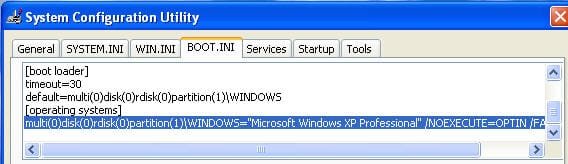
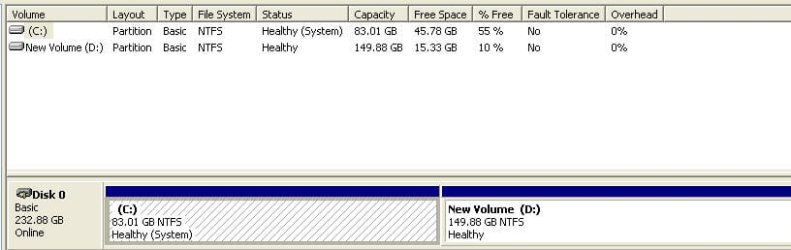
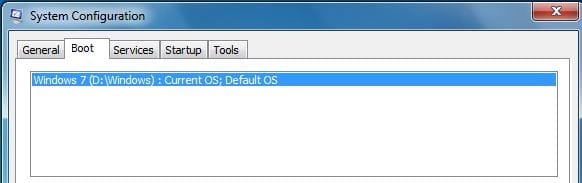
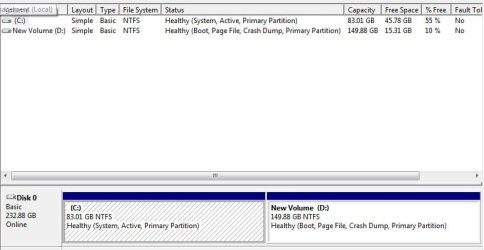
Here you go Greg. I am including snapshots of Boot.Ini & Disk Mgmt. from both OS's. To recap my goal - Remove the dual boot option at startup, remove all traces of Win 7 from Drive D: and most important not lose any data from C: OR D:
I hope this is what you want and thanks to all for your patience.
Cheers
JohnnyAXP-BootIni.jpg

Xp-DiskMgm.jpg

Win7-BootIni.JPG

Win7_DiskMgm.JPG
 

My Computer My Computer

At a glance

Windows Home Premium 64bitT61-- 2.0ghz4 GBOn board
Computer Manufacturer/Model Number
Toshiba C650
OS
Windows Home Premium 64bit
CPU
T61-- 2.0ghz
Motherboard
Toshiba
Memory
4 GB
Graphics Card(s)
On board
Sound Card
On board
Monitor(s) Displays
15.6"
Hard Drives
500 GB
In XP Disk Management, rightclick D to Delete, then rightclick C to Extend as desired.
http://www.sevenforums.com/tutorials/2668-partition-volume-delete.html
http://www.sevenforums.com/tutorials/2670-partition-volume-extend.html

Then on msconfig>Boot tab highlight and delete the Win7 Pro listing.

If Disk Mgmt balks, use Method Two shown here to force delete: http://www.sevenforums.com/tutorials/2668-partition-volume-delete.html

If ghost listing remains after msconfig deletion, install EasyBCD to XP to delete XP on Edit OS tab.
 
Greg, I do NOT want to delete drive D:, lots of data there. or extend drive C:. Both these partitions must be preserved!!
Thanks
JohnnyA
 

My Computer My Computer

At a glance

Windows Home Premium 64bitT61-- 2.0ghz4 GBOn board
Computer Manufacturer/Model Number
Toshiba C650
OS
Windows Home Premium 64bit
CPU
T61-- 2.0ghz
Motherboard
Toshiba
Memory
4 GB
Graphics Card(s)
On board
Sound Card
On board
Monitor(s) Displays
15.6"
Hard Drives
500 GB
Johnny, just as I said before and Greg is saying now, delete the Win 7 listing in msconfig -> boot. If you don't do anything else, then you will simply boot to XP all the time. After that you may simply delete Win 7 files from your D:\ disk, leaving whatever data you need intact.
 

My Computer My Computer

At a glance

Windows 7 Ultimate (x64)Q66008 GBATI Radeon HD 2600 XT
Computer Manufacturer/Model Number
Dell Inspiron 530
OS
Windows 7 Ultimate (x64)
CPU
Q6600
Memory
8 GB
Graphics Card(s)
ATI Radeon HD 2600 XT
Monitor(s) Displays
Samsung Syncmaster P2450
Screen Resolution
1920x1080
Hard Drives
Samsung HD103UJ
Samsung HD501LJ
Internet Speed
25 Mb/s
Install Take Ownership shortcut to your rightclick context menu so you can take ownership of any Windows folder files which will not delete as you clean out the OS files in D: http://www.sevenforums.com/tutorials/1911-take-ownership-shortcut.html

There may still be some files that balk, requiring deleting sub-files first to drill down, then manually full-permissioning Everyone on Security tab.

It is hard to do if you haven't done it a lot, which is why it is easier to move data off and delete the OS partition to recreate it as a data partition. But it can be done.
 
Wow - I thought you would have done it a long time ago.

It only takes a minute.

Apparently our ancillary debate threw him off track.

Sorry, Johnny, but regardless of what's been argued, both options provided by me and SWI2 and others in here will get you what you need. I'm not sure what you're still looking for.
 

My Computer My Computer

At a glance

XP / Win7 x64 ProIntel Quad-Core Q9450 @ 3.2GHz2x2GB GSkill DDR2NVIDIA GeForce 8600 GTS (EVGA)
OS
XP / Win7 x64 Pro
CPU
Intel Quad-Core Q9450 @ 3.2GHz
Motherboard
Asus P5-E
Memory
2x2GB GSkill DDR2
Graphics Card(s)
NVIDIA GeForce 8600 GTS (EVGA)
Monitor(s) Displays
Dell 2408WFP
Screen Resolution
1920x1200
Hey Greg, FlGi7, Uniflex & SiW2, got it done. Taking ownership helped delete Win 7 files from Drive D, and removing Win 7 from boot.ini stopped the dual boot page. You folks have been very patient and most helpfull. Always a pleasure being on the Forum.
Take care all
JohnnyA
 
Last edited:

My Computer My Computer

At a glance

Windows Home Premium 64bitT61-- 2.0ghz4 GBOn board
Computer Manufacturer/Model Number
Toshiba C650
OS
Windows Home Premium 64bit
CPU
T61-- 2.0ghz
Motherboard
Toshiba
Memory
4 GB
Graphics Card(s)
On board
Sound Card
On board
Monitor(s) Displays
15.6"
Hard Drives
500 GB
Great!
 

My Computer My Computer

At a glance

XP / Win7 x64 ProIntel Quad-Core Q9450 @ 3.2GHz2x2GB GSkill DDR2NVIDIA GeForce 8600 GTS (EVGA)
OS
XP / Win7 x64 Pro
CPU
Intel Quad-Core Q9450 @ 3.2GHz
Motherboard
Asus P5-E
Memory
2x2GB GSkill DDR2
Graphics Card(s)
NVIDIA GeForce 8600 GTS (EVGA)
Monitor(s) Displays
Dell 2408WFP
Screen Resolution
1920x1200
Back
Top