Where do I update my BIOS?

tokyopopk

New member
Local time
2:52 AM
Messages
13
I am not really god with computers and really need help since my laptop takes like 6 hour cool down before I can turn it back on. I took some screen shots and stuff not knowing what I need to tell you guys. Also will updating my bios fix my coprocessor missing problem?

This was originally a win-32 bit vista home but i got a new hard drive installed and clean installed win7 ultimate 64 bit.

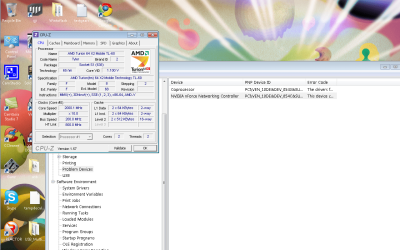
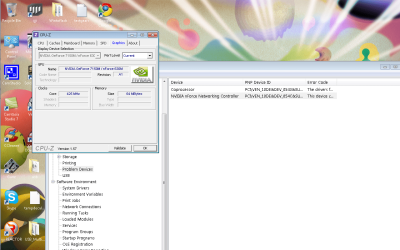
I also took screen shots of my nVidia because something about chip-set and still cannot update my coproccessor so maybe updating my bios might help since my sounds cut on and off.
 

Attachments
  • 1.png
    1.png
    148.7 KB · Views: 112
  • 2.png
    2.png
    152.9 KB · Views: 66
  • 3.png
    3.png
    151.7 KB · Views: 55

My Computer My Computer

At a glance

64 bit windows 7 ultimate
OS
64 bit windows 7 ultimate
I am not really god with computers and really need help since my laptop takes like 6 hour cool down before I can turn it back on. I took some screen shots and stuff not knowing what I need to tell you guys. Also will updating my bios fix my coprocessor missing problem?

This was originally a win-32 bit vista home but i got a new hard drive installed and clean installed win7 ultimate 64 bit.

I also took screen shots of my nVidia because something about chip-set and still cannot update my coproccessor so maybe updating my bios might help since my sounds cut on and off.

You have several problems but have provided no info.

please fill in your sysem specs.
1-cool-down? from heat? or something else?

2-If it is heat updating your BIOS (done differently on different computers) wont help

3-sound cut offs might be anything, a driver, a device,etc.
 

My Computer My Computer

At a glance

Win 8 Release candidate 8400[email protected]4 gigsNvidia 9600M
Computer Manufacturer/Model Number
HP Pavillion dv-7 1005 Tx
OS
Win 8 Release candidate 8400
CPU
[email protected]
Memory
4 gigs
Graphics Card(s)
Nvidia 9600M
Sound Card
HD built-in
Monitor(s) Displays
17" Wxga
Screen Resolution
1440x900
Cooling
none
Internet Speed
45Mb down 5Mb up
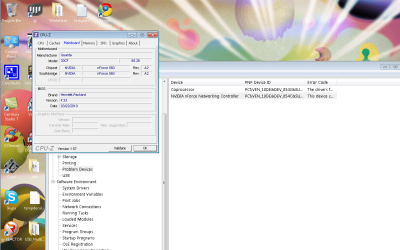
Coprocessor driver is a part of the chipset drivers. Go to the HP support site (I think your PC is an HP) and download the latest drivers for your model. Also, updating the bios is not a panacea for all problems, in any case your bios is dated March, 2010 which is not all that long.

But see if a new bios update is listed on that HP page, dont install it straight away, go through the changelog and see if it includes any fan algorithm changes that may make a difference to the heat issue. HP machines esp. laptops are notorious for heat issues.
 

My Computer My Computer

At a glance

Windows 7 x64 pro/ Windows 7 x86 Pro/ XP SP3 x86
Computer Manufacturer/Model Number
Too many to describe...
OS
Windows 7 x64 pro/ Windows 7 x86 Pro/ XP SP3 x86
Cool down I mean by just leaving it off. not from heat. I want to update my bios because my laptop has long start up times and I was reading up on Google about the bios and it does pertain to the reason my my laptop never wants to turn on. So I just leave it off and get 'lucky' my laptop turns on. I know my sound driver is messed up because something nVidia chip set or something been reading a lot of articles saying that nVidia cannot support my drivers or maybe my bios is causing the problem.
 

My Computer My Computer

At a glance

64 bit windows 7 ultimate
OS
64 bit windows 7 ultimate
Coprocessor driver is a part of the chipset drivers. Go to the HP support site (I think your PC is an HP) and download the latest drivers for your model. Also, updating the bios is not a panacea for all problems, in any case your bios is dated March, 2010 which is not all that long.

But see if a new bios update is listed on that HP page, dont install it straight away, go through the changelog and see if it includes any fan algorithm changes that may make a difference to the heat issue. HP machines esp. laptops are notorious for heat issues.

HP support site is very confusing to me. I know my laptop model is a dv6700 but they have like dv6700 CTo and dv6700z and other stuff. My sound driver is RealTek which is working fine but just cuts out when I'm playing a game.
 

My Computer My Computer

At a glance

64 bit windows 7 ultimate
OS
64 bit windows 7 ultimate
Cool down I mean by just leaving it off. not from heat. I want to update my bios because my laptop has long start up times and I was reading up on Google about the bios and it does pertain to the reason my my laptop never wants to turn on. So I just leave it off and get 'lucky' my laptop turns on. I know my sound driver is messed up because something nVidia chip set or something been reading a lot of articles saying that nVidia cannot support my drivers or maybe my bios is causing the problem.
Your laptop has long startup times- you could have a lot of programs set to start at boot, check in MSCONFIG/Startup tab and uncheck any unessential items.

A laptop is not human, can you please describe when exactly it turns on and when not? Do the power leds come on, does the fan turn on, can you see the cursor, what?
 

My Computer My Computer

At a glance

Windows 7 x64 pro/ Windows 7 x86 Pro/ XP SP3 x86
Computer Manufacturer/Model Number
Too many to describe...
OS
Windows 7 x64 pro/ Windows 7 x86 Pro/ XP SP3 x86
Cool down I mean by just leaving it off. not from heat. I want to update my bios because my laptop has long start up times and I was reading up on Google about the bios and it does pertain to the reason my my laptop never wants to turn on. So I just leave it off and get 'lucky' my laptop turns on. I know my sound driver is messed up because something nVidia chip set or something been reading a lot of articles saying that nVidia cannot support my drivers or maybe my bios is causing the problem.
Your laptop has long startup times- you could have a lot of programs set to start at boot, check in MSCONFIG/Startup tab and uncheck any unessential items.

A laptop is not human, can you please describe when exactly it turns on and when not? Do the power leds come on, does the fan turn on, can you see the cursor, what?

I've got it to run the least possible when I turn the laptop on. but by start up I mean when you see the 'HP Invent' logo. Some times I see it, or sometimes the laptop turns on and immediately shuts off. I came to the conclusion 'Update BIOS.' Once the laptop is one it works fine like a normal laptop. Except the sound cutting off.
 

My Computer My Computer

At a glance

64 bit windows 7 ultimate
OS
64 bit windows 7 ultimate
You can try cleaning the thermal compound in the heat sink and apply a new thermal compound,If you know how to open the laptop its fine or get it done by a authorized service personnal.....
 

My Computer My Computer

At a glance

Windows 7 ProAMD ATHLON X2 2401 GB Corsair DDR2256 MB Geforce 7100
Computer Manufacturer/Model Number
CUSTOM MODEL
OS
Windows 7 Pro
CPU
AMD ATHLON X2 240
Motherboard
ASUS M2N68
Memory
1 GB Corsair DDR2
Graphics Card(s)
256 MB Geforce 7100
Monitor(s) Displays
Samsung 15''
Hard Drives
Seagate 500GB 32MB Cache

My Computer My Computer

At a glance

Windows 7 x64 pro/ Windows 7 x86 Pro/ XP SP3 x86
Computer Manufacturer/Model Number
Too many to describe...
OS
Windows 7 x64 pro/ Windows 7 x86 Pro/ XP SP3 x86

My Computer My Computer

At a glance

64 bit windows 7 ultimate
OS
64 bit windows 7 ultimate
Where did you get your copy of windows from?
 

My Computer My Computer

At a glance

Windows 7 x64 pro/ Windows 7 x86 Pro/ XP SP3 x86
Computer Manufacturer/Model Number
Too many to describe...
OS
Windows 7 x64 pro/ Windows 7 x86 Pro/ XP SP3 x86
I don't usually recommend this, but I'd suggest taking your computer to a repair shop and having them look at it, or calling HP if it is still under warranty. Updating the BIOS likely won't solve any of these issues, and based on your questioning, I'd be worried that you'd do some permanent damage to the system.

The exact model number is on the bottom of the laptop, but you also should know this from your documentation from the purchase of the laptop.

If the system doesn't power on right away or each time you try, that is usually a sign of a failing motherboard.
 

My Computer My Computer

At a glance

Windows 7 Ultimate x64 SP1Intel Core i7-260012 GB Patriot Extreme DDR3-1333Nvidia GTX 470
OS
Windows 7 Ultimate x64 SP1
CPU
Intel Core i7-2600
Motherboard
Gigabyte GA-P67A-UD3P-B3
Memory
12 GB Patriot Extreme DDR3-1333
Graphics Card(s)
Nvidia GTX 470
Monitor(s) Displays
Dell UltraSharp 2209WA
Hard Drives
OCZ Agility3 240 GB, WD5001AALS, WD7501AALS
PSU
OCZ ModStream 700W
Case
CoolerMaster HAF 912 Advanced
Cooling
CoolerMaster Hyper 212 Plus
How old is this laptop? What kind of shape is the battery in? If the battery is dead or quits in a short period of time, try booting up the laptop with it removed.
 

My Computer My Computer

At a glance

Windows 10 Education 64 bitAMD Phenom II X4 980 Black Edition Deneb 3.7GHz8GB 4GBx2 Kingston PC10600 DDR3 1333 MemoryZotac NVIDIA Geforce GT640 2 Gig DDR3 PCIe
Computer type
PC/Desktop
Computer Manufacturer/Model Number
Home Built
OS
Windows 10 Education 64 bit
CPU
AMD Phenom II X4 980 Black Edition Deneb 3.7GHz
Motherboard
Asus M4N68T-M V2 µATX Motherboard
Memory
8GB 4GBx2 Kingston PC10600 DDR3 1333 Memory
Graphics Card(s)
Zotac NVIDIA Geforce GT640 2 Gig DDR3 PCIe
Sound Card
VIA VT1708s High Definition Audio 8-channel Onboard
Monitor(s) Displays
22" LG E2242 1080p and 2 19" I-INC AG191D
Screen Resolution
1280x1024 - 1920x1080 - 1280x1024
Hard Drives
Crucial M100 256 GB SSD and 500 GB WD Blue SATA
PSU
Thermaltake TR 620
Case
Power Up Black ATX Mid-Tower Case
Cooling
Stock heatsink and fan
Keyboard
Logitech Wireless K350 Wave
Mouse
Logitech Wireless M570 Trackman Wheel
Internet Speed
80 Mbps Down 30 Mbps Up
Antivirus
Windows Defender
Browser
Internet Explorer 11
Other Info
HP DVD1040e Lightscribe - External USB2
The missing co-processor is a known issue solved by installing the full chipset download from the HP Support Downloads webpage for your model computer. Download it to desktop, extract the files, then rightclick the .exe file to Run As Administrator.

If this isn't sufficient, use the scanner on the Nvidia Drivers download webpage which will tell you what chipset you have and provide the latest driver.

Work through these troubleshooting steps to make sure you have everything covered.
 
Back
Top