
When I insert a USB device in two of my USB ports, I get a message; "Windows does not recognize this device, etc."
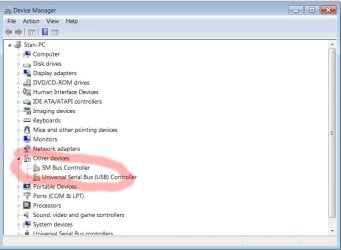
So I opened my Device Manager, and there are yellow triangles on two of my USB Serial Bus Controllers. (see picture)
I clicked on them, and it says there are no drivers installed. I click on Update Driver, and I get a message that Windows cannot find a driver. (see picture)
Where do I get the drivers for these USB ports? Are they part of the MB? One is on the rear of the case, so I assume that is on the MB, but the other one is on the front of the case (a USB 2.0)
Any help or suggestions would be appreciated.
Thank you,
TRS
So I opened my Device Manager, and there are yellow triangles on two of my USB Serial Bus Controllers. (see picture)
I clicked on them, and it says there are no drivers installed. I click on Update Driver, and I get a message that Windows cannot find a driver. (see picture)
Where do I get the drivers for these USB ports? Are they part of the MB? One is on the rear of the case, so I assume that is on the MB, but the other one is on the front of the case (a USB 2.0)
Any help or suggestions would be appreciated.
Thank you,
TRS
Attachments

My Computer
At a glance
Win 7 Home Premium 64Intel Core i5 3570K @ 3.40GHZ 3.80 GHZ16GBEVGA Nvidia GeForce GTX 750Ti
- Computer type
- PC/Desktop
- Computer Manufacturer/Model Number
- custom build
- OS
- Win 7 Home Premium 64
- CPU
- Intel Core i5 3570K @ 3.40GHZ 3.80 GHZ
- Motherboard
- Gigabyte GA-B75M-HD3
- Memory
- 16GB
- Graphics Card(s)
- EVGA Nvidia GeForce GTX 750Ti
- Sound Card
- Creative Sound Blaster Audigy FX
- Monitor(s) Displays
- Dell 2407WFP-HC
- Screen Resolution
- 1920 x 1200
- Hard Drives
- 1TB Toshiba DT01ACA100 ATA Device
- PSU
- Inland Silver Series ILS 500R2
- Case
- Thermaltake V3 Black
- Cooling
- some fans that are inside :)
- Keyboard
- ONN wireless
- Mouse
- Logitech wireless laser
- Internet Speed
- 4.89 avg dl speed 3.67 avg ul speed
- Antivirus
- Microsoft Security Essentials
- Browser
- Mozilla


