
Startup issues - not repaired by sfc /scannow

MoxieMomma

New member
Guru
VIP
Local time
12:47 PM
Messages
1,102
Hello:

Need help with startup issues that began suddenly on 3/16 - Dell XPS 8100.

3/16:
Out of the blue (no prior shutdown or startup issues) could not boot.
Eventually got into WRE which automatically (?) ran startup repair, but "could not fix".
(I was too freaked to note the details.)
Eventually booted to safe mode.
Ran diagnostics: OK.
Rolled back to system RP from 3/10.
Seemed OK.
Normal shutdown/cold start and normal restarts for ~24 hours.
3/18:
Booted partially to desktop without system tray icons, had mouse, but start menu froze, requiring hard shut down.
Booted to safe mode w/networking.
Disabled all non-MS services and all non-essential startup programs.
Booted fine.
Selectively re-enabled important services; still OK.
Because AVs don't like system restore, even though KIS2011 was working OK, I cleanly uninstalled KIS (& MBAM & SAS), ran their cleaners, and reinstalled all.
Scans with all 3 -- plus ESET online scanner -- are all clean.
No evidence of infection.

3/19:
CHKDSK /f /r: No problems found. System still working fine, but no attempts to reboot.

Today:
SFC /verifyonly: "Found integrity violations"
SFC /scannow: "Found corrupt files but was unable to fix some of them".
Then, for no reason, explorer just crashed.
I did a warm restart (first in 3 days) & it was slow, but went OK.
Not sure about a cold start though -- too scared to try it since last week.

Windows repair install is not an option b/c system is now SP1 and original install DVD is not.

Dell is only offering either a OSRI from the recovery partition or a complete clean install (nuke/pave?). That will cost me weeks of lost productivity (I work mostly from home).

So, it looks as though I am down to this: http://www.sevenforums.com/tutorials/42776-extract-files-windows-7-installation-dvd.html

But it looks to be very technically complicated.

I do have the original Win7 install DVD, but it is without SP1. So, I'm not sure if the files that Windows tried to repair are even on the install disk.

Can someone please, please review my attached sfc.txt log to see if it is worth trying?
(I also have the xml Reliability Monitor history (wrong file format), a complete CBS log (too big?), if needed.)

PLEASE HELP -- system works fine as long as I don't have to shutdown.
Not a long-term solution, of course.
So, I need to resolve soon.

THANK YOU SO VERY MUCH,

MM
 

Attachments

My Computer My Computer

At a glance

OEM Windows 7 Ult (x64) SP1Intel Core-i7 3770 @ 3.4 GHz16 GB DDR3 SDRAM @ 1333 MHzNVidia GeForce GT620 1 GB
Computer type
PC/Desktop
Computer Manufacturer/Model Number
Dell Studio XPS 8500
OS
OEM Windows 7 Ult (x64) SP1
CPU
Intel Core-i7 3770 @ 3.4 GHz
Motherboard
"Dell" branded
Memory
16 GB DDR3 SDRAM @ 1333 MHz
Graphics Card(s)
NVidia GeForce GT620 1 GB
Sound Card
THX TruStudio PC
Monitor(s) Displays
Dell U2410 Full HD
Hard Drives
2.0 TB SATA2 @ 7200 RPM
PSU
350W
Keyboard
MS 4000 Ergon - Wired
Mouse
Logitech Anywhere MX
Internet Speed
Cable HSI w/Turbo (router)
Antivirus
KIS-MBAM Premium-MBAE Premium
Browser
Fx (current version); IE
Other Info
And a Win7/64 Pro laptop; And a Win10/64 Pro desktop.
Do you have a friend with Technet or MSDN who can download your version with SP1 for you to do the Repair Install?

If not and you are forced to download from web, be sure to rightclick ISO to scan with your AV and Malwarebytes first, read the comments to make sure nothing is added.

Other troubleshooting steps to consider.
 
Hi, Greg:

No, no contacts at Technet or MSDN.

Sorry, I am an old, self-taught home user who doesn't really grasp the highly technical stuff.

Are you saying that I can't do the "extract files" thing b/c my install DVD does not contain the files in question and/or that it won't work b/c 7-zip won't have the correct version of Win7?

So, my only options are:
1) Download a current ISO of Win7 that contains SP1, burn that to media and use that for the file extraction?
2) Or do the same and perform a repair install with that disk?

Both seem risky and a "long run for a short slide", with no guarantee of success.

I am really stressed - I don't know which is the best of several apparently bad options: losing so much time and productivity to reinstall the system & everything on it from scratch, or trying a somewhat faster "fix" that might irreversibly break what is otherwise a totally stable, usable system.

Please advise -- in the interim, I'll look at the link you mentioned.

Thanks,

MM
 

My Computer My Computer

At a glance

OEM Windows 7 Ult (x64) SP1Intel Core-i7 3770 @ 3.4 GHz16 GB DDR3 SDRAM @ 1333 MHzNVidia GeForce GT620 1 GB
Computer type
PC/Desktop
Computer Manufacturer/Model Number
Dell Studio XPS 8500
OS
OEM Windows 7 Ult (x64) SP1
CPU
Intel Core-i7 3770 @ 3.4 GHz
Motherboard
"Dell" branded
Memory
16 GB DDR3 SDRAM @ 1333 MHz
Graphics Card(s)
NVidia GeForce GT620 1 GB
Sound Card
THX TruStudio PC
Monitor(s) Displays
Dell U2410 Full HD
Hard Drives
2.0 TB SATA2 @ 7200 RPM
PSU
350W
Keyboard
MS 4000 Ergon - Wired
Mouse
Logitech Anywhere MX
Internet Speed
Cable HSI w/Turbo (router)
Antivirus
KIS-MBAM Premium-MBAE Premium
Browser
Fx (current version); IE
Other Info
And a Win7/64 Pro laptop; And a Win10/64 Pro desktop.
I think you should be able to create a new system repair disk and use that. Use method 2.

http://www.sevenforums.com/tutorials/2083-system-repair-disc-create.html?ltr=S

Then run sfc scan (offline) and startup repair a few times. You can also consider running bootrec commands.

How to use the Bootrec.exe tool in the Windows Recovery Environment to troubleshoot and repair startup issues in Windows

If the disk doesnt work, go the way Greg suggested.

But ultimately, you can just save all your work and run the dell factory restore.

Edit: Edit: If you had created a system repair disk previously, try using that as well.
 
Last edited:

My Computer My Computer

At a glance

Windows 7 x64 pro/ Windows 7 x86 Pro/ XP SP3 x86
Computer Manufacturer/Model Number
Too many to describe...
OS
Windows 7 x64 pro/ Windows 7 x86 Pro/ XP SP3 x86

My Computer My Computer

At a glance

W 7 64-bit UltimateIntel Q9550 Yorkfield8GB Dominator 8500C5DATI : XFX 5870
Computer Manufacturer/Model Number
* BFK Customs *
OS
W 7 64-bit Ultimate
CPU
Intel Q9550 Yorkfield
Motherboard
ASUS P5Q Pro
Memory
8GB Dominator 8500C5D
Graphics Card(s)
ATI : XFX 5870
Sound Card
Realtek HD Audio 7-1
Monitor(s) Displays
1x 47" LCD HDMI & 3x 26" LCD HDMI
Screen Resolution
1920x1080P & 1920x1200
Hard Drives
1x 80GB Intel X25-M G2 SSD : 1x 500GB & 1x 640GB WD Caviar Black(s)
PSU
Corsair 620HX
Case
Cooler Master RC-690
Cooling
Tuniq Tower 120, 2x 140mm and 3x 120mm case fans
Keyboard
Microsoft 500
Mouse
Razer Diamondback 3G
Internet Speed
14 Mb/s
Other Info
1x Koutech 3Gb/s SATA HDD Hot Swap Rack
Hi, Bill2:

OK, so now I am confused.:confused:

I have both the factory install DVD (no SP1), and a repair disk created the day the computer arrived (also no SP1), and there is a recovery partition on the D: drive (factory image, also no SP1) that was used to re-image the OS once back in 8/2010 (thanks to OEM McAfee crapware version update).

I already ran sfc /scannow from the elevated command prompt this morning -- that's what was run to generate the log I attached to my previous post.
Would it not have tried to repair the files from the recovery partition, but it could not?

And startup repair ran the day the problem started -- however, this was prior to doing the roll-back and the other hardware diagnostics, chkdsk, sfc & troubleshooting).

Most of all: I don't understand how creating a new repair disk, now, with a "corrupted" OS (even though it is SP1) solves anything, since the OS in its current state contains corrupted files.

1. So, what should be the next step -- especially based on the data in the sfc.txt log?
A) Run another startup repair?
B) Run sfc /scannow again (I don't know what you mean by "offline")?
C) Bootrec.exe (again, looks hard and risky?)?

2. Am I correct to assume that I can NEITHER do a repair install NOR run the "extract system files" procedure from my Windows install DVD (http://www.sevenforums.com/tutorials/42776-extract-files-windows-7-installation-dvd.html) b/c both require that the DVD be the same SP or higher, which it is not?

The more layers of tutorials and KB articles I read, the more my head spins.:cry:

Thanks for your patience and expertise,

MM
 

My Computer My Computer

At a glance

OEM Windows 7 Ult (x64) SP1Intel Core-i7 3770 @ 3.4 GHz16 GB DDR3 SDRAM @ 1333 MHzNVidia GeForce GT620 1 GB
Computer type
PC/Desktop
Computer Manufacturer/Model Number
Dell Studio XPS 8500
OS
OEM Windows 7 Ult (x64) SP1
CPU
Intel Core-i7 3770 @ 3.4 GHz
Motherboard
"Dell" branded
Memory
16 GB DDR3 SDRAM @ 1333 MHz
Graphics Card(s)
NVidia GeForce GT620 1 GB
Sound Card
THX TruStudio PC
Monitor(s) Displays
Dell U2410 Full HD
Hard Drives
2.0 TB SATA2 @ 7200 RPM
PSU
350W
Keyboard
MS 4000 Ergon - Wired
Mouse
Logitech Anywhere MX
Internet Speed
Cable HSI w/Turbo (router)
Antivirus
KIS-MBAM Premium-MBAE Premium
Browser
Fx (current version); IE
Other Info
And a Win7/64 Pro laptop; And a Win10/64 Pro desktop.

My Computer My Computer

At a glance

OEM Windows 7 Ult (x64) SP1Intel Core-i7 3770 @ 3.4 GHz16 GB DDR3 SDRAM @ 1333 MHzNVidia GeForce GT620 1 GB
Computer type
PC/Desktop
Computer Manufacturer/Model Number
Dell Studio XPS 8500
OS
OEM Windows 7 Ult (x64) SP1
CPU
Intel Core-i7 3770 @ 3.4 GHz
Motherboard
"Dell" branded
Memory
16 GB DDR3 SDRAM @ 1333 MHz
Graphics Card(s)
NVidia GeForce GT620 1 GB
Sound Card
THX TruStudio PC
Monitor(s) Displays
Dell U2410 Full HD
Hard Drives
2.0 TB SATA2 @ 7200 RPM
PSU
350W
Keyboard
MS 4000 Ergon - Wired
Mouse
Logitech Anywhere MX
Internet Speed
Cable HSI w/Turbo (router)
Antivirus
KIS-MBAM Premium-MBAE Premium
Browser
Fx (current version); IE
Other Info
And a Win7/64 Pro laptop; And a Win10/64 Pro desktop.
1) Your sfc log showed a corrupted tcpmon.ini, dont think thats contributing to your startup problems.

2) Dont confuse an OEM factory restore disk with a System repair disk. The former are made by using the recovery manager on the computer such as dell's datasafe. These restore the computer to factory state and is identical to restoring from the OEM recovery partition.

A system repair disk that is created via the method I linked in my earlier post merely lets you boot to system recovery options (such as startup repair, command prompt etc.).

What you should do is to create a system repair disk (if you already have, use that), boot from it and run offline sfc scan and startup repair. This is explained in the tut Ted linked. If that doesnt help, try repairing boot via bootrec commands that I linked in my earlier post.

Go one by one and ask after each step.

3) Or you can just reimage from the recovery partition and install SP1 later. For this backup all your work first.

4) Your assumptions about the pre-sp1 dvd are correct.
 

My Computer My Computer

At a glance

Windows 7 x64 pro/ Windows 7 x86 Pro/ XP SP3 x86
Computer Manufacturer/Model Number
Too many to describe...
OS
Windows 7 x64 pro/ Windows 7 x86 Pro/ XP SP3 x86
1) Your sfc log showed a corrupted tcpmon.ini, dont think thats contributing to your startup problems.

2) Dont confuse an OEM factory restore disk with a System repair disk. The former are made by using the recovery manager on the computer such as dell's datasafe. These restore the computer to factory state and is identical to restoring from the OEM recovery partition.

A system repair disk that is created via the method I linked in my earlier post merely lets you boot to system recovery options (such as startup repair, command prompt etc.).

What you should do is to create a system repair disk (if you already have, use that), boot from it and run offline sfc scan and startup repair. This is explained in the tut Ted linked. If that doesnt help, try repairing boot via bootrec commands that I linked in my earlier post.

Go one by one and ask after each step.

3) Or you can just reimage from the recovery partition and install SP1 later. For this backup all your work first.

4) Your assumptions about the pre-sp1 dvd are correct.

Hi, again, Bill:

1) So, what do I do about corrupted tcpmon.ini, since I don't even know what it does?

2) OK, thanks for the info. I'm still not sure I understand it all. The original repair disc I created (from the Windows control panel > system protection) dates to the day I received the computer, so it is not SP1. But if I understand correctly, that doesn't matter. Is there any point in creating a new one now (with SP1, but with "corrupted" files)?

3) I am a bit wary of going back to factory image a 2nd time.
Here's why: it was used to reimage Windows 08/2010 successfully after a major update of OEM McAfee corrupted OS drivers. Although it was uneventful & system has been stable (replaced McAfee with KIS2011), I was shocked to see a red, critical event in my newly discovered (by me, just last week) Windows Reliability Monitor console time-stamped for EVERY single shutdown dating back to the day I did the factory image. It looks as though EVERY time I shutdown, Windows said "Windows was not properly shut down" > technical details > "The previous system shutdown at <whatever time> on ‎<whatever date> was unexpected." This has been happening invisibly to me, with NO shutdown or startup errors until last week. I have no idea what this means, but if I go back in WRM console all the way to 8/15/2010, it appears to have generated this message every or nearly every time the system was either restarted or shutdown.

Anyway, fearing some sort of subtle corruption of this factory image, I hate to lose 6 weeks of my life going back to something that may or may not resolve my current issue.

Moreover, I read this: http://www.sevenforums.com/tutorials/91339-ssd-hdd-optimize-windows-reinstallation.html. It seems to reinforce my reluctance to restore to that image, rather than a CLEAN INSTALL or REFORMAT/REINSTALL.

4. OK. So, those are both non-starters.

5. SOOOOOOOOO, getting back to question of how next to proceed:

OFFLINE SFC /SCANNOW: I read the tutorial, but I am not sure which method to use -- I assume One is OK, since I have both the install disk and a repair disc, and I don't have a dual boot system.

But I don't understand 2 steps, where it asks to specify the drive being repaired and the source of the "repair" files, esp since Brink's example uses the same drive "f:" for both.
The OS drive I am trying to repair is C.
The DVD with the install media will be in an optical drive D: or E:.

Moreover, to do this, I first need to shutdown > tap F2 > change boot options to put CD/DVD first on list > shutdown system > put EITHER install disk OR repair disk in the drive > reboot from tower?

Thanks,

MM
 

Attachments

  • 3-22-2011 9-28-54 AM.png
    3-22-2011 9-28-54 AM.png
    50.5 KB · Views: 50
  • 3-22-2011 9-30-50 AM.png
    3-22-2011 9-30-50 AM.png
    21.4 KB · Views: 57
Last edited:

My Computer My Computer

At a glance

OEM Windows 7 Ult (x64) SP1Intel Core-i7 3770 @ 3.4 GHz16 GB DDR3 SDRAM @ 1333 MHzNVidia GeForce GT620 1 GB
Computer type
PC/Desktop
Computer Manufacturer/Model Number
Dell Studio XPS 8500
OS
OEM Windows 7 Ult (x64) SP1
CPU
Intel Core-i7 3770 @ 3.4 GHz
Motherboard
"Dell" branded
Memory
16 GB DDR3 SDRAM @ 1333 MHz
Graphics Card(s)
NVidia GeForce GT620 1 GB
Sound Card
THX TruStudio PC
Monitor(s) Displays
Dell U2410 Full HD
Hard Drives
2.0 TB SATA2 @ 7200 RPM
PSU
350W
Keyboard
MS 4000 Ergon - Wired
Mouse
Logitech Anywhere MX
Internet Speed
Cable HSI w/Turbo (router)
Antivirus
KIS-MBAM Premium-MBAE Premium
Browser
Fx (current version); IE
Other Info
And a Win7/64 Pro laptop; And a Win10/64 Pro desktop.
If you go with the reimage.
If you have a External HD, you could copy & paste your data.
http://www.sevenforums.com/tutorials/93347-copy-paste-windows-recovery-console.html

Yes, my data are backed up offsite at Carbonite (very slow to recover), as well as on a USB external hard drive (both direct copy/paste AND windows files/folders backup).

I will need to update/refresh everything, especially 10-years worth of emails, all my documents, etc before proceeding with any of this.

Thanks,

MM
 

My Computer My Computer

At a glance

OEM Windows 7 Ult (x64) SP1Intel Core-i7 3770 @ 3.4 GHz16 GB DDR3 SDRAM @ 1333 MHzNVidia GeForce GT620 1 GB
Computer type
PC/Desktop
Computer Manufacturer/Model Number
Dell Studio XPS 8500
OS
OEM Windows 7 Ult (x64) SP1
CPU
Intel Core-i7 3770 @ 3.4 GHz
Motherboard
"Dell" branded
Memory
16 GB DDR3 SDRAM @ 1333 MHz
Graphics Card(s)
NVidia GeForce GT620 1 GB
Sound Card
THX TruStudio PC
Monitor(s) Displays
Dell U2410 Full HD
Hard Drives
2.0 TB SATA2 @ 7200 RPM
PSU
350W
Keyboard
MS 4000 Ergon - Wired
Mouse
Logitech Anywhere MX
Internet Speed
Cable HSI w/Turbo (router)
Antivirus
KIS-MBAM Premium-MBAE Premium
Browser
Fx (current version); IE
Other Info
And a Win7/64 Pro laptop; And a Win10/64 Pro desktop.
Sometimes you'll need to run SFC several times to get it to repair all files, and running from Command Line can work better if it presents any problems.

The point in obtaining the new installer with SP1 would be to run the Repair Install which is amazingly effective even on bloated factory preinstalls, and has always been the solution I've found to repair SFC Irreparable System Files.

Another option is to uninstall SP1 to run a Repair Install with the current DVD: http://windows.microsoft.com/en-US/windows7/uninstall-sp1

Based on your hesitation with the Recovery Partition option, if you're unable to find a Win7 Installation DVD with SP1, what I would consider is wiping the HD to clean reinstall with either a slipstreamed DVD or your pre-SP1 DVD, then immediately install SP1 from Windows Updates. Make this a perfect install so you can save its image after setup and never have to reinstall again: Reinstalling Windows 7 - Windows 7 Forums
 
Hello, again:

I need further clarification on how to run sfc /scannow from command prompt at boot, as per my last post.

I first ran sfc /scannow from within Windows (I guess?).

But I do not understand the steps in the tutorial about how to run it offline.
The only media I have are my Windows install DVD (no SP1) and my repair disc I created in 2/2010 (also no SP1).

Since this is just a sfc /scannow (not a repair install), can I use either disk as the "source" from which to repair the system files?

If so, I do not understand steps 5 and 7 in the tutorial, as to which drive is which. (The OS partition I am trying to repair is C:, and the media from which I will be trying to run sfc will be in D: or E: (my optical drives).

Also, I assume I first need to boot into F2 in order to change the order of the boot options to put the CD first, or is that not necessary if the system is able to boot from C:?

Please advise -- I'm sorry for not understanding. With so many people replying, I am becoming a bit overwhelmed.

Also: please note, the system otherwise works fine, and I have done at least 2 warm restarts this morning without incident. So, the only mystery is whether a cold start from a normal shutdown will work.

Thanks,

MM
 

My Computer My Computer

At a glance

OEM Windows 7 Ult (x64) SP1Intel Core-i7 3770 @ 3.4 GHz16 GB DDR3 SDRAM @ 1333 MHzNVidia GeForce GT620 1 GB
Computer type
PC/Desktop
Computer Manufacturer/Model Number
Dell Studio XPS 8500
OS
OEM Windows 7 Ult (x64) SP1
CPU
Intel Core-i7 3770 @ 3.4 GHz
Motherboard
"Dell" branded
Memory
16 GB DDR3 SDRAM @ 1333 MHz
Graphics Card(s)
NVidia GeForce GT620 1 GB
Sound Card
THX TruStudio PC
Monitor(s) Displays
Dell U2410 Full HD
Hard Drives
2.0 TB SATA2 @ 7200 RPM
PSU
350W
Keyboard
MS 4000 Ergon - Wired
Mouse
Logitech Anywhere MX
Internet Speed
Cable HSI w/Turbo (router)
Antivirus
KIS-MBAM Premium-MBAE Premium
Browser
Fx (current version); IE
Other Info
And a Win7/64 Pro laptop; And a Win10/64 Pro desktop.
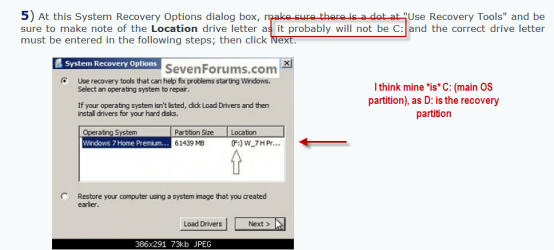
When you get here, in Method One use this letter as seen by WinRE not the optical drive or what you THINK the drive letter is.


My Computer My Computer

At a glance

W 7 64-bit UltimateIntel Q9550 Yorkfield8GB Dominator 8500C5DATI : XFX 5870
Computer Manufacturer/Model Number
* BFK Customs *
OS
W 7 64-bit Ultimate
CPU
Intel Q9550 Yorkfield
Motherboard
ASUS P5Q Pro
Memory
8GB Dominator 8500C5D
Graphics Card(s)
ATI : XFX 5870
Sound Card
Realtek HD Audio 7-1
Monitor(s) Displays
1x 47" LCD HDMI & 3x 26" LCD HDMI
Screen Resolution
1920x1080P & 1920x1200
Hard Drives
1x 80GB Intel X25-M G2 SSD : 1x 500GB & 1x 640GB WD Caviar Black(s)
PSU
Corsair 620HX
Case
Cooler Master RC-690
Cooling
Tuniq Tower 120, 2x 140mm and 3x 120mm case fans
Keyboard
Microsoft 500
Mouse
Razer Diamondback 3G
Internet Speed
14 Mb/s
Other Info
1x Koutech 3Gb/s SATA HDD Hot Swap Rack
OK, yes, I think I understand that part, BKD.
1) But I do not understand step 7 where one has to manually specify the drive/partition/location (sorry, I do not know the proper terminology) letters. In the tutorial, it looked as though the example used F: for both. Can you please explain a bit further?
2) And I still do not understand whether or not I need to change the boot order in the BIOS first, or am I not actually trying to boot from the repair/install disk?
3) Would I use the Windows install DVD or the repair disc I created?
4) If the system has restarted at least twice today without incident, does that in any way predict whether the problem might be resolved, in which case it might also boot OK cold? (Note: since the problem first began, it has only been cold starts that were a problem.)
5) Could you please explain further the tcpmon.ini corruption detected by sfc earlier today -- what it means, what I need to do?
6) Is it your best educated guess that trying these procedures (sfc /scannow offline, another startup repair, etc) is worth the effort, based on the severity of the corruption?

I am sorry for the torture.
It's pretty miserable at my end, too.
I sure do appreciate your assistance!

Thanks
 

My Computer My Computer

At a glance

OEM Windows 7 Ult (x64) SP1Intel Core-i7 3770 @ 3.4 GHz16 GB DDR3 SDRAM @ 1333 MHzNVidia GeForce GT620 1 GB
Computer type
PC/Desktop
Computer Manufacturer/Model Number
Dell Studio XPS 8500
OS
OEM Windows 7 Ult (x64) SP1
CPU
Intel Core-i7 3770 @ 3.4 GHz
Motherboard
"Dell" branded
Memory
16 GB DDR3 SDRAM @ 1333 MHz
Graphics Card(s)
NVidia GeForce GT620 1 GB
Sound Card
THX TruStudio PC
Monitor(s) Displays
Dell U2410 Full HD
Hard Drives
2.0 TB SATA2 @ 7200 RPM
PSU
350W
Keyboard
MS 4000 Ergon - Wired
Mouse
Logitech Anywhere MX
Internet Speed
Cable HSI w/Turbo (router)
Antivirus
KIS-MBAM Premium-MBAE Premium
Browser
Fx (current version); IE
Other Info
And a Win7/64 Pro laptop; And a Win10/64 Pro desktop.
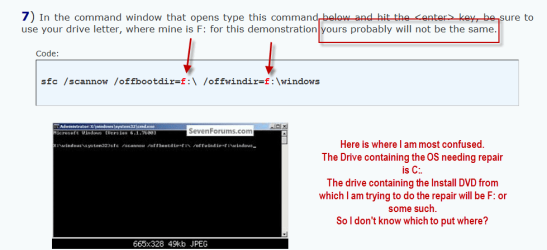
You are to boot the repair/recovery CD/DVD and in Method one you use the same letter twice, you are confusing it with Method Two the dual boot method.
 

My Computer My Computer

At a glance

W 7 64-bit UltimateIntel Q9550 Yorkfield8GB Dominator 8500C5DATI : XFX 5870
Computer Manufacturer/Model Number
* BFK Customs *
OS
W 7 64-bit Ultimate
CPU
Intel Q9550 Yorkfield
Motherboard
ASUS P5Q Pro
Memory
8GB Dominator 8500C5D
Graphics Card(s)
ATI : XFX 5870
Sound Card
Realtek HD Audio 7-1
Monitor(s) Displays
1x 47" LCD HDMI & 3x 26" LCD HDMI
Screen Resolution
1920x1080P & 1920x1200
Hard Drives
1x 80GB Intel X25-M G2 SSD : 1x 500GB & 1x 640GB WD Caviar Black(s)
PSU
Corsair 620HX
Case
Cooler Master RC-690
Cooling
Tuniq Tower 120, 2x 140mm and 3x 120mm case fans
Keyboard
Microsoft 500
Mouse
Razer Diamondback 3G
Internet Speed
14 Mb/s
Other Info
1x Koutech 3Gb/s SATA HDD Hot Swap Rack
To all the great folks helping:

UPDATE:

SFC /scannow "online": Same results as before. Only corrupt tcpmon.ini, could not fix.

SFC /scannow "offline" using Windows install DVD: Same as above (log attached).

Startup repair: No problems found. This is an improvement from when it was run on 3/16 when the problems began (and before the system restore & other fixes in the last few days).

Quick scans with KIS, MBAM and SAS: all clean (nothing suggests infection, unless this is some well-hidden rootkit that has escaped detection by both KIS & MBAM real-time protection).

Several restarts and at least 2 shutdown/cold boot sequences have been OK.
Computer is behaving normally for now.
However, everything worked for a day or so after the system restore last week, before breaking again 2 days later for no apparent reason.

Questions remaining:

1) What shall I do about corrupt tcpmon.ini? (Conflicting info on the web -- "do nothing" to "reset TCP/IP stack" to "repair install of Windows" (which is not an option for me).)

2) What else should I do now?

I am VERY grateful for your help & your patience,
 

Attachments

My Computer My Computer

At a glance

OEM Windows 7 Ult (x64) SP1Intel Core-i7 3770 @ 3.4 GHz16 GB DDR3 SDRAM @ 1333 MHzNVidia GeForce GT620 1 GB
Computer type
PC/Desktop
Computer Manufacturer/Model Number
Dell Studio XPS 8500
OS
OEM Windows 7 Ult (x64) SP1
CPU
Intel Core-i7 3770 @ 3.4 GHz
Motherboard
"Dell" branded
Memory
16 GB DDR3 SDRAM @ 1333 MHz
Graphics Card(s)
NVidia GeForce GT620 1 GB
Sound Card
THX TruStudio PC
Monitor(s) Displays
Dell U2410 Full HD
Hard Drives
2.0 TB SATA2 @ 7200 RPM
PSU
350W
Keyboard
MS 4000 Ergon - Wired
Mouse
Logitech Anywhere MX
Internet Speed
Cable HSI w/Turbo (router)
Antivirus
KIS-MBAM Premium-MBAE Premium
Browser
Fx (current version); IE
Other Info
And a Win7/64 Pro laptop; And a Win10/64 Pro desktop.
Back
Top