- Local time
- 12:47 PM
- Messages
- 1,102
Hello:
Need help with startup issues that began suddenly on 3/16 - Dell XPS 8100.
3/16:
Out of the blue (no prior shutdown or startup issues) could not boot.
Eventually got into WRE which automatically (?) ran startup repair, but "could not fix".
(I was too freaked to note the details.)
Eventually booted to safe mode.
Ran diagnostics: OK.
Rolled back to system RP from 3/10.
Seemed OK.
Normal shutdown/cold start and normal restarts for ~24 hours.
3/18:
Booted partially to desktop without system tray icons, had mouse, but start menu froze, requiring hard shut down.
Booted to safe mode w/networking.
Disabled all non-MS services and all non-essential startup programs.
Booted fine.
Selectively re-enabled important services; still OK.
Because AVs don't like system restore, even though KIS2011 was working OK, I cleanly uninstalled KIS (& MBAM & SAS), ran their cleaners, and reinstalled all.
Scans with all 3 -- plus ESET online scanner -- are all clean.
No evidence of infection.
3/19:
CHKDSK /f /r: No problems found. System still working fine, but no attempts to reboot.
Today:
SFC /verifyonly: "Found integrity violations"
SFC /scannow: "Found corrupt files but was unable to fix some of them".
Then, for no reason, explorer just crashed.
I did a warm restart (first in 3 days) & it was slow, but went OK.
Not sure about a cold start though -- too scared to try it since last week.
Windows repair install is not an option b/c system is now SP1 and original install DVD is not.
Dell is only offering either a OSRI from the recovery partition or a complete clean install (nuke/pave?). That will cost me weeks of lost productivity (I work mostly from home).
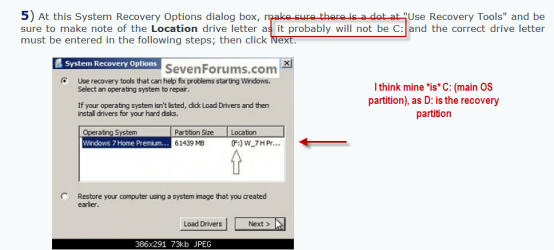
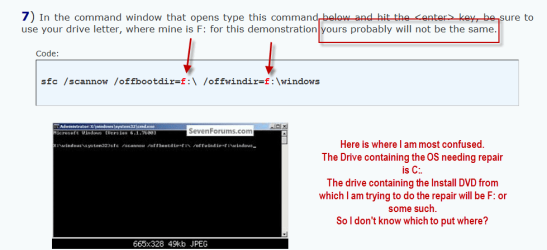
So, it looks as though I am down to this: http://www.sevenforums.com/tutorials/42776-extract-files-windows-7-installation-dvd.html
But it looks to be very technically complicated.
I do have the original Win7 install DVD, but it is without SP1. So, I'm not sure if the files that Windows tried to repair are even on the install disk.
Can someone please, please review my attached sfc.txt log to see if it is worth trying?
(I also have the xml Reliability Monitor history (wrong file format), a complete CBS log (too big?), if needed.)
PLEASE HELP -- system works fine as long as I don't have to shutdown.
Not a long-term solution, of course.
So, I need to resolve soon.
THANK YOU SO VERY MUCH,
MM
Need help with startup issues that began suddenly on 3/16 - Dell XPS 8100.
3/16:
Out of the blue (no prior shutdown or startup issues) could not boot.
Eventually got into WRE which automatically (?) ran startup repair, but "could not fix".
(I was too freaked to note the details.)
Eventually booted to safe mode.
Ran diagnostics: OK.
Rolled back to system RP from 3/10.
Seemed OK.
Normal shutdown/cold start and normal restarts for ~24 hours.
3/18:
Booted partially to desktop without system tray icons, had mouse, but start menu froze, requiring hard shut down.
Booted to safe mode w/networking.
Disabled all non-MS services and all non-essential startup programs.
Booted fine.
Selectively re-enabled important services; still OK.
Because AVs don't like system restore, even though KIS2011 was working OK, I cleanly uninstalled KIS (& MBAM & SAS), ran their cleaners, and reinstalled all.
Scans with all 3 -- plus ESET online scanner -- are all clean.
No evidence of infection.
3/19:
CHKDSK /f /r: No problems found. System still working fine, but no attempts to reboot.
Today:
SFC /verifyonly: "Found integrity violations"
SFC /scannow: "Found corrupt files but was unable to fix some of them".
Then, for no reason, explorer just crashed.
I did a warm restart (first in 3 days) & it was slow, but went OK.
Not sure about a cold start though -- too scared to try it since last week.
Windows repair install is not an option b/c system is now SP1 and original install DVD is not.
Dell is only offering either a OSRI from the recovery partition or a complete clean install (nuke/pave?). That will cost me weeks of lost productivity (I work mostly from home).
So, it looks as though I am down to this: http://www.sevenforums.com/tutorials/42776-extract-files-windows-7-installation-dvd.html
But it looks to be very technically complicated.
I do have the original Win7 install DVD, but it is without SP1. So, I'm not sure if the files that Windows tried to repair are even on the install disk.
Can someone please, please review my attached sfc.txt log to see if it is worth trying?
(I also have the xml Reliability Monitor history (wrong file format), a complete CBS log (too big?), if needed.)
PLEASE HELP -- system works fine as long as I don't have to shutdown.
Not a long-term solution, of course.
So, I need to resolve soon.
THANK YOU SO VERY MUCH,
MM
Attachments
My Computer
At a glance
OEM Windows 7 Ult (x64) SP1Intel Core-i7 3770 @ 3.4 GHz16 GB DDR3 SDRAM @ 1333 MHzNVidia GeForce GT620 1 GB
- Computer type
- PC/Desktop
- Computer Manufacturer/Model Number
- Dell Studio XPS 8500
- OS
- OEM Windows 7 Ult (x64) SP1
- CPU
- Intel Core-i7 3770 @ 3.4 GHz
- Motherboard
- "Dell" branded
- Memory
- 16 GB DDR3 SDRAM @ 1333 MHz
- Graphics Card(s)
- NVidia GeForce GT620 1 GB
- Sound Card
- THX TruStudio PC
- Monitor(s) Displays
- Dell U2410 Full HD
- Hard Drives
- 2.0 TB SATA2 @ 7200 RPM
- PSU
- 350W
- Keyboard
- MS 4000 Ergon - Wired
- Mouse
- Logitech Anywhere MX
- Internet Speed
- Cable HSI w/Turbo (router)
- Antivirus
- KIS-MBAM Premium-MBAE Premium
- Browser
- Fx (current version); IE
- Other Info
- And a Win7/64 Pro laptop; And a Win10/64 Pro desktop.