Mozilla launches Firefox 4

I've never been a fan of Firefox, but I must say that I like it better now, than what I had seen in the past. I haven't actually worked with it yet, other than setting it up, so I'm uncertain how my opinion will stand up. One thing that they need to add is Speed Dial.

Speed Dial for Firefox is extremely powerful compared to anything I have seen while testing Opera/Chrome.

It is so configurable that I actually use FF Speed Dial to keep tabs on several web pages, like posts in this forum. I have a tab (it has tabbed pages of speed dials) devoted to forums like this one. Then you can zoom and crop to actually make the text you are intrested in readable from the speed dial. So I can just look at the speed dial and see if there is a new posting in any topics I am involved in.

I also have readable speed dials in FF set up with weather/tv guide/TV torrents/email/news headlines.
 

My Computer

OS
Windows 7 x64 Home Premium
CPU
Intel Q9400 @ 3.2 GHz
Motherboard
Gigabyte DS3L
Memory
6GB PC 6400
Graphics Card(s)
Nvidia 8800GT
Screen Resolution
1920x1200
Hard Drives
Dual WD Green 1TB
Internet Speed
10 Mb/s
Also note, Microsoft has released a new update, KB2454826. In this update, according to the KB article, D2d1.dll, Fntcache.dll, Dwrite.dll, D3d10_1.dll and D3d10_1core.dll is updated to version which solves font related graphics issues in rendering. Windows 7 users might want to test this update for better font performance. # Fix Firefox 4 Font Problem in Smoothing, Blurry Rendering in FF 4 Beta

That is an old update and was released on Feb 8 and is also included in SP1 with updated file versions. Won't help if you have SP1 installed.

Jim :geek:
 

My Computer

Computer type
PC/Desktop
Computer Manufacturer/Model Number
Home Built
OS
Windows 8.1 Pro w/Media Center 64bit, Windows 7 HP 64bit
CPU
Phenom II X6 1100T
Motherboard
ASUS M5A99X EVO
Memory
Crucial Balistic 8gb DDR3-1866 CL9
Graphics Card(s)
MSI R6850 Cyclone IGD5 PE
Sound Card
On Board
Monitor(s) Displays
ASUS VE258Q 25" LED with DVI-HDMI-DisplayPort
Screen Resolution
1920 x 1080
Hard Drives
Two WD Cavier Black 2TB Sata III, WD My Book Essential 2TB USB 3.0
PSU
Seasonic X650 80 Plus GOLD Modular
Case
Corsair 400R
Cooling
Antec Kuhler H2O 620, Two 120mm and four 140mm
Keyboard
Logitech K120
Mouse
Logitech Marble Mouse USB, Logitech Precision Game Pad
Internet Speed
15MB
Antivirus
Norton IS 2013, Malwarebytes Pro Beta 2
Browser
IE-11, FF-27
Other Info
APC UPS ES 750, Netgear WNR3500L Gigabit & Wireless N Router with SamKnows Test Program, Motorola SB6120 Gigabit Cable Modem. Brother HL-2170W Laser Printer, Epson V300 Scanner
Snowdog,

Thanks for the link, but I installed it and left the options at default, but after FF restarted, I don't see hide nor hair of Speed Dial. How is it accessed?
 

My Computer

Computer Manufacturer/Model Number
DIY
OS
W7x64 Pro, SuSe 12.1/** W7 x64 Pro, XP MCE
CPU
Phenom II 1090T w/Noctua NH-D14 /**4400+ X2 w/CM Hyper TX 3
Motherboard
ASRock 890FX Deluxe 4/**A8N-SLI
Memory
2 x 2GB Patriot PGS34g1600LLKA/**4x1GB Corsair VS
Graphics Card(s)
EVGA GTX460 SC/**EVGA 8800GTS
Sound Card
Asus Xonar D2X/**Xonar D1
Monitor(s) Displays
Acer X233H, Dell E152FPc /**LG M237-WD
Screen Resolution
1920x1080 & 1024x768/**1980x1080
Hard Drives
WDC 2TB, 1.5TB, 1TB, 500GB,Seagate 500GB , Maxtor 80GB /**500GB Seagate & WDC 1TB Black
PSU
CM RS600 w/ APC BX1000G/**Antec 500 TP w/ APC BX1000
Case
HAF922/**Antec 1040IIB
Cooling
3x200mm, 1x140 and 1x120mm/**5x80mm fans
Keyboard
Logitech Media USB/**Saitek Eclipse
Mouse
Cordless Trackman Wheel/**Ditto
Internet Speed
3.3Mbps
Other Info
SB 560 5.1 w/ Sennheiser RS140/**Creative T20 speakers, Dvico FusionHDTV7 Gold RT, Cisco E3000, HP 5510V AIO, Linksys E3000, Belkin F5U237 hub and **F5D8055 adapter
(** = 2nd rig)
Snowdog,

Thanks for the link, but I installed it and left the options at default, but after FF restarted, I don't see hide nor hair of Speed Dial. How is it accessed?

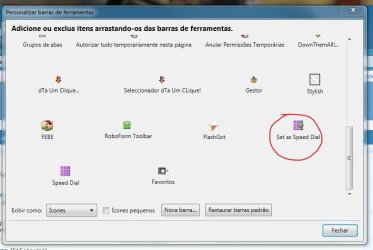
View - toolbar - customize. Drag to where you want and relax!
 

Attachments

  • Capturar.JPG
    Capturar.JPG
    43.8 KB · Views: 26

My Computer

Computer Manufacturer/Model Number
WALLONN7 / LIN BLACK SERIES II
OS
Windows 7 Ultimate x64 SP1
CPU
AMD PHENOM II X6 1090T 3.2GHz
Motherboard
GIGABYTE GA-890FXA-UD7
Memory
8GB G.SKILL RIPJAWS - F3-10666CL7D
Graphics Card(s)
SAPPHIRE ATI RADEON HD 5870 VAPOR X OC
Sound Card
REALTEK DOLBY HOME THEATER
Monitor(s) Displays
LED LG W2486L
Screen Resolution
1080p
Hard Drives
SEAGATE 1TB -ST31000528AS - AHCI MODE - AS SATA
PSU
ZALMAN ZM1000-HP 1000W
Case
THERMALTAKE XASER VI VG4000SWA
Cooling
140MM x3 / 120MM x1 AIR COOLING - THERMALTAKE
Keyboard
MICROSOFT DIGITAL MEDIA KEYBOARD 3000 - USB
Mouse
MICROSOFT BASIC OPTICAL MOUSE 2.0 - USB
Internet Speed
600KBPS
Other Info
MICROSOFT XBOX 360 CONTROLLER
Wallonn7,

Thanks, that helped. I have used FF so little, that I'm somewhat lost on it. While I understand that one can create multiple Speed Dial pages, is it possible to configure one with more than 9 windows, or use custom graphics for a website thumbnail, rather than what is loaded in automatically?
 

My Computer

Computer Manufacturer/Model Number
DIY
OS
W7x64 Pro, SuSe 12.1/** W7 x64 Pro, XP MCE
CPU
Phenom II 1090T w/Noctua NH-D14 /**4400+ X2 w/CM Hyper TX 3
Motherboard
ASRock 890FX Deluxe 4/**A8N-SLI
Memory
2 x 2GB Patriot PGS34g1600LLKA/**4x1GB Corsair VS
Graphics Card(s)
EVGA GTX460 SC/**EVGA 8800GTS
Sound Card
Asus Xonar D2X/**Xonar D1
Monitor(s) Displays
Acer X233H, Dell E152FPc /**LG M237-WD
Screen Resolution
1920x1080 & 1024x768/**1980x1080
Hard Drives
WDC 2TB, 1.5TB, 1TB, 500GB,Seagate 500GB , Maxtor 80GB /**500GB Seagate & WDC 1TB Black
PSU
CM RS600 w/ APC BX1000G/**Antec 500 TP w/ APC BX1000
Case
HAF922/**Antec 1040IIB
Cooling
3x200mm, 1x140 and 1x120mm/**5x80mm fans
Keyboard
Logitech Media USB/**Saitek Eclipse
Mouse
Cordless Trackman Wheel/**Ditto
Internet Speed
3.3Mbps
Other Info
SB 560 5.1 w/ Sennheiser RS140/**Creative T20 speakers, Dvico FusionHDTV7 Gold RT, Cisco E3000, HP 5510V AIO, Linksys E3000, Belkin F5U237 hub and **F5D8055 adapter
(** = 2nd rig)
Snowdog,

Thanks for the link, but I installed it and left the options at default, but after FF restarted, I don't see hide nor hair of Speed Dial. How is it accessed?

I don't remember having any issues starting using it from the beginning, but I have been using for a long time. It is possible that by default it will open in empty windows/tabs, but if you have something else (your homepage) set to open in empty windows, you will get that instead since it won't be empty.

I also have my homepage set to:
chrome://speeddial/content/speeddial.xul

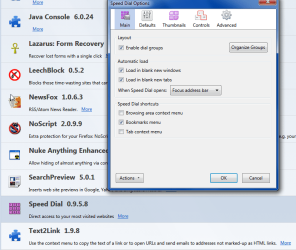
Here is the general options set for Speed Dial.
 

Attachments

  • SDCrop.png
    SDCrop.png
    64.3 KB · Views: 8

My Computer

OS
Windows 7 x64 Home Premium
CPU
Intel Q9400 @ 3.2 GHz
Motherboard
Gigabyte DS3L
Memory
6GB PC 6400
Graphics Card(s)
Nvidia 8800GT
Screen Resolution
1920x1200
Hard Drives
Dual WD Green 1TB
Internet Speed
10 Mb/s
Wallonn7,

Thanks, that helped. I have used FF so little, that I'm somewhat lost on it. While I understand that one can create multiple Speed Dial pages, is it possible to configure one with more than 9 windows, or use custom graphics for a website thumbnail, rather than what is loaded in automatically?

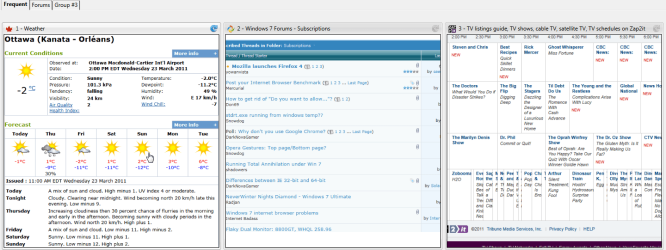
Yes any number. I just did a test with 6 x 8 = 48 dials on one tab. I don't know where the limit is. I prefer big and readable(attached) so I use 8 per tab to make a bunch of mini web pages.

But there is also a "make image from" option for a static image as well.

Basically it is Speed Dial on steroids. After using this, I consider the Opera speed dial nearly unusable.
 

Attachments

  • SDThumbs.png
    SDThumbs.png
    101.4 KB · Views: 48

My Computer

OS
Windows 7 x64 Home Premium
CPU
Intel Q9400 @ 3.2 GHz
Motherboard
Gigabyte DS3L
Memory
6GB PC 6400
Graphics Card(s)
Nvidia 8800GT
Screen Resolution
1920x1200
Hard Drives
Dual WD Green 1TB
Internet Speed
10 Mb/s
Wallonn7,

Thanks, that helped. I have used FF so little, that I'm somewhat lost on it. While I understand that one can create multiple Speed Dial pages, is it possible to configure one with more than 9 windows, or use custom graphics for a website thumbnail, rather than what is loaded in automatically?

Yes any number. I just did a test with 6 x 8 = 48 dials on one tab. I don't know where the limit is. I prefer big and readable(attached) so I use 8 per tab to make a bunch of mini web pages.

But there is also a "make image from" option for a static image as well.

Basically it is Speed Dial on steroids.

Doing my job, huh... :p Since I did yours earlier, okay, I forgive you! :D
 

My Computer

Computer Manufacturer/Model Number
WALLONN7 / LIN BLACK SERIES II
OS
Windows 7 Ultimate x64 SP1
CPU
AMD PHENOM II X6 1090T 3.2GHz
Motherboard
GIGABYTE GA-890FXA-UD7
Memory
8GB G.SKILL RIPJAWS - F3-10666CL7D
Graphics Card(s)
SAPPHIRE ATI RADEON HD 5870 VAPOR X OC
Sound Card
REALTEK DOLBY HOME THEATER
Monitor(s) Displays
LED LG W2486L
Screen Resolution
1080p
Hard Drives
SEAGATE 1TB -ST31000528AS - AHCI MODE - AS SATA
PSU
ZALMAN ZM1000-HP 1000W
Case
THERMALTAKE XASER VI VG4000SWA
Cooling
140MM x3 / 120MM x1 AIR COOLING - THERMALTAKE
Keyboard
MICROSOFT DIGITAL MEDIA KEYBOARD 3000 - USB
Mouse
MICROSOFT BASIC OPTICAL MOUSE 2.0 - USB
Internet Speed
600KBPS
Other Info
MICROSOFT XBOX 360 CONTROLLER
Wallonn7,

Thanks, that helped. I have used FF so little, that I'm somewhat lost on it. While I understand that one can create multiple Speed Dial pages, is it possible to configure one with more than 9 windows, or use custom graphics for a website thumbnail, rather than what is loaded in automatically?

Yes any number. I just did a test with 6 x 8 = 48 dials on one tab. I don't know where the limit is. I prefer big and readable(attached) so I use 8 per tab to make a bunch of mini web pages.

But there is also a "make image from" option for a static image as well.

Basically it is Speed Dial on steroids. After using this, I consider the Opera speed dial nearly unusable.

That's good, but can you give me a scent to follow, or must I simply follow my nose without a whisp to go by. I understand your preference for large thumbnail windows, but by using custom graphics, it is easy to select one when it is much, much smaller. On Opera, I have ~ 68 gathered together, and could add many more if needed. I really don't care for the idea of multiple tabs for them.

EDIT: I found the control for adding thumbnail windows, although it appears that all that I could add was a total of 60 (6x10). I tried setting it for 6x12 and it didn't change. That would be sufficient, but I still need to have the control for using custom graphics.
 

My Computer

Computer Manufacturer/Model Number
DIY
OS
W7x64 Pro, SuSe 12.1/** W7 x64 Pro, XP MCE
CPU
Phenom II 1090T w/Noctua NH-D14 /**4400+ X2 w/CM Hyper TX 3
Motherboard
ASRock 890FX Deluxe 4/**A8N-SLI
Memory
2 x 2GB Patriot PGS34g1600LLKA/**4x1GB Corsair VS
Graphics Card(s)
EVGA GTX460 SC/**EVGA 8800GTS
Sound Card
Asus Xonar D2X/**Xonar D1
Monitor(s) Displays
Acer X233H, Dell E152FPc /**LG M237-WD
Screen Resolution
1920x1080 & 1024x768/**1980x1080
Hard Drives
WDC 2TB, 1.5TB, 1TB, 500GB,Seagate 500GB , Maxtor 80GB /**500GB Seagate & WDC 1TB Black
PSU
CM RS600 w/ APC BX1000G/**Antec 500 TP w/ APC BX1000
Case
HAF922/**Antec 1040IIB
Cooling
3x200mm, 1x140 and 1x120mm/**5x80mm fans
Keyboard
Logitech Media USB/**Saitek Eclipse
Mouse
Cordless Trackman Wheel/**Ditto
Internet Speed
3.3Mbps
Other Info
SB 560 5.1 w/ Sennheiser RS140/**Creative T20 speakers, Dvico FusionHDTV7 Gold RT, Cisco E3000, HP 5510V AIO, Linksys E3000, Belkin F5U237 hub and **F5D8055 adapter
(** = 2nd rig)
FF4 is definitely faster than 3.
 

My Computer

Computer type
PC/Desktop
Computer Manufacturer/Model Number
Self Hand Build
OS
Windows 8.1 Pro
CPU
Core i5 4440
Motherboard
Gigabyte GA H97M-DS3P
Memory
4GB Corsair Vengeance DDR3
Graphics Card(s)
Sapphire Ati Radeon R7 240
Sound Card
ASUS Xonar DX - Fiio E10 - Audio Technica M50
Monitor(s) Displays
Panasonic L42ET60D & Dell 2240L (Dual Display)
Screen Resolution
1920X1080
Hard Drives
Samsung 850 Pro 128 GB
1 TB WD Green.
3 TB WD Green
1 TB WD External
PSU
Corsair VS350
Case
Corsair Carbide 400R
Cooling
Stock
Keyboard
Logitech
Mouse
Logitech Optical/MX518.
Internet Speed
60 KBps (Things are different in India LOL)
Antivirus
AVIRA Free Edition
Browser
Waterfox
Other Info
Previous set-up:
E6300>E2140 @3.6 Ghz>Q6600 @ 3.8 Ghz with Thermaltake Ultima 90.
Nvidia 8600GT>8800 GT>ATI 4850>ATI 3450>ATI 5770>ATI 3100>ATI R7 240.
Intel DG965WH>ASUS P5B>ABIT IP35-E>Gigabyte G31-S2L> Gigabyte GA78LMT-USB3>Gigabyte H97M-DS3P.
Corsair Value Select 2GB>Crucial Ballistix 2GB>GSkill 2GB>Corsair Vengeance 4GB.
Matrix Server Chassis (with 12 Glacialtech Fans)>Coolermaster Elit
I had a problem with ff4 font size. It did not save my settings for my fonts or screen. So I went in and changed the fornts and screen settings, (40 in) and restarted ff4. No change it would not take my setting change. I restarted the computer no help. Removed ff4 because I just don't need the hassle.
 

My Computer

Computer type
PC/Desktop
Computer Manufacturer/Model Number
Home made Desktop
OS
Windows 10 Pro. 64/ version 1709 Windows 7 Pro/64
CPU
Intel i7-6800K @ 4.3
Motherboard
ASUS X-99 Deluxe II
Memory
Corsair Platinum 16 gig @2400
Graphics Card(s)
EVGA GTX 1070 OC
Monitor(s) Displays
Asus 27" LED LCD/VE278Q
Screen Resolution
1920-1080 or 1280-720 HDMI
Hard Drives
INTEL SSD 730-240 Gb Sata 3.0/
PSU
EVGA Platium 1200W
Case
Phanteks Luxe Tempered Glass 8 fans/ one radiator
Cooling
XSPC/ Water Cooled CPU
Keyboard
Das 4 Professional
Mouse
Logitech M705/MX Anywhere 2-S
Internet Speed
100 mbits
Antivirus
Microsoft Security Essentials/ Malwarebytes Premium 3.0/ SAS
Browser
I.E. 11 default/Firefox/ ISP Time Warner Cable/Spectrum
Other Info
LG BluRay Burner/
Sound system-KLipsch-THX/
Icy Dock ssd Hot Swap bays.
I don't understand why every last one of you are not also screaming about how HORRIBLE the new interface is! They moved everything into stupid positions that not only look bad, but slow down productivity. I refuse to use this crap until the interface is able to be restored to its original positioning. The only decent idea is a combined stop/reload button - but I still prefer to have them separate.

Join the mozilla thread if you have the same complaint:
https://support.mozilla.com/en-US/questions/795712#answer-150463

This is what a browser MUST look like or I refuse to use it:
 

Attachments

  • screenshot.jpg
    screenshot.jpg
    81.4 KB · Views: 56
Last edited:

My Computer

Computer Manufacturer/Model Number
2many 2list
OS
XP32 and 7 Ultimate64
That's good, but can you give me a scent to follow, or must I simply follow my nose without a whisp to go by. I understand your preference for large thumbnail windows, but by using custom graphics, it is easy to select one when it is much, much smaller. On Opera, I have ~ 68 gathered together, and could add many more if needed. I really don't care for the idea of multiple tabs for them.

EDIT: I found the control for adding thumbnail windows, although it appears that all that I could add was a total of 60 (6x10). I tried setting it for 6x12 and it didn't change. That would be sufficient, but I still need to have the control for using custom graphics.

Well you are asking me about features I don't actually use so you could poke around and find it as well as I could.

Pick a dial, click edit, first item under the "basic" tab is "Make image from".

You can probably get more than 60 on one page if go into the defaults and change the minimum height/width, which on mine are set at 200 pixels.

Though I would think with 60+ you would benefit from some tabs categorization.

Also each tab group can have different sized dials in different numbers. So you could have one tab of a few big readable dials like mine for most frequent items and another page of many tiny bookmark dials.

It can easily duplicate the limited functionality of Opera Speed dial if that is what you want, but really it can do so much more that makes it better. I have only scratched the surface on this great extension.
 

My Computer

OS
Windows 7 x64 Home Premium
CPU
Intel Q9400 @ 3.2 GHz
Motherboard
Gigabyte DS3L
Memory
6GB PC 6400
Graphics Card(s)
Nvidia 8800GT
Screen Resolution
1920x1200
Hard Drives
Dual WD Green 1TB
Internet Speed
10 Mb/s
I had a problem with ff4 font size. It did not save my settings for my fonts or screen. So I went in and changed the fornts and screen settings, (40 in) and restarted ff4. No change it would not take my setting change. I restarted the computer no help. Removed ff4 because I just don't need the hassle.
Did you try increasing the minimum font size, or just the individual type sizes?
 

My Computer

Computer Manufacturer/Model Number
DIY
OS
W7x64 Pro, SuSe 12.1/** W7 x64 Pro, XP MCE
CPU
Phenom II 1090T w/Noctua NH-D14 /**4400+ X2 w/CM Hyper TX 3
Motherboard
ASRock 890FX Deluxe 4/**A8N-SLI
Memory
2 x 2GB Patriot PGS34g1600LLKA/**4x1GB Corsair VS
Graphics Card(s)
EVGA GTX460 SC/**EVGA 8800GTS
Sound Card
Asus Xonar D2X/**Xonar D1
Monitor(s) Displays
Acer X233H, Dell E152FPc /**LG M237-WD
Screen Resolution
1920x1080 & 1024x768/**1980x1080
Hard Drives
WDC 2TB, 1.5TB, 1TB, 500GB,Seagate 500GB , Maxtor 80GB /**500GB Seagate & WDC 1TB Black
PSU
CM RS600 w/ APC BX1000G/**Antec 500 TP w/ APC BX1000
Case
HAF922/**Antec 1040IIB
Cooling
3x200mm, 1x140 and 1x120mm/**5x80mm fans
Keyboard
Logitech Media USB/**Saitek Eclipse
Mouse
Cordless Trackman Wheel/**Ditto
Internet Speed
3.3Mbps
Other Info
SB 560 5.1 w/ Sennheiser RS140/**Creative T20 speakers, Dvico FusionHDTV7 Gold RT, Cisco E3000, HP 5510V AIO, Linksys E3000, Belkin F5U237 hub and **F5D8055 adapter
(** = 2nd rig)
Snowdog,

It can easily duplicate the limited functionality of Opera Speed dial if that is what you want, but really it can do so much more that makes it better. I have only scratched the surface on this great extension.
That may well be true, but that is something that each person must decide for themself.
 

My Computer

Computer Manufacturer/Model Number
DIY
OS
W7x64 Pro, SuSe 12.1/** W7 x64 Pro, XP MCE
CPU
Phenom II 1090T w/Noctua NH-D14 /**4400+ X2 w/CM Hyper TX 3
Motherboard
ASRock 890FX Deluxe 4/**A8N-SLI
Memory
2 x 2GB Patriot PGS34g1600LLKA/**4x1GB Corsair VS
Graphics Card(s)
EVGA GTX460 SC/**EVGA 8800GTS
Sound Card
Asus Xonar D2X/**Xonar D1
Monitor(s) Displays
Acer X233H, Dell E152FPc /**LG M237-WD
Screen Resolution
1920x1080 & 1024x768/**1980x1080
Hard Drives
WDC 2TB, 1.5TB, 1TB, 500GB,Seagate 500GB , Maxtor 80GB /**500GB Seagate & WDC 1TB Black
PSU
CM RS600 w/ APC BX1000G/**Antec 500 TP w/ APC BX1000
Case
HAF922/**Antec 1040IIB
Cooling
3x200mm, 1x140 and 1x120mm/**5x80mm fans
Keyboard
Logitech Media USB/**Saitek Eclipse
Mouse
Cordless Trackman Wheel/**Ditto
Internet Speed
3.3Mbps
Other Info
SB 560 5.1 w/ Sennheiser RS140/**Creative T20 speakers, Dvico FusionHDTV7 Gold RT, Cisco E3000, HP 5510V AIO, Linksys E3000, Belkin F5U237 hub and **F5D8055 adapter
(** = 2nd rig)
This is what a browser MUST look like or I refuse to use it:
Things change over time. Why keep releasing exactly the same thing over and over again. Good news, you can happily stick with FF 3.6 for as long as you like. I'm sure somebody out there is still using a Netscape browser to surf the web.
 

My Computer

Computer Manufacturer/Model Number
Self-Built in July 2009
OS
Windows 7 Ultimate x64
CPU
Intel Q9550 2.83Ghz OC'd to 3.40Ghz
Motherboard
Gigabyte GA-EP45-UD3R rev. 1.1, F12 BIOS
Memory
8GB G.Skill PI DDR2-800, 4-4-4-12 timings
Graphics Card(s)
EVGA 1280MB Nvidia GeForce GTX570
Sound Card
Realtek ALC899A 8 channel onboard audio
Monitor(s) Displays
23" Acer x233H
Screen Resolution
1920x1080
Hard Drives
Intel X25-M 80GB Gen 2 SSD
Western Digital 1TB Caviar Black, 32MB cache. WD1001FALS
PSU
Corsair 620HX modular
Case
Antec P182
Cooling
stock
Keyboard
ABS M1 Mechanical
Mouse
Logitech G9 Laser Mouse
Internet Speed
15/2 cable modem
Other Info
Windows and Linux enthusiast. Logitech G35 Headset.
On Opera, I have ~ 68 gathered together, and could add many more if needed. I really don't care for the idea of multiple tabs for them.

Just curious. How do you do that in Opera. I checked Opera speed dial again and the max option it shows me is 5x5. I also don't see the image option for speed dials. It seems extremely limited.
 

My Computer

OS
Windows 7 x64 Home Premium
CPU
Intel Q9400 @ 3.2 GHz
Motherboard
Gigabyte DS3L
Memory
6GB PC 6400
Graphics Card(s)
Nvidia 8800GT
Screen Resolution
1920x1200
Hard Drives
Dual WD Green 1TB
Internet Speed
10 Mb/s
On Opera, I have ~ 68 gathered together, and could add many more if needed. I really don't care for the idea of multiple tabs for them.

Just curious. How do you do that in Opera. I checked Opera speed dial again and the max option it shows me is 5x5. I also don't see the image option for speed dials. It seems extremely limited.
It is not done from the UI, it requires going into the speeddial.ini in the program folder and setting the columns and rows there. To add the custom images is somewhat more involved, but it basically requires renaming the custom image to the alphanumeric identify of a website that you already have set on the speed dial and replacing it. I could give you more detailed info, but I'm not going to, first because you don't sound that interested, and secondly, because you didn't even give me this much to go on with FF.
 

My Computer

Computer Manufacturer/Model Number
DIY
OS
W7x64 Pro, SuSe 12.1/** W7 x64 Pro, XP MCE
CPU
Phenom II 1090T w/Noctua NH-D14 /**4400+ X2 w/CM Hyper TX 3
Motherboard
ASRock 890FX Deluxe 4/**A8N-SLI
Memory
2 x 2GB Patriot PGS34g1600LLKA/**4x1GB Corsair VS
Graphics Card(s)
EVGA GTX460 SC/**EVGA 8800GTS
Sound Card
Asus Xonar D2X/**Xonar D1
Monitor(s) Displays
Acer X233H, Dell E152FPc /**LG M237-WD
Screen Resolution
1920x1080 & 1024x768/**1980x1080
Hard Drives
WDC 2TB, 1.5TB, 1TB, 500GB,Seagate 500GB , Maxtor 80GB /**500GB Seagate & WDC 1TB Black
PSU
CM RS600 w/ APC BX1000G/**Antec 500 TP w/ APC BX1000
Case
HAF922/**Antec 1040IIB
Cooling
3x200mm, 1x140 and 1x120mm/**5x80mm fans
Keyboard
Logitech Media USB/**Saitek Eclipse
Mouse
Cordless Trackman Wheel/**Ditto
Internet Speed
3.3Mbps
Other Info
SB 560 5.1 w/ Sennheiser RS140/**Creative T20 speakers, Dvico FusionHDTV7 Gold RT, Cisco E3000, HP 5510V AIO, Linksys E3000, Belkin F5U237 hub and **F5D8055 adapter
(** = 2nd rig)
It is not done from the UI, it requires going into the speeddial.ini in the program folder and setting the columns and rows there. To add the custom images is somewhat more involved, but it basically requires renaming the custom image to the alphanumeric identify of a website that you already have set on the speed dial and replacing it. I could give you more detailed info, but I'm not going to, first because you don't sound that interested, and secondly, because you didn't even give me this much to go on with FF.

That is all I need thanks.

But really, not much to go on?? I gave you info on how to do both of those things, it is just that they were so much easier, no editing ini files, just simple options in the UI. I also did a couple of screen caps to point things out.
 

My Computer

OS
Windows 7 x64 Home Premium
CPU
Intel Q9400 @ 3.2 GHz
Motherboard
Gigabyte DS3L
Memory
6GB PC 6400
Graphics Card(s)
Nvidia 8800GT
Screen Resolution
1920x1200
Hard Drives
Dual WD Green 1TB
Internet Speed
10 Mb/s
It is not done from the UI, it requires going into the speeddial.ini in the program folder and setting the columns and rows there. To add the custom images is somewhat more involved, but it basically requires renaming the custom image to the alphanumeric identify of a website that you already have set on the speed dial and replacing it. I could give you more detailed info, but I'm not going to, first because you don't sound that interested, and secondly, because you didn't even give me this much to go on with FF.

That is all I need thanks.

But really, not much to go on?? I gave you info on how to do both of those things, it is just that they were so much easier, no editing ini files, just simple options in the UI. I also did a couple of screen caps to point things out.

What you gave me was adequate for adjusting the number of thumbnail windows, but what I asked for is an explanation for this:

But there is also a "make image from" option for a static image as well.

I have not found that option, and without it, extra thumbnail windows are of no use.
 

My Computer

Computer Manufacturer/Model Number
DIY
OS
W7x64 Pro, SuSe 12.1/** W7 x64 Pro, XP MCE
CPU
Phenom II 1090T w/Noctua NH-D14 /**4400+ X2 w/CM Hyper TX 3
Motherboard
ASRock 890FX Deluxe 4/**A8N-SLI
Memory
2 x 2GB Patriot PGS34g1600LLKA/**4x1GB Corsair VS
Graphics Card(s)
EVGA GTX460 SC/**EVGA 8800GTS
Sound Card
Asus Xonar D2X/**Xonar D1
Monitor(s) Displays
Acer X233H, Dell E152FPc /**LG M237-WD
Screen Resolution
1920x1080 & 1024x768/**1980x1080
Hard Drives
WDC 2TB, 1.5TB, 1TB, 500GB,Seagate 500GB , Maxtor 80GB /**500GB Seagate & WDC 1TB Black
PSU
CM RS600 w/ APC BX1000G/**Antec 500 TP w/ APC BX1000
Case
HAF922/**Antec 1040IIB
Cooling
3x200mm, 1x140 and 1x120mm/**5x80mm fans
Keyboard
Logitech Media USB/**Saitek Eclipse
Mouse
Cordless Trackman Wheel/**Ditto
Internet Speed
3.3Mbps
Other Info
SB 560 5.1 w/ Sennheiser RS140/**Creative T20 speakers, Dvico FusionHDTV7 Gold RT, Cisco E3000, HP 5510V AIO, Linksys E3000, Belkin F5U237 hub and **F5D8055 adapter
(** = 2nd rig)
Back
Top