New PSU-Won't boot

johnwillyums

New member
Guru
Gold Member
VIP
Local time
10:18 PM
Messages
4,286
Location
Colne, Lancashire, UK
Hi folks,

A couple of weeks ago my PSU failed. I was just reading an email and suddenly the pc just stopped. I thought I'd turned the power off with my foot, no smell, no noise, it just stopped.
I RMAd the PSU and it has been replaced by a Corsair AX850 and I spent hours yesterday installing it and trying to get it working but failed.
I have a Gigabyte EX58-UD5 mobo and 6GB of Corsair XMS3 RAM.
The PSU is fully modular and I've been trying various ways of connecting it but when I press the on switch nothing happens.
Just once it started up but I did not have the monitor connected so I shut it down and it hasn't done so since.
I have a couple of LEDs lit on the mobo but when I push the start button it does not even attempt to start. No fans start, no more lights appear on the mobo. Zero.
I wonder if it's the tiny power switch and reset etc pins but can't see why it should be them that's failed. Also there is a blue lit square button on the mobo that I believe should start the boot but it doesn't.
I'm at a loss as to what to try to sort this out. Could it be a faulty RAM stick?
I'd appreciate any suggestions as to how to get this sorted out or any way of diagnosing what is wrong.
I can't think it's the RAM as the failure was so painless and the PSU company say that it had failed completely. Could it have taken a stick of RAM with it?
If so would that cause this total failure to attempt to boot?
I feel I may have something connected wrongly as it shows no sign of life at all other than the mobo lights.

Help would be appreciated, thanks, John
 

My Computer My Computer

At a glance

Windows 7 Home Premium 64 biti7 [email protected]2x4GB Corsair Vegeance DDR3XFX GTX 260 Black Edition
Computer Manufacturer/Model Number
The Monolith. 3.1
OS
Windows 7 Home Premium 64 bit
CPU
i7 [email protected]
Motherboard
Gigabyte Z77-D3H
Memory
2x4GB Corsair Vegeance DDR3
Graphics Card(s)
XFX GTX 260 Black Edition
Sound Card
none-through large stereo hi fi
Monitor(s) Displays
Croosover 27MDP LED IPS Dell 2408 WFP
Screen Resolution
2560x1440 1920x1200
Hard Drives
1x Samsung 840Pro 128GB SSD
1x Samsung Spinpoint F1 1TB
PSU
Corsair AX 850 Watt
Case
Cooler Master ACTS 840
Cooling
Be Quiet! Dark Rock Pro
Keyboard
Enermax Aurora
Mouse
Logitech Ballmouse
Internet Speed
20MBPS
I had a smilair problem with one of my older builds once. I put a new powersupply in (Aero Cool 550W), I switched the powersupply on and one motherboard led came on. I smilingly push the powerbutton on the front of the case and...nothing. After messing around a bunch with the tiny plugs for the powerswitch and led lights (they're still all connected to the FP1 connectors on the motherboard, just in a different order) then it finally came on. Maybe your problem is as simple as mine.
 

My Computer My Computer

At a glance

Windows 7 Ultimate 64-BitCore i7-990X Extreme Edition24 GB DDR3-1066 Hex-KitXFX HD5970 Black Edition Limited 4096MB
Computer type
PC/Desktop
Computer Manufacturer/Model Number
Custom build
OS
Windows 7 Ultimate 64-Bit
CPU
Core i7-990X Extreme Edition
Motherboard
ASUS P6T6 WS Revolution
Memory
24 GB DDR3-1066 Hex-Kit
Graphics Card(s)
XFX HD5970 Black Edition Limited 4096MB
Sound Card
Sound Blaster X-FI Titanium HD SB1270
Monitor(s) Displays
[will update soon]
Screen Resolution
[will update soon]
Hard Drives
OCZ SSD 60GB
Seagate 1TB
Samsung 1TB
Western Digital 1TB
LaCie 500GB
PSU
SilverStone Strider ST 1500W
Case
Antec Dark Fleet DF-85
Cooling
Deepcool IceWing 5 Pro + 2x 140mm fans + 5x 120mm fans
Keyboard
Microsoft Wired Keyboard 200
Mouse
Logitech Revolution MX
Internet Speed
2MB/s
Antivirus
Bit Defender 2013
Browser
Chrome
Hi John,

Double check all motherboard and PSU connections. In particular, many newer PSUs have voltage-sense feedback circuitry to ensure stable output voltages. This function is usually provided by means of a feedback cable that is wired into the motherboard end of the main connector. Check that if you have such a connector that you have plugged it into the PSU.
 

My Computer My Computer

At a glance

Windows 8.1 Pro RTM x64Intel Core-i5-3570K 4-core @ 3.4GHz (Ivy Brid...4 x 4GB DDR3-1600 Corsair Vengeance CMZ8GX3M2...MSI GeForce GTX770 Gaming OC 2GB
Computer type
PC/Desktop
Computer Manufacturer/Model Number
Dwarf Dwf/11/2012 r09/2013
OS
Windows 8.1 Pro RTM x64
CPU
Intel Core-i5-3570K 4-core @ 3.4GHz (Ivy Bridge) (OC 4.4GHz)
Motherboard
ASRock Z77 Extreme4-M
Memory
4 x 4GB DDR3-1600 Corsair Vengeance CMZ8GX3M2A1600C9B (16GB)
Graphics Card(s)
MSI GeForce GTX770 Gaming OC 2GB
Sound Card
Realtek High Definition on board solution (ALC 898)
Monitor(s) Displays
ViewSonic VA1912w Widescreen (VGA)
Screen Resolution
1440x900
Hard Drives
OCZ Agility 3 SSD 120GB SATA III x2 (RAID 0)
Samsung HD501LJ 500GB SATA II x2
Hitachi HDS721010CLA332 1TB SATA II
Iomega 1.5TB Ext USB 2.0
WD 2.0TB Ext USB 3.0
PSU
XFX Pro Series 850W Semi-Modular
Case
Gigabyte IF233
Cooling
1 x 120mm Front Inlet 1 x 120mm Rear Exhaust
Keyboard
Microsoft Comfort Curve Keyboard 3000 (USB)
Mouse
Microsoft Comfort Mouse 3000 for Business (USB)
Internet Speed
NetGear DG834Gv3 ADSL Modem/Router (Ethernet) ~4.0 Mb/s (O2)
Antivirus
Avast! 8.0.1497
Browser
IE 11
Other Info
Optical Drive: HL-DT-ST BD-RE BH10LS30 SATA Bluray
Lexmark S305 Printer/Scanner/Copier (USB)
WEI Score: 8.1/8.1/8.5/8.5/8.25
Asus Eee PC 1011PX Netbook (Windows 7 x86 Starter)
There is certainly a possibility a voltage spike from the PSU could have friend something on the motherboard or one of your components. It's hard to say. I would disconnect all hard drives, optical drives, and take out all of the memory. Make sure only the 24pin power from the PSU is hooked to the motherboard and that it's a good connection, then try booting it up to see if it will get to the BIOS screen. If not, either your motherboard is dead or the PSU is.

BTW, that's a really nice PSU.
 

My Computer My Computer

At a glance

XP / Win7 x64 ProIntel Quad-Core Q9450 @ 3.2GHz2x2GB GSkill DDR2NVIDIA GeForce 8600 GTS (EVGA)
OS
XP / Win7 x64 Pro
CPU
Intel Quad-Core Q9450 @ 3.2GHz
Motherboard
Asus P5-E
Memory
2x2GB GSkill DDR2
Graphics Card(s)
NVIDIA GeForce 8600 GTS (EVGA)
Monitor(s) Displays
Dell 2408WFP
Screen Resolution
1920x1200
Thanks Morph. I think you might be right. When I first built the pc (14 months ago) I had a similar problem and after much messing about it was finally sorted. However I never managed to get the reset button to work.
I know that I have followed the mobo guide to the positioning of those connectors but I'm sure they are not in the same grouping as they were before.
Also, on one configuration I achieved a blue power led on the top panel. That is no longer appearing.
I think I'll get my camera from the car and post some pics of the them. perhaps someone with the same mobo can put me right.
Thanks for your input:)
 

My Computer My Computer

At a glance

Windows 7 Home Premium 64 biti7 [email protected]2x4GB Corsair Vegeance DDR3XFX GTX 260 Black Edition
Computer Manufacturer/Model Number
The Monolith. 3.1
OS
Windows 7 Home Premium 64 bit
CPU
i7 [email protected]
Motherboard
Gigabyte Z77-D3H
Memory
2x4GB Corsair Vegeance DDR3
Graphics Card(s)
XFX GTX 260 Black Edition
Sound Card
none-through large stereo hi fi
Monitor(s) Displays
Croosover 27MDP LED IPS Dell 2408 WFP
Screen Resolution
2560x1440 1920x1200
Hard Drives
1x Samsung 840Pro 128GB SSD
1x Samsung Spinpoint F1 1TB
PSU
Corsair AX 850 Watt
Case
Cooler Master ACTS 840
Cooling
Be Quiet! Dark Rock Pro
Keyboard
Enermax Aurora
Mouse
Logitech Ballmouse
Internet Speed
20MBPS
You have probably checked this a dozen times already but have a look.
There are only two (2) plugs from the power supply that connect directly to the Motherboard. The large 24 pin main plug, and then there is a 4 pin plug that also plugs into the Motherboard. Are they (both) connected and securely seated?
Cheers
JohnnyA
 

My Computer My Computer

At a glance

Windows Home Premium 64bitT61-- 2.0ghz4 GBOn board
Computer Manufacturer/Model Number
Toshiba C650
OS
Windows Home Premium 64bit
CPU
T61-- 2.0ghz
Motherboard
Toshiba
Memory
4 GB
Graphics Card(s)
On board
Sound Card
On board
Monitor(s) Displays
15.6"
Hard Drives
500 GB
You have probably checked this a dozen times already but have a look.
There are only two (2) plugs from the power supply that connect directly to the Motherboard. The large 24 pin main plug, and then there is a 4 pin plug that also plugs into the Motherboard. Are they (both) connected and securely seated?
Cheers
JohnnyA

This is true. Forgot about that one!
 

My Computer My Computer

At a glance

XP / Win7 x64 ProIntel Quad-Core Q9450 @ 3.2GHz2x2GB GSkill DDR2NVIDIA GeForce 8600 GTS (EVGA)
OS
XP / Win7 x64 Pro
CPU
Intel Quad-Core Q9450 @ 3.2GHz
Motherboard
Asus P5-E
Memory
2x2GB GSkill DDR2
Graphics Card(s)
NVIDIA GeForce 8600 GTS (EVGA)
Monitor(s) Displays
Dell 2408WFP
Screen Resolution
1920x1200
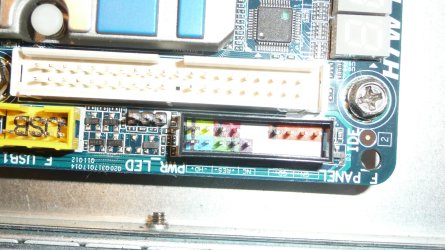
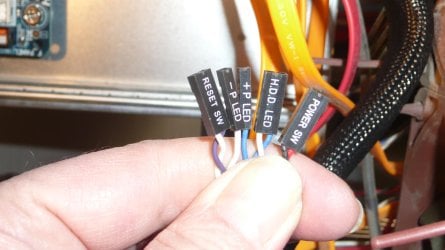
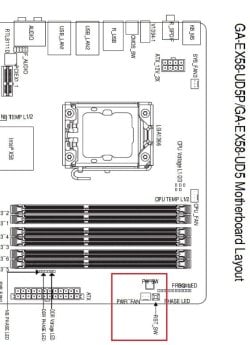
Thanks for all your replies folks. I've been rapidly reorganising my table to accomodate two pcs. I've taken some pics of the mobo and in particular the power switch connector, reset and LED pins.
I can't help thinking these are wrong but , as I say, I've followed the guide in the mobo manual.
Basically the hard drive activity LED ( blue&white 2 socket pin) goes in the little box bottom left, the reset switch (purple&white 2 socket pin) directly beside it. On the top row of pins the power LEDs (1 blue& 1 white) and then the power sw (red&black 2 socket) goes next to them on the top row.
The more I look at them the more I think they were not like that before but that is what the manual says. I have a feeling that a couple of them were outside this little box but I can't be sure.
here's the pics:
 

Attachments

  • P1020113.jpg
    P1020113.jpg
    587 KB · Views: 27
  • P1020114.jpg
    P1020114.jpg
    455.5 KB · Views: 25
  • P1020117.jpg
    P1020117.jpg
    536.5 KB · Views: 20
  • P1020116.jpg
    P1020116.jpg
    627.2 KB · Views: 19

My Computer My Computer

At a glance

Windows 7 Home Premium 64 biti7 [email protected]2x4GB Corsair Vegeance DDR3XFX GTX 260 Black Edition
Computer Manufacturer/Model Number
The Monolith. 3.1
OS
Windows 7 Home Premium 64 bit
CPU
i7 [email protected]
Motherboard
Gigabyte Z77-D3H
Memory
2x4GB Corsair Vegeance DDR3
Graphics Card(s)
XFX GTX 260 Black Edition
Sound Card
none-through large stereo hi fi
Monitor(s) Displays
Croosover 27MDP LED IPS Dell 2408 WFP
Screen Resolution
2560x1440 1920x1200
Hard Drives
1x Samsung 840Pro 128GB SSD
1x Samsung Spinpoint F1 1TB
PSU
Corsair AX 850 Watt
Case
Cooler Master ACTS 840
Cooling
Be Quiet! Dark Rock Pro
Keyboard
Enermax Aurora
Mouse
Logitech Ballmouse
Internet Speed
20MBPS
This might be stupid but would a dead CMOS battery cause the problem?

It just died totally or lost contact.

No throwing things at me if I'm way off on the thought! :D

Mike
 

My Computer My Computer

At a glance

Windows7 Pro 64bit SP-1; Windows XP Pro 32bitIntel Core i7-870 Lynnfield 2.93GHz LGA 1156 ...8GB@1400MHz Crucial Ballistix DDR3-1600 4x2GBASUS ENGTX460 DirectCU/2DI/1GD5 1GB 256-bit G...
Computer Manufacturer/Model Number
Hopalong/ Godzilla
OS
Windows7 Pro 64bit SP-1; Windows XP Pro 32bit
CPU
Intel Core i7-870 Lynnfield 2.93GHz LGA 1156 95W Quad-Core
Motherboard
ASUS P7P55D-E PRO
Memory
8GB@1400MHz Crucial Ballistix DDR3-1600 4x2GB
Graphics Card(s)
ASUS ENGTX460 DirectCU/2DI/1GD5 1GB 256-bit GDDR5
Sound Card
VIA Onboard
Monitor(s) Displays
Asus VS248H-P 24"; Samsung SyncMaster 941BW 19"ws
Screen Resolution
1920x1080; 1440x900
Hard Drives
Samsung 830 120GB SSD
Intel 320 120GB SSD
Western Digital Caviar Black WD7501AALS 750GB 7200 RPM SATA 3.0Gb/s
Western Digital Caviar Black WD6401AALS 640GB 7200 RPM SATA 3.0Gb/s
PSU
COOLER MASTER Silent Pro RS850-AMBAJ3-US 850W Modular
Case
COOLER MASTER HAF 932 RC-932-KKN5-GP Black
Cooling
Scythe "Mugen-2 Rev.B" (2 ScytheKaze-Jyuni PWM fans)
Keyboard
Logitech K-320
Mouse
Kensington
Antivirus
Avast Inernet Suite
Browser
IE 9 ; Chrome
I don't know Mike. The battery seems to be seated ok and I do have a green and yellow LED on the mobo plus a blue light behind what I take is a start button on the mobo. Would I still have those if the battery was dead?
Here's a pic of the little front panel header pins:
 

Attachments

  • P1020121.jpg
    P1020121.jpg
    315.4 KB · Views: 9

My Computer My Computer

At a glance

Windows 7 Home Premium 64 biti7 [email protected]2x4GB Corsair Vegeance DDR3XFX GTX 260 Black Edition
Computer Manufacturer/Model Number
The Monolith. 3.1
OS
Windows 7 Home Premium 64 bit
CPU
i7 [email protected]
Motherboard
Gigabyte Z77-D3H
Memory
2x4GB Corsair Vegeance DDR3
Graphics Card(s)
XFX GTX 260 Black Edition
Sound Card
none-through large stereo hi fi
Monitor(s) Displays
Croosover 27MDP LED IPS Dell 2408 WFP
Screen Resolution
2560x1440 1920x1200
Hard Drives
1x Samsung 840Pro 128GB SSD
1x Samsung Spinpoint F1 1TB
PSU
Corsair AX 850 Watt
Case
Cooler Master ACTS 840
Cooling
Be Quiet! Dark Rock Pro
Keyboard
Enermax Aurora
Mouse
Logitech Ballmouse
Internet Speed
20MBPS
Have you tried plugging in the 8 pin PSU connector, instead of the 4 pin connector.
 

My Computer My Computer

At a glance

Windows 7 Home Premium 64 bitIntel Core i7-4790G.SKILL 8GB (2 x 4GB) DDR3 F3-10666CL9D-8GBNTAMD Radeon R7 250
Computer type
PC/Desktop
Computer Manufacturer/Model Number
Custom Build
OS
Windows 7 Home Premium 64 bit
CPU
Intel Core i7-4790
Motherboard
GA-Z87X-D3H
Memory
G.SKILL 8GB (2 x 4GB) DDR3 F3-10666CL9D-8GBNT
Graphics Card(s)
AMD Radeon R7 250
Sound Card
Realtek ALC892
Monitor(s) Displays
Samsung UN32EH5000, Dell 1703FPT
Screen Resolution
1920 x 1080, 1280 x 1024
Hard Drives
WD5003AZEX
WD10EZEX
Samsung HD103SJ
Samsung 128 GB 840 PRO
PSU
SeaSonic M12II SS-500GM
Case
Fractal Design Define R4
Cooling
Zalman CNPS9900ALED
Keyboard
Logitech K800
Mouse
Logitech M705
Internet Speed
16 Mbps
Antivirus
Avast
Browser
Firefox
Other Info
Bose Companion 2 Multimedia Speakers
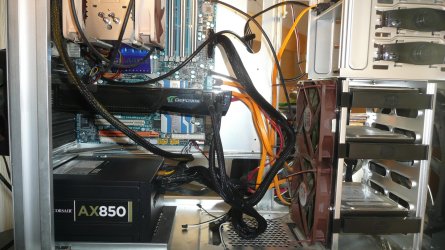
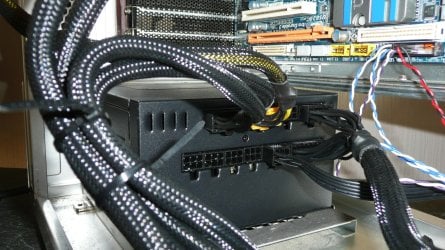
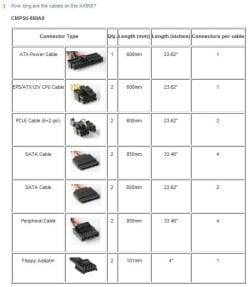
Not sure what you mean p5. There's a 10 pin (top right in the pic of the psu) and an 18 pin bottom right. These connect to the 24 pin going into the mobo on the right hand side.
The yellow plug is a 10 pin (only 8 active) going to an 8 pin ATX 12 volt on the top left of the mobo. I don't seem to have a 4 pin connector.
I'll try what flig suggested. Back in a minute as I have t0 reconnect the monitor and switch this pc off. This is getting me down.
 

My Computer My Computer

At a glance

Windows 7 Home Premium 64 biti7 [email protected]2x4GB Corsair Vegeance DDR3XFX GTX 260 Black Edition
Computer Manufacturer/Model Number
The Monolith. 3.1
OS
Windows 7 Home Premium 64 bit
CPU
i7 [email protected]
Motherboard
Gigabyte Z77-D3H
Memory
2x4GB Corsair Vegeance DDR3
Graphics Card(s)
XFX GTX 260 Black Edition
Sound Card
none-through large stereo hi fi
Monitor(s) Displays
Croosover 27MDP LED IPS Dell 2408 WFP
Screen Resolution
2560x1440 1920x1200
Hard Drives
1x Samsung 840Pro 128GB SSD
1x Samsung Spinpoint F1 1TB
PSU
Corsair AX 850 Watt
Case
Cooler Master ACTS 840
Cooling
Be Quiet! Dark Rock Pro
Keyboard
Enermax Aurora
Mouse
Logitech Ballmouse
Internet Speed
20MBPS
The CR2032 coin cell battery only provides power to maintain the CMOS and RTC (Real Time Clock) when the computer is disconnected from the mains supply. Its presence, or lack of it, has no effect whatsoever on the normal running of the computer, save that if it was missing/dead it would just simply mean that you would need to reset the BIOS settings each time you apply mains power after having said power removed.
 

My Computer My Computer

At a glance

Windows 8.1 Pro RTM x64Intel Core-i5-3570K 4-core @ 3.4GHz (Ivy Brid...4 x 4GB DDR3-1600 Corsair Vengeance CMZ8GX3M2...MSI GeForce GTX770 Gaming OC 2GB
Computer type
PC/Desktop
Computer Manufacturer/Model Number
Dwarf Dwf/11/2012 r09/2013
OS
Windows 8.1 Pro RTM x64
CPU
Intel Core-i5-3570K 4-core @ 3.4GHz (Ivy Bridge) (OC 4.4GHz)
Motherboard
ASRock Z77 Extreme4-M
Memory
4 x 4GB DDR3-1600 Corsair Vengeance CMZ8GX3M2A1600C9B (16GB)
Graphics Card(s)
MSI GeForce GTX770 Gaming OC 2GB
Sound Card
Realtek High Definition on board solution (ALC 898)
Monitor(s) Displays
ViewSonic VA1912w Widescreen (VGA)
Screen Resolution
1440x900
Hard Drives
OCZ Agility 3 SSD 120GB SATA III x2 (RAID 0)
Samsung HD501LJ 500GB SATA II x2
Hitachi HDS721010CLA332 1TB SATA II
Iomega 1.5TB Ext USB 2.0
WD 2.0TB Ext USB 3.0
PSU
XFX Pro Series 850W Semi-Modular
Case
Gigabyte IF233
Cooling
1 x 120mm Front Inlet 1 x 120mm Rear Exhaust
Keyboard
Microsoft Comfort Curve Keyboard 3000 (USB)
Mouse
Microsoft Comfort Mouse 3000 for Business (USB)
Internet Speed
NetGear DG834Gv3 ADSL Modem/Router (Ethernet) ~4.0 Mb/s (O2)
Antivirus
Avast! 8.0.1497
Browser
IE 11
Other Info
Optical Drive: HL-DT-ST BD-RE BH10LS30 SATA Bluray
Lexmark S305 Printer/Scanner/Copier (USB)
WEI Score: 8.1/8.1/8.5/8.5/8.25
Asus Eee PC 1011PX Netbook (Windows 7 x86 Starter)
Not sure what you mean p5. There's a 10 pin (top right in the pic of the psu) and an 18 pin bottom right. These connect to the 24 pin going into the mobo on the right hand side.
The yellow plug is a 10 pin (only 8 active) going to an 8 pin ATX 12 volt on the top left of the mobo. I don't seem to have a 4 pin connector.
I'll try what flig suggested. Back in a minute as I have t0 reconnect the monitor and switch this pc off. This is getting me down.

Take a look at image number 10.
All about the various PC power supply cables and connectors
 

My Computer My Computer

At a glance

Windows 7 Home Premium 64 bitIntel Core i7-4790G.SKILL 8GB (2 x 4GB) DDR3 F3-10666CL9D-8GBNTAMD Radeon R7 250
Computer type
PC/Desktop
Computer Manufacturer/Model Number
Custom Build
OS
Windows 7 Home Premium 64 bit
CPU
Intel Core i7-4790
Motherboard
GA-Z87X-D3H
Memory
G.SKILL 8GB (2 x 4GB) DDR3 F3-10666CL9D-8GBNT
Graphics Card(s)
AMD Radeon R7 250
Sound Card
Realtek ALC892
Monitor(s) Displays
Samsung UN32EH5000, Dell 1703FPT
Screen Resolution
1920 x 1080, 1280 x 1024
Hard Drives
WD5003AZEX
WD10EZEX
Samsung HD103SJ
Samsung 128 GB 840 PRO
PSU
SeaSonic M12II SS-500GM
Case
Fractal Design Define R4
Cooling
Zalman CNPS9900ALED
Keyboard
Logitech K800
Mouse
Logitech M705
Internet Speed
16 Mbps
Antivirus
Avast
Browser
Firefox
Other Info
Bose Companion 2 Multimedia Speakers
I don't know Mike. The battery seems to be seated ok and I do have a green and yellow LED on the mobo plus a blue light behind what I take is a start button on the mobo. Would I still have those if the battery was dead?
Here's a pic of the little front panel header pins:
John I have noticed whenever I worked on the MB the connections should be marked to match where those header pins would go...Steve
 

Attachments

  • JohnMB.jpg
    JohnMB.jpg
    53.7 KB · Views: 32

My Computer My Computer

At a glance

Originally Win 7 Hm Prem x64 Ver 6.1.7600 Bui...Intel i3 530 2.93GHz, 2933MHz 2 Cores 4 Logic...6GB of 1,333MHz DDR3 SDRAM32MB Intel Graphics Media Accelerator HD IGChip
Computer type
PC/Desktop
Computer Manufacturer/Model Number
Gateway DX4831-01e (Mid-Tower Desktop)
OS
Originally Win 7 Hm Prem x64 Ver 6.1.7600 Build 7601-SP1 | Upgraded to Windows 10 December 14, 2019
CPU
Intel i3 530 2.93GHz, 2933MHz 2 Cores 4 Logical Processors
Motherboard
Gateway H57M01 133 megahertz
Memory
6GB of 1,333MHz DDR3 SDRAM
Graphics Card(s)
32MB Intel Graphics Media Accelerator HD IGChip
Sound Card
Realtek High Definition Audio
Monitor(s) Displays
Gateway HX2000 20inch TFT active matrix TN
Screen Resolution
1600 x 900 x 59 hertz
Hard Drives
WDC WD10EADS-00M2B0 [HDD] (1000.20 GB) -- drive 0,
HL-DT-ST DVDRAM GH41N [CD-ROM dr]
Four card readers, and Four USB 2.0
PSU
300watts.
Case
Mid-Tower Desktop
Cooling
Stock from Gateway
Keyboard
Natural Ergonomic Keyboard 4000, see Other Info
Mouse
Orig. Gateway wore out now using Insignia USB wired optical
Internet Speed
Vz FIOS 10ms png 57.64Mbps down 65.53Mbps up Speedtest.org
Antivirus
Zamana Anti-logger with Anti-malware, MSE, Windows Firewall,
Browser
IE11.0.9600.19399-Upd ver11.0.135, Firefox 68.0.1 x64
Other Info
System Specs by Belarc.

BIOS: American Megatrends Inc. P01-A0 11/17/2009

Replaced the MS 'Natural' Standard PS/2 Enhanced 101-102 Keyboard with a new Natural Ergonomic Keyboard 4000 on August 1st 2014.

Canon Pixma MG3222 Printer.

Updated to IE11 on 12102015 | Fios Quantum Router g1100

Additional AV: SpywareBlaster, manual Mbam, SAS
You power supply is an
ATX12V v2.31 / EPS12V

I would use the 8 Pin PSU connector that came with your PSU.
The 8 Pin PSU power connector, like the 4 Pin PSU power connector
is what you plug into the motherboard for power.

You know, that 8 slot white power connector on the motherboard that many people only plug the 4 pin connector into.
 

My Computer My Computer

At a glance

Windows 7 Home Premium 64 bitIntel Core i7-4790G.SKILL 8GB (2 x 4GB) DDR3 F3-10666CL9D-8GBNTAMD Radeon R7 250
Computer type
PC/Desktop
Computer Manufacturer/Model Number
Custom Build
OS
Windows 7 Home Premium 64 bit
CPU
Intel Core i7-4790
Motherboard
GA-Z87X-D3H
Memory
G.SKILL 8GB (2 x 4GB) DDR3 F3-10666CL9D-8GBNT
Graphics Card(s)
AMD Radeon R7 250
Sound Card
Realtek ALC892
Monitor(s) Displays
Samsung UN32EH5000, Dell 1703FPT
Screen Resolution
1920 x 1080, 1280 x 1024
Hard Drives
WD5003AZEX
WD10EZEX
Samsung HD103SJ
Samsung 128 GB 840 PRO
PSU
SeaSonic M12II SS-500GM
Case
Fractal Design Define R4
Cooling
Zalman CNPS9900ALED
Keyboard
Logitech K800
Mouse
Logitech M705
Internet Speed
16 Mbps
Antivirus
Avast
Browser
Firefox
Other Info
Bose Companion 2 Multimedia Speakers

My Computer My Computer

At a glance

Originally Win 7 Hm Prem x64 Ver 6.1.7600 Bui...Intel i3 530 2.93GHz, 2933MHz 2 Cores 4 Logic...6GB of 1,333MHz DDR3 SDRAM32MB Intel Graphics Media Accelerator HD IGChip
Computer type
PC/Desktop
Computer Manufacturer/Model Number
Gateway DX4831-01e (Mid-Tower Desktop)
OS
Originally Win 7 Hm Prem x64 Ver 6.1.7600 Build 7601-SP1 | Upgraded to Windows 10 December 14, 2019
CPU
Intel i3 530 2.93GHz, 2933MHz 2 Cores 4 Logical Processors
Motherboard
Gateway H57M01 133 megahertz
Memory
6GB of 1,333MHz DDR3 SDRAM
Graphics Card(s)
32MB Intel Graphics Media Accelerator HD IGChip
Sound Card
Realtek High Definition Audio
Monitor(s) Displays
Gateway HX2000 20inch TFT active matrix TN
Screen Resolution
1600 x 900 x 59 hertz
Hard Drives
WDC WD10EADS-00M2B0 [HDD] (1000.20 GB) -- drive 0,
HL-DT-ST DVDRAM GH41N [CD-ROM dr]
Four card readers, and Four USB 2.0
PSU
300watts.
Case
Mid-Tower Desktop
Cooling
Stock from Gateway
Keyboard
Natural Ergonomic Keyboard 4000, see Other Info
Mouse
Orig. Gateway wore out now using Insignia USB wired optical
Internet Speed
Vz FIOS 10ms png 57.64Mbps down 65.53Mbps up Speedtest.org
Antivirus
Zamana Anti-logger with Anti-malware, MSE, Windows Firewall,
Browser
IE11.0.9600.19399-Upd ver11.0.135, Firefox 68.0.1 x64
Other Info
System Specs by Belarc.

BIOS: American Megatrends Inc. P01-A0 11/17/2009

Replaced the MS 'Natural' Standard PS/2 Enhanced 101-102 Keyboard with a new Natural Ergonomic Keyboard 4000 on August 1st 2014.

Canon Pixma MG3222 Printer.

Updated to IE11 on 12102015 | Fios Quantum Router g1100

Additional AV: SpywareBlaster, manual Mbam, SAS

My Computer My Computer

At a glance

Windows 7 Home Premium 64 bitIntel Core i7-4790G.SKILL 8GB (2 x 4GB) DDR3 F3-10666CL9D-8GBNTAMD Radeon R7 250
Computer type
PC/Desktop
Computer Manufacturer/Model Number
Custom Build
OS
Windows 7 Home Premium 64 bit
CPU
Intel Core i7-4790
Motherboard
GA-Z87X-D3H
Memory
G.SKILL 8GB (2 x 4GB) DDR3 F3-10666CL9D-8GBNT
Graphics Card(s)
AMD Radeon R7 250
Sound Card
Realtek ALC892
Monitor(s) Displays
Samsung UN32EH5000, Dell 1703FPT
Screen Resolution
1920 x 1080, 1280 x 1024
Hard Drives
WD5003AZEX
WD10EZEX
Samsung HD103SJ
Samsung 128 GB 840 PRO
PSU
SeaSonic M12II SS-500GM
Case
Fractal Design Define R4
Cooling
Zalman CNPS9900ALED
Keyboard
Logitech K800
Mouse
Logitech M705
Internet Speed
16 Mbps
Antivirus
Avast
Browser
Firefox
Other Info
Bose Companion 2 Multimedia Speakers
Anak. Yes I have followed the diagram in the manual, it does specify where the pins go.
Flig, I tried what you suggested, unplugged everything except the 24 pin ATX and the 8 pin 12v ATX. Nothing at all happened, no fans no nothing.
P5. Maybe this is where the problem lies. I don't seem to hjave an appropriate cable for the 12v ATX at the top left of the mobo. I can't find one in the Corsair cable bag that will fit. This is why the 12v ATX is yellow in my pic. It's the old one from my previous PSU.
I'll have another look but I couldn't see one before. Does it matter that some of the pin sockets have a rounded end and some don't. The cables supplied by Corsair do not include one with the same pin profile as the old one I'm using.
I'll take it out and have another look.
Remember this thing actually started, fans, power etc once, but I stopped it because I did't have the monitor connected and it hasn't started again since.
 

My Computer My Computer

At a glance

Windows 7 Home Premium 64 biti7 [email protected]2x4GB Corsair Vegeance DDR3XFX GTX 260 Black Edition
Computer Manufacturer/Model Number
The Monolith. 3.1
OS
Windows 7 Home Premium 64 bit
CPU
i7 [email protected]
Motherboard
Gigabyte Z77-D3H
Memory
2x4GB Corsair Vegeance DDR3
Graphics Card(s)
XFX GTX 260 Black Edition
Sound Card
none-through large stereo hi fi
Monitor(s) Displays
Croosover 27MDP LED IPS Dell 2408 WFP
Screen Resolution
2560x1440 1920x1200
Hard Drives
1x Samsung 840Pro 128GB SSD
1x Samsung Spinpoint F1 1TB
PSU
Corsair AX 850 Watt
Case
Cooler Master ACTS 840
Cooling
Be Quiet! Dark Rock Pro
Keyboard
Enermax Aurora
Mouse
Logitech Ballmouse
Internet Speed
20MBPS
I had a problem like that. Turns out one of the pins in the 24pin cable was bent and I have to twist it a bit and it solved the problem.
 

My Computer My Computer

At a glance

Windows 7 Professional x64Intel i5-2500k @ 3.3Ghz4GB DDR3Nvidia GTS250 1GB
Computer Manufacturer/Model Number
Desktop
OS
Windows 7 Professional x64
CPU
Intel i5-2500k @ 3.3Ghz
Motherboard
Gigabyte GA-Z77X-UD5H
Memory
4GB DDR3
Graphics Card(s)
Nvidia GTS250 1GB
Monitor(s) Displays
Sony SDM S95A
Screen Resolution
1280x1024
Hard Drives
1x 1TB, 2x 250GB HDDs
PSU
Corsair HX850W
Case
Cooler Master 690 II
Cooling
Thermalright True Spirit 140mm & 3x 120mm & 3x 140mm Fans
Keyboard
Logitech Media Keyboard
Mouse
Microsoft Intellimouse
Internet Speed
8MB
Back
Top