New SSD - Questions

Deleted. Sorry!
 

My Computer My Computer

Computer Manufacturer/Model Number
Myself
OS
Win7 Ultimate x64, Server 2008 R2
CPU
AMD Phenom II X6 1055T Thuban 2.8GHz
Motherboard
GIGABYTE GA-890FXA-UD5
Memory
8GB G.SKILL Ripjaws Series DDR3 1600 (PC3 12800)
Graphics Card(s)
2x HIS/Sapphire ATI Radeon HD 5830 in CrossfireX
Sound Card
Sound Blaster X-Fi Xtreme
Monitor(s) Displays
Dell 2407WFP 24", Dell 22"
Screen Resolution
1920x1200
Hard Drives
Patriot Torqx 128GB SSD
3TB other HD
PSU
CORSAIR HX Series CMPSU-750HX 750W
Case
Antec Nine Hundred
Cooling
Cooler Master Hyper 212 Plus CPU cooler
Keyboard
SteelSeries MercStealth
Mouse
Razer Lachesis
Internet Speed
HAHA NO MOAR COMCAST. Now, FiOS :D
Other Info
I am a virtualization enthusiast. I like Hyper-V. It's free.
I'm a Windows 7 fangirl. I will teach a class for you or write a custom course for you RIGHT NOW.
I love EVE Online. I'm Sayra Sainer. I play Starcraft II. My gamertag is Tal0nn. I'm trying not to play Minecraft.
I also like coffee. I'll take a basic triple grande extra-hot breve stirred ristretto caramel machiatto.
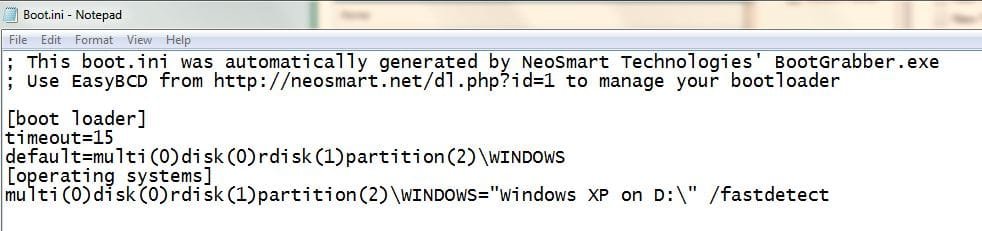
ok... what I did was disabled the Raid SSD in the bios and F8 to bring up the SaTA drive. Tried to load XP on HDD, but no luck.

I then re-enabled the SSD and both drives booted. I do get a windows boot manager screen with Win7 listed first, Xp second. I think this is because of setting it up with easyBCD awhile back. Attached is a capture
 

Attachments

  • Capture4.JPG
    Capture4.JPG
    44.2 KB · Views: 8

My Computer My Computer

Computer Manufacturer/Model Number
Asus
OS
Win 7 x64 H.Prem XP SP3 x86
CPU
E8400
Motherboard
P5Q-E
Memory
4Gb.
Graphics Card(s)
Radeon 4870
Monitor(s) Displays
Samsung T220HD
Hard Drives
SSD - OCZ RevoDrive PCI-e 120Gb

Spinner - Seagate Barracuda 7200.11 SATA 3Gb/s 500-GB
Case
Antec 900
That confirms it is booting off the Win7 SSD.

You're all set whenever you want to delete XP partition and remove its listing in EasyBCD.

Let us know how performance turns out.
 
ok, off to try!

Are you running Win7 Pro or Ultimate?
If you are running either of those versions you might want to try XP Mode.
It give you XP Pro inside Win 7. That way you don't need to boot back and forth and you can set the drive configuation to AHCI.
 

My Computer My Computer

Computer Manufacturer/Model Number
Built be Me
OS
Windows 7 Pro x64
CPU
i5 760
Motherboard
Asus P7P55D-E Pro
Memory
16GB
Graphics Card(s)
Nvidia GTS450
Sound Card
On board
Monitor(s) Displays
Dell 2007WFP Dell 1800FP
Screen Resolution
1680x1050 1280x1024
Hard Drives
Seagate 250GB & 750GB
WD 1TB
PSU
Antec 750
Case
In Win
Cooling
Cooler Master Hyper 212+
Keyboard
IBM
Mouse
MS
Greg: I'm thinking I should probably leave well enough alone for now. Its working and that is good enough for me at this point. But, I am wondering now if I was to partition the SSD raid drive to house XP too... ahhh never mind... :)

Shootist: Yes, but the programs I wanted to use in Win7 XPmode would not work.

Thanks very much for all your help guys!
 

My Computer My Computer

Computer Manufacturer/Model Number
Asus
OS
Win 7 x64 H.Prem XP SP3 x86
CPU
E8400
Motherboard
P5Q-E
Memory
4Gb.
Graphics Card(s)
Radeon 4870
Monitor(s) Displays
Samsung T220HD
Hard Drives
SSD - OCZ RevoDrive PCI-e 120Gb

Spinner - Seagate Barracuda 7200.11 SATA 3Gb/s 500-GB
Case
Antec 900
Wasn't saying you need to delete XP now, Jimmy, only that when you want to get rid of it that it will be easier than normal.

Normally XP holds the System Files on a Win7 Dual Boot, so that removing XP requires repairing Win7 by writing the System Boot Files to its partition after marking it Active.

But in this case Win7 is already marked Active so no surgery is required

You can also save a Win7 backup image without being forced to include XP unless you select it. Backup Complete Computer - Create an Image Backup
 
Last edited:
Ok Greg, I am going to create an image of the Win7 disk.
 

My Computer My Computer

Computer Manufacturer/Model Number
Asus
OS
Win 7 x64 H.Prem XP SP3 x86
CPU
E8400
Motherboard
P5Q-E
Memory
4Gb.
Graphics Card(s)
Radeon 4870
Monitor(s) Displays
Samsung T220HD
Hard Drives
SSD - OCZ RevoDrive PCI-e 120Gb

Spinner - Seagate Barracuda 7200.11 SATA 3Gb/s 500-GB
Case
Antec 900
Shootist: Yes, but the programs I wanted to use in Win7 XPmode would not work.

Thanks very much for all your help guys!

Do you mean XP Mode won't work on your Win 7? Because you are running Home Premium?
Or that program won't run in XP mode?

What program is this?
If it will run on a XP install it will run in XP Mode.

If it is a DOS program give DOSBox a try right in Win 7.
I run some very old DOS games using DOSBox on both XP and Win 7.
 

My Computer My Computer

Computer Manufacturer/Model Number
Built be Me
OS
Windows 7 Pro x64
CPU
i5 760
Motherboard
Asus P7P55D-E Pro
Memory
16GB
Graphics Card(s)
Nvidia GTS450
Sound Card
On board
Monitor(s) Displays
Dell 2007WFP Dell 1800FP
Screen Resolution
1680x1050 1280x1024
Hard Drives
Seagate 250GB & 750GB
WD 1TB
PSU
Antec 750
Case
In Win
Cooling
Cooler Master Hyper 212+
Keyboard
IBM
Mouse
MS
Yes, I just bought my copy of Home Prem. the same day I purchased the SSD. Prior to that I bought a copy of Ultimate off of a guy coming out of a local computer store and as it turned out, it was not legit, worked fine for awhile, but I woke up one day to the desktop saying I was a victim of piracy. Guess thats why it was much cheaper than the in store versions...

I tried to run Mealmaster and MenuPro, both programs I have had for well over 13years, and neither of them would work in XP mode. Not sure if it was me or the XPmode, but enlight of todays findings... it was most likely me! :)
 

My Computer My Computer

Computer Manufacturer/Model Number
Asus
OS
Win 7 x64 H.Prem XP SP3 x86
CPU
E8400
Motherboard
P5Q-E
Memory
4Gb.
Graphics Card(s)
Radeon 4870
Monitor(s) Displays
Samsung T220HD
Hard Drives
SSD - OCZ RevoDrive PCI-e 120Gb

Spinner - Seagate Barracuda 7200.11 SATA 3Gb/s 500-GB
Case
Antec 900
ok Greg, I just finished running the backup image. Saved it to a data drive.
 

My Computer My Computer

Computer Manufacturer/Model Number
Asus
OS
Win 7 x64 H.Prem XP SP3 x86
CPU
E8400
Motherboard
P5Q-E
Memory
4Gb.
Graphics Card(s)
Radeon 4870
Monitor(s) Displays
Samsung T220HD
Hard Drives
SSD - OCZ RevoDrive PCI-e 120Gb

Spinner - Seagate Barracuda 7200.11 SATA 3Gb/s 500-GB
Case
Antec 900
The backup included that boot.ini on c: drive tho... will that matter?
 

My Computer My Computer

Computer Manufacturer/Model Number
Asus
OS
Win 7 x64 H.Prem XP SP3 x86
CPU
E8400
Motherboard
P5Q-E
Memory
4Gb.
Graphics Card(s)
Radeon 4870
Monitor(s) Displays
Samsung T220HD
Hard Drives
SSD - OCZ RevoDrive PCI-e 120Gb

Spinner - Seagate Barracuda 7200.11 SATA 3Gb/s 500-GB
Case
Antec 900

My Computer My Computer

Computer Manufacturer/Model Number
Asus
OS
Win 7 x64 H.Prem XP SP3 x86
CPU
E8400
Motherboard
P5Q-E
Memory
4Gb.
Graphics Card(s)
Radeon 4870
Monitor(s) Displays
Samsung T220HD
Hard Drives
SSD - OCZ RevoDrive PCI-e 120Gb

Spinner - Seagate Barracuda 7200.11 SATA 3Gb/s 500-GB
Case
Antec 900
Good Morning!

I am attempting to slipstream AHCI drivers into my XP cd.

I would like to know how to ID my specific SATA controller on my ASUS P5Q-e board, and then load that into the slipstream. I have checked Device Manager, but not quite sure where to look.
 

My Computer My Computer

Computer Manufacturer/Model Number
Asus
OS
Win 7 x64 H.Prem XP SP3 x86
CPU
E8400
Motherboard
P5Q-E
Memory
4Gb.
Graphics Card(s)
Radeon 4870
Monitor(s) Displays
Samsung T220HD
Hard Drives
SSD - OCZ RevoDrive PCI-e 120Gb

Spinner - Seagate Barracuda 7200.11 SATA 3Gb/s 500-GB
Case
Antec 900
In Device Manager it will be SATA controller.

Find the make/model number there, or check the mobo specs to find SATA controller, then download XP driver from maker's Support Downloads webpage.
 
Good Morning!

I am attempting to slipstream AHCI drivers into my XP cd.

I would like to know how to ID my specific SATA controller on my ASUS P5Q-e board, and then load that into the slipstream. I have checked Device Manager, but not quite sure where to look.

I believe all Asus Intel base motherboards, one that use Intel CPUs, use Intel chipsets and the SATA controller is built into the chipset. So you need to go to the Intel website.
 

My Computer My Computer

Computer Manufacturer/Model Number
Built be Me
OS
Windows 7 Pro x64
CPU
i5 760
Motherboard
Asus P7P55D-E Pro
Memory
16GB
Graphics Card(s)
Nvidia GTS450
Sound Card
On board
Monitor(s) Displays
Dell 2007WFP Dell 1800FP
Screen Resolution
1680x1050 1280x1024
Hard Drives
Seagate 250GB & 750GB
WD 1TB
PSU
Antec 750
Case
In Win
Cooling
Cooler Master Hyper 212+
Keyboard
IBM
Mouse
MS
I'm sure you will find this hard to believe, but I am lost! :haha:

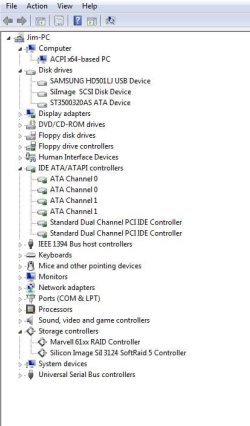
If I look in device manager from Win7, I can't find anything regarding SATA Controller (see 1st snip)

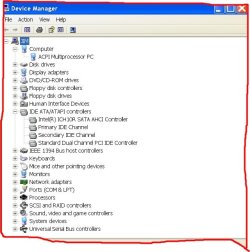
If I look when in XP, I can find SATA controller (snip2), but I cannot find appropriate drivers at Intel or Asus.

The listed controller is Intel ICH10 and for the life of me I cannot find the AHCI drivers for that for XP. Only thing I have found for it is Server Drivers.

The AHCI drivers I have downloaded for XP32bit and looked through only support up to ICH09, so I have cancelled the slipstream for now and will await advice
 

Attachments

  • Win7device.JPG
    Win7device.JPG
    45.3 KB · Views: 6
  • XPDevice.jpg
    XPDevice.jpg
    107.3 KB · Views: 8

My Computer My Computer

Computer Manufacturer/Model Number
Asus
OS
Win 7 x64 H.Prem XP SP3 x86
CPU
E8400
Motherboard
P5Q-E
Memory
4Gb.
Graphics Card(s)
Radeon 4870
Monitor(s) Displays
Samsung T220HD
Hard Drives
SSD - OCZ RevoDrive PCI-e 120Gb

Spinner - Seagate Barracuda 7200.11 SATA 3Gb/s 500-GB
Case
Antec 900
Update...

I now have the system booting into both OS with AHCI set in the bios.

I found that within the Server AHCI driver package at Intel was SATA AHCI for win xp. Figured I would try it. Seems to have worked.

I have now slipstreamed that driver into XP and have it saved as an .iso

Attached is a snip from XP device manager as it is now...
 

Attachments

  • XPAHCI.jpg
    XPAHCI.jpg
    52.1 KB · Views: 3

My Computer My Computer

Computer Manufacturer/Model Number
Asus
OS
Win 7 x64 H.Prem XP SP3 x86
CPU
E8400
Motherboard
P5Q-E
Memory
4Gb.
Graphics Card(s)
Radeon 4870
Monitor(s) Displays
Samsung T220HD
Hard Drives
SSD - OCZ RevoDrive PCI-e 120Gb

Spinner - Seagate Barracuda 7200.11 SATA 3Gb/s 500-GB
Case
Antec 900
Update...

I now have the system booting into both OS with AHCI set in the bios.

I found that within the Server AHCI driver package at Intel was SATA AHCI for win xp. Figured I would try it. Seems to have worked.

I have now slipstreamed that driver into XP and have it saved as an .iso

Attached is a snip from XP device manager as it is now...
When you say "Seemed to have worked" how did you get it to work?
Was this on your original XP install?
 

My Computer My Computer

Computer Manufacturer/Model Number
Built be Me
OS
Windows 7 Pro x64
CPU
i5 760
Motherboard
Asus P7P55D-E Pro
Memory
16GB
Graphics Card(s)
Nvidia GTS450
Sound Card
On board
Monitor(s) Displays
Dell 2007WFP Dell 1800FP
Screen Resolution
1680x1050 1280x1024
Hard Drives
Seagate 250GB & 750GB
WD 1TB
PSU
Antec 750
Case
In Win
Cooling
Cooler Master Hyper 212+
Keyboard
IBM
Mouse
MS
Back
Top