Shutdown when I close the lid in my Notebook

gyverd

New member
Local time
3:39 AM
Messages
10
Hi, I'm just reinstalled my Acer 4736G with Win7. The previous one is Win XP.

After I installed Win7 Ultimate, there's something that don't go right,
1. When I close the lid of my notebook, it's shutdown not go to sleep mode even the setting in power management is Sleep. What should I do ?

2. The button in the right, such as : Vol +, Vol -, Bluetooth, Wireless. Why it can't display the logo in the desktop. In Win XP it will show when I press each of it. Ex. When I press Bluetooth button, it will appeared "B" (bluetooth logo).

I'm already installed the drivers for, Sound Card, Chipset, Card Reader, Bluetooth, Camera from the sites.

Can anyone help me :)

Thanks.
 

My Computer My Computer

OS
Windows 7
Hi Gyverd

The on screen pictures for volume/Bluetooth/Wireless etc on acer notebooks are controlled by a program called "Launch Manager" download and install this and see if that brings your icons back. Acer Support: Welcome to Acer Support

Danny
 

My Computer My Computer

Computer Manufacturer/Model Number
acer aspire 5935g
OS
Windows 7 Home Premium x64 SP1
CPU
intel(R)core(TM)2 duo CPU T6600 @ 2.20GHz
Motherboard
intel gm45/gm47 revision 07
Memory
3 gb ddr3
Graphics Card(s)
ati radeon hd4570/512mb
Monitor(s) Displays
lop156wh2-tle1 15.3 flat
Screen Resolution
1366x768
Hard Drives
OCZ-Agility3 60gig ssd
320gig external hdd
500gig external hdd
Mouse
Optical
Internet Speed
30Mbps Down/30Mbps Up
Yeah. It worked. I'm already downloaded that one but not installed it. :) After you said, I'm installing it.

But what about the sleep problem when I close the lid ? What should I do ?

Thanks.
 

My Computer My Computer

OS
Windows 7
But what about the sleep problem when I close the lid ? What should I do ?

Thanks.
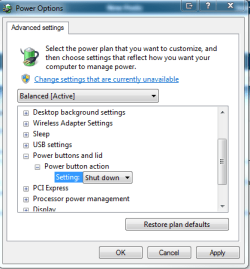
Click on the start orb, type power options and select it when it appears.
Under power buttons and lid you can change it from shut down to sleep. you will have to do this for all the power plans that you use (Power saver, Balanced and High performance)
I hope this helps
 

Attachments

  • Capture.PNG
    Capture.PNG
    14.6 KB · Views: 16
Last edited:

My Computer My Computer

Computer Manufacturer/Model Number
Something I threw together
OS
Windows 7 Ultimate x64
CPU
Intel Core i7-2600K
Motherboard
Asus P8P67
Memory
16 GB G Skill F3-10666 CL9D-4GBRL
Graphics Card(s)
ATI Radeon HD 6870
Sound Card
ATI Radeon HDMI / Realtek ALC892
Monitor(s) Displays
2 x 22" standard monitors / LG32LC56v TV to watch films
Screen Resolution
1920 x1080
Hard Drives
2 x OCZ Vertex2 111.79GB
3 x Samsung103SJ
1 x Samsung103UJ
1 x WD3200BEVT
1 x Hitachi5K320-160
PSU
Thermaltake Toughpower Cable Management 750W
Case
Antec 300
Cooling
Noctua NH-U12P SE2 and 5 120mm Case fans
Keyboard
Microsoft Comfort Curve Keyboard 2000
Mouse
Hama M3110 / Logitech M305
Internet Speed
16000
Other Info
I have also used Fedora, Suse, Ubuntu Linux
And all other Windows from 95 to date except ME
Follow what pooch has said and change the settings for all the power plans you use.That should do it.I know you stated you have tried this but just double check to make sure.

Danny
 

My Computer My Computer

Computer Manufacturer/Model Number
acer aspire 5935g
OS
Windows 7 Home Premium x64 SP1
CPU
intel(R)core(TM)2 duo CPU T6600 @ 2.20GHz
Motherboard
intel gm45/gm47 revision 07
Memory
3 gb ddr3
Graphics Card(s)
ati radeon hd4570/512mb
Monitor(s) Displays
lop156wh2-tle1 15.3 flat
Screen Resolution
1366x768
Hard Drives
OCZ-Agility3 60gig ssd
320gig external hdd
500gig external hdd
Mouse
Optical
Internet Speed
30Mbps Down/30Mbps Up
Yeah. Already Done that. Everything about Power Button, Lid Action is SLEEP. But the result is the same.
It's Restart the notebook, I don't even have one action that using "Restart" only Sleep.

Sorry my mistake.. It's Restart not Shutdown. So when I opened the lid, it starting from the bios again. :(

Anything else I can do ?

Thanks anyway for Pooch and Danny :)
 

My Computer My Computer

OS
Windows 7
Hi gyverd

Try restoring all the power plans back to default and then just change the lid close action only to the setting you want.I'm lost a bit now are you trying to get it to sleep or shut down when you close the lid

Danny
 

My Computer My Computer

Computer Manufacturer/Model Number
acer aspire 5935g
OS
Windows 7 Home Premium x64 SP1
CPU
intel(R)core(TM)2 duo CPU T6600 @ 2.20GHz
Motherboard
intel gm45/gm47 revision 07
Memory
3 gb ddr3
Graphics Card(s)
ati radeon hd4570/512mb
Monitor(s) Displays
lop156wh2-tle1 15.3 flat
Screen Resolution
1366x768
Hard Drives
OCZ-Agility3 60gig ssd
320gig external hdd
500gig external hdd
Mouse
Optical
Internet Speed
30Mbps Down/30Mbps Up
Yeah. Already Done that. Everything about Power Button, Lid Action is SLEEP. But the result is the same.
It's Restart the notebook, I don't even have one action that using "Restart" only Sleep.

Sorry my mistake.. It's Restart not Shutdown. So when I opened the lid, it starting from the bios again. :(


yeah just for my curiosity right click the start orb select properties, now change the pba to sleep
 

My Computer My Computer

Computer Manufacturer/Model Number
Something I threw together
OS
Windows 7 Ultimate x64
CPU
Intel Core i7-2600K
Motherboard
Asus P8P67
Memory
16 GB G Skill F3-10666 CL9D-4GBRL
Graphics Card(s)
ATI Radeon HD 6870
Sound Card
ATI Radeon HDMI / Realtek ALC892
Monitor(s) Displays
2 x 22" standard monitors / LG32LC56v TV to watch films
Screen Resolution
1920 x1080
Hard Drives
2 x OCZ Vertex2 111.79GB
3 x Samsung103SJ
1 x Samsung103UJ
1 x WD3200BEVT
1 x Hitachi5K320-160
PSU
Thermaltake Toughpower Cable Management 750W
Case
Antec 300
Cooling
Noctua NH-U12P SE2 and 5 120mm Case fans
Keyboard
Microsoft Comfort Curve Keyboard 2000
Mouse
Hama M3110 / Logitech M305
Internet Speed
16000
Other Info
I have also used Fedora, Suse, Ubuntu Linux
And all other Windows from 95 to date except ME
@danny
I want it to Sleep.

@pooch
Already do that. But the result is the same. It's restart the computer when I close the lid.
 

My Computer My Computer

OS
Windows 7
Can you get the notebook to sleep without closing the lid using the Fn and which ever F button it is on your system.Does it sleep if forced too

Danny
 

My Computer My Computer

Computer Manufacturer/Model Number
acer aspire 5935g
OS
Windows 7 Home Premium x64 SP1
CPU
intel(R)core(TM)2 duo CPU T6600 @ 2.20GHz
Motherboard
intel gm45/gm47 revision 07
Memory
3 gb ddr3
Graphics Card(s)
ati radeon hd4570/512mb
Monitor(s) Displays
lop156wh2-tle1 15.3 flat
Screen Resolution
1366x768
Hard Drives
OCZ-Agility3 60gig ssd
320gig external hdd
500gig external hdd
Mouse
Optical
Internet Speed
30Mbps Down/30Mbps Up
@pooch
Already do that. But the result is the same. It's restart the computer when I close the lid.
You are not pressing the power button before closing the lid by any chance
 

My Computer My Computer

Computer Manufacturer/Model Number
Something I threw together
OS
Windows 7 Ultimate x64
CPU
Intel Core i7-2600K
Motherboard
Asus P8P67
Memory
16 GB G Skill F3-10666 CL9D-4GBRL
Graphics Card(s)
ATI Radeon HD 6870
Sound Card
ATI Radeon HDMI / Realtek ALC892
Monitor(s) Displays
2 x 22" standard monitors / LG32LC56v TV to watch films
Screen Resolution
1920 x1080
Hard Drives
2 x OCZ Vertex2 111.79GB
3 x Samsung103SJ
1 x Samsung103UJ
1 x WD3200BEVT
1 x Hitachi5K320-160
PSU
Thermaltake Toughpower Cable Management 750W
Case
Antec 300
Cooling
Noctua NH-U12P SE2 and 5 120mm Case fans
Keyboard
Microsoft Comfort Curve Keyboard 2000
Mouse
Hama M3110 / Logitech M305
Internet Speed
16000
Other Info
I have also used Fedora, Suse, Ubuntu Linux
And all other Windows from 95 to date except ME
@Danny
After I trying it again, I see when I close the lid, I think it's in Sleep Mode ( Because the light is still and usb power in on too ). But when I open the lid.. the Windows can't Wake Up the computer, so it's goes to Restart and give me black screen with some choices and "Start Windows Normally".
It's the same when I tried to press Fn + F4. It goes to Sleep but when I awaken the computer.. It's Restart again.

@Pooch
I think the problem is when I open the lid now.. So when I press the Power button, it will Sleep but when I awake it, it's restart by itself :)

Some wrong drivers ? Or .. ?

I'm using Windows 7 Ultimate. 6.1.7600. Build 7600.
 

My Computer My Computer

OS
Windows 7
I know two possible answers when a PC won't wake up from sleep
Look in your BIOS If you have ACPI options and try to switch modes among "S1 and S3", "S3" etc
Click on start orb type cmd right click on it when it appears in the list and select run as administrator accept the UAC type powercfg -h on and press enter
 

My Computer My Computer

Computer Manufacturer/Model Number
Something I threw together
OS
Windows 7 Ultimate x64
CPU
Intel Core i7-2600K
Motherboard
Asus P8P67
Memory
16 GB G Skill F3-10666 CL9D-4GBRL
Graphics Card(s)
ATI Radeon HD 6870
Sound Card
ATI Radeon HDMI / Realtek ALC892
Monitor(s) Displays
2 x 22" standard monitors / LG32LC56v TV to watch films
Screen Resolution
1920 x1080
Hard Drives
2 x OCZ Vertex2 111.79GB
3 x Samsung103SJ
1 x Samsung103UJ
1 x WD3200BEVT
1 x Hitachi5K320-160
PSU
Thermaltake Toughpower Cable Management 750W
Case
Antec 300
Cooling
Noctua NH-U12P SE2 and 5 120mm Case fans
Keyboard
Microsoft Comfort Curve Keyboard 2000
Mouse
Hama M3110 / Logitech M305
Internet Speed
16000
Other Info
I have also used Fedora, Suse, Ubuntu Linux
And all other Windows from 95 to date except ME
I know two possible answers when a PC won't wake up from sleep
Look in your BIOS If you have ACPI options and try to switch modes among "S1 and S3", "S3" etc
Click on start orb type cmd right click on it when it appears in the list and select run as administrator accept the UAC type powercfg -h on and press enter

I can't see something useful that I can change in BIOS.

Only Information, Boot, etc. Don't see ACPI.

Should I need to tried "powercfg -h on" ?
 

My Computer My Computer

OS
Windows 7

My Computer My Computer

Computer Manufacturer/Model Number
Something I threw together
OS
Windows 7 Ultimate x64
CPU
Intel Core i7-2600K
Motherboard
Asus P8P67
Memory
16 GB G Skill F3-10666 CL9D-4GBRL
Graphics Card(s)
ATI Radeon HD 6870
Sound Card
ATI Radeon HDMI / Realtek ALC892
Monitor(s) Displays
2 x 22" standard monitors / LG32LC56v TV to watch films
Screen Resolution
1920 x1080
Hard Drives
2 x OCZ Vertex2 111.79GB
3 x Samsung103SJ
1 x Samsung103UJ
1 x WD3200BEVT
1 x Hitachi5K320-160
PSU
Thermaltake Toughpower Cable Management 750W
Case
Antec 300
Cooling
Noctua NH-U12P SE2 and 5 120mm Case fans
Keyboard
Microsoft Comfort Curve Keyboard 2000
Mouse
Hama M3110 / Logitech M305
Internet Speed
16000
Other Info
I have also used Fedora, Suse, Ubuntu Linux
And all other Windows from 95 to date except ME
I'm already trying powercfg -h and trying to see lastwakeup but..

powercfg.jpg


-h that's mean hibernate and not sleep rite ? but it also doesn't work :(
 

My Computer My Computer

OS
Windows 7
Yes that is hibernate, now go back to the options and make sure that Hybrid sleep and Hibernation are set to never, do this for all power schemes
In Device Manager go to human interface devices, under the power management tab make sure there is a tick in the box allow this device to wake the computer.
When the computer is asleep try to wake it by tapping the keyboard
 

My Computer My Computer

Computer Manufacturer/Model Number
Something I threw together
OS
Windows 7 Ultimate x64
CPU
Intel Core i7-2600K
Motherboard
Asus P8P67
Memory
16 GB G Skill F3-10666 CL9D-4GBRL
Graphics Card(s)
ATI Radeon HD 6870
Sound Card
ATI Radeon HDMI / Realtek ALC892
Monitor(s) Displays
2 x 22" standard monitors / LG32LC56v TV to watch films
Screen Resolution
1920 x1080
Hard Drives
2 x OCZ Vertex2 111.79GB
3 x Samsung103SJ
1 x Samsung103UJ
1 x WD3200BEVT
1 x Hitachi5K320-160
PSU
Thermaltake Toughpower Cable Management 750W
Case
Antec 300
Cooling
Noctua NH-U12P SE2 and 5 120mm Case fans
Keyboard
Microsoft Comfort Curve Keyboard 2000
Mouse
Hama M3110 / Logitech M305
Internet Speed
16000
Other Info
I have also used Fedora, Suse, Ubuntu Linux
And all other Windows from 95 to date except ME
Back
Top