What's your memory assessment speed?

Status
Not open for further replies.
Corsair Vengeance

Timings.JPG[/ATTACH]
 

Attachments

  • spd.JPG
    spd.JPG
    46.6 KB · Views: 7

My Computer My Computer

Computer Manufacturer/Model Number
Samurai Jack Special
OS
Windows 7 Ultimate x64
CPU
i7 2600k
Motherboard
Asus-P67-Sabertooth
Memory
8G Corsair-DDR3
Graphics Card(s)
GTX 260 Evga
Monitor(s) Displays
HP 2711x
Hard Drives
3 Samsung.. 500G/250/250/
PSU
Corsair
Case
Antec
Cooling
5 Fans
Other Info
Laptop Asus G75VW. A little heavy but its a Beast...
Very nice score :)

Is your CPU OC'ed?
 

My Computer My Computer

Computer type
PC/Desktop
Computer Manufacturer/Model Number
76~2.0
OS
Windows 7 Ult x64 - SP1/ Windows 8 Pro x64
CPU
Intel Core i5-3570K 4.6GHz
Motherboard
Gigabyte GA-Z77X UD3H, f18
Memory
8GB (2X4GB) DDR3 1600 Corsair Vengeance CL8 1.5v
Graphics Card(s)
Sapphire HD 7770 Vapor-X OC 1GB DDR5
Sound Card
Onboard VIA VT2021
Monitor(s) Displays
22" LCD Dell
Screen Resolution
1680x1050
Hard Drives
Samsung 840Pro 128GB SSD,
Seagate Barracuda 500GB SATA2 7200rpm 32MB cache, Seagate Barracuda 1TB SATA2 7200rpm 32MB cache,
PSU
Corsair HX650W
Case
Cooler Master Storm Scout
Cooling
Corsair H80 2x12cm Noctua NF P12 , 2x14cm case fans
Keyboard
Logitech Wave
Mouse
CM Sentinel
Internet Speed
Dismal
Antivirus
Avast
Browser
Opera Next
Other Info
Haswell laptop: HP Envy 17t-j, i7-4700MQ, GeForce 740M 2GB DDR3, 17.3" Full HD 1920x1080, 16GB RAM, Samsung 840 Pro 128GB, 1TB Hitachi 7200 HDD,
Desktop: eSATA ports,
External eSATA Seagate 500GB SATA2 7200rpm,
External WD USB 500GB
4.4K-offset.JPG


Hello yes I have oc a bit:) is that allowed?
 

My Computer My Computer

Computer Manufacturer/Model Number
Samurai Jack Special
OS
Windows 7 Ultimate x64
CPU
i7 2600k
Motherboard
Asus-P67-Sabertooth
Memory
8G Corsair-DDR3
Graphics Card(s)
GTX 260 Evga
Monitor(s) Displays
HP 2711x
Hard Drives
3 Samsung.. 500G/250/250/
PSU
Corsair
Case
Antec
Cooling
5 Fans
Other Info
Laptop Asus G75VW. A little heavy but its a Beast...
View attachment 151666


Hello yes I have oc a bit:) is that allowed?

I think 90% of the users that post anything in the "Show Us Your ..." threads have at least some sort of overclock...
picture.php
Even my little AMD Athlon 5400+ is OC'd.
 

My Computer My Computer

Computer type
PC/Desktop
OS
Win 10 x64 Pro x64 / Ubuntu 15.10 x64
CPU
Intel i7-4960X
Motherboard
Asus Rampage IV Black Edition
Memory
4x8GB Corsair Dominator Platinum @2400MHz 10-12-12-31
Graphics Card(s)
2x MSI GTX780Ti 3GB (SLI)
Sound Card
Onboard SupremeFX (Cirrus Logic CS4398)
Monitor(s) Displays
3x LG Cinema 27" IPS LED (27MP65)
Screen Resolution
[1920x1080]x3
Hard Drives
Crucial M500 120GB, Crucial M500 480GB, Toshiba DT01ACA200 2TB
PSU
CoolerMaster V1000
Case
Corsair Obsidian 750D
Cooling
ThermalTake Water 3.0 Extreme, 4xSP120, 3xAF120
Keyboard
Moshi Luna
Mouse
Logitech G700s / Roccat Tyon
Internet Speed
4Mb uncapped ADSL (Afrihost)
Antivirus
MS Security Essentials
Browser
Chrome... Duh. (:

My Computer My Computer

Computer type
PC/Desktop
Computer Manufacturer/Model Number
76~2.0
OS
Windows 7 Ult x64 - SP1/ Windows 8 Pro x64
CPU
Intel Core i5-3570K 4.6GHz
Motherboard
Gigabyte GA-Z77X UD3H, f18
Memory
8GB (2X4GB) DDR3 1600 Corsair Vengeance CL8 1.5v
Graphics Card(s)
Sapphire HD 7770 Vapor-X OC 1GB DDR5
Sound Card
Onboard VIA VT2021
Monitor(s) Displays
22" LCD Dell
Screen Resolution
1680x1050
Hard Drives
Samsung 840Pro 128GB SSD,
Seagate Barracuda 500GB SATA2 7200rpm 32MB cache, Seagate Barracuda 1TB SATA2 7200rpm 32MB cache,
PSU
Corsair HX650W
Case
Cooler Master Storm Scout
Cooling
Corsair H80 2x12cm Noctua NF P12 , 2x14cm case fans
Keyboard
Logitech Wave
Mouse
CM Sentinel
Internet Speed
Dismal
Antivirus
Avast
Browser
Opera Next
Other Info
Haswell laptop: HP Envy 17t-j, i7-4700MQ, GeForce 740M 2GB DDR3, 17.3" Full HD 1920x1080, 16GB RAM, Samsung 840 Pro 128GB, 1TB Hitachi 7200 HDD,
Desktop: eSATA ports,
External eSATA Seagate 500GB SATA2 7200rpm,
External WD USB 500GB
4.0GB Dual-Channel DDR3 @ 666MHz (9-9-9-24)

Code:
Windows System Assessment Tool
> Running: Feature Enumeration ''
> Run Time 00:00:00.00
> Running: System memory performance assessment ''
> Run Time 00:00:05.20
> Memory Performance                           11495.17 MB/s
> Total Run Time 00:00:08.36

:)
 

My Computer My Computer

OS
Windows 7 Home Premium SP1 x64
Absolutely awesome score samurai jack!
 

My Computer My Computer

OS
Windows 7 Professional 64 bit
6GB (3x 2GB) Corsair XMS3 DDR3 1600 Triple Channel (Model# TR3X6G1600C9)
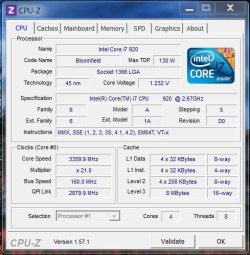
i7 920 @ 3.36ghz / Win 7 64 / Gigabyte GA-EX58-UD3R rev 1.6 motherboard

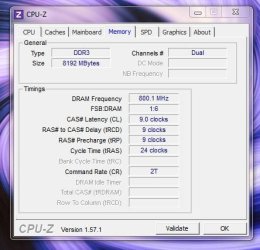
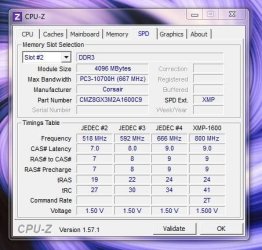
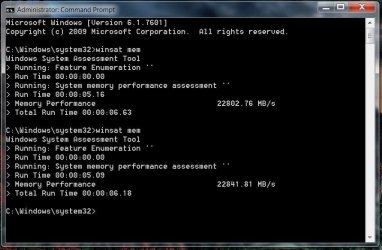
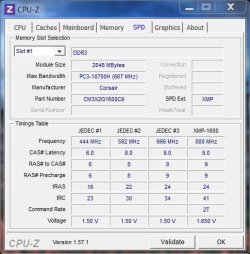
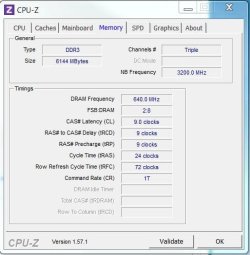
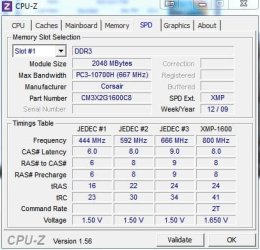
I'm not sure if these are ideal memory settings Ive always had it set on Auto in BIOS ever since I built it in 2009.
 

Attachments

  • winsat_result.JPG
    winsat_result.JPG
    60.3 KB · Views: 26
  • cpuz_cpu.JPG
    cpuz_cpu.JPG
    55.9 KB · Views: 6
  • cpu-z_spd.JPG
    cpu-z_spd.JPG
    47.7 KB · Views: 3
  • cpu-z_memory.JPG
    cpu-z_memory.JPG
    38.4 KB · Views: 5

My Computer My Computer

Computer type
PC/Desktop
Computer Manufacturer/Model Number
Custom
OS
Win 7 Ultimate 64-bit
CPU
i7 920 @ 3.36ghz
Motherboard
Gigabyte EX58-UD3R rev 1.6
Memory
12GB (3x 4gb) G.Skill Ripjaws DDR3 1600
Graphics Card(s)
EVGA GTX 480 1.5GB
Sound Card
Creative X-Fi XtremeMusic
Monitor(s) Displays
Samsung 2333T (PVA), Samsung PX2370 (TN)
Screen Resolution
1920x1080
Hard Drives
Samsung 1TB HD103SJ
Samsung 1.5TB HD154UI
WD 500GB 5000AACS
Maxtor 250GB 6B250R0
PSU
Corsair CMPSU-750TX PSU
Case
Antec TX1050B SOHO
Mouse
Logitech G5 Rev2
Internet Speed
28Mbps cable
Mathesar

Very nice numbers.

Nothing wrong with AUTO when you top 22K. ;)
Mike
 

My Computer My Computer

Computer Manufacturer/Model Number
Hopalong/ Godzilla
OS
Windows7 Pro 64bit SP-1; Windows XP Pro 32bit
CPU
Intel Core i7-870 Lynnfield 2.93GHz LGA 1156 95W Quad-Core
Motherboard
ASUS P7P55D-E PRO
Memory
8GB@1400MHz Crucial Ballistix DDR3-1600 4x2GB
Graphics Card(s)
ASUS ENGTX460 DirectCU/2DI/1GD5 1GB 256-bit GDDR5
Sound Card
VIA Onboard
Monitor(s) Displays
Asus VS248H-P 24"; Samsung SyncMaster 941BW 19"ws
Screen Resolution
1920x1080; 1440x900
Hard Drives
Samsung 830 120GB SSD
Intel 320 120GB SSD
Western Digital Caviar Black WD7501AALS 750GB 7200 RPM SATA 3.0Gb/s
Western Digital Caviar Black WD6401AALS 640GB 7200 RPM SATA 3.0Gb/s
PSU
COOLER MASTER Silent Pro RS850-AMBAJ3-US 850W Modular
Case
COOLER MASTER HAF 932 RC-932-KKN5-GP Black
Cooling
Scythe "Mugen-2 Rev.B" (2 ScytheKaze-Jyuni PWM fans)
Keyboard
Logitech K-320
Mouse
Kensington
Antivirus
Avast Inernet Suite
Browser
IE 9 ; Chrome
6GB (3x 2GB) Corsair XMS3 DDR3 1600 Triple Channel (Model# TR3X6G1600C9)
i7 920 @ 3.36ghz / Win 7 64 / Gigabyte GA-EX58-UD3R rev 1.6 motherboard

I'm not sure if these are ideal memory settings Ive always had it set on Auto in BIOS ever since I built it in 2009.
Check my Specs list - our rigs could be twins. :D

Your RAM is rated higher than the 1333 it's currently running at - check this and use the BIOS XMP-1600 settings for your RAM:

EDIT: Looks like you've got a dandy OC going on there!
 

Attachments

  • CPU-Z 28APR2011-01.JPG
    CPU-Z 28APR2011-01.JPG
    33.8 KB · Views: 1
  • CPU-Z 28APR2011-02.JPG
    CPU-Z 28APR2011-02.JPG
    39.9 KB · Views: 1
Last edited:

My Computer My Computer

Computer Manufacturer/Model Number
Self
OS
Main - Windows 7 Pro SP1 64-Bit; 2nd - Windows Server 2008 R2
CPU
Main - Core i7 2600K; 2nd - Core i7 920
Motherboard
Main - Asus P8Z68-V Pro/Gen3; 2nd - Gigabyte GA-EX58-UDR3
Memory
Main - 16GB Corsair Vengeance; 2nd - 12GB Corsair Vengeance
Graphics Card(s)
Main - XFX Radeon 6870 1GB; 2nd - XFX Radeon 4870 1GB
Sound Card
Both: Onboard Realtek Azalia
Monitor(s) Displays
Main - Hann 25" + I-INC 25" + Acer 23"; 2nd - Upgrading Soon
Screen Resolution
Main - 1920x1080 (All Three Monitors); 2nd - Upgrading Soon
Hard Drives
Main - (1) Crucial M4 128GB (Boot)
Main - (1) Seagate 2TB 64MB Cache (Data)
Main - (1) Seagate 2TB 64MB Cache (Data Backup)
2nd - (1) Intel X25-M SSD 80GB (Boot)
2nd - (3) Seagate 1TB 32MB Cache (Data Backup)
2nd - (1) Seagate 320GB (Because)
PSU
Main - OCZ 600W Modular; 2nd - OCZ 600W
Case
Main - Thermaltake Element G; 2nd - NZXT something or other
Cooling
Main - Corsair H80; 2nd - Prolimatech Megahalems
Keyboard
Main - Razer Reclusa; 2nd - Old MS Keyboard
Mouse
Main - Logitech MX Revolution; 2nd - Old MS Mouse
Internet Speed
20Mbps Time-Warner Cable

My Computer My Computer

Computer type
PC/Desktop
OS
Windows 10 Home x64
CPU
INTEL Core i5-750 Quad-Core 3.37GHz
Motherboard
ASUS P7P55D
Memory
HyperX Fury Black Series 8GB (2 x 4GB) 1866Mhz
Graphics Card(s)
EVGA GeForce GTX 750 Superclocked 1GB 128-Bit GDDR5
Monitor(s) Displays
LG 32MA68HY 32" IPS
Screen Resolution
1920 x 1080
Hard Drives
Samsung 840 Evo 120GB, SEAGATE 500GB Barracuda® 7200.12, SATA 3 Gb/s, 7200 RPM, 16MB cache
PSU
ANTEC TruePower New TP-550, 80 PLUS, 550W
Case
ANTEC Three Hundred Illusion
Cooling
COOLER MASTER Hyper 212 Plus, 4 x 120mm 1 x 140mm Noctua's
Internet Speed
85 + Mbps
Antivirus
Avast
Browser
Vivaldi
6GB (3x 2GB) Corsair XMS3 DDR3 1600 Triple Channel (Model# TR3X6G1600C9)
i7 920 @ 3.36ghz / Win 7 64 / Gigabyte GA-EX58-UD3R rev 1.6 motherboard

I'm not sure if these are ideal memory settings Ive always had it set on Auto in BIOS ever since I built it in 2009.
Check my Specs list - our rigs could be twins. :D

Your RAM is rated higher than the 1333 it's currently running at - check this and use the BIOS XMP-1600 settings for your RAM:

EDIT: Looks like you've got a dandy OC going on there!

I think the CPU OC might be affecting my ability to run at the rated 1600 memory speed but I will double check and give your settings a try, The good thing is our bios shows what the memory speed will actually be at based on the current CPU overclock.

(Ive updated my system spec info, some of it changed since I originally built it.)
 

My Computer My Computer

Computer type
PC/Desktop
Computer Manufacturer/Model Number
Custom
OS
Win 7 Ultimate 64-bit
CPU
i7 920 @ 3.36ghz
Motherboard
Gigabyte EX58-UD3R rev 1.6
Memory
12GB (3x 4gb) G.Skill Ripjaws DDR3 1600
Graphics Card(s)
EVGA GTX 480 1.5GB
Sound Card
Creative X-Fi XtremeMusic
Monitor(s) Displays
Samsung 2333T (PVA), Samsung PX2370 (TN)
Screen Resolution
1920x1080
Hard Drives
Samsung 1TB HD103SJ
Samsung 1.5TB HD154UI
WD 500GB 5000AACS
Maxtor 250GB 6B250R0
PSU
Corsair CMPSU-750TX PSU
Case
Antec TX1050B SOHO
Mouse
Logitech G5 Rev2
Internet Speed
28Mbps cable
I'm too lazy to reboot and check it for sure, but I think there is a place to de-link the CPU from the RAM and have your cake and eat it too.

For what it's worth, I think your memory score is pretty much what I had, even with the XMP setting enabled on my system. Somewhere a few pages back in this thread my score should be listed if you want to check. (I'm too lazy to look for that, too.) :o
 

My Computer My Computer

Computer Manufacturer/Model Number
Self
OS
Main - Windows 7 Pro SP1 64-Bit; 2nd - Windows Server 2008 R2
CPU
Main - Core i7 2600K; 2nd - Core i7 920
Motherboard
Main - Asus P8Z68-V Pro/Gen3; 2nd - Gigabyte GA-EX58-UDR3
Memory
Main - 16GB Corsair Vengeance; 2nd - 12GB Corsair Vengeance
Graphics Card(s)
Main - XFX Radeon 6870 1GB; 2nd - XFX Radeon 4870 1GB
Sound Card
Both: Onboard Realtek Azalia
Monitor(s) Displays
Main - Hann 25" + I-INC 25" + Acer 23"; 2nd - Upgrading Soon
Screen Resolution
Main - 1920x1080 (All Three Monitors); 2nd - Upgrading Soon
Hard Drives
Main - (1) Crucial M4 128GB (Boot)
Main - (1) Seagate 2TB 64MB Cache (Data)
Main - (1) Seagate 2TB 64MB Cache (Data Backup)
2nd - (1) Intel X25-M SSD 80GB (Boot)
2nd - (3) Seagate 1TB 32MB Cache (Data Backup)
2nd - (1) Seagate 320GB (Because)
PSU
Main - OCZ 600W Modular; 2nd - OCZ 600W
Case
Main - Thermaltake Element G; 2nd - NZXT something or other
Cooling
Main - Corsair H80; 2nd - Prolimatech Megahalems
Keyboard
Main - Razer Reclusa; 2nd - Old MS Keyboard
Mouse
Main - Logitech MX Revolution; 2nd - Old MS Mouse
Internet Speed
20Mbps Time-Warner Cable

My Computer My Computer

Computer Manufacturer/Model Number
Self
OS
Main - Windows 7 Pro SP1 64-Bit; 2nd - Windows Server 2008 R2
CPU
Main - Core i7 2600K; 2nd - Core i7 920
Motherboard
Main - Asus P8Z68-V Pro/Gen3; 2nd - Gigabyte GA-EX58-UDR3
Memory
Main - 16GB Corsair Vengeance; 2nd - 12GB Corsair Vengeance
Graphics Card(s)
Main - XFX Radeon 6870 1GB; 2nd - XFX Radeon 4870 1GB
Sound Card
Both: Onboard Realtek Azalia
Monitor(s) Displays
Main - Hann 25" + I-INC 25" + Acer 23"; 2nd - Upgrading Soon
Screen Resolution
Main - 1920x1080 (All Three Monitors); 2nd - Upgrading Soon
Hard Drives
Main - (1) Crucial M4 128GB (Boot)
Main - (1) Seagate 2TB 64MB Cache (Data)
Main - (1) Seagate 2TB 64MB Cache (Data Backup)
2nd - (1) Intel X25-M SSD 80GB (Boot)
2nd - (3) Seagate 1TB 32MB Cache (Data Backup)
2nd - (1) Seagate 320GB (Because)
PSU
Main - OCZ 600W Modular; 2nd - OCZ 600W
Case
Main - Thermaltake Element G; 2nd - NZXT something or other
Cooling
Main - Corsair H80; 2nd - Prolimatech Megahalems
Keyboard
Main - Razer Reclusa; 2nd - Old MS Keyboard
Mouse
Main - Logitech MX Revolution; 2nd - Old MS Mouse
Internet Speed
20Mbps Time-Warner Cable
Curiosity > Laziness

http://www.sevenforums.com/886556-post819.html

Looks like you're right about the FSB OC being worth more than the memory speed alone. :)

For what its worth the i7 920 is easily overclocked especially if you have a D0 revision (CPU-Z will show revision) Most hit 4ghz without having to increase any voltages, the only reason im holding back is because im still using the stock intel cooler on mine and it runs a little hot while under load beyond 3.36ghz.

The Corsair H50 CPU cooler seems to be popular choice for i7 OC'ing.
 

My Computer My Computer

Computer type
PC/Desktop
Computer Manufacturer/Model Number
Custom
OS
Win 7 Ultimate 64-bit
CPU
i7 920 @ 3.36ghz
Motherboard
Gigabyte EX58-UD3R rev 1.6
Memory
12GB (3x 4gb) G.Skill Ripjaws DDR3 1600
Graphics Card(s)
EVGA GTX 480 1.5GB
Sound Card
Creative X-Fi XtremeMusic
Monitor(s) Displays
Samsung 2333T (PVA), Samsung PX2370 (TN)
Screen Resolution
1920x1080
Hard Drives
Samsung 1TB HD103SJ
Samsung 1.5TB HD154UI
WD 500GB 5000AACS
Maxtor 250GB 6B250R0
PSU
Corsair CMPSU-750TX PSU
Case
Antec TX1050B SOHO
Mouse
Logitech G5 Rev2
Internet Speed
28Mbps cable
Thanks guys
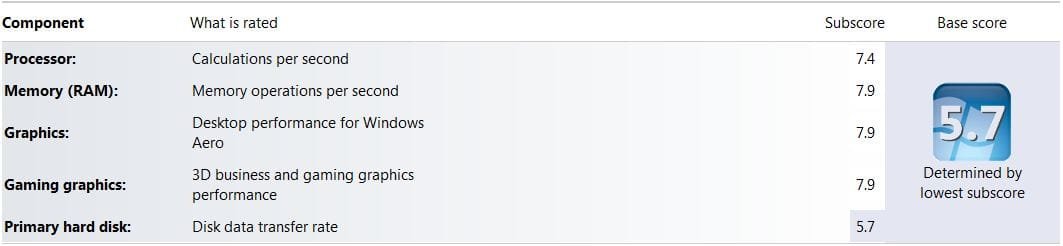
Changed from E6750.. DDR2..Win7x32...
Everything is pretty good now except those HDD:(
WEI.JPG
 

My Computer My Computer

Computer Manufacturer/Model Number
Samurai Jack Special
OS
Windows 7 Ultimate x64
CPU
i7 2600k
Motherboard
Asus-P67-Sabertooth
Memory
8G Corsair-DDR3
Graphics Card(s)
GTX 260 Evga
Monitor(s) Displays
HP 2711x
Hard Drives
3 Samsung.. 500G/250/250/
PSU
Corsair
Case
Antec
Cooling
5 Fans
Other Info
Laptop Asus G75VW. A little heavy but its a Beast...
stock speed

memory-performance.png


overclocked(i love the wallpaper so decided to share with you lot)

memory-performance-overclocked.png


have to revert back to stock speed cause of stability issue
 

My Computer My Computer

Computer type
PC/Desktop
Computer Manufacturer/Model Number
Self Built
OS
Windows 8.1 - 64 Bit
CPU
Intel Core i5-4670K (Haswell)
Motherboard
Gigabyte GA-Z87X-D3H
Memory
8GB DDR3-RAM PC1600 CL9 ADATA XPG V1.0 black
Graphics Card(s)
Gigabyte NVIDIA GTX 770 Graphics Card (2GB, DDR5, PCI-E)
Sound Card
ASUS Xonar DX 7.1 | Turtle Beach HPA 2
Monitor(s) Displays
Samsung SyncMaster P2270HD
Screen Resolution
1080p
Hard Drives
Samsung 840 Evo 250 GB (OS only)
Seagate Barracuda 1TB S-ATA
Seagate Barracuda 250GB S-ATA
Maxtor 250GB S-ATA (Backup only)
WD Elements 500Gb/Go
PSU
750 watts
Case
Zalman GS-1000 Special Edition
Cooling
Zalman CNPS10X Performa
Keyboard
Logitech K350
Mouse
Logitech M705 | Razer Vespula Mouse Pad
Internet Speed
Virgin Media - 60Mbps
Antivirus
Microsoft Security Essentials
Other Info
120mm fans x 4
(2 on top, 1 at rear, 1 at bottom)
Thanks guys
Changed from E6750.. DDR2..Win7x32...
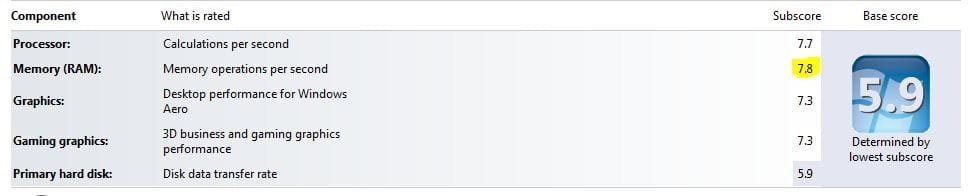
Everything is pretty good now except those HDD:(
View attachment 151871

I wonder how windows calculates the memory score, I figured with your winsat result it would be a 7.9

Here's mine, My boot drive is looking slow these days I need to upgrade it (500GB WD)
 

Attachments

  • win7index.JPG
    win7index.JPG
    29.3 KB · Views: 22

My Computer My Computer

Computer type
PC/Desktop
Computer Manufacturer/Model Number
Custom
OS
Win 7 Ultimate 64-bit
CPU
i7 920 @ 3.36ghz
Motherboard
Gigabyte EX58-UD3R rev 1.6
Memory
12GB (3x 4gb) G.Skill Ripjaws DDR3 1600
Graphics Card(s)
EVGA GTX 480 1.5GB
Sound Card
Creative X-Fi XtremeMusic
Monitor(s) Displays
Samsung 2333T (PVA), Samsung PX2370 (TN)
Screen Resolution
1920x1080
Hard Drives
Samsung 1TB HD103SJ
Samsung 1.5TB HD154UI
WD 500GB 5000AACS
Maxtor 250GB 6B250R0
PSU
Corsair CMPSU-750TX PSU
Case
Antec TX1050B SOHO
Mouse
Logitech G5 Rev2
Internet Speed
28Mbps cable
Thanks guys
Changed from E6750.. DDR2..Win7x32...
Everything is pretty good now except those HDD:(
View attachment 151871

I wonder how windows calculates the memory score, I figured with your winsat result it would be a 7.9

Here's mine, My boot drive is looking slow these days I need to upgrade it (500GB WD)

You can run the WEI test manually if you want... To see the memory score, open a command prompt and run "winsat mem" to see the MB/s speed of your RAM (more info).
 

My Computer My Computer

Computer type
PC/Desktop
OS
Win 10 x64 Pro x64 / Ubuntu 15.10 x64
CPU
Intel i7-4960X
Motherboard
Asus Rampage IV Black Edition
Memory
4x8GB Corsair Dominator Platinum @2400MHz 10-12-12-31
Graphics Card(s)
2x MSI GTX780Ti 3GB (SLI)
Sound Card
Onboard SupremeFX (Cirrus Logic CS4398)
Monitor(s) Displays
3x LG Cinema 27" IPS LED (27MP65)
Screen Resolution
[1920x1080]x3
Hard Drives
Crucial M500 120GB, Crucial M500 480GB, Toshiba DT01ACA200 2TB
PSU
CoolerMaster V1000
Case
Corsair Obsidian 750D
Cooling
ThermalTake Water 3.0 Extreme, 4xSP120, 3xAF120
Keyboard
Moshi Luna
Mouse
Logitech G700s / Roccat Tyon
Internet Speed
4Mb uncapped ADSL (Afrihost)
Antivirus
MS Security Essentials
Browser
Chrome... Duh. (:
Thanks guys
Changed from E6750.. DDR2..Win7x32...
Everything is pretty good now except those HDD:(
View attachment 151871

I wonder how windows calculates the memory score, I figured with your winsat result it would be a 7.9

Here's mine, My boot drive is looking slow these days I need to upgrade it (500GB WD)

You can run the WEI test manually if you want... To see the memory score, open a command prompt and run "winsat mem" to see the MB/s speed of your RAM (more info).

Oh I have ran it manually but my results were slower than his, so I was curious why the memory index was 7.8 for him and 7.9 on mine.

my results: http://www.sevenforums.com/performa...-memory-assessment-speed-111.html#post1372448
 

My Computer My Computer

Computer type
PC/Desktop
Computer Manufacturer/Model Number
Custom
OS
Win 7 Ultimate 64-bit
CPU
i7 920 @ 3.36ghz
Motherboard
Gigabyte EX58-UD3R rev 1.6
Memory
12GB (3x 4gb) G.Skill Ripjaws DDR3 1600
Graphics Card(s)
EVGA GTX 480 1.5GB
Sound Card
Creative X-Fi XtremeMusic
Monitor(s) Displays
Samsung 2333T (PVA), Samsung PX2370 (TN)
Screen Resolution
1920x1080
Hard Drives
Samsung 1TB HD103SJ
Samsung 1.5TB HD154UI
WD 500GB 5000AACS
Maxtor 250GB 6B250R0
PSU
Corsair CMPSU-750TX PSU
Case
Antec TX1050B SOHO
Mouse
Logitech G5 Rev2
Internet Speed
28Mbps cable
Status
Not open for further replies.
Back
Top