- Local time
- 6:57 PM
- Messages
- 333
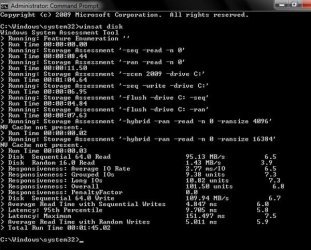
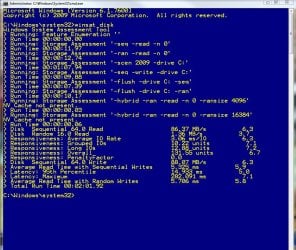
I'm curious to see what other people are getting for their WEI disk scores. I would like to see all types and combinations of drives to see how they differ in performance. If possible try to keep HDTach/HDTune/etc. scores to a minimum as there is another thread for that.
Some general questions for this thread (answered through benchmarks):
Simple directions to run test:
Some general questions for this thread (answered through benchmarks):
- How does RAID affect random reads/writes and latency?
- How much does NV Cache help?
- What subtest shows the biggest difference between and SSD and HDD?
- Can defragmenting a used HDD actually improve benchmark scores?
- What's the difference between a used SSD with TRIM vs. non-TRIM?
Code:
C:\Windows\system32>winsat disk
Windows System Assessment Tool
> Running: Feature Enumeration ''
> Run Time 00:00:00.00
> Running: Storage Assessment '-seq -read -n 0'
> Run Time 00:00:15.05
> Running: Storage Assessment '-ran -read -n 0'
> Run Time 00:00:14.90
> Running: Storage Assessment '-scen 2009 -drive C:'
> Run Time 00:01:41.00
> Running: Storage Assessment '-seq -write -drive C:'
> Run Time 00:00:13.90
> Running: Storage Assessment '-flush -drive C: -seq'
> Run Time 00:00:14.38
> Running: Storage Assessment '-flush -drive C: -ran'
> Run Time 00:00:26.32
> Running: Storage Assessment '-hybrid -ran -read -n 0 -ransize 4096'
NV Cache not present.
> Run Time 00:00:00.08
> Running: Storage Assessment '-hybrid -ran -read -n 0 -ransize 16384'
NV Cache not present.
> Run Time 00:00:00.06
> Disk  Sequential 64.0 Read                   54.79 MB/s          5.5
> Disk  Random 16.0 Read                       1.11 MB/s          3.2
> Responsiveness: Average IO Rate              7.08 ms/IO          4.5
> Responsiveness: Grouped IOs                  11.72 units          6.8
> Responsiveness: Long IOs                     33.56 units          1.9
> Responsiveness: Overall                      393.42 units          4.1
> Responsiveness: PenaltyFactor                1.0
> Disk  Sequential 64.0 Write                  54.00 MB/s          5.5
> Average Read Time with Sequential Writes     17.962 ms          2.8
> Latency: 95th Percentile                     102.751 ms          1.9
> Latency: Maximum                             229.118 ms          7.2
> Average Read Time with Random Writes         32.215 ms          1.9
> Total Run Time 00:03:07.33
Simple directions to run test:
- Press Windows key.
- Type "cmd" without quotes.
- Right click on the program that pops up and select "Run as administrator".
- Type "winsat disk" without quotes in the command prompt.
- After the test is done right click in the black area of the command prompt and choose "Select All"
- Press Enter to Copy.
- Ctrl+V to Paste here.
My Computer
At a glance
Linux (Debian, Android)Intel Core i7 8602x 2GB Kingston DDR3-1333AMD Radeon HD 5750
- Computer Manufacturer/Model Number
- Intel WBIBX10J
- OS
- Linux (Debian, Android)
- CPU
- Intel Core i7 860
- Motherboard
- Intel DP55WB
- Memory
- 2x 2GB Kingston DDR3-1333
- Graphics Card(s)
- AMD Radeon HD 5750
- Sound Card
- Realtek ALC888
- Monitor(s) Displays
- 2x Dell Inc. E248WFP
- Screen Resolution
- 3840x1200
- Hard Drives
- Intel X25-V
Samsung HD103SJ
- PSU
- Corsair CX400
- Case
- Silverstone GD05
- Cooling
- Stock
- Keyboard
- Dell Inc. Bluetooth Wireless
- Internet Speed
- 30 Mbps