
Win 7 Pro PC does not access Win XP PC

Hey Bill,

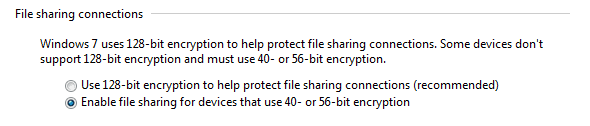
Yep, try knocking the encryption level down. Screenshot attached.
 

Attachments

  • encryptionlevel.PNG
    encryptionlevel.PNG
    3.6 KB · Views: 9

My Computer My Computer

At a glance

Win7 Ultimate x64, Server 2008 R2AMD Phenom II X6 1055T Thuban 2.8GHz8GB G.SKILL Ripjaws Series DDR3 1600 (PC3 12800)2x HIS/Sapphire ATI Radeon HD 5830 in CrossfireX
Computer Manufacturer/Model Number
Myself
OS
Win7 Ultimate x64, Server 2008 R2
CPU
AMD Phenom II X6 1055T Thuban 2.8GHz
Motherboard
GIGABYTE GA-890FXA-UD5
Memory
8GB G.SKILL Ripjaws Series DDR3 1600 (PC3 12800)
Graphics Card(s)
2x HIS/Sapphire ATI Radeon HD 5830 in CrossfireX
Sound Card
Sound Blaster X-Fi Xtreme
Monitor(s) Displays
Dell 2407WFP 24", Dell 22"
Screen Resolution
1920x1200
Hard Drives
Patriot Torqx 128GB SSD
3TB other HD
PSU
CORSAIR HX Series CMPSU-750HX 750W
Case
Antec Nine Hundred
Cooling
Cooler Master Hyper 212 Plus CPU cooler
Keyboard
SteelSeries MercStealth
Mouse
Razer Lachesis
Internet Speed
HAHA NO MOAR COMCAST. Now, FiOS :D
Other Info
I am a virtualization enthusiast. I like Hyper-V. It's free.
I'm a Windows 7 fangirl. I will teach a class for you or write a custom course for you RIGHT NOW.
I love EVE Online. I'm Sayra Sainer. I play Starcraft II. My gamertag is Tal0nn. I'm trying not to play Minecraft.
I also like coffee. I'll take a basic triple grande extra-hot breve stirred ristretto caramel machiatto.
Snapshots are very helpful. Can you please come back to the Sharing properties to make sure that the name of the Shared folder is called C?
Enabled Netbios
DHCP already enabled
Get the below when typing in \\BILLDT2\C.............
Are you referring to "C" on BILLDT2, the XP OS? If so, "C" is my hard drive, how would I do this?
Thanks.............Bill
 

My Computer My Computer

At a glance

Windows 7 Professional 64 bitAthlon 640 quad core4gb DDR32
Computer Manufacturer/Model Number
HP
OS
Windows 7 Professional 64 bit
CPU
Athlon 640 quad core
Motherboard
quad core
Memory
4gb DDR3
Graphics Card(s)
2
Sound Card
1
Monitor(s) Displays
2
Hard Drives
1-1tb
1-80gb external
Hey Bill,

Yep, try knocking the encryption level down. Screenshot attached.
I did, no help.
Thanks anyway.........................Bill
 

My Computer My Computer

At a glance

Windows 7 Professional 64 bitAthlon 640 quad core4gb DDR32
Computer Manufacturer/Model Number
HP
OS
Windows 7 Professional 64 bit
CPU
Athlon 640 quad core
Motherboard
quad core
Memory
4gb DDR3
Graphics Card(s)
2
Sound Card
1
Monitor(s) Displays
2
Hard Drives
1-1tb
1-80gb external
BillDT2 is where you are trying to access shared folders from correct?

From BillDT2 Computer, locate Local disk C, right click on it, select Properties, Security tab, click Edit, click Add button and enter the name of the User you want to set Security permissions or choose 'Everyone' make sure to give a Full Permission.
Try accessing the C drive from another computer. Please see Post# 8 again for full instruction.
 

My Computer My Computer

At a glance

Win7 & Win8 64bitIntel i5
Computer Manufacturer/Model Number
Lenovo Desktop/Samsung Laptop
OS
Win7 & Win8 64bit
CPU
Intel i5
Internet Speed
Charter-20 Mbps
Antivirus
Avast
Browser
FF, IE9 and Chrome
BillDT2 is where you are trying to access shared folders from correct?

From BillDT2 Computer, locate Local disk C, right click on it, select Properties, Security tab, click Edit, click Add button and enter the name of the User you want to set Security permissions or choose 'Everyone' make sure to give a Full Permission.
Try accessing the C drive from another computer. Please see Post# 8 again for full instruction.
Yes BILLDT2 is the PC I want to access, ON this PC BILLDT1 I see BILLDT2 but when I click on it is when I get the error noted earlier.

On BILLDT2, I right-clicked the C: drive, selected Properties but there was no Security Tab only a Share Tab which showes BILLDT2 but will not allow me to add the \C to end of it. Remember BILLDT2 has XP Home with SP3. I did tell it to Share C Drive and a window popped up showing foldrs being moved from left to right.
 

My Computer My Computer

At a glance

Windows 7 Professional 64 bitAthlon 640 quad core4gb DDR32
Computer Manufacturer/Model Number
HP
OS
Windows 7 Professional 64 bit
CPU
Athlon 640 quad core
Motherboard
quad core
Memory
4gb DDR3
Graphics Card(s)
2
Sound Card
1
Monitor(s) Displays
2
Hard Drives
1-1tb
1-80gb external
Being a Newbie on here, am I replying to the Posts correctly? I'm clicking "Quote" in the Window where some one is providing instructions. Just want to do it right.
Thanks....BillG226
 

My Computer My Computer

At a glance

Windows 7 Professional 64 bitAthlon 640 quad core4gb DDR32
Computer Manufacturer/Model Number
HP
OS
Windows 7 Professional 64 bit
CPU
Athlon 640 quad core
Motherboard
quad core
Memory
4gb DDR3
Graphics Card(s)
2
Sound Card
1
Monitor(s) Displays
2
Hard Drives
1-1tb
1-80gb external
The instruction that I gave you was for Windows 7, I'm glad that you're able to figured it out. :D
On BILLDT2, I right-clicked the C: drive, selected Properties but there was no Security Tab only a Share Tab which showes BILLDT2 but will not allow me to add the \C to end of it. Remember BILLDT2 has XP Home with SP3. I did tell it to Share C Drive and a window popped up showing foldrs being moved from left to right.
When you Share the Drive all you need to do is type a letter cap 'C' with no \ symbol. You will put the symbol if you're trying to access the BILLDT2 shared drive from another computer.

Now, pls. verify that you have shared the C driver by right clicking on it and select the Share Tab again make sure that the name of the Shared Drive is C. Did you give a Full Permission to Everyone for now? Then try accessing \\BILLDT2\C from another computer in you network. Let's see if this time you're able to connect.
Being a Newbie on here, am I replying to the Posts correctly? I'm clicking "Quote" in the Window where some one is providing instructions. Just want to do it right.
You're doing very well on replying. Thanks.
 

My Computer My Computer

At a glance

Win7 & Win8 64bitIntel i5
Computer Manufacturer/Model Number
Lenovo Desktop/Samsung Laptop
OS
Win7 & Win8 64bit
CPU
Intel i5
Internet Speed
Charter-20 Mbps
Antivirus
Avast
Browser
FF, IE9 and Chrome
The instruction that I gave you was for Windows 7, I'm glad that you're able to figured it out. :D
On BILLDT2, I right-clicked the C: drive, selected Properties but there was no Security Tab only a Share Tab which showes BILLDT2 but will not allow me to add the \C to end of it. Remember BILLDT2 has XP Home with SP3. I did tell it to Share C Drive and a window popped up showing foldrs being moved from left to right.
When you Share the Drive all you need to do is type a letter cap 'C' with no \ symbol. You will put the symbol if you're trying to access the BILLDT2 shared drive from another computer.

Now, pls. verify that you have shared the C driver by right clicking on it and select the Share Tab again make sure that the name of the Shared Drive is C. Did you give a Full Permission to Everyone for now? Then try accessing \\BILLDT2\C from another computer in you network. Let's see if this time you're able to connect.
When I right-click C, it gives me Sharing & Security Tab, I click it & I can't change BILLDT2 to C in the Sharing & Security window.


Being a Newbie on here, am I replying to the Posts correctly? I'm clicking "Quote" in the Window where some one is providing instructions. Just want to do it right.
You're doing very well on replying. Thanks.
Thanks for reply
 

My Computer My Computer

At a glance

Windows 7 Professional 64 bitAthlon 640 quad core4gb DDR32
Computer Manufacturer/Model Number
HP
OS
Windows 7 Professional 64 bit
CPU
Athlon 640 quad core
Motherboard
quad core
Memory
4gb DDR3
Graphics Card(s)
2
Sound Card
1
Monitor(s) Displays
2
Hard Drives
1-1tb
1-80gb external

My Computer My Computer

At a glance

Win7 & Win8 64bitIntel i5
Computer Manufacturer/Model Number
Lenovo Desktop/Samsung Laptop
OS
Win7 & Win8 64bit
CPU
Intel i5
Internet Speed
Charter-20 Mbps
Antivirus
Avast
Browser
FF, IE9 and Chrome
Thanks, it is a great tutorial, however I'd went past the 1st Window it shows & now don't know how to rename it from BILLDT2 to C. If only I saw this 1st.
Would a System Restore say back about a week undo the share of C so I can then start over?
Thanks for all your help to this PC Dummy, lol.
 

My Computer My Computer

At a glance

Windows 7 Professional 64 bitAthlon 640 quad core4gb DDR32
Computer Manufacturer/Model Number
HP
OS
Windows 7 Professional 64 bit
CPU
Athlon 640 quad core
Motherboard
quad core
Memory
4gb DDR3
Graphics Card(s)
2
Sound Card
1
Monitor(s) Displays
2
Hard Drives
1-1tb
1-80gb external
A system restore won't hurt and as you say, it will give you a fresh start, although you may have to re-install any software you installed during the intervening period.

As for being a PC dummy, we've all felt the same at times. Was it Ghandi who said that every journey starts with a single step? ;)
 

My Computer My Computer

At a glance

Windows 7 Ultimate SP1 64-BitIntel Core i7 870 @ 2.93GHz8Gb Dual-Channel DDR3 @ 664MHznVidia GeForce GTX 460 1024MB dedicated RAM
Computer Manufacturer/Model Number
HP Pavilion Elite 495UK
OS
Windows 7 Ultimate SP1 64-Bit
CPU
Intel Core i7 870 @ 2.93GHz
Motherboard
MSI 2A9C (CPU1)
Memory
8Gb Dual-Channel DDR3 @ 664MHz
Graphics Card(s)
nVidia GeForce GTX 460 1024MB dedicated RAM
Sound Card
Realtek HD Audio
Monitor(s) Displays
HP2310i
Screen Resolution
1920 x 1080
Hard Drives
1x1954GB Hitachi HDS22020ALA 330 (RAID), 1x1954GB Hitachi External for backup and storage
PSU
460W
Case
HP Elite
Cooling
Air cooled
Keyboard
Logitech K750 solar-powered keyboard
Mouse
Logitech Wireless M180 mouse
Internet Speed
2Mb
Other Info
Pure Avanti Flow Internet Radio with iPod Dock, 64Gb iPod, HP USB Speakers, Sony MDR-V500 Headphones, Sony Vaio F-Series Laptop
System Restore - it's up to you, it will undo All that you've done so far from the beginning of this Thread.
Thanks, it is a great tutorial, however I'd went past the 1st Window it shows & now don't know how to rename it from BILLDT2 to C. If only I saw this 1st.
BILLDT2 is your Computer Name isn't it? Computer Name is different than the Shared Folder Name. You may unshare a Shared Folder, re-do and give it a new shared name, call it C.

Can you pls. provide an ipconfig /all of BILLDT2 computer and another computer in your network?
Click on Start => in run or search box type cmd, enter. Open up a command prompt then Copy and Paste these ipconfig /all >c:\ipconfig.txt . Please attach the .txt file to be found in your Local Disk 'C' on your next post.
 

My Computer My Computer

At a glance

Win7 & Win8 64bitIntel i5
Computer Manufacturer/Model Number
Lenovo Desktop/Samsung Laptop
OS
Win7 & Win8 64bit
CPU
Intel i5
Internet Speed
Charter-20 Mbps
Antivirus
Avast
Browser
FF, IE9 and Chrome
Do you have the same firewall program running on XP and Win7?

I had a problem with my XP and Win7 sharing, until I allowed my Win7's address to be 'permmited' and not blocked in XP (ZA firewall at the time).
 

My Computer My Computer

At a glance

Windows 7 Ultimate 32bit SP1Intel(R) Core(TM)2 Quad CPU @ 2.40GHz, 2400 MHz4 GBATI Radeon HD 2600 Pro
Computer type
PC/Desktop
Computer Manufacturer/Model Number
Bruce ... somewhere in his 40's
OS
Windows 7 Ultimate 32bit SP1
CPU
Intel(R) Core(TM)2 Quad CPU @ 2.40GHz, 2400 MHz
Motherboard
INTEL/D975XBX2
Memory
4 GB
Graphics Card(s)
ATI Radeon HD 2600 Pro
Monitor(s) Displays
Samsung SyncMaster 914v
Screen Resolution
1280 x 1024
Hard Drives
2/500GB each ... ST3500630AS ATA Device.
One is not connected
PSU
Rocketfish 700 W
Case
G.Skill Gigabyte Chassis
Keyboard
Standard PS/2 Keyboard
Mouse
Microsoft PS/2 Mouse
Internet Speed
DSL
Antivirus
Avira Internet Security
Browser
IE 11
Other Info
ATI HDMI Audio
A system restore won't hurt and as you say, it will give you a fresh start, although you may have to re-install any software you installed during the intervening period.

As for being a PC dummy, we've all felt the same at times. Was it Ghandi who said that every journey starts with a single step? ;)
Restore did not work as it left BILLGDT2 still in the Sharing & Security Tag.
I have a Drive D on BIILDT2 and it had not been set to share but I did follow the link provided earlier & got D in the Security & Sharing Tab, Still didn't help. How do I access the Setting of Permissions?
Thanks............Bill
 

My Computer My Computer

At a glance

Windows 7 Professional 64 bitAthlon 640 quad core4gb DDR32
Computer Manufacturer/Model Number
HP
OS
Windows 7 Professional 64 bit
CPU
Athlon 640 quad core
Motherboard
quad core
Memory
4gb DDR3
Graphics Card(s)
2
Sound Card
1
Monitor(s) Displays
2
Hard Drives
1-1tb
1-80gb external
Do you have the same firewall program running on XP and Win7?

I had a problem with my XP and Win7 sharing, until I allowed my Win7's address to be 'permmited' and not blocked in XP (ZA firewall at the time).
I only use the Windows Firewall........Bill
 

My Computer My Computer

At a glance

Windows 7 Professional 64 bitAthlon 640 quad core4gb DDR32
Computer Manufacturer/Model Number
HP
OS
Windows 7 Professional 64 bit
CPU
Athlon 640 quad core
Motherboard
quad core
Memory
4gb DDR3
Graphics Card(s)
2
Sound Card
1
Monitor(s) Displays
2
Hard Drives
1-1tb
1-80gb external
System Restore - it's up to you, it will undo All that you've done so far from the beginning of this Thread.
Thanks, it is a great tutorial, however I'd went past the 1st Window it shows & now don't know how to rename it from BILLDT2 to C. If only I saw this 1st.
BILLDT2 is your Computer Name isn't it? Computer Name is different than the Shared Folder Name. You may unshare a Shared Folder, re-do and give it a new shared name, call it C.

Can you pls. provide an ipconfig /all of BILLDT2 computer and another computer in your network?
Click on Start => in run or search box type cmd, enter. Open up a command prompt then Copy and Paste these ipconfig /all >c:\ipconfig.txt . Please attach the .txt file to be found in your Local Disk 'C' on your next post.
Yes BILLDT2 is the PC name, I know now difference of PC Name & Folder Name. How do I un-share besides unchecking the box in Sharing & Security Tab? Also, how do I go into the Permissions Settings?

I've put below the .txt file from BILLGDT2:
 

Attachments

Last edited:

My Computer My Computer

At a glance

Windows 7 Professional 64 bitAthlon 640 quad core4gb DDR32
Computer Manufacturer/Model Number
HP
OS
Windows 7 Professional 64 bit
CPU
Athlon 640 quad core
Motherboard
quad core
Memory
4gb DDR3
Graphics Card(s)
2
Sound Card
1
Monitor(s) Displays
2
Hard Drives
1-1tb
1-80gb external
System Restore - it's up to you, it will undo All that you've done so far from the beginning of this Thread.
Thanks, it is a great tutorial, however I'd went past the 1st Window it shows & now don't know how to rename it from BILLDT2 to C. If only I saw this 1st.
BILLDT2 is your Computer Name isn't it? Computer Name is different than the Shared Folder Name. You may unshare a Shared Folder, re-do and give it a new shared name, call it C.

Can you pls. provide an ipconfig /all of BILLDT2 computer and another computer in your network?
Click on Start => in run or search box type cmd, enter. Open up a command prompt then Copy and Paste these ipconfig /all >c:\ipconfig.txt . Please attach the .txt file to be found in your Local Disk 'C' on your next post.
Yes BILLDT2 is the PC name, I know now difference of PC Name & Folder Name. How do I un-share besides unchecking the box in Sharing & Security Tab? Also, how do I go into the Permissions Settings?

Also note, I had a Drive D that was unshared so I shared it & put D in that box where it is showing BILLDT2 but still getting same error as before.

I've put below the .txt file from BILLGDT2:
See above note on Drive D.
 

My Computer My Computer

At a glance

Windows 7 Professional 64 bitAthlon 640 quad core4gb DDR32
Computer Manufacturer/Model Number
HP
OS
Windows 7 Professional 64 bit
CPU
Athlon 640 quad core
Motherboard
quad core
Memory
4gb DDR3
Graphics Card(s)
2
Sound Card
1
Monitor(s) Displays
2
Hard Drives
1-1tb
1-80gb external
Thanks for the ipconfig /all, you forgot the other computer's ipconfig /all as well. I'd like to see that one too.

On both XP Computers, verify that all your Network Services are Started. Dependencies Services need to be on Started Mode also.
Click on Start, type services.msc then press enter.

• COM+ Event System (for WZC issues)
• Computer Browser
• DHCP Client
• DNS Client
• Network Connections
• Network Location Awareness
• Remote Procedure Call (RPC)
• Server
• TCP/IP Netbios helper
• Workstation
 

My Computer My Computer

At a glance

Win7 & Win8 64bitIntel i5
Computer Manufacturer/Model Number
Lenovo Desktop/Samsung Laptop
OS
Win7 & Win8 64bit
CPU
Intel i5
Internet Speed
Charter-20 Mbps
Antivirus
Avast
Browser
FF, IE9 and Chrome
Thanks for the ipconfig /all, you forgot the other computer's ipconfig /all as well. I'd like to see that one too.

On both XP Computers, verify that all your Network Services are Started. Dependencies Services need to be on Started Mode also.
Click on Start, type services.msc then press enter.

• COM+ Event System (for WZC issues)
• Computer Browser
• DHCP Client
• DNS Client
• Network Connections
• Network Location Awareness
• Remote Procedure Call (RPC)
• Server
• TCP/IP Netbios helper
• Workstation
All the Services show started on both XP pcs, 1 being a Desktop, the other a Laptop (BILLLT).
Note: BILLLT sees BILLDT2 but doing same as it was from BILLDT1, though from both I can access files & use the printer attached to BILLDT1. Still no ideal how to Set Permissions in XP??

I tried to get a ipconfig.txt off this PC (BILLDT1) but it goes to C:\Users\Bill> then when I Paste ipconfig /all >c:\ipconfig.txt & press Enter, it comes back with Access Denied. I did get you one off the Laptop, so I'll send the 2 I got, ipconfigdt2.txt & ipconfiglt.txt.
 

Attachments

My Computer My Computer

At a glance

Windows 7 Professional 64 bitAthlon 640 quad core4gb DDR32
Computer Manufacturer/Model Number
HP
OS
Windows 7 Professional 64 bit
CPU
Athlon 640 quad core
Motherboard
quad core
Memory
4gb DDR3
Graphics Card(s)
2
Sound Card
1
Monitor(s) Displays
2
Hard Drives
1-1tb
1-80gb external
ipconfig /all shows no issues at all.

Pls. enable the Guest Account from BILLDT2, although it's not too safe. Not much you can do for XP Home Edition in terms of Permission. Usually creating Identical Usernames and Passwords helps.

Also, please have a read at this.

It won't hurt to change MSHOME to a diff Name. Can you pls. give this a go?
 
Last edited:

My Computer My Computer

At a glance

Win7 & Win8 64bitIntel i5
Computer Manufacturer/Model Number
Lenovo Desktop/Samsung Laptop
OS
Win7 & Win8 64bit
CPU
Intel i5
Internet Speed
Charter-20 Mbps
Antivirus
Avast
Browser
FF, IE9 and Chrome
Back
Top