Absolutely NO Hibernate

Micro1321

New member
Member
Local time
1:53 PM
Messages
37
First, sorry about spelling, I'm bad at it.
OK, so whenever I click on "Hibernate" from the start menu, my computer goes on standby. Also my computer usually has the uncanny ability to Hibernate when its battery gets critical. Now it just goes on standby, and I lose my work.

Thank you for your help!
 

My Computer My Computer

At a glance

Windows 7 Ultimate 64 BitIntel Core i5-3350P CPI @ 3.10GHz (Quad Core)12 GBAMD Radeon HD 7570
Computer type
PC/Desktop
Computer Manufacturer/Model Number
Dell
OS
Windows 7 Ultimate 64 Bit
CPU
Intel Core i5-3350P CPI @ 3.10GHz (Quad Core)
Memory
12 GB
Graphics Card(s)
AMD Radeon HD 7570
Sound Card
Integrated
Screen Resolution
3200 x 1080
Internet Speed
50/10
Browser
Google Chrome
Hibernate utilizes a disk file named hiberfil.sys placed on C. It's generally in the 3-4GB or larger range (depending on the amount of memory in your computer), and if you previously have hibernated successfully that file would have already been allocated from previous hibernations. But it may vary in size, so that its required size now is perhaps larger than it was previously.

Have you run out of space on C?


Have you changed video or updated video drivers recently? These are associated with the hibernation function.


Do you have a system restore point from a moment in time that you know you used to have working hibernation, that you can restore from to see if that fixes the problem?

More extreme, do you have a "system image" you can restore (first, preserving any recent data you don't want to lose in the process, to a second drive or backup you can later copy back from after the "system image" is restored)? Presumably, this system image was again taken at a moment in time when hibernation was working?


Obviously it's not clear yet whether the problem is a software or hardware issue, but certainly either of the above "restore" options from a previously working environment where hibernation was functional should return you to that state... if the current problem is a Windows or driver software cause. Presumably you would be back in business after the restore, and hibernation would be working again.

If it's really a hardware problem of some sort, you should still have the same problem even after these restores.

This would at least narrow your diagnostic efforts... to either hardware or software.
 

My Computer My Computer

At a glance

Windows 7 Pro x64 (1), Win7 Pro X64 (2)i5-3350p 3.1Ghz/6MB-cache (1); E8400 3.0Ghz/6...8GB PC3-12800 DDR3 (1); 4GB PC3-10600 DDR3 (2)ATI HD7750 (1), (see TV cards); ATI R7 250 (2)
Computer type
PC/Desktop
Computer Manufacturer/Model Number
Home-built, two systems (1) and (2)
OS
Windows 7 Pro x64 (1), Win7 Pro X64 (2)
CPU
i5-3350p 3.1Ghz/6MB-cache (1); E8400 3.0Ghz/6MB-cache (2)
Motherboard
ASUS P8Z77-V Pro (1); ASUS P5Q3 (2)
Memory
8GB PC3-12800 DDR3 (1); 4GB PC3-10600 DDR3 (2)
Graphics Card(s)
ATI HD7750 (1), (see TV cards); ATI R7 250 (2)
Sound Card
Realtek ALC892 HD Audio (1); Realtek ALC1200 HD Audio (2)
Monitor(s) Displays
Eizo HD2441W LCD, Eizo S2433W (1); Eizo 24" S2433W (2)
Screen Resolution
1920x1200, 1920x1200 (1); 1920x1200 (2)
Hard Drives
(1) 1TB SATA-II (7200RPM), 2x2TB SATA-III (7200RPM), 250GB SATA-III (10000RPM) for OS; 2x2TB external USB 3.0

(2) 320GB SATA-II (7200RPM), 750GB SATA-II (7200RPM), 150GB SATA-II (10000RPM) for OS; 2TB external USB 3.0
PSU
Nesteq ECS-6001 600W (1); Nesteq ECS-5001 500W (2)
Case
Acousti-Case 360 (1) and (2)
Cooling
Noctua NH-U12P SE2 for CPU, 2x120mm case fans (1) and (2)
Keyboard
IBM PS/2 (1) and (2)
Mouse
Logitech MX Revolution wireless (1); Microsoft wired (2)
Internet Speed
100mbps down / 10mbps up
Antivirus
Microsoft Security Essentials; Malwarebyte Anti-Malware Pro
Browser
Firefox
Other Info
Ceton InfiniTV 4-tuner cablecard-enabled TV card as well as Hauppauge HVR-2250 OTA/ATSC 2-tuner TV card in (1), running under Win7 WMC
I don't think I changed any of my drivers in a while.
I did try a system restore, but I don't THINK (I'm not sure) that it was far enough back. I do not have a system image. Not sure if this is useful, but I do have a Windows 7 32bit repair disk, as well as an install disk (I did not use it to install Windows on my computer). I have 55.5 GB of disk space on my windows partition.

I can't find hiberfil.sys on my hard drive either.

Thanks for your help.
 

My Computer My Computer

At a glance

Windows 7 Ultimate 64 BitIntel Core i5-3350P CPI @ 3.10GHz (Quad Core)12 GBAMD Radeon HD 7570
Computer type
PC/Desktop
Computer Manufacturer/Model Number
Dell
OS
Windows 7 Ultimate 64 Bit
CPU
Intel Core i5-3350P CPI @ 3.10GHz (Quad Core)
Memory
12 GB
Graphics Card(s)
AMD Radeon HD 7570
Sound Card
Integrated
Screen Resolution
3200 x 1080
Internet Speed
50/10
Browser
Google Chrome
I'm not a lappy. So I can help just a little. Why not just shut it off and save the battery. When it's off charge the battery. It takes 90 to 120 seconds to start a well set up computer with Windows 7 on it with a hdd. From my understanding, when you battery is low a quick boot does not work to full capability. When you shut down your lappy save the work and it will be there for you later. When your power is at it's minimum your system works at a minimum.
 

My Computer My Computer

At a glance

Windows 10 Pro. 64/ version 1709 Windows 7 Pr...Intel i7-6800K @ 4.3Corsair Platinum 16 gig @2400EVGA GTX 1070 OC
Computer type
PC/Desktop
Computer Manufacturer/Model Number
Home made Desktop
OS
Windows 10 Pro. 64/ version 1709 Windows 7 Pro/64
CPU
Intel i7-6800K @ 4.3
Motherboard
ASUS X-99 Deluxe II
Memory
Corsair Platinum 16 gig @2400
Graphics Card(s)
EVGA GTX 1070 OC
Monitor(s) Displays
Asus 27" LED LCD/VE278Q
Screen Resolution
1920-1080 or 1280-720 HDMI
Hard Drives
INTEL SSD 730-240 Gb Sata 3.0/
PSU
EVGA Platium 1200W
Case
Phanteks Luxe Tempered Glass 8 fans/ one radiator
Cooling
XSPC/ Water Cooled CPU
Keyboard
Das 4 Professional
Mouse
Logitech M705/MX Anywhere 2-S
Internet Speed
100 mbits
Antivirus
Microsoft Security Essentials/ Malwarebytes Premium 3.0/ SAS
Browser
I.E. 11 default/Firefox/ ISP Time Warner Cable/Spectrum
Other Info
LG BluRay Burner/
Sound system-KLipsch-THX/
Icy Dock ssd Hot Swap bays.
I don't think I changed any of my drivers in a while.
Ok, so it's not the video drivers which would explain your symptom.


I did try a system restore, but I don't THINK (I'm not sure) that it was far enough back.
Normally, there are multiple generations of system restore points retained, depending on max space utilization settings. This space utilization limit can certainly control how much of your hard drive gets eaten up by these system restore points, but sometimes it's "penny wise, pound foolish".

You can check your system restore space setting by Control Panel -> System and Security -> System -> Advanced system settings -> system properties window. Then select the "system protection" tab, select your C drive from the list of drives (it probably shows "ON"), and push the "configure" button. There's a slider that controls how much hard drive space should be the, as a GB number and also a percentage of your hard drive capacity. Adjust this, and push the OK button to apply... if what you see is outlandish.

If you've never played with this setting before, I don't know what the default value would be on your system. But the more space you allow, the more generations of restore points will be kept before "pruning" the oldest ones to make room for new ones.

restorepoints.jpg


I do not have a system image.
Unfortunate. This is perhaps THE biggest new feature in Win7, in my opinion. It's worth it to buy an external USB hard drive and use it for backups, and for system images... as you can now see.


Not sure if this is useful, but I do have a Windows 7 32bit repair disk, as well as an install disk (I did not use it to install Windows on my computer).
Not of any value for resolution of the current problem. We still don't really know what has caused it to show up... either hardware, or software, or battery issue, or something else.


I have 55.5 GB of disk space on my windows partition.
You mean 55GB of FREE disk space on C? Or is 55GB the total size of your C partition?


I can't find hiberfil.sys on my hard drive either.
Well it's a hidden+system file, and you would not normally see it in any Explorer view unless you've modified the default Win7 settings to show hidden/system files.

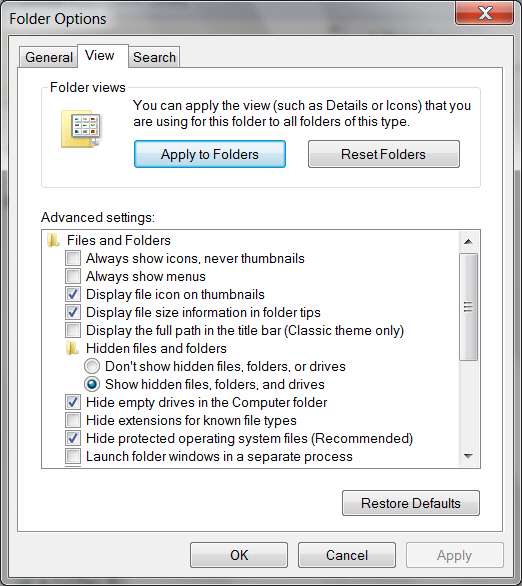
Open Explorer (say, click on the "Libraries" folder icon on the task bar, or just open Explorer somehow) and then click on the "Organize" item near the top-left, and select "folder and search options" from the dropdown menu, to get the Folder Options window. Then select the "view" tab, and check the "show hidden files, folders and drives" radio button. Then push the OK button.

foldersz.jpg


Now once again Explore your C drive, and see if you see hiberfil.sys (you should also now see pagefile.sys, which is in the same system+hidden category).


If you don't see hiberfil.sys but you do see pagefile.sys, then we're onto something. It is absolutely relevant to the problem if you do NOT see hiberfil.sys, since without it there can be no hibernation.

What we don't know then, is which came first... the chicken or the egg. Is the somehow missing hiberfil.sys the CAUSE of the problem, or the RESULT of the problem?

Of course, if you DO see hiberfil.sys but are still not getting hibernation, well we don't know the answer yet but it's an interesting piece of information we need to fit into the story somehow.
 

My Computer My Computer

At a glance

Windows 7 Pro x64 (1), Win7 Pro X64 (2)i5-3350p 3.1Ghz/6MB-cache (1); E8400 3.0Ghz/6...8GB PC3-12800 DDR3 (1); 4GB PC3-10600 DDR3 (2)ATI HD7750 (1), (see TV cards); ATI R7 250 (2)
Computer type
PC/Desktop
Computer Manufacturer/Model Number
Home-built, two systems (1) and (2)
OS
Windows 7 Pro x64 (1), Win7 Pro X64 (2)
CPU
i5-3350p 3.1Ghz/6MB-cache (1); E8400 3.0Ghz/6MB-cache (2)
Motherboard
ASUS P8Z77-V Pro (1); ASUS P5Q3 (2)
Memory
8GB PC3-12800 DDR3 (1); 4GB PC3-10600 DDR3 (2)
Graphics Card(s)
ATI HD7750 (1), (see TV cards); ATI R7 250 (2)
Sound Card
Realtek ALC892 HD Audio (1); Realtek ALC1200 HD Audio (2)
Monitor(s) Displays
Eizo HD2441W LCD, Eizo S2433W (1); Eizo 24" S2433W (2)
Screen Resolution
1920x1200, 1920x1200 (1); 1920x1200 (2)
Hard Drives
(1) 1TB SATA-II (7200RPM), 2x2TB SATA-III (7200RPM), 250GB SATA-III (10000RPM) for OS; 2x2TB external USB 3.0

(2) 320GB SATA-II (7200RPM), 750GB SATA-II (7200RPM), 150GB SATA-II (10000RPM) for OS; 2TB external USB 3.0
PSU
Nesteq ECS-6001 600W (1); Nesteq ECS-5001 500W (2)
Case
Acousti-Case 360 (1) and (2)
Cooling
Noctua NH-U12P SE2 for CPU, 2x120mm case fans (1) and (2)
Keyboard
IBM PS/2 (1) and (2)
Mouse
Logitech MX Revolution wireless (1); Microsoft wired (2)
Internet Speed
100mbps down / 10mbps up
Antivirus
Microsoft Security Essentials; Malwarebyte Anti-Malware Pro
Browser
Firefox
Other Info
Ceton InfiniTV 4-tuner cablecard-enabled TV card as well as Hauppauge HVR-2250 OTA/ATSC 2-tuner TV card in (1), running under Win7 WMC
I have look at the system restore setting before, but I never changed it. (I probably should have, and will now) It was at 8GB. I can see hidden files and folders, and cannot see hiberfil.sys, OR pagefile.sys.

What does pagefile.sys do?

I have 55.5GB of FREE space, and 42.8GB on another partition. (Ubuntu)
 

My Computer My Computer

At a glance

Windows 7 Ultimate 64 BitIntel Core i5-3350P CPI @ 3.10GHz (Quad Core)12 GBAMD Radeon HD 7570
Computer type
PC/Desktop
Computer Manufacturer/Model Number
Dell
OS
Windows 7 Ultimate 64 Bit
CPU
Intel Core i5-3350P CPI @ 3.10GHz (Quad Core)
Memory
12 GB
Graphics Card(s)
AMD Radeon HD 7570
Sound Card
Integrated
Screen Resolution
3200 x 1080
Internet Speed
50/10
Browser
Google Chrome
I can see hidden files and folders, and cannot see hiberfil.sys, OR pagefile.sys.
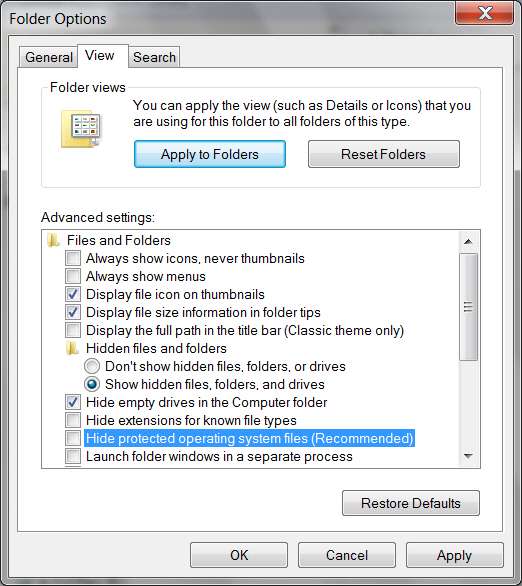
Ooops... sorry, my mistake. In addition to checking the "show hidden files" item I'd mentioned before, you also need to UN-CHECK the "hide protected operating system files" item just a bit below it:

unhide.jpg


You'll get a confirmation popup when you un-check that item, so just reply OK.

Note that my own preference is also to UN-CHECK that "hide extensions for known file types" item, because my own personal preference is to WANT to see things like the ".txt" or ".avi" or ".docx" or ".mpg" or ".MP3" or whatever extension, when seeing a file name. I don't want to have to guess at it, or deduce what it is from the associated program mini-icon to its left. I simply want to see the full and complete file name exactly as it is... including extension. Period.

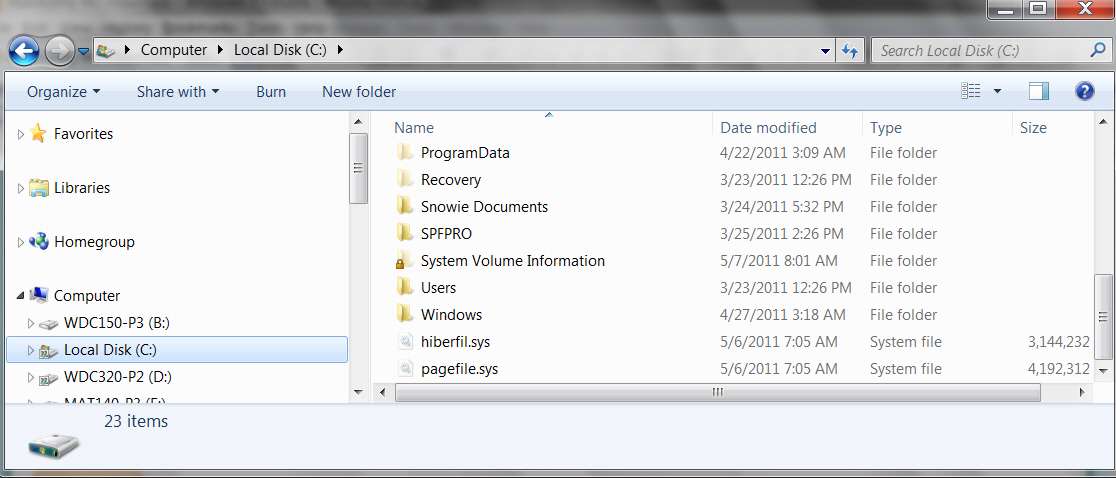
Now if you look at C you will (or should) see these two files, hiberfil.sys and pagefile.sys:

unhide2.jpg


What does pagefile.sys do?
It's a system file that allows your operating system to function as if it had much more RAM virtual memory than it really does physically have.

To be technical, this pagefile.sys is part of the "paging mechanism" in the operating system which swaps "virtual page frames" (that provide addressability to virtual memory with virtual addresses that can be exceedingly large) into "physical page frames" in your actual finite physical RAM memory, which is almost always (until recent technology improvements coupled with drops in memory prices) smaller than your virtual address space need.

So you can run Windows as if it had 6GB of "virtual address space", even though you may only have 512MB of "physical memory". Obviously, it will not run as well as if it truly had 6GB of physical memory... because with 6GB of physical memory there would likely be zero or almost zero "page swapping" since everything in the "virtual address space" would actually be mapped to true "physical RAM memory" to match.

That's why adding more physical RAM memory (in a 64-bit OS that can support it) is always a good thing... to improve performance by reducing "page swapping" when your open application windows require more and more "virtual memory" from "virtual address space".

Anyway, that's what pagefile.sys is for. It generally is sized at about the size of your real RAM memory when no paging/swapping is occurring (i.e. you have sufficient real physical RAM memory to support your Windows needs). However it will grow in size if you open a sufficient number of program windows, tabs in browsers, documents to be edited, etc., so that the total current "virtual address space" requirement exceeds that of your actual physical RAM memory... so that you now need more "virtual address space" than your physical RAM memory can 1:1 map.

It is a system file, managed by the system, sized by the system automatically, and you don't need to worry about it. That's also why it's normally hidden from casual user Explorer view.


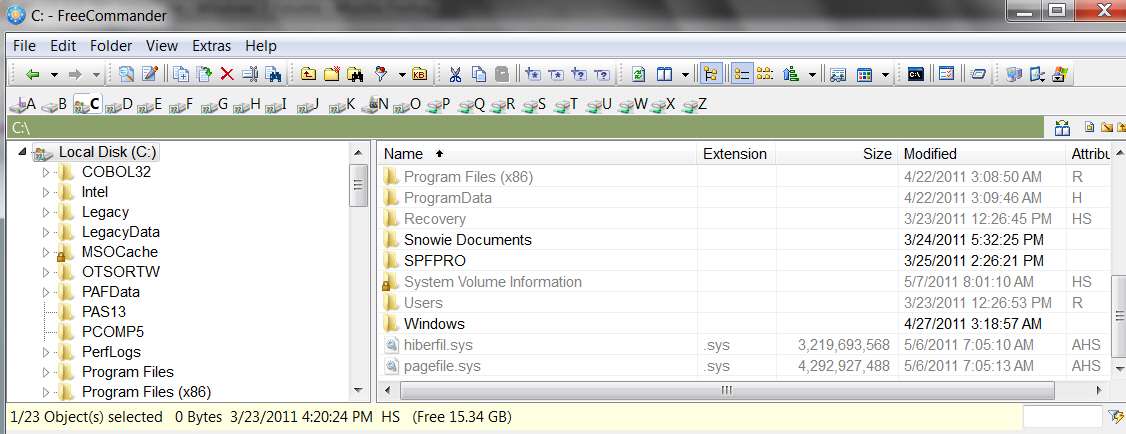
NOTE: in my own mind, I was really thinking about looking for it with a File Manager that I use named "Free Commander". This is a highly recommended free program that performs all Windows Explorer functions and then some, in a highly intuitive and easy-to-use multi-pane presentation.

I don't have that "hide protected operating system files" item un-checked, because actually I do NOT want to see them when doing normal Explorer functions... so that I won't accidentally rename or delete them or otherwise modify or move them.

But I can still see them with Free Commander:

unhide3.jpg


You should consider installing Free Commander, available from here... it's highly recommended by me, and other users on this Forum. Excellent product.


I have 55.5GB of FREE space, and 42.8GB on another partition. (Ubuntu)
Well then it should not be a space problem not being able to allocate hiberfil.sys.

So, now that you've un-checked "hide protected files" and looked at your C drive with Explorer (or Free Commander), do you have hiberfil.sys or not?

 

My Computer My Computer

At a glance

Windows 7 Pro x64 (1), Win7 Pro X64 (2)i5-3350p 3.1Ghz/6MB-cache (1); E8400 3.0Ghz/6...8GB PC3-12800 DDR3 (1); 4GB PC3-10600 DDR3 (2)ATI HD7750 (1), (see TV cards); ATI R7 250 (2)
Computer type
PC/Desktop
Computer Manufacturer/Model Number
Home-built, two systems (1) and (2)
OS
Windows 7 Pro x64 (1), Win7 Pro X64 (2)
CPU
i5-3350p 3.1Ghz/6MB-cache (1); E8400 3.0Ghz/6MB-cache (2)
Motherboard
ASUS P8Z77-V Pro (1); ASUS P5Q3 (2)
Memory
8GB PC3-12800 DDR3 (1); 4GB PC3-10600 DDR3 (2)
Graphics Card(s)
ATI HD7750 (1), (see TV cards); ATI R7 250 (2)
Sound Card
Realtek ALC892 HD Audio (1); Realtek ALC1200 HD Audio (2)
Monitor(s) Displays
Eizo HD2441W LCD, Eizo S2433W (1); Eizo 24" S2433W (2)
Screen Resolution
1920x1200, 1920x1200 (1); 1920x1200 (2)
Hard Drives
(1) 1TB SATA-II (7200RPM), 2x2TB SATA-III (7200RPM), 250GB SATA-III (10000RPM) for OS; 2x2TB external USB 3.0

(2) 320GB SATA-II (7200RPM), 750GB SATA-II (7200RPM), 150GB SATA-II (10000RPM) for OS; 2TB external USB 3.0
PSU
Nesteq ECS-6001 600W (1); Nesteq ECS-5001 500W (2)
Case
Acousti-Case 360 (1) and (2)
Cooling
Noctua NH-U12P SE2 for CPU, 2x120mm case fans (1) and (2)
Keyboard
IBM PS/2 (1) and (2)
Mouse
Logitech MX Revolution wireless (1); Microsoft wired (2)
Internet Speed
100mbps down / 10mbps up
Antivirus
Microsoft Security Essentials; Malwarebyte Anti-Malware Pro
Browser
Firefox
Other Info
Ceton InfiniTV 4-tuner cablecard-enabled TV card as well as Hauppauge HVR-2250 OTA/ATSC 2-tuner TV card in (1), running under Win7 WMC
I can now find the two files.
 

My Computer My Computer

At a glance

Windows 7 Ultimate 64 BitIntel Core i5-3350P CPI @ 3.10GHz (Quad Core)12 GBAMD Radeon HD 7570
Computer type
PC/Desktop
Computer Manufacturer/Model Number
Dell
OS
Windows 7 Ultimate 64 Bit
CPU
Intel Core i5-3350P CPI @ 3.10GHz (Quad Core)
Memory
12 GB
Graphics Card(s)
AMD Radeon HD 7570
Sound Card
Integrated
Screen Resolution
3200 x 1080
Internet Speed
50/10
Browser
Google Chrome
I can now find the two files.
Hmmm... that's good, and actually what I expected you to find, really (since "hibernate" was still an available shutdown option and that means hiberfil.sys should exist).

But it's also bad, in that it means something yet to be explained is preventing the hibernation process from actually proceeding as intended, whether you manually request it or whether your low-battery trigger attempts to hibernate.

Does this failure still occur with the A/C adapter connected, so that the laptop is not running on battery?
 

My Computer My Computer

At a glance

Windows 7 Pro x64 (1), Win7 Pro X64 (2)i5-3350p 3.1Ghz/6MB-cache (1); E8400 3.0Ghz/6...8GB PC3-12800 DDR3 (1); 4GB PC3-10600 DDR3 (2)ATI HD7750 (1), (see TV cards); ATI R7 250 (2)
Computer type
PC/Desktop
Computer Manufacturer/Model Number
Home-built, two systems (1) and (2)
OS
Windows 7 Pro x64 (1), Win7 Pro X64 (2)
CPU
i5-3350p 3.1Ghz/6MB-cache (1); E8400 3.0Ghz/6MB-cache (2)
Motherboard
ASUS P8Z77-V Pro (1); ASUS P5Q3 (2)
Memory
8GB PC3-12800 DDR3 (1); 4GB PC3-10600 DDR3 (2)
Graphics Card(s)
ATI HD7750 (1), (see TV cards); ATI R7 250 (2)
Sound Card
Realtek ALC892 HD Audio (1); Realtek ALC1200 HD Audio (2)
Monitor(s) Displays
Eizo HD2441W LCD, Eizo S2433W (1); Eizo 24" S2433W (2)
Screen Resolution
1920x1200, 1920x1200 (1); 1920x1200 (2)
Hard Drives
(1) 1TB SATA-II (7200RPM), 2x2TB SATA-III (7200RPM), 250GB SATA-III (10000RPM) for OS; 2x2TB external USB 3.0

(2) 320GB SATA-II (7200RPM), 750GB SATA-II (7200RPM), 150GB SATA-II (10000RPM) for OS; 2TB external USB 3.0
PSU
Nesteq ECS-6001 600W (1); Nesteq ECS-5001 500W (2)
Case
Acousti-Case 360 (1) and (2)
Cooling
Noctua NH-U12P SE2 for CPU, 2x120mm case fans (1) and (2)
Keyboard
IBM PS/2 (1) and (2)
Mouse
Logitech MX Revolution wireless (1); Microsoft wired (2)
Internet Speed
100mbps down / 10mbps up
Antivirus
Microsoft Security Essentials; Malwarebyte Anti-Malware Pro
Browser
Firefox
Other Info
Ceton InfiniTV 4-tuner cablecard-enabled TV card as well as Hauppauge HVR-2250 OTA/ATSC 2-tuner TV card in (1), running under Win7 WMC
Yes, it does.
 

My Computer My Computer

At a glance

Windows 7 Ultimate 64 BitIntel Core i5-3350P CPI @ 3.10GHz (Quad Core)12 GBAMD Radeon HD 7570
Computer type
PC/Desktop
Computer Manufacturer/Model Number
Dell
OS
Windows 7 Ultimate 64 Bit
CPU
Intel Core i5-3350P CPI @ 3.10GHz (Quad Core)
Memory
12 GB
Graphics Card(s)
AMD Radeon HD 7570
Sound Card
Integrated
Screen Resolution
3200 x 1080
Internet Speed
50/10
Browser
Google Chrome
Maybe the file is corrupeted.
 

My Computer My Computer

At a glance

Windows 7 Ultimate 64 BitIntel Core i5-3350P CPI @ 3.10GHz (Quad Core)12 GBAMD Radeon HD 7570
Computer type
PC/Desktop
Computer Manufacturer/Model Number
Dell
OS
Windows 7 Ultimate 64 Bit
CPU
Intel Core i5-3350P CPI @ 3.10GHz (Quad Core)
Memory
12 GB
Graphics Card(s)
AMD Radeon HD 7570
Sound Card
Integrated
Screen Resolution
3200 x 1080
Internet Speed
50/10
Browser
Google Chrome
Maybe the file is corrupted.
I believe it's only written-to when you shutdown by going into hibernation. I don't think whatever it currently is has any relevance.

Now if it were corrupted at restart time, and couldn't be used to bring the system out of hibernation successfully, you'd get a message to that effect. Your choice would then be to simply abort the attempt at coming out of hibernation and simply do a normal "cold boot" from scratch.

I've seen instances where simply re-trying the re-start out of hibernation a second time (by pushing the RESET button on the case, to simply re-boot) magically cures whatever the problem was the first time, and lo and behold the restart using the hiberfil.sys data now works perfectly. Of course, this is really just good luck, and there's that real chance the file was genuinely corrupted somehow and could not be used.

Anyway, at shutdown time, the current desktop situation is WRITTEN to hiberfil.sys... assuming it can be written. Current old contents of hiberfil.sys don't matter.

We still don't know what the story is here.


Can you please look in the Event Viewer to see if there's any interesting messages that might shed some light.

Start -> right click on Computer -> Manage, to get the "Computer Management" window. Resize or maximize the window so you can see more, and spread the columns and sub-columns so you can read everything under each column heading better.

Then click on the "Event Viewer" item, and you'll get an "Overview and Summary" presentation in the center pane.

Do you have any items shown in the Critical or Error sections? If so, when you expand them (by clicking on the "+" next to that group) and look at them (by double-clicking on that line to present the individual messages view) and then look at the detail by selecting a message in the top frame of this new view and reading the description in the "General" tab in the bottom pane, is there anything at all which seems to pertain to a problem occurring when you tried to go into hibernation?
 

My Computer My Computer

At a glance

Windows 7 Pro x64 (1), Win7 Pro X64 (2)i5-3350p 3.1Ghz/6MB-cache (1); E8400 3.0Ghz/6...8GB PC3-12800 DDR3 (1); 4GB PC3-10600 DDR3 (2)ATI HD7750 (1), (see TV cards); ATI R7 250 (2)
Computer type
PC/Desktop
Computer Manufacturer/Model Number
Home-built, two systems (1) and (2)
OS
Windows 7 Pro x64 (1), Win7 Pro X64 (2)
CPU
i5-3350p 3.1Ghz/6MB-cache (1); E8400 3.0Ghz/6MB-cache (2)
Motherboard
ASUS P8Z77-V Pro (1); ASUS P5Q3 (2)
Memory
8GB PC3-12800 DDR3 (1); 4GB PC3-10600 DDR3 (2)
Graphics Card(s)
ATI HD7750 (1), (see TV cards); ATI R7 250 (2)
Sound Card
Realtek ALC892 HD Audio (1); Realtek ALC1200 HD Audio (2)
Monitor(s) Displays
Eizo HD2441W LCD, Eizo S2433W (1); Eizo 24" S2433W (2)
Screen Resolution
1920x1200, 1920x1200 (1); 1920x1200 (2)
Hard Drives
(1) 1TB SATA-II (7200RPM), 2x2TB SATA-III (7200RPM), 250GB SATA-III (10000RPM) for OS; 2x2TB external USB 3.0

(2) 320GB SATA-II (7200RPM), 750GB SATA-II (7200RPM), 150GB SATA-II (10000RPM) for OS; 2TB external USB 3.0
PSU
Nesteq ECS-6001 600W (1); Nesteq ECS-5001 500W (2)
Case
Acousti-Case 360 (1) and (2)
Cooling
Noctua NH-U12P SE2 for CPU, 2x120mm case fans (1) and (2)
Keyboard
IBM PS/2 (1) and (2)
Mouse
Logitech MX Revolution wireless (1); Microsoft wired (2)
Internet Speed
100mbps down / 10mbps up
Antivirus
Microsoft Security Essentials; Malwarebyte Anti-Malware Pro
Browser
Firefox
Other Info
Ceton InfiniTV 4-tuner cablecard-enabled TV card as well as Hauppauge HVR-2250 OTA/ATSC 2-tuner TV card in (1), running under Win7 WMC
Check also the Performance Log which may log what is hanging Hibernate: troubleshooting steps

The #1 culprit is often Display driver, so focus on updating it, rolling it back, trying other drivers including the one delivered by optional Windows Updates when you enable hardware auto-updating: Automatically get recommended drivers and updates for your hardware. Unlike XP, Win7 is the authority on its drivers.

You'll also want to turn off wake alerts in Power Options and on Power tab of any drivers.

If these turn up nothing, do the trace using the tutorial posted with it to try to interpret it's results. If you need help, post up the trace .etl file to file sharing like Windows Live and link it here to be read by our own Cluberti, who is the top help expert on this in the world.
 
Do you have any items shown in the Critical or Error sections? If so, when you expand them (by clicking on the "+" next to that group) and look at them (by double-clicking on that line to present the individual messages view) and then look at the detail by selecting a message in the top frame of this new view and reading the description in the "General" tab in the bottom pane, is there anything at all which seems to pertain to a problem occurring when you tried to go into hibernation?

I have a few kernel-power critical errors, where a reboot was made without a clean shutdown, but those were probably due to my battery, or overheating (after this all started).
 

My Computer My Computer

At a glance

Windows 7 Ultimate 64 BitIntel Core i5-3350P CPI @ 3.10GHz (Quad Core)12 GBAMD Radeon HD 7570
Computer type
PC/Desktop
Computer Manufacturer/Model Number
Dell
OS
Windows 7 Ultimate 64 Bit
CPU
Intel Core i5-3350P CPI @ 3.10GHz (Quad Core)
Memory
12 GB
Graphics Card(s)
AMD Radeon HD 7570
Sound Card
Integrated
Screen Resolution
3200 x 1080
Internet Speed
50/10
Browser
Google Chrome
Check also the Performance Log which may log what is hanging Hibernate: troubleshooting steps

The #1 culprit is often Display driver, so focus on updating it, rolling it back, trying other drivers including the one delivered by optional Windows Updates when you enable hardware auto-updating: Automatically get recommended drivers and updates for your hardware. Unlike XP, Win7 is the authority on its drivers.

You'll also want to turn off wake alerts in Power Options and on Power tab of any drivers.

If these turn up nothing, do the trace using the tutorial posted with it to try to interpret it's results. If you need help, post up the trace .etl file to file sharing like Windows Live and link it here to be read by our own Cluberti, who is the top help expert on this in the world.

I have application, security, setup, system, and forwarded events logs, but no Performance log.

All my drivers are up to date, and I tried everything else with them.

I'll try the trace and post here when I find out more.
 

My Computer My Computer

At a glance

Windows 7 Ultimate 64 BitIntel Core i5-3350P CPI @ 3.10GHz (Quad Core)12 GBAMD Radeon HD 7570
Computer type
PC/Desktop
Computer Manufacturer/Model Number
Dell
OS
Windows 7 Ultimate 64 Bit
CPU
Intel Core i5-3350P CPI @ 3.10GHz (Quad Core)
Memory
12 GB
Graphics Card(s)
AMD Radeon HD 7570
Sound Card
Integrated
Screen Resolution
3200 x 1080
Internet Speed
50/10
Browser
Google Chrome
The light blue type are links to more information to explain how to do the steps:

Check also the Performance log on Advanced Tools page accessed by clicking your WEI score link at Computer>Properties.
 
The light blue type are links to more information to explain how to do the steps:

I know that blue = link, but it just brought me to a "Computer lags a couple seconds" page.
 

My Computer My Computer

At a glance

Windows 7 Ultimate 64 BitIntel Core i5-3350P CPI @ 3.10GHz (Quad Core)12 GBAMD Radeon HD 7570
Computer type
PC/Desktop
Computer Manufacturer/Model Number
Dell
OS
Windows 7 Ultimate 64 Bit
CPU
Intel Core i5-3350P CPI @ 3.10GHz (Quad Core)
Memory
12 GB
Graphics Card(s)
AMD Radeon HD 7570
Sound Card
Integrated
Screen Resolution
3200 x 1080
Internet Speed
50/10
Browser
Google Chrome
Thats a post where I give the basic troubleshooting steps for Win7. Accessing the Performance log is in the first paragraph.
 
I can't run the trace as xbootmgr is not a program, even after I install Windows 7 SDK.
 

My Computer My Computer

At a glance

Windows 7 Ultimate 64 BitIntel Core i5-3350P CPI @ 3.10GHz (Quad Core)12 GBAMD Radeon HD 7570
Computer type
PC/Desktop
Computer Manufacturer/Model Number
Dell
OS
Windows 7 Ultimate 64 Bit
CPU
Intel Core i5-3350P CPI @ 3.10GHz (Quad Core)
Memory
12 GB
Graphics Card(s)
AMD Radeon HD 7570
Sound Card
Integrated
Screen Resolution
3200 x 1080
Internet Speed
50/10
Browser
Google Chrome
Back
Top