I can see hidden files and folders, and cannot see hiberfil.sys, OR pagefile.sys.
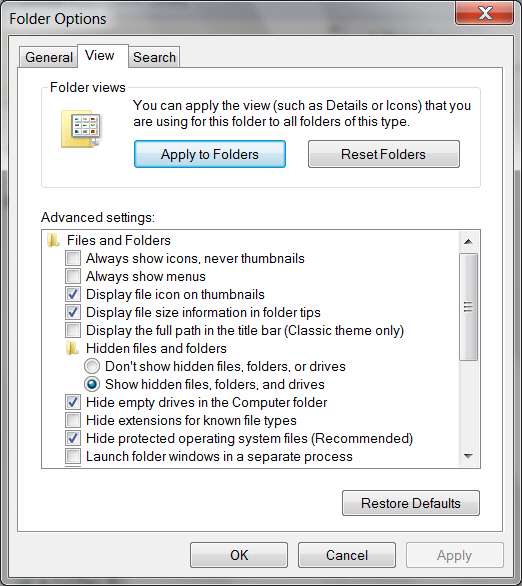
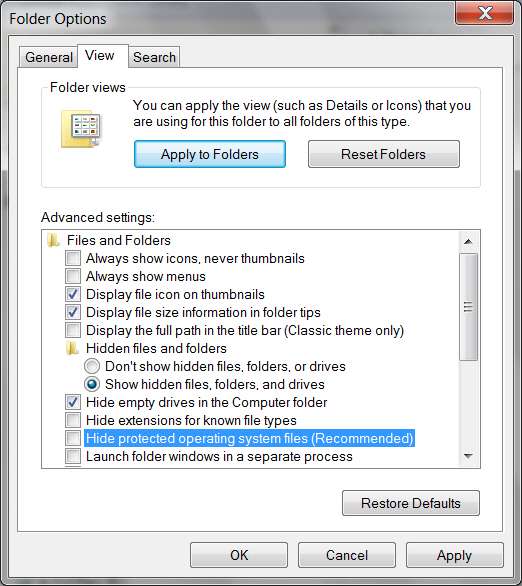
Ooops... sorry, my mistake. In addition to checking the "show hidden files" item I'd mentioned before, you also need to UN-CHECK the "hide protected operating system files" item just a bit below it:
You'll get a confirmation popup when you un-check that item, so just reply OK.
Note that my own preference is also to UN-CHECK that "hide extensions for known file types" item, because my own personal preference is to WANT to see things like the ".txt" or ".avi" or ".docx" or ".mpg" or ".MP3" or whatever extension, when seeing a file name. I don't want to have to guess at it, or deduce what it is from the associated program mini-icon to its left. I simply want to see the full and complete file name exactly as it is... including extension. Period.
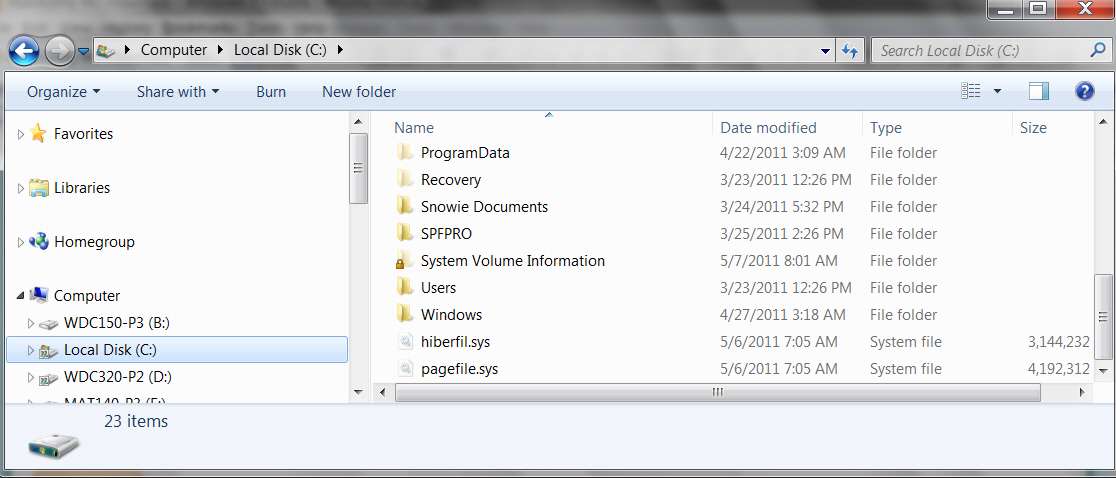
Now if you look at C you will (or should) see these two files, hiberfil.sys and pagefile.sys:
What does pagefile.sys do?
It's a system file that allows your operating system to function as if it had much more RAM virtual memory than it really does physically have.
To be technical, this pagefile.sys is part of the "paging mechanism" in the operating system which swaps "virtual page frames" (that provide addressability to virtual memory with virtual addresses that can be exceedingly large) into "physical page frames" in your actual finite physical RAM memory, which is almost always (until recent technology improvements coupled with drops in memory prices) smaller than your virtual address space need.
So you can run Windows as if it had 6GB of "virtual address space", even though you may only have 512MB of "physical memory". Obviously, it will not run as well as if it truly had 6GB of physical memory... because with 6GB of physical memory there would likely be zero or almost zero "page swapping" since everything in the "virtual address space" would actually be mapped to true "physical RAM memory" to match.
That's why adding more physical RAM memory (in a 64-bit OS that can support it) is always a good thing... to improve performance by reducing "page swapping" when your open application windows require more and more "virtual memory" from "virtual address space".
Anyway, that's what pagefile.sys is for. It generally is sized at about the size of your real RAM memory when no paging/swapping is occurring (i.e. you have sufficient real physical RAM memory to support your Windows needs). However it will grow in size if you open a sufficient number of program windows, tabs in browsers, documents to be edited, etc., so that the total current "virtual address space" requirement exceeds that of your actual physical RAM memory... so that you now need more "virtual address space" than your physical RAM memory can 1:1 map.
It is a system file, managed by the system, sized by the system automatically, and you don't need to worry about it. That's also why it's normally hidden from casual user Explorer view.
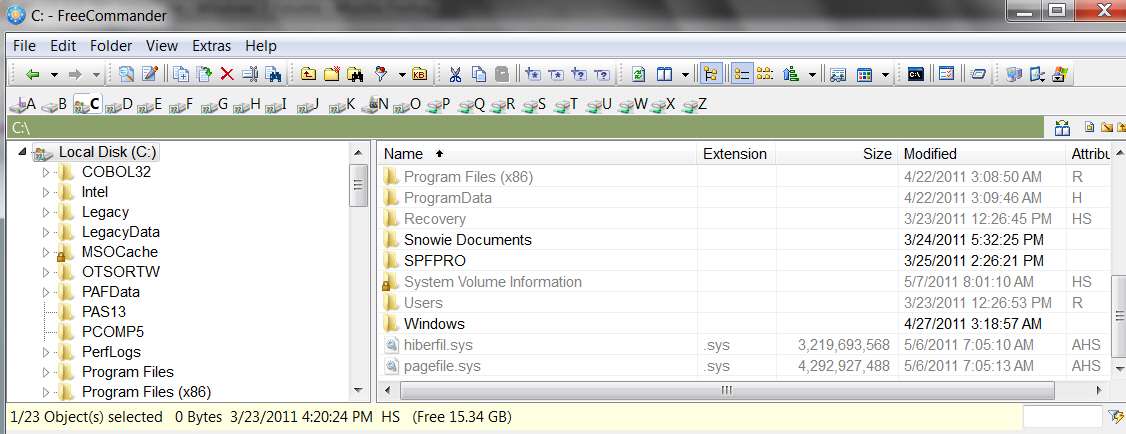
NOTE: in my own mind, I was really thinking about looking for it with a File Manager that I use named "Free Commander". This is a highly recommended free program that performs all Windows Explorer functions and then some, in a highly intuitive and easy-to-use multi-pane presentation.
I don't have that "hide protected operating system files" item un-checked, because actually I do NOT want to see them when doing normal Explorer functions... so that I won't accidentally rename or delete them or otherwise modify or move them.
But I can still see them with Free Commander:
You should consider installing
Free Commander, available from here... it's highly recommended by me, and other users on this Forum. Excellent product.
I have 55.5GB of FREE space, and 42.8GB on another partition. (Ubuntu)
Well then it should not be a space problem not being able to allocate hiberfil.sys.
So, now that you've un-checked "hide protected files" and looked at your C drive with Explorer (or Free Commander), do you have hiberfil.sys or not?