External Hard drive cannot shrink volume to partition

fairgrace

New member
Local time
7:53 PM
Messages
7
Hi,

Sorry if this has been treated somewhere else, but I cannot find a suitable answer anywhere. I have a used trascend external HD and am trying to partition it to make it NTFS so that I can create and store on it the system image of my computer.

I have plenty of free space, but when I right click on it, in Windows Disk Management, the option 'shrink volume' is greyed out and am not able to partition the drive :confused: .

I do not want to format the whole drive as I've got an older version of Windows that might not recognise the files (am I correct in thinking this?).

Any advice really appreciated :D

Thanks,

Lucia
 

My Computer My Computer

At a glance

windows7 starter 32 bit
OS
windows7 starter 32 bit
Sorry if this has been treated somewhere else,
Well, this probably belongs in the "hardware" forum where disk drive and partition questions normally go, but I'll respond here. An admin may move this thread to the "hardware" forum later.


I have a used trascend external HD and am trying to partition it to make it NTFS so that I can create and store on it the system image of my computer.

I have plenty of free space, but when I right click on it, in Windows Disk Management, the option 'shrink volume' is greyed out and am not able to partition the drive :confused: .
Can you please post a screenshot from Diskmgmt.msc, maximized and with columns spread so the text contents in each column are readable in the screenshot.

Once you post this screenshot, we can recommend a proper course of action or suggest a possible "recipe" that might work, or maybe ask more questions.


As an excellent alternative to Windows Disk Management, I suggest you try Partition Wizard... either standalone boot CD or using the installed program under Win7. PW should have no problem dealing with this drive, and being able to resize partitions, format partitions to NTFS, or if necessary being able to "delete all partitions" and then you can "create partition" and format to NTFS, etc.

Partition Wizard can be used to do anything Diskmgmt can do, and more. It also has a standalone boot CD which can be used for more significant drive/partition work... involving the OS's C-partition... which cannot be completed while actually running under Windows but which must be done at re-boot time (or using the standalone boot CD for PW).

You can get [free] Partition Wizard Home Edition v5.2 from here.

You can download the ISO for the standalone boot CD from here, and then use something like [free] IMGBURN (which you can get from here) to burn the ISO to CD.
 

My Computer My Computer

At a glance

Windows 7 Pro x64 (1), Win7 Pro X64 (2)i5-3350p 3.1Ghz/6MB-cache (1); E8400 3.0Ghz/6...8GB PC3-12800 DDR3 (1); 4GB PC3-10600 DDR3 (2)ATI HD7750 (1), (see TV cards); ATI R7 250 (2)
Computer type
PC/Desktop
Computer Manufacturer/Model Number
Home-built, two systems (1) and (2)
OS
Windows 7 Pro x64 (1), Win7 Pro X64 (2)
CPU
i5-3350p 3.1Ghz/6MB-cache (1); E8400 3.0Ghz/6MB-cache (2)
Motherboard
ASUS P8Z77-V Pro (1); ASUS P5Q3 (2)
Memory
8GB PC3-12800 DDR3 (1); 4GB PC3-10600 DDR3 (2)
Graphics Card(s)
ATI HD7750 (1), (see TV cards); ATI R7 250 (2)
Sound Card
Realtek ALC892 HD Audio (1); Realtek ALC1200 HD Audio (2)
Monitor(s) Displays
Eizo HD2441W LCD, Eizo S2433W (1); Eizo 24" S2433W (2)
Screen Resolution
1920x1200, 1920x1200 (1); 1920x1200 (2)
Hard Drives
(1) 1TB SATA-II (7200RPM), 2x2TB SATA-III (7200RPM), 250GB SATA-III (10000RPM) for OS; 2x2TB external USB 3.0

(2) 320GB SATA-II (7200RPM), 750GB SATA-II (7200RPM), 150GB SATA-II (10000RPM) for OS; 2TB external USB 3.0
PSU
Nesteq ECS-6001 600W (1); Nesteq ECS-5001 500W (2)
Case
Acousti-Case 360 (1) and (2)
Cooling
Noctua NH-U12P SE2 for CPU, 2x120mm case fans (1) and (2)
Keyboard
IBM PS/2 (1) and (2)
Mouse
Logitech MX Revolution wireless (1); Microsoft wired (2)
Internet Speed
100mbps down / 10mbps up
Antivirus
Microsoft Security Essentials; Malwarebyte Anti-Malware Pro
Browser
Firefox
Other Info
Ceton InfiniTV 4-tuner cablecard-enabled TV card as well as Hauppauge HVR-2250 OTA/ATSC 2-tuner TV card in (1), running under Win7 WMC
Sorry for posting in the wrong forum. Anyway, I'll try the course you suggested. I'm working on a notebook without DVD drive, so, maybe I'm a bit limited!

I'll try to post a screenshot of the problem.

Thanks for now.

Lucia
 

My Computer My Computer

At a glance

windows7 starter 32 bit
OS
windows7 starter 32 bit
Sorry for posting in the wrong forum. Anyway, I'll try the course you suggested. I'm working on a notebook without DVD drive, so, maybe I'm a bit limited!
Well if you don't mind spending $29 (and it's WELL WORTH IT, believe me) you can get the Partition Wizard v6.0 Professional Edition, instead of v5.2 Home Edition which is free.

The Professional Edition of the product includes a "bootable flash drive" option, in addition to the standalone bootable CD option.

So the absence of a DVD drive on your notebook shouldn't be a problem, assuming you do have a USB port which I assume you do.

Partition Wizard is an excellent resource to have in your arsenal for all hard drive and partition needs.
 

My Computer My Computer

At a glance

Windows 7 Pro x64 (1), Win7 Pro X64 (2)i5-3350p 3.1Ghz/6MB-cache (1); E8400 3.0Ghz/6...8GB PC3-12800 DDR3 (1); 4GB PC3-10600 DDR3 (2)ATI HD7750 (1), (see TV cards); ATI R7 250 (2)
Computer type
PC/Desktop
Computer Manufacturer/Model Number
Home-built, two systems (1) and (2)
OS
Windows 7 Pro x64 (1), Win7 Pro X64 (2)
CPU
i5-3350p 3.1Ghz/6MB-cache (1); E8400 3.0Ghz/6MB-cache (2)
Motherboard
ASUS P8Z77-V Pro (1); ASUS P5Q3 (2)
Memory
8GB PC3-12800 DDR3 (1); 4GB PC3-10600 DDR3 (2)
Graphics Card(s)
ATI HD7750 (1), (see TV cards); ATI R7 250 (2)
Sound Card
Realtek ALC892 HD Audio (1); Realtek ALC1200 HD Audio (2)
Monitor(s) Displays
Eizo HD2441W LCD, Eizo S2433W (1); Eizo 24" S2433W (2)
Screen Resolution
1920x1200, 1920x1200 (1); 1920x1200 (2)
Hard Drives
(1) 1TB SATA-II (7200RPM), 2x2TB SATA-III (7200RPM), 250GB SATA-III (10000RPM) for OS; 2x2TB external USB 3.0

(2) 320GB SATA-II (7200RPM), 750GB SATA-II (7200RPM), 150GB SATA-II (10000RPM) for OS; 2TB external USB 3.0
PSU
Nesteq ECS-6001 600W (1); Nesteq ECS-5001 500W (2)
Case
Acousti-Case 360 (1) and (2)
Cooling
Noctua NH-U12P SE2 for CPU, 2x120mm case fans (1) and (2)
Keyboard
IBM PS/2 (1) and (2)
Mouse
Logitech MX Revolution wireless (1); Microsoft wired (2)
Internet Speed
100mbps down / 10mbps up
Antivirus
Microsoft Security Essentials; Malwarebyte Anti-Malware Pro
Browser
Firefox
Other Info
Ceton InfiniTV 4-tuner cablecard-enabled TV card as well as Hauppauge HVR-2250 OTA/ATSC 2-tuner TV card in (1), running under Win7 WMC
Thanks so much for your help. Downloaded the free edition for now and managed to create a partition :D !

I'm now creating the ISO on the external HD and I'm still hoping I'll never needed anyway.

Thanks again.
 

My Computer My Computer

At a glance

windows7 starter 32 bit
OS
windows7 starter 32 bit
Thanks so much for your help. Downloaded the free edition for now and managed to create a partition :D !
Just for closure, can you please post a final screenshot from Diskmgmt (or from Paritition Wizard itself) of your now completed multi-hard drive setup?

Don't forget to first maximize the program window first, and then spread the columns horizontally so that everything important and as much as possible which would be relevant is visible. Then take the screenshot and post here.

I'm curious to see the result.


I'm now creating the ISO on the external HD and I'm still hoping I'll never needed anyway.
Don't quite understand what you're saying here, but maybe it's just the semantics.

The ISO file is a "disk image" packaged single-file version of a CD (in this case). It's a single file which can be input directly to a program like IMGBURN, which can then expand its contents and write them to a blank CD. Similar to a ZIP file, but it represents a CD/DVD image.

There are programs like WinMount and others (like WinRAR), that can look inside an ISO file (like they were looking inside of a ZIP file) and even extract the inner content folder/files so that you don't have to actually burn that ISO to a CD/DVD in order to get to the files.

Perhaps that's what you're describing that you've done temporarily... namely expand the ISO file onto new space of your external drive that is now available, to someday BURN directly from that expanded folder structure that came from the original ISO file. Yes, that will work as well for data-only, but not for a "bootable" CD/DVD like this one.

That's why you really do need to actually "burn it, from the ISO file itself, using a tool such as the IMGBURN program". This will produce an actual "bootable CD" as was intended by this particular ISO file, not just the folder/file structure on the burned CD. It's not just data... it needs to be bootable to be usable in the standalone Partition Wizard environment for which it was intended.

Anyway, as long as you've now conquered the original external hard drive problem with the Win7 version of the program (and never really did need the standalone boot CD version anyway) I'm happy (as I'm sure you are).


Incidentally, I recently purchased the $29 Professional Edition version of PW, having used the free Home Edition for many years. In addition to the "bootable flash drive" feature, it also has a "merge partition" feature which perhaps might come in handy some day as a simpler way to reconfigure things than if that feature was not available.

But I was most pleased to find that some of the rigid and inflexible GUI interface aspects of the free Home Edition are actually no longer rigid and inflexible in the non-free Professional Edition. This has made me VERY happy!

And finally, I really did want to reward the author for this very fine product. I'd made a "donation" previously, but have now decided that my use of the product way more than justifies actually "buying it" for the extremely reasonable $29 price... not to mention (a) merge partition, (b) bootable flash drive, and (c) GUI interface improvements.


Anyway, glad your problem was finally solved.
 

My Computer My Computer

At a glance

Windows 7 Pro x64 (1), Win7 Pro X64 (2)i5-3350p 3.1Ghz/6MB-cache (1); E8400 3.0Ghz/6...8GB PC3-12800 DDR3 (1); 4GB PC3-10600 DDR3 (2)ATI HD7750 (1), (see TV cards); ATI R7 250 (2)
Computer type
PC/Desktop
Computer Manufacturer/Model Number
Home-built, two systems (1) and (2)
OS
Windows 7 Pro x64 (1), Win7 Pro X64 (2)
CPU
i5-3350p 3.1Ghz/6MB-cache (1); E8400 3.0Ghz/6MB-cache (2)
Motherboard
ASUS P8Z77-V Pro (1); ASUS P5Q3 (2)
Memory
8GB PC3-12800 DDR3 (1); 4GB PC3-10600 DDR3 (2)
Graphics Card(s)
ATI HD7750 (1), (see TV cards); ATI R7 250 (2)
Sound Card
Realtek ALC892 HD Audio (1); Realtek ALC1200 HD Audio (2)
Monitor(s) Displays
Eizo HD2441W LCD, Eizo S2433W (1); Eizo 24" S2433W (2)
Screen Resolution
1920x1200, 1920x1200 (1); 1920x1200 (2)
Hard Drives
(1) 1TB SATA-II (7200RPM), 2x2TB SATA-III (7200RPM), 250GB SATA-III (10000RPM) for OS; 2x2TB external USB 3.0

(2) 320GB SATA-II (7200RPM), 750GB SATA-II (7200RPM), 150GB SATA-II (10000RPM) for OS; 2TB external USB 3.0
PSU
Nesteq ECS-6001 600W (1); Nesteq ECS-5001 500W (2)
Case
Acousti-Case 360 (1) and (2)
Cooling
Noctua NH-U12P SE2 for CPU, 2x120mm case fans (1) and (2)
Keyboard
IBM PS/2 (1) and (2)
Mouse
Logitech MX Revolution wireless (1); Microsoft wired (2)
Internet Speed
100mbps down / 10mbps up
Antivirus
Microsoft Security Essentials; Malwarebyte Anti-Malware Pro
Browser
Firefox
Other Info
Ceton InfiniTV 4-tuner cablecard-enabled TV card as well as Hauppauge HVR-2250 OTA/ATSC 2-tuner TV card in (1), running under Win7 WMC
Hi,

Sorry, I'm really thick. How do I post a PrtSc?

And though confused, I think I know what you mean re the ISO, but I've got no DVD at the moment, so I can't burn a recover disk. Will do as soon as I buy some. Does this make any sense or am I completely off the mark once again?

Cheers,
Lucia
 

My Computer My Computer

At a glance

windows7 starter 32 bit
OS
windows7 starter 32 bit
How do I post a PrtSc?
Many forum software products provide a shortcut button to post an image, in one way or another.

(1) My own approach which seems to work for ALL forums (independent of built-in button shortcuts that may or may not also be available) is to first upload the image to a "hosting site", such as ImageShack® - Online Photo and Video Hosting or similar.

These image uploads may specify a default "resize for 800x600 screen" option, but you can change that. I have "resize for 1024x768" specified when I do an upload, so that the result is clear and visible when the image is shared and seen inside the forum posts into which I've linked that Imageshack-hosted image via its URL.

The image upload to Imageshack provides a URL (http address) for a variety of presentation forms for that image. I copy the "direct URL", so that the image itself... exactly as I uploaded it and possibly resized for nice looking display presentation on a 1024x768 screen... can be inserted instream in a forum post somewhere.

Now... to actually use that Imageshack URL in a forum post (like here), I manually surround the http URL address that I COPY'd from Imageshack's "direct URL" provided to me for the uploaded image, between
which I manually type on a blank line in my forum post, preceded and followed by one blank line.

The result of this is to actually IMBED the image I'm wanting to include INSIDE MY POST, between normal text like I'm typing now, placed between paragraphs or sentences appropriately so that it is readable and visible quite understandably. Text above and below it, and the image in the middle, just like an illustration in a book.

Simply surround the http URL obtained from an image hosting site for the image you've uploaded to that image hosting site between
, and your image will appear just like in illustration, imbedded into a forum post.

This
technique seems to work on 100% of the forums I participate in, even though they may have their own buttons to accomplish a similar result to insert images in your response.

(2) On this forum (and most other forums), there is also a way to post an "attachment"... which can be a JPG and other common (non-dangerous) file type extensions.

At the top row of the composition window for your reply (which I'm typing in right now) on this forum, there are two rows of buttons and other controls for fonts, highlights, indentations, conversion of selected text into active URL links, etc. Well there is a "paperclip" icon which is actually the "attachments" feature.

If you click on the paperclip you'll get a second window, where you'll be allowed to upload an image from your local hard drive and attach it to this post. It will then become available as an "attachment link" at the bottom of the post. The uploaded image is actually hosted by the forum itself, and you can upload multiple attachments.

I normally don't use this approach even if available, because the attachment link(s) get placed at the very bottom of the post and not "imbedded inside of the post", where the actual image would be seen like an illustration.

As attachments, they also may be converted to thumbnail shortcuts possibly and arranged side-by-side at the very bottom of the post so that they can each be clicked on to open in another tab or window of your browser.

Anyway, "attachments" work on this forum. But they don't give me the results I really want... which is to imbed an image in the midst of my text, as an illustration (since a picture's worth 1,000 words). That's why I prefer the
method of imbedding an image uploaded to a secondary image hosting site, pointed to between the
boundaries by its URL.

 

My Computer My Computer

At a glance

Windows 7 Pro x64 (1), Win7 Pro X64 (2)i5-3350p 3.1Ghz/6MB-cache (1); E8400 3.0Ghz/6...8GB PC3-12800 DDR3 (1); 4GB PC3-10600 DDR3 (2)ATI HD7750 (1), (see TV cards); ATI R7 250 (2)
Computer type
PC/Desktop
Computer Manufacturer/Model Number
Home-built, two systems (1) and (2)
OS
Windows 7 Pro x64 (1), Win7 Pro X64 (2)
CPU
i5-3350p 3.1Ghz/6MB-cache (1); E8400 3.0Ghz/6MB-cache (2)
Motherboard
ASUS P8Z77-V Pro (1); ASUS P5Q3 (2)
Memory
8GB PC3-12800 DDR3 (1); 4GB PC3-10600 DDR3 (2)
Graphics Card(s)
ATI HD7750 (1), (see TV cards); ATI R7 250 (2)
Sound Card
Realtek ALC892 HD Audio (1); Realtek ALC1200 HD Audio (2)
Monitor(s) Displays
Eizo HD2441W LCD, Eizo S2433W (1); Eizo 24" S2433W (2)
Screen Resolution
1920x1200, 1920x1200 (1); 1920x1200 (2)
Hard Drives
(1) 1TB SATA-II (7200RPM), 2x2TB SATA-III (7200RPM), 250GB SATA-III (10000RPM) for OS; 2x2TB external USB 3.0

(2) 320GB SATA-II (7200RPM), 750GB SATA-II (7200RPM), 150GB SATA-II (10000RPM) for OS; 2TB external USB 3.0
PSU
Nesteq ECS-6001 600W (1); Nesteq ECS-5001 500W (2)
Case
Acousti-Case 360 (1) and (2)
Cooling
Noctua NH-U12P SE2 for CPU, 2x120mm case fans (1) and (2)
Keyboard
IBM PS/2 (1) and (2)
Mouse
Logitech MX Revolution wireless (1); Microsoft wired (2)
Internet Speed
100mbps down / 10mbps up
Antivirus
Microsoft Security Essentials; Malwarebyte Anti-Malware Pro
Browser
Firefox
Other Info
Ceton InfiniTV 4-tuner cablecard-enabled TV card as well as Hauppauge HVR-2250 OTA/ATSC 2-tuner TV card in (1), running under Win7 WMC

My Computer My Computer

At a glance

Windows 7 Ultimate x64 SP1Core i7 920 (D0) @ 4Ghz, *26c idle *65c full ...12GB DDR3 Corsair Dominator -CMD12GX3M6A1600C...Zotac Geforce GTX 770
Computer type
PC/Desktop
Computer Manufacturer/Model Number
Airbot 2.0
OS
Windows 7 Ultimate x64 SP1
CPU
Core i7 920 (D0) @ 4Ghz, *26c idle *65c full load on air
Motherboard
Asus P6X58D Premium - Sata 6Gb/s - USB 3.0
Memory
12GB DDR3 Corsair Dominator -CMD12GX3M6A1600C8 at 1600MHz
Graphics Card(s)
Zotac Geforce GTX 770
Sound Card
ASUS Xonar D2X
Monitor(s) Displays
1 LG 24" Flatron W2453V-PF 1 Samsung 24" P2450H both 2ms RT
Screen Resolution
1920x1080@60hz
Hard Drives
1 Samsung 250GB 840 Evo SSD
1 OCZ Vertex2 180GB SSD
1 TB Samsung Spinpoint F1 7200RPM 32MB cache
2 500GB WD Caviar Blacks 7200RPM 32MB cache (WD5001AALS)

Pioneer DVD Burner DVR-S18M
PSU
Corsair HX1000W
Case
Cooler Master HAF 932
Cooling
Case Fans *3 230mm, *1 140mm/CPU - *Tuniq Tower 120 Extreme
Keyboard
Logitech Wireless MK700
Mouse
Logitech Wireless MK700
Internet Speed
DL 15 Mbps UL 0.98 Mbps
Antivirus
None
Browser
Firefox Nightly
Other Info
Processor-7.7 *RAM- 7.9 *Graphics-7.9 *Gaming Graphics- 7.9 *SSD- 7.8 W.E.I final score= 7.7
*Phone- LG Nexus 5
Once again, thanks!

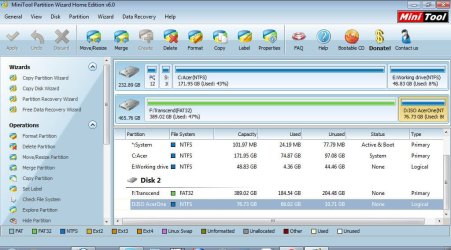
Here is the shot which I simply attached this time, but will try to use your other suggested method in the future.

I hope it's OK.

Cheers,
Lucia
:D
 

Attachments

  • MiniTool Partition Wizard Home Edition v6.0 11052011 070937.jpg
    MiniTool Partition Wizard Home Edition v6.0 11052011 070937.jpg
    103 KB · Views: 503

My Computer My Computer

At a glance

windows7 starter 32 bit
OS
windows7 starter 32 bit
Once again, thanks!

Here is the shot which I simply attached this time, but will try to use your other suggested method in the future.

I hope it's OK.
Excellent!

I didn't realize that Partition Wizard's Home Edition had now been upgraded to v6.0 as well. I just purchased the Professional Edition v6.0 because I wanted the "merge partition" feature just for possible future use, which is not part of the free Home Edition. Also, the Professional Edition supports creating a standalone boot USB flash drive, not just a standalone boot CD. I thought both of these features deserved compensation to the author of this fine product which I'd been using for free for years.

The web pages on the site appear to not all have been updated yet, and the main "Products" page still shows v5.2. Your 6.0 Home Edition screenshot thus startled me.

Nevertheless, excellent!


However... you've mistakenly created the large 389GB partition on that new drive as FAT32. That's the wrong file system to use for it. It should be NTFS.

Interestingly, you have a second 76GB partition now also on that second drive, which you created as NTFS... but as "logical", rather than as "primary" which you chose for the first 389GB partition (unfortunately selecting FAT32 instead of NTFS).

Now there's really nothing wrong with the mix of "logical" and "primary" partitions as you've got, and as long as you have a total of no more than FOUR partitions on a drive you can really use either format.

But if you do have one or more "logical" partitions then all "logical" partitions must be CONTIGUOUS, meaning they're all physically adjacent to each other (since they're really all carved out of one single large "primary" partition area referred to as the "extended partition").

And within that "extended partition", there are actually no limits to the number of "logical partitions" you can sub-define. So if you really do want more than FOUR total partitions on a drive, then you're limited to no more than THREE true independent "primary" partitions along with one "extended partition" inside of which you can then have as many "logical" partitions as you care to define.


Anyway, you really do want to delete and recreate that 389GB partition on your second drive, this time creating it as NTFS. Wouldn't be a bad idea to also FORMAT it after creating it, just to be sure.

Use Partition Wizard again, to do all this.
 

My Computer My Computer

At a glance

Windows 7 Pro x64 (1), Win7 Pro X64 (2)i5-3350p 3.1Ghz/6MB-cache (1); E8400 3.0Ghz/6...8GB PC3-12800 DDR3 (1); 4GB PC3-10600 DDR3 (2)ATI HD7750 (1), (see TV cards); ATI R7 250 (2)
Computer type
PC/Desktop
Computer Manufacturer/Model Number
Home-built, two systems (1) and (2)
OS
Windows 7 Pro x64 (1), Win7 Pro X64 (2)
CPU
i5-3350p 3.1Ghz/6MB-cache (1); E8400 3.0Ghz/6MB-cache (2)
Motherboard
ASUS P8Z77-V Pro (1); ASUS P5Q3 (2)
Memory
8GB PC3-12800 DDR3 (1); 4GB PC3-10600 DDR3 (2)
Graphics Card(s)
ATI HD7750 (1), (see TV cards); ATI R7 250 (2)
Sound Card
Realtek ALC892 HD Audio (1); Realtek ALC1200 HD Audio (2)
Monitor(s) Displays
Eizo HD2441W LCD, Eizo S2433W (1); Eizo 24" S2433W (2)
Screen Resolution
1920x1200, 1920x1200 (1); 1920x1200 (2)
Hard Drives
(1) 1TB SATA-II (7200RPM), 2x2TB SATA-III (7200RPM), 250GB SATA-III (10000RPM) for OS; 2x2TB external USB 3.0

(2) 320GB SATA-II (7200RPM), 750GB SATA-II (7200RPM), 150GB SATA-II (10000RPM) for OS; 2TB external USB 3.0
PSU
Nesteq ECS-6001 600W (1); Nesteq ECS-5001 500W (2)
Case
Acousti-Case 360 (1) and (2)
Cooling
Noctua NH-U12P SE2 for CPU, 2x120mm case fans (1) and (2)
Keyboard
IBM PS/2 (1) and (2)
Mouse
Logitech MX Revolution wireless (1); Microsoft wired (2)
Internet Speed
100mbps down / 10mbps up
Antivirus
Microsoft Security Essentials; Malwarebyte Anti-Malware Pro
Browser
Firefox
Other Info
Ceton InfiniTV 4-tuner cablecard-enabled TV card as well as Hauppauge HVR-2250 OTA/ATSC 2-tuner TV card in (1), running under Win7 WMC
Hi,

Yes, you're right, but that was the old used partition and I'm concerned to convert it to NTFS in case I won't be able to use the files I've got on older versions of Windows...am I once again off the mark?

MMm, not sure I understand about the 'logical' partition I've created...just followed the Mini Tool Default option!

Cheers,
Lucia
 

My Computer My Computer

At a glance

windows7 starter 32 bit
OS
windows7 starter 32 bit
Yes, you're right, but that was the old used partition and I'm concerned to convert it to NTFS in case I won't be able to use the files I've got on older versions of Windows...am I once again off the mark?
What "older versions of Windows" are you concerned about?

Do you have them installed in another partition of this same machine? Can you boot to either one using Boot Manager Menu?

Win98 does NOT support NTFS, but WinXP does. Which do you have? If you have WinXP as well as Win7, then there is no problem CONVERTING this partition to NTFS from FAT32. I had forgotten you had an existing partition you were trying to "shrink", and thus had existing data which would need to be preserved. Naturally, deleting and re-creating would of course lose everything on the partition so that's not the right solution.

But you can use Partition Wizard to CONVERT your FAT32 partition to NTFS, as described on their web site.


I'm not sure I understand about the 'logical' partition I've created...just followed the Mini Tool Default option!
It may have been the default, and in your case it really doesn't matter whether you created it as "logical" or "primary".

As I said earlier there's no problem having a mix of both "primary" and "logical" partitions on the same drive, as long as you don't exceed FOUR "primary" partitions on the drive. If you need four or fewer partitions, you can use either type... although "logical" partitions would be physically contiguous to each other inside of the one "extended partition". That's just where "logical" partitions go, and that's where they'd be created.

And since the "extended partition" (which supports any number of "logical" partitions sub-defined inside of it) is also a "primary" partition, that means you can have as many as THREE true "primary" partitions, and then the fourth "extended partition" (also "primary") to hold any number of "logical" partitions inside of it.

But in your case... with only two partitions total... it really doesn't matter which were selected. Both could have been "logical", or both could have been "primary", or you could do it the way you did it. No consequence, no performance impact.


Anyway, FAT32 is NOT a good file system choice for such a large partition... for several reasons. But if you're using an OS like WinXP or Win7, you should ALWAYS format drives as NTFS.

I would absolutely recommend that you use Partition Wizard to convert that partition from FAT32 to NTFS. If there is anything crucial on it, you are well advised to take a backup first or copy those files to a second location temporarily, just to feel secure... before requesting PW to convert fro FAT32 to NTFS. I have 100% confidence that it will be successful and without incident, but you don't want to be devastated if the electricity goes out while you're doing this.

Of course, if you do have crucial data anywhere... presumably you already have a reliable and dependable backup scheme (to secondary media) in place, so that you don't get devastated by some unexpected disaster on your "live" data.
 

My Computer My Computer

At a glance

Windows 7 Pro x64 (1), Win7 Pro X64 (2)i5-3350p 3.1Ghz/6MB-cache (1); E8400 3.0Ghz/6...8GB PC3-12800 DDR3 (1); 4GB PC3-10600 DDR3 (2)ATI HD7750 (1), (see TV cards); ATI R7 250 (2)
Computer type
PC/Desktop
Computer Manufacturer/Model Number
Home-built, two systems (1) and (2)
OS
Windows 7 Pro x64 (1), Win7 Pro X64 (2)
CPU
i5-3350p 3.1Ghz/6MB-cache (1); E8400 3.0Ghz/6MB-cache (2)
Motherboard
ASUS P8Z77-V Pro (1); ASUS P5Q3 (2)
Memory
8GB PC3-12800 DDR3 (1); 4GB PC3-10600 DDR3 (2)
Graphics Card(s)
ATI HD7750 (1), (see TV cards); ATI R7 250 (2)
Sound Card
Realtek ALC892 HD Audio (1); Realtek ALC1200 HD Audio (2)
Monitor(s) Displays
Eizo HD2441W LCD, Eizo S2433W (1); Eizo 24" S2433W (2)
Screen Resolution
1920x1200, 1920x1200 (1); 1920x1200 (2)
Hard Drives
(1) 1TB SATA-II (7200RPM), 2x2TB SATA-III (7200RPM), 250GB SATA-III (10000RPM) for OS; 2x2TB external USB 3.0

(2) 320GB SATA-II (7200RPM), 750GB SATA-II (7200RPM), 150GB SATA-II (10000RPM) for OS; 2TB external USB 3.0
PSU
Nesteq ECS-6001 600W (1); Nesteq ECS-5001 500W (2)
Case
Acousti-Case 360 (1) and (2)
Cooling
Noctua NH-U12P SE2 for CPU, 2x120mm case fans (1) and (2)
Keyboard
IBM PS/2 (1) and (2)
Mouse
Logitech MX Revolution wireless (1); Microsoft wired (2)
Internet Speed
100mbps down / 10mbps up
Antivirus
Microsoft Security Essentials; Malwarebyte Anti-Malware Pro
Browser
Firefox
Other Info
Ceton InfiniTV 4-tuner cablecard-enabled TV card as well as Hauppauge HVR-2250 OTA/ATSC 2-tuner TV card in (1), running under Win7 WMC
Grrreat! I've got Windows XP on another computer, and if it's supported, then I'll converted to NTFS.

Thanks again.

Lucia

:D
 

My Computer My Computer

At a glance

windows7 starter 32 bit
OS
windows7 starter 32 bit
Back
Top