weird ping problem

devilite

New member
Local time
4:44 AM
Messages
17
i got 12mb internet connection.
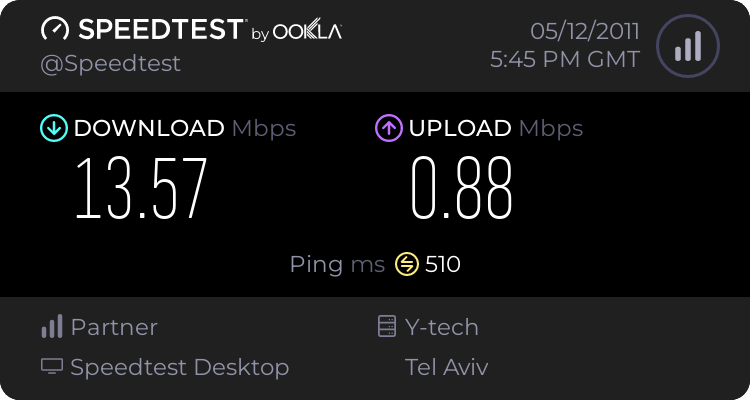
my pc (win7) is connected to the router, and in speed test i get 12mb, and 500ms~.

but with my laptop(winxp), thats connected wireless, i get 22ms~.

how is that possible?
whats wrong with my pc?
 

My Computer My Computer

At a glance

Windows 7 Ultimate x64e75002g DDRIIgma 4500
OS
Windows 7 Ultimate x64
CPU
e7500
Motherboard
G41
Memory
2g DDRII
Graphics Card(s)
gma 4500
PSU
500w
anybody?
 

My Computer My Computer

At a glance

Windows 7 Ultimate x64e75002g DDRIIgma 4500
OS
Windows 7 Ultimate x64
CPU
e7500
Motherboard
G41
Memory
2g DDRII
Graphics Card(s)
gma 4500
PSU
500w
Welcome to sevenforums devilite. Hows your win 7 pc connected to the router and what standard of wireless card is fitted to your laptop or is your laptop connected by ethernet?
 

My Computer My Computer

At a glance

win7
OS
win7
the laptop isnt the issue,

my pc is connected to a router, and the router is connected to a modem.
 

My Computer My Computer

At a glance

Windows 7 Ultimate x64e75002g DDRIIgma 4500
OS
Windows 7 Ultimate x64
CPU
e7500
Motherboard
G41
Memory
2g DDRII
Graphics Card(s)
gma 4500
PSU
500w
The reason I asked about both is because I was trying to figure why the time difference and whether this was due to a wireless / wired issue. If your PC is connected by wire ie ethernet, you could try using a different cable as these sometimes break at the RJ54 plug.
 

My Computer My Computer

At a glance

win7
OS
win7
May also be worth connecting the PC to a different port on the router, it's not unknown for a port to go bad.
 

My Computer My Computer

At a glance

Windows 10 Pro x64Intel Core i5 7400 @ 3.00GHz8GB 2133Mhz DDR4 (OEM supplied)Gygabyte Windforce GTX 1050Ti (Factory Overcl...
Computer type
PC/Desktop
Computer Manufacturer/Model Number
Medion Erazer (note to self: insert model number) - with custom additions
OS
Windows 10 Pro x64
CPU
Intel Core i5 7400 @ 3.00GHz
Motherboard
OEM supllied with PC
Memory
8GB 2133Mhz DDR4 (OEM supplied)
Graphics Card(s)
Gygabyte Windforce GTX 1050Ti (Factory Overclocked)
Sound Card
Realtek
Monitor(s) Displays
Acer Al1980 + HKC
Screen Resolution
1360*768(HKC) / 1280*1024(Acer)
Hard Drives
1TB Toshiba
1TB WD Caviar Green
120GB Samsung Evo 840
PSU
OEM supplied (no power rating on case)
Case
OEM Supplied
Cooling
Stock
Keyboard
Logitech Wireless
Mouse
Logitect Wireless
Internet Speed
40Mb/s Down 10Mb/s Up
Antivirus
Defender
Browser
Firefox
the cables are pretty new, so thats not the issue.
and i tried to connect it to a different port, still i get the same problem....
 

My Computer My Computer

At a glance

Windows 7 Ultimate x64e75002g DDRIIgma 4500
OS
Windows 7 Ultimate x64
CPU
e7500
Motherboard
G41
Memory
2g DDRII
Graphics Card(s)
gma 4500
PSU
500w
I assume the speedtest is hitting the same 'site' for both tests, right?
 

My Computer My Computer

At a glance

7 Pro
OS
7 Pro
Newness of cables is not a guarantee of being working......
 

My Computer My Computer

At a glance

win7
OS
win7
Newness of cables is not a guarantee of being working......

+1 at this point I would say that cables are the most likely culprit. I personally had 3 cables break on me within a week, all brand new.
 

My Computer My Computer

At a glance

Windows 10 Pro x64Intel Core i5 7400 @ 3.00GHz8GB 2133Mhz DDR4 (OEM supplied)Gygabyte Windforce GTX 1050Ti (Factory Overcl...
Computer type
PC/Desktop
Computer Manufacturer/Model Number
Medion Erazer (note to self: insert model number) - with custom additions
OS
Windows 10 Pro x64
CPU
Intel Core i5 7400 @ 3.00GHz
Motherboard
OEM supllied with PC
Memory
8GB 2133Mhz DDR4 (OEM supplied)
Graphics Card(s)
Gygabyte Windforce GTX 1050Ti (Factory Overclocked)
Sound Card
Realtek
Monitor(s) Displays
Acer Al1980 + HKC
Screen Resolution
1360*768(HKC) / 1280*1024(Acer)
Hard Drives
1TB Toshiba
1TB WD Caviar Green
120GB Samsung Evo 840
PSU
OEM supplied (no power rating on case)
Case
OEM Supplied
Cooling
Stock
Keyboard
Logitech Wireless
Mouse
Logitect Wireless
Internet Speed
40Mb/s Down 10Mb/s Up
Antivirus
Defender
Browser
Firefox
i changed the cables, still no change.
i think its a problem with the internet settings, what do i do?
 

My Computer My Computer

At a glance

Windows 7 Ultimate x64e75002g DDRIIgma 4500
OS
Windows 7 Ultimate x64
CPU
e7500
Motherboard
G41
Memory
2g DDRII
Graphics Card(s)
gma 4500
PSU
500w
Are you using speedtest.net for these tests?
If so, can you post screenies of your 2 tests?
 

My Computer My Computer

At a glance

7 Pro
OS
7 Pro
ok, this is the win7 pc thats connected with cable.


and the laptop thats connected wireless is the same result, exept the ping is 20ms~
 

My Computer My Computer

At a glance

Windows 7 Ultimate x64e75002g DDRIIgma 4500
OS
Windows 7 Ultimate x64
CPU
e7500
Motherboard
G41
Memory
2g DDRII
Graphics Card(s)
gma 4500
PSU
500w
I know you've tried different ports and cables as stated, have you tried bypassing the router and going directly to the modem just to see if the desktop behaves the same?
 

My Computer My Computer

At a glance

.
OS
.
you mean connect the pc only to the modem? without using the router?
well i tried it now, and the internet doesnt even work when the pc is connected only to the modem...
 

My Computer My Computer

At a glance

Windows 7 Ultimate x64e75002g DDRIIgma 4500
OS
Windows 7 Ultimate x64
CPU
e7500
Motherboard
G41
Memory
2g DDRII
Graphics Card(s)
gma 4500
PSU
500w
You probably have to powercycle the modem once the pc is connected.
 

My Computer My Computer

At a glance

.
OS
.
power cycle...?
sorry for being a noob, but i have no idea what that means
 

My Computer My Computer

At a glance

Windows 7 Ultimate x64e75002g DDRIIgma 4500
OS
Windows 7 Ultimate x64
CPU
e7500
Motherboard
G41
Memory
2g DDRII
Graphics Card(s)
gma 4500
PSU
500w
Sorry, my bad :eek:

Turn off the computer. Turn the modem off (pull the power cable if needed), plug the computer's ethernet cable into the modem, then turn the modem back on and wait for the status lights to indicate a good connection(usually takes a minute or so to reconnect). Now start your machine again. It should connect fine after that.
 

My Computer My Computer

At a glance

.
OS
.
pull power cable then plug back in
 

My Computer My Computer

At a glance

7 Pro
OS
7 Pro
ok, i did the power cycle thing, the pc is connected directly to the modem, but still i get 500ms on speed test...
 

My Computer My Computer

At a glance

Windows 7 Ultimate x64e75002g DDRIIgma 4500
OS
Windows 7 Ultimate x64
CPU
e7500
Motherboard
G41
Memory
2g DDRII
Graphics Card(s)
gma 4500
PSU
500w
Back
Top