Solved How can I find out and set dedicated graphics memory?

JaidynM

BSOD Dump Analyst
Guru
Gold Member
Local time
12:25 AM
Messages
6,061
Location
Somewhere Over The Rainbow
Hi, I would like to find out how much dedicated graphics/video memory I have and how much I have in total. If I'm not using all of it, how can I dedicate the rest of the memory so all of it is in use?

Thanks in advance,
Jaidyn :)
 

My Computer My Computer

At a glance

Windows 7 Ultimate x64/Windows 8 Consumer Pre...Intel Pentium Dual Core E6700 3.2GHzStrontium 8192MB DDR3 1333Mhzmsi GeForce N560GTX-M2D1GD5 1GB
Computer Manufacturer/Model Number
Custom Build
OS
Windows 7 Ultimate x64/Windows 8 Consumer Preview x64/Ubuntu 11.04
CPU
Intel Pentium Dual Core E6700 3.2GHz
Motherboard
ASUS P5G41T-M LX
Memory
Strontium 8192MB DDR3 1333Mhz
Graphics Card(s)
msi GeForce N560GTX-M2D1GD5 1GB
Sound Card
Realtek HD Audio
Monitor(s) Displays
CHIMEI CMV 221D 22"
Screen Resolution
1680x1050
Hard Drives
Seagate Barracuda LP Green 3.5'' 2TB Internal HDD 5900RPM + WD Elements Desktop 1TB External HDD 7200RPM
PSU
SHAW Viper-1500w Gaming PSU
Case
Black eMaxx ATX Mini Tower Case
Keyboard
Microsoft Wireless Keyboard 1000
Mouse
Microsoft Wireless Optical Mouse 2000
Internet Speed
100GB @ 4.76Mbps
Wow, I'm not even sure where to begin in correcting your misconceptions about what video memory is.

The OS will allocate video memory for several things, among them is the actual video display (the pixels shown on your screen). This memory is typically much smaller than the total amount of memory your card has, but that extra memory is used by programs (such as Aero, or 3D Games) to create textures, do compositing, or various other tasks. This is dedicated video memory and cannot be used for anything other than video GPU memory.

Ok, I lied, that's not entirely true. Some video chipsets (notably Intel) can share video memory with the host computer, and you can change the amount of memory is allocated to video rather than system memory. That memory must still be dedicated to video memory though, once you set it in the bios.

In any event, video memory is video memory. Your system will use what you have, and any extra goes unused if it's not needed.
 

My Computer My Computer

At a glance

Windows 7 64 bit SP1Core i7 92012 GB (6x2GB Corsair)nVidia 250GTS
Computer Manufacturer/Model Number
Self-Built
OS
Windows 7 64 bit SP1
CPU
Core i7 920
Motherboard
Gigabyte GA-X58A-UD3R
Memory
12 GB (6x2GB Corsair)
Graphics Card(s)
nVidia 250GTS
Sound Card
Built-in
Monitor(s) Displays
2x Samsung SyncMaster 2343 (23" Widescreen)
Keyboard
Microsoft Natural Keyboard
Mouse
Logitech Laser
3rd paragraph is what describes my graphics card. As for the misconceptions, I'm not sure what you mean. All I wanted to know was how much memory I could allocate and how to allocate. Thanks anyway though. ;)
 

My Computer My Computer

At a glance

Windows 7 Ultimate x64/Windows 8 Consumer Pre...Intel Pentium Dual Core E6700 3.2GHzStrontium 8192MB DDR3 1333Mhzmsi GeForce N560GTX-M2D1GD5 1GB
Computer Manufacturer/Model Number
Custom Build
OS
Windows 7 Ultimate x64/Windows 8 Consumer Preview x64/Ubuntu 11.04
CPU
Intel Pentium Dual Core E6700 3.2GHz
Motherboard
ASUS P5G41T-M LX
Memory
Strontium 8192MB DDR3 1333Mhz
Graphics Card(s)
msi GeForce N560GTX-M2D1GD5 1GB
Sound Card
Realtek HD Audio
Monitor(s) Displays
CHIMEI CMV 221D 22"
Screen Resolution
1680x1050
Hard Drives
Seagate Barracuda LP Green 3.5'' 2TB Internal HDD 5900RPM + WD Elements Desktop 1TB External HDD 7200RPM
PSU
SHAW Viper-1500w Gaming PSU
Case
Black eMaxx ATX Mini Tower Case
Keyboard
Microsoft Wireless Keyboard 1000
Mouse
Microsoft Wireless Optical Mouse 2000
Internet Speed
100GB @ 4.76Mbps
3rd paragraph is what describes my graphics card. As for the misconceptions, I'm not sure what you mean. All I wanted to know was how much memory I could allocate and how to allocate. Thanks anyway though. ;)
In short, you can't.

As he said, dedicated video memory is dedicated video memory, and it's either used by the GPU or it isn't.

Some onbaord graphics will pull from system RAM, but that still cannot be (easily) changed.

The best option to get more Graphics memory would be to upgrade the card.

~Lordbob
 

My Computer My Computer

At a glance

Windows 7 Ultimate x64, Mint 9Intel i5-2500k2x 4Gb Corsair VENGEANCE DDR3-1600NVidia GeForce N260GTX Twin Frozr
Computer Manufacturer/Model Number
Hera
OS
Windows 7 Ultimate x64, Mint 9
CPU
Intel i5-2500k
Motherboard
ASUS P8P67 Pro
Memory
2x 4Gb Corsair VENGEANCE DDR3-1600
Graphics Card(s)
NVidia GeForce N260GTX Twin Frozr
Sound Card
Realtek HD OnBoard Audio
Monitor(s) Displays
ASUS 24" Monitor
Screen Resolution
1920x1080
Hard Drives
G.SKILL Phoenix Series 60GB SATA II MLC Internal Solid State Drive (SSD)
SAMSUNG Spinpoint F3R 1TB 7200 RPM 32MB Cache SATA II
PSU
Cooler Master Real Power Pro 750W
Case
Cooler Master Haf 932
Cooling
Fans
Keyboard
Razer Tarantula
Mouse
Razer Lachesis
Internet Speed
not fast enough
^^ Right, so when my computer needs more video memory, it'll pull it out of the RAM. Okay then.... So how can I find out how much memory my video card has?
 

My Computer My Computer

At a glance

Windows 7 Ultimate x64/Windows 8 Consumer Pre...Intel Pentium Dual Core E6700 3.2GHzStrontium 8192MB DDR3 1333Mhzmsi GeForce N560GTX-M2D1GD5 1GB
Computer Manufacturer/Model Number
Custom Build
OS
Windows 7 Ultimate x64/Windows 8 Consumer Preview x64/Ubuntu 11.04
CPU
Intel Pentium Dual Core E6700 3.2GHz
Motherboard
ASUS P5G41T-M LX
Memory
Strontium 8192MB DDR3 1333Mhz
Graphics Card(s)
msi GeForce N560GTX-M2D1GD5 1GB
Sound Card
Realtek HD Audio
Monitor(s) Displays
CHIMEI CMV 221D 22"
Screen Resolution
1680x1050
Hard Drives
Seagate Barracuda LP Green 3.5'' 2TB Internal HDD 5900RPM + WD Elements Desktop 1TB External HDD 7200RPM
PSU
SHAW Viper-1500w Gaming PSU
Case
Black eMaxx ATX Mini Tower Case
Keyboard
Microsoft Wireless Keyboard 1000
Mouse
Microsoft Wireless Optical Mouse 2000
Internet Speed
100GB @ 4.76Mbps

My Computer My Computer

At a glance

Windows 10 Pro x64, Arch LinuxIntel Core 2 Quad Q8200 OC'd 3.08GHz8GB DDR2 900MhzMSI GT730 2GB GDDR5 (Kepler)
Computer type
PC/Desktop
Computer Manufacturer/Model Number
Custom Build
OS
Windows 10 Pro x64, Arch Linux
CPU
Intel Core 2 Quad Q8200 OC'd 3.08GHz
Motherboard
Asus Rampage formula LGA775
Memory
8GB DDR2 900Mhz
Graphics Card(s)
MSI GT730 2GB GDDR5 (Kepler)
Sound Card
Supreme FX2
Monitor(s) Displays
Samsung LS22F350 LED
Screen Resolution
1080P
Hard Drives
Kingston SSDNow UV400 120GB, 500GB Hitachi, 2TB Samsung, 500GB Seagate FreeAgent, 640GB Samsung, 160GB Toshiba (Arch)
PSU
AeroCool 500W Bronze
Cooling
Cooler Master V6 + 3X fans
Keyboard
Prolink keyboard
Mouse
Logitech M705
Internet Speed
1MiB/s
Browser
Chrome Beta
Thanks but it says I have 32MB memory whereas dxdiag tells me I have 1695MB. I'm confused. :/
 

My Computer My Computer

At a glance

Windows 7 Ultimate x64/Windows 8 Consumer Pre...Intel Pentium Dual Core E6700 3.2GHzStrontium 8192MB DDR3 1333Mhzmsi GeForce N560GTX-M2D1GD5 1GB
Computer Manufacturer/Model Number
Custom Build
OS
Windows 7 Ultimate x64/Windows 8 Consumer Preview x64/Ubuntu 11.04
CPU
Intel Pentium Dual Core E6700 3.2GHz
Motherboard
ASUS P5G41T-M LX
Memory
Strontium 8192MB DDR3 1333Mhz
Graphics Card(s)
msi GeForce N560GTX-M2D1GD5 1GB
Sound Card
Realtek HD Audio
Monitor(s) Displays
CHIMEI CMV 221D 22"
Screen Resolution
1680x1050
Hard Drives
Seagate Barracuda LP Green 3.5'' 2TB Internal HDD 5900RPM + WD Elements Desktop 1TB External HDD 7200RPM
PSU
SHAW Viper-1500w Gaming PSU
Case
Black eMaxx ATX Mini Tower Case
Keyboard
Microsoft Wireless Keyboard 1000
Mouse
Microsoft Wireless Optical Mouse 2000
Internet Speed
100GB @ 4.76Mbps
Thanks but it says I have 32MB memory whereas dxdiag tells me I have 1695MB. I'm confused. :/
32MB is the dedicated video memory
1695MB is the approx total shared memory
 

My Computer My Computer

At a glance

Windows 10 Pro x64, Arch LinuxIntel Core 2 Quad Q8200 OC'd 3.08GHz8GB DDR2 900MhzMSI GT730 2GB GDDR5 (Kepler)
Computer type
PC/Desktop
Computer Manufacturer/Model Number
Custom Build
OS
Windows 10 Pro x64, Arch Linux
CPU
Intel Core 2 Quad Q8200 OC'd 3.08GHz
Motherboard
Asus Rampage formula LGA775
Memory
8GB DDR2 900Mhz
Graphics Card(s)
MSI GT730 2GB GDDR5 (Kepler)
Sound Card
Supreme FX2
Monitor(s) Displays
Samsung LS22F350 LED
Screen Resolution
1080P
Hard Drives
Kingston SSDNow UV400 120GB, 500GB Hitachi, 2TB Samsung, 500GB Seagate FreeAgent, 640GB Samsung, 160GB Toshiba (Arch)
PSU
AeroCool 500W Bronze
Cooling
Cooler Master V6 + 3X fans
Keyboard
Prolink keyboard
Mouse
Logitech M705
Internet Speed
1MiB/s
Browser
Chrome Beta

My Computer My Computer

At a glance

Win 7 Ultimate x64FX-8350 @ 4.6 GHz so farADATA XPG V1 Series Black 8GB DDR3 1600Sapphire R9 270x Dual-X
Computer type
PC/Desktop
Computer Manufacturer/Model Number
Me
OS
Win 7 Ultimate x64
CPU
FX-8350 @ 4.6 GHz so far
Motherboard
Asus M5A97 EVO
Memory
ADATA XPG V1 Series Black 8GB DDR3 1600
Graphics Card(s)
Sapphire R9 270x Dual-X
Sound Card
Xonar DGX w/ Corsair Vengence 1300
Monitor(s) Displays
Acer S232HL Abid
Screen Resolution
1920x1080
Hard Drives
120 GB OCZ Vertex 3
500 GB Seagate 7200.12
PSU
Antec Earthwatts 650W Green
Case
Antec Three Hundred
Cooling
Cooler Master 212 EVO
Keyboard
Logitech G510
Mouse
Logitech G500s
Internet Speed
35000/3000
some laptops can adjust the ram allocation from the bios, desktops using integrated graphics may also have this feature. I can't speak for every bios.

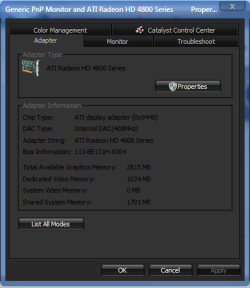
display settings advanced will show you just how much you have dedicated and the total including any shared.
dedicated memory.PNG

If your machine doesn't have the option then it can't be changed. Sometimes your best leaving these things alone. Windows will manage the memory for what it needs and allocate more.

The reason we prefer graphics cards with more dedicated memory is because that memory is alot faster and takes less from the slower system ram leaving more for multi tasking and other apps we may be running.
 

My Computer My Computer

At a glance

....
Computer Manufacturer/Model Number
.
OS
.
CPU
.
Motherboard
.
Memory
.
Graphics Card(s)
.
Monitor(s) Displays
.
Screen Resolution
.
Hard Drives
.
PSU
.
Case
.
Cooling
.
Keyboard
.
Mouse
.
Internet Speed
.
Other Info
.
How to change the amount of shared graphics memory.

If at all you can find that setting in the BIOS (Basic Input Output System) or nowadays in the UEFI or EFI ([Unified] Extensible Firmware Interface).
Most often you can enter the BIOS through holding the del(delete) button or one of the keys F1-F12 on your keyboard at startup.
Startup means after a reset or after you turnned it off.
Might work after hibernation too but is not guaranteed.
 

My Computer My Computer

At a glance

Windows XPPhenom X4 2.6GHz 140WExceleram PC8500ATI HD4350 + Zotac AMP 260
Computer Manufacturer/Model Number
Custom
OS
Windows XP
CPU
Phenom X4 2.6GHz 140W
Motherboard
MSI K9A2 Platinum
Memory
Exceleram PC8500
Graphics Card(s)
ATI HD4350 + Zotac AMP 260
Sound Card
ALC888
Monitor(s) Displays
LG E2240
Hard Drives
Hitachi 500GB
Samsung 1.5TB
PSU
BQuiet 700W
Case
K400 3RSYS
Cooling
Fan CPU+NB+SB
Your system will allocate the video memory that it needs. Say, you're going to play games and your system will get some memory from your RAM and send it to the GPU and it'll be the Shared Video Memory :D
 

My Computer My Computer

At a glance

Windows 7 Home Premium 64-BITAMD A8 7200P8GB 1600mhzRadeon R5 (APU) + Radeon R5 M230 2GB Dual Gra...
Computer type
PC/Desktop
Computer Manufacturer/Model Number
ASUS X550ZE
OS
Windows 7 Home Premium 64-BIT
CPU
AMD A8 7200P
Motherboard
N/A
Memory
8GB 1600mhz
Graphics Card(s)
Radeon R5 (APU) + Radeon R5 M230 2GB Dual Graphics
Sound Card
Realtek ALC269 with SonicMaster
Monitor(s) Displays
Laptop Display
Screen Resolution
1920 x 1080 @60hz
Hard Drives
WDC WD50 00LPVX-80V0TT0 (500GB)
PSU
Laptop Charger
Mouse
ARMAGGEDON TEXTRON SCORPION 7
Internet Speed
100 mbps DOWN / 50 mbps UP
Antivirus
Windows Defender
Browser
Mozzila FireFox, Valve Steam in-game internet browser
Back
Top