
two "Unallocated Space" partitions with 0MB

FredeGail

It's full of stars
Guru
Gold Member
Local time
6:16 PM
Messages
2,360
Location
Denmark
Partitions trouble!

Hello 7forums!

I noticed in the Windows 7 installation at my partition page.. you know, where you select what disk you want to install Windows on, there were two "Unallocated Space"-partitions on 0MB.. both of them. And they were hanging together with my SDD. When I deleted the Unallocated ones, it said that they were probably needed for Windows, but I didn't really care, I just deleted them. And I also deleted the entire SDD. When I recreated the whole SDD, the unallocated partitions came back. 0MB again! .. So do I need them? They ain't in my Disk Management either in-windows!

Best Regards,
FredeGail
 

Attachments

  • IMAG0003.jpg
    IMAG0003.jpg
    236.5 KB · Views: 96

My Computer My Computer

Computer Manufacturer/Model Number
Brewed
OS
Microsoft Windows 7 Ultimate: x64 (SP1)
CPU
Intel® Core™ i5-2500K Processor
Motherboard
ASUS P8Z68-V PRO
Memory
Kingston DDR3 HyperX 1600MHz 8GB
Graphics Card(s)
ASUS GTX 560 TI DirectCU II 900MHz
Sound Card
Realtek® ALC892 8-Channel High Definition Audio CODEC
Monitor(s) Displays
ACER LCD P246HBD 1920x1080 (24") - Dell 1280x800
Screen Resolution
ACER LCD P246HBD ~ [1920X1080] - DELL ~ [1280x800]
Hard Drives
500 GB WD Caviar SE116 7200rpm SATA2
PSU
Corsair 750W Power Supply
Case
Coolermaster CM Scout
Cooling
Zalman FS-C77 Fatal1ty CPU Cooler
Keyboard
Logitech G15
Mouse
Coolermaster Sentinel Advanced
Internet Speed
[↓ 10 MB/s DL] [↑ 1 MB/s UL]
Other Info
- ROCCAT™ Kave – Solid 5.1 Surround Sound Gaming Headset
- Not overclocking
DId you try deleting evey last one, and then formating again? I would do that. If it doesn't work, there is no harm in 0mb taken from your main partition ;)

I know that often windows creates extra space for system files, perhaps this is just a messed up way of doing it.
 

My Computer My Computer

Computer type
PC/Desktop
Computer Manufacturer/Model Number
Custom Asus Build
OS
Microsoft Windows 8.1 Pro 64-bit
CPU
Intel(R) Core(TM) i3-4130 CPU @ 3.40GHz
Motherboard
B85M-E
Memory
8.00 GB
Graphics Card(s)
None
Sound Card
Realtek High Definition Audio
Monitor(s) Displays
Asus 23.6" Monitor
Screen Resolution
1920 x 1080 x 32 bits (4294967296 colors) @ 60 Hz
Hard Drives
INTEL SSDSC2BW180A4
Samsung SSD 840 PRO Series
PSU
Seasonic S12II-380Bronze
Case
Lian Li
Cooling
Fan, Passive
Keyboard
Logitech K120
Mouse
Microsoft Touch Mouse
Internet Speed
4ms Ping, 19.0 Mbps Download, 19.0 Mbps Upload
Antivirus
Eset Endpoint
Browser
Internet Explorer, Chrome
DId you try deleting evey last one, and then formating again? I would do that. If it doesn't work, there is no harm in 0mb taken from your main partition ;)

So.. I delete both Unallocated, and leave the main, them format main?

Sorry, im not that of an expert with partitions :)
But if im going to format again, its pretty good, because im gonna move from 32-bit to 64.
Oh, and thanks for your reply!

I know that often windows creates extra space for system files, perhaps this is just a messed up way of doing it.

Best Regards,
FredeGail
 
Last edited:

My Computer My Computer

Computer Manufacturer/Model Number
Brewed
OS
Microsoft Windows 7 Ultimate: x64 (SP1)
CPU
Intel® Core™ i5-2500K Processor
Motherboard
ASUS P8Z68-V PRO
Memory
Kingston DDR3 HyperX 1600MHz 8GB
Graphics Card(s)
ASUS GTX 560 TI DirectCU II 900MHz
Sound Card
Realtek® ALC892 8-Channel High Definition Audio CODEC
Monitor(s) Displays
ACER LCD P246HBD 1920x1080 (24") - Dell 1280x800
Screen Resolution
ACER LCD P246HBD ~ [1920X1080] - DELL ~ [1280x800]
Hard Drives
500 GB WD Caviar SE116 7200rpm SATA2
PSU
Corsair 750W Power Supply
Case
Coolermaster CM Scout
Cooling
Zalman FS-C77 Fatal1ty CPU Cooler
Keyboard
Logitech G15
Mouse
Coolermaster Sentinel Advanced
Internet Speed
[↓ 10 MB/s DL] [↑ 1 MB/s UL]
Other Info
- ROCCAT™ Kave – Solid 5.1 Surround Sound Gaming Headset
- Not overclocking
Have you checked the alignment of the SSD?

How did you create the partitons?
 

My Computer My Computer

Computer type
PC/Desktop
Computer Manufacturer/Model Number
Custom Built
OS
Windows 10 Pro x64, Windows 8.1 Pro x64, Windows 7 Ultimate x64 SP1,
CPU
INTEL i9-7920X LGA 2066
Motherboard
Gigabyte X299-WU8 F3
Memory
64 GB (4 X 16 GB) G-Skill V Series DDR4 3200 Quad Channel
Graphics Card(s)
EVGA GTX 1060 SC 3 GB
Sound Card
Realtek Onboard ALC1220
Monitor(s) Displays
2 x Samsung S27E310
Screen Resolution
1920x1080
Hard Drives
Samsung 2 x 970 EVO Plus 500 GB NVMe
1 x 6TB WD 6003FZBX SATA
1 x 6TB WD 60EFRX SATA
12 x 3TB WD 30EFRX SATA
PSU
Seasonic X-1050
Case
Thermaltake Armor+
Cooling
Corsair H80i V2 Liquid AOI Cooler
Keyboard
Logitech G510s
Mouse
Logitech MX Master 2S
Internet Speed
200 Mb/s
Antivirus
ESET NOD32 13.1
Browser
EDGE (Dev, Canary, Beta), Chrome
Other Info
ASUS RT-AC68U router
Malwarebytes 4.0.4
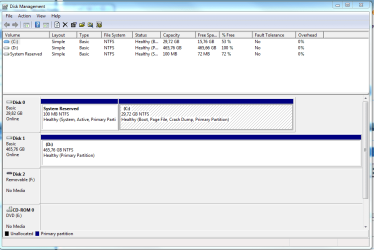
How does that look like in Disk Management?
 

My Computer My Computer

Computer Manufacturer/Model Number
HP, Dell, Gateway, Toshiba - 4 laptops and 2 desktops
OS
Vista, Windows7, Mint Mate, Zorin, Windows 8
CPU
from 1.6GHz Duo to i7
Monitor(s) Displays
2x HP w2207
Hard Drives
5x HDD, 7x SSD, 12x Externals
Keyboard
with trackball - no mices
Mouse
Trackball mice
Internet Speed
DSL 6000
You can't delete Unallocated Space of any size. It is already deleted. Just ignore it.

So actually it's just some bug of MS or my SSD?

Have you checked the alignment of the SSD?

How did you create the partitons?

I'll try that. When I deleted all the partitions, I selected the main, pressed new (in win7 install) and just maxed the number.

How does that look like in Disk Management?

Like this!

Capture.PNG
 

My Computer My Computer

Computer Manufacturer/Model Number
Brewed
OS
Microsoft Windows 7 Ultimate: x64 (SP1)
CPU
Intel® Core™ i5-2500K Processor
Motherboard
ASUS P8Z68-V PRO
Memory
Kingston DDR3 HyperX 1600MHz 8GB
Graphics Card(s)
ASUS GTX 560 TI DirectCU II 900MHz
Sound Card
Realtek® ALC892 8-Channel High Definition Audio CODEC
Monitor(s) Displays
ACER LCD P246HBD 1920x1080 (24") - Dell 1280x800
Screen Resolution
ACER LCD P246HBD ~ [1920X1080] - DELL ~ [1280x800]
Hard Drives
500 GB WD Caviar SE116 7200rpm SATA2
PSU
Corsair 750W Power Supply
Case
Coolermaster CM Scout
Cooling
Zalman FS-C77 Fatal1ty CPU Cooler
Keyboard
Logitech G15
Mouse
Coolermaster Sentinel Advanced
Internet Speed
[↓ 10 MB/s DL] [↑ 1 MB/s UL]
Other Info
- ROCCAT™ Kave – Solid 5.1 Surround Sound Gaming Headset
- Not overclocking
Well, if we go by Disk Management, those zero partitions are non existant.
 

My Computer My Computer

Computer Manufacturer/Model Number
HP, Dell, Gateway, Toshiba - 4 laptops and 2 desktops
OS
Vista, Windows7, Mint Mate, Zorin, Windows 8
CPU
from 1.6GHz Duo to i7
Monitor(s) Displays
2x HP w2207
Hard Drives
5x HDD, 7x SSD, 12x Externals
Keyboard
with trackball - no mices
Mouse
Trackball mice
Internet Speed
DSL 6000
Well, if we go by Disk Management, those zero partitions are non existant.

True. Maybe we should just ignore them!
I deleted the main, then the unallocated removed totally, but when I re-created the main one, they were back.
 

My Computer My Computer

Computer Manufacturer/Model Number
Brewed
OS
Microsoft Windows 7 Ultimate: x64 (SP1)
CPU
Intel® Core™ i5-2500K Processor
Motherboard
ASUS P8Z68-V PRO
Memory
Kingston DDR3 HyperX 1600MHz 8GB
Graphics Card(s)
ASUS GTX 560 TI DirectCU II 900MHz
Sound Card
Realtek® ALC892 8-Channel High Definition Audio CODEC
Monitor(s) Displays
ACER LCD P246HBD 1920x1080 (24") - Dell 1280x800
Screen Resolution
ACER LCD P246HBD ~ [1920X1080] - DELL ~ [1280x800]
Hard Drives
500 GB WD Caviar SE116 7200rpm SATA2
PSU
Corsair 750W Power Supply
Case
Coolermaster CM Scout
Cooling
Zalman FS-C77 Fatal1ty CPU Cooler
Keyboard
Logitech G15
Mouse
Coolermaster Sentinel Advanced
Internet Speed
[↓ 10 MB/s DL] [↑ 1 MB/s UL]
Other Info
- ROCCAT™ Kave – Solid 5.1 Surround Sound Gaming Headset
- Not overclocking
Well, if we go by Disk Management, those zero partitions are non existant.

True. Maybe we should just ignore them!
I deleted the main, then the unallocated removed totally, but when I re-created the main one, they were back.
I would classify it as a "reporting error".
 

My Computer My Computer

Computer Manufacturer/Model Number
HP, Dell, Gateway, Toshiba - 4 laptops and 2 desktops
OS
Vista, Windows7, Mint Mate, Zorin, Windows 8
CPU
from 1.6GHz Duo to i7
Monitor(s) Displays
2x HP w2207
Hard Drives
5x HDD, 7x SSD, 12x Externals
Keyboard
with trackball - no mices
Mouse
Trackball mice
Internet Speed
DSL 6000
So.. I should just ignore them? I mean, they don't show up in Disk Management, which is weird ain't it?
 

My Computer My Computer

Computer Manufacturer/Model Number
Brewed
OS
Microsoft Windows 7 Ultimate: x64 (SP1)
CPU
Intel® Core™ i5-2500K Processor
Motherboard
ASUS P8Z68-V PRO
Memory
Kingston DDR3 HyperX 1600MHz 8GB
Graphics Card(s)
ASUS GTX 560 TI DirectCU II 900MHz
Sound Card
Realtek® ALC892 8-Channel High Definition Audio CODEC
Monitor(s) Displays
ACER LCD P246HBD 1920x1080 (24") - Dell 1280x800
Screen Resolution
ACER LCD P246HBD ~ [1920X1080] - DELL ~ [1280x800]
Hard Drives
500 GB WD Caviar SE116 7200rpm SATA2
PSU
Corsair 750W Power Supply
Case
Coolermaster CM Scout
Cooling
Zalman FS-C77 Fatal1ty CPU Cooler
Keyboard
Logitech G15
Mouse
Coolermaster Sentinel Advanced
Internet Speed
[↓ 10 MB/s DL] [↑ 1 MB/s UL]
Other Info
- ROCCAT™ Kave – Solid 5.1 Surround Sound Gaming Headset
- Not overclocking
If you created the partitions during the Windows 7 install, then they are aligned properly.
I would ignor the 0MB.
 

My Computer My Computer

Computer type
PC/Desktop
Computer Manufacturer/Model Number
Custom Built
OS
Windows 10 Pro x64, Windows 8.1 Pro x64, Windows 7 Ultimate x64 SP1,
CPU
INTEL i9-7920X LGA 2066
Motherboard
Gigabyte X299-WU8 F3
Memory
64 GB (4 X 16 GB) G-Skill V Series DDR4 3200 Quad Channel
Graphics Card(s)
EVGA GTX 1060 SC 3 GB
Sound Card
Realtek Onboard ALC1220
Monitor(s) Displays
2 x Samsung S27E310
Screen Resolution
1920x1080
Hard Drives
Samsung 2 x 970 EVO Plus 500 GB NVMe
1 x 6TB WD 6003FZBX SATA
1 x 6TB WD 60EFRX SATA
12 x 3TB WD 30EFRX SATA
PSU
Seasonic X-1050
Case
Thermaltake Armor+
Cooling
Corsair H80i V2 Liquid AOI Cooler
Keyboard
Logitech G510s
Mouse
Logitech MX Master 2S
Internet Speed
200 Mb/s
Antivirus
ESET NOD32 13.1
Browser
EDGE (Dev, Canary, Beta), Chrome
Other Info
ASUS RT-AC68U router
Malwarebytes 4.0.4

My Computer My Computer

Computer Manufacturer/Model Number
HP, Dell, Gateway, Toshiba - 4 laptops and 2 desktops
OS
Vista, Windows7, Mint Mate, Zorin, Windows 8
CPU
from 1.6GHz Duo to i7
Monitor(s) Displays
2x HP w2207
Hard Drives
5x HDD, 7x SSD, 12x Externals
Keyboard
with trackball - no mices
Mouse
Trackball mice
Internet Speed
DSL 6000
If you created the partitions during the Windows 7 install, then they are aligned properly.
I would ignor the 0MB.

I never really created those two unallocated space partitions. All I wanted is my 100MB system reserved (as I didn't touch a thing, because it's creating itself), my SSD (C:) and my D: (500GB WD).

A thing I could try.. just for the matter..

Is to format my SDD, delete the Unallocated, and it should be gone as I told. We'll just do it the other way, you see?

I really wonder what the Alignment is, I didn't get the explanation good enough I think, i'll read it through a couple of times

Oh and, thanks! :)
 

My Computer My Computer

Computer Manufacturer/Model Number
Brewed
OS
Microsoft Windows 7 Ultimate: x64 (SP1)
CPU
Intel® Core™ i5-2500K Processor
Motherboard
ASUS P8Z68-V PRO
Memory
Kingston DDR3 HyperX 1600MHz 8GB
Graphics Card(s)
ASUS GTX 560 TI DirectCU II 900MHz
Sound Card
Realtek® ALC892 8-Channel High Definition Audio CODEC
Monitor(s) Displays
ACER LCD P246HBD 1920x1080 (24") - Dell 1280x800
Screen Resolution
ACER LCD P246HBD ~ [1920X1080] - DELL ~ [1280x800]
Hard Drives
500 GB WD Caviar SE116 7200rpm SATA2
PSU
Corsair 750W Power Supply
Case
Coolermaster CM Scout
Cooling
Zalman FS-C77 Fatal1ty CPU Cooler
Keyboard
Logitech G15
Mouse
Coolermaster Sentinel Advanced
Internet Speed
[↓ 10 MB/s DL] [↑ 1 MB/s UL]
Other Info
- ROCCAT™ Kave – Solid 5.1 Surround Sound Gaming Headset
- Not overclocking
You cannot create or delete Unallocated space.

It is not a partition, it is not an entity at all. It is a minor reporting error.

It is thin air, not even a dead parrot.
 
You cannot create or delete Unallocated space.

It is not a partition, it is not an entity at all. It is a minor reporting error.

It is thin air, not even a dead parrot.

But, "Reporting Errors".. what is it exactly they report? I know I should ignore this and it's fixed and all that, but it's a bit of a mystery why.. yea.. why they're here without my permission!
 

My Computer My Computer

Computer Manufacturer/Model Number
Brewed
OS
Microsoft Windows 7 Ultimate: x64 (SP1)
CPU
Intel® Core™ i5-2500K Processor
Motherboard
ASUS P8Z68-V PRO
Memory
Kingston DDR3 HyperX 1600MHz 8GB
Graphics Card(s)
ASUS GTX 560 TI DirectCU II 900MHz
Sound Card
Realtek® ALC892 8-Channel High Definition Audio CODEC
Monitor(s) Displays
ACER LCD P246HBD 1920x1080 (24") - Dell 1280x800
Screen Resolution
ACER LCD P246HBD ~ [1920X1080] - DELL ~ [1280x800]
Hard Drives
500 GB WD Caviar SE116 7200rpm SATA2
PSU
Corsair 750W Power Supply
Case
Coolermaster CM Scout
Cooling
Zalman FS-C77 Fatal1ty CPU Cooler
Keyboard
Logitech G15
Mouse
Coolermaster Sentinel Advanced
Internet Speed
[↓ 10 MB/s DL] [↑ 1 MB/s UL]
Other Info
- ROCCAT™ Kave – Solid 5.1 Surround Sound Gaming Headset
- Not overclocking
I am sorry, but I think you are beating a dead horse.
 

My Computer My Computer

Computer Manufacturer/Model Number
HP, Dell, Gateway, Toshiba - 4 laptops and 2 desktops
OS
Vista, Windows7, Mint Mate, Zorin, Windows 8
CPU
from 1.6GHz Duo to i7
Monitor(s) Displays
2x HP w2207
Hard Drives
5x HDD, 7x SSD, 12x Externals
Keyboard
with trackball - no mices
Mouse
Trackball mice
Internet Speed
DSL 6000
I am sorry, but I think you are beating a dead horse.

HAHAHAHA :D I laughed so bad.
Sorry I don't get this partition thingy. I'll just ignore them, and let's get through :)

Get me right. I want to get a rid of them.
 

My Computer My Computer

Computer Manufacturer/Model Number
Brewed
OS
Microsoft Windows 7 Ultimate: x64 (SP1)
CPU
Intel® Core™ i5-2500K Processor
Motherboard
ASUS P8Z68-V PRO
Memory
Kingston DDR3 HyperX 1600MHz 8GB
Graphics Card(s)
ASUS GTX 560 TI DirectCU II 900MHz
Sound Card
Realtek® ALC892 8-Channel High Definition Audio CODEC
Monitor(s) Displays
ACER LCD P246HBD 1920x1080 (24") - Dell 1280x800
Screen Resolution
ACER LCD P246HBD ~ [1920X1080] - DELL ~ [1280x800]
Hard Drives
500 GB WD Caviar SE116 7200rpm SATA2
PSU
Corsair 750W Power Supply
Case
Coolermaster CM Scout
Cooling
Zalman FS-C77 Fatal1ty CPU Cooler
Keyboard
Logitech G15
Mouse
Coolermaster Sentinel Advanced
Internet Speed
[↓ 10 MB/s DL] [↑ 1 MB/s UL]
Other Info
- ROCCAT™ Kave – Solid 5.1 Surround Sound Gaming Headset
- Not overclocking

My Computer My Computer

Computer Manufacturer/Model Number
HP, Dell, Gateway, Toshiba - 4 laptops and 2 desktops
OS
Vista, Windows7, Mint Mate, Zorin, Windows 8
CPU
from 1.6GHz Duo to i7
Monitor(s) Displays
2x HP w2207
Hard Drives
5x HDD, 7x SSD, 12x Externals
Keyboard
with trackball - no mices
Mouse
Trackball mice
Internet Speed
DSL 6000

My Computer My Computer

Computer Manufacturer/Model Number
Brewed
OS
Microsoft Windows 7 Ultimate: x64 (SP1)
CPU
Intel® Core™ i5-2500K Processor
Motherboard
ASUS P8Z68-V PRO
Memory
Kingston DDR3 HyperX 1600MHz 8GB
Graphics Card(s)
ASUS GTX 560 TI DirectCU II 900MHz
Sound Card
Realtek® ALC892 8-Channel High Definition Audio CODEC
Monitor(s) Displays
ACER LCD P246HBD 1920x1080 (24") - Dell 1280x800
Screen Resolution
ACER LCD P246HBD ~ [1920X1080] - DELL ~ [1280x800]
Hard Drives
500 GB WD Caviar SE116 7200rpm SATA2
PSU
Corsair 750W Power Supply
Case
Coolermaster CM Scout
Cooling
Zalman FS-C77 Fatal1ty CPU Cooler
Keyboard
Logitech G15
Mouse
Coolermaster Sentinel Advanced
Internet Speed
[↓ 10 MB/s DL] [↑ 1 MB/s UL]
Other Info
- ROCCAT™ Kave – Solid 5.1 Surround Sound Gaming Headset
- Not overclocking
Back
Top