

I want to make the font size larger:
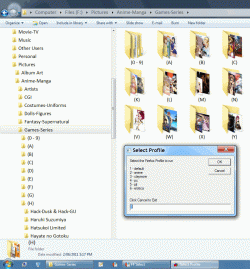
Does anyone know which setting adjusts the font size in those areas?
I can make the text larger by using the "Medium - 125%" setting (in the Display window).
However some of my programs and a few installers can't cope with it (i.e. buttons don't appear because they are outside the window area).
- On the Command Bar.
- On the Task Bar.
- In the Details Pane.
- In Message Boxes.
Does anyone know which setting adjusts the font size in those areas?
I can make the text larger by using the "Medium - 125%" setting (in the Display window).
However some of my programs and a few installers can't cope with it (i.e. buttons don't appear because they are outside the window area).
My Computer
- Computer type
- PC/Desktop
- Computer Manufacturer/Model Number
- n/a
- OS
- W7 Ultimate SP1, LM19.2 MATE, W10 Home 1703, W10 Pro 1703 VM, #All 64 bit
- CPU
- AMD Phenom II x6 1100T, 3.3 GHz
- Motherboard
- ASUS M4A88T-M/USB3 (AM3)
- Memory
- 12GB DDR3 1333 G-Skill (4GB x 2), G-Skill (2GB x 2)
- Graphics Card(s)
- NVIDIA GeForce GTX 660
- Sound Card
- Realtek?
- Monitor(s) Displays
- Samsung S23B350
- Screen Resolution
- 1920x1080
- Hard Drives
- WD Green 2TB (SATA), WD Green 3TB (SATA), WD Blue 4TB (SATA), WD Blue 6TB (SATA)
- PSU
- Cooler Master
- Case
- Antec GX300 Tower
- Cooling
- 3x Antec TRICOOL 120mm Fans
- Mouse
- Wired Optical
- Internet Speed
- DSL
- Antivirus
- Avast
- Browser
- Pale Moon (64 bit)
- Other Info
- 2018-12-27 Upgraded HDDs
2015-12-10 Upgraded case, graphics card, storage
2015-08-15 Upgraded motherboard & RAM
2015-07-15 Upgraded LM17.1 to LM17.2


