How to share entire drives

barend

New member
Member
VIP
Local time
4:43 PM
Messages
126
Using the WORKGROUP method on W7, because one of my laptops has XP.
I'm the only one using my net, so I want to open EVERYTHING on EVERY computer on my wlan.
Googling produced only results for folder sharing.
But that's not what I want: got a drive with 90 or so folders...:rolleyes:
 

My Computer My Computer

At a glance

Windows 7
OS
Windows 7

My Computer My Computer

At a glance

Windows 10 Pro x64 ; Xubuntu x64Intel i7 860 @ 2.80 GHz O/C'ed to 4.0GHz16GB Corsair Vengance DDR3 @ 661 MHz Dual Cha...EVGA NVidia GTX 560 1024MB
Computer type
PC/Desktop
Computer Manufacturer/Model Number
Golden Mk. I.4
OS
Windows 10 Pro x64 ; Xubuntu x64
CPU
Intel i7 860 @ 2.80 GHz O/C'ed to 4.0GHz
Motherboard
Gigabyte P55A-UD3R Rev.1. Award BIOS F13
Memory
16GB Corsair Vengance DDR3 @ 661 MHz Dual Channel (9-9-9-24)
Graphics Card(s)
EVGA NVidia GTX 560 1024MB
Sound Card
Realtek Integrated
Monitor(s) Displays
Dual Samsung SyncMaster 2494HS
Screen Resolution
1920*1080 and 1920*1080
Hard Drives
1*Samsung 840 EVO 120GB SSD;
1*OCZ Vertex 2 60GB SSD;
2*Samsung F3 SpinPoint 1TB in RAID0;
1*Samsung F1 SpinPoint 1TB;
2*Western Digital 1TB External USB 3.0
1*Western Digital 500GB External USB 3.0
1*Seagate 500GB External USB 2.0
PSU
Thermaltake ToughPower QFan 750W
Case
Thermaltake Element S VK60001W2Z
Cooling
Corsair H60 Water Cooling, 2*230mm and 2*80mm case fans
Keyboard
Logitech G110
Mouse
Logitech MX518
Printing the tut now, will read in coffee break...thanks for the link!
In the Old Days, sharing partitions used to be simple, but since MS tries to think for us instead of with us, too many constraints are laid...:(
 

My Computer My Computer

At a glance

Windows 7
OS
Windows 7

My Computer My Computer

At a glance

Windows 7 Ultimate SP1 64-BitIntel Core i7 870 @ 2.93GHz8Gb Dual-Channel DDR3 @ 664MHznVidia GeForce GTX 460 1024MB dedicated RAM
Computer Manufacturer/Model Number
HP Pavilion Elite 495UK
OS
Windows 7 Ultimate SP1 64-Bit
CPU
Intel Core i7 870 @ 2.93GHz
Motherboard
MSI 2A9C (CPU1)
Memory
8Gb Dual-Channel DDR3 @ 664MHz
Graphics Card(s)
nVidia GeForce GTX 460 1024MB dedicated RAM
Sound Card
Realtek HD Audio
Monitor(s) Displays
HP2310i
Screen Resolution
1920 x 1080
Hard Drives
1x1954GB Hitachi HDS22020ALA 330 (RAID), 1x1954GB Hitachi External for backup and storage
PSU
460W
Case
HP Elite
Cooling
Air cooled
Keyboard
Logitech K750 solar-powered keyboard
Mouse
Logitech Wireless M180 mouse
Internet Speed
2Mb
Other Info
Pure Avanti Flow Internet Radio with iPod Dock, 64Gb iPod, HP USB Speakers, Sony MDR-V500 Headphones, Sony Vaio F-Series Laptop
Not interested in "dangers".
I just want to decide for myself, and shere everything.
And MS won't let me.
Duh...
 

My Computer My Computer

At a glance

Windows 7
OS
Windows 7
Hi barend,

It can be such a hassle sharing files and other network resources over your network. Another option is a Network Attached Storage or NAS. A NAS is an external network hard drive; just plug it in to a Network Switch or to a Router’s LAN Port using a straight or a patch network cable.
Some NASs have a wireless capability, also with a Media Server built in which will allow music and videos to be streamed around the house; useful for the current wave of internet ready TVs etc .
Not interested in "dangers".
I just want to decide for myself, and shere everything.
And MS won't let me.
Duh...

Just a thought.
 

My Computer My Computer

At a glance

Win7 & Win8 64bitIntel i5
Computer Manufacturer/Model Number
Lenovo Desktop/Samsung Laptop
OS
Win7 & Win8 64bit
CPU
Intel i5
Internet Speed
Charter-20 Mbps
Antivirus
Avast
Browser
FF, IE9 and Chrome
Every drive, by default, has the hidden share applied to it (i.e: C$), couldn't you simply give yourself permission to use those?
 

My Computer My Computer

At a glance

W7 Professional x64Core 2 Duo 2.932 GBATI Radeon 4695
Computer Manufacturer/Model Number
HP 6000 Pro Micro Tower
OS
W7 Professional x64
CPU
Core 2 Duo 2.93
Memory
2 GB
Graphics Card(s)
ATI Radeon 4695
Monitor(s) Displays
Two HP 17's
Hard Drives
150GB Sata Drive
Case
Tiny. Kinda cute.
Keyboard
HP Supplied. Surprisingly nice.
Mouse
Gateway Mouse from an E2610D
Internet Speed
45 mbps
Yes. The C$ share (for the C: drive) shares the drive at the root which gives access to the subfolders. You can share the root folder of any drive .
 

My Computer My Computer

At a glance

W10 Pro desktop, W11 laptop, W11 Pro tablet (...3.7Ghz 8700K i7, i7-11800H, i7-1065G716G desktop, 16G laptop, 4G tabletAMD Radeon RX580, RTX 3060, Intel Iris Plus
Computer type
PC/Desktop
Computer Manufacturer/Model Number
Home Built desktop, Dell G15 5511 Gaming laptop,MS Surface Pro 7 tablet
OS
W10 Pro desktop, W11 laptop, W11 Pro tablet (all 64-bit)
CPU
3.7Ghz 8700K i7, i7-11800H, i7-1065G7
Motherboard
ASUS TUF Z370-Pro Gaming in desktop
Memory
16G desktop, 16G laptop, 4G tablet
Graphics Card(s)
AMD Radeon RX580, RTX 3060, Intel Iris Plus
Sound Card
High Definition Audio (Built-in to mobo)
Monitor(s) Displays
Samsung U32J59 32" (2x), 15.6", 12"
Screen Resolution
3840x2160, 3840x2160, 1920x1080, 2160x1440
Hard Drives
500G SSD for OS; 2T, 10T & 15T HDDs for Data on Desktop, 1TB SSD laptop, 128G SSD tablet.
PSU
Corsair CX 750M
Case
Antec 100
Cooling
CM 212+
Keyboard
IBM Model M - used continuously since 1986
Mouse
Microsoft Pro IntelliMouse
Internet Speed
400M down 8M up
Antivirus
Windows Defender
Browser
FireFox
Other Info
Built my first computer (8Mhz 8088cpu, 640K RAM, 20MB HDD, 2 360K floppy drives) in 1985 and have been building them for myself, relatives and friends ever since.
Thanks!
How do I do that?
Went to Advanced Sharing of my R: drive, and tried to share as R$ name.
Got a msg that was not possible because I was already sharing under that name, however I did not share it yet...
 

My Computer My Computer

At a glance

Windows 7
OS
Windows 7
Hi barend,

It can be such a hassle sharing files and other network resources over your network. Another option is a Network Attached Storage or NAS. A NAS is an external network hard drive; just plug it in to a Network Switch or to a Router’s LAN Port using a straight or a patch network cable.
Some NASs have a wireless capability, also with a Media Server built in which will allow music and videos to be streamed around the house; useful for the current wave of internet ready TVs etc .
Not interested in "dangers".
I just want to decide for myself, and shere everything.
And MS won't let me.
Duh...

Just a thought.

Thanks- food for thought indeed...something like an ad hoc LAN wide server right?
 

My Computer My Computer

At a glance

Windows 7
OS
Windows 7
Thanks!
How do I do that?
Went to Advanced Sharing of my R: drive, and tried to share as R$ name.
Got a msg that was not possible because I was already sharing under that name, however I did not share it yet...
It's a default, hidden share done to all hard drives. Go to another machine, open a run prompt (windows r), and type in \\machinename\r$ and it'll hook you to the root of the drive. :)
 

My Computer My Computer

At a glance

W7 Professional x64Core 2 Duo 2.932 GBATI Radeon 4695
Computer Manufacturer/Model Number
HP 6000 Pro Micro Tower
OS
W7 Professional x64
CPU
Core 2 Duo 2.93
Memory
2 GB
Graphics Card(s)
ATI Radeon 4695
Monitor(s) Displays
Two HP 17's
Hard Drives
150GB Sata Drive
Case
Tiny. Kinda cute.
Keyboard
HP Supplied. Surprisingly nice.
Mouse
Gateway Mouse from an E2610D
Internet Speed
45 mbps
Thanks WebMattR, will try that.
Hope it'll also clear the subfolders on that drive...
And I hope I can make a permanent link from the other machine with $ sign...
 

My Computer My Computer

At a glance

Windows 7
OS
Windows 7
You definitely should be able to, provided you have no issues authenticating to those machines (which, being your own, you shouldn't). Let us know if there's anything else you need help with. :)
 

My Computer My Computer

At a glance

W7 Professional x64Core 2 Duo 2.932 GBATI Radeon 4695
Computer Manufacturer/Model Number
HP 6000 Pro Micro Tower
OS
W7 Professional x64
CPU
Core 2 Duo 2.93
Memory
2 GB
Graphics Card(s)
ATI Radeon 4695
Monitor(s) Displays
Two HP 17's
Hard Drives
150GB Sata Drive
Case
Tiny. Kinda cute.
Keyboard
HP Supplied. Surprisingly nice.
Mouse
Gateway Mouse from an E2610D
Internet Speed
45 mbps
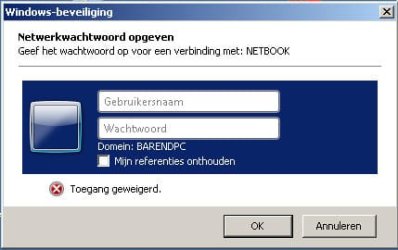
When I type \\NETBOOK\c$ I am presented with attached screen, I can enter the p/w (it's the same on all three computers) but what to enter as NAME ? :confused:

next to X is ACCESS REFUSED in Dutch...
 

Attachments

  • shotnetwork.jpg
    shotnetwork.jpg
    17.8 KB · Views: 2

My Computer My Computer

At a glance

Windows 7
OS
Windows 7
After all the $ fiddling for some reason my network does not work correctly anymore, so here's the situation:
BARENDNETBOOK has Windows 7 Starter
BARENDLAPTOP has Windows XP Pro
BARENDPC has Windows 7 Ultimate

All are member of WORKGROUP.
Both W7 machines are set to "Let Windows handle..."
On all at the roots of the drives are shared, at least.

FROM BARENDPC I cannot access anything on BARENDNETBOOK
FROM BARENDPC I can access everything on BARENDLAPTOP

FROM BARENDNOTEBOOK I cannot access anything on BARENDNETBOOK
FROM BARENDNOTEBOOK I can access everything on BARENDPC

FROM BARENDNETBOOK I cannot access anything on BARENDPC
FROM BARENDNETBOOK I can access everything on BARENDLAPTOP

Help, my head is spinning...
Any help greatly appreciated! :sick:
 

My Computer My Computer

At a glance

Windows 7
OS
Windows 7

My Computer My Computer

At a glance

Win7 & Win8 64bitIntel i5
Computer Manufacturer/Model Number
Lenovo Desktop/Samsung Laptop
OS
Win7 & Win8 64bit
CPU
Intel i5
Internet Speed
Charter-20 Mbps
Antivirus
Avast
Browser
FF, IE9 and Chrome
To log into the machine, when you get that prompt, you want to use the name of the machine you're connecting to (i.e: if you're on your pc, and connecting to the netbook, it'd be barendnetbook\barend (or whatever your username is) and then the password).

Does that help? And when you say can't access anything, are you getting an error message, or the window you posted above wanting you to authenticate, or what?
 

My Computer My Computer

At a glance

W7 Professional x64Core 2 Duo 2.932 GBATI Radeon 4695
Computer Manufacturer/Model Number
HP 6000 Pro Micro Tower
OS
W7 Professional x64
CPU
Core 2 Duo 2.93
Memory
2 GB
Graphics Card(s)
ATI Radeon 4695
Monitor(s) Displays
Two HP 17's
Hard Drives
150GB Sata Drive
Case
Tiny. Kinda cute.
Keyboard
HP Supplied. Surprisingly nice.
Mouse
Gateway Mouse from an E2610D
Internet Speed
45 mbps
Tried everything, nothing helps.
Took out the XP machine, so both are W7 now, made a homegroup on both, entered the cryptic 10 digit password on both, all succesful.
Shared folders on both.
Ping OK both directions.
But still my pc can access the netbook, but the netbook can't access anything on the pc.
Everything I to access, even the root of c, leads to the no access message.
Only the printer connected to the pc works.
So I'm out of options it seems...

Is there a simple program that takes the pain away?
Found a Cisco program that proposes to do just that, but it's expensive and seems awfully complicated itself...
 

My Computer My Computer

At a glance

Windows 7
OS
Windows 7
Just found out that the only folder (no matter what I share on the PC) I can access from the Netbook is the PUBLIC folder (c:\users\public).
Should this tell me something?
 

My Computer My Computer

At a glance

Windows 7
OS
Windows 7
That may be a limitation of Windows 7 Starter. Either that, or your firewall/av on the other machine is restricting it.
 

My Computer My Computer

At a glance

W7 Professional x64Core 2 Duo 2.932 GBATI Radeon 4695
Computer Manufacturer/Model Number
HP 6000 Pro Micro Tower
OS
W7 Professional x64
CPU
Core 2 Duo 2.93
Memory
2 GB
Graphics Card(s)
ATI Radeon 4695
Monitor(s) Displays
Two HP 17's
Hard Drives
150GB Sata Drive
Case
Tiny. Kinda cute.
Keyboard
HP Supplied. Surprisingly nice.
Mouse
Gateway Mouse from an E2610D
Internet Speed
45 mbps
Back
Top