
Help with Partitioning My Hard Drive

jetablack4

New member
Member
Local time
12:54 AM
Messages
56
The question I have is once I am ready to image my hard drive (C drive and D drive) do I also make images of "RECOVERY" and "39 MB Healthy (OEM Partition)"? If so do I include the C drive, "RECOVERY" and "39 MB Healthy (OEM Partition)" in one image (if thats even possible) or separate?
1. The 39MB partition I would not image on a regular basis - maybe once just to have it. That is most likely the tools partition for the BIOS tools.

2. In your case, the recovery partition is iffy because it contains the bootmgr. That I would also image once. Make sure you do not declare the C partition as active when you restore the image of C. Also do not replace the MBR.

Maybe at one point in time you want to fix the C partition so that it is active and deactivate the recovery partition. For guidance I suggest you start a different thread.

3. You can image several partitions in one shot. That does not mean that you have to restore them all together. In your case though, I would suggest that you create one definition where you image the 39MB partition and the recovery partition together - and stick those into a seperate folder.
Then make another definition (which creates an XML file) for the C partition and stick those images into another folder. If you want to schedule the imaging of the C partition, right click on that XML file (in the Macrium control window) and go to "Schedule".
If you ever want to delete the definitions, do not do it in the Macrium control window but in Documents > Reflect. That is a better way.


I am starting a new thread as I was getting off topic in my other thread. I want to image my hard drive and I want to go about doing it the right way. I noticed that my current drive is broken up into 3 partitions (the computer came this way) and I am curious as to which parts I should image and if I should image them separately or together.

Member whs stated that I should make my OS (C) drive active and deactivate my recovery drive. I need helping on doing this, and some advice on properly imaging my drive. Please see attachment below

Thanks
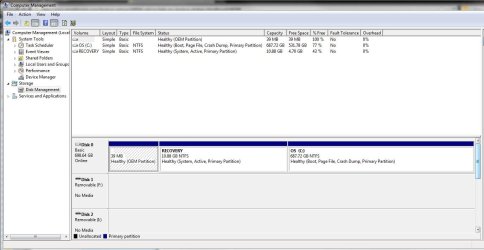
Capture.JPG
 

My Computer My Computer

Computer Manufacturer/Model Number
Dell XPS 8100
OS
Windows 7 64 bit
CPU
Intel Core i5 650
Memory
6 GB RAM
Many here may disagree, but I Imaged my Dell which is set up like yours. I imaged each partition seperately and then imaged the entire drive. That way I have it any way I need it.
 

My Computers My Computers

System One System Two

  • Computer type
    PC/Desktop
    Computer Manufacturer/Model Number
    ALWAYS UNDER CONSTRUCTION
    OS
    Windows 11 Pro
    CPU
    Ryzen 9 5900X
    Motherboard
    Asus X570 Crosshair Viii Hero
    Memory
    32GB G Skill DDR4-3600
    Graphics Card(s)
    EVGA RTX 3080 FTW 3 Ultra
    Sound Card
    On Board/Sennheiser PC37X Headset
    Monitor(s) Displays
    3 X Asus 27"
    Screen Resolution
    2560x1440
    Hard Drives
    2 X 1 TB NVME drives
    PSU
    EVGA 850
    Case
    Phanteks Eclipse P400A
    Cooling
    EVGA 280 AIO
    Keyboard
    Logitech G510s/ Logitech G13
    Mouse
    Logitech G502
    Internet Speed
    24/1
    Antivirus
    ESET/MBAM Pro/SAS Pro
    Browser
    Chrome/ Firefox/ Edge
  • Computer type
    Laptop
    System Manufacturer/Model Number
    Dell 16 Plus
    OS
    Windows 11 Pro
    CPU
    Intel Ultra 9 288V
    Memory
    32 GB LPDDR5X 8533
    Monitor(s) Displays
    16" Mini-LED HDR600 Touch 90 Hz
    Screen Resolution
    2560X1600
    Hard Drives
    1 TB NVME
You can make a partition active in disk management by right clicking the partition and choosing "mark partition as active".

I looked through your other long thread and agree that data should be backed up without imaging. Imaging is not foolproof and you don't want a non-foolproof method for something as critical as data. This forum has a lot of posts from people who simply were unable to restore an image---for whatever reason and regardless of application. Any backup method can fail, but it's a good idea to tilt the odds in your favor whenever possible.


I use Second Copy. It is $30, with a free 30 day trial. You can think of it as robocopy with a graphical interface. You just make a "profile" for each backup task, which can be as simple as backing up one file or as detailed as backing up all files. You can pick and choose which folders and files to include or exclude. You can include or exclude by file extension. It has been in development for over 10 years and has never caused me a problem--I've used it for over 10 years.

I use 5 profiles:

data and text files
mp3
pictures and video
email
bookmarks

I run these profiles manually, but they can be scheduled as well.

Regarding imaging:

I use Macrium Reflect Free Edition and Acronis, alternating, about every month or two. I image only my C partition. I built my own PC so I don't have a tools or recovery partition and don't need them. I keep the 2 most recent images and have never had to do a restore. I hope they work when needed, but don't count on it. My worst case scenario is that I have to reinstall Windows manually.
 

My Computer My Computer

Computer type
PC/Desktop
Computer Manufacturer/Model Number
Ignatz Special; 4 speed manual gearbox; factory air conditioning; one of one
OS
Windows 7 Home Premium SP1, 64-bit
CPU
Intel Skylake i5-6600K, not overclocked
Motherboard
AsRock Z170M Extreme 4, micro ATX
Memory
8 GB HyperX DDR4-2666 (2 x 4 GB)
Graphics Card(s)
none; graphics are integrated on CPU
Sound Card
onboard: Realtek ALC1150; external: USB Behringer UF0-202
Monitor(s) Displays
Dell S2340M 23 inch IPS
Screen Resolution
1600 x 900
Hard Drives
System: Crucial MX100 series SSD, 128 GB;
Data: Samsung Spinpoint 103SJ, 1 TB;
Backup: WD Caviar Green WD30EZRX-00D8PB0, 3 TB
PSU
Rosewill SilentNight 500 watt fanless, semi-modular
Case
Antec Solo II
Cooling
Noctua NH-U12S; Noctua F12 intake, Noctua S12A exhaust
Keyboard
Microsoft 200 6JH-00001 USB
Mouse
Dell or Microsoft optical wired; USB
Antivirus
Microsoft Security Essentials and Malwarebytes Premium
Browser
Pale Moon
Other Info
All fans PWM; speeds at idle: CPU circa 500 rpm; intake circa 600 rpm; exhaust circa 600 rpm; CPU temps 27 idle and 47 C load in a warm room (27 C/81 F) when running Intel Extreme Tuning Utility stress test.
I haven't read the previous thread.
However, as it stands I would leave your Dell system as it is and image each partition with Macrium.

As you recognise Dell appear to use the recovery partition for both recovery and the "system reserved" function. So inside there I would expect to see a bootsector, bootmgr and a Boot folder containing the BCD. Most of the time you would only need to image and reimage your OS partition. Macrium keeps a copy of the MBR with each image.

I don't know to what extent Dell factory recovery relies on the recovery partition being active.

{As an aside I would expect Windows imaging to require you include the system/recovery partition - does it?}
 

My Computer My Computer

Computer type
PC/Desktop
Computer Manufacturer/Model Number
Own build
OS
Windows 7x64 Home Premium SP1
CPU
Intel i7 2600k
Motherboard
ASUS P8Z68 Deluxe
Memory
G.Skill Ripjaws (DDR3-1600) 2x4GB
Graphics Card(s)
Nvidia GeForce GTS 450; Intel HD Graphics 3000(GT2+)
Monitor(s) Displays
Dell Ultrasharp IPS panel U2311H, Samsung SyncMaster P2350
Screen Resolution
1920x1080
Hard Drives
Samsung 850 Pro SSD 256GB, Samsung SSD 840 120GB, Seagates 1TB Barracuda ST31000528AS x2
PSU
Seasonic M12II 520W
Case
Lian Li Lancool PC-K60
Cooling
Case: 1x120mm, 3x140mm CPU: Hyper 212+
Keyboard
Logitech MK520 (wireless)
Mouse
Logitech MK520
Internet Speed
6-7 Mbps
Antivirus
Norton Security Premium, Malwarebytes on 2 (MSE on 3rd PC)
Browser
FireFox
Other Info
Audio: Logitech Z523 2.1
jetablack,

What is the size of the drive to which you will be backing up?

If you ask 5 people how to backup and how to partition, you will get 7 answers.


Here's what I do.

One I have a partition for my operating system.
Two I have a partition for date.
Three I use Win 7 Backup and Restore to make an image backup of the partitions.

Incidentally, my os partition is 50 GB with nearly 30 GB free.
 

My Computer My Computer

Computer Manufacturer/Model Number
Toshiba Satellite S875D-S7239 laptop
OS
MS Windows 7 Ultimate SP1 64-bit
CPU
AMD A10-4600M
Motherboard
AMD Pumori (Socket FT1)
Memory
6.00 GB Dual-Channel DDR3 @ 798MHz (11-11-12-28)
Graphics Card(s)
AMD Radeon HD 7660G
Sound Card
High Definition Audio Device
Monitor(s) Displays
Generic PnP Monitor (1600x900@60Hz)
Screen Resolution
1600x900@60Hz
Hard Drives
SSD 119GB Corsair CSSD-V128GB2 ATA Device
Keyboard
Standard PS/2 Keyboard
Mouse
HP Wireless Optical Mobile Mouse Model FHA-3410
Internet Speed
What the local pub, local coffee shop offers.
Other Info
Optical Drive:MATSHITA BD-CMB UJ160B ATA Device


Also have an Asus ha1002xp netbook with Win 7 Ultimate installed.
Having a separate partition for you personal data makes sense, because your personal files are at less risk if your operating system goes walkabout.

I've created a system image for my operating system and applications, and then use Robocopy to back up my personal data, music and digital photos, which are all on a separate partition to Windows.
 

My Computer My Computer

Computer Manufacturer/Model Number
HP Pavilion Elite 495UK
OS
Windows 7 Ultimate SP1 64-Bit
CPU
Intel Core i7 870 @ 2.93GHz
Motherboard
MSI 2A9C (CPU1)
Memory
8Gb Dual-Channel DDR3 @ 664MHz
Graphics Card(s)
nVidia GeForce GTX 460 1024MB dedicated RAM
Sound Card
Realtek HD Audio
Monitor(s) Displays
HP2310i
Screen Resolution
1920 x 1080
Hard Drives
1x1954GB Hitachi HDS22020ALA 330 (RAID), 1x1954GB Hitachi External for backup and storage
PSU
460W
Case
HP Elite
Cooling
Air cooled
Keyboard
Logitech K750 solar-powered keyboard
Mouse
Logitech Wireless M180 mouse
Internet Speed
2Mb
Other Info
Pure Avanti Flow Internet Radio with iPod Dock, 64Gb iPod, HP USB Speakers, Sony MDR-V500 Headphones, Sony Vaio F-Series Laptop
Thanks all for the responses.

I do plan on creating another partition for my data and labeling it my D drive. Creating a new a partition seems straight forward enough and I don't see that being a problem, however, I am very new to imaging and have only created images through Windows 7 backup. Since at this point I only have 1 Hard drive along with the tools and recovery partition I am assuming that Windows 7 backed up all 3 partitions but I have no idea.

Thats what i find so confusing, I don't which parts I should back up (I will back them all up just in case) but then I would not know how to go about properly restoring them. The c drive first or the tools and recovery?? And then whs in the other thread was telling me to make my c drive active - this all gets very confusing. But at least I am learning a lot and once I get this straightened out I am sure I will be very grateful if my system ever crashes.

As ignatzatsonic and pparks1 (from the other thread) have stated about creating backups of these files separate from and image, I total agree with. I am currently working with Robocopy and trying to get it to fully work, although, I am running into some errors with some files and folders - so I am may look into that program you have mentioned. Second Copy simply copies files to another destination and they are not in a container file like the backups that windows, acronis or macrium offer correct? http://www.sevenforums.com/member.php?u=21149
 

My Computer My Computer

Computer Manufacturer/Model Number
Dell XPS 8100
OS
Windows 7 64 bit
CPU
Intel Core i5 650
Memory
6 GB RAM

I have the dell discs that my computer came with - but I do not plan on using dell's backup and recovery, so I do not think making a dell recovery disc would be of use to me. Instead I will be using Macrium
 

My Computer My Computer

Computer Manufacturer/Model Number
Dell XPS 8100
OS
Windows 7 64 bit
CPU
Intel Core i5 650
Memory
6 GB RAM
Thanks all for the responses.

I do plan on creating another partition for my data and labeling it my D drive. Creating a new a partition seems straight forward enough and I don't see that being a problem, however, I am very new to imaging and have only created images through Windows 7 backup. Since at this point I only have 1 Hard drive along with the tools and recovery partition I am assuming that Windows 7 backed up all 3 partitions but I have no idea.

Thats what i find so confusing, I don't which parts I should back up (I will back them all up just in case) but then I would not know how to go about properly restoring them. The c drive first or the tools and recovery?? And then whs in the other thread was telling me to make my c drive active - this all gets very confusing. But at least I am learning a lot and once I get this straightened out I am sure I will be very grateful if my system ever crashes.

As ignatzatsonic and pparks1 (from the other thread) have stated about creating backups of these files separate from and image, I total agree with. I am currently working with Robocopy and trying to get it to fully work, although, I am running into some errors with some files and folders - so I am may look into that program you have mentioned. Second Copy simply copies files to another destination and they are not in a container file like the backups that windows, acronis or macrium offer correct?

I kept this information from my Vista days and hope it helps you get to grips with Robocopy:


Windows Robocopy File Backup

Use Robocopy, which is built into Vista.

Go to command prompt and type robocopy /?
This will show you the settings.

I use two main switches: /mir and /e

/MIR mirrors the destination to be the same as the source. So in your source location, if you move, delete, add anything, the destination will be mirrored. If you delete something in the source, it gets deleted in the destination. If you move a file from one folder to another in the source, it also gets moved in the destination. If you update a file and it is newer then the destination file will be overwritten with the newer one.

/E will copy any file that is newer or doesn't exist but doesn't remove files that have been moved or deleted in the source. So if you delete a file from the source, it will remain in the destination. If you move a file from one folder to another in the source, then the destination will contain two copies of the file, one in the old location and one in the new.

The /E switch is pretty much the same an incremental backup. Depending on what you are doing you might want to use the /MIR option. On my machine, I use /E for documents and pictures in case I accidentally delete something, since documents and pictures can be important. However, for my music directory, since WMP11 is constantly moving and renaming files as I organize my music, I don't want a bunch of extra files everywhere, so I use the /MIR switch just to mirror the backup to the source.

In my case, I have a batch file that runs every night and it looks like this:

robocopy "e:\Documents" "f:\Backup\Documents" /e
robocopy "e:\Pictures" "f:\Backup\Pictures" /e
robocopy "e:\Contacts" "f:\Backup\Contacts" /e

robocopy "e:\Favorites" "f:\Backup\Favorites" /mir
robocopy "e:\Mail" "f:\Backup\Mail" /mir
robocopy "e:\Music" "f:\Backup\Music" /mir
robocopy "e:\Videos" "d:\Backup\Videos" /mir
 

My Computer My Computer

Computer Manufacturer/Model Number
HP Pavilion Elite 495UK
OS
Windows 7 Ultimate SP1 64-Bit
CPU
Intel Core i7 870 @ 2.93GHz
Motherboard
MSI 2A9C (CPU1)
Memory
8Gb Dual-Channel DDR3 @ 664MHz
Graphics Card(s)
nVidia GeForce GTX 460 1024MB dedicated RAM
Sound Card
Realtek HD Audio
Monitor(s) Displays
HP2310i
Screen Resolution
1920 x 1080
Hard Drives
1x1954GB Hitachi HDS22020ALA 330 (RAID), 1x1954GB Hitachi External for backup and storage
PSU
460W
Case
HP Elite
Cooling
Air cooled
Keyboard
Logitech K750 solar-powered keyboard
Mouse
Logitech Wireless M180 mouse
Internet Speed
2Mb
Other Info
Pure Avanti Flow Internet Radio with iPod Dock, 64Gb iPod, HP USB Speakers, Sony MDR-V500 Headphones, Sony Vaio F-Series Laptop
As I said before. Windows imaging requires the system partition to be backed up. This probably means your recovery partition which is relatively large.
I use Windows imaging primarily along with Macrium. You may be best with Macrium.

If you want to make a 4th partition (D: ) then Windows Disk Management will require that this be an extended/logical partition. There is nothing wrong with this but if you want a primary partition you will need to use a third party tool like Partition Wizard.
 

My Computer My Computer

Computer type
PC/Desktop
Computer Manufacturer/Model Number
Own build
OS
Windows 7x64 Home Premium SP1
CPU
Intel i7 2600k
Motherboard
ASUS P8Z68 Deluxe
Memory
G.Skill Ripjaws (DDR3-1600) 2x4GB
Graphics Card(s)
Nvidia GeForce GTS 450; Intel HD Graphics 3000(GT2+)
Monitor(s) Displays
Dell Ultrasharp IPS panel U2311H, Samsung SyncMaster P2350
Screen Resolution
1920x1080
Hard Drives
Samsung 850 Pro SSD 256GB, Samsung SSD 840 120GB, Seagates 1TB Barracuda ST31000528AS x2
PSU
Seasonic M12II 520W
Case
Lian Li Lancool PC-K60
Cooling
Case: 1x120mm, 3x140mm CPU: Hyper 212+
Keyboard
Logitech MK520 (wireless)
Mouse
Logitech MK520
Internet Speed
6-7 Mbps
Antivirus
Norton Security Premium, Malwarebytes on 2 (MSE on 3rd PC)
Browser
FireFox
Other Info
Audio: Logitech Z523 2.1
I am sorry, but I am not fully grasping the difference between the OS (C), the recovery partition and the tools partition, so bare with me.

What I want to figure out is if my computer crashes and I want to restore to an earlier point in time or have to use my rescue CD and restore to a earlier point in time how do I go about restoring? I understand that I can image all 3 current partitions separately, together or in different combinations - however, which method will allow me to get my computer back to the way it was before the crash?

As I said before. Windows imaging requires the system partition to be backed up. This probably means your recovery partition which is relatively large.
I use Windows imaging primarily along with Macrium. You may be best with Macrium.

I am getting confused between what is considered my "system" - is it the (C) partition or is it the "recovery" partition?

Which one of these contains the "bootsector, bootmgr and a Boot folder containing the BCD"?

whs and others think it is the recovery partition contains the boot manager and that I should change my (C) to active.

All of this info together, as you can imagine is confusing to me


If you want to make a 4th partition (D: ) then Windows Disk Management will require that this be an extended/logical partition. There is nothing wrong with this but if you want a primary partition you will need to use a third party tool like Partition Wizard.

What is the difference between extended/logical partition and a primary partition?


From all the information that I have read, my understand thus far is that I should create an image of the tools and recovery partition together (one time only) and then create images of the (C) and (D) -once I create it - and keep making either full, incremental or diff images of the C and D drives as I wish.

If that part is correct that what would be the proper way to restore these images?:confused:
 

My Computer My Computer

Computer Manufacturer/Model Number
Dell XPS 8100
OS
Windows 7 64 bit
CPU
Intel Core i5 650
Memory
6 GB RAM
Second Copy simply copies files to another destination and they are not in a container file like the backups that windows, acronis or macrium offer correct? http://www.sevenforums.com/member.php?u=21149

That is correct. They are not in a container of any kind. It's just as if you manually copied them to another location with a mouse.

The advantage of Second Copy is that all of your choices are made with a series of check boxes and you don't have to deal with a command line. Just choose what files to back up, to where, and how often. One file or a million. Only Word files. Only Word files within the XYZ folder. ALL files except Word files in the XYZ folder. All files every Wednesday. Only Excel files every 8 hours. Etcetera. You have total control, but don't use a command line.

You would probably find Macrium to be more intuitive than the Windows imaging program.

An extended partition is a convenience to allow you to have more than 4 partitions on a drive. Most people don't use an extended partition because they don't need that many partitions.
 

My Computer My Computer

Computer type
PC/Desktop
Computer Manufacturer/Model Number
Ignatz Special; 4 speed manual gearbox; factory air conditioning; one of one
OS
Windows 7 Home Premium SP1, 64-bit
CPU
Intel Skylake i5-6600K, not overclocked
Motherboard
AsRock Z170M Extreme 4, micro ATX
Memory
8 GB HyperX DDR4-2666 (2 x 4 GB)
Graphics Card(s)
none; graphics are integrated on CPU
Sound Card
onboard: Realtek ALC1150; external: USB Behringer UF0-202
Monitor(s) Displays
Dell S2340M 23 inch IPS
Screen Resolution
1600 x 900
Hard Drives
System: Crucial MX100 series SSD, 128 GB;
Data: Samsung Spinpoint 103SJ, 1 TB;
Backup: WD Caviar Green WD30EZRX-00D8PB0, 3 TB
PSU
Rosewill SilentNight 500 watt fanless, semi-modular
Case
Antec Solo II
Cooling
Noctua NH-U12S; Noctua F12 intake, Noctua S12A exhaust
Keyboard
Microsoft 200 6JH-00001 USB
Mouse
Dell or Microsoft optical wired; USB
Antivirus
Microsoft Security Essentials and Malwarebytes Premium
Browser
Pale Moon
Other Info
All fans PWM; speeds at idle: CPU circa 500 rpm; intake circa 600 rpm; exhaust circa 600 rpm; CPU temps 27 idle and 47 C load in a warm room (27 C/81 F) when running Intel Extreme Tuning Utility stress test.
Your System partition is the recovery partition. It contains the boot critical files.

If you use Windows Imaging app. - it will image the recovery partition as well as your Windows partition.

One of the problems with Windows imaging is that if you restore using the GUI - then it will put your partition structure back to what it was at the time you made the image.

A touch inconvenient if you have repartitioned since..

A third party imaging app. will be more flexible - there are some great free ones.

If you have an issue with the boot critical files - they can be easily fixed by startup repair on the win 7 repair cd /install dvd.

If you have a major problem with your windows partition - then you would restore an image to it.
 

My Computers My Computers

System One System Two

  • Computer type
    PC/Desktop
    OS
    7 X64
    CPU
    i5 8400
    Motherboard
    gigabyte b365m ds3h
    Memory
    2x8gb 3200mhz
    Hard Drives
    various
    PSU
    pure power 11 400w cm
    Case
    Coolermaster
    Cooling
    cryorig m9i
  • Computer type
    PC/Desktop
    OS
    7x64
    CPU
    g5400
    Motherboard
    ga b365m ds3h
    Memory
    8gb ddr4 2400
    PSU
    xfx pro 450w
Second Copy simply copies files to another destination and they are not in a container file like the backups that windows, acronis or macrium offer correct?

That is correct. They are not in a container of any kind. It's just as if you manually copied them to another location with a mouse.

The advantage of Second Copy is that all of your choices are made with a series of check boxes and you don't have to deal with a command line. Just choose what files to back up, to where, and how often. One file or a million. Only Word files. Only Word files within the XYZ folder. ALL files except Word files in the XYZ folder. All files every Wednesday. Only Excel files every 8 hours. Etcetera. You have total control, but don't use a command line.

You would probably find Macrium to be more intuitive than the Windows imaging program.

An extended partition is a convenience to allow you to have more than 4 partitions on a drive. Most people don't use an extended partition because they don't need that many partitions.

Thanks ignatzatsonic, for $30 I would rather have the convenience of a program do all the work for me, rather then spending time trouble shooting what I am doing wrong with Robocopy.
 

My Computer My Computer

Computer Manufacturer/Model Number
Dell XPS 8100
OS
Windows 7 64 bit
CPU
Intel Core i5 650
Memory
6 GB RAM
If you just want something to automate backing up your files - you can't do better than Karen's Replicator

It is unbelievably easy to use - it's also free.
 

My Computers My Computers

System One System Two

  • Computer type
    PC/Desktop
    OS
    7 X64
    CPU
    i5 8400
    Motherboard
    gigabyte b365m ds3h
    Memory
    2x8gb 3200mhz
    Hard Drives
    various
    PSU
    pure power 11 400w cm
    Case
    Coolermaster
    Cooling
    cryorig m9i
  • Computer type
    PC/Desktop
    OS
    7x64
    CPU
    g5400
    Motherboard
    ga b365m ds3h
    Memory
    8gb ddr4 2400
    PSU
    xfx pro 450w
I am sorry, but I am not fully grasping the difference between the OS (C), the recovery partition and the tools partition, so bare with me.

What I want to figure out is if my computer crashes and I want to restore to an earlier point in time or have to use my rescue CD and restore to a earlier point in time how do I go about restoring? I understand that I can image all 3 current partitions separately, together or in different combinations - however, which method will allow me to get my computer back to the way it was before the crash?

you can use the windows recovery manager to do restore to an earlier point in time.
here is a link to the tutorial, This tutorial shows both methods.
http://www.sevenforums.com/tutorials/700-system-restore.html?ltr=S

I am getting confused between what is considered my "system" - is it the (C) partition or is it the "recovery" partition?

Which one of these contains the "bootsector, bootmgr and a Boot folder containing the BCD"?

whs and others think it is the recovery partition contains the boot manager and that I should change my (C) to active.

All of this info together, as you can imagine is confusing to me

ok now your reading to much into this, as no boot partition is visable on your disk managment page it would be safe to assume the master boot record is located in the recovery partition. To that end do not under any circumstances disable that partition. The option should not be there for you to do it anyway.

that being said the boot sector isn't visible in my disk managment either which is a home build so i wouldn't worry about it not being there or at least not visible to you.


What is the difference between extended/logical partition and a primary partition?


From all the information that I have read, my understand thus far is that I should create an image of the tools and recovery partition together (one time only) and then create images of the (C) and (D) -once I create it - and keep making either full, incremental or diff images of the C and D drives as I wish.

If that part is correct that what would be the proper way to restore these images?

you can't make incrimental images an image is exactly what it sounds like a picture of the drive, nor can you pick and choose which files to include.

using the backup and restore function within windows 7 will let you pick and choose but the image creator won't.

it is also not reccomended to image to the same drive and in most occasions won't let you without several warnings.

most of your partitions will be primary i've certainly never seen a need to use logical or extended for them and haven't(knock on wood) had any issues with my drives for several years.

here is a link to a tutorial by Brink regarding system image recovery
http://www.sevenforums.com/tutorials/675-system-image-recovery.html?ltr=S

there are some very good points to remember from that tutorial and it should answer alot of your questions.
 

My Computer My Computer

Computer Manufacturer/Model Number
.
OS
.
CPU
.
Motherboard
.
Memory
.
Graphics Card(s)
.
Monitor(s) Displays
.
Screen Resolution
.
Hard Drives
.
PSU
.
Case
.
Cooling
.
Keyboard
.
Mouse
.
Internet Speed
.
Other Info
.
If you just want something to automate backing up your files - you can't do better than Karen's Replicator

It is unbelievably easy to use - it's also free.

Thanks SIW2 - I will look into this as well. In addition to file backups, I also want to create images of my hard drive. I just want to fully understand how it works before doing so.

Your System partition is the recovery partition. It contains the boot critical files.

If you use Windows Imaging app. - it will image the recovery partition as well as your Windows partition.

One of the problems with Windows imaging is that if you restore using the GUI - then it will put your partition structure back to what it was at the time you made the image.

A touch inconvenient if you have repartitioned since..

A third party imaging app. will be more flexible - there are some great free ones.

If you have an issue with the boot critical files - they can be easily fixed by startup repair on the win 7 repair cd /install dvd.

If you have a major problem with your windows partition - then you would restore an image to it.

As I mentioned, I have been using the Windows 7 imaging tool and I no longer care to use it as it is very inflexible and I have no idea on what it is actually imaging.

After doing lots of research I have chosen to use Macrium for images, now I am just trying to learn how to properly make an image and properly restore if necessary.

If I understand what you are saying - the Recovery partition is actually the system (which contains the boot files) and the OS (C) contains windows and my program files (and my data files, which I want to create a D drive for) - is this correct?

In the event that I needed to do a restore, and I imagine there can be many reasons (I will list a few scenarios), I am interested in knowing what to restore and how.

Example 1 - my whole computer crashes.

Do I reboot from my recovery CD (if necessary) and then restore the recovery partition and then the C partition and then D partition?

or

Do i restore with an image that contains the C drive, recovery and tools together and then restore the D drive?

Example 2 - operating system is acting up or I have some corrupt data

If the OS is corrupt do I just restore the OS image (not including the recovery or tools partition) over the corrupt one. Same for the D drive?


I am sorry if it seems like I am asking the same questions over and over, I just don't feel like I am getting direct answers for what I am asking. Everyone is being very helpful and I am asking a lot of questions and I don't know if I am phrasing my questions correctly. But thanks everyone for the patients and help!
 

My Computer My Computer

Computer Manufacturer/Model Number
Dell XPS 8100
OS
Windows 7 64 bit
CPU
Intel Core i5 650
Memory
6 GB RAM
If I understand what you are saying - the Recovery partition is actually the system (which contains the boot files) and the OS (C) contains windows and my program files (and my data files, which I want to create a D drive for) - is this correct?

I don't use recovery or tools partitions, so I can't answer your question re whether they specifically need to be restored.

However, you are correct about the system partition.

In my case, with no recovery partition, my C drive is both the system AND the OS partition. In your case, the recovery partition is your system partition and C is your OS.

My guess is that you would not typically have to restore the recovery partition unless that partition specifically was corrupted in some way.

Karen's replicator generally has a good rep--I'm just not sure if it is still under development. It may work well on Windows 7?

If you backup your D partition (personal data) with a NON-imaging program such as Karen's or Second Copy, there wouldn't be a major reason to image D. I don't image my data.

Instead I do the Second Copy thing and I also periodically (every 2 or 3 months) do a simple drag and drop copy of my most critical data to a USB thumb drive which I keep in a safe location away from my PC. No container involved in this backup either.

And I periodically backup data only to a spare hard drive which I put in a drive dock. It works like a huge USB thumb drive----like an external drive without the enclosure. No container involved.
 

My Computer My Computer

Computer type
PC/Desktop
Computer Manufacturer/Model Number
Ignatz Special; 4 speed manual gearbox; factory air conditioning; one of one
OS
Windows 7 Home Premium SP1, 64-bit
CPU
Intel Skylake i5-6600K, not overclocked
Motherboard
AsRock Z170M Extreme 4, micro ATX
Memory
8 GB HyperX DDR4-2666 (2 x 4 GB)
Graphics Card(s)
none; graphics are integrated on CPU
Sound Card
onboard: Realtek ALC1150; external: USB Behringer UF0-202
Monitor(s) Displays
Dell S2340M 23 inch IPS
Screen Resolution
1600 x 900
Hard Drives
System: Crucial MX100 series SSD, 128 GB;
Data: Samsung Spinpoint 103SJ, 1 TB;
Backup: WD Caviar Green WD30EZRX-00D8PB0, 3 TB
PSU
Rosewill SilentNight 500 watt fanless, semi-modular
Case
Antec Solo II
Cooling
Noctua NH-U12S; Noctua F12 intake, Noctua S12A exhaust
Keyboard
Microsoft 200 6JH-00001 USB
Mouse
Dell or Microsoft optical wired; USB
Antivirus
Microsoft Security Essentials and Malwarebytes Premium
Browser
Pale Moon
Other Info
All fans PWM; speeds at idle: CPU circa 500 rpm; intake circa 600 rpm; exhaust circa 600 rpm; CPU temps 27 idle and 47 C load in a warm room (27 C/81 F) when running Intel Extreme Tuning Utility stress test.
I have been keeping up with this thread but have not participated much because there has been a lot of good info passed out here. I am situated and back up much like ignatzatsonic. I do pretty much the same but just use some different programs. I wan't to add one suggestion. You have said that you have decided on Macrium for images. I think that is a good choice and use it myself. But, no matter how good an imaging program is, sometimes they don't work. I would suggest you use Macrium and another imaging program, just to be sure. Seagate and Western Digital both have cut down versions of Acronis that are free if you have one of their drives. Paragon has a good free program. Just find 2 that you feel confident in and use them both, just for insurance.
 

My Computers My Computers

System One System Two

  • Computer type
    PC/Desktop
    Computer Manufacturer/Model Number
    ALWAYS UNDER CONSTRUCTION
    OS
    Windows 11 Pro
    CPU
    Ryzen 9 5900X
    Motherboard
    Asus X570 Crosshair Viii Hero
    Memory
    32GB G Skill DDR4-3600
    Graphics Card(s)
    EVGA RTX 3080 FTW 3 Ultra
    Sound Card
    On Board/Sennheiser PC37X Headset
    Monitor(s) Displays
    3 X Asus 27"
    Screen Resolution
    2560x1440
    Hard Drives
    2 X 1 TB NVME drives
    PSU
    EVGA 850
    Case
    Phanteks Eclipse P400A
    Cooling
    EVGA 280 AIO
    Keyboard
    Logitech G510s/ Logitech G13
    Mouse
    Logitech G502
    Internet Speed
    24/1
    Antivirus
    ESET/MBAM Pro/SAS Pro
    Browser
    Chrome/ Firefox/ Edge
  • Computer type
    Laptop
    System Manufacturer/Model Number
    Dell 16 Plus
    OS
    Windows 11 Pro
    CPU
    Intel Ultra 9 288V
    Memory
    32 GB LPDDR5X 8533
    Monitor(s) Displays
    16" Mini-LED HDR600 Touch 90 Hz
    Screen Resolution
    2560X1600
    Hard Drives
    1 TB NVME
Back
Top