IconPackager Messes Up My Imagres.dll

IPSucks

New member
Local time
3:15 PM
Messages
14
Hey guys i am new to the forum!
For a couple of days I've been using a slicer icon pack for iconpackager then i decided that
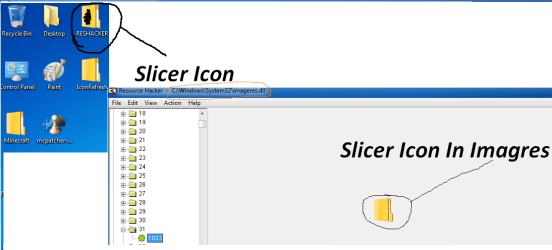
i want to go back to default icons, but each time I click default windows icon pack it does not work there is still some icons still applied I have tried to reboot, clear icon cache system restore sfc /scannow still not working. So after trying all of them i decided to check if imagres.dll was the problem i opened up ResHacker and when into system32 and clicked on imagres.dll and I saw that there was Slicer Icons left instead of Windows 7 icons. So could someone could just upload there default Imagres.dll and I could replace it.
Please and Thank You! I have tried fixing for 3 days still no luck :cry::cry::cry:
And Here are some screen shots:

-:mad:IPSucks:mad:
 

Attachments

  • someproof.png
    someproof.png
    35.2 KB · Views: 33

My Computer My Computer

At a glance

Windows 7 Ultimate X32bit.
OS
Windows 7 Ultimate X32bit.
Welcome to the forums ... and nice username :D

Do you still have Iconpackager installed? Select the default icon theme, and uninstall it . And then see post 4 and post 5 of the thread Help! - How do i restore default icons? .

Post 5 is much easier option, IMO .
 

My Computer My Computer

At a glance

Microsoft Windows 10 Pro Insider Preview 64-bitIntel(R) Core(TM) i3-4130 CPU @ 3.40GHzCorsair Vengence 4GB x2 (8.00GB Dual-Channel ...2047MB GeForce GTS 450 (ZOTAC International)
Computer type
PC/Desktop
Computer Manufacturer/Model Number
Self Assembled
OS
Microsoft Windows 10 Pro Insider Preview 64-bit
CPU
Intel(R) Core(TM) i3-4130 CPU @ 3.40GHz
Motherboard
Gigabyte Technology Co., Ltd. B85M-D3H
Memory
Corsair Vengence 4GB x2 (8.00GB Dual-Channel DDR3 @ 798MHz)
Graphics Card(s)
2047MB GeForce GTS 450 (ZOTAC International)
Sound Card
Onboard (Realtek High Definition Audio)
Monitor(s) Displays
LG Flatron E2040T
Screen Resolution
1600x900
Hard Drives
Western Digital 1 TB
Seagate 500 GB
PSU
Corsair VS550
Case
Cooler Master K380
Cooling
Cooler Master Seidon 120V Plus
Keyboard
Logitech MK260r
Mouse
Logitech MK260r
Internet Speed
PMPL Broadband
Antivirus
Windows Defender + MBAM
Browser
Firefox
Other Info
Dell Studio 15" Laptop
I do still have IconPakcager Installed i try your method out thank you
Stay active because i will post back
-:mad:IPSucks:mad:
 

My Computer My Computer

At a glance

Windows 7 Ultimate X32bit.
OS
Windows 7 Ultimate X32bit.
I do still have IconPakcager Installed i try your method out thank you
Stay active because i will post back
-:mad:IPSucks:mad:
Ok I am here for one more hour :D
 

My Computer My Computer

At a glance

Microsoft Windows 10 Pro Insider Preview 64-bitIntel(R) Core(TM) i3-4130 CPU @ 3.40GHzCorsair Vengence 4GB x2 (8.00GB Dual-Channel ...2047MB GeForce GTS 450 (ZOTAC International)
Computer type
PC/Desktop
Computer Manufacturer/Model Number
Self Assembled
OS
Microsoft Windows 10 Pro Insider Preview 64-bit
CPU
Intel(R) Core(TM) i3-4130 CPU @ 3.40GHz
Motherboard
Gigabyte Technology Co., Ltd. B85M-D3H
Memory
Corsair Vengence 4GB x2 (8.00GB Dual-Channel DDR3 @ 798MHz)
Graphics Card(s)
2047MB GeForce GTS 450 (ZOTAC International)
Sound Card
Onboard (Realtek High Definition Audio)
Monitor(s) Displays
LG Flatron E2040T
Screen Resolution
1600x900
Hard Drives
Western Digital 1 TB
Seagate 500 GB
PSU
Corsair VS550
Case
Cooler Master K380
Cooling
Cooler Master Seidon 120V Plus
Keyboard
Logitech MK260r
Mouse
Logitech MK260r
Internet Speed
PMPL Broadband
Antivirus
Windows Defender + MBAM
Browser
Firefox
Other Info
Dell Studio 15" Laptop
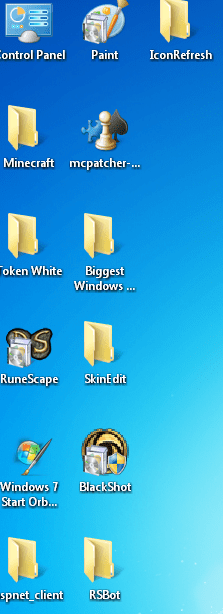
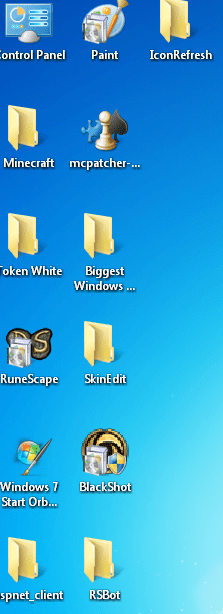
Thanks but i tried apply the imageres.dll and reboot this is how it looks
 

Attachments

  • stillproblem.png
    stillproblem.png
    45.7 KB · Views: 18

My Computer My Computer

At a glance

Windows 7 Ultimate X32bit.
OS
Windows 7 Ultimate X32bit.

Attachments

  • stillproblem.png
    stillproblem.png
    45.7 KB · Views: 6

My Computer My Computer

At a glance

Windows 7 Ultimate X32bit.
OS
Windows 7 Ultimate X32bit.

My Computer My Computer

At a glance

Microsoft Windows 10 Pro Insider Preview 64-bitIntel(R) Core(TM) i3-4130 CPU @ 3.40GHzCorsair Vengence 4GB x2 (8.00GB Dual-Channel ...2047MB GeForce GTS 450 (ZOTAC International)
Computer type
PC/Desktop
Computer Manufacturer/Model Number
Self Assembled
OS
Microsoft Windows 10 Pro Insider Preview 64-bit
CPU
Intel(R) Core(TM) i3-4130 CPU @ 3.40GHz
Motherboard
Gigabyte Technology Co., Ltd. B85M-D3H
Memory
Corsair Vengence 4GB x2 (8.00GB Dual-Channel DDR3 @ 798MHz)
Graphics Card(s)
2047MB GeForce GTS 450 (ZOTAC International)
Sound Card
Onboard (Realtek High Definition Audio)
Monitor(s) Displays
LG Flatron E2040T
Screen Resolution
1600x900
Hard Drives
Western Digital 1 TB
Seagate 500 GB
PSU
Corsair VS550
Case
Cooler Master K380
Cooling
Cooler Master Seidon 120V Plus
Keyboard
Logitech MK260r
Mouse
Logitech MK260r
Internet Speed
PMPL Broadband
Antivirus
Windows Defender + MBAM
Browser
Firefox
Other Info
Dell Studio 15" Laptop

My Computer My Computer

At a glance

Microsoft Windows 10 Pro Insider Preview 64-bitIntel(R) Core(TM) i3-4130 CPU @ 3.40GHzCorsair Vengence 4GB x2 (8.00GB Dual-Channel ...2047MB GeForce GTS 450 (ZOTAC International)
Computer type
PC/Desktop
Computer Manufacturer/Model Number
Self Assembled
OS
Microsoft Windows 10 Pro Insider Preview 64-bit
CPU
Intel(R) Core(TM) i3-4130 CPU @ 3.40GHz
Motherboard
Gigabyte Technology Co., Ltd. B85M-D3H
Memory
Corsair Vengence 4GB x2 (8.00GB Dual-Channel DDR3 @ 798MHz)
Graphics Card(s)
2047MB GeForce GTS 450 (ZOTAC International)
Sound Card
Onboard (Realtek High Definition Audio)
Monitor(s) Displays
LG Flatron E2040T
Screen Resolution
1600x900
Hard Drives
Western Digital 1 TB
Seagate 500 GB
PSU
Corsair VS550
Case
Cooler Master K380
Cooling
Cooler Master Seidon 120V Plus
Keyboard
Logitech MK260r
Mouse
Logitech MK260r
Internet Speed
PMPL Broadband
Antivirus
Windows Defender + MBAM
Browser
Firefox
Other Info
Dell Studio 15" Laptop
Still they dont get my desktop icons back like when you put folders in folder its not that icon
 

My Computer My Computer

At a glance

Windows 7 Ultimate X32bit.
OS
Windows 7 Ultimate X32bit.
Still they dont get my desktop icons back like when you put folders in folder its not that icon
one question ..... are all the system icons (drives , folders and files) look normal ? Is it troubling the third party programs' icons only ? Or the system icons are still not like they should be ?

The shortcuts .... they have nothing to do with imageres.dll . They are to be fixed differently . Right click on the particular shortcut and select properties . The properties window will open with the shortcut tab selected. Click on change icon ... and browse to C:\Program Files\ <the particular programs folder>.

Find the appropriate icon there (usuallu a exe file), select it , and apply it .
 

My Computer My Computer

At a glance

Microsoft Windows 10 Pro Insider Preview 64-bitIntel(R) Core(TM) i3-4130 CPU @ 3.40GHzCorsair Vengence 4GB x2 (8.00GB Dual-Channel ...2047MB GeForce GTS 450 (ZOTAC International)
Computer type
PC/Desktop
Computer Manufacturer/Model Number
Self Assembled
OS
Microsoft Windows 10 Pro Insider Preview 64-bit
CPU
Intel(R) Core(TM) i3-4130 CPU @ 3.40GHz
Motherboard
Gigabyte Technology Co., Ltd. B85M-D3H
Memory
Corsair Vengence 4GB x2 (8.00GB Dual-Channel DDR3 @ 798MHz)
Graphics Card(s)
2047MB GeForce GTS 450 (ZOTAC International)
Sound Card
Onboard (Realtek High Definition Audio)
Monitor(s) Displays
LG Flatron E2040T
Screen Resolution
1600x900
Hard Drives
Western Digital 1 TB
Seagate 500 GB
PSU
Corsair VS550
Case
Cooler Master K380
Cooling
Cooler Master Seidon 120V Plus
Keyboard
Logitech MK260r
Mouse
Logitech MK260r
Internet Speed
PMPL Broadband
Antivirus
Windows Defender + MBAM
Browser
Firefox
Other Info
Dell Studio 15" Laptop
Still they dont get my desktop icons back like when you put folders in folder its not that icon
one question ..... are all the system icons (drives , folders and files) look normal ? Is it troubling the third party programs' icons only ? Or the system icons are still not like they should be ?

The shortcuts .... they have nothing to do with imageres.dll . They are to be fixed differently . Right click on the particular shortcut and select properties . The properties window will open with the shortcut tab selected. Click on change icon ... and browse to C:\Program Files\ <the particular programs folder>.

Find the appropriate icon there (usuallu a exe file), select it , and apply it .
I could right click and apply but is there a quicker way because I need to go to the shops
in like 10 minutes
 

My Computer My Computer

At a glance

Windows 7 Ultimate X32bit.
OS
Windows 7 Ultimate X32bit.
I could right click and apply but is there a quicker way because I need to go to the shops
in like 10 minutes
No unfortunately :sarc: Coz they all are from different locations :(
 

My Computer My Computer

At a glance

Microsoft Windows 10 Pro Insider Preview 64-bitIntel(R) Core(TM) i3-4130 CPU @ 3.40GHzCorsair Vengence 4GB x2 (8.00GB Dual-Channel ...2047MB GeForce GTS 450 (ZOTAC International)
Computer type
PC/Desktop
Computer Manufacturer/Model Number
Self Assembled
OS
Microsoft Windows 10 Pro Insider Preview 64-bit
CPU
Intel(R) Core(TM) i3-4130 CPU @ 3.40GHz
Motherboard
Gigabyte Technology Co., Ltd. B85M-D3H
Memory
Corsair Vengence 4GB x2 (8.00GB Dual-Channel DDR3 @ 798MHz)
Graphics Card(s)
2047MB GeForce GTS 450 (ZOTAC International)
Sound Card
Onboard (Realtek High Definition Audio)
Monitor(s) Displays
LG Flatron E2040T
Screen Resolution
1600x900
Hard Drives
Western Digital 1 TB
Seagate 500 GB
PSU
Corsair VS550
Case
Cooler Master K380
Cooling
Cooler Master Seidon 120V Plus
Keyboard
Logitech MK260r
Mouse
Logitech MK260r
Internet Speed
PMPL Broadband
Antivirus
Windows Defender + MBAM
Browser
Firefox
Other Info
Dell Studio 15" Laptop
Back
Top