
Solved New 7 install on added HDD,Dual Boot XP Pro

No change

And I have replied repeatedly that the NTLDR Missing error pertains to XP only.

If you don't have XP HD plugged in there is no way to get that error, unless you've got a failed install to the SATA HD which is trying to boot - do you? We can deal with that if so.

So once again I ask you to unplug the XP HD and report back the exact error message or behavior when you try to boot the DVD drive.

Set the DVD drive to boot first in BIOS setup. Do you get the prompt to "Press any key to boot DVD?"

I am too tired to look for the post, but I mentioned that I had tried every configuration of plugged-in or not, but I just did it again with the old drive disconnected and there never is a DVD listed in the BIOS, just the general Onboard or USB CD-ROM Device. Nothing more in the BIOS.
Again, the error message after pressing F12, then CD ROM Device, says strike F1 key to try again, F2 for Setup utility. I strike F1 again and get the same message, then re-boot, shut down or F2 if I need to change anything in the OLD BIOS that never mentions a specific HDD or CD ROM or DVD ROM etc.

I am not, and never have been able to get to elevated Command prompt with this XP HOME edition. I have used Safe Mode to set the password in XP PRO for added security but have never had access to the "Administrator" account in this machine. I have forgotten how to go to safe mode to try to access the Administrator account and gain access so I can use command prompt with Administrator priveledges, even though I am in the Administrators group. Is it F5?
 

My Computer My Computer

At a glance

Win 7 PRO / Win XP PRO / 32 bitPentium 4 3.4 Ghz Dual Core3 GB
Computer Manufacturer/Model Number
Dell Optiplex GX280
OS
Win 7 PRO / Win XP PRO / 32 bit
CPU
Pentium 4 3.4 Ghz Dual Core
Memory
3 GB
Sound Card
SoundMax
Monitor(s) Displays
IBM Flat Panel
Hard Drives
Seagate ST - Internal 80 GB
Western Digital WD10EALX - Internal 1TB
Maxtor One Touch 4 Plus - External 500GB
Case
Mini-Tower
Cooling
forced air fans, or maybe 12 nephews with a lot of wind!
Keyboard
Logitech 600 series multi-media
Mouse
Logitech MX 310 optical
Internet Speed
Qwest DSL 1.5 GB, Finally, now have 1.5GB for $9.95
Other Info
Dell Inspiron 5100 2.8 Gxz. with a wireless card when I really need some speed and can locate an open network.
Flash Software for Drive

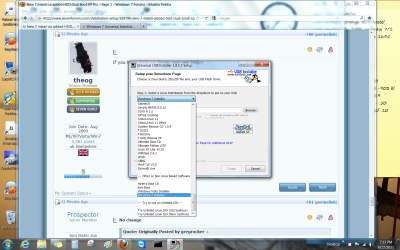
I formatted my flash drive and am installing the Universal USB software but the dropdown list has dozens of options and my SANDISK is not listed. What would you suggest I choose as the correct software?

The NTLDR error message happened again even though the old drive is fully disconnected!
 
Last edited:

My Computer My Computer

At a glance

Win 7 PRO / Win XP PRO / 32 bitPentium 4 3.4 Ghz Dual Core3 GB
Computer Manufacturer/Model Number
Dell Optiplex GX280
OS
Win 7 PRO / Win XP PRO / 32 bit
CPU
Pentium 4 3.4 Ghz Dual Core
Memory
3 GB
Sound Card
SoundMax
Monitor(s) Displays
IBM Flat Panel
Hard Drives
Seagate ST - Internal 80 GB
Western Digital WD10EALX - Internal 1TB
Maxtor One Touch 4 Plus - External 500GB
Case
Mini-Tower
Cooling
forced air fans, or maybe 12 nephews with a lot of wind!
Keyboard
Logitech 600 series multi-media
Mouse
Logitech MX 310 optical
Internet Speed
Qwest DSL 1.5 GB, Finally, now have 1.5GB for $9.95
Other Info
Dell Inspiron 5100 2.8 Gxz. with a wireless card when I really need some speed and can locate an open network.
Untitled.png

Choose Windows 7 installer in dropdown.

Then browse to Win7 ISO,

Then choose the flash stick drive letter.

Click Create.

Boot stick under USB or HD's in BIOS Setup or F12.
 
Windows 7 installer
The last post just said Windows 7, was that a question? I selected the SATA 0 Drive (New HDD in slot 1), this time and pressed enter and again I got the NTLDR Missing message. I thought that you would need that Information, is it important?
 

My Computer My Computer

At a glance

Win 7 PRO / Win XP PRO / 32 bitPentium 4 3.4 Ghz Dual Core3 GB
Computer Manufacturer/Model Number
Dell Optiplex GX280
OS
Win 7 PRO / Win XP PRO / 32 bit
CPU
Pentium 4 3.4 Ghz Dual Core
Memory
3 GB
Sound Card
SoundMax
Monitor(s) Displays
IBM Flat Panel
Hard Drives
Seagate ST - Internal 80 GB
Western Digital WD10EALX - Internal 1TB
Maxtor One Touch 4 Plus - External 500GB
Case
Mini-Tower
Cooling
forced air fans, or maybe 12 nephews with a lot of wind!
Keyboard
Logitech 600 series multi-media
Mouse
Logitech MX 310 optical
Internet Speed
Qwest DSL 1.5 GB, Finally, now have 1.5GB for $9.95
Other Info
Dell Inspiron 5100 2.8 Gxz. with a wireless card when I really need some speed and can locate an open network.
What does selecting the SATA HD have to do with creating the Win7 installer on a flash stick?

If you are getting the NTLDR error with only the SATA HD plugged in, then you must have had a failed XP install to the SATA HD at some point?

Finish formatting the flash stick and boot it correctly then you won't get the NTLDR error. It only errors because it is attempting to boot the HD and not the DVD or Flash stick. You haven't correctly booted either yet.
 
Windows 7 .iso

View attachment 161177

Choose Windows 7 installer in dropdown.

Then browse to Win7 ISO,

Then choose the flash stick drive letter.

Click Create.

Boot stick under USB or HD's in BIOS Setup or F12.

Greg I searched that DVD looking for the .iso image and did not find it. Did it say somewhere that I was to go to Microsoft and download it? I was working with this DVD as the source of the transfer to the flash drive. I am getting just a little exhausted mentally about now and if I need to download the iso file then on this slow dial-up, it will take 2 or 3 days to do it!
 

My Computer My Computer

At a glance

Win 7 PRO / Win XP PRO / 32 bitPentium 4 3.4 Ghz Dual Core3 GB
Computer Manufacturer/Model Number
Dell Optiplex GX280
OS
Win 7 PRO / Win XP PRO / 32 bit
CPU
Pentium 4 3.4 Ghz Dual Core
Memory
3 GB
Sound Card
SoundMax
Monitor(s) Displays
IBM Flat Panel
Hard Drives
Seagate ST - Internal 80 GB
Western Digital WD10EALX - Internal 1TB
Maxtor One Touch 4 Plus - External 500GB
Case
Mini-Tower
Cooling
forced air fans, or maybe 12 nephews with a lot of wind!
Keyboard
Logitech 600 series multi-media
Mouse
Logitech MX 310 optical
Internet Speed
Qwest DSL 1.5 GB, Finally, now have 1.5GB for $9.95
Other Info
Dell Inspiron 5100 2.8 Gxz. with a wireless card when I really need some speed and can locate an open network.

Good Morning, thought exhausted, I was up till near midnight trying to get the flash drive to boot but no go, no load!
Without pressing, just the normal boot I get this message: SYSINUX 4.04 EDD 2011-4-18 Copyright (C) 1994-2011 H. Peter Anvin et al
Loading the boot file...
Failed to load the boot file
boot: this DOS command is available but without a loader, can it help? After several attempts with different configurations, different types of attempts to get the flash drive to boot, I changed my focus to the floppy drive to see if I could get the Automated System Recovery "ASR" disc to boot the old HDD, after plugging it in and turning off the new Win 7 HDD. The ASR would not boot but I was able to get a DOS prompt with a DOS "boot disk". I do not know much about does and have forgotten what little I have done in the past. I was able to initiate the A:>C: command to change the focus to the C: drive but was not able to change to the F: which is the Drive designation for the New Win 7 HDD.

Also, I was able in the boot menu to run the drive diagnostics on the old "de-activated drive with the new drive, SATA 0 turned off, the results were OK, it passed the test. I tried various DOS commands to even re-activate the old drive which will now obviously be necessary to get this machine operating again!
Please give me some DOS commands for both drives, to work from both ends of this issue.
 

My Computer My Computer

At a glance

Win 7 PRO / Win XP PRO / 32 bitPentium 4 3.4 Ghz Dual Core3 GB
Computer Manufacturer/Model Number
Dell Optiplex GX280
OS
Win 7 PRO / Win XP PRO / 32 bit
CPU
Pentium 4 3.4 Ghz Dual Core
Memory
3 GB
Sound Card
SoundMax
Monitor(s) Displays
IBM Flat Panel
Hard Drives
Seagate ST - Internal 80 GB
Western Digital WD10EALX - Internal 1TB
Maxtor One Touch 4 Plus - External 500GB
Case
Mini-Tower
Cooling
forced air fans, or maybe 12 nephews with a lot of wind!
Keyboard
Logitech 600 series multi-media
Mouse
Logitech MX 310 optical
Internet Speed
Qwest DSL 1.5 GB, Finally, now have 1.5GB for $9.95
Other Info
Dell Inspiron 5100 2.8 Gxz. with a wireless card when I really need some speed and can locate an open network.
What OS do you have on your other PC?
 

My Computer My Computer

At a glance

ME/XP/Vista/Win7
OS
ME/XP/Vista/Win7
Win XP Home

What OS do you have on your other PC?

I tried to get the elevated command line but the
"Administrator" user is locked. In Safe Mode, which I tried after the post, asking if F5 was for safe mode, I went to user accounts and found that I can not access the Administrator account with any other user accounts except the "Guest account. I tried to delete my administrative group account but was not able to find the delete function after I activated the "Guest account". THat was more than you asked but it answers why I was unable to use the t

Tutorial from yesterday that requires "Use as Administrator" option, right click.
 

My Computer My Computer

At a glance

Win 7 PRO / Win XP PRO / 32 bitPentium 4 3.4 Ghz Dual Core3 GB
Computer Manufacturer/Model Number
Dell Optiplex GX280
OS
Win 7 PRO / Win XP PRO / 32 bit
CPU
Pentium 4 3.4 Ghz Dual Core
Memory
3 GB
Sound Card
SoundMax
Monitor(s) Displays
IBM Flat Panel
Hard Drives
Seagate ST - Internal 80 GB
Western Digital WD10EALX - Internal 1TB
Maxtor One Touch 4 Plus - External 500GB
Case
Mini-Tower
Cooling
forced air fans, or maybe 12 nephews with a lot of wind!
Keyboard
Logitech 600 series multi-media
Mouse
Logitech MX 310 optical
Internet Speed
Qwest DSL 1.5 GB, Finally, now have 1.5GB for $9.95
Other Info
Dell Inspiron 5100 2.8 Gxz. with a wireless card when I really need some speed and can locate an open network.
Do you still want to Dual Boot XP with Win7 on your SATA HD?

If so, unplug the 80gb HD and boot the XP CD, install to a partition you create next to Win7.

After install follow Steps 7-12 in Method Two of this tutorial to add Win7 to a Dual Boot from XP: Dual Boot Installation with Windows 7 and XP

The USB Universal installation utility has never been reported to have failed for anyone before. If you cannot boot the stick after formatting the stick and trying it again, then install UltraISO trial version, on File tab Open DVD, on BOotable tab Write Disk Image, Format, Write. These are the two easiest methods which don't require lengthy DOS formatting.
 
What OS do you have on your other PC?

I tried to get the elevated command line but the
"Administrator" user is locked. In Safe Mode, which I tried after the post, asking if F5 was for safe mode, I went to user accounts and found that I can not access the Administrator account with any other user accounts except the "Guest account. I tried to delete my administrative group account but was not able to find the delete function after I activated the "Guest account". THat was more than you asked but it answers why I was unable to use the t

Tutorial from yesterday that requires "Use as Administrator" option, right click.

Win95, Win98, Win me, win 2000, Win Xp, Win Vista, Windows7.
 

My Computer My Computer

At a glance

ME/XP/Vista/Win7
OS
ME/XP/Vista/Win7
Yes I Do Want To Dual Boot On The New HDD

Do you still want to Dual Boot XP with Win7 on your SATA HD?

If so, unplug the 80gb HD and boot the XP CD, install to a partition you create next to Win7.

After install follow Steps 7-12 in Method Two of this tutorial to add Win7 to a Dual Boot from XP: Dual Boot Installation with Windows 7 and XP

Greg, NOTHING has changed to allow the CD-ROM or DVD-RW to load and run the XP CD. I only have access to the "Ancient Floppy" Drive. I asked for help with commands for the DOS! If you can help me with the DOS commands then maybe we can get the DVD or CD to function again! Also, when I had both OS's running, I played a DVD movie to make sure that there were NO problems with the DVD Drive.
 

My Computer My Computer

At a glance

Win 7 PRO / Win XP PRO / 32 bitPentium 4 3.4 Ghz Dual Core3 GB
Computer Manufacturer/Model Number
Dell Optiplex GX280
OS
Win 7 PRO / Win XP PRO / 32 bit
CPU
Pentium 4 3.4 Ghz Dual Core
Memory
3 GB
Sound Card
SoundMax
Monitor(s) Displays
IBM Flat Panel
Hard Drives
Seagate ST - Internal 80 GB
Western Digital WD10EALX - Internal 1TB
Maxtor One Touch 4 Plus - External 500GB
Case
Mini-Tower
Cooling
forced air fans, or maybe 12 nephews with a lot of wind!
Keyboard
Logitech 600 series multi-media
Mouse
Logitech MX 310 optical
Internet Speed
Qwest DSL 1.5 GB, Finally, now have 1.5GB for $9.95
Other Info
Dell Inspiron 5100 2.8 Gxz. with a wireless card when I really need some speed and can locate an open network.
What DOS commands are you trying to run, and why?

Unplug the floppy drive, set CD drive first to boot in BIOS, SATA HD second to boot, boot the XP CD.

What exact error message do you get?

Can you please answer the questions asked now, and nothing else?

I'm not sure we've ever had a thread like this. If you won't cooperate with the EXACT steps given and report back only the EXACT questions asked, then we cannot help you.
 
Last edited:
What DOS commands are you trying to run, and why?

Unplug the floppy drive, set CD drive first to boot in BIOS, SATA HD second to boot, boot the XP CD.

What exact error message do you get?

Can you please answer the questions asked now, and nothing else?

I'm not sure we've ever had a thread like this. If you won't cooperate with the EXACT steps given and report back only the EXACT questions asked, then we cannot help you.

I am not at all trying to alienate you, but you are driving me crazy!!!

(1) I have done everything you have asked and answered ALL of your questions to the best of my ability with all additional information to clarify, although I have missed things and tried to make up for it. I write long posts so there will be NO misunderstandings.
(2) Did you read my first post this morning? Please read it and then tell me which error message you are talking about. I have given you the same error messages that I have received already. Which ones would you like for me to repeat?
 

My Computer My Computer

At a glance

Win 7 PRO / Win XP PRO / 32 bitPentium 4 3.4 Ghz Dual Core3 GB
Computer Manufacturer/Model Number
Dell Optiplex GX280
OS
Win 7 PRO / Win XP PRO / 32 bit
CPU
Pentium 4 3.4 Ghz Dual Core
Memory
3 GB
Sound Card
SoundMax
Monitor(s) Displays
IBM Flat Panel
Hard Drives
Seagate ST - Internal 80 GB
Western Digital WD10EALX - Internal 1TB
Maxtor One Touch 4 Plus - External 500GB
Case
Mini-Tower
Cooling
forced air fans, or maybe 12 nephews with a lot of wind!
Keyboard
Logitech 600 series multi-media
Mouse
Logitech MX 310 optical
Internet Speed
Qwest DSL 1.5 GB, Finally, now have 1.5GB for $9.95
Other Info
Dell Inspiron 5100 2.8 Gxz. with a wireless card when I really need some speed and can locate an open network.
Did you notice how you fail again to answer the questions I posed there?

Again
: Unplug your floppy drive and 80gb HD, set CD drive first to boot in BIOS, set SATA HD second to boot. Insert the XP CD, restart machine.

Do you get a prompt to "Press any key to boot from CD?" If so, what happens when you do exactly?

If not, reboot and tap the F12 key. Are you given the CD drive as a choice? What happens if you choose it?

Again: What DOS commands are you trying to run? For what purpose?

Again: Have you tried to install XP to the SATA HD, to explain why it is getting NTLDR error?

Again, for the 4-5th time: Do you still want a Dual Boot on the SATA?

Answer each and every question and be a lot nicer if you want our help.
 
Is your CD/DVD drive show in BIOS YES or NO

Is your New HD show in BIOS yes or NO.

When you boot the CD/DVD drive, What exact error message do you get?
 

My Computer My Computer

At a glance

ME/XP/Vista/Win7
OS
ME/XP/Vista/Win7
Did you notice how you fail again to answer the questions I posed there?

Again: Unplug your floppy drive and 80gb HD, set CD drive first to boot in BIOS, set SATA HD second to boot. Insert the XP CD, restart machine.

Do you get a prompt to "Press any key to boot from CD?" If so, what happens when you do exactly?

If not, reboot and tap the F12 key. Are you given the CD drive as a choice? What happens if you choose it?

Again: What DOS commands are you trying to run? For what purpose?

Again: Have you tried to install XP to the SATA HD, to explain why it is getting NTLDR error?

Again, for the 4-5th time: Do you still want a Dual Boot on the SATA?

Answer each and every question and be a lot nicer if you want our help.

I did exactly as you asked, first with the CD-ROM, then the DVD-RW after disconnecting the old HDD and the floppy and with the XP CD-ROM in each drive. First boot with XP in CD-ROM Drive I received this error message: Press any key to boot from CD....
NTLDR is missing
Press Ctrl+Alt+Del to restart.
Next, I rebooted pressing F12 and it gave the option for CD-ROM Device in option #1 position, pressed and received this message: Selected Boot Device Not Available- strike F1 to retry boot, F2 for setup utility.
Next the DVD: NTLDR missing
Press Ctrl+Alt+Del to restart
Then re-booted, it again gave the Onboard or USB CD-ROM Drive in the first position, pressed enter and received this error message: Selected boot device not available-
Strike F1 to retry boot, F2 for setup utility
Pressing F1 only repeats the message.
I wrote at the top of the last response to you, Yes I do want to dual boot the new HDD! You must have missed it.
You asked if I have tried to install XP to the SATA HDD. I believe this information answers that question. I do not have a device available to do so.
Now for the DOS Commands: The first post this morning answered that, I thought, because the flash drive failed to boot leaving a DOS command prompt: Boot:
If you read it again you will see that the floppy drive is the only option left for access to the OS's to un-do the damage that has been done!
Have I missed anything?
 

My Computer My Computer

At a glance

Win 7 PRO / Win XP PRO / 32 bitPentium 4 3.4 Ghz Dual Core3 GB
Computer Manufacturer/Model Number
Dell Optiplex GX280
OS
Win 7 PRO / Win XP PRO / 32 bit
CPU
Pentium 4 3.4 Ghz Dual Core
Memory
3 GB
Sound Card
SoundMax
Monitor(s) Displays
IBM Flat Panel
Hard Drives
Seagate ST - Internal 80 GB
Western Digital WD10EALX - Internal 1TB
Maxtor One Touch 4 Plus - External 500GB
Case
Mini-Tower
Cooling
forced air fans, or maybe 12 nephews with a lot of wind!
Keyboard
Logitech 600 series multi-media
Mouse
Logitech MX 310 optical
Internet Speed
Qwest DSL 1.5 GB, Finally, now have 1.5GB for $9.95
Other Info
Dell Inspiron 5100 2.8 Gxz. with a wireless card when I really need some speed and can locate an open network.
Press a key at this stage.

Step1.jpg

Than setup will start.
 

My Computer My Computer

At a glance

ME/XP/Vista/Win7
OS
ME/XP/Vista/Win7
Try writing 7 ISO to flash using UltraISO which also is not known to fail:

Install UltraISO trial version.

On File tab Open DVD.

On Bootable tab Write Disk Image.

Format button.

Write button.

Now try booting under USB or HD's as it sometimes lists stick as HD.

If this fails, download and burn to CD free Partition Wizard,
boot it, click on HD to highlight it,
from Disk tab Wipe HD using one set of zeroes.

This will force CD or DVD to autostart.

If you still want Dual Boot, start XP CD, create partition to install, Install.

Next boot Win7 DVD, create it's partition with Custom>Drive options, Install. It should create a Dual Boot Menu. Clean Install Windows 7

This has worked for hundreds of others who couldn't get CD/DVD to boot.
 
Back
Top