Copy & Paste - in Windows Recovery Console

How to Copy & Paste in Recovery Console on Windows 7 or Vista

1) Boot from your Windows installation DVD/USB or System Repair Disc.

2) Click Repair my Computer
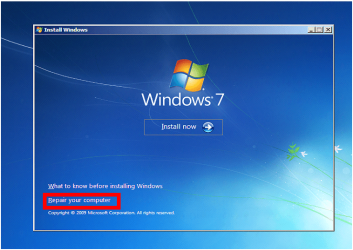
Capture1.PNG

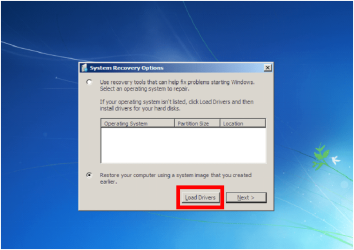
3) Click Load Drivers.
Capture2.PNG
4) Click OK
Capture3.PNG
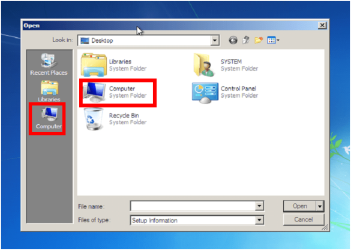
5) Click Computer.
Capture4.PNG
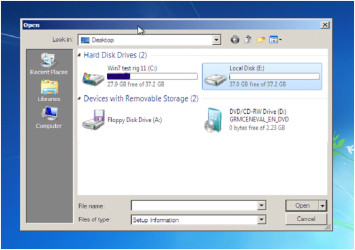
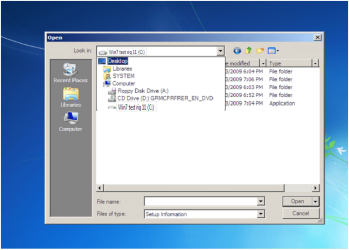
6) Choose the HD to copy from.
Capture5.PNG
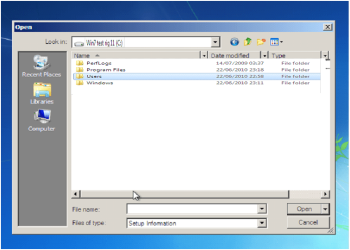
7) Choose the Data you want to copy
Capture6.PNG
Capture7.PNG
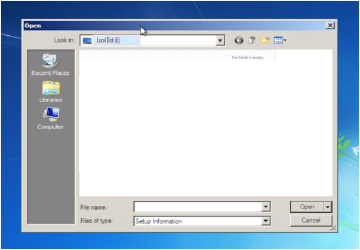
8) Choose the HD to paste to.
Capture8.PNG
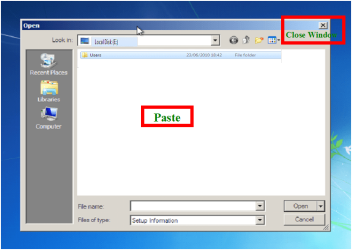
9) Close Window.
Capture9.PNG
10) Click Cancel.
Capture10.PNG
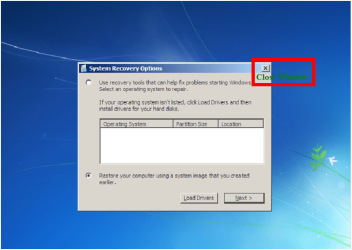
11) Close Window.
Capture11.PNG
12) Continue with Repair.


Note your PC's Hardrive must be readable.


Last edited by a moderator:
Question on tutorial

I am trying the technique for copying & pasting data shown in the tutorial.

When I get to step 6 "choose the data you want to copy", what do I do after I have clicked and highlighted that data? Clicking Open gives the message "the specified location does not contain information about your hardware".
And when I get to step 8 where it says "Paste" in green letters, how do I do the paste operation?
Thanks
 

My Computer My Computer

OS
Windows 7 Professional x64
Hello.


You would right click / copy the data, then right click / paste where you want to 'paste' the data.
 

My Computer My Computer

Computer Manufacturer/Model Number
* BFK Customs *
OS
W 7 64-bit Ultimate
CPU
Intel Q9550 Yorkfield
Motherboard
ASUS P5Q Pro
Memory
8GB Dominator 8500C5D
Graphics Card(s)
ATI : XFX 5870
Sound Card
Realtek HD Audio 7-1
Monitor(s) Displays
1x 47" LCD HDMI & 3x 26" LCD HDMI
Screen Resolution
1920x1080P & 1920x1200
Hard Drives
1x 80GB Intel X25-M G2 SSD : 1x 500GB & 1x 640GB WD Caviar Black(s)
PSU
Corsair 620HX
Case
Cooler Master RC-690
Cooling
Tuniq Tower 120, 2x 140mm and 3x 120mm case fans
Keyboard
Microsoft 500
Mouse
Razer Diamondback 3G
Internet Speed
14 Mb/s
Other Info
1x Koutech 3Gb/s SATA HDD Hot Swap Rack
I thought I had tried that, but perhaps not, since it does work.

OK good, thanks for the help.
 

My Computer My Computer

OS
Windows 7 Professional x64
I thought I had tried that, but perhaps not, since it does work.

OK good, thanks for the help.


Good to see you got it working and thanks for the update.
 

My Computer My Computer

Computer Manufacturer/Model Number
* BFK Customs *
OS
W 7 64-bit Ultimate
CPU
Intel Q9550 Yorkfield
Motherboard
ASUS P5Q Pro
Memory
8GB Dominator 8500C5D
Graphics Card(s)
ATI : XFX 5870
Sound Card
Realtek HD Audio 7-1
Monitor(s) Displays
1x 47" LCD HDMI & 3x 26" LCD HDMI
Screen Resolution
1920x1080P & 1920x1200
Hard Drives
1x 80GB Intel X25-M G2 SSD : 1x 500GB & 1x 640GB WD Caviar Black(s)
PSU
Corsair 620HX
Case
Cooler Master RC-690
Cooling
Tuniq Tower 120, 2x 140mm and 3x 120mm case fans
Keyboard
Microsoft 500
Mouse
Razer Diamondback 3G
Internet Speed
14 Mb/s
Other Info
1x Koutech 3Gb/s SATA HDD Hot Swap Rack
Hi,

It seems that it doesn't work for windows 7 because i don't have the official cd ? (preinstalled windows)

I just have a repair CD that i downloaded but that shoes the same options as when i try to repair without any CD, just by using windows 7 recovery options.

Bye.
 

My Computer My Computer

OS
windows 7 seven 64

My Computer My Computer

Computer Manufacturer/Model Number
* BFK Customs *
OS
W 7 64-bit Ultimate
CPU
Intel Q9550 Yorkfield
Motherboard
ASUS P5Q Pro
Memory
8GB Dominator 8500C5D
Graphics Card(s)
ATI : XFX 5870
Sound Card
Realtek HD Audio 7-1
Monitor(s) Displays
1x 47" LCD HDMI & 3x 26" LCD HDMI
Screen Resolution
1920x1080P & 1920x1200
Hard Drives
1x 80GB Intel X25-M G2 SSD : 1x 500GB & 1x 640GB WD Caviar Black(s)
PSU
Corsair 620HX
Case
Cooler Master RC-690
Cooling
Tuniq Tower 120, 2x 140mm and 3x 120mm case fans
Keyboard
Microsoft 500
Mouse
Razer Diamondback 3G
Internet Speed
14 Mb/s
Other Info
1x Koutech 3Gb/s SATA HDD Hot Swap Rack
Thank you, finally i found the option to back up everything to external HD.
 

My Computer My Computer

OS
windows 7 seven 64

My Computer My Computer

Computer Manufacturer/Model Number
* BFK Customs *
OS
W 7 64-bit Ultimate
CPU
Intel Q9550 Yorkfield
Motherboard
ASUS P5Q Pro
Memory
8GB Dominator 8500C5D
Graphics Card(s)
ATI : XFX 5870
Sound Card
Realtek HD Audio 7-1
Monitor(s) Displays
1x 47" LCD HDMI & 3x 26" LCD HDMI
Screen Resolution
1920x1080P & 1920x1200
Hard Drives
1x 80GB Intel X25-M G2 SSD : 1x 500GB & 1x 640GB WD Caviar Black(s)
PSU
Corsair 620HX
Case
Cooler Master RC-690
Cooling
Tuniq Tower 120, 2x 140mm and 3x 120mm case fans
Keyboard
Microsoft 500
Mouse
Razer Diamondback 3G
Internet Speed
14 Mb/s
Other Info
1x Koutech 3Gb/s SATA HDD Hot Swap Rack
How do I get that first screen? The windows recovery screen.
Right now I'm on Startup Repair.
It is checking for disk errors... how long should I let it run?
I'm on another laptop right now and I really need to save my work.
 
Last edited:

My Computer My Computer

Computer Manufacturer/Model Number
toshiba satellite L305-S5933
OS
WINDOWS 7 home premium 32bit

My Computer My Computer

Computer Manufacturer/Model Number
* BFK Customs *
OS
W 7 64-bit Ultimate
CPU
Intel Q9550 Yorkfield
Motherboard
ASUS P5Q Pro
Memory
8GB Dominator 8500C5D
Graphics Card(s)
ATI : XFX 5870
Sound Card
Realtek HD Audio 7-1
Monitor(s) Displays
1x 47" LCD HDMI & 3x 26" LCD HDMI
Screen Resolution
1920x1080P & 1920x1200
Hard Drives
1x 80GB Intel X25-M G2 SSD : 1x 500GB & 1x 640GB WD Caviar Black(s)
PSU
Corsair 620HX
Case
Cooler Master RC-690
Cooling
Tuniq Tower 120, 2x 140mm and 3x 120mm case fans
Keyboard
Microsoft 500
Mouse
Razer Diamondback 3G
Internet Speed
14 Mb/s
Other Info
1x Koutech 3Gb/s SATA HDD Hot Swap Rack

My Computer My Computer

OS
ME/XP/Vista/Win7
My laptop is currently doing the start-up repair loop and I'm looking to hopefully backup my data if it's not too late. Ive read thru this post and the responses and I'm just wondering if I need to make the System Repair Disk if I can get to the System Recovery Options by booting,pressing F8, and clicking repair computer.

Also, if this is the correct thing to do,when I click System Image Recovery I get the error message "Windows cannot find a system image on this computer". I dont have the option of checking the box "Use the latest available system image" for some reason as well. Unfortunately I dont have anything on an external HD.

Lastly,I'm not a computer pro or anything so I'd greatly appreciate your patience with my ignorance. lol

Thank You
 

My Computer My Computer

Computer Manufacturer/Model Number
Sony VGN-SR510G
OS
Windows 7 Pro 64 Bit
My laptop is currently doing the start-up repair loop and I'm looking to hopefully backup my data if it's not too late. Ive read thru this post and the responses and I'm just wondering if I need to make the System Repair Disk if I can get to the System Recovery Options by booting,pressing F8, and clicking repair computer.

Also, if this is the correct thing to do,when I click System Image Recovery I get the error message "Windows cannot find a system image on this computer". I dont have the option of checking the box "Use the latest available system image" for some reason as well. Unfortunately I dont have anything on an external HD.

Lastly,I'm not a computer pro or anything so I'd greatly appreciate your patience with my ignorance. lol

Thank You

Startup Repair works better from CD.
Boot up using the Startup disk CD (or Windows 7 DVD). (not the OEM manufacturer's Recovery Disk) If you have a Netbook, you will need a CD/DVD drive.
Make sure no USB drives are plugged.

Do a Strartup Repair:
http://www.sevenforums.com/tutorials/681-startup-repair.html?ltr=S
Note: You may need to do startup repair 3 to 4 times.
http://www.sevenforums.com/tutorials/105541-startup-repair-run-3-separate-times.html

If you have not made your Startup Repair
http://www.sevenforums.com/tutorials/2083-system-repair-disc-create.html
Do you have a mate with Windows 7 & CD/DVD RW Drive, how could burn one off.

For better help, Can you post your specs.
http://www.sevenforums.com/general-discussion/22550-filling-out-system-specs.html
http://www.sevenforums.com/hardware-devices/6936-dont-know-what-hardware-you-have.html
VistaForums SysInfo Tool - Vista Forums
 

My Computer My Computer

OS
ME/XP/Vista/Win7
Thank you! Sorry for the late reply,but I have someone at work who made a CD for me today so I'm going to go thru your steps today. Ill also try and get back to you on my system specs.

Once I use the Windows disk I can actually follow all of the steps in this post's tutorials. Do I still need to run Recovery 3 times or should I just go ahead and get an external HD and transfer all my stuff over? I should have a hard drive by the end of the day hopefully.

Thank for your help and patience!
 
Last edited by a moderator:

My Computer My Computer

Computer Manufacturer/Model Number
Sony VGN-SR510G
OS
Windows 7 Pro 64 Bit
Thank you! Sorry for the late reply,but I have someone at work who made a CD for me today so I'm going to go thru your steps today. Ill also try and get back to you on my system specs.

Once I use the Windows disk I can actually follow all of the steps in this post's tutorials. Do I still need to run Recovery 3 times or should I just go ahead and get an external HD and transfer all my stuff over? I should have a hard drive by the end of the day hopefully.

Thank for your help and patience!

I would go for trying to Repair first.
 

My Computer My Computer

OS
ME/XP/Vista/Win7
ok, so i've tried all of these things and the loop still happens. I went thru every step on the 'repair 3 times' link..but alas...
I'm thinking now I'm just going to re-install Windows 7 (64 bit), have it format my current HD,and just throw everything back on it afterwards from my external HD. Do you see any issues with this solution? I have copied everything over to my External HD, so apart from re-installing programs is there anything I should be wary about?
(and I'm not as to how I can give you system specs without my PC getting past System Repair)

Thanks
 

My Computer My Computer

Computer Manufacturer/Model Number
Sony VGN-SR510G
OS
Windows 7 Pro 64 Bit
ok, so i've tried all of these things and the loop still happens. I went thru every step on the 'repair 3 times' link..but alas...
I'm thinking now I'm just going to re-install Windows 7 (64 bit), have it format my current HD,and just throw everything back on it afterwards from my external HD. Do you see any issues with this solution? I have copied everything over to my External HD, so apart from re-installing programs is there anything I should be wary about?
(and I'm not as to how I can give you system specs without my PC getting past System Repair)

Thanks
How to make Sony Recovery Disks:
View Document

How to use Sony Recovery:
View Document

How to use Sony Hardware Diagostics:
View Document

How to order Sony Recovery disks:
1.Go to http://servicesales.sel.sony.com.
2.Enter your computer's model number (for example, PCV-XXXX), and click List Parts and accessories.
3.Follow the online instructions to order the Recovery Media Kit.
If you are not able to access the Sony Direct Accessories and Parts Center Web site, contact a customer service representative at 1-800-488-7669.
 

My Computer My Computer

OS
ME/XP/Vista/Win7
ok,thank you for that. Before i do anything though, just wondering how much you'd recommend ordering these recovery disks. I cannot make my own due to my laptop only getting to System Recovery options, and i could order from Sony but I just want to make sure this is a must before I give them any money. So what I mentioned in my last post (reinstalling windows 7,formatting over old data,then re adding it from external HD) wouldnt be adequate enough to get mt computer going again? Once again, thank you! I'm not trying to test your knowledge,just wanting to clearly understand what I can do to save money. (I do understand i might have to go the Sony Recovery route though)

Thank you so much
 

My Computer My Computer

Computer Manufacturer/Model Number
Sony VGN-SR510G
OS
Windows 7 Pro 64 Bit
Most OEM manufacturer's will send out disks free (maybe a postage fee) within the first 12 months.
OEM manufacturer's install a app to make disks, when you first boot up the new PC.
 

My Computer My Computer

OS
ME/XP/Vista/Win7
alright,thanks for all the help!
 

My Computer My Computer

Computer Manufacturer/Model Number
Sony VGN-SR510G
OS
Windows 7 Pro 64 Bit
Back
Top