Accessibility on drag and drop options

RoseRodent

New member
Local time
1:24 PM
Messages
16
I am a disabled W7 user and I frequently find I have a problem when I am trying to select multiple files to work with (copy, move, delete) that my hand accidentally has the tiniest wobble and W7 takes this as a "ctrl drag and drop" and creates copies of everything I've selected so far. It's really tedious because every time I try to make a batch to work on I end up with 3 or more copies of everything before I successfully complete the batch selection.

Is there any way to reduce the sensitivity to this small movement, or turn off the "ctrl-click to copy" thing without removing all the drag and drop features? I just want to be able to ctrl-click a number of files without this annoying automatic copy if I have a small tremor in the middle.

Or perhaps there is another way to batch select a number of non-contiguous files without using ctrl-click so if I move it at least won't make me any copies!! :cry:

Thanks.
 

My Computer My Computer

Computer Manufacturer/Model Number
Packard Bell Easynote LJ61 Vista model **now with W7**
OS
Windows 7
Hard Drives
External is 2.5in Western Digital Passport 250GB
Hi! RoseRodent, welcome to 7F :)

In Vista and newer, including Windows 7 and Windows 8, there is an option to use check boxes for multi-selection. For some reason, this is turned off by default, but it is simple to turn on:

  • In Windows Explorer, hit the ALT key one time to make the hidden menu bar appear.
  • Select Tools > Folder Options.
  • Select the View tab.
  • Scroll down and select the option named “Use check boxes to select items”.
  • Click Apply, then OK.
You will now have the option to select each file by simply placing a check to the left of each file name.


Or you can go >Control Panel >Folder Options >View tab >Scroll down and select the option named “Use check boxes to select items”.

Then go back to any Folder you want to work in, and you will see the boxes on or near the files you would like to select.
It depends on how you have your view settings set.

It can be reversed by going back into Tools or Control Panel >Folder Options >View >and deselecting the check box for check boxes.
 

My Computer My Computer

Computer type
PC/Desktop
Computer Manufacturer/Model Number
Gateway DX4831-01e (Mid-Tower Desktop)
OS
Originally Win 7 Hm Prem x64 Ver 6.1.7600 Build 7601-SP1 | Upgraded to Windows 10 December 14, 2019
CPU
Intel i3 530 2.93GHz, 2933MHz 2 Cores 4 Logical Processors
Motherboard
Gateway H57M01 133 megahertz
Memory
6GB of 1,333MHz DDR3 SDRAM
Graphics Card(s)
32MB Intel Graphics Media Accelerator HD IGChip
Sound Card
Realtek High Definition Audio
Monitor(s) Displays
Gateway HX2000 20inch TFT active matrix TN
Screen Resolution
1600 x 900 x 59 hertz
Hard Drives
WDC WD10EADS-00M2B0 [HDD] (1000.20 GB) -- drive 0,
HL-DT-ST DVDRAM GH41N [CD-ROM dr]
Four card readers, and Four USB 2.0
PSU
300watts.
Case
Mid-Tower Desktop
Cooling
Stock from Gateway
Keyboard
Natural Ergonomic Keyboard 4000, see Other Info
Mouse
Orig. Gateway wore out now using Insignia USB wired optical
Internet Speed
Vz FIOS 10ms png 57.64Mbps down 65.53Mbps up Speedtest.org
Antivirus
Zamana Anti-logger with Anti-malware, MSE, Windows Firewall,
Browser
IE11.0.9600.19399-Upd ver11.0.135, Firefox 68.0.1 x64
Other Info
System Specs by Belarc.

BIOS: American Megatrends Inc. P01-A0 11/17/2009

Replaced the MS 'Natural' Standard PS/2 Enhanced 101-102 Keyboard with a new Natural Ergonomic Keyboard 4000 on August 1st 2014.

Canon Pixma MG3222 Printer.

Updated to IE11 on 12102015 | Fios Quantum Router g1100

Additional AV: SpywareBlaster, manual Mbam, SAS
Thanks, I did that but it still only allows me to click one item at a time unless I am holding the ctrl key, so the problem remains, if you move while you are ctrl-clicking you still end up with copies. I'm looking for a way to select multiple items not next to each other besides using the ctrl key, or a way to turn off the ctrl-click automatically resulting in a copy of the file. Or maybe something in mouse settings to increase the central dead zone more like a joystick?
 

My Computer My Computer

Computer Manufacturer/Model Number
Packard Bell Easynote LJ61 Vista model **now with W7**
OS
Windows 7
Hard Drives
External is 2.5in Western Digital Passport 250GB
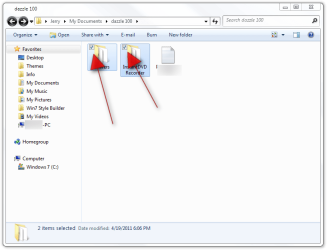
I am a Quadriplegic with no finger movement I use my thumbs and a touchpad and use the check boxes all the time, you have to click inside the check boxes.
Jerry
dazzle 100.png
 

My Computer My Computer

Computer type
Laptop
Computer Manufacturer/Model Number
Sager NP9170
OS
Win 7 Pro x64 / Win 10 Pro
CPU
Intel(R) Core(TM) i7-3630QM CPU @ 2.40GHz
Motherboard
CLEVO P170EM
Memory
12 GB
Graphics Card(s)
(1) Intel(R) HD Graphics 4000 (2) NVIDIA GeForce GTX 675M
Sound Card
(1) Realtek High Definition Audio (2) Intel(R) Display Aud
Monitor(s) Displays
17.3
Screen Resolution
1920x1080
Hard Drives
(1) Samsung 860 EVO 500GB(OS) (1) Samsung 860 EVO 500GB(Data)
Keyboard
Backlite
Antivirus
MSE, Malwarebytes Pro
Browser
Firefox
Other Info
DESKTOP: Custom-built.
OS: Win 10 Pro x64.
CASE: Rosewill R5.
CPU: Intel I5 4670K CPU @ 3.40GHz.
CPU COOLER: Cool Master Hyper 212 EVO.
MOTHERBOARD: Asus Z87-A.
MEMORY: Kingston HyperX 2x4 GB.
GPU: Nvidia Geforce 650 TI.
PSU: Corsair TX750.
DRIVES: (1) Samsung 840 120 GB SSD (2) Western Digital blue 500 GB 7200 RPM.
Okay, Rose what I have found so far you may already know.

There is Microsoft Accessibility: Technology for Everyone, Home This link explains the ease of access center in win7.
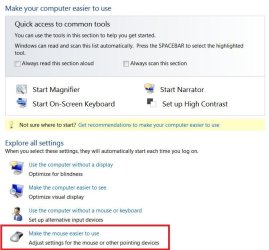
You can reach the ease of access center by going to:
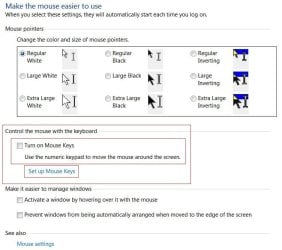
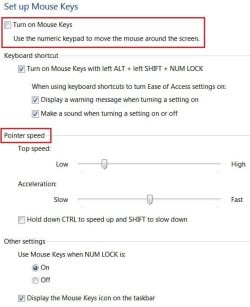
Control Panel\All Control Panel Items\Ease of Access Center. Here you would use the numeric keypad to move the mouse pointer.

Follow the red rectangles make changes as you need them:
1.1RRacess.JPG 2.1RRacess2.JPG
3.1RRacess3.JPG

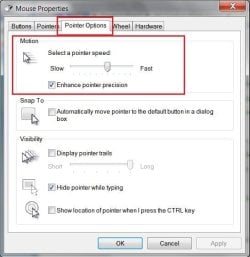
In Control Panel\Mouse Controls click on the pointer Options tab, there you can slow down the pointer, if Enhance Pointer Precision is checked you may want to un-check it to test.
1RRaccess4.JPG

I did find one mouse control program that might work here:
SteadyMouse - Hand Tremor Mouse Accessibility Software

Have you ever installed a program before? After you download the program, right click on the icon and when the context menu opens run it as administrator.
See option #2 here: http://www.sevenforums.com/tutorials/11841-run-administrator.html

This site has a list of programs for the physically disabled:
Software: Free enabling software for people with disability
 

My Computer My Computer

Computer type
PC/Desktop
Computer Manufacturer/Model Number
Gateway DX4831-01e (Mid-Tower Desktop)
OS
Originally Win 7 Hm Prem x64 Ver 6.1.7600 Build 7601-SP1 | Upgraded to Windows 10 December 14, 2019
CPU
Intel i3 530 2.93GHz, 2933MHz 2 Cores 4 Logical Processors
Motherboard
Gateway H57M01 133 megahertz
Memory
6GB of 1,333MHz DDR3 SDRAM
Graphics Card(s)
32MB Intel Graphics Media Accelerator HD IGChip
Sound Card
Realtek High Definition Audio
Monitor(s) Displays
Gateway HX2000 20inch TFT active matrix TN
Screen Resolution
1600 x 900 x 59 hertz
Hard Drives
WDC WD10EADS-00M2B0 [HDD] (1000.20 GB) -- drive 0,
HL-DT-ST DVDRAM GH41N [CD-ROM dr]
Four card readers, and Four USB 2.0
PSU
300watts.
Case
Mid-Tower Desktop
Cooling
Stock from Gateway
Keyboard
Natural Ergonomic Keyboard 4000, see Other Info
Mouse
Orig. Gateway wore out now using Insignia USB wired optical
Internet Speed
Vz FIOS 10ms png 57.64Mbps down 65.53Mbps up Speedtest.org
Antivirus
Zamana Anti-logger with Anti-malware, MSE, Windows Firewall,
Browser
IE11.0.9600.19399-Upd ver11.0.135, Firefox 68.0.1 x64
Other Info
System Specs by Belarc.

BIOS: American Megatrends Inc. P01-A0 11/17/2009

Replaced the MS 'Natural' Standard PS/2 Enhanced 101-102 Keyboard with a new Natural Ergonomic Keyboard 4000 on August 1st 2014.

Canon Pixma MG3222 Printer.

Updated to IE11 on 12102015 | Fios Quantum Router g1100

Additional AV: SpywareBlaster, manual Mbam, SAS
OK, I think I get it a bit more now... but that presents the different problem of aim - I need the checkbox to be about the size of the icon due to terrible aim with hand tremors. Perhaps zoomed up to 6x size I might be able to click in them! I rely on being able to click somewhere vaguely near the icon for it to pick up the selection, so a tiny box won't enable me to stop using the ctrl key. Probably why I wasn't able to tell that the checkbox would allow multiple selections.

There really isn't a way to stop it from taking ctrl-tiny-accidental-motion as "I'd really like copies of all this stuff, please"? I don't like putting in additional programs unless it absolutely 100% can't be avoided, it's just the way I like my system, if Windows will do it then I want Windows to do it, it tends to result in a less upset PC, particularly on programs which don't cleanly uninstall - something you don't tend to know till you want to do it.

Have you ever installed a program before?

:rolleyes: I'm gonna guess you get people swinging by who haven't, but let's just say yes.
 

My Computer My Computer

Computer Manufacturer/Model Number
Packard Bell Easynote LJ61 Vista model **now with W7**
OS
Windows 7
Hard Drives
External is 2.5in Western Digital Passport 250GB
OK, I think I get it a bit more now... but that presents the different problem of aim - I need the checkbox to be about the size of the icon due to terrible aim with hand tremors. Perhaps zoomed up to 6x size I might be able to click in them! I rely on being able to click somewhere vaguely near the icon for it to pick up the selection, so a tiny box won't enable me to stop using the ctrl key. Probably why I wasn't able to tell that the checkbox would allow multiple selections.

There really isn't a way to stop it from taking ctrl-tiny-accidental-motion as "I'd really like copies of all this stuff, please"?
I don't like putting in additional programs unless it absolutely 100% can't be avoided, it's just the way I like my system, if Windows will do it then I want Windows to do it, it tends to result in a less upset PC, particularly on programs which don't cleanly uninstall - something you don't tend to know till you want to do it.

Have you ever installed a program before?
:rolleyes: I'm gonna guess you get people swinging by who haven't, but let's just say yes.

I understand, if you read my Quote within your Quote ;)

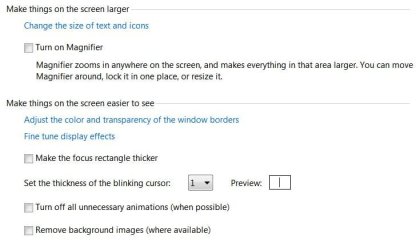
Going back to Control Panel\All Control Panel Items\Ease of Access Center,

Go to above where I showed you the mouse controls you will see \Make the computer easier to see.
rr1.JPG

Click on that, and you will next see:

rr2.JPG

From here you can turn on the magnifier, and make the focus rectangle thicker.
Test the different settings for now and see if they work for you.


I have to go out for a while, but I will check back, hang in there we will make this comfortable for you.
 

My Computer My Computer

Computer type
PC/Desktop
Computer Manufacturer/Model Number
Gateway DX4831-01e (Mid-Tower Desktop)
OS
Originally Win 7 Hm Prem x64 Ver 6.1.7600 Build 7601-SP1 | Upgraded to Windows 10 December 14, 2019
CPU
Intel i3 530 2.93GHz, 2933MHz 2 Cores 4 Logical Processors
Motherboard
Gateway H57M01 133 megahertz
Memory
6GB of 1,333MHz DDR3 SDRAM
Graphics Card(s)
32MB Intel Graphics Media Accelerator HD IGChip
Sound Card
Realtek High Definition Audio
Monitor(s) Displays
Gateway HX2000 20inch TFT active matrix TN
Screen Resolution
1600 x 900 x 59 hertz
Hard Drives
WDC WD10EADS-00M2B0 [HDD] (1000.20 GB) -- drive 0,
HL-DT-ST DVDRAM GH41N [CD-ROM dr]
Four card readers, and Four USB 2.0
PSU
300watts.
Case
Mid-Tower Desktop
Cooling
Stock from Gateway
Keyboard
Natural Ergonomic Keyboard 4000, see Other Info
Mouse
Orig. Gateway wore out now using Insignia USB wired optical
Internet Speed
Vz FIOS 10ms png 57.64Mbps down 65.53Mbps up Speedtest.org
Antivirus
Zamana Anti-logger with Anti-malware, MSE, Windows Firewall,
Browser
IE11.0.9600.19399-Upd ver11.0.135, Firefox 68.0.1 x64
Other Info
System Specs by Belarc.

BIOS: American Megatrends Inc. P01-A0 11/17/2009

Replaced the MS 'Natural' Standard PS/2 Enhanced 101-102 Keyboard with a new Natural Ergonomic Keyboard 4000 on August 1st 2014.

Canon Pixma MG3222 Printer.

Updated to IE11 on 12102015 | Fios Quantum Router g1100

Additional AV: SpywareBlaster, manual Mbam, SAS
Hi, RoseRodent, I wrote a couple of utilities that might help with what you want to do. They allow you to adjust the distance that an item must be dragged before Windows interprets the movement as a drag operation.

There is a graphical UI version:
Windows Version of Dragsens « Parks Computing

and also a command-line version:
Dragsens version 1.4 « Parks Computing

The first one might be a little easier for you to use.
 

My Computer My Computer

Computer type
PC/Desktop
OS
Windows 8.1 Update 64-bit
Back
Top