please help i dont know where to turn

mob4life

New member
Local time
4:34 PM
Messages
18
ok so i have strange issue that has carried over to windows 7 from Vista on my DV6500 laptop. basicly what happens is i will be using the laptop or playing a game and the mouse will just all the sudden not allow me to click or select anything. i dont know how it happens and there is nothing different that i do from time to time.

the only way to fix it is just to control alt delete and bring up the task manager. once it goes back to the windows screen it works again.

sometimes only for like 30 seconds and it will start doing it again.

i have upgrade my bios as well as changed the OS 3x and it still has the same issue.

Can anyone please help mE???????
 

My Computer My Computer

OS
win7
mouse issue

ok so i have strange issue that has carried over to windows 7 from Vista on my DV6500 laptop. basicly what happens is i will be using the laptop or playing a game and the mouse will just all the sudden not allow me to click or select anything. i dont know how it happens and there is nothing different that i do from time to time.

the only way to fix it is just to control alt delete and bring up the task manager. once it goes back to the windows screen it works again.

sometimes only for like 30 seconds and it will start doing it again.

i have upgrade my bios as well as changed the OS 3x and it still has the same issue.

Can anyone please help mE???????

Hi and welcome to sevenforums.
Since your mouse issue has carried over from vista to win 7 it can only be a couple of things. But before I can realy be of much help I need to know everthing about your computer.
Who makes it, what model, how much ram, what kind of mouse, What OS, what mouse driver.

We can start from there

Ken
 

My Computer My Computer

Computer Manufacturer/Model Number
HP Pavillion dv-7 1005 Tx
OS
Win 8 Release candidate 8400
CPU
[email protected]
Memory
4 gigs
Graphics Card(s)
Nvidia 9600M
Sound Card
HD built-in
Monitor(s) Displays
17" Wxga
Screen Resolution
1440x900
Cooling
none
Internet Speed
45Mb down 5Mb up
HP dv6500t
3gb ram
intel core 2 duo t7700
windows 7 evolution copy
hid-compliant mouse 6.1.7100.0
PS/2 Compatible Mouse in port ( same thing happens if wireless mouse is in or not) 6.1.7100.0
 

My Computer My Computer

OS
win7
mouse issue

HP dv6500t
3gb ram
intel core 2 duo t7700
windows 7 evolution copy
hid-compliant mouse 6.1.7100.0
PS/2 Compatible Mouse in port ( same thing happens if wireless mouse is in or not) 6.1.7100.0

These seem normal. Next go into event viewer (type event into search) and see if there is any errors associated with these freezes. using the snipping tool (type snip into search) take pictures of the event errors and upload them so we can see them.

Ken
 

My Computer My Computer

Computer Manufacturer/Model Number
HP Pavillion dv-7 1005 Tx
OS
Win 8 Release candidate 8400
CPU
[email protected]
Memory
4 gigs
Graphics Card(s)
Nvidia 9600M
Sound Card
HD built-in
Monitor(s) Displays
17" Wxga
Screen Resolution
1440x900
Cooling
none
Internet Speed
45Mb down 5Mb up
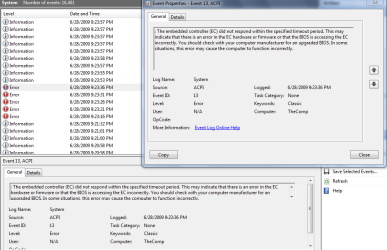
here is a snip. let me know if i need more than this.
 

Attachments

  • error.PNG
    error.PNG
    9.4 KB · Views: 23

My Computer My Computer

OS
win7
its happened 2x while this convo is going on.... i just walked away for about 3 minutes came back and i was unable to click anything....
 

My Computer My Computer

OS
win7
driver prob

its happened 2x while this convo is going on.... i just walked away for about 3 minutes came back and i was unable to click anything....

If it happened while you were not clicking on something (away) i kinda think its not a mouse driver. could you check the event viewer logs again the things we are looking for look like this

Waiting on info

Ken
 
Last edited:

My Computer My Computer

Computer Manufacturer/Model Number
HP Pavillion dv-7 1005 Tx
OS
Win 8 Release candidate 8400
CPU
[email protected]
Memory
4 gigs
Graphics Card(s)
Nvidia 9600M
Sound Card
HD built-in
Monitor(s) Displays
17" Wxga
Screen Resolution
1440x900
Cooling
none
Internet Speed
45Mb down 5Mb up
ok im not sure if this is correct. i assumed the error would show a bunch of times considering when i tried to play a game online (warcraft 3) it happened every 30 seconds to a minute. very annoying.

hhere is a differenet snip
 

My Computer My Computer

OS
win7
sorry here....
 

Attachments

  • snip2.PNG
    snip2.PNG
    29.2 KB · Views: 17

My Computer My Computer

OS
win7
sorry here....
What the troubleshooter is telling you in the screenshot is this may be directly related to a BIOS issue.
So is there a new Bios version available for your computer? :sarc:

Also, this is just a hunch but I just have a feeling about this...
Since this is a Laptop & games push your graphics processor (GPU) HARD this creates a TON of Heat!!!
So, do you have this on a cooling station?
IF not, I think this is directly related to your graphics processor getting too hot & the reason for the freezes...just a hunch of course. ;)

One more thing...When was the last time you clean out all the dust & dirt out of it if ever...This will also cause overheating issues with a mobile graphics card & your CPU as well if the heatsinks are all clogged up with dust & dirt!
 

My Computer My Computer

Computer Manufacturer/Model Number
ABS Tech Ultimate X9
OS
Windows® 7 Ultimate x64 SP1
CPU
Intel Core 2 Duo E8400 (E0) @ 4.0GHz
Motherboard
ASUS P5Q Pro Turbo / 1780 FSB
Memory
G.SKILL-F2-8500CL5D-4GBPK (2x2Gbs) (5-5-5-15) @ 1067Mhz
Graphics Card(s)
EVGA GTX 470 SC (845/1690/2000) 160Gbs
Sound Card
VIA HD Audio / Boston Acoustics
Monitor(s) Displays
Acer X222W HD 22" LCD 2500:1 / 5ms
Screen Resolution
1680x1050
Hard Drives
Seagate Barracuda SATAII 2 x 320GB
Seagate Barracuda SATAII 1Tb
Intel® Rapid Storage Technology v10.1.0.1008
AHCI-NCQ Enabled
PSU
Silent Pro GOLD 80 PLUS 800w /95% efficiency / SLI-Crossfire
Case
ABS Stealth Black-Custom
Cooling
CoolerMaster V6GT 6 Heatpipe 200w CPU Cooler
Keyboard
Logitech G15 Gaming Keyboard (Old Style Blue!)
Mouse
Logitech MX518 Gaming Mouse
Internet Speed
1Mbs-up/ 6Mbs-down
driver error

sorry here....

Now that was useful. if you look at the info in the snip, it says the source of the error is acpi. acpi.sys is used by the video driver and is taking too long to load hence the freeze. the way to correct this is to get the most current driver for your video card and install it. I will be lurking this thread so let me know how it turns out

Hope this helps
Ken
 

My Computer My Computer

Computer Manufacturer/Model Number
HP Pavillion dv-7 1005 Tx
OS
Win 8 Release candidate 8400
CPU
[email protected]
Memory
4 gigs
Graphics Card(s)
Nvidia 9600M
Sound Card
HD built-in
Monitor(s) Displays
17" Wxga
Screen Resolution
1440x900
Cooling
none
Internet Speed
45Mb down 5Mb up
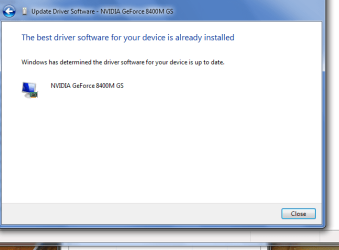
yes i juust updated to it yesterday.... same issue nothing changed
 

My Computer My Computer

OS
win7
says best driver is installed
 

Attachments

  • snip3.PNG
    snip3.PNG
    14 KB · Views: 7

My Computer My Computer

OS
win7
vid driver

says best driver is installed

the message also says it could also be caused by your bios. did you update that as well?

K
 

My Computer My Computer

Computer Manufacturer/Model Number
HP Pavillion dv-7 1005 Tx
OS
Win 8 Release candidate 8400
CPU
[email protected]
Memory
4 gigs
Graphics Card(s)
Nvidia 9600M
Sound Card
HD built-in
Monitor(s) Displays
17" Wxga
Screen Resolution
1440x900
Cooling
none
Internet Speed
45Mb down 5Mb up
umm ive never taken the laptop apart but that sounds like a good idea. yes there was a new bios released and i just updated to it yesterday. i went into the device management tab and located the graphics card and searched online for drivers. im going to HPs site now to see if anything different is there.
 

My Computer My Computer

OS
win7
umm ive never taken the laptop apart but that sounds like a good idea. yes there was a new bios released and i just updated to it yesterday. i went into the device management tab and located the graphics card and searched online for drivers. im going to HPs site now to see if anything different is there.
I have a feeling my hunch is going to prove correct on this being a graphics card issue...but I could be wrong. Never say never...

That is NOT the way to update your Nvidia 8400M GO Graphics processor driver!!! Never rely on Windows to update your drivers!!!
EVER!

You have to Manually go & download it from Nvidia under Windows 7 Drivers!!!

Here's the info & link to that... ;)

GeForce Driver Release 186 for NoteBooks WHQL Version: 186.03 Release Date: June 09, 2009 Operating System: Windows 7 (32-bit) Language: U.S English File Size: 112 MB
This is for the 8400M Notebook graphics processor
which is what supposed to be in that Laptop...
GeForce Release 186
 

My Computer My Computer

Computer Manufacturer/Model Number
ABS Tech Ultimate X9
OS
Windows® 7 Ultimate x64 SP1
CPU
Intel Core 2 Duo E8400 (E0) @ 4.0GHz
Motherboard
ASUS P5Q Pro Turbo / 1780 FSB
Memory
G.SKILL-F2-8500CL5D-4GBPK (2x2Gbs) (5-5-5-15) @ 1067Mhz
Graphics Card(s)
EVGA GTX 470 SC (845/1690/2000) 160Gbs
Sound Card
VIA HD Audio / Boston Acoustics
Monitor(s) Displays
Acer X222W HD 22" LCD 2500:1 / 5ms
Screen Resolution
1680x1050
Hard Drives
Seagate Barracuda SATAII 2 x 320GB
Seagate Barracuda SATAII 1Tb
Intel® Rapid Storage Technology v10.1.0.1008
AHCI-NCQ Enabled
PSU
Silent Pro GOLD 80 PLUS 800w /95% efficiency / SLI-Crossfire
Case
ABS Stealth Black-Custom
Cooling
CoolerMaster V6GT 6 Heatpipe 200w CPU Cooler
Keyboard
Logitech G15 Gaming Keyboard (Old Style Blue!)
Mouse
Logitech MX518 Gaming Mouse
Internet Speed
1Mbs-up/ 6Mbs-down
dont take it apart

umm ive never taken the laptop apart but that sounds like a good idea. yes there was a new bios released and i just updated to it yesterday. i went into the device management tab and located the graphics card and searched online for drivers. im going to HPs site now to see if anything different is there.

dont take it apart they are impossible for most ppl to get them back together.

All the drivers are software installed easily

Ken
 

My Computer My Computer

Computer Manufacturer/Model Number
HP Pavillion dv-7 1005 Tx
OS
Win 8 Release candidate 8400
CPU
[email protected]
Memory
4 gigs
Graphics Card(s)
Nvidia 9600M
Sound Card
HD built-in
Monitor(s) Displays
17" Wxga
Screen Resolution
1440x900
Cooling
none
Internet Speed
45Mb down 5Mb up
In the Bios Setup, make sure ACPI is enabled !!!
 

My Computer My Computer

Computer type
PC/Desktop
Computer Manufacturer/Model Number
Built them myself, Science Experiments !
OS
Win7 Enterprise, Win7 x86 (Ult 7600), Win7 x64 Ult 7600, TechNet RTM on AMD x64 (2.8Ghz)
CPU
AMD fx8350 4ghz, AMD-32 2400mhz, AMD-64 3200mhz, AMDx64 2.8G
Motherboard
SIS 755, ECS-K8M890M-M (Ult 7600), GigaByte & others
Memory
2gb, 4gb on the Ult 7600, 4gb on Technet RTM, 32gb on FX8350
Graphics Card(s)
Draw my own Graphics, several nVidia cards
Sound Card
on motherboard
Monitor(s) Displays
19" flat scr, 28" I-Inc widescr,22" Emprex Widescr, 23" Acer
Screen Resolution
1280 x 1024, 1440 x 900, 1920 x 1080
Hard Drives
6 pata Ide HD's & 2 Sata HD's
added 80gb external on Ult 7600 computer,
numerous extra 1tb, 2TB, 3Tb SATA HD's
A collection of ext HD Docks w/ HDs
PSU
430w, 550w, 600w, 700, 800, etc
Case
All Generic Full Towers
Cooling
Open Air & a few fans, some w/ colored LEDs
Keyboard
Compaq & Dell recycled from GoodWill
Mouse
Made in China Optical Wired Mouse
Internet Speed
Fast Cable InterNet
Antivirus
AVG Free on 24 different Desktops, NO Problems!
Browser
IE 8 is preferred, but use FireFox sometimes
Other Info
Linksys Routers, switches, & Hubs
Too Many USB Flash Drives to count, Biggest is 64GB !
Eight computers in my home network.
Sixteen computers at my business network.
Linked via TeamViewer !
Lots of old used spare computer parts everywhere!
If changing the BIOS settings do not help, you could always reinstall the BIOS as the last time you installed it, it may have installed incorrectly.
 

My Computer My Computer

Computer Manufacturer/Model Number
Custom | Whitebox
OS
Windows 7 Ultimate, OS X 10.7, Ubuntu 11.04
CPU
Intel E6750 @ 3.80GHz
Motherboard
Gigabyte GA-EP45-UD3L (Revision 1.1)
Memory
2x2GB & 2x1GB (6GB) OCZ Reaper 1066MHz @ 1080MHz
Graphics Card(s)
EVGA nVidia GTX 260 896mb (216 Core) FTW Edition
Sound Card
Realtek ALC888
Monitor(s) Displays
21" VIZIO TV
Screen Resolution
1680x1050 @ 60Hz
Hard Drives
Western Digital WD6401AALS - 640GB
Hitachi HDP725016GLA380 - 160GB
PSU
Corsair 750W
Case
NZXT Nemesis Elite
Cooling
Thermaltake SpinQ
Keyboard
Logitech Wireless S520
Mouse
Logitech Wireless S520 - Microsoft Wireless Arc Mouse
Internet Speed
Download: 20mbps, Upload: 3mbps
ok updating driver for graphics card now... im pretty sure i actually did this a few days ago but im going to do it again. as for acpi i will verify that also
 

My Computer My Computer

OS
win7
Back
Top