No HDMI audio to TV

bleron

New member
Local time
2:55 AM
Messages
14
No audio heard from TV

Hello guys,

I have looked through a dozen threads here on the forum and spent multiple hours through Google and still have not found a solution.

Graphics Card = XFX GTS 250
Sound Card = (integrated) Realtek ALC888S

I have everything setup.
I have an SPDIF cable connected from my motherboard to the graphics card on the side.
One DVI port is connected to my Acer X192W monitor.
The other DVI port has a DVI-HDMI adapter with an HDMI cable connected to my Sony Bravia 32BX421.

On the Sound options in control panel, I only see "Speakers," "Headphones," and "Realtek Digital Output."
I have set the Realtek Digital Output as default before and I still wont hear any audio on the TV.

Capture.PNG
 
Last edited:

My Computer My Computer

Computer Manufacturer/Model Number
HP Pavilion m8120n
OS
Windows 7 Ultimate x64
CPU
Intel Core2 Quad Q6600 @2.4 GHz
Motherboard
Asus P5BW-LA (Basswood3g)
Memory
3 GB DDR2 PC5300
Graphics Card(s)
XFX GTS 250
Sound Card
Realtek ALC888S (integrated)
Monitor(s) Displays
Acer X192W
Screen Resolution
1400 x 900
Hard Drives
2x Hitachi Desktar 320 GB
PSU
Corsair 620 W Nonmodular
Internet Speed
5 Mbps - 15 Mbps
Hello,
please provide the exact model number of the card or a link to the card.
 

My Computer My Computer

Computer type
PC/Desktop
Computer Manufacturer/Model Number
Custom Build
OS
Windows 7 Home Premium 64 bit
CPU
Intel Core i7-4790
Motherboard
GA-Z87X-D3H
Memory
G.SKILL 8GB (2 x 4GB) DDR3 F3-10666CL9D-8GBNT
Graphics Card(s)
AMD Radeon R7 250
Sound Card
Realtek ALC892
Monitor(s) Displays
Samsung UN32EH5000, Dell 1703FPT
Screen Resolution
1920 x 1080, 1280 x 1024
Hard Drives
WD5003AZEX
WD10EZEX
Samsung HD103SJ
Samsung 128 GB 840 PRO
PSU
SeaSonic M12II SS-500GM
Case
Fractal Design Define R4
Cooling
Zalman CNPS9900ALED
Keyboard
Logitech K800
Mouse
Logitech M705
Internet Speed
16 Mbps
Antivirus
Avast
Browser
Firefox
Other Info
Bose Companion 2 Multimedia Speakers

My Computer My Computer

Computer Manufacturer/Model Number
HP Pavilion m8120n
OS
Windows 7 Ultimate x64
CPU
Intel Core2 Quad Q6600 @2.4 GHz
Motherboard
Asus P5BW-LA (Basswood3g)
Memory
3 GB DDR2 PC5300
Graphics Card(s)
XFX GTS 250
Sound Card
Realtek ALC888S (integrated)
Monitor(s) Displays
Acer X192W
Screen Resolution
1400 x 900
Hard Drives
2x Hitachi Desktar 320 GB
PSU
Corsair 620 W Nonmodular
Internet Speed
5 Mbps - 15 Mbps

My Computer My Computer

Computer type
PC/Desktop
Computer Manufacturer/Model Number
Custom Build
OS
Windows 7 Home Premium 64 bit
CPU
Intel Core i7-4790
Motherboard
GA-Z87X-D3H
Memory
G.SKILL 8GB (2 x 4GB) DDR3 F3-10666CL9D-8GBNT
Graphics Card(s)
AMD Radeon R7 250
Sound Card
Realtek ALC892
Monitor(s) Displays
Samsung UN32EH5000, Dell 1703FPT
Screen Resolution
1920 x 1080, 1280 x 1024
Hard Drives
WD5003AZEX
WD10EZEX
Samsung HD103SJ
Samsung 128 GB 840 PRO
PSU
SeaSonic M12II SS-500GM
Case
Fractal Design Define R4
Cooling
Zalman CNPS9900ALED
Keyboard
Logitech K800
Mouse
Logitech M705
Internet Speed
16 Mbps
Antivirus
Avast
Browser
Firefox
Other Info
Bose Companion 2 Multimedia Speakers

My Computer My Computer

Computer Manufacturer/Model Number
HP Pavilion m8120n
OS
Windows 7 Ultimate x64
CPU
Intel Core2 Quad Q6600 @2.4 GHz
Motherboard
Asus P5BW-LA (Basswood3g)
Memory
3 GB DDR2 PC5300
Graphics Card(s)
XFX GTS 250
Sound Card
Realtek ALC888S (integrated)
Monitor(s) Displays
Acer X192W
Screen Resolution
1400 x 900
Hard Drives
2x Hitachi Desktar 320 GB
PSU
Corsair 620 W Nonmodular
Internet Speed
5 Mbps - 15 Mbps

My Computer My Computer

Computer type
PC/Desktop
Computer Manufacturer/Model Number
Me
OS
Win 7 Ultimate x64
CPU
FX-8350 @ 4.6 GHz so far
Motherboard
Asus M5A97 EVO
Memory
ADATA XPG V1 Series Black 8GB DDR3 1600
Graphics Card(s)
Sapphire R9 270x Dual-X
Sound Card
Xonar DGX w/ Corsair Vengence 1300
Monitor(s) Displays
Acer S232HL Abid
Screen Resolution
1920x1080
Hard Drives
120 GB OCZ Vertex 3
500 GB Seagate 7200.12
PSU
Antec Earthwatts 650W Green
Case
Antec Three Hundred
Cooling
Cooler Master 212 EVO
Keyboard
Logitech G510
Mouse
Logitech G500s
Internet Speed
35000/3000
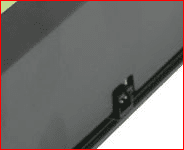
Actually that card doesn't have built in audio. What it has is a SPDIF connector along the top edge of it,

View attachment 163971

that use have to connect to the SPDIF header on the motherboard, then you can get audio over HDMI with it. Same process as described here,

Guide: 8800GT/9800GT/9800GTX Sound over HDMI (Now including Creative cards) - Overclock.net - Overclocking.net
.

im sorry, but i wasnt referring to that. I meant the sound is already integrated as part of the motherboard, meaning that i dont have a separate sound card.

and yes, i already have an SPDIF cable connected from my motherboard to the graphics card.
 

My Computer My Computer

Computer Manufacturer/Model Number
HP Pavilion m8120n
OS
Windows 7 Ultimate x64
CPU
Intel Core2 Quad Q6600 @2.4 GHz
Motherboard
Asus P5BW-LA (Basswood3g)
Memory
3 GB DDR2 PC5300
Graphics Card(s)
XFX GTS 250
Sound Card
Realtek ALC888S (integrated)
Monitor(s) Displays
Acer X192W
Screen Resolution
1400 x 900
Hard Drives
2x Hitachi Desktar 320 GB
PSU
Corsair 620 W Nonmodular
Internet Speed
5 Mbps - 15 Mbps
Sorry missed that. You set it to digital out instead of speakers?

Also have you tried switching the video connections on the card? If not I have a feeling that only one of the DVI ports can be used for HDMI with audio.
 

My Computer My Computer

Computer type
PC/Desktop
Computer Manufacturer/Model Number
Me
OS
Win 7 Ultimate x64
CPU
FX-8350 @ 4.6 GHz so far
Motherboard
Asus M5A97 EVO
Memory
ADATA XPG V1 Series Black 8GB DDR3 1600
Graphics Card(s)
Sapphire R9 270x Dual-X
Sound Card
Xonar DGX w/ Corsair Vengence 1300
Monitor(s) Displays
Acer S232HL Abid
Screen Resolution
1920x1080
Hard Drives
120 GB OCZ Vertex 3
500 GB Seagate 7200.12
PSU
Antec Earthwatts 650W Green
Case
Antec Three Hundred
Cooling
Cooler Master 212 EVO
Keyboard
Logitech G510
Mouse
Logitech G500s
Internet Speed
35000/3000
Sorry missed that. You set it to digital out instead of speakers?

Also have you tried switching the video connections on the card? If not I have a feeling that only one of the DVI ports can be used for HDMI with audio.

yup, I disconnected the monitor, and then I tried each DVI port for the TV, and for each DVI port, I also tried both "Speakers" and "Realtek Digital Output."

Also, on the NVIDIA Control Panel, its actually detecting that I am using an HDMI and the HDMI is enabled with audio.
 

My Computer My Computer

Computer Manufacturer/Model Number
HP Pavilion m8120n
OS
Windows 7 Ultimate x64
CPU
Intel Core2 Quad Q6600 @2.4 GHz
Motherboard
Asus P5BW-LA (Basswood3g)
Memory
3 GB DDR2 PC5300
Graphics Card(s)
XFX GTS 250
Sound Card
Realtek ALC888S (integrated)
Monitor(s) Displays
Acer X192W
Screen Resolution
1400 x 900
Hard Drives
2x Hitachi Desktar 320 GB
PSU
Corsair 620 W Nonmodular
Internet Speed
5 Mbps - 15 Mbps
I cant solve this problem, but nevertheless I bought a 3.5mm stereo cable.
I removed the SPDIF cable from the computer, and I still have an HDMI cable connected to a DVI-HDMI adapter. The stereo cable is connected from the computer to the TV, but here is the problem:

When the HDMI cable is disconnected from the TV, I hear audio from the PC.
When the HDMI cable is connected to the TV, I hear no audio whatsoever from the PC.

Any help would be appreciated :)
 

My Computer My Computer

Computer Manufacturer/Model Number
HP Pavilion m8120n
OS
Windows 7 Ultimate x64
CPU
Intel Core2 Quad Q6600 @2.4 GHz
Motherboard
Asus P5BW-LA (Basswood3g)
Memory
3 GB DDR2 PC5300
Graphics Card(s)
XFX GTS 250
Sound Card
Realtek ALC888S (integrated)
Monitor(s) Displays
Acer X192W
Screen Resolution
1400 x 900
Hard Drives
2x Hitachi Desktar 320 GB
PSU
Corsair 620 W Nonmodular
Internet Speed
5 Mbps - 15 Mbps
I cant solve this problem, but nevertheless I bought a 3.5mm stereo cable.
I removed the SPDIF cable from the computer, and I still have an HDMI cable connected to a DVI-HDMI adapter. The stereo cable is connected from the computer to the TV, but here is the problem:

When the HDMI cable is disconnected from the TV, I hear audio from the PC.
When the HDMI cable is connected to the TV, I hear no audio whatsoever from the PC.

Any help would be appreciated :)

Your card doesn't do HDMI. Since your card has DVI ports and DVI doesn't carry audio, the DVI-HDMI adapter is useless (for audio).

You may be able to use SPDIF to get audio from the card, to the motherboard, to an AV receiver, using the SPDIF outputs on the motherboard, but that's a separate issue.
 

My Computer My Computer

Computer type
PC/Desktop
Computer Manufacturer/Model Number
Custom Build
OS
Windows 7 Home Premium 64 bit
CPU
Intel Core i7-4790
Motherboard
GA-Z87X-D3H
Memory
G.SKILL 8GB (2 x 4GB) DDR3 F3-10666CL9D-8GBNT
Graphics Card(s)
AMD Radeon R7 250
Sound Card
Realtek ALC892
Monitor(s) Displays
Samsung UN32EH5000, Dell 1703FPT
Screen Resolution
1920 x 1080, 1280 x 1024
Hard Drives
WD5003AZEX
WD10EZEX
Samsung HD103SJ
Samsung 128 GB 840 PRO
PSU
SeaSonic M12II SS-500GM
Case
Fractal Design Define R4
Cooling
Zalman CNPS9900ALED
Keyboard
Logitech K800
Mouse
Logitech M705
Internet Speed
16 Mbps
Antivirus
Avast
Browser
Firefox
Other Info
Bose Companion 2 Multimedia Speakers
I cant solve this problem, but nevertheless I bought a 3.5mm stereo cable.
I removed the SPDIF cable from the computer, and I still have an HDMI cable connected to a DVI-HDMI adapter. The stereo cable is connected from the computer to the TV, but here is the problem:

When the HDMI cable is disconnected from the TV, I hear audio from the PC.
When the HDMI cable is connected to the TV, I hear no audio whatsoever from the PC.

Any help would be appreciated :)

Your card doesn't do HDMI. Since your card has DVI ports and DVI doesn't carry audio, the DVI-HDMI adapter is useless (for audio).

thats why i got a 3.5mm stereo cable running from my computer, yet im still having trouble getting picture with sound.

this is actually a different problem. sorry, i didnt really wanna make another thread.
 

My Computer My Computer

Computer Manufacturer/Model Number
HP Pavilion m8120n
OS
Windows 7 Ultimate x64
CPU
Intel Core2 Quad Q6600 @2.4 GHz
Motherboard
Asus P5BW-LA (Basswood3g)
Memory
3 GB DDR2 PC5300
Graphics Card(s)
XFX GTS 250
Sound Card
Realtek ALC888S (integrated)
Monitor(s) Displays
Acer X192W
Screen Resolution
1400 x 900
Hard Drives
2x Hitachi Desktar 320 GB
PSU
Corsair 620 W Nonmodular
Internet Speed
5 Mbps - 15 Mbps
You may be able to get it work using the tutorial, but from what I've read, it's hit or miss.
If all fails, you'll need to get a card with an HDMI port.:cry:
 

My Computer My Computer

Computer type
PC/Desktop
Computer Manufacturer/Model Number
Custom Build
OS
Windows 7 Home Premium 64 bit
CPU
Intel Core i7-4790
Motherboard
GA-Z87X-D3H
Memory
G.SKILL 8GB (2 x 4GB) DDR3 F3-10666CL9D-8GBNT
Graphics Card(s)
AMD Radeon R7 250
Sound Card
Realtek ALC892
Monitor(s) Displays
Samsung UN32EH5000, Dell 1703FPT
Screen Resolution
1920 x 1080, 1280 x 1024
Hard Drives
WD5003AZEX
WD10EZEX
Samsung HD103SJ
Samsung 128 GB 840 PRO
PSU
SeaSonic M12II SS-500GM
Case
Fractal Design Define R4
Cooling
Zalman CNPS9900ALED
Keyboard
Logitech K800
Mouse
Logitech M705
Internet Speed
16 Mbps
Antivirus
Avast
Browser
Firefox
Other Info
Bose Companion 2 Multimedia Speakers
Your card doesn't do HDMI. Since your card has DVI ports and DVI doesn't carry audio, the DVI-HDMI adapter is useless (for audio).

Yes and no. Yes you're right that a normal DVI to HDMI adapter or cable won't carry audio, there are some that do. Some of the early ATI HD 2xxx series of cards that didn't have a native HDMI port came with an adapter like this,

http://www.newegg.com/Product/Produ...re=dvi_to_hdmi_adapter-_-14-999-007-_-Product

that does allow audio over HDMI from the proper DVI port on the card (only one of the two DVI ports supported it). The adapter is wired up differently to a regular adapter to make use of the unused pins to allow for audio. Same goes for any Nvidia card that used the SPDIF header for audio, only most of them didn't come with the adapter but could usually be obtained from the card manufacturer after asking about it.

bleron one thing comes to mind if your adapter/cable is one that allows for audio, did you happen to try reversing the SPDIF cable on either the card or the motherboard header? All it is is a two wire connection and if it is backwards on one end it will shows as being available/in use, but no sound comes out.
 

My Computer My Computer

Computer type
PC/Desktop
Computer Manufacturer/Model Number
Me
OS
Win 7 Ultimate x64
CPU
FX-8350 @ 4.6 GHz so far
Motherboard
Asus M5A97 EVO
Memory
ADATA XPG V1 Series Black 8GB DDR3 1600
Graphics Card(s)
Sapphire R9 270x Dual-X
Sound Card
Xonar DGX w/ Corsair Vengence 1300
Monitor(s) Displays
Acer S232HL Abid
Screen Resolution
1920x1080
Hard Drives
120 GB OCZ Vertex 3
500 GB Seagate 7200.12
PSU
Antec Earthwatts 650W Green
Case
Antec Three Hundred
Cooling
Cooler Master 212 EVO
Keyboard
Logitech G510
Mouse
Logitech G500s
Internet Speed
35000/3000
Stormy13 is back.:D
Bleron missed you. :cry:
I hope he get's it working.:)
 

My Computer My Computer

Computer type
PC/Desktop
Computer Manufacturer/Model Number
Custom Build
OS
Windows 7 Home Premium 64 bit
CPU
Intel Core i7-4790
Motherboard
GA-Z87X-D3H
Memory
G.SKILL 8GB (2 x 4GB) DDR3 F3-10666CL9D-8GBNT
Graphics Card(s)
AMD Radeon R7 250
Sound Card
Realtek ALC892
Monitor(s) Displays
Samsung UN32EH5000, Dell 1703FPT
Screen Resolution
1920 x 1080, 1280 x 1024
Hard Drives
WD5003AZEX
WD10EZEX
Samsung HD103SJ
Samsung 128 GB 840 PRO
PSU
SeaSonic M12II SS-500GM
Case
Fractal Design Define R4
Cooling
Zalman CNPS9900ALED
Keyboard
Logitech K800
Mouse
Logitech M705
Internet Speed
16 Mbps
Antivirus
Avast
Browser
Firefox
Other Info
Bose Companion 2 Multimedia Speakers
Stormy13 is back.:D
Bleron missed you. :cry:
I hope he get's it working.:)

lol, i appreciate both of your help

bleron one thing comes to mind if your adapter/cable is one that allows for audio, did you happen to try reversing the SPDIF cable on either the card or the motherboard header? All it is is a two wire connection and if it is backwards on one end it will shows as being available/in use, but no sound comes out.

the thing is that i actually have this
EVGA | Products

the connection on the card is irreversible.
on the motherboard, ive alreadyy tried that and still nothing
 

My Computer My Computer

Computer Manufacturer/Model Number
HP Pavilion m8120n
OS
Windows 7 Ultimate x64
CPU
Intel Core2 Quad Q6600 @2.4 GHz
Motherboard
Asus P5BW-LA (Basswood3g)
Memory
3 GB DDR2 PC5300
Graphics Card(s)
XFX GTS 250
Sound Card
Realtek ALC888S (integrated)
Monitor(s) Displays
Acer X192W
Screen Resolution
1400 x 900
Hard Drives
2x Hitachi Desktar 320 GB
PSU
Corsair 620 W Nonmodular
Internet Speed
5 Mbps - 15 Mbps
i assumed that that also works with XFX graphics cards so i got it.
but as of now, I give up on this hdmi and spdif, so I got a 3.5mm stereo cable running from my computer to my Sony tv.

so heres the new story,
when i connect both the HDMI cable and stereo cable to the TV, I get only picture, no sound.
but when i disconnect the HDMI cable and leave only the stereo cable connected, I get sound, but no picture.
this is driving me nuts :mad:

either way, I cant get it right.
 

My Computer My Computer

Computer Manufacturer/Model Number
HP Pavilion m8120n
OS
Windows 7 Ultimate x64
CPU
Intel Core2 Quad Q6600 @2.4 GHz
Motherboard
Asus P5BW-LA (Basswood3g)
Memory
3 GB DDR2 PC5300
Graphics Card(s)
XFX GTS 250
Sound Card
Realtek ALC888S (integrated)
Monitor(s) Displays
Acer X192W
Screen Resolution
1400 x 900
Hard Drives
2x Hitachi Desktar 320 GB
PSU
Corsair 620 W Nonmodular
Internet Speed
5 Mbps - 15 Mbps
Probably asking the obvious, but did you make sure that when both are connected that the Realtek audio (speakers and not digital) is set as the default playback device?
 

My Computer My Computer

Computer type
PC/Desktop
Computer Manufacturer/Model Number
Me
OS
Win 7 Ultimate x64
CPU
FX-8350 @ 4.6 GHz so far
Motherboard
Asus M5A97 EVO
Memory
ADATA XPG V1 Series Black 8GB DDR3 1600
Graphics Card(s)
Sapphire R9 270x Dual-X
Sound Card
Xonar DGX w/ Corsair Vengence 1300
Monitor(s) Displays
Acer S232HL Abid
Screen Resolution
1920x1080
Hard Drives
120 GB OCZ Vertex 3
500 GB Seagate 7200.12
PSU
Antec Earthwatts 650W Green
Case
Antec Three Hundred
Cooling
Cooler Master 212 EVO
Keyboard
Logitech G510
Mouse
Logitech G500s
Internet Speed
35000/3000
Probably asking the obvious, but did you make sure that when both are connected that the Realtek audio (speakers and not digital) is set as the default playback device?

lol, yes, speakers are set as default. my speakers are working fine but when i connect the same cable to the TV I get the above situation.
 

My Computer My Computer

Computer Manufacturer/Model Number
HP Pavilion m8120n
OS
Windows 7 Ultimate x64
CPU
Intel Core2 Quad Q6600 @2.4 GHz
Motherboard
Asus P5BW-LA (Basswood3g)
Memory
3 GB DDR2 PC5300
Graphics Card(s)
XFX GTS 250
Sound Card
Realtek ALC888S (integrated)
Monitor(s) Displays
Acer X192W
Screen Resolution
1400 x 900
Hard Drives
2x Hitachi Desktar 320 GB
PSU
Corsair 620 W Nonmodular
Internet Speed
5 Mbps - 15 Mbps
You wouldn't happen to have anything showing in Device Manager for Nvidia audio would you? If so disable any that are showing (can be up to 4) and see what happens.

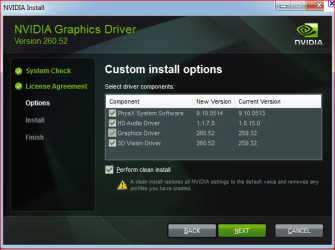
Also if you're using the latest or reasonably recent video driver, it is possible that when installing it also installed the Nvidia audio. Open Programs and Features and locate the Nvidia drivers entry and start the uninstall. That should bring up a Nvidia window asking whether to uninstall everything or only selected drivers, something like this,

nvidiainstall.PNG

If the audio driver is there select only it to uninstall and leave the rest.
 

My Computer My Computer

Computer type
PC/Desktop
Computer Manufacturer/Model Number
Me
OS
Win 7 Ultimate x64
CPU
FX-8350 @ 4.6 GHz so far
Motherboard
Asus M5A97 EVO
Memory
ADATA XPG V1 Series Black 8GB DDR3 1600
Graphics Card(s)
Sapphire R9 270x Dual-X
Sound Card
Xonar DGX w/ Corsair Vengence 1300
Monitor(s) Displays
Acer S232HL Abid
Screen Resolution
1920x1080
Hard Drives
120 GB OCZ Vertex 3
500 GB Seagate 7200.12
PSU
Antec Earthwatts 650W Green
Case
Antec Three Hundred
Cooling
Cooler Master 212 EVO
Keyboard
Logitech G510
Mouse
Logitech G500s
Internet Speed
35000/3000
Back
Top