Create an ISO-file from 3 dvds

hardrocker

New member
Local time
10:21 AM
Messages
16
How can i create 1 Isofile from my three windows 7-discs? I wanna use the RT7 Lite-program and it needs the Windowsinstallationdiscs as an Isofile.
I know how to make 3 isofiles from the 3 discs, but I just want 1 big one! Any tips?
 

My Computer My Computer

OS
Windows 7 Home Premium 64bit
You can zip them or iso them, but you will have to extract them when u want to use it.
 

My Computer My Computer

Computer type
PC/Desktop
Computer Manufacturer/Model Number
Custom Built PC
OS
Windows 7 Ultimate 64 bit SP1
CPU
Intel(R) Core(TM) i5-2500K
Motherboard
Gigabyte Technology Co., Ltd. Z68X-UD3-B3
Memory
12GB Kingston Hyperx 1600MHz
Graphics Card(s)
Asus GTS 450
PSU
500W Coolink
Other Info
Genius G-Pen F610 (PenPad)
How do you mean exactly? Please explain for me, I'm a novice.
 

My Computer My Computer

OS
Windows 7 Home Premium 64bit

My Computer My Computer

Computer type
PC/Desktop
Computer Manufacturer/Model Number
Home Built Desktop By DataTech
OS
Windows 7 Ultimate X64 SP1
CPU
Intel i5-2550K, Differing ~4.4-4.8GHz No built in GPU
Motherboard
ASUS P8Z68-V PRO/GEN3
Memory
16GB G.Skill Sniper 1866MHz @ 2133MHz 2x8GB
Graphics Card(s)
ASUS GTX650TIB-DC2OC-2GD5, (650TI Boost)
Sound Card
Onboard Realtek 5-1
Monitor(s) Displays
Samsung P2570HD
Screen Resolution
1920x1080
Hard Drives
Samsung 840 Pro 256GB SSD for OS, 500GB Seagate Constellation (Enterprise drive) for Data
PSU
Corsair HX650W
Case
Inwin Dragon Rider
Cooling
Hyper 212 EVO w/two Noctua fans, push-pull, @1300 RPM
Keyboard
E-Z Eyes, bright yellow keys with large characters
Mouse
steelseries SENSEI Laser Pro Gaming
Internet Speed
48-51Mbs Mbs down, 11 Mbs up Xfinity Cable
Antivirus
Norton Internet Security 2013
Browser
IE 10, Opera, Pale Moon if needed
Other Info
4 case fans, LG BluRay-RE, ASUS DVD-RW, Mr. Fusion power supply, 1.21 gigawatts.
Copy all the contents of the three DVD's into one folder. Use ImgBurn The Official ImgBurn Website to make an ISO file out of the contents of the 3 DVD's (in the folder).
 

My Computer My Computer

Computer Manufacturer/Model Number
HP Pavilion dv6-2020ev
OS
Ubuntu 12.10
CPU
Intel Core i7 720QM
Motherboard
Its a HP secret...
Memory
4GB RAM
Graphics Card(s)
NVIDIA GeForce 230M
Sound Card
IDT
Screen Resolution
1366x768
Hard Drives
500 GB
Mouse
HP
Internet Speed
4 Mbps
Copy all the contents of the three DVD's into one folder. Use ImgBurn The Official ImgBurn Website to make an ISO file out of the contents of the 3 DVD's (in the folder).

Yeah? You think that will work? Sounds too easy. Thought that the discs had to be installed in a specific order, not just dump everything in one folder. I'll try it though!
 

My Computer My Computer

OS
Windows 7 Home Premium 64bit
Didn't work.. It has to be bootable.
 

My Computer My Computer

OS
Windows 7 Home Premium 64bit
There should be an option in ImgBurn to make the iso file bootable. What Windows 7 version are the three CD's?
 

My Computer My Computer

Computer Manufacturer/Model Number
HP Pavilion dv6-2020ev
OS
Ubuntu 12.10
CPU
Intel Core i7 720QM
Motherboard
Its a HP secret...
Memory
4GB RAM
Graphics Card(s)
NVIDIA GeForce 230M
Sound Card
IDT
Screen Resolution
1366x768
Hard Drives
500 GB
Mouse
HP
Internet Speed
4 Mbps
Windows 7 HP. I didn't get Windows on discs. The first time I started the computer I had to make three revovery discs. It would be so much easier if I just could download an ISO-file from Microsoft..
 

My Computer My Computer

OS
Windows 7 Home Premium 64bit
What brand computer is this?
 

My Computer My Computer

Computer Manufacturer/Model Number
Too many to describe...
OS
Windows 7 x64 pro/ Windows 7 x86 Pro/ XP SP3 x86
Windows 7 HP. I didn't get Windows on discs. The first time I started the computer I had to make three revovery discs. It would be so much easier if I just could download an ISO-file from Microsoft..

The three recovery disks you created can only be used to recover your computer to its factory state i.e. exactly how it was when you first bought it.

You can though download an ISO file that you burn to disk to create a bootable Windows recovery disk.

Download Windows 7 System Recovery Discs — The NeoSmart Files

Take note, this only gets you into Windows 7's recovery centre, which gives you several options such as system restore. It does not re-install Windows.
 

My Computer My Computer

Computer Manufacturer/Model Number
HP Pavilion Elite 495UK
OS
Windows 7 Ultimate SP1 64-Bit
CPU
Intel Core i7 870 @ 2.93GHz
Motherboard
MSI 2A9C (CPU1)
Memory
8Gb Dual-Channel DDR3 @ 664MHz
Graphics Card(s)
nVidia GeForce GTX 460 1024MB dedicated RAM
Sound Card
Realtek HD Audio
Monitor(s) Displays
HP2310i
Screen Resolution
1920 x 1080
Hard Drives
1x1954GB Hitachi HDS22020ALA 330 (RAID), 1x1954GB Hitachi External for backup and storage
PSU
460W
Case
HP Elite
Cooling
Air cooled
Keyboard
Logitech K750 solar-powered keyboard
Mouse
Logitech Wireless M180 mouse
Internet Speed
2Mb
Other Info
Pure Avanti Flow Internet Radio with iPod Dock, 64Gb iPod, HP USB Speakers, Sony MDR-V500 Headphones, Sony Vaio F-Series Laptop
That sucks! So I can't get an ISO-file for my own Windows? I bought the damn computer so I should own the license!
The computer isa Sony Vaio and it's packed with bullshit programes and services that I never use. That's why I wanna make a clean install with RT7 Lite so I can decide what I want installed. But that's not possible then?
 

My Computer My Computer

OS
Windows 7 Home Premium 64bit
That sucks! So I can't get an ISO-file for my own Windows? I bought the damn computer so I should own the license!
The computer isa Sony Vaio and it's packed with bullshit programes and services that I never use. That's why I wanna make a clean install with RT7 Lite so I can decide what I want installed. But that's not possible then?
You sound very confused. What iso are you talking about? The sony bloatware can be uninstalled in Programs and features, the machine tweaked to your liking, after that just make an image using the inbuilt backup/restore feature or a 3rd party tool like the highly recommended macrium reflect. This image can be restored to the machine whenever required.

The recovery disks you have right now contain ALL the bloatware that came preinstalled, its not a clean iso. If you want to clean install, borrow a disk from a friend or get it from elsewhere, install the same edition you have right now, then activate with the sticker key.

 

My Computer My Computer

Computer Manufacturer/Model Number
Too many to describe...
OS
Windows 7 x64 pro/ Windows 7 x86 Pro/ XP SP3 x86
What you can do, as Bill suggests, is uninstall all Sony's software that you don't want.

If you can't beg, steal or borrow a Windows DVD to carry out a clean install using the product key that is stuck on your laptop, you might want to consider a Windows Anytime Upgrade.

Just go to Microsoft's upgrade page and buy a product key: e.g. you could upgrade from Home Premium to Professional. Once you've paid for the key it'll be sent to you by e-mail.

Then, it's just a question of launching Windows Anytime Upgrade on your computer, inserting your new product key, waiting for the upgrade to complete (10-30 mins) and then activating the upgrade on completion.
 

My Computer My Computer

Computer Manufacturer/Model Number
HP Pavilion Elite 495UK
OS
Windows 7 Ultimate SP1 64-Bit
CPU
Intel Core i7 870 @ 2.93GHz
Motherboard
MSI 2A9C (CPU1)
Memory
8Gb Dual-Channel DDR3 @ 664MHz
Graphics Card(s)
nVidia GeForce GTX 460 1024MB dedicated RAM
Sound Card
Realtek HD Audio
Monitor(s) Displays
HP2310i
Screen Resolution
1920 x 1080
Hard Drives
1x1954GB Hitachi HDS22020ALA 330 (RAID), 1x1954GB Hitachi External for backup and storage
PSU
460W
Case
HP Elite
Cooling
Air cooled
Keyboard
Logitech K750 solar-powered keyboard
Mouse
Logitech Wireless M180 mouse
Internet Speed
2Mb
Other Info
Pure Avanti Flow Internet Radio with iPod Dock, 64Gb iPod, HP USB Speakers, Sony MDR-V500 Headphones, Sony Vaio F-Series Laptop
That sucks! So I can't get an ISO-file for my own Windows? I bought the damn computer so I should own the license!
The computer isa Sony Vaio and it's packed with bullshit programes and services that I never use. That's why I wanna make a clean install with RT7 Lite so I can decide what I want installed. But that's not possible then?
You sound very confused. What iso are you talking about? The sony bloatware can be uninstalled in Programs and features, the machine tweaked to your liking, after that just make an image using the inbuilt backup/restore feature or a 3rd party tool like the highly recommended macrium reflect. This image can be restored to the machine whenever required.

The recovery disks you have right now contain ALL the bloatware that came preinstalled, its not a clean iso. If you want to clean install, borrow a disk from a friend or get it from elsewhere, install the same edition you have right now, then activate with the sticker key.

Of course I can uninstall the bloatware that I don't want. But the thing is that I wanna try this RT7 Lite. Apperantly I can decide how Windows 7 should look (and what's installed) when I install it with RT7 Lite. All the programs that I don't want will not be installed, and all the hundreds of services that normally are installed
(and which I don't use or need) I don't need to install. This will make my computer faster, I think. Therefor I need an ISO-file of Windows 7. A file that I don't have. The recovery part doesn't help me.
Maybe I'm stupid and confused and don't understand you, but I'm right? Right?..
 

My Computer My Computer

OS
Windows 7 Home Premium 64bit
No, you're not right. Win7 doesnt need too much optimization, in any case you can turn off many features after install. Removing services in RT7lite is a terrible idea because most users have only a faint idea of what each service does and how it is tied to other services. We see instances here where people do this, then have trouble installing and running windows. If desired, services can be disabled after install though its largely a myth that they make the system faster.

You can have a light, fast system with the default install, there are tuts here for optimal tweaking should you want to use those.
 

My Computer My Computer

Computer Manufacturer/Model Number
Too many to describe...
OS
Windows 7 x64 pro/ Windows 7 x86 Pro/ XP SP3 x86
Accept Bill's advice.

Windows 7 is a great operating system that does its job well and too much tinkering can mess things up.
 

My Computer My Computer

Computer Manufacturer/Model Number
HP Pavilion Elite 495UK
OS
Windows 7 Ultimate SP1 64-Bit
CPU
Intel Core i7 870 @ 2.93GHz
Motherboard
MSI 2A9C (CPU1)
Memory
8Gb Dual-Channel DDR3 @ 664MHz
Graphics Card(s)
nVidia GeForce GTX 460 1024MB dedicated RAM
Sound Card
Realtek HD Audio
Monitor(s) Displays
HP2310i
Screen Resolution
1920 x 1080
Hard Drives
1x1954GB Hitachi HDS22020ALA 330 (RAID), 1x1954GB Hitachi External for backup and storage
PSU
460W
Case
HP Elite
Cooling
Air cooled
Keyboard
Logitech K750 solar-powered keyboard
Mouse
Logitech Wireless M180 mouse
Internet Speed
2Mb
Other Info
Pure Avanti Flow Internet Radio with iPod Dock, 64Gb iPod, HP USB Speakers, Sony MDR-V500 Headphones, Sony Vaio F-Series Laptop
Okey then, I'll give up. I do as you say and install from the recovery dvds with all the bloatware and the uninstall the shit I don't want. Is it true that the Revo Uninstaller is better than the original Windows uninstaller or is that also a myth? And where do I find those tutorials?

Thanks guys!
 

My Computer My Computer

OS
Windows 7 Home Premium 64bit
Revo is good, but be careful because its deep scan (should you choose it) can mess your registry settings up.

As for the WSF tutorials, just click the link at the top of the page and do a search for some awesome stuff from Brink & Co..
 

My Computer My Computer

Computer Manufacturer/Model Number
HP Pavilion Elite 495UK
OS
Windows 7 Ultimate SP1 64-Bit
CPU
Intel Core i7 870 @ 2.93GHz
Motherboard
MSI 2A9C (CPU1)
Memory
8Gb Dual-Channel DDR3 @ 664MHz
Graphics Card(s)
nVidia GeForce GTX 460 1024MB dedicated RAM
Sound Card
Realtek HD Audio
Monitor(s) Displays
HP2310i
Screen Resolution
1920 x 1080
Hard Drives
1x1954GB Hitachi HDS22020ALA 330 (RAID), 1x1954GB Hitachi External for backup and storage
PSU
460W
Case
HP Elite
Cooling
Air cooled
Keyboard
Logitech K750 solar-powered keyboard
Mouse
Logitech Wireless M180 mouse
Internet Speed
2Mb
Other Info
Pure Avanti Flow Internet Radio with iPod Dock, 64Gb iPod, HP USB Speakers, Sony MDR-V500 Headphones, Sony Vaio F-Series Laptop
Here it is Download Revo Uninstaller Freeware - Free and Full Download - Uninstall software, remove programs, solve uninstall problems read the help files. It is recommended by several members here to help solve driver issues since they don't get completely uninstalled.
This is the main window and the display can be changed with the View button much like Windows Explorer.
Revo 1.PNG

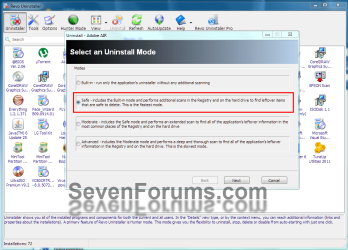
You will be given 4 options for uninstall as shown. Use the Safe Mode. After the program's uninstaller runs it will show left-over registry entries, if any. You can choose the one to delete. Choose carefully.

Revo 2.PNG

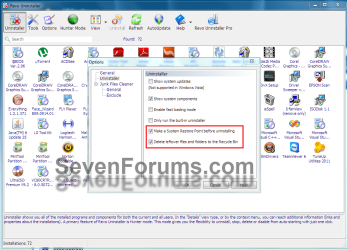
In options you can set a few things, make sure these, at least are checked. If you render your PC unusable you can go to a restore point or restore from the recycle bin. Don't check Show system Updates.
Revo 3.PNG

Another option is CCleaner, link in my sig, which has an uninstaller option which uses the program's own uninstaller.
 

My Computer My Computer

Computer type
PC/Desktop
Computer Manufacturer/Model Number
Home Built Desktop By DataTech
OS
Windows 7 Ultimate X64 SP1
CPU
Intel i5-2550K, Differing ~4.4-4.8GHz No built in GPU
Motherboard
ASUS P8Z68-V PRO/GEN3
Memory
16GB G.Skill Sniper 1866MHz @ 2133MHz 2x8GB
Graphics Card(s)
ASUS GTX650TIB-DC2OC-2GD5, (650TI Boost)
Sound Card
Onboard Realtek 5-1
Monitor(s) Displays
Samsung P2570HD
Screen Resolution
1920x1080
Hard Drives
Samsung 840 Pro 256GB SSD for OS, 500GB Seagate Constellation (Enterprise drive) for Data
PSU
Corsair HX650W
Case
Inwin Dragon Rider
Cooling
Hyper 212 EVO w/two Noctua fans, push-pull, @1300 RPM
Keyboard
E-Z Eyes, bright yellow keys with large characters
Mouse
steelseries SENSEI Laser Pro Gaming
Internet Speed
48-51Mbs Mbs down, 11 Mbs up Xfinity Cable
Antivirus
Norton Internet Security 2013
Browser
IE 10, Opera, Pale Moon if needed
Other Info
4 case fans, LG BluRay-RE, ASUS DVD-RW, Mr. Fusion power supply, 1.21 gigawatts.
Back
Top