

- Local time
- 2:13 PM
- Messages
- 102
I cannot make a new Restore Point in System Restore. I'm obviously doing something wrong or not doing something.
Here's what I am doing:
SYSTEM > SYSTEM PROTECTION > SYSTEM PROPERTIES opens.
Click CREATE and the CREATE A RSTORE POINT window opens.
I typed in 7/30/2011 9:00:00 AM and clicked CREATE.
Small window "Creating a rstore point" finished with "The restore point was created successfully."
I closed that window and it returned to the System Properties window.
Here is where I am not sure what to do. If I click "Create", I've already done that (and I can't change older retore points in the list.
If I click System Restore, I get this:
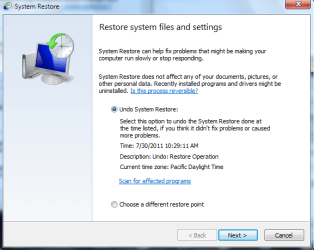
I did what I thought was a restore, but I got this and it did not fix my problem: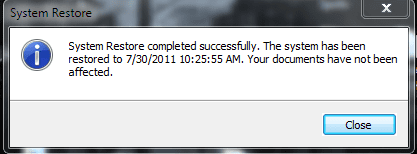
Here's what I am doing:
SYSTEM > SYSTEM PROTECTION > SYSTEM PROPERTIES opens.
Click CREATE and the CREATE A RSTORE POINT window opens.
I typed in 7/30/2011 9:00:00 AM and clicked CREATE.
Small window "Creating a rstore point" finished with "The restore point was created successfully."
I closed that window and it returned to the System Properties window.
Here is where I am not sure what to do. If I click "Create", I've already done that (and I can't change older retore points in the list.
If I click System Restore, I get this:
I did what I thought was a restore, but I got this and it did not fix my problem:
My Computer
At a glance
Windows 7 Home Premium
- OS
- Windows 7 Home Premium


