
Can't make new restore point

Dick H

New member
Member
VIP
Local time
12:02 PM
Messages
102
I cannot make a new Restore Point in System Restore. I'm obviously doing something wrong or not doing something.
Here's what I am doing:
SYSTEM > SYSTEM PROTECTION > SYSTEM PROPERTIES opens.
Click CREATE and the CREATE A RSTORE POINT window opens.
I typed in 7/30/2011 9:00:00 AM and clicked CREATE.
Small window "Creating a rstore point" finished with "The restore point was created successfully."
I closed that window and it returned to the System Properties window.
Here is where I am not sure what to do. If I click "Create", I've already done that (and I can't change older retore points in the list.
If I click System Restore, I get this:
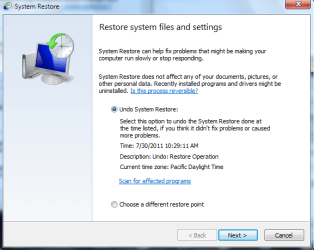
Restore-01.png

I did what I thought was a restore, but I got this and it did not fix my problem: Restore-02.png
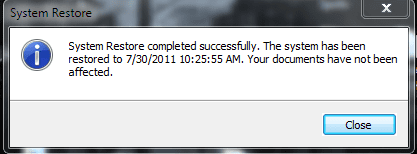
 

My Computer My Computer

At a glance

Windows 7 Home Premium
OS
Windows 7 Home Premium
Hi Dick,

Here is a very good tutorial which tells you step by step how to create a restore point and how to do a system restore in Windows 7 - did you follow these steps? Did you select "choose a different restore point"?
http://www.sevenforums.com/tutorials/700-system-restore.html

Also, please make sure that your system clock and date are correct.
 

My Computer My Computer

At a glance

-
OS
-
What seems to be the problem - you apparently had a restore point that was younger than the one from 9.00AM. And the system always first proposes the latest restore point. But you can choose a different one.
 

My Computer My Computer

At a glance

Vista, Windows7, Mint Mate, Zorin, Windows 8from 1.6GHz Duo to i7
Computer Manufacturer/Model Number
HP, Dell, Gateway, Toshiba - 4 laptops and 2 desktops
OS
Vista, Windows7, Mint Mate, Zorin, Windows 8
CPU
from 1.6GHz Duo to i7
Monitor(s) Displays
2x HP w2207
Hard Drives
5x HDD, 7x SSD, 12x Externals
Keyboard
with trackball - no mices
Mouse
Trackball mice
Internet Speed
DSL 6000

My Computer My Computer

At a glance

Microsoft Windows 7 Home Premium 64-bit 7600IIx4 amd athelon 635 processor2x2gbati radeon HD 5450
Computer Manufacturer/Model Number
Hewlett packard/p6512uk
OS
Microsoft Windows 7 Home Premium 64-bit 7600
CPU
IIx4 amd athelon 635 processor
Motherboard
FOXCONN 2AA9
Memory
2x2gb
Graphics Card(s)
ati radeon HD 5450
Sound Card
(1) Realtek High Definition Audio (2) AMD High Definition
Monitor(s) Displays
samsung lcd tv 32"
Screen Resolution
1360x 768
Hard Drives
(1) WDC WD10 01FAES-60Z2A0 SATA Disk Device (2) Maxtor OneTouch USB Device (3) ST310003 33AS USB Device (4) WD My Book 1111 USB Device
PSU
?
Cooling
air!
Keyboard
wireless hp
Mouse
wireless Hp,optical
Internet Speed
1.10mb/s
Antivirus
MSE
Browser
Firefox
I cannot make a new Restore Point in System Restore. I'm obviously doing something wrong or not doing something.
Here's what I am doing:
SYSTEM > SYSTEM PROTECTION > SYSTEM PROPERTIES opens.
Click CREATE and the CREATE A RSTORE POINT window opens.
I typed in 7/30/2011 9:00:00 AM and clicked CREATE.
Small window "Creating a rstore point" finished with "The restore point was created successfully."
I closed that window and it returned to the System Properties window.
Here is where I am not sure what to do. If I click "Create", I've already done that (and I can't change older retore points in the list.
If I click System Restore, I get this:
View attachment 167733

I did what I thought was a restore, but I got this and it did not fix my problem: View attachment 167734


1. >>>Small window "Creating a restore point" finished with "The restore point was created successfully."
I closed that window and it returned to the System Properties window.
Here is where I am not sure what to do. >>>>>

You had done what you wanted to do, to create a restore point. Get out of the System Properties window. You are done.

2.
system restore #1.png

Did you read what it says in that window ?
It says... the system has been restored to 7/30/2011.
You can NOT fix anything if you chose the date you are having problem as your restore point.... 7/30/2011.
The idea of system restore is to " roll back " the system to a date when everything was running smoothly..... like a " time machine ".
So, you should have clicked the empty dot in front of " Choose a different restore point " ( see you first screenshot ) > then click Next

3. Adding ......
Why did you want to do a system restore anyway ? Problem ?
 

My Computer My Computer

At a glance

Windows 7 Home Premium 64-bit, SP1Intel Pentium P6200, Cores 2, 2.13 GHz4 GBIntel HD
Computer Manufacturer/Model Number
Acer Aspire 7741Z
OS
Windows 7 Home Premium 64-bit, SP1
CPU
Intel Pentium P6200, Cores 2, 2.13 GHz
Memory
4 GB
Graphics Card(s)
Intel HD
Sound Card
unknown
Monitor(s) Displays
17.3 inches
Screen Resolution
1600 x 900
Hard Drives
640 GB, 5400 PRM
I cannot make a new Restore Point in System Restore. I'm obviously doing something wrong or not doing something.
Here's what I am doing:
SYSTEM > SYSTEM PROTECTION > SYSTEM PROPERTIES opens.
Click CREATE and the CREATE A RSTORE POINT window opens.
I typed in 7/30/2011 9:00:00 AM and clicked CREATE.
Small window "Creating a rstore point" finished with "The restore point was created successfully."
I closed that window and it returned to the System Properties window.
Here is where I am not sure what to do. If I click "Create", I've already done that (and I can't change older retore points in the list.
If I click System Restore, I get this:
View attachment 167733

I did what I thought was a restore, but I got this and it did not fix my problem: View attachment 167734

After reading your OLD post, it has become obvious that you have misunderstood " restore point ".

YOU can NOT create a restore point using a date that was in the past.
Ex : If you were on 7/9/2010, you cannot create a restore point for 7/5/2010. System will not register it that way. The system will mark the date as 7/9/2010, no matter what date you typed in.
To repeat what I wrote earlier, you click " Choose a different restore point " > then find the date you want > select it > then click NEXT.
 

My Computer My Computer

At a glance

Windows 7 Home Premium 64-bit, SP1Intel Pentium P6200, Cores 2, 2.13 GHz4 GBIntel HD
Computer Manufacturer/Model Number
Acer Aspire 7741Z
OS
Windows 7 Home Premium 64-bit, SP1
CPU
Intel Pentium P6200, Cores 2, 2.13 GHz
Memory
4 GB
Graphics Card(s)
Intel HD
Sound Card
unknown
Monitor(s) Displays
17.3 inches
Screen Resolution
1600 x 900
Hard Drives
640 GB, 5400 PRM
  • Like
Reactions: JMH
I cannot make a new Restore Point in System Restore. I'm obviously doing something wrong or not doing something.
Here's what I am doing:
SYSTEM > SYSTEM PROTECTION > SYSTEM PROPERTIES opens.
Click CREATE and the CREATE A RSTORE POINT window opens.
I typed in 7/30/2011 9:00:00 AM and clicked CREATE.
Small window "Creating a rstore point" finished with "The restore point was created successfully."
I closed that window and it returned to the System Properties window.
Here is where I am not sure what to do. If I click "Create", I've already done that (and I can't change older retore points in the list.
If I click System Restore, I get this:
View attachment 167733

I did what I thought was a restore, but I got this and it did not fix my problem: View attachment 167734

After reading your OLD post, it has become obvious that you have misunderstood " restore point ".

YOU can NOT create a restore point using a date that was in the past.
Ex : If you were on 7/9/2010, you cannot create a restore point for 7/5/2010. System will not register it that way. The system will mark the date as 7/9/2010, no matter what date you typed in.
To repeat what I wrote earlier, you click " Choose a different restore point " > then find the date you want > select it > then click NEXT.

Well, I guess I still do not understand.
Here's what I need to do.
At about 9:15 this AM, I somehow increased the size of the lowest bar. Doing that disrupted all my desktop icons. Since it would take a long time to get them back to where they were, I thought a System Restore would fix it. That's why I want to restore the system to 9:00 this AM. Is that not possible?
 

My Computer My Computer

At a glance

Windows 7 Home Premium
OS
Windows 7 Home Premium
I cannot make a new Restore Point in System Restore. I'm obviously doing something wrong or not doing something.
Here's what I am doing:
SYSTEM > SYSTEM PROTECTION > SYSTEM PROPERTIES opens.
Click CREATE and the CREATE A RSTORE POINT window opens.
I typed in 7/30/2011 9:00:00 AM and clicked CREATE.
Small window "Creating a rstore point" finished with "The restore point was created successfully."
I closed that window and it returned to the System Properties window.
Here is where I am not sure what to do. If I click "Create", I've already done that (and I can't change older retore points in the list.
If I click System Restore, I get this:
View attachment 167733

I did what I thought was a restore, but I got this and it did not fix my problem: View attachment 167734

After reading your OLD post, it has become obvious that you have misunderstood " restore point ".

YOU can NOT create a restore point using a date that was in the past.
Ex : If you were on 7/9/2010, you cannot create a restore point for 7/5/2010. System will not register it that way. The system will mark the date as 7/9/2010, no matter what date you typed in.
To repeat what I wrote earlier, you click " Choose a different restore point " > then find the date you want > select it > then click NEXT.

Well, I guess I still do not understand.
Here's what I need to do.
At about 9:15 this AM, I somehow increased the size of the lowest bar. Doing that disrupted all my desktop icons. Since it would take a long time to get them back to where they were, I thought a System Restore would fix it. That's why I want to restore the system to 9:00 this AM. Is that not possible?

In order to " roll back " to " 7/30.2011 9:00 AM ", you need a restore point that says 7/30/2011 9:00 AM.
You might find a restore date that says 7/30/2011, it won't help you, because it is the most recent restore point when you'd already done the damage.

Go back to system restore, pick a date that is 2 days ago as your restore point. That should bring your computer back to where it was.

Try to understand this....
1. Any time you want to make settings changes etc, CREATE a restore point FIRST. That restore point is your safety valve. Should you change your mind, use that restore point to bring your computer back to where it was.

2. Any restore point is dated on the date you create the restore point. NOT the date you typed in, which is irrelevant to the system.

3. Whenever you create a restore point, type in a short note as reference point, such as installed windows Updates.

4. Make it a habit, periodically, to create a restore point WHEN the system IS running smoothly. Again that would serve as your reference point should you run into trouble.
 

My Computer My Computer

At a glance

Windows 7 Home Premium 64-bit, SP1Intel Pentium P6200, Cores 2, 2.13 GHz4 GBIntel HD
Computer Manufacturer/Model Number
Acer Aspire 7741Z
OS
Windows 7 Home Premium 64-bit, SP1
CPU
Intel Pentium P6200, Cores 2, 2.13 GHz
Memory
4 GB
Graphics Card(s)
Intel HD
Sound Card
unknown
Monitor(s) Displays
17.3 inches
Screen Resolution
1600 x 900
Hard Drives
640 GB, 5400 PRM
Try to understand this....
1. Any time you want to make settings changes etc, CREATE a restore point FIRST. That restore point is your safety valve. Should you change your mind, use that restore point to bring your computer back to where it was.

If I knew when I was going to make an error I'd be an oracle. :)

I still don't understand why it tells me I can create a restore point, when you say I can't.!!!

Anyway, I bit the bullet and spent considerable time shuffling around all my icons. Now they are back to where I want them.
 

My Computer My Computer

At a glance

Windows 7 Home Premium
OS
Windows 7 Home Premium
Try to understand this....
1. Any time you want to make settings changes etc, CREATE a restore point FIRST. That restore point is your safety valve. Should you change your mind, use that restore point to bring your computer back to where it was.

If I knew when I was going to make an error I'd be an oracle. :)

I still don't understand why it tells me I can create a restore point, when you say I can't.!!!

Anyway, I bit the bullet and spent considerable time shuffling around all my icons. Now they are back to where I want them.

We have communication problem, and I sense the resentment from your part.
I'll make my last effort to explain, and I'll get out of your hair.

The " safety valve " is a " plan B ".
If the changes you have made do not pan out, you can use the restore point to go back to where it was. I did not say you should know when you were going to make an error. In fact, that is precisely why a restore point is to be created first before making any changes, BECAUSE you couldn't have known if you would make an error. And, if you don't like the changes you had made, then you can use that " safety valve " to restore.

You can make all the restore points you want. .... the date you make those restore points is the date registered by the computer.

Good luck.
 

My Computer My Computer

At a glance

Windows 7 Home Premium 64-bit, SP1Intel Pentium P6200, Cores 2, 2.13 GHz4 GBIntel HD
Computer Manufacturer/Model Number
Acer Aspire 7741Z
OS
Windows 7 Home Premium 64-bit, SP1
CPU
Intel Pentium P6200, Cores 2, 2.13 GHz
Memory
4 GB
Graphics Card(s)
Intel HD
Sound Card
unknown
Monitor(s) Displays
17.3 inches
Screen Resolution
1600 x 900
Hard Drives
640 GB, 5400 PRM
  • Like
Reactions: whs

My Computer My Computer

At a glance

Vista, Windows7, Mint Mate, Zorin, Windows 8from 1.6GHz Duo to i7
Computer Manufacturer/Model Number
HP, Dell, Gateway, Toshiba - 4 laptops and 2 desktops
OS
Vista, Windows7, Mint Mate, Zorin, Windows 8
CPU
from 1.6GHz Duo to i7
Monitor(s) Displays
2x HP w2207
Hard Drives
5x HDD, 7x SSD, 12x Externals
Keyboard
with trackball - no mices
Mouse
Trackball mice
Internet Speed
DSL 6000
I create a system restore point each morning when i boot my pc.that way any problems that day and i dont have to go too far back with a restore, i am covered. consider using the tutorial i directed you to earlier and save your self grief in future, also you can have some reassurance that if you do have to restore you dont have several days or weeks of changes to make.
just to clarify, a restore point is a point in time that the system restore can go back to,
 

My Computer My Computer

At a glance

Microsoft Windows 7 Home Premium 64-bit 7600IIx4 amd athelon 635 processor2x2gbati radeon HD 5450
Computer Manufacturer/Model Number
Hewlett packard/p6512uk
OS
Microsoft Windows 7 Home Premium 64-bit 7600
CPU
IIx4 amd athelon 635 processor
Motherboard
FOXCONN 2AA9
Memory
2x2gb
Graphics Card(s)
ati radeon HD 5450
Sound Card
(1) Realtek High Definition Audio (2) AMD High Definition
Monitor(s) Displays
samsung lcd tv 32"
Screen Resolution
1360x 768
Hard Drives
(1) WDC WD10 01FAES-60Z2A0 SATA Disk Device (2) Maxtor OneTouch USB Device (3) ST310003 33AS USB Device (4) WD My Book 1111 USB Device
PSU
?
Cooling
air!
Keyboard
wireless hp
Mouse
wireless Hp,optical
Internet Speed
1.10mb/s
Antivirus
MSE
Browser
Firefox
Back
Top