Setup unable to create a new partition or locate an existing partition

mrvoid

New member
Local time
11:14 AM
Messages
14
I bought a fairly new eMachines E528-2325 from a friend. before buying he decided to use DBAN 2.2.6 to wipe Windows 7 and install Ubuntu 11.04, after buying i requested him to reinstall Windows 7 using usb, so he again used DBAN to wipe the computer. Upon trying to install windows he got the error "Setup was unable to create a new system partition or locate an existing partition." We both cannot find a fix to this problem, and we have basic knowledge on computers. Please and thanks for any help.

eMachines E528-2325
Intel Celeron 900 processor
2GB DDR3 system memory
250GB SATA hard drive
DVD/CD drive doesn't work
 

My Computer My Computer

OS
Windows 7 Home Premium 32bit
Hello mrvoid, welcome to Seven Forums!

Boot the Windows 7 installer and do at least a clean to start and a clean all would be best; have a look at the information below and be sure to post back with any further questions you may have and to keep us informed.


To start fresh with a clean installation or clean install with an upgrade version of Windows 7, it may be best to over-write the Master Boot Record of any possible corruption and then use the Windows installer to create and format the partition(s) for installation, have a look at the "#6 clean" option of Method One in this first tutorial linked below.
If you want to completely wipe, over-write the entire Hard Disk Drive of any possible malware infection and / or to get the best possible space to do the install to or just for security purposes, have a look at these tutorials.
 

My Computer My Computer

Computer Manufacturer/Model Number
* BFK Customs *
OS
W 7 64-bit Ultimate
CPU
Intel Q9550 Yorkfield
Motherboard
ASUS P5Q Pro
Memory
8GB Dominator 8500C5D
Graphics Card(s)
ATI : XFX 5870
Sound Card
Realtek HD Audio 7-1
Monitor(s) Displays
1x 47" LCD HDMI & 3x 26" LCD HDMI
Screen Resolution
1920x1080P & 1920x1200
Hard Drives
1x 80GB Intel X25-M G2 SSD : 1x 500GB & 1x 640GB WD Caviar Black(s)
PSU
Corsair 620HX
Case
Cooler Master RC-690
Cooling
Tuniq Tower 120, 2x 140mm and 3x 120mm case fans
Keyboard
Microsoft 500
Mouse
Razer Diamondback 3G
Internet Speed
14 Mb/s
Other Info
1x Koutech 3Gb/s SATA HDD Hot Swap Rack
It isn't necessary to do a secure wipe of the HD which is done to make data irretrievable and has already been done twice now since the sale of computer. If going through the troubleshooting steps given here doesn't help then using the Diskpart "Clean" command is sufficient and less wearing on the HD.

This is a reinstall of the factory OEM Win7 Home Premium which originally came on the computer?

Where did seller obtain the installation DVD to do the reinstall? If he burned it himself, Confirm the ISO integrity and burn another using ImgBurn at 4x speed, or write the ISO to flash stick using this tool with Win7 in the dropdown menu: Universal USB Installer – Easy as 1 2 3, then boot it under USB or HD's.

If you have booted the flash stick to do successful installs elsewhere then make sure it boots correctly on this machine: tap the eMachines F10 one-time BIOS Boot Menu key to boot it if it doesn't work to set it first to boot in BIOS setup Boot Order.

Unplug all other HD's and peripherals.

Once installer boots, follow these steps to get a perfect reinstall of factory OEM: Reinstalling Windows 7

Check for newer BIOS update on eMachines website. If none, reset the CMOS: Clear CMOS - 3 Ways to Clear the CMOS - Reset BIOS.
While in BIOS setup, set SATA controller to AHCI to try install. If this fails, try IDE mode.

Try formatting your own Primary partition marked Active with Diskpart using these Commands from DVD Repair console Command Prompt:

Select Disk 0 (use WIn7 HD #)
create partition primary
format fs=ntfs label="Windows 7"
Active
exit

Test RAM using memtest86 for 5-6 passes or overnight: RAM - Test with Memtest86+

Test your HD using maker's diagnostics extended CD scan: HD Diagnostic

Report back progress for added steps if needed.
 
Last edited:
Doing a clean all to a Hard Disk Drive is not harmful at all and may be beneficial.
 

My Computer My Computer

Computer Manufacturer/Model Number
* BFK Customs *
OS
W 7 64-bit Ultimate
CPU
Intel Q9550 Yorkfield
Motherboard
ASUS P5Q Pro
Memory
8GB Dominator 8500C5D
Graphics Card(s)
ATI : XFX 5870
Sound Card
Realtek HD Audio 7-1
Monitor(s) Displays
1x 47" LCD HDMI & 3x 26" LCD HDMI
Screen Resolution
1920x1080P & 1920x1200
Hard Drives
1x 80GB Intel X25-M G2 SSD : 1x 500GB & 1x 640GB WD Caviar Black(s)
PSU
Corsair 620HX
Case
Cooler Master RC-690
Cooling
Tuniq Tower 120, 2x 140mm and 3x 120mm case fans
Keyboard
Microsoft 500
Mouse
Razer Diamondback 3G
Internet Speed
14 Mb/s
Other Info
1x Koutech 3Gb/s SATA HDD Hot Swap Rack
Secure Erase is not necessary for all installation issues and could wear a SSD: http://www.sevenforums.com/installa...l-made-before-first-complete.html#post1312320

The top installation forum Guru SIW2 who developed most of the methods used here said in the same thread linked that the "Clean" command is sufficient for wiping possible boot sector corruption, which is only one of the possible problems which could be blocking install.

Wiping the HD using DBAN twice then repeating "Clean All" is millions of unncessary writes to an old HD.
 
Last edited by a moderator:
Thank you both for the replies. Currently the system is running a clean all, after this is finished i will report back on whether it has worked, and if not i will follow through with gregrocker's solution.

Where did seller obtain the installation DVD to do the reinstall? If he burned it himself, Confirm the ISO integrity and burn another using ImgBurn at 4x speed, or write the ISO to flash stick using this tool with Windows 7 in the dropdown menu: Universal USB Installer – Easy as 1 2 3, then boot it under USB or HD's.

My friend, "the seller", bought the laptop new with Windows 7 already installed on it, and we are using a USB to reinstall Windows 7. After failure to install we tried installing the same Windows 7 ISO with the same USB on two other laptops and it worked perfectly. If it fails to install after using Bare Foot Kid's instruction i will try your solution and report back ASAP. Thanks again.
 

My Computer My Computer

OS
Windows 7 Home Premium 32bit
Bare Foot Kid's solution did not work so i will begin trying out gregrocker's
 

My Computer My Computer

OS
Windows 7 Home Premium 32bit
neither solution helpped
 

My Computer My Computer

OS
Windows 7 Home Premium 32bit
Hello mrvoid, welcome to Seven Forums!

Boot the Windows 7 installer and do at least a clean to start and a clean all would be best; have a look at the information below and be sure to post back with any further questions you may have and to keep us informed.


To start fresh with a clean installation or clean install with an upgrade version of Windows 7, it may be best to over-write the Master Boot Record of any possible corruption and then use the Windows installer to create and format the partition(s) for installation, have a look at the "#6 clean" option of Method One in this first tutorial linked below.
If you want to completely wipe, over-write the entire Hard Disk Drive of any possible malware infection and / or to get the best possible space to do the install to or just for security purposes, have a look at these tutorials.

All Linux code must be deleted using the CLEAN ALL command.As you have had linux on the HD you need do a Clean all & full format.

Boot up using the Startup disk CD or Windows 7 DVD. (not the OEM manufacturer's Recovery Disk) If you have a Netbook, you will need a CD/DVD drive.
NOTE: Make sure no USB drives are plugged in.

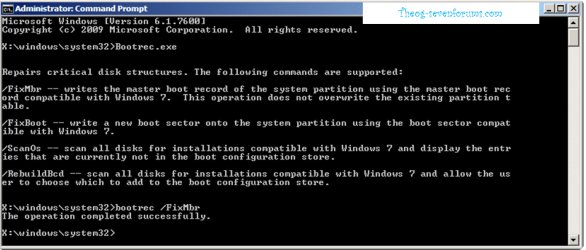
After the CLEAN ALL, Use the FIXMBR & FIXBOOT commands in this tutorial:
How to use the Bootrec.exe tool in the Windows Recovery Environment to troubleshoot and repair startup issues in Windows

Startup Repair 6.PNG
 

My Computer My Computer

OS
ME/XP/Vista/Win7
I have used "clean all" but i am running Windows 7 Setup off USB because the DVD/CD drive in the laptop does not work (hardware problem)
 

My Computer My Computer

OS
Windows 7 Home Premium 32bit
neither solution helpped

I've given you nearly a dozen steps to try which have helped with this error in the past. Report back results on each.

Confirm the ISO integrity and burn another using ImgBurn at 4x speed, or write the ISO to flash stick using this tool with Win7 in the dropdown menu: Universal USB Installer – Easy as 1 2 3, then boot it under USB or HD's.

If you have booted the flash stick to do successful installs elsewhere then make sure it boots correctly on this machine: tap the eMachines F10 one-time BIOS Boot Menu key to boot it if it doesn't work to set it first to boot in BIOS setup Boot Order.

Unplug all other HD's and peripherals.

Once installer boots, follow these steps to get a perfect reinstall of factory OEM: Reinstalling Windows 7

Check for newer BIOS update on eMachines website. If none, reset the CMOS: Clear CMOS - 3 Ways to Clear the CMOS - Reset BIOS.
While in BIOS setup, set SATA controller to AHCI to try install. If this fails, try IDE mode.

Try formatting your own Primary partition marked Active with Diskpart using these Commands from DVD Repair console Command Prompt:

Select Disk 0 (use WIn7 HD #)
create partition primary
format fs=ntfs label="Windows 7"
Active
exit

Test RAM using memtest86 for 5-6 passes or overnight: RAM - Test with Memtest86+

Test your HD using maker's diagnostics extended CD scan: HD Diagnostic

I would borrow a DVD drive to run installer if all else fails.
 
Last edited:
/FixMbr The operation completed successfully.
/FixBoot Element not found
 

My Computer My Computer

OS
Windows 7 Home Premium 32bit
At this time, you still have Linux MBR inplace. This needs to be deleted using the Windows 7 DVD or Startup Repair CD.
 

My Computer My Computer

OS
ME/XP/Vista/Win7
Theog -

HD has been zeroed three times now, twice since Ubuntu install.

This removes MBR code as well.

MrVoid -

When exactly during install do you get the error you reported: Clean Install Windows 7
 
Mind you all that there is not an operating system installed on this laptop, i am trying to install Windows 7 from USB because the DVD/CD drive is broken and does not work, due to a hardware malfunction.
Sorry if i sound disgruntled we have been working on this problem for almost a month now.
 
Last edited:

My Computer My Computer

OS
Windows 7 Home Premium 32bit
gregrocker
In step 7 of Clean Install Windows 7 is when i get the problem. I select the Disk 0 Unallocated Space and click next and get the message "Setup was unable to create a new system partition or locate an existing partition." after this i clicked Drive options (advanced) > New
and it changed to Disk 0 Partition 1 i click next and get the same error message. After this i clicked Format it finishes i click next again and got the error message again.
 

My Computer My Computer

OS
Windows 7 Home Premium 32bit
Bare Foot Kid
It did then i tried continuing the installation and the same problem occured as i explained to gregrocker in post #19
 

My Computer My Computer

OS
Windows 7 Home Premium 32bit
What happens when you try creating, formatting and marking Active a partition using Diskpart from the steps I gave you.

Doublecheck you don't have a Dynamic disk, which you shouldn't after wiping but often causes the error. I would look at it with free Partition Wizard bootable CD, if necessary convert it using PW CD, then create Primary NTFS partition marked Active to try install.

Also did you at any point remove the HD then replace it, and is the cabling and jumper set correctly if IDE? If SATA, what is the controller setting in BIOS?

Still waiting to hear back on each of the many steps given when you have the time.
 
Back
Top