Unable to create a new system partition or locate an existin partition

Shreyaskudav

Banned
Local time
2:46 PM
Messages
16
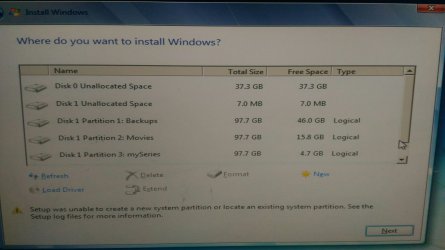
I am getting this error while installing windows 7 again!
My earlier win 7 got corrupted and i am trying to reinstall it.
I am using USB drive.
I have tried re-inserting pen drive and diskpart method to set the location of the partition.but both solutions are useless!
What can be the reason and what should i do?
 

Attachments

  • FB_IMG_1467563450047.jpg
    FB_IMG_1467563450047.jpg
    1.2 MB · Views: 4

My Computer My Computer

At a glance

Windows 7
Computer type
PC/Desktop
OS
Windows 7
The problem is all your partitions are Logical.
The bootloader needs to be installed in a Primary partition.

You can delete Partition 4 so it becomes Unallocated space.
Then Windows should be able to create a system partition and install.
Installing in Unallocated space Windows will create 2 partitions, a System Reserved partition for the bootloader and a C partition for Windows.

Or, you could delete Partition 4 and create a new Primary partition.
If you install Windows into that Primary partition the bootloader and Windows will be in the C partition.
You won't have a System Reserved partition.

I like having Windows as the first partition, before any data partitions, but that would be more work if you want to move partitions around before installing Windows.
 

My Computer My Computer

At a glance

Multi-Boot W7_Pro_x64 W8.1_Pro_x64 W10_Pro_x6...AMD Athlon II x4 6206GB GSkill DDR2 800AMD 4670 GPU + AMD 4200 IGP
Computer type
PC/Desktop
Computer Manufacturer/Model Number
home built
OS
Multi-Boot W7_Pro_x64 W8.1_Pro_x64 W10_Pro_x64 +Linux_VMs +Chromium_VM
CPU
AMD Athlon II x4 620
Motherboard
Gigabyte GA-MA785G-UD3H
Memory
6GB GSkill DDR2 800
Graphics Card(s)
AMD 4670 GPU + AMD 4200 IGP
Sound Card
on board Realtek ALC889A
Monitor(s) Displays
RCA 40" LCD TV, Insignia 32" LCD TV, HP 15" LCD monitor
Screen Resolution
1680 x 1050
Hard Drives
OCZ Vertex 3 120GB,
Samsung F3 1TB (3),
Several others - WD, Seagate, Hitachi, ...
PSU
Corsair 500 W
Case
Rosewill mid tower
Cooling
CM 90mm rifle
Keyboard
Gyration wireless, Logitech wireless, Dell USB wired
Mouse
Gyration wireless, Logitech wireless, V7 USB wired
Internet Speed
Spectrum - 100Mbps D / 10Mbps U
Antivirus
Avast, MBAM3, EMET, WinPatrol
Browser
Pale Moon, Firefox, IE
Other Info
2 multi-boot PC's
Mainly HTPC/Office/Gen purpose (no gaming).
Trendnet USB KVM.
LG DVD burner/Blue Ray Player.
Tray system for removable SATA backup drives.

Not currently OCd, under-volted.
I use Hybrid sleep, rarely re-boot or shutdown.

Hauppauge HD-PVR, Avermedia PCIe TV Tuner, Hauppauge PCI TV Tuner.
I have tried that already, i deleted the logical partition, and tried to installed the os.. Thinking that the software will deal with creation of partition according to its needs..
But its still showing the same error.
 

My Computer My Computer

At a glance

Windows 7
Computer type
PC/Desktop
OS
Windows 7
I'm not sure, but it might be because the bootloader needs to be toward the beginning of the drive.
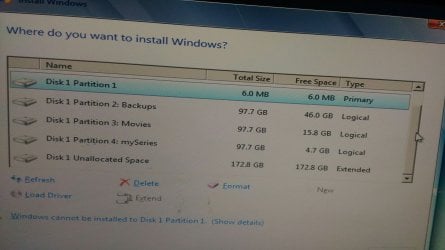
You only have 7 MB unallocated space before partition 1 and that isn't enough for the bootloader (or Windows).

Can you move the data off Partition 1 to some other device, such as an External drive ?
Then you could delete Partition 1 and see if Windows can install in that space.
 

My Computer My Computer

At a glance

Multi-Boot W7_Pro_x64 W8.1_Pro_x64 W10_Pro_x6...AMD Athlon II x4 6206GB GSkill DDR2 800AMD 4670 GPU + AMD 4200 IGP
Computer type
PC/Desktop
Computer Manufacturer/Model Number
home built
OS
Multi-Boot W7_Pro_x64 W8.1_Pro_x64 W10_Pro_x64 +Linux_VMs +Chromium_VM
CPU
AMD Athlon II x4 620
Motherboard
Gigabyte GA-MA785G-UD3H
Memory
6GB GSkill DDR2 800
Graphics Card(s)
AMD 4670 GPU + AMD 4200 IGP
Sound Card
on board Realtek ALC889A
Monitor(s) Displays
RCA 40" LCD TV, Insignia 32" LCD TV, HP 15" LCD monitor
Screen Resolution
1680 x 1050
Hard Drives
OCZ Vertex 3 120GB,
Samsung F3 1TB (3),
Several others - WD, Seagate, Hitachi, ...
PSU
Corsair 500 W
Case
Rosewill mid tower
Cooling
CM 90mm rifle
Keyboard
Gyration wireless, Logitech wireless, Dell USB wired
Mouse
Gyration wireless, Logitech wireless, V7 USB wired
Internet Speed
Spectrum - 100Mbps D / 10Mbps U
Antivirus
Avast, MBAM3, EMET, WinPatrol
Browser
Pale Moon, Firefox, IE
Other Info
2 multi-boot PC's
Mainly HTPC/Office/Gen purpose (no gaming).
Trendnet USB KVM.
LG DVD burner/Blue Ray Player.
Tray system for removable SATA backup drives.

Not currently OCd, under-volted.
I use Hybrid sleep, rarely re-boot or shutdown.

Hauppauge HD-PVR, Avermedia PCIe TV Tuner, Hauppauge PCI TV Tuner.
with all those other partitions why didn`t you create a system image ? So you wouldn`t have to reinstall windows.

Why are all those partitions before your install partition ? They should all be after it.

Why are you storing all that data on the same drive as your windows drive ?

Yes I like to ask why questions :)

The only reason you should get that message is when installing to a GPT drive, but as you say "Again" I have no clue why you are getting it, because obviously you`ve installed 7 on this drive before.

As David has hinted, your drive is setup all wrong, it needs to be totally deleted to unallocated space, and the install partition needs to be at the top of the list, other partitions can be created after windows is installed, with Partition Wizard.

With a drive that small, I would not have more then 2 partitions on it total.
 

My Computer My Computer

At a glance

Windows 10 Pro x64Intel Core i7 6700KGSkill TridentZ RGB 16GB 3600 16-16-16-36EVGA GTX 980 Ti SC x2
Computer type
PC/Desktop
Computer Manufacturer/Model Number
Skylake Special #666
OS
Windows 10 Pro x64
CPU
Intel Core i7 6700K
Motherboard
Asus Sabertooth Z170 Mark 1
Memory
GSkill TridentZ RGB 16GB 3600 16-16-16-36
Graphics Card(s)
EVGA GTX 980 Ti SC x2
Sound Card
Realtek High Definition
Monitor(s) Displays
AOC G2460PG
Screen Resolution
1920 x 1080 144Hz
Hard Drives
Samsung 860 Pro 256GB, Seagate Barracuda 4TB x2
PSU
EVGA 1000 P2, EVGA White Custom Braided Cables
Case
Corsair Vengeance C70 Gunmetal Black
Cooling
Corsair H100i v2, Corsair ML120 x2, Thermal Grizzly Kryonaut
Keyboard
Logitech G910 Orion Spectrum
Mouse
Logitech G700s
Internet Speed
Verizon Fios Quantum Gateway 75/75
Antivirus
Windows Defender, Malwarebytes Free 3.8.3
Browser
Chrome
Other Info
Corsair SP120 x4, LG Blu-ray Drive, Durabrand HT-395 100 Watt Dolby Digital Amp, Corsair H2100 Wireless 7.1 Headset
Hi Shreyaskudav

Something is not correct or not shown.

1. What is the TOP which was not shown on the screenshot, the side bar is on below, what about top?

2. Your Partition 4: I would say that the system is trying to install in to this partition 4.
But cannot continue because it is a Logical partition.
Hence there is no name as you did name the other 3 partitions.

3. How many GB is your harddisk, by calculating from 500GB to maybe 1TB hard disk.
Because by adding all the GB, it is only 470GB, which may not correct size, even if it is 500GB. (point 1)

4. Maybe if you could write, not necessary to use screenshot, what you see on the screen from the very top.

5. Too many missing links, that is why we cannot provide you on your next move.

6. You need to Buy a brand NEW hard disk (use the same size, as some computer do have limit).

7. If you reinstall to this Hard disk, the problem will come back again.

8. Hard disk corrupted could mean that this hard disk sooner or later, will again happen.

Reconsider you decision to re-install Windows 7 to this corrupted hard disk.
 

My Computer My Computer

At a glance

Windows 7 x64
Computer type
Laptop
Computer Manufacturer/Model Number
Toshiba L630 and L735
OS
Windows 7 x64
Hard Drives
240 GB SSD
A 500 GB is only 465 GB in windows, totally normal.

He said Windows 7 was corrupted, not the hard drive.

I would just buy an ssd to install windows on, it`s the best thing you can do and just use this drive for storage.
 

My Computer My Computer

At a glance

Windows 10 Pro x64Intel Core i7 6700KGSkill TridentZ RGB 16GB 3600 16-16-16-36EVGA GTX 980 Ti SC x2
Computer type
PC/Desktop
Computer Manufacturer/Model Number
Skylake Special #666
OS
Windows 10 Pro x64
CPU
Intel Core i7 6700K
Motherboard
Asus Sabertooth Z170 Mark 1
Memory
GSkill TridentZ RGB 16GB 3600 16-16-16-36
Graphics Card(s)
EVGA GTX 980 Ti SC x2
Sound Card
Realtek High Definition
Monitor(s) Displays
AOC G2460PG
Screen Resolution
1920 x 1080 144Hz
Hard Drives
Samsung 860 Pro 256GB, Seagate Barracuda 4TB x2
PSU
EVGA 1000 P2, EVGA White Custom Braided Cables
Case
Corsair Vengeance C70 Gunmetal Black
Cooling
Corsair H100i v2, Corsair ML120 x2, Thermal Grizzly Kryonaut
Keyboard
Logitech G910 Orion Spectrum
Mouse
Logitech G700s
Internet Speed
Verizon Fios Quantum Gateway 75/75
Antivirus
Windows Defender, Malwarebytes Free 3.8.3
Browser
Chrome
Other Info
Corsair SP120 x4, LG Blu-ray Drive, Durabrand HT-395 100 Watt Dolby Digital Amp, Corsair H2100 Wireless 7.1 Headset
I'm not sure, but it might be because the bootloader needs to be toward the beginning of the drive.
You only have 7 MB unallocated space before partition 1 and that isn't enough for the bootloader (or Windows).

Can you move the data off Partition 1 to some other device, such as an External drive ?
Then you could delete Partition 1 and see if Windows can install in that space.
Well i can do but its too much of data, also i already have space enough to install win7.. Its a lengthy process of transferring all 300gb so i just want to try my chances using any alternative way before i do that. :(
I will also try getting new setup, maybe its the problem of the setup file.

with all those other partitions why didn`t you create a system image ? So you wouldn`t have to reinstall windows.

Why are all those partitions before your install partition ? They should all be after it.

Why are you storing all that data on the same drive as your windows drive ?

Yes I like to ask why questions :)

The only reason you should get that message is when installing to a GPT drive, but as you say "Again" I have no clue why you are getting it, because obviously you`ve installed 7 on this drive before.

As David has hinted, your drive is setup all wrong, it needs to be totally deleted to unallocated space, and the install partition needs to be at the top of the list, other partitions can be created after windows is installed, with Partition Wizard.

With a drive that small, I would not have more then 2 partitions on it total.

-i didnt realize i dont have any image file.:(
-initially when the system was assembled there were 5 partitions. Each of 100gb. Later i modified the size . so the partition you see with size 172gb is where my older windows7 was installed.
-no i have separate drive for my windows os and other drives for my data.
Yes i am trying to get new setup..maybe thats the problem.:huh:


Hi Shreyaskudav

Something is not correct or not shown.

1. What is the TOP which was not shown on the screenshot, the side bar is on below, what about top?

2. Your Partition 4: I would say that the system is trying to install in to this partition 4.
But cannot continue because it is a Logical partition.
Hence there is no name as you did name the other 3 partitions.

3. How many GB is your harddisk, by calculating from 500GB to maybe 1TB hard disk.
Because by adding all the GB, it is only 470GB, which may not correct size, even if it is 500GB. (point 1)

4. Maybe if you could write, not necessary to use screenshot, what you see on the screen from the very top.

5. Too many missing links, that is why we cannot provide you on your next move.

6. You need to Buy a brand NEW hard disk (use the same size, as some computer do have limit).

7. If you reinstall to this Hard disk, the problem will come back again.

8. Hard disk corrupted could mean that this hard disk sooner or later, will again happen.

Reconsider you decision to re-install Windows 7 to this corrupted hard disk.

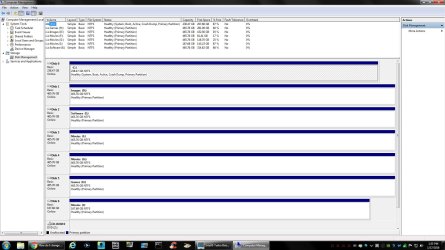
1. Image attached
3.in total its 500gb. Each partition size is varied.
Well i am not in need of any new hard disk.. Also my disk were working well, till i encountered my first error before the booting starts, which was "Error loading operating system". So i decided to format and reinstall the os.
 

Attachments

  • 1467605960471-1759309510.jpg
    1467605960471-1759309510.jpg
    881.1 KB · Views: 2

My Computer My Computer

At a glance

Windows 7
Computer type
PC/Desktop
OS
Windows 7
A 500 GB is only 465 GB in windows, totally normal.

He said Windows 7 was corrupted, not the hard drive.

I would just buy an ssd to install windows on, it`s the best thing you can do and just use this drive for storage.

I am not sure too if it was hard disk or os which was creating problem.
I was getting an error, "Error loading operating system" on black screen. So i decided to reinstall the OS.
 

My Computer My Computer

At a glance

Windows 7
Computer type
PC/Desktop
OS
Windows 7
I think, this is the problem.
My primary is 7mb only, and extended is 172gb.
How can i deal with it?i need 172gb as primary right?
 

Attachments

  • 1467609728511973484656.jpg
    1467609728511973484656.jpg
    1.3 MB · Views: 2

My Computer My Computer

At a glance

Windows 7
Computer type
PC/Desktop
OS
Windows 7
No, you only need a 50 to 100 GB Primary partition to install windows on, but you can`t make that 172 GB unallocated space a Primary partition because it is extended space.

The only way to do it right is to get your data off that drive and delete the entire drive to unallocated space, or just buy an ssd to install windows on. And unplug that 500 GB hard drive.

This is a proper setup scheme.
 

Attachments

  • DM.jpg
    DM.jpg
    198.1 KB · Views: 5

My Computer My Computer

At a glance

Windows 10 Pro x64Intel Core i7 6700KGSkill TridentZ RGB 16GB 3600 16-16-16-36EVGA GTX 980 Ti SC x2
Computer type
PC/Desktop
Computer Manufacturer/Model Number
Skylake Special #666
OS
Windows 10 Pro x64
CPU
Intel Core i7 6700K
Motherboard
Asus Sabertooth Z170 Mark 1
Memory
GSkill TridentZ RGB 16GB 3600 16-16-16-36
Graphics Card(s)
EVGA GTX 980 Ti SC x2
Sound Card
Realtek High Definition
Monitor(s) Displays
AOC G2460PG
Screen Resolution
1920 x 1080 144Hz
Hard Drives
Samsung 860 Pro 256GB, Seagate Barracuda 4TB x2
PSU
EVGA 1000 P2, EVGA White Custom Braided Cables
Case
Corsair Vengeance C70 Gunmetal Black
Cooling
Corsair H100i v2, Corsair ML120 x2, Thermal Grizzly Kryonaut
Keyboard
Logitech G910 Orion Spectrum
Mouse
Logitech G700s
Internet Speed
Verizon Fios Quantum Gateway 75/75
Antivirus
Windows Defender, Malwarebytes Free 3.8.3
Browser
Chrome
Other Info
Corsair SP120 x4, LG Blu-ray Drive, Durabrand HT-395 100 Watt Dolby Digital Amp, Corsair H2100 Wireless 7.1 Headset
IMO, backups should never be on the same hard-drive; rather, such should be on reliable external media, with either usb or dvd boot. "Moving" the backups to external media would free up a large portion of the present hard-drive.
 

My Computer My Computer

At a glance

Windows 7 Professional 64-bitDesktop i5; Acers i5 & i7desktop 16GB; 1 Acer 8GB & 1 Acer 16GB
Computer type
PC/Desktop
Computer Manufacturer/Model Number
Antec desktop; Acer Aspire laptops
OS
Windows 7 Professional 64-bit
CPU
Desktop i5; Acers i5 & i7
Memory
desktop 16GB; 1 Acer 8GB & 1 Acer 16GB
Hard Drives
1TB split into 2 equal partitions [OS and data] usable by RJS
Internet Speed
AT&T DSL
Browser
FF, GChrome, msIE
Other Info
Windows 7 Firewall, Emsisoft AM/AV, MSE [scan-only], SpywareBlaster, Ruiware/BillP combine
Yep, he should get everything off that drive, or just keep it for storage and get an ssd for windows.
 

My Computer My Computer

At a glance

Windows 10 Pro x64Intel Core i7 6700KGSkill TridentZ RGB 16GB 3600 16-16-16-36EVGA GTX 980 Ti SC x2
Computer type
PC/Desktop
Computer Manufacturer/Model Number
Skylake Special #666
OS
Windows 10 Pro x64
CPU
Intel Core i7 6700K
Motherboard
Asus Sabertooth Z170 Mark 1
Memory
GSkill TridentZ RGB 16GB 3600 16-16-16-36
Graphics Card(s)
EVGA GTX 980 Ti SC x2
Sound Card
Realtek High Definition
Monitor(s) Displays
AOC G2460PG
Screen Resolution
1920 x 1080 144Hz
Hard Drives
Samsung 860 Pro 256GB, Seagate Barracuda 4TB x2
PSU
EVGA 1000 P2, EVGA White Custom Braided Cables
Case
Corsair Vengeance C70 Gunmetal Black
Cooling
Corsair H100i v2, Corsair ML120 x2, Thermal Grizzly Kryonaut
Keyboard
Logitech G910 Orion Spectrum
Mouse
Logitech G700s
Internet Speed
Verizon Fios Quantum Gateway 75/75
Antivirus
Windows Defender, Malwarebytes Free 3.8.3
Browser
Chrome
Other Info
Corsair SP120 x4, LG Blu-ray Drive, Durabrand HT-395 100 Watt Dolby Digital Amp, Corsair H2100 Wireless 7.1 Headset
Okk but what if, i delete one of the partition, like for example "Movies". If i delete it, will the memory size be available as primary? In that way i can keep rest of the data and also install windows in it!?
Will this work!?
 

My Computer My Computer

At a glance

Windows 7
Computer type
PC/Desktop
OS
Windows 7
As others have suggested, you should back up all important data to a different Hard Drive asap so you can recover if anything goes wrong.
I can't answer your latest questions, i never had your situation, and can't do any testing.

To make sure it's not a hardware problem where the HD is starting to fail, you can run utilities to test the HD.
Seagate Seatools for DOS should work for any HD manufacturer.
SeaTools for DOS | Seagate
SeaTools | Seagate
If you know the manufacturer of your HD, check their support site for other test utilities.
Running these utilities on a failing HD can make things worse, and/or cause loss of data.

You can try Partition Wizard free bootable CD to see what it shows.
https://www.partitionwizard.com/partition-wizard-bootable-cd.html

For these utilities you would need to download and burn a bootable CD.
You would need to be able to boot your PC from a CD.

It's possible your MBR (Master Boot Record) is corrupt causing your problem.
To fix that you can do a Diskpart Clean.
Diskpart Clean will delete everything on the HD, all data, all partitions, and the MBR.
http://www.sevenforums.com/tutorials/52129-disk-clean-clean-all-diskpart-command.html

If by setup file you mean your Win 7 installation media might be bad,
you can download the Win 7 ISO from MS servers using the ISO Downloader available at Heidoc:
https://www.heidoc.net/joomla/techn...icrosoft-windows-and-office-iso-download-tool
You can create a new bootable DVD/flash stick from the Win 7 ISO.

What is the Disk 0 device with 37.3 GB unallocated space ?

When installing Windows it's best to only have the HD/SSD being installed TO attached, and the DVD/Flash stick installing FROM.

Read this tutorial by gregrocker and all the links in the tutorial.
It's the most comprehensive/complete instructions i know of for installing/troubleshooting a Win 7 install:
Clean Reinstall - Windows 7
 

My Computer My Computer

At a glance

Multi-Boot W7_Pro_x64 W8.1_Pro_x64 W10_Pro_x6...AMD Athlon II x4 6206GB GSkill DDR2 800AMD 4670 GPU + AMD 4200 IGP
Computer type
PC/Desktop
Computer Manufacturer/Model Number
home built
OS
Multi-Boot W7_Pro_x64 W8.1_Pro_x64 W10_Pro_x64 +Linux_VMs +Chromium_VM
CPU
AMD Athlon II x4 620
Motherboard
Gigabyte GA-MA785G-UD3H
Memory
6GB GSkill DDR2 800
Graphics Card(s)
AMD 4670 GPU + AMD 4200 IGP
Sound Card
on board Realtek ALC889A
Monitor(s) Displays
RCA 40" LCD TV, Insignia 32" LCD TV, HP 15" LCD monitor
Screen Resolution
1680 x 1050
Hard Drives
OCZ Vertex 3 120GB,
Samsung F3 1TB (3),
Several others - WD, Seagate, Hitachi, ...
PSU
Corsair 500 W
Case
Rosewill mid tower
Cooling
CM 90mm rifle
Keyboard
Gyration wireless, Logitech wireless, Dell USB wired
Mouse
Gyration wireless, Logitech wireless, V7 USB wired
Internet Speed
Spectrum - 100Mbps D / 10Mbps U
Antivirus
Avast, MBAM3, EMET, WinPatrol
Browser
Pale Moon, Firefox, IE
Other Info
2 multi-boot PC's
Mainly HTPC/Office/Gen purpose (no gaming).
Trendnet USB KVM.
LG DVD burner/Blue Ray Player.
Tray system for removable SATA backup drives.

Not currently OCd, under-volted.
I use Hybrid sleep, rarely re-boot or shutdown.

Hauppauge HD-PVR, Avermedia PCIe TV Tuner, Hauppauge PCI TV Tuner.
Okk but what if, i delete one of the partition, like for example "Movies". If i delete it, will the memory size be available as primary? In that way i can keep rest of the data and also install windows in it!?
Will this work!?

Not possible.
This is because the partition "Movies" is in the middle of the whole single Logical drive.

You have another hard disk for the Windows OS.
That is why i want to see what is on top.
As there is no Drive 0 in your 1st picture.
This "Drive 0 Unallocated Space" as Drive 0 is the 1st HDD 40GB.

For the rest is "Drive 1" is the 2nd HDD. 500GB (465GB)

You have to be install the Windows OS on the Drive 0.
But it seem that your 1st HDD 40GB may be corrupted.
It is a very old HDD, no longer around.
You still able to use until now.
Hence you need another HDD or do something on the 500GB HDD.
This is possible, as i am doing these for years.
 
Last edited:

My Computer My Computer

At a glance

Windows 7 x64
Computer type
Laptop
Computer Manufacturer/Model Number
Toshiba L630 and L735
OS
Windows 7 x64
Hard Drives
240 GB SSD
Thank you all for your help! I think i would just take backup and format the entire HDD!
I hope that works!

One last question!
If I use cmd -> notepad to copy files to my external drive.. How much tym will it take? I mean is this process slow or its same as normal copying?
Coz i have 10 GB data to copy and its already 1 hr, the transfer has still not completed!
 

My Computer My Computer

At a glance

Windows 7
Computer type
PC/Desktop
OS
Windows 7
I'm confused, what does notepad have to do with copying files from source to target? Rather, are you using explorer.exe to copy folders and files from source to target?
 

My Computer My Computer

At a glance

Windows 7 Professional 64-bitDesktop i5; Acers i5 & i7desktop 16GB; 1 Acer 8GB & 1 Acer 16GB
Computer type
PC/Desktop
Computer Manufacturer/Model Number
Antec desktop; Acer Aspire laptops
OS
Windows 7 Professional 64-bit
CPU
Desktop i5; Acers i5 & i7
Memory
desktop 16GB; 1 Acer 8GB & 1 Acer 16GB
Hard Drives
1TB split into 2 equal partitions [OS and data] usable by RJS
Internet Speed
AT&T DSL
Browser
FF, GChrome, msIE
Other Info
Windows 7 Firewall, Emsisoft AM/AV, MSE [scan-only], SpywareBlaster, Ruiware/BillP combine
Thank you all for your help! I think i would just take backup and format the entire HDD!
I hope that works!

One last question!
If I use cmd -> notepad to copy files to my external drive.. How much tym will it take? I mean is this process slow or its same as normal copying?
Coz i have 10 GB data to copy and its already 1 hr, the transfer has still not completed!


This is not right.
It should have completed within an hour.
Partition 1 + 2 +3 = < 70 GB of file size, in total is about 2 hours or less.
 

My Computer My Computer

At a glance

Windows 7 x64
Computer type
Laptop
Computer Manufacturer/Model Number
Toshiba L630 and L735
OS
Windows 7 x64
Hard Drives
240 GB SSD
Thank you all for your help! I think i would just take backup and format the entire HDD!
I hope that works!

One last question!
If I use cmd -> notepad to copy files to my external drive.. How much tym will it take? I mean is this process slow or its same as normal copying?
Coz i have 10 GB data to copy and its already 1 hr, the transfer has still not completed!


As what RolandJS mentioned, do provided the steps that you are doing copying.

What sort of data that has 10 GB in size.
 

My Computer My Computer

At a glance

Windows 7 x64
Computer type
Laptop
Computer Manufacturer/Model Number
Toshiba L630 and L735
OS
Windows 7 x64
Hard Drives
240 GB SSD
Back
Top