
You are using an out of date browser. It may not display this or other websites correctly.
You should upgrade or use an alternative browser.
You should upgrade or use an alternative browser.
Solved How do I change the color of this taskbar
- Thread starter TALLY
- Start date

- Local time
- 3:41 AM
- Messages
- 18,396
Apply a third party theme...have to modify Windows system files, components, etc.
My Computer
At a glance
Windows 7 Ultimate x64 SP1Core i7 920 (D0) @ 4Ghz, *26c idle *65c full ...12GB DDR3 Corsair Dominator -CMD12GX3M6A1600C...Zotac Geforce GTX 770
- Computer type
- PC/Desktop
- Computer Manufacturer/Model Number
- Airbot 2.0
- OS
- Windows 7 Ultimate x64 SP1
- CPU
- Core i7 920 (D0) @ 4Ghz, *26c idle *65c full load on air
- Motherboard
- Asus P6X58D Premium - Sata 6Gb/s - USB 3.0
- Memory
- 12GB DDR3 Corsair Dominator -CMD12GX3M6A1600C8 at 1600MHz
- Graphics Card(s)
- Zotac Geforce GTX 770
- Sound Card
- ASUS Xonar D2X
- Monitor(s) Displays
- 1 LG 24" Flatron W2453V-PF 1 Samsung 24" P2450H both 2ms RT
- Screen Resolution
- 1920x1080@60hz
- Hard Drives
- 1 Samsung 250GB 840 Evo SSD
1 OCZ Vertex2 180GB SSD
1 TB Samsung Spinpoint F1 7200RPM 32MB cache
2 500GB WD Caviar Blacks 7200RPM 32MB cache (WD5001AALS)
Pioneer DVD Burner DVR-S18M
- PSU
- Corsair HX1000W
- Case
- Cooler Master HAF 932
- Cooling
- Case Fans *3 230mm, *1 140mm/CPU - *Tuniq Tower 120 Extreme
- Keyboard
- Logitech Wireless MK700
- Mouse
- Logitech Wireless MK700
- Internet Speed
- DL 15 Mbps UL 0.98 Mbps
- Antivirus
- None
- Browser
- Firefox Nightly
- Other Info
- Processor-7.7 *RAM- 7.9 *Graphics-7.9 *Gaming Graphics- 7.9 *SSD- 7.8 W.E.I final score= 7.7
*Phone- LG Nexus 5
- Local time
- 3:41 AM
- Messages
- 18,396
Ok, well how do I know you knew that? You didn't say anything about it your first post. :huh:
You do what I stated in the first place. Either use a third party theme, or modify Windows system files, components.
Look into "Resource Hacker" and search around for "Windows command bar color customize", or "Menu bar color change". There is no quick manual one-step way to do it, unless you find a program to do it for you.
You do what I stated in the first place. Either use a third party theme, or modify Windows system files, components.
Look into "Resource Hacker" and search around for "Windows command bar color customize", or "Menu bar color change". There is no quick manual one-step way to do it, unless you find a program to do it for you.
My Computer
At a glance
Windows 7 Ultimate x64 SP1Core i7 920 (D0) @ 4Ghz, *26c idle *65c full ...12GB DDR3 Corsair Dominator -CMD12GX3M6A1600C...Zotac Geforce GTX 770
- Computer type
- PC/Desktop
- Computer Manufacturer/Model Number
- Airbot 2.0
- OS
- Windows 7 Ultimate x64 SP1
- CPU
- Core i7 920 (D0) @ 4Ghz, *26c idle *65c full load on air
- Motherboard
- Asus P6X58D Premium - Sata 6Gb/s - USB 3.0
- Memory
- 12GB DDR3 Corsair Dominator -CMD12GX3M6A1600C8 at 1600MHz
- Graphics Card(s)
- Zotac Geforce GTX 770
- Sound Card
- ASUS Xonar D2X
- Monitor(s) Displays
- 1 LG 24" Flatron W2453V-PF 1 Samsung 24" P2450H both 2ms RT
- Screen Resolution
- 1920x1080@60hz
- Hard Drives
- 1 Samsung 250GB 840 Evo SSD
1 OCZ Vertex2 180GB SSD
1 TB Samsung Spinpoint F1 7200RPM 32MB cache
2 500GB WD Caviar Blacks 7200RPM 32MB cache (WD5001AALS)
Pioneer DVD Burner DVR-S18M
- PSU
- Corsair HX1000W
- Case
- Cooler Master HAF 932
- Cooling
- Case Fans *3 230mm, *1 140mm/CPU - *Tuniq Tower 120 Extreme
- Keyboard
- Logitech Wireless MK700
- Mouse
- Logitech Wireless MK700
- Internet Speed
- DL 15 Mbps UL 0.98 Mbps
- Antivirus
- None
- Browser
- Firefox Nightly
- Other Info
- Processor-7.7 *RAM- 7.9 *Graphics-7.9 *Gaming Graphics- 7.9 *SSD- 7.8 W.E.I final score= 7.7
*Phone- LG Nexus 5

- Local time
- 2:11 PM
- Messages
- 35,002
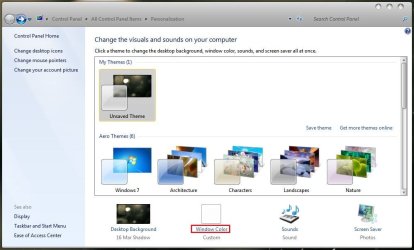
Right click on any empty space of your desktop, and select "Personalize" . You will get this :
Click on the "Window Color" link, and you will get this :
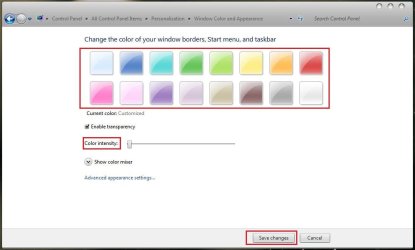
Choose any color, adjust color intensity at your will, and save changes .
For more advanced color changing operations, you will need Ave's Windows7 Style Builder .
Click on the "Window Color" link, and you will get this :
Choose any color, adjust color intensity at your will, and save changes .
For more advanced color changing operations, you will need Ave's Windows7 Style Builder .
My Computer
At a glance
Microsoft Windows 10 Pro Insider Preview 64-bitIntel(R) Core(TM) i3-4130 CPU @ 3.40GHzCorsair Vengence 4GB x2 (8.00GB Dual-Channel ...2047MB GeForce GTS 450 (ZOTAC International)
- Computer type
- PC/Desktop
- Computer Manufacturer/Model Number
- Self Assembled
- OS
- Microsoft Windows 10 Pro Insider Preview 64-bit
- CPU
- Intel(R) Core(TM) i3-4130 CPU @ 3.40GHz
- Motherboard
- Gigabyte Technology Co., Ltd. B85M-D3H
- Memory
- Corsair Vengence 4GB x2 (8.00GB Dual-Channel DDR3 @ 798MHz)
- Graphics Card(s)
- 2047MB GeForce GTS 450 (ZOTAC International)
- Sound Card
- Onboard (Realtek High Definition Audio)
- Monitor(s) Displays
- LG Flatron E2040T
- Screen Resolution
- 1600x900
- Hard Drives
- Western Digital 1 TB
Seagate 500 GB
- PSU
- Corsair VS550
- Case
- Cooler Master K380
- Cooling
- Cooler Master Seidon 120V Plus
- Keyboard
- Logitech MK260r
- Mouse
- Logitech MK260r
- Internet Speed
- PMPL Broadband
- Antivirus
- Windows Defender + MBAM
- Browser
- Firefox
- Other Info
- Dell Studio 15" Laptop
- Local time
- 3:41 AM
- Messages
- 18,396
Right click on any empty space of your desktop, and select "Personalize" . You will get this :
View attachment 170777
Click on the "Window Color" link, and you will get this :
View attachment 170778
Choose any color, adjust color intensity at your will, and save changes .
Umm, that doesn't change the command bar color.
My Computer
At a glance
Windows 7 Ultimate x64 SP1Core i7 920 (D0) @ 4Ghz, *26c idle *65c full ...12GB DDR3 Corsair Dominator -CMD12GX3M6A1600C...Zotac Geforce GTX 770
- Computer type
- PC/Desktop
- Computer Manufacturer/Model Number
- Airbot 2.0
- OS
- Windows 7 Ultimate x64 SP1
- CPU
- Core i7 920 (D0) @ 4Ghz, *26c idle *65c full load on air
- Motherboard
- Asus P6X58D Premium - Sata 6Gb/s - USB 3.0
- Memory
- 12GB DDR3 Corsair Dominator -CMD12GX3M6A1600C8 at 1600MHz
- Graphics Card(s)
- Zotac Geforce GTX 770
- Sound Card
- ASUS Xonar D2X
- Monitor(s) Displays
- 1 LG 24" Flatron W2453V-PF 1 Samsung 24" P2450H both 2ms RT
- Screen Resolution
- 1920x1080@60hz
- Hard Drives
- 1 Samsung 250GB 840 Evo SSD
1 OCZ Vertex2 180GB SSD
1 TB Samsung Spinpoint F1 7200RPM 32MB cache
2 500GB WD Caviar Blacks 7200RPM 32MB cache (WD5001AALS)
Pioneer DVD Burner DVR-S18M
- PSU
- Corsair HX1000W
- Case
- Cooler Master HAF 932
- Cooling
- Case Fans *3 230mm, *1 140mm/CPU - *Tuniq Tower 120 Extreme
- Keyboard
- Logitech Wireless MK700
- Mouse
- Logitech Wireless MK700
- Internet Speed
- DL 15 Mbps UL 0.98 Mbps
- Antivirus
- None
- Browser
- Firefox Nightly
- Other Info
- Processor-7.7 *RAM- 7.9 *Graphics-7.9 *Gaming Graphics- 7.9 *SSD- 7.8 W.E.I final score= 7.7
*Phone- LG Nexus 5

This is the main reason that I don't use IE9. I know it sounds stupid and petty, but it just looks so lame to have my bookmarks bar a light blue, when the rest of my system is black. Why in the heck does Microsoft make this so hard to customize??
My Computer
At a glance
Windows 7 Home Premium x64 SP1
- OS
- Windows 7 Home Premium x64 SP1
- Local time
- 2:11 PM
- Messages
- 35,002
Am I missing something ? I guess so :sarc:Right click on any empty space of your desktop, and select "Personalize" . You will get this :
View attachment 170777
Click on the "Window Color" link, and you will get this :
View attachment 170778
Choose any color, adjust color intensity at your will, and save changes .
Umm, that doesn't change the command bar color.
If not, how I missed Command bar ans IE9 ?
My Computer
At a glance
Microsoft Windows 10 Pro Insider Preview 64-bitIntel(R) Core(TM) i3-4130 CPU @ 3.40GHzCorsair Vengence 4GB x2 (8.00GB Dual-Channel ...2047MB GeForce GTS 450 (ZOTAC International)
- Computer type
- PC/Desktop
- Computer Manufacturer/Model Number
- Self Assembled
- OS
- Microsoft Windows 10 Pro Insider Preview 64-bit
- CPU
- Intel(R) Core(TM) i3-4130 CPU @ 3.40GHz
- Motherboard
- Gigabyte Technology Co., Ltd. B85M-D3H
- Memory
- Corsair Vengence 4GB x2 (8.00GB Dual-Channel DDR3 @ 798MHz)
- Graphics Card(s)
- 2047MB GeForce GTS 450 (ZOTAC International)
- Sound Card
- Onboard (Realtek High Definition Audio)
- Monitor(s) Displays
- LG Flatron E2040T
- Screen Resolution
- 1600x900
- Hard Drives
- Western Digital 1 TB
Seagate 500 GB
- PSU
- Corsair VS550
- Case
- Cooler Master K380
- Cooling
- Cooler Master Seidon 120V Plus
- Keyboard
- Logitech MK260r
- Mouse
- Logitech MK260r
- Internet Speed
- PMPL Broadband
- Antivirus
- Windows Defender + MBAM
- Browser
- Firefox
- Other Info
- Dell Studio 15" Laptop
- Local time
- 3:41 AM
- Messages
- 18,396
Yeah, you are. The screenshot. 
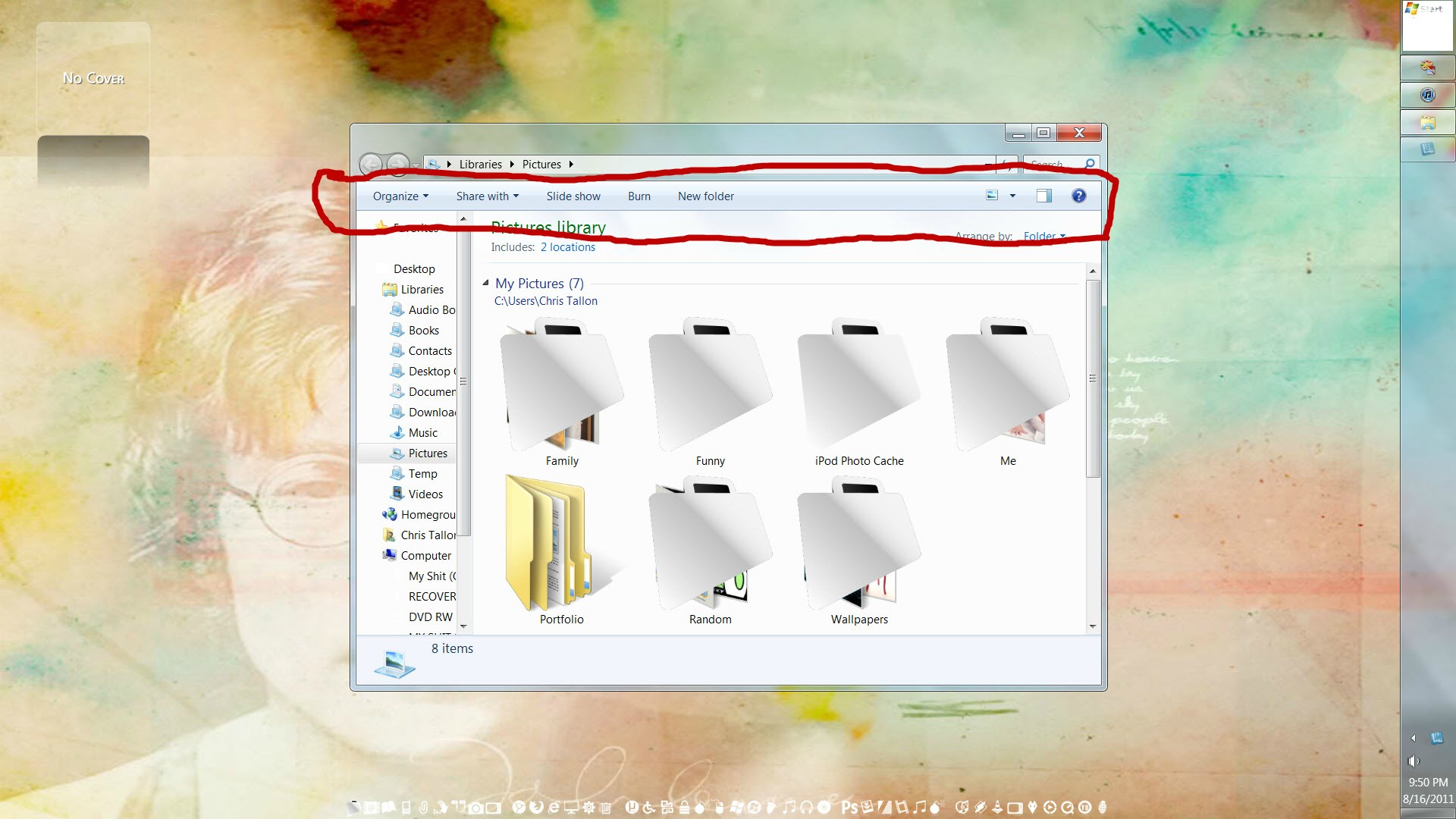
OP is mistakenly calling the command bar the taskbar. He has the command bar circled in the screenshot.
OP is mistakenly calling the command bar the taskbar. He has the command bar circled in the screenshot.
My Computer
At a glance
Windows 7 Ultimate x64 SP1Core i7 920 (D0) @ 4Ghz, *26c idle *65c full ...12GB DDR3 Corsair Dominator -CMD12GX3M6A1600C...Zotac Geforce GTX 770
- Computer type
- PC/Desktop
- Computer Manufacturer/Model Number
- Airbot 2.0
- OS
- Windows 7 Ultimate x64 SP1
- CPU
- Core i7 920 (D0) @ 4Ghz, *26c idle *65c full load on air
- Motherboard
- Asus P6X58D Premium - Sata 6Gb/s - USB 3.0
- Memory
- 12GB DDR3 Corsair Dominator -CMD12GX3M6A1600C8 at 1600MHz
- Graphics Card(s)
- Zotac Geforce GTX 770
- Sound Card
- ASUS Xonar D2X
- Monitor(s) Displays
- 1 LG 24" Flatron W2453V-PF 1 Samsung 24" P2450H both 2ms RT
- Screen Resolution
- 1920x1080@60hz
- Hard Drives
- 1 Samsung 250GB 840 Evo SSD
1 OCZ Vertex2 180GB SSD
1 TB Samsung Spinpoint F1 7200RPM 32MB cache
2 500GB WD Caviar Blacks 7200RPM 32MB cache (WD5001AALS)
Pioneer DVD Burner DVR-S18M
- PSU
- Corsair HX1000W
- Case
- Cooler Master HAF 932
- Cooling
- Case Fans *3 230mm, *1 140mm/CPU - *Tuniq Tower 120 Extreme
- Keyboard
- Logitech Wireless MK700
- Mouse
- Logitech Wireless MK700
- Internet Speed
- DL 15 Mbps UL 0.98 Mbps
- Antivirus
- None
- Browser
- Firefox Nightly
- Other Info
- Processor-7.7 *RAM- 7.9 *Graphics-7.9 *Gaming Graphics- 7.9 *SSD- 7.8 W.E.I final score= 7.7
*Phone- LG Nexus 5
I figured it out. Thanks for all the help yall.
For anyone who is interested, this is how I did it...
Working with ResHack.
-Download and merge the Take Ownership.reg file into your registry. Download and
open Resource Hacker 3.5.2 Beta (download roughly half way down the page in a green box).
-GoTo C:\Windows\Resources\Themes\Aero and r-click Aero.msstyles and then use the Take Ownership.
-Drag n drop Aero.msstyles into ResHack.
-Expand IMAGE and scroll down to #891 and then expand that
-Click on the "flower" and then r-click it and select Replace resource.
-Search and select your new image.
-Fill in Resource Type: IMAGE and Resource Name: 891 then click Replace.
-On the Menu bar select File and then Save.
-In the Aero theme folder you will now have your modified aero.msstyles and the original named aero_original.msstyles.
-Right click your Desktop and select Personalize.
-Select Windows 7. Once your new style has loaded the Command Module (which is its proper name) will have changed colour!
For anyone who is interested, this is how I did it...
Working with ResHack.
-Download and merge the Take Ownership.reg file into your registry. Download and
open Resource Hacker 3.5.2 Beta (download roughly half way down the page in a green box).
-GoTo C:\Windows\Resources\Themes\Aero and r-click Aero.msstyles and then use the Take Ownership.
-Drag n drop Aero.msstyles into ResHack.
-Expand IMAGE and scroll down to #891 and then expand that
-Click on the "flower" and then r-click it and select Replace resource.
-Search and select your new image.
-Fill in Resource Type: IMAGE and Resource Name: 891 then click Replace.
-On the Menu bar select File and then Save.
-In the Aero theme folder you will now have your modified aero.msstyles and the original named aero_original.msstyles.
-Right click your Desktop and select Personalize.
-Select Windows 7. Once your new style has loaded the Command Module (which is its proper name) will have changed colour!
My Computer
At a glance
win7
- OS
- win7
Similar threads

- Replies
- 28
- Views
- 14K
- Replies
- 4
- Views
- 1K
- Replies
- 1
- Views
- 2K


- Replies
- 1
- Views
- 1K