Solved I need help with following font issues

ksfno1

Banned
Local time
8:57 PM
Messages
19
I need help with following font issues:

First, I need to change the font of taskbar buttons.

1vf0015l6.jpg


Despite having changed the MS Shell Dlg and MS Shell Dlg 2 fonts from system default fonts into Lucida Sans Unicode, which is my favorite font, the font of taskbar buttons is still system default font Tahoma, which I really hate.

Is it possible to change system default font into Lucida Sans Unicode for taskbar buttons?

I also want to modify the italic fonts of start menu search bar and explorer windows search bar. In other words, I have a strong desire to turn them into normal (non-italic) text.

1vf1015l6.jpg


1vf2015l6.jpg


I'd be really grateful to one/those, who help/s me with these issues.

Thanks in advance!
 
Last edited:

My Computer My Computer

At a glance

Windows 7
OS
Windows 7
If you are using the default aero theme I can change that for you. I have Windows Style Builder for that and can post it in a zip here for you.
If you are using a custom theme you will need to ask the theme maker. It's not cool to change someone else work.
&
You will need to do 1 of these 2 ways of Enabling custom themes for it to work.
http://www.sevenforums.com/tutorials/34579-enabling-custom-themes-windows-7-a.html
Or
http://www.sevenforums.com/tutorials/28377-theme-how-apply-custom-themes.html?filter
Let me know
Jerry
 

My Computer My Computer

At a glance

Win 7 Pro x64 / Win 10 ProIntel(R) Core(TM) i7-3630QM CPU @ 2.40GHz12 GB(1) Intel(R) HD Graphics 4000 (2) NVIDIA GeFo...
Computer type
Laptop
Computer Manufacturer/Model Number
Sager NP9170
OS
Win 7 Pro x64 / Win 10 Pro
CPU
Intel(R) Core(TM) i7-3630QM CPU @ 2.40GHz
Motherboard
CLEVO P170EM
Memory
12 GB
Graphics Card(s)
(1) Intel(R) HD Graphics 4000 (2) NVIDIA GeForce GTX 675M
Sound Card
(1) Realtek High Definition Audio (2) Intel(R) Display Aud
Monitor(s) Displays
17.3
Screen Resolution
1920x1080
Hard Drives
(1) Samsung 860 EVO 500GB(OS) (1) Samsung 860 EVO 500GB(Data)
Keyboard
Backlite
Antivirus
MSE, Malwarebytes Pro
Browser
Firefox
Other Info
DESKTOP: Custom-built.
OS: Win 10 Pro x64.
CASE: Rosewill R5.
CPU: Intel I5 4670K CPU @ 3.40GHz.
CPU COOLER: Cool Master Hyper 212 EVO.
MOTHERBOARD: Asus Z87-A.
MEMORY: Kingston HyperX 2x4 GB.
GPU: Nvidia Geforce 650 TI.
PSU: Corsair TX750.
DRIVES: (1) Samsung 840 120 GB SSD (2) Western Digital blue 500 GB 7200 RPM.
First of all, thanks for your reply, Jerry. I'm using the default Aero theme currently. It would be nice to have Windows Style Builder. I'll be waiting for your next post impatiently.
 

My Computer My Computer

At a glance

Windows 7
OS
Windows 7
Give me about 1 hour and I will have it for you.
Jerry
 

My Computer My Computer

At a glance

Win 7 Pro x64 / Win 10 ProIntel(R) Core(TM) i7-3630QM CPU @ 2.40GHz12 GB(1) Intel(R) HD Graphics 4000 (2) NVIDIA GeFo...
Computer type
Laptop
Computer Manufacturer/Model Number
Sager NP9170
OS
Win 7 Pro x64 / Win 10 Pro
CPU
Intel(R) Core(TM) i7-3630QM CPU @ 2.40GHz
Motherboard
CLEVO P170EM
Memory
12 GB
Graphics Card(s)
(1) Intel(R) HD Graphics 4000 (2) NVIDIA GeForce GTX 675M
Sound Card
(1) Realtek High Definition Audio (2) Intel(R) Display Aud
Monitor(s) Displays
17.3
Screen Resolution
1920x1080
Hard Drives
(1) Samsung 860 EVO 500GB(OS) (1) Samsung 860 EVO 500GB(Data)
Keyboard
Backlite
Antivirus
MSE, Malwarebytes Pro
Browser
Firefox
Other Info
DESKTOP: Custom-built.
OS: Win 10 Pro x64.
CASE: Rosewill R5.
CPU: Intel I5 4670K CPU @ 3.40GHz.
CPU COOLER: Cool Master Hyper 212 EVO.
MOTHERBOARD: Asus Z87-A.
MEMORY: Kingston HyperX 2x4 GB.
GPU: Nvidia Geforce 650 TI.
PSU: Corsair TX750.
DRIVES: (1) Samsung 840 120 GB SSD (2) Western Digital blue 500 GB 7200 RPM.
Here you go
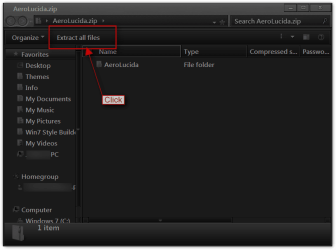
Download the zip at the bottom double click it and
Click on Extract all files
AeroLucida.zip.png

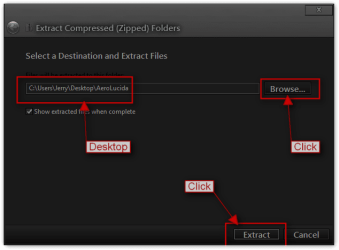
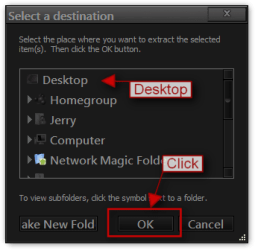
Click Browse and browse to your Desktop click OK
Then Extract
Extract Compressed (Zipped) Folders.pngSelect a destination.png

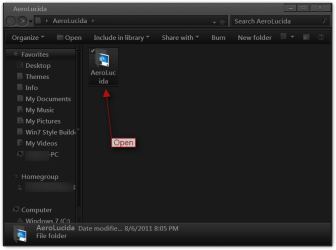
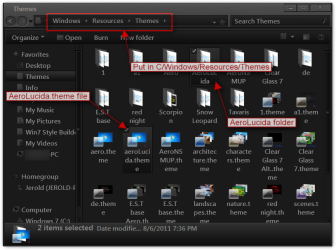
Then Open AeroLucida folder
44.png


Put both (1 AeroLucida folder & 1 AeroLucida.theme file)
1.png

In
C/Windows/Resources/Themes
2.png

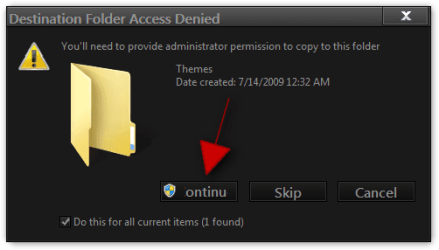
You will get this click Continue
3.png

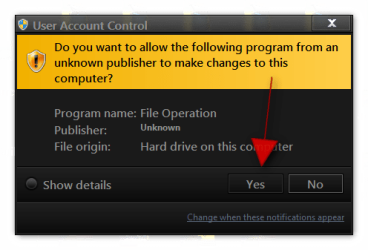
And you will get this click Yes
4.png

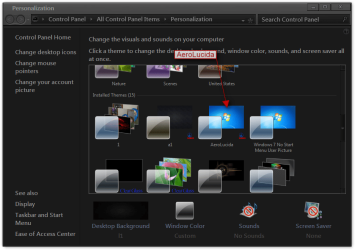
It will show up in Personalization as AeroLucida
5.png

Make sure you did 1 of then two Tutorials in post #2 for it to work.
Let me know if you need some help with this.
Jerry​
 

Attachments

My Computer My Computer

At a glance

Win 7 Pro x64 / Win 10 ProIntel(R) Core(TM) i7-3630QM CPU @ 2.40GHz12 GB(1) Intel(R) HD Graphics 4000 (2) NVIDIA GeFo...
Computer type
Laptop
Computer Manufacturer/Model Number
Sager NP9170
OS
Win 7 Pro x64 / Win 10 Pro
CPU
Intel(R) Core(TM) i7-3630QM CPU @ 2.40GHz
Motherboard
CLEVO P170EM
Memory
12 GB
Graphics Card(s)
(1) Intel(R) HD Graphics 4000 (2) NVIDIA GeForce GTX 675M
Sound Card
(1) Realtek High Definition Audio (2) Intel(R) Display Aud
Monitor(s) Displays
17.3
Screen Resolution
1920x1080
Hard Drives
(1) Samsung 860 EVO 500GB(OS) (1) Samsung 860 EVO 500GB(Data)
Keyboard
Backlite
Antivirus
MSE, Malwarebytes Pro
Browser
Firefox
Other Info
DESKTOP: Custom-built.
OS: Win 10 Pro x64.
CASE: Rosewill R5.
CPU: Intel I5 4670K CPU @ 3.40GHz.
CPU COOLER: Cool Master Hyper 212 EVO.
MOTHERBOARD: Asus Z87-A.
MEMORY: Kingston HyperX 2x4 GB.
GPU: Nvidia Geforce 650 TI.
PSU: Corsair TX750.
DRIVES: (1) Samsung 840 120 GB SSD (2) Western Digital blue 500 GB 7200 RPM.
Hi Jerry,

Thanks a million for your effort but what I need is only editing the stuff I mentioned in my first post. To be precise, I need regedit hints about that. The theme you have sent exhibits high contrast taskbar and search bar features. I must be able to change what I want without having to give up some features of the Aero theme I really like.

I think I can edit any theme however I like if I learn the technique of changing font features using RegEdit.

I'm looking forward to reading your next post.

PS: How does Windows Style Builder work? Does it enable the users to build new themes from the default or installed ones?
 

My Computer My Computer

At a glance

Windows 7
OS
Windows 7
The only thing I did was change all the fonts to Lucida Sans Unicode and removed the italic from the search box's with Windows Style Builder based off the default aero theme. In your screenshots I see you adjust the colors to black did you do that with the theme I did? Will you post a screenshot of what my theme is doing so I can see it. You should not lose any features of the aero theme with my theme..


Yes Windows Style Builder and a image editor lets you build a theme starting with the default aero theme.
Jerry

Look at this it will show how to start a new theme http://www.sevenforums.com/customization/135985-start-menu-color-change-4.html#post1358071
Post #38

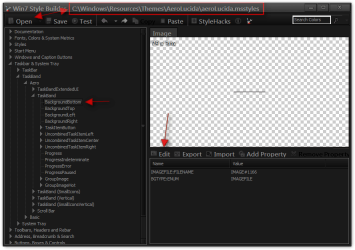
Here is a screenshot of WSB
Win7 Style Builder - CWindowsResourcesThemesAeroLucidaaeroLucida.msstyles.png
 

My Computer My Computer

At a glance

Win 7 Pro x64 / Win 10 ProIntel(R) Core(TM) i7-3630QM CPU @ 2.40GHz12 GB(1) Intel(R) HD Graphics 4000 (2) NVIDIA GeFo...
Computer type
Laptop
Computer Manufacturer/Model Number
Sager NP9170
OS
Win 7 Pro x64 / Win 10 Pro
CPU
Intel(R) Core(TM) i7-3630QM CPU @ 2.40GHz
Motherboard
CLEVO P170EM
Memory
12 GB
Graphics Card(s)
(1) Intel(R) HD Graphics 4000 (2) NVIDIA GeForce GTX 675M
Sound Card
(1) Realtek High Definition Audio (2) Intel(R) Display Aud
Monitor(s) Displays
17.3
Screen Resolution
1920x1080
Hard Drives
(1) Samsung 860 EVO 500GB(OS) (1) Samsung 860 EVO 500GB(Data)
Keyboard
Backlite
Antivirus
MSE, Malwarebytes Pro
Browser
Firefox
Other Info
DESKTOP: Custom-built.
OS: Win 10 Pro x64.
CASE: Rosewill R5.
CPU: Intel I5 4670K CPU @ 3.40GHz.
CPU COOLER: Cool Master Hyper 212 EVO.
MOTHERBOARD: Asus Z87-A.
MEMORY: Kingston HyperX 2x4 GB.
GPU: Nvidia Geforce 650 TI.
PSU: Corsair TX750.
DRIVES: (1) Samsung 840 120 GB SSD (2) Western Digital blue 500 GB 7200 RPM.
Jerry, sorry for my early comment. Later when I tried once more, everything went smoothly. Thanks a lot
wink3.gif
 

My Computer My Computer

At a glance

Windows 7
OS
Windows 7
Jerry, sorry for my early comment. Later when I tried once more, everything went smoothly. Thanks a lot
wink3.gif
You're Welcome
Glad it worked for you.
Jerry
 

My Computer My Computer

At a glance

Win 7 Pro x64 / Win 10 ProIntel(R) Core(TM) i7-3630QM CPU @ 2.40GHz12 GB(1) Intel(R) HD Graphics 4000 (2) NVIDIA GeFo...
Computer type
Laptop
Computer Manufacturer/Model Number
Sager NP9170
OS
Win 7 Pro x64 / Win 10 Pro
CPU
Intel(R) Core(TM) i7-3630QM CPU @ 2.40GHz
Motherboard
CLEVO P170EM
Memory
12 GB
Graphics Card(s)
(1) Intel(R) HD Graphics 4000 (2) NVIDIA GeForce GTX 675M
Sound Card
(1) Realtek High Definition Audio (2) Intel(R) Display Aud
Monitor(s) Displays
17.3
Screen Resolution
1920x1080
Hard Drives
(1) Samsung 860 EVO 500GB(OS) (1) Samsung 860 EVO 500GB(Data)
Keyboard
Backlite
Antivirus
MSE, Malwarebytes Pro
Browser
Firefox
Other Info
DESKTOP: Custom-built.
OS: Win 10 Pro x64.
CASE: Rosewill R5.
CPU: Intel I5 4670K CPU @ 3.40GHz.
CPU COOLER: Cool Master Hyper 212 EVO.
MOTHERBOARD: Asus Z87-A.
MEMORY: Kingston HyperX 2x4 GB.
GPU: Nvidia Geforce 650 TI.
PSU: Corsair TX750.
DRIVES: (1) Samsung 840 120 GB SSD (2) Western Digital blue 500 GB 7200 RPM.
I got another question: Can I also change the size of the fonts using WSB? Is the latest edition of that 1.5.0.0?
 

My Computer My Computer

At a glance

Windows 7
OS
Windows 7
I got another question: Can I also change the size of the fonts using WSB? Is the latest edition of that 1.5.0.0?
Yes and Yes
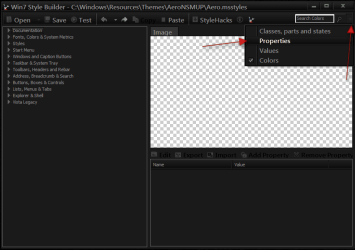
You would use the dropdown menu choose properties
WSB.PNG

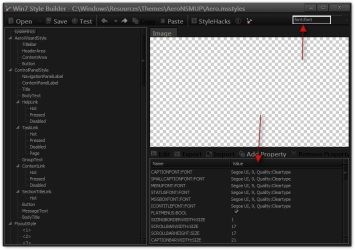
And you would put in Font:Font and it will list all the places on the left side where there is a font then you have to click each one and change it.
Win7 Style Builder.png

Also look at post #8 in this thread there is an easier way if you do not want to purchase Windows Style Builder http://www.sevenforums.com/customization/176089-dialog-box-colour.html#post1499449
let me know if you need help doing it it's not that hard or I can do it for you if you like
Jerry
 

My Computer My Computer

At a glance

Win 7 Pro x64 / Win 10 ProIntel(R) Core(TM) i7-3630QM CPU @ 2.40GHz12 GB(1) Intel(R) HD Graphics 4000 (2) NVIDIA GeFo...
Computer type
Laptop
Computer Manufacturer/Model Number
Sager NP9170
OS
Win 7 Pro x64 / Win 10 Pro
CPU
Intel(R) Core(TM) i7-3630QM CPU @ 2.40GHz
Motherboard
CLEVO P170EM
Memory
12 GB
Graphics Card(s)
(1) Intel(R) HD Graphics 4000 (2) NVIDIA GeForce GTX 675M
Sound Card
(1) Realtek High Definition Audio (2) Intel(R) Display Aud
Monitor(s) Displays
17.3
Screen Resolution
1920x1080
Hard Drives
(1) Samsung 860 EVO 500GB(OS) (1) Samsung 860 EVO 500GB(Data)
Keyboard
Backlite
Antivirus
MSE, Malwarebytes Pro
Browser
Firefox
Other Info
DESKTOP: Custom-built.
OS: Win 10 Pro x64.
CASE: Rosewill R5.
CPU: Intel I5 4670K CPU @ 3.40GHz.
CPU COOLER: Cool Master Hyper 212 EVO.
MOTHERBOARD: Asus Z87-A.
MEMORY: Kingston HyperX 2x4 GB.
GPU: Nvidia Geforce 650 TI.
PSU: Corsair TX750.
DRIVES: (1) Samsung 840 120 GB SSD (2) Western Digital blue 500 GB 7200 RPM.
Lemme first check it personally. If I can't manage to do that on my own, I'll certainly ask for your help, Jerry.

Thanks again and again
 

My Computer My Computer

At a glance

Windows 7
OS
Windows 7
Lemme first check it personally. If I can't manage to do that on my own, I'll certainly ask for your help, Jerry.

Thanks again and again
Let me know how it turns out.
Jerry
 

My Computer My Computer

At a glance

Win 7 Pro x64 / Win 10 ProIntel(R) Core(TM) i7-3630QM CPU @ 2.40GHz12 GB(1) Intel(R) HD Graphics 4000 (2) NVIDIA GeFo...
Computer type
Laptop
Computer Manufacturer/Model Number
Sager NP9170
OS
Win 7 Pro x64 / Win 10 Pro
CPU
Intel(R) Core(TM) i7-3630QM CPU @ 2.40GHz
Motherboard
CLEVO P170EM
Memory
12 GB
Graphics Card(s)
(1) Intel(R) HD Graphics 4000 (2) NVIDIA GeForce GTX 675M
Sound Card
(1) Realtek High Definition Audio (2) Intel(R) Display Aud
Monitor(s) Displays
17.3
Screen Resolution
1920x1080
Hard Drives
(1) Samsung 860 EVO 500GB(OS) (1) Samsung 860 EVO 500GB(Data)
Keyboard
Backlite
Antivirus
MSE, Malwarebytes Pro
Browser
Firefox
Other Info
DESKTOP: Custom-built.
OS: Win 10 Pro x64.
CASE: Rosewill R5.
CPU: Intel I5 4670K CPU @ 3.40GHz.
CPU COOLER: Cool Master Hyper 212 EVO.
MOTHERBOARD: Asus Z87-A.
MEMORY: Kingston HyperX 2x4 GB.
GPU: Nvidia Geforce 650 TI.
PSU: Corsair TX750.
DRIVES: (1) Samsung 840 120 GB SSD (2) Western Digital blue 500 GB 7200 RPM.
Holla back, Jerry!

I'm back with bad news: I've installed Win7 Style Builder and given it a try; however, I couldn't manage to modify the parts I want to as I don't know which item to choose in the list in order to make desired changes :(

edit_1.jpg


Well, I have two more questions:

Can the shine effect which the open toolbar buttons have on be disabled? Does this effect stem from Aero?

toolbar_buttons_shine_effect12.png


You remember the theme (Aero Lucida) you created at me request. While using Tweak IE9, I encountered a problem about the appearance of dialog box. I'm posting the screen captures about this problem:

1vwa015l6.jpg

big_font_problem.jpg


I'm a rookie who wants to acquaint himself with this editing stuff and I think there is a lot to learn from you and others like you. Thanks for your patience and great dedication to the issue.
 

My Computer My Computer

At a glance

Windows 7
OS
Windows 7
For the shine on the taskbar buttons you will need to go to
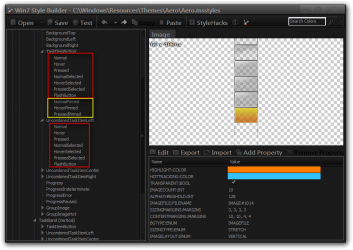
Taskbar & System Tray > TaskBand > Basic > TaskBand
and
Taskbar & System Tray > TaskBand > Basic > TaskBand (Vertical)
and edit the images in the locations highlighted in the red. They all open of showing the different states of the buttons.
1.png

As you can see from this screenshot the ones highlighted in red show the different states the buttons have the ones highlighted in yellow are for the pinned items on the task bar.
2.png

I have never used Tweakie9 so I don't think I can help their sorry.

Jerry
 

My Computer My Computer

At a glance

Win 7 Pro x64 / Win 10 ProIntel(R) Core(TM) i7-3630QM CPU @ 2.40GHz12 GB(1) Intel(R) HD Graphics 4000 (2) NVIDIA GeFo...
Computer type
Laptop
Computer Manufacturer/Model Number
Sager NP9170
OS
Win 7 Pro x64 / Win 10 Pro
CPU
Intel(R) Core(TM) i7-3630QM CPU @ 2.40GHz
Motherboard
CLEVO P170EM
Memory
12 GB
Graphics Card(s)
(1) Intel(R) HD Graphics 4000 (2) NVIDIA GeForce GTX 675M
Sound Card
(1) Realtek High Definition Audio (2) Intel(R) Display Aud
Monitor(s) Displays
17.3
Screen Resolution
1920x1080
Hard Drives
(1) Samsung 860 EVO 500GB(OS) (1) Samsung 860 EVO 500GB(Data)
Keyboard
Backlite
Antivirus
MSE, Malwarebytes Pro
Browser
Firefox
Other Info
DESKTOP: Custom-built.
OS: Win 10 Pro x64.
CASE: Rosewill R5.
CPU: Intel I5 4670K CPU @ 3.40GHz.
CPU COOLER: Cool Master Hyper 212 EVO.
MOTHERBOARD: Asus Z87-A.
MEMORY: Kingston HyperX 2x4 GB.
GPU: Nvidia Geforce 650 TI.
PSU: Corsair TX750.
DRIVES: (1) Samsung 840 120 GB SSD (2) Western Digital blue 500 GB 7200 RPM.
May the problem about the appearance of dialog box stem from having changed MS Shell Dlg and MS Shell Dlg 2 fonts from system default fonts into Lucida Sans Unicode?

Could you please also post the screen captures of how the fonts of taskbar buttons and search boxes (start menu and explorer window) are modified?
 

My Computer My Computer

At a glance

Windows 7
OS
Windows 7
May the problem about the appearance of dialog box stem from having changed MS Shell Dlg and MS Shell Dlg 2 fonts from system default fonts into Lucida Sans Unicode?
That could possibly do it and the size of the font.

Could you please also post the screen captures of how the fonts of taskbar buttons and search boxes (start menu and explorer window) are modified?
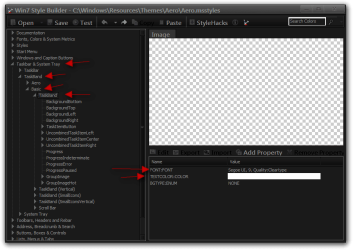
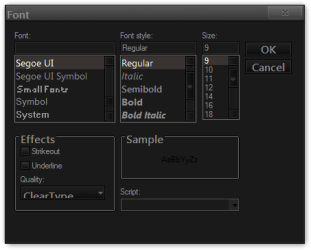
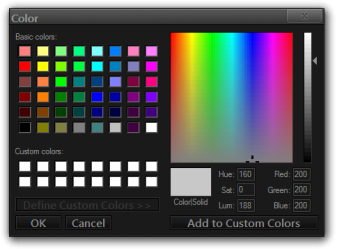
For the taskbar buttons the font and text color is at Taskbar & System Tray > TaskBand > Basic > TaskBand You can click on the color and the font name and a box will open up for you to choose what you want
font.pngFont2.pngColor.png

The search box font in Windows Explorer is at
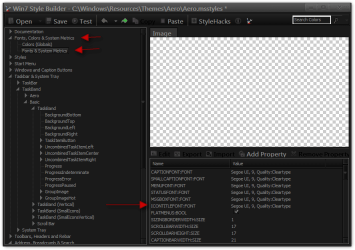
Fonts, Colors & System Metrics > Fonts & System Metrics > ICONTITLEFONT:FONT click on the font name in the box will open up for you to choose. This will change some other fonts to.
3.pngFont2.png

The search box text color is at
Address, Breadcrumb & Search > Search > Edit > SearchEdit > TextBox > Normal Text and Accelerator Text.
text.png

The search box font in the start menu I don't think can be change sorry.

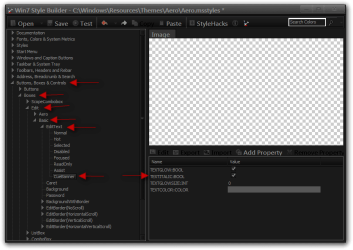
If you want to remove the italic text in the search boxes go here
Buttons, Boxes & Controls > Boxes > Edit > Basic > EditText > CueBanner and untick TEXTITALIC:BOOL BOX
4.png

Jerry
 

My Computer My Computer

At a glance

Win 7 Pro x64 / Win 10 ProIntel(R) Core(TM) i7-3630QM CPU @ 2.40GHz12 GB(1) Intel(R) HD Graphics 4000 (2) NVIDIA GeFo...
Computer type
Laptop
Computer Manufacturer/Model Number
Sager NP9170
OS
Win 7 Pro x64 / Win 10 Pro
CPU
Intel(R) Core(TM) i7-3630QM CPU @ 2.40GHz
Motherboard
CLEVO P170EM
Memory
12 GB
Graphics Card(s)
(1) Intel(R) HD Graphics 4000 (2) NVIDIA GeForce GTX 675M
Sound Card
(1) Realtek High Definition Audio (2) Intel(R) Display Aud
Monitor(s) Displays
17.3
Screen Resolution
1920x1080
Hard Drives
(1) Samsung 860 EVO 500GB(OS) (1) Samsung 860 EVO 500GB(Data)
Keyboard
Backlite
Antivirus
MSE, Malwarebytes Pro
Browser
Firefox
Other Info
DESKTOP: Custom-built.
OS: Win 10 Pro x64.
CASE: Rosewill R5.
CPU: Intel I5 4670K CPU @ 3.40GHz.
CPU COOLER: Cool Master Hyper 212 EVO.
MOTHERBOARD: Asus Z87-A.
MEMORY: Kingston HyperX 2x4 GB.
GPU: Nvidia Geforce 650 TI.
PSU: Corsair TX750.
DRIVES: (1) Samsung 840 120 GB SSD (2) Western Digital blue 500 GB 7200 RPM.
Holla back, Jerry!

I'm here again and have new questions:

Question #1: Is it possible to edit all themes using Vista Style Builder? Or can we just modify Aero?

Question #2: I couldn't manage to remove the shine effect on active task bar buttons cos I don't really know what to do when I open the parts you indicated on your previous posts using Vista Style Builder. To be honest, it is really hard for such a rookie as me to capture all these things at once. Could you please do it for me and post the new build of your AeroLucida theme on the first page?

Question #3: I also want to have Lucida Sans Unicode as the font of explorer windows commands which is placed under the explorer address bar. Is it tangible?

bangbang.png


PS: I have witnessed many theme creators use Restorator, which you also recommended, and then I have downloaded it. If it is more practical than Vista Style Builder, you may post screenshots of Restorator, too.
 

My Computer My Computer

At a glance

Windows 7
OS
Windows 7
Holla back, Jerry!

I'm here again and have new questions:

Question #1: Is it possible to edit all themes using Vista Style Builder? Or can we just modify Aero?

Question #2: I couldn't manage to remove the shine effect on active task bar buttons cos I don't really know what to do when I open the parts you indicated on your previous posts using Vista Style Builder. To be honest, it is really hard for such a rookie as me to capture all these things at once. Could you please do it for me and post the new build of your AeroLucida theme on the first page?

Question #3: I also want to have Lucida Sans Unicode as the font of explorer windows commands which is placed under the explorer address bar. Is it tangible?

bangbang.png


PS: I have witnessed many theme creators use Restorator, which you also recommended, and then I have downloaded it. If it is more practical than Vista Style Builder, you may post screenshots of Restorator, too.
I will back in about in about 8 to 10 hours
What size of font do you want?
Jerry
 

My Computer My Computer

At a glance

Win 7 Pro x64 / Win 10 ProIntel(R) Core(TM) i7-3630QM CPU @ 2.40GHz12 GB(1) Intel(R) HD Graphics 4000 (2) NVIDIA GeFo...
Computer type
Laptop
Computer Manufacturer/Model Number
Sager NP9170
OS
Win 7 Pro x64 / Win 10 Pro
CPU
Intel(R) Core(TM) i7-3630QM CPU @ 2.40GHz
Motherboard
CLEVO P170EM
Memory
12 GB
Graphics Card(s)
(1) Intel(R) HD Graphics 4000 (2) NVIDIA GeForce GTX 675M
Sound Card
(1) Realtek High Definition Audio (2) Intel(R) Display Aud
Monitor(s) Displays
17.3
Screen Resolution
1920x1080
Hard Drives
(1) Samsung 860 EVO 500GB(OS) (1) Samsung 860 EVO 500GB(Data)
Keyboard
Backlite
Antivirus
MSE, Malwarebytes Pro
Browser
Firefox
Other Info
DESKTOP: Custom-built.
OS: Win 10 Pro x64.
CASE: Rosewill R5.
CPU: Intel I5 4670K CPU @ 3.40GHz.
CPU COOLER: Cool Master Hyper 212 EVO.
MOTHERBOARD: Asus Z87-A.
MEMORY: Kingston HyperX 2x4 GB.
GPU: Nvidia Geforce 650 TI.
PSU: Corsair TX750.
DRIVES: (1) Samsung 840 120 GB SSD (2) Western Digital blue 500 GB 7200 RPM.
Back
Top