windows 7 hangs with following message..

paparazzo79

New member
Member
Local time
10:08 PM
Messages
95
Until yesterday my Windows 7 64bit worked normally until after 1-2 hours from booting I noticed that my notebook acts weird.
Windows 7 just hangs/freezes iwith a message that any program I click is not responding.Then when I try to close it:I get message:
Windows can not end this process.Do you want to close it...
and when I click on end process I just get white screen,and it brings me back to desktop with no icons.HDD led doesn't work at that time.
I checked all the process who boot up with system and I didn't noticed anything suspicious with process explorer by sisinternals.
the only solution is that I must power it off with power off button on my notebook.
This is really annoying because it doesn't happen at start,it happens after boot up maybe few hours after I work on my notebook.
I did sfc /scannow and I got no integrity violation message,which seems that everything is OK...
Anyone had the same problem and what can I do?I really don't want to do clean install cuz I have a lot of documents here.
I scanned it with spybot no suspicious files found.I will scan it now with my AV software.
 

My Computer My Computer

OS
Windows 7 Ultimate 32bit
CPU
amd athlon 64 3600+ X2
Motherboard
Biostar NF520-TE
Graphics Card(s)
Ati Radeon 3650 HD
Monitor(s) Displays
Philips 227EL

My Computer My Computer

Computer type
PC/Desktop
Computer Manufacturer/Model Number
Self Assembled
OS
Microsoft Windows 10 Pro Insider Preview 64-bit
CPU
Intel(R) Core(TM) i3-4130 CPU @ 3.40GHz
Motherboard
Gigabyte Technology Co., Ltd. B85M-D3H
Memory
Corsair Vengence 4GB x2 (8.00GB Dual-Channel DDR3 @ 798MHz)
Graphics Card(s)
2047MB GeForce GTS 450 (ZOTAC International)
Sound Card
Onboard (Realtek High Definition Audio)
Monitor(s) Displays
LG Flatron E2040T
Screen Resolution
1600x900
Hard Drives
Western Digital 1 TB
Seagate 500 GB
PSU
Corsair VS550
Case
Cooler Master K380
Cooling
Cooler Master Seidon 120V Plus
Keyboard
Logitech MK260r
Mouse
Logitech MK260r
Internet Speed
PMPL Broadband
Antivirus
Windows Defender + MBAM
Browser
Firefox
Other Info
Dell Studio 15" Laptop
OK.I will do tommorow.
 
Last edited:

My Computer My Computer

OS
Windows 7 Ultimate 32bit
CPU
amd athlon 64 3600+ X2
Motherboard
Biostar NF520-TE
Graphics Card(s)
Ati Radeon 3650 HD
Monitor(s) Displays
Philips 227EL
I got message:Sorry no dump found when I run SF Diagnostic Tool.
 

My Computer My Computer

OS
Windows 7 Ultimate 32bit
CPU
amd athlon 64 3600+ X2
Motherboard
Biostar NF520-TE
Graphics Card(s)
Ati Radeon 3650 HD
Monitor(s) Displays
Philips 227EL
May be there are no minidumps, but MSINFO32.nfo, event log, etc files will help us to have a closer look to the issue.

Apparently, as the exe files are acting not properly, have a malware scan at first.

Download, install and update MBAM Free, then boot into http://www.sevenforums.com/tutorials/69585-safe-mode.html, and then perform a full system scan.

Precaution is the first.

Then run SF Diag tool again, upload the MSINFo32 and event log here.
 

My Computer My Computer

Computer type
PC/Desktop
Computer Manufacturer/Model Number
Self Assembled
OS
Microsoft Windows 10 Pro Insider Preview 64-bit
CPU
Intel(R) Core(TM) i3-4130 CPU @ 3.40GHz
Motherboard
Gigabyte Technology Co., Ltd. B85M-D3H
Memory
Corsair Vengence 4GB x2 (8.00GB Dual-Channel DDR3 @ 798MHz)
Graphics Card(s)
2047MB GeForce GTS 450 (ZOTAC International)
Sound Card
Onboard (Realtek High Definition Audio)
Monitor(s) Displays
LG Flatron E2040T
Screen Resolution
1600x900
Hard Drives
Western Digital 1 TB
Seagate 500 GB
PSU
Corsair VS550
Case
Cooler Master K380
Cooling
Cooler Master Seidon 120V Plus
Keyboard
Logitech MK260r
Mouse
Logitech MK260r
Internet Speed
PMPL Broadband
Antivirus
Windows Defender + MBAM
Browser
Firefox
Other Info
Dell Studio 15" Laptop
Ok here is the zip I got with this tool.Hope it helps...
 

Attachments

My Computer My Computer

OS
Windows 7 Ultimate 32bit
CPU
amd athlon 64 3600+ X2
Motherboard
Biostar NF520-TE
Graphics Card(s)
Ati Radeon 3650 HD
Monitor(s) Displays
Philips 227EL
Apparently, it comes from the Atheros AR8151 PCI-E Gigabit Ethernet Controller (NDIS 6.20). Do you use it anymore? or use Atheros AR9002WB-1NG Wireless Network Adapter only?

Event[33371]:
Log Name: System
Source: Service Control Manager
Date: 2012-07-11T12:19:27.254
Event ID: 7036
Task: N/A
Level: Information
Opcode: N/A
Keyword: Classic
User: N/A
User Name: N/A
Computer: MikeMyerz-PC
Description:
The WLAN AutoConfig service entered the stopped state.
============================================
Event[33367]:
Log Name: System
Source: Microsoft-Windows-WLAN-AutoConfig
Date: 2012-07-11T12:19:26.350
Event ID: 10003
Task: N/A
Level: Error
Opcode: Info
Keyword: N/A
User: S-1-5-18
User Name: NT AUTHORITY\SYSTEM
Computer: MikeMyerz-PC
Description:
WLAN Extensibility Module has stopped unexpectedly.

Module Path: C:\Windows\system32\athihvs.dll

Uninstall that one you dont use. And update the other one.
 

My Computer My Computer

Computer type
PC/Desktop
Computer Manufacturer/Model Number
Self Assembled
OS
Microsoft Windows 10 Pro Insider Preview 64-bit
CPU
Intel(R) Core(TM) i3-4130 CPU @ 3.40GHz
Motherboard
Gigabyte Technology Co., Ltd. B85M-D3H
Memory
Corsair Vengence 4GB x2 (8.00GB Dual-Channel DDR3 @ 798MHz)
Graphics Card(s)
2047MB GeForce GTS 450 (ZOTAC International)
Sound Card
Onboard (Realtek High Definition Audio)
Monitor(s) Displays
LG Flatron E2040T
Screen Resolution
1600x900
Hard Drives
Western Digital 1 TB
Seagate 500 GB
PSU
Corsair VS550
Case
Cooler Master K380
Cooling
Cooler Master Seidon 120V Plus
Keyboard
Logitech MK260r
Mouse
Logitech MK260r
Internet Speed
PMPL Broadband
Antivirus
Windows Defender + MBAM
Browser
Firefox
Other Info
Dell Studio 15" Laptop
I don't use wireless on that notebook.I haven't even installed it.The wirless led is red on my notebook.
I really don't know why this causes the problem because I don't use wireless,I use network card with adsl connection.
and about updating drivers I don't think I can.All I did is that I installed my network card from offical weebsite with drivers specific for my notebook and everything worked fine until yesterday.
And as you can see the date there is 2012-07-11 but today is 2012-09-24.
 

My Computer My Computer

OS
Windows 7 Ultimate 32bit
CPU
amd athlon 64 3600+ X2
Motherboard
Biostar NF520-TE
Graphics Card(s)
Ati Radeon 3650 HD
Monitor(s) Displays
Philips 227EL
All you are saying about the ethernet connection are true. But I am seeing the wireless connection is causing some problem :(

As you dont use it, can you disable it?
 

My Computer My Computer

Computer type
PC/Desktop
Computer Manufacturer/Model Number
Self Assembled
OS
Microsoft Windows 10 Pro Insider Preview 64-bit
CPU
Intel(R) Core(TM) i3-4130 CPU @ 3.40GHz
Motherboard
Gigabyte Technology Co., Ltd. B85M-D3H
Memory
Corsair Vengence 4GB x2 (8.00GB Dual-Channel DDR3 @ 798MHz)
Graphics Card(s)
2047MB GeForce GTS 450 (ZOTAC International)
Sound Card
Onboard (Realtek High Definition Audio)
Monitor(s) Displays
LG Flatron E2040T
Screen Resolution
1600x900
Hard Drives
Western Digital 1 TB
Seagate 500 GB
PSU
Corsair VS550
Case
Cooler Master K380
Cooling
Cooler Master Seidon 120V Plus
Keyboard
Logitech MK260r
Mouse
Logitech MK260r
Internet Speed
PMPL Broadband
Antivirus
Windows Defender + MBAM
Browser
Firefox
Other Info
Dell Studio 15" Laptop
OK I did it.I will tell you if it happens again...
 
Last edited:

My Computer My Computer

OS
Windows 7 Ultimate 32bit
CPU
amd athlon 64 3600+ X2
Motherboard
Biostar NF520-TE
Graphics Card(s)
Ati Radeon 3650 HD
Monitor(s) Displays
Philips 227EL
NO help.Recently I tried to run some of my applications which worked normally so far,but they won't run and I see icon of this circle going round and round forever (mouse icon).Then I tried to reboot,but it hanged on desktop screen with no icons.after power off on a key on my notebook I ran your application and here is what I got:
 

Attachments

My Computer My Computer

OS
Windows 7 Ultimate 32bit
CPU
amd athlon 64 3600+ X2
Motherboard
Biostar NF520-TE
Graphics Card(s)
Ati Radeon 3650 HD
Monitor(s) Displays
Philips 227EL
Event[34215]:
Log Name: System
Source: Service Control Manager
Date: 2012-07-17T19:08:31.616
Event ID: 7001
Task: N/A
Level: Error
Opcode: N/A
Keyword: Classic
User: N/A
User Name: N/A
Computer: MikeMyerz-PC
Description:
The SBSD Security Center Service service depends on the Security Center service which failed to start because of the following error:
The service cannot be started, either because it is disabled or because it has no enabled devices associated with it.


Uninstall SpyBot.

Event[34156]:
Log Name: System
Source: Application Popup
Date: 2012-07-17T19:08:11.178
Event ID: 1060
Task: N/A
Level: Error
Opcode: N/A
Keyword: Classic
User: N/A
User Name: N/A
Computer: MikeMyerz-PC
Description:
\SystemRoot\SysWow64\Drivers\cpuidlep.SYS has been blocked from loading due to incompatibility with this system. Please contact your software vendor for a compatible version of the driver.
The program you are using to cooling and power management of your CPU, uninstall it.

Report with the results.
 

My Computer My Computer

Computer type
PC/Desktop
Computer Manufacturer/Model Number
Self Assembled
OS
Microsoft Windows 10 Pro Insider Preview 64-bit
CPU
Intel(R) Core(TM) i3-4130 CPU @ 3.40GHz
Motherboard
Gigabyte Technology Co., Ltd. B85M-D3H
Memory
Corsair Vengence 4GB x2 (8.00GB Dual-Channel DDR3 @ 798MHz)
Graphics Card(s)
2047MB GeForce GTS 450 (ZOTAC International)
Sound Card
Onboard (Realtek High Definition Audio)
Monitor(s) Displays
LG Flatron E2040T
Screen Resolution
1600x900
Hard Drives
Western Digital 1 TB
Seagate 500 GB
PSU
Corsair VS550
Case
Cooler Master K380
Cooling
Cooler Master Seidon 120V Plus
Keyboard
Logitech MK260r
Mouse
Logitech MK260r
Internet Speed
PMPL Broadband
Antivirus
Windows Defender + MBAM
Browser
Firefox
Other Info
Dell Studio 15" Laptop
I removed spybot.and uninstall core temp program but everytime it hangs on different application.
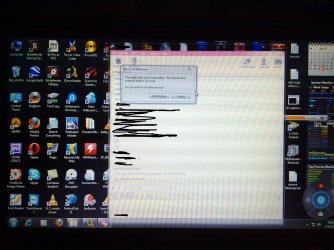
This time it happened again.Now it hanged on my yahoo messenger window,and I have screenshot and zip file as a result of your program,take a look what happened.
I could not even reboot,when I did it left me with that window still hanging and desktop picture behind it with no icons.
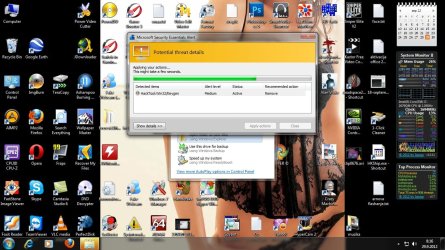
Before that I ran my bitdefender antivirus and I think it found one trojan,tried to delete it,as you can see it was runing in the background.
 

Attachments

My Computer My Computer

OS
Windows 7 Ultimate 32bit
CPU
amd athlon 64 3600+ X2
Motherboard
Biostar NF520-TE
Graphics Card(s)
Ati Radeon 3650 HD
Monitor(s) Displays
Philips 227EL

My Computer My Computer

Computer type
PC/Desktop
Computer Manufacturer/Model Number
Self Assembled
OS
Microsoft Windows 10 Pro Insider Preview 64-bit
CPU
Intel(R) Core(TM) i3-4130 CPU @ 3.40GHz
Motherboard
Gigabyte Technology Co., Ltd. B85M-D3H
Memory
Corsair Vengence 4GB x2 (8.00GB Dual-Channel DDR3 @ 798MHz)
Graphics Card(s)
2047MB GeForce GTS 450 (ZOTAC International)
Sound Card
Onboard (Realtek High Definition Audio)
Monitor(s) Displays
LG Flatron E2040T
Screen Resolution
1600x900
Hard Drives
Western Digital 1 TB
Seagate 500 GB
PSU
Corsair VS550
Case
Cooler Master K380
Cooling
Cooler Master Seidon 120V Plus
Keyboard
Logitech MK260r
Mouse
Logitech MK260r
Internet Speed
PMPL Broadband
Antivirus
Windows Defender + MBAM
Browser
Firefox
Other Info
Dell Studio 15" Laptop
If these fail here are a few other Troubleshooting Steps for Windows 7 including to establish a Clean Boot, scour the logs for repeat errors to google to resolution, use System Resources, do a Repair Install, leading up to getting a perfect Reinstall which is always a good thing and better than getting a new computer today.
 

My Computer My Computer

OS
Windows 7 Ultimate 32bit
CPU
amd athlon 64 3600+ X2
Motherboard
Biostar NF520-TE
Graphics Card(s)
Ati Radeon 3650 HD
Monitor(s) Displays
Philips 227EL
If it fails, follow what gregrocker suggested.
 

My Computer My Computer

Computer type
PC/Desktop
Computer Manufacturer/Model Number
Self Assembled
OS
Microsoft Windows 10 Pro Insider Preview 64-bit
CPU
Intel(R) Core(TM) i3-4130 CPU @ 3.40GHz
Motherboard
Gigabyte Technology Co., Ltd. B85M-D3H
Memory
Corsair Vengence 4GB x2 (8.00GB Dual-Channel DDR3 @ 798MHz)
Graphics Card(s)
2047MB GeForce GTS 450 (ZOTAC International)
Sound Card
Onboard (Realtek High Definition Audio)
Monitor(s) Displays
LG Flatron E2040T
Screen Resolution
1600x900
Hard Drives
Western Digital 1 TB
Seagate 500 GB
PSU
Corsair VS550
Case
Cooler Master K380
Cooling
Cooler Master Seidon 120V Plus
Keyboard
Logitech MK260r
Mouse
Logitech MK260r
Internet Speed
PMPL Broadband
Antivirus
Windows Defender + MBAM
Browser
Firefox
Other Info
Dell Studio 15" Laptop
That antvirus hanged on one trojan virus...just froze with it's screen while it was trying to delete or remove it.
I haven't wrote which one,will do tommorow...
 

My Computer My Computer

OS
Windows 7 Ultimate 32bit
CPU
amd athlon 64 3600+ X2
Motherboard
Biostar NF520-TE
Graphics Card(s)
Ati Radeon 3650 HD
Monitor(s) Displays
Philips 227EL
Here is what is happening:
 

Attachments

  • mse.jpg
    mse.jpg
    179 KB · Views: 17

My Computer My Computer

OS
Windows 7 Ultimate 32bit
CPU
amd athlon 64 3600+ X2
Motherboard
Biostar NF520-TE
Graphics Card(s)
Ati Radeon 3650 HD
Monitor(s) Displays
Philips 227EL
Back
Top