Choice of Displays-Intel & Nvidia

Ziani

New member
Member
Local time
10:37 PM
Messages
51
Hiya...never had this before 2 displays....Intel (R) HD Graphics Family and Nvidia GeForce 540M.

Question is which to use when? Looks like the default for everything seems to be the Intel even a game I have started playing....would have thought the displays would automatically change accordingly, is this the case? I see I can override settings if need be but do I really need to do this or will it decide which to use and change automatically?

Thanks
 

My Computer My Computer

At a glance

Windows 7 Home 64 bit
OS
Windows 7 Home 64 bit
Sounds like you have a laptop with the switchable graphics card. The Intel HD Graphics card is generally used for the standard graphics and the nVidia GeForce 540 would kick in for the more heavy duty graphics processing such as 3D rendering.

As to when it would switch over, I would presume it depends on who the manufacturer of that laptop has decided how it handles it.
 

My Computer My Computer

At a glance

Windows 7 Ultimate x64 and Home Premium x64Intel i7 960 (3.2 GHz Quad Core)12 Gigs (Triple Channel)Alienware OEM nVidia GTX 560 Ti (1.25 Gig)
Computer Manufacturer/Model Number
Alienware Area 51 Desktop and Dell Inspirion 17R (N7010)
OS
Windows 7 Ultimate x64 and Home Premium x64
CPU
Intel i7 960 (3.2 GHz Quad Core)
Motherboard
Alienware Intel based X58
Memory
12 Gigs (Triple Channel)
Graphics Card(s)
Alienware OEM nVidia GTX 560 Ti (1.25 Gig)
Sound Card
Creative Labs X-Fi Titanium
Monitor(s) Displays
Samsung PX2370 LED 23" Monitor
Screen Resolution
1920x1080
Hard Drives
2 320 Gig SATA in Raid 1 Configuration (System/App)
1 1 Tera SATA (Games)
1 1 Tera SATA (Data/Music/Videos)
PSU
750 Watt Power Supply
Case
Alienware Area 51 Desktop
Cooling
Liquid Cooled
Keyboard
Logitech G510
Mouse
Microsoft Trackball Explorer
Internet Speed
Cable
Right click on a empty spot on desk top and choose nvidia control panel. I use auto select,(recommended). You have other choices if you care to check them out.
 

My Computer My Computer

At a glance

Windows 10 Pro. 64/ version 1709 Windows 7 Pr...Intel i7-6800K @ 4.3Corsair Platinum 16 gig @2400EVGA GTX 1070 OC
Computer type
PC/Desktop
Computer Manufacturer/Model Number
Home made Desktop
OS
Windows 10 Pro. 64/ version 1709 Windows 7 Pro/64
CPU
Intel i7-6800K @ 4.3
Motherboard
ASUS X-99 Deluxe II
Memory
Corsair Platinum 16 gig @2400
Graphics Card(s)
EVGA GTX 1070 OC
Monitor(s) Displays
Asus 27" LED LCD/VE278Q
Screen Resolution
1920-1080 or 1280-720 HDMI
Hard Drives
INTEL SSD 730-240 Gb Sata 3.0/
PSU
EVGA Platium 1200W
Case
Phanteks Luxe Tempered Glass 8 fans/ one radiator
Cooling
XSPC/ Water Cooled CPU
Keyboard
Das 4 Professional
Mouse
Logitech M705/MX Anywhere 2-S
Internet Speed
100 mbits
Antivirus
Microsoft Security Essentials/ Malwarebytes Premium 3.0/ SAS
Browser
I.E. 11 default/Firefox/ ISP Time Warner Cable/Spectrum
Other Info
LG BluRay Burner/
Sound system-KLipsch-THX/
Icy Dock ssd Hot Swap bays.
Right click on a empty spot on desk top and choose nvidia control panel. I use auto select,(recommended). You have other choices if you care to check them out.

Thanks...I have mine set to auto select.....just wondered if I should just let it decide. How do I know which display it decides to use?
 

My Computer My Computer

At a glance

Windows 7 Home 64 bit
OS
Windows 7 Home 64 bit
I don't know how it is decides but my thought is the nvidia program watches the ram on the card being used and decides whether to ask for motherboard ram for a little help.
I hope someone with more knowledge than I can help us both understand this a little better.
 

My Computer My Computer

At a glance

Windows 10 Pro. 64/ version 1709 Windows 7 Pr...Intel i7-6800K @ 4.3Corsair Platinum 16 gig @2400EVGA GTX 1070 OC
Computer type
PC/Desktop
Computer Manufacturer/Model Number
Home made Desktop
OS
Windows 10 Pro. 64/ version 1709 Windows 7 Pro/64
CPU
Intel i7-6800K @ 4.3
Motherboard
ASUS X-99 Deluxe II
Memory
Corsair Platinum 16 gig @2400
Graphics Card(s)
EVGA GTX 1070 OC
Monitor(s) Displays
Asus 27" LED LCD/VE278Q
Screen Resolution
1920-1080 or 1280-720 HDMI
Hard Drives
INTEL SSD 730-240 Gb Sata 3.0/
PSU
EVGA Platium 1200W
Case
Phanteks Luxe Tempered Glass 8 fans/ one radiator
Cooling
XSPC/ Water Cooled CPU
Keyboard
Das 4 Professional
Mouse
Logitech M705/MX Anywhere 2-S
Internet Speed
100 mbits
Antivirus
Microsoft Security Essentials/ Malwarebytes Premium 3.0/ SAS
Browser
I.E. 11 default/Firefox/ ISP Time Warner Cable/Spectrum
Other Info
LG BluRay Burner/
Sound system-KLipsch-THX/
Icy Dock ssd Hot Swap bays.
Hi Ziani this is a post from one of our resident graphic experts stormy13

"From what I can see yours uses the switchable graphics that should switch automatically based on required usage,

ASUSTeK Computer Inc.-Forum- K42JC 64bit nVidia

Do you have the latest driver for both installed? If not go here,

ASUSTeK Computer Inc. - Notebooks - ASUS K42JC

to get them as both are required for it to work. Also don't use the reference Intel or Nvidia driver as they haven't been written to work with the switching, only get them from Asus. "

Ignore the Asus link but follow stormys advice about using only the PC manufacturers drivers the were developed for your particular PC ;)
 

My Computer My Computer

At a glance

win 7 ultimate32bit, Win8.1pro wmc 32bitamd phenom x4 9600corsair twinxs 2x2gb2x nvidia 1gb 8500gt
Computer type
PC/Desktop
Computer Manufacturer/Model Number
self build
OS
win 7 ultimate32bit, Win8.1pro wmc 32bit
CPU
amd phenom x4 9600
Motherboard
asus m2n32-sli deluxe
Memory
corsair twinxs 2x2gb
Graphics Card(s)
2x nvidia 1gb 8500gt
Sound Card
onboard
Monitor(s) Displays
23" PB Viseo 233d
Screen Resolution
1920x1080
Hard Drives
maxtor sata 500gb
maxtor sata 320gb
fujitsu sata200gb
PSU
oryxx tornado 750w
Case
thermaltake xaser lll
Cooling
artic freezer64 pro + 7 case fans

My Computer My Computer

At a glance

Windows 7 ultimate 64 bit / XP Home sp3intel Core 2 Duo E8400 3.0ghz8 gigs 1066 OCZ Fata1tyEVGA GTX 580 Call of Duty Black Ops Edition
Computer Manufacturer/Model Number
Self Built
OS
Windows 7 ultimate 64 bit / XP Home sp3
CPU
intel Core 2 Duo E8400 3.0ghz
Motherboard
Asus P5ND bios 1401
Memory
8 gigs 1066 OCZ Fata1ty
Graphics Card(s)
EVGA GTX 580 Call of Duty Black Ops Edition
Sound Card
Creative Soundblaster Audigy 2zs
Monitor(s) Displays
Asus 24in LCD's 2MS X2
Screen Resolution
1920x1080p @60Hz
Hard Drives
WD Caviar 500 Black/ WD Caviar 200 Blue
PSU
OCZ 700W GameXtreme
Case
NZXT Apollo
Cooling
Corsair H50 CPU/120mm x3 /60mm x2 /Corsair Dominator Ram
Keyboard
Logitech Bluetooth Wireless MX5000
Mouse
Logitech Bluetooth Wireless MX1000
Internet Speed
Download 19.83 Upload 0.97
Other Info
Logitech Z2300 Speakers/ Bose Noise Cancelling Headphones/Avermedia PCI-e Hybrid TV Bravo/Epson NX415 all in one/ 4 Port Powered USB Hub/ LG 10x Bluray Burner /TSST Corp DVDRW External
Hi Ziani this is a post from one of our resident graphic experts stormy13

"From what I can see yours uses the switchable graphics that should switch automatically based on required usage,

ASUSTeK Computer Inc.-Forum- K42JC 64bit nVidia

Do you have the latest driver for both installed? If not go here,

ASUSTeK Computer Inc. - Notebooks - ASUS K42JC

to get them as both are required for it to work. Also don't use the reference Intel or Nvidia driver as they haven't been written to work with the switching, only get them from Asus. "

Ignore the Asus link but follow stormys advice about using only the PC manufacturers drivers the were developed for your particular PC ;)

Oh dear.....I did try and install the latest Nvidia driver from Nvidia site as I was having a problem with a game that told me the physxloader.dll was missing but it did not update the driver but fixed the dll issue....driver still the original so should be ok?

Mine is an Asus funnily enough so will stick with stormys advise in future.

Is there a way to find out if they are switching automatically?
 

My Computer My Computer

At a glance

Windows 7 Home 64 bit
OS
Windows 7 Home 64 bit
Had a little play with Nvidia Control Panel and checked some programs in the "manage 3D settings" "Program settings" and in the drop down box for preferred graphics processors some programs said they were using "integrated graphics" and others said "global settings (auto-select integrated)" and although did not find anything for "Nvidia processor" I presume because nothing is needing it at the moment must mean its all working ok.

Thanks guys for your help :)
 

My Computer My Computer

At a glance

Windows 7 Home 64 bit
OS
Windows 7 Home 64 bit
Sounds like you have a laptop with the switchable graphics card. The Intel HD Graphics card is generally used for the standard graphics and the nVidia GeForce 540 would kick in for the more heavy duty graphics processing such as 3D rendering.

As to when it would switch over, I would presume it depends on who the manufacturer of that laptop has decided how it handles it.

I'm fairly sure the OS and/or related drivers have control over switching the cards. Although, its possible the laptop shipped with software made by the OEM which controls it (my laptop has custom software it shipped with for controlling it's touchscreen; I don't see how this couldn't be used to switch graphics dynamically...)
 

My Computer My Computer

At a glance

Windows 8 Pro x64Intel Core i7 92012GB (2GB x6) Triple Channel DDR3 1333 MHzATI Radeon HD 4870 X2 2GB GDDR5
Computer Manufacturer/Model Number
iBuyPower Chimera X58
OS
Windows 8 Pro x64
CPU
Intel Core i7 920
Motherboard
Asus P6T Deluxe V2
Memory
12GB (2GB x6) Triple Channel DDR3 1333 MHz
Graphics Card(s)
ATI Radeon HD 4870 X2 2GB GDDR5
Sound Card
Integrated Digital HD 7.1 Surround Sound
Monitor(s) Displays
24.6-inch ASUS VW246H 20000:1 Contrast, 2 ms response time,
Screen Resolution
1920x1080
Hard Drives
1 TB 7200 RPM SATA II 3 GBps 16MB cache
PSU
NZXT 800W Gaming Series
Case
Guardian Inferno (Custom Painted NZXT Guardian 921)
Cooling
Thermaltake V1 Fan Cooling System OC Proof
Keyboard
Razer Lycosa
Mouse
iBuyPower Ergonomical Internet Mouse
Internet Speed
11 MBps High-speed Cable
There have been some discussions with regards to the Switchable graphics cards where people were unable to put the latest drivers for the 'other' card. They were only able to update the dominant part, which in this case, would be the intel.
 

My Computer My Computer

At a glance

Windows 7 Ultimate x64 and Home Premium x64Intel i7 960 (3.2 GHz Quad Core)12 Gigs (Triple Channel)Alienware OEM nVidia GTX 560 Ti (1.25 Gig)
Computer Manufacturer/Model Number
Alienware Area 51 Desktop and Dell Inspirion 17R (N7010)
OS
Windows 7 Ultimate x64 and Home Premium x64
CPU
Intel i7 960 (3.2 GHz Quad Core)
Motherboard
Alienware Intel based X58
Memory
12 Gigs (Triple Channel)
Graphics Card(s)
Alienware OEM nVidia GTX 560 Ti (1.25 Gig)
Sound Card
Creative Labs X-Fi Titanium
Monitor(s) Displays
Samsung PX2370 LED 23" Monitor
Screen Resolution
1920x1080
Hard Drives
2 320 Gig SATA in Raid 1 Configuration (System/App)
1 1 Tera SATA (Games)
1 1 Tera SATA (Data/Music/Videos)
PSU
750 Watt Power Supply
Case
Alienware Area 51 Desktop
Cooling
Liquid Cooled
Keyboard
Logitech G510
Mouse
Microsoft Trackball Explorer
Internet Speed
Cable
Hiya...never had this before 2 displays....Intel (R) HD Graphics Family and Nvidia GeForce 540M.

Question is which to use when? Looks like the default for everything seems to be the Intel even a game I have started playing....would have thought the displays would automatically change accordingly, is this the case? I see I can override settings if need be but do I really need to do this or will it decide which to use and change automatically?

Thanks

You can try the steps in the link below.

It will help you Customize the application and the GPU with which you can run an application. You can change the option to choose only NVIDIA GPU while running any specific application.

How do I customize Optimus profiles and settings?
 

My Computer My Computer

At a glance

Windows 7 Home Premium 64-bit
OS
Windows 7 Home Premium 64-bit
Hiya...never had this before 2 displays....Intel (R) HD Graphics Family and Nvidia GeForce 540M.

Question is which to use when? Looks like the default for everything seems to be the Intel even a game I have started playing....would have thought the displays would automatically change accordingly, is this the case? I see I can override settings if need be but do I really need to do this or will it decide which to use and change automatically?

Thanks

You can try the steps in the link below.

It will help you Customize the application and the GPU with which you can run an application. You can change the option to choose only NVIDIA GPU while running any specific application.

How do I customize Optimus profiles and settings?

Thanks....I see that I can change manually....my main concern was should I just let the displays sort themselves out....spose its down to me at the end of the day.

I have contacted Asus support and they say that I can update drivers from their own manufactures although my Nvidia driver update would not update as the system would not allow so have got back to Asus and now awaiting their reply.

Thanks again guys for all your input :D
 

My Computer My Computer

At a glance

Windows 7 Home 64 bit
OS
Windows 7 Home 64 bit
Just something you should note about any laptop with switchable graphics. If your laptop has them then you should always go back to the manufacturer page for drivers. If you just go to the nVidia or ATI sites they usually say somewhere on the page to do so as well because you can run into issue using their version of the drivers.

So make sure you go to the site for whatever brand of laptop you use and get the drivers there to avoid problems.
 

My Computer My Computer

At a glance

Win7 64bit UltimateAMD Phenom II X6 1100T Black Edition Thuban 3...CORSAIR DOMINATOR GT 8GB (2 x 4GB) 1866 DDR3XFX HD-697A-CNDC Radeon HD6970 2GB 256-bit
Computer Manufacturer/Model Number
Custom
OS
Win7 64bit Ultimate
CPU
AMD Phenom II X6 1100T Black Edition Thuban 3.3GHz, 3.7GHz
Motherboard
Gigabyte GA-890FXA-UD5
Memory
CORSAIR DOMINATOR GT 8GB (2 x 4GB) 1866 DDR3
Graphics Card(s)
XFX HD-697A-CNDC Radeon HD6970 2GB 256-bit
Sound Card
Creative SoundBlaster X-Fi Platinum Fatal1ty Edition
Monitor(s) Displays
Dual 25 Inch Hanns-G HZ251
Screen Resolution
1920x1080 X 2
PSU
Corsair 850W Single Rail
Case
Thermaltake V9 BlacX w/ Dual HDD Docking Station
Cooling
Air lots and lots of air and copper...
Keyboard
Kensington (Low-Profile)
Mouse
Creative Fatal1ty
Internet Speed
15Gbit (15 Down 5 Up)
Other Info
XIGMATEK HDT-S1284F 120mm HYPRO Bearing CPU Cooler, LG Blu-Ray Burner.
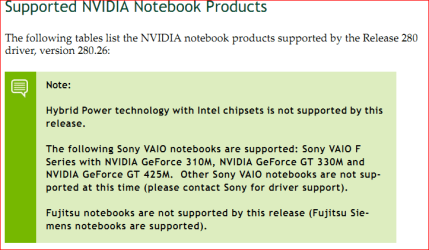
Correct Corpsecrank. From AMD's release notes for the latest driver,

The following notebooks are not compatible with this release:

  • Any notebook launched after this driver release
  • Switchable Graphics enabled notebooks using Intel® chipsets.
  • Toshiba® notebooks (please contact the notebook OEM for driver support for these notebooks)
  • Sony® VAIO® notebooks (please contact the notebook OEM for driver support for these notebooks)
  • Panasonic® notebooks (please contact the notebook OEM for driver support for these notebooks)
and from Nvidia's.


nvidia.PNG

Be nice if the laptop manufacturer's with this feature would put it somewhere that reference video drivers will not work with these systems.

Also Ziani the reason that the reference Nvidia driver fixed your Physx problem is that it also contains the latest Physx driver/software (as well as a few other things that most don't use) and can be downloaded,

NVIDIA DRIVERS 9.10.0513

and installed/updated regardless of what video card is in the computer.
 

My Computer My Computer

At a glance

Win 7 Ultimate x64FX-8350 @ 4.6 GHz so farADATA XPG V1 Series Black 8GB DDR3 1600Sapphire R9 270x Dual-X
Computer type
PC/Desktop
Computer Manufacturer/Model Number
Me
OS
Win 7 Ultimate x64
CPU
FX-8350 @ 4.6 GHz so far
Motherboard
Asus M5A97 EVO
Memory
ADATA XPG V1 Series Black 8GB DDR3 1600
Graphics Card(s)
Sapphire R9 270x Dual-X
Sound Card
Xonar DGX w/ Corsair Vengence 1300
Monitor(s) Displays
Acer S232HL Abid
Screen Resolution
1920x1080
Hard Drives
120 GB OCZ Vertex 3
500 GB Seagate 7200.12
PSU
Antec Earthwatts 650W Green
Case
Antec Three Hundred
Cooling
Cooler Master 212 EVO
Keyboard
Logitech G510
Mouse
Logitech G500s
Internet Speed
35000/3000
Be nice if the laptop manufacturer's with this feature would put it somewhere that reference video drivers will not work with these systems.

I know right. I don't know why they can't make it more obvious for users that you are so restricted on that specific driver. A little warning about that could go a long ways.
 

My Computer My Computer

At a glance

Win7 64bit UltimateAMD Phenom II X6 1100T Black Edition Thuban 3...CORSAIR DOMINATOR GT 8GB (2 x 4GB) 1866 DDR3XFX HD-697A-CNDC Radeon HD6970 2GB 256-bit
Computer Manufacturer/Model Number
Custom
OS
Win7 64bit Ultimate
CPU
AMD Phenom II X6 1100T Black Edition Thuban 3.3GHz, 3.7GHz
Motherboard
Gigabyte GA-890FXA-UD5
Memory
CORSAIR DOMINATOR GT 8GB (2 x 4GB) 1866 DDR3
Graphics Card(s)
XFX HD-697A-CNDC Radeon HD6970 2GB 256-bit
Sound Card
Creative SoundBlaster X-Fi Platinum Fatal1ty Edition
Monitor(s) Displays
Dual 25 Inch Hanns-G HZ251
Screen Resolution
1920x1080 X 2
PSU
Corsair 850W Single Rail
Case
Thermaltake V9 BlacX w/ Dual HDD Docking Station
Cooling
Air lots and lots of air and copper...
Keyboard
Kensington (Low-Profile)
Mouse
Creative Fatal1ty
Internet Speed
15Gbit (15 Down 5 Up)
Other Info
XIGMATEK HDT-S1284F 120mm HYPRO Bearing CPU Cooler, LG Blu-Ray Burner.
Well, generally, it is implied by the chipset manufacturers that in most cases, you should refer to your OEM manufacturer or retail manufacturer for the drivers that would work best for your card. And given some manufacturers tend to tweak the settings, sometimes they even recommend you get the drivers from them before trying to use the reference drivers for optimal performance as an end user.
 

My Computer My Computer

At a glance

Windows 7 Ultimate x64 and Home Premium x64Intel i7 960 (3.2 GHz Quad Core)12 Gigs (Triple Channel)Alienware OEM nVidia GTX 560 Ti (1.25 Gig)
Computer Manufacturer/Model Number
Alienware Area 51 Desktop and Dell Inspirion 17R (N7010)
OS
Windows 7 Ultimate x64 and Home Premium x64
CPU
Intel i7 960 (3.2 GHz Quad Core)
Motherboard
Alienware Intel based X58
Memory
12 Gigs (Triple Channel)
Graphics Card(s)
Alienware OEM nVidia GTX 560 Ti (1.25 Gig)
Sound Card
Creative Labs X-Fi Titanium
Monitor(s) Displays
Samsung PX2370 LED 23" Monitor
Screen Resolution
1920x1080
Hard Drives
2 320 Gig SATA in Raid 1 Configuration (System/App)
1 1 Tera SATA (Games)
1 1 Tera SATA (Data/Music/Videos)
PSU
750 Watt Power Supply
Case
Alienware Area 51 Desktop
Cooling
Liquid Cooled
Keyboard
Logitech G510
Mouse
Microsoft Trackball Explorer
Internet Speed
Cable
Be nice if the laptop manufacturer's with this feature would put it somewhere that reference video drivers will not work with these systems.

I know right. I don't know why they can't make it more obvious for users that you are so restricted on that specific driver. A little warning about that could go a long ways.

Yeah you are right but anyways all been a learning curve...thanks again guys :)
 

My Computer My Computer

At a glance

Windows 7 Home 64 bit
OS
Windows 7 Home 64 bit
Correct Corpsecrank. From AMD's release notes for the latest driver,

The following notebooks are not compatible with this release:

  • Any notebook launched after this driver release
  • Switchable Graphics enabled notebooks using Intel® chipsets.
  • Toshiba® notebooks (please contact the notebook OEM for driver support for these notebooks)
  • Sony® VAIO® notebooks (please contact the notebook OEM for driver support for these notebooks)
  • Panasonic® notebooks (please contact the notebook OEM for driver support for these notebooks)
and from Nvidia's.


View attachment 174202

Be nice if the laptop manufacturer's with this feature would put it somewhere that reference video drivers will not work with these systems.

Also Ziani the reason that the reference Nvidia driver fixed your Physx problem is that it also contains the latest Physx driver/software (as well as a few other things that most don't use) and can be downloaded,

NVIDIA DRIVERS 9.10.0513

and installed/updated regardless of what video card is in the computer.

Hybrid Power is not Optimus. I have those Nvidia drivers installed and they do their job better than the ASUS stock drivers. I report problems I see directly to Nvidia, and they get solved one by one, version by version.
 

My Computer My Computer

At a glance

Windows 7 x64 Ultimate SP1Core i7-2630QM6 GB DDR3Nvidia GT 540M / Intel HD 3000 - Optimus swit...
Computer Manufacturer/Model Number
Asus N73SV
OS
Windows 7 x64 Ultimate SP1
CPU
Core i7-2630QM
Motherboard
Intel HM 65
Memory
6 GB DDR3
Graphics Card(s)
Nvidia GT 540M / Intel HD 3000 - Optimus switching
Sound Card
HD Audio (Intel Azalia/Realtek) ALC269
Monitor(s) Displays
LED flat panel
Screen Resolution
1920 x 1080
Hard Drives
2x Seagate Momentus 640 GB - 1,28 TB in total
Internet Speed
4 MB/256 kbps
Other Info
External HDs

WD Elements 1,5 TB
WD MyBook 500 GB
Back
Top