Windows 7 Installation - Transfer to a New Computer

How to Transfer your Complete Windows 7 Installation to New Computer

To start, a warning from Microsoft:

   Note
Important

You must use the Sysprep /generalize command to generalize a complete Windows installation before you can use the installation for deployment to a new computer, whether you use imaging, hard disk duplication, or another method. Moving or copying a Windows image to a different computer without running the Sysprep /generalize command is not supported.

This tutorial will show you how to do the transfer.

   Information
Windows 7 System Preparation Tool is a powerful, native Windows tool. When for instance used in so called Audit Mode, it let's you to freely configure Windows 7 to be then deployed to other computers as hardware independent image.

In this tutorial we use System Preparation Tool (sysprep) to prepare your Windows 7 installation to be moved to a new computer, keeping all your installed applications, program settings and user profiles. You can use this method for instance when you have bought a new PC and want to transfer your existing setup completely, without need to reinstall everything, or when you want to make major hardware changes like change the motherboard or GPU, which would usually cause Windows to stop booting normally.

   Warning
Using this method causes Windows 7 to lose all activation information, and it needs to be reactivated afterwards. If your Windows 7 is an OEM version, you might not be able to reactivate it, at least not without phone activation option.

I do not recommend to use this method on RAID systems. All experiments on RAID I know have failed.

With the speed of today's hardware evolution, most of us geeks are upgrading the hardware more often than operating system. Upgrading hardware can be painfully slow process if we need to reinstall the operating system and all our installed applications, plus transfer program settings and user profiles.

Using sysprep makes this easy. Changing the motherboard, or for instance an old ATI GPU to a new nVidia GPU quite often causes Windows 7 not to be able to boot anymore. This fact is usually accepted by the user, who then reinstalls the OS and all applications and transfers user profiles from a backup location.

Same thing when buying a new computer with completely different hardware setup compared to the old one, or trying to restore a system image to different hardware setup. Normally this would include a complete reinstallation of Windows 7 and all applications.

Why not use sysprep to avoid reinstalling? Here are the different scenarios where you can use it.


   Warning

An upgraded Windows cannot be sysprepped. As this method is based in sysprepping, this tutorial is valid only for Windows setups which have not been upgraded.

This means that if you have for instance in-place upgraded Vista to Seven, or using Anytime Upgrade upgraded for instance a Home Premium to Ultimate, you cannot sysprep and this tutorial cannot be used in your case.

Notice that a repair install is also an upgrade install, so if you have ever done a repair install (= in-place upgrade to same edition), you cannot sysprep.


PLEASE DO NOT FORGET TO CREATE A SYSTEM IMAGE BEFORE PROCEEDING!​


As you can read on this thread, on rare occasions this method does not work. If this happens, you can always restore your system using your backup image.

Backup Complete Computer - Create an Image Backup
System Image Recovery

IE10 Users: Please read this article first: Sysprep Fatal Error With IE 10 (FIX) | System Administration


METHOD ONE

Changing hardware components but keeping old hard disk(s)


Use this method if you:
- Change other hardware components but keep your old HD containing Windows 7
- Move the HD containing Windows 7 to another computer
  1. Before installing new hardware, boot Windows 7 normally
  2. Disconnect all external hardware except mouse, keyboard and main display. If your system folders are located only on C: drive, disconnect all other hard disks except that containing the C:. In case of relocated system folders, for instance the profile folder Users located in another drive and other system folders on C:, first move the relocated system folders back to C: then disconnect all other drives. Reboot after this
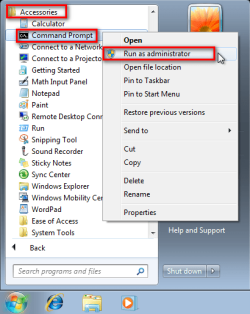
  3. Run Command Prompt as administrator
    .
    Audit_1.png
    .
  4. Type to Command Prompt: %windir%\System32\Sysprep\Sysprep.exe, and hit Enter
    .
    sysprep_start.png
    .
  5. In sysprep dialog that opens, choose System Cleanup Action as Enter System Out-of-Box-Experience (OOBE), select Generalize, select Shutdown Options Shutdown. Click OK
    .
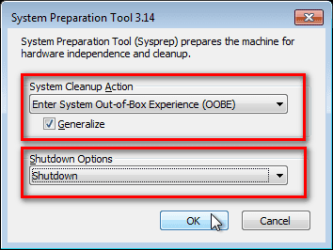
    Sysprep_Run_and_generalize.png
    .
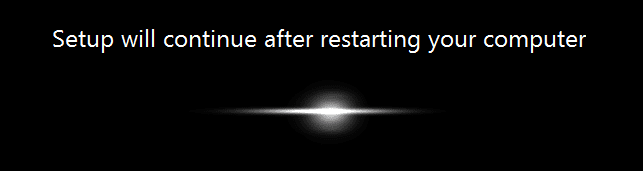
  6. Sysprep generalizes now your Windows 7 setup and shuts down your computer. Do not run any other programs during this phase!
    .
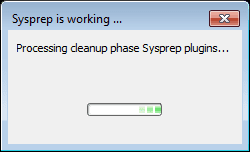
    Sysprep_Run_and_generalize_2.png
    .
    Sysprep_Run_and_generalize_3.png
    .
  7. Switch the main power of your PC off and install the new hardware OR dismount the hard disk(s) and mount it (them) to a new computer
  8. Boot the PC from sysprep generalized hard disk. You will notice Windows booting as if it was the first boot after installation, installing default drivers and updating registry. One or two reboots are needed, depending on your system specifications
    .

    Sysprep_Reinstalling_devices.png
    .
    Sysprep_Registry_settings.png
    .
    Sysprep_Reboot_needed.png
    .
  9. When Windows finally boots up, you will need to enter all information as if this really was a new, fresh installation
    .
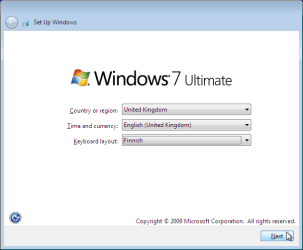
    Sysprep_First_boot_2.png
    .
  10. Because your old user profiles already exist, Windows does not accept your normal username, but instead you have to create a new temporary user. I use username Test for this purpose
    .
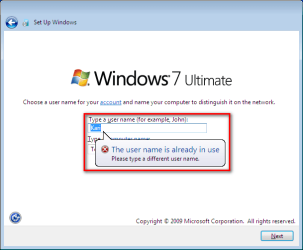
    Sysprep_First_boot_3.png
    .
  11. When login screen appears, choose your old user account to login
    .

    Sysprep_First_boot_5.png
    .
  12. Windows boots now to default OOBE first boot desktop, with default 800*600 resolution and default theme. All your installed applications are there, as well as your old user profiles and folders. Windows has installed the default drivers for your setup, you can update them if needed
    .
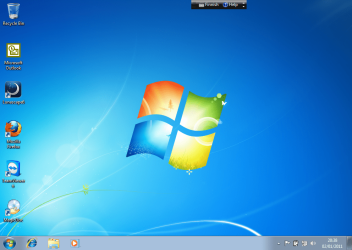
    Sysprep_First_boot_6.png
    .
  13. Go to Control Panel > User Accounts and delete the temporary user account (in this case Test) that you just created


METHOD TWO

Change the hard disk(s) or move Windows 7 setup to a new computer using third party imaging software

Use this method if you:
- Replace the HD containing Windows 7 on your old computer
- Move Windows 7 to a new HD on another computer
  1. Follow steps 1 through 5 above (method 1)
  2. Boot PC with an imaging CD/DVD (Paragon, Macrium etc.). See Macrium Reflect Free:at our sister site TenForums.com: Backup and Restore with Macrium Reflect Windows 10 Backup Restore Tutorials . Also see this post for a practical tip to create a Macrium system image.
  3. Create an image of your system
  4. Turn PC off, change the hard disk(s) and reboot with imaging application, restoring the image OR boot the new computer with imaging software and restore the image
  5. Continue from step 7 above (method 1)

This procedure is failsafe, and works every time. There is nothing to worry, but of course it is recommended to make a backup before trying this. I have even used this method when some serious driver issues caused the PC to constantly crash (BSOD), to reset all drivers to Windows defaults and then reinstalling them one by one to find the culprit.

   Note
What does Sysprep generalizing do to my Windows 7 setup?
  • All system specific information is removed or uninstalled
  • Security ID (SID) of your hardware setup is reseted
  • All system restore points are deleted
  • All event logs are deleted
  • All personalization is removed (taskbar, toolbars, folder options, start orb etc.)
  • Built-in administrator account is disabled (if it was enabled) and needs to be re-enabled after the transfer if needed

What happens when booting first time after sysprep generalizing?
  • First boot configuration is run
  • New SID is created
  • Re-arm counter is reseted if not already re-armed three times
  • Windows 7 is booted using first boot default drivers and settings


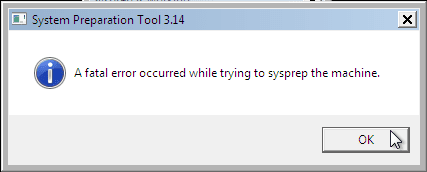
I have tested all above mentioned methods with all versions of Windows 7, from Starter to Enterprise. It works every time, with one exception: for reasons unknown to me, sysprep seems sometimes dislike Windows Media Player networking service, which is by default started every time Windows 7 starts. In about every third time I've done this, I've got an error message when trying to generalize:
Sysprep_Fatal_Error.png

However, this is not a big problem. You just need to stop the WMP networking service, and run sysprep with generalize option again. You can stop the service in question by typing net stop WMPNetworkSvc to command prompt, and hitting Enter:

Sysprep_Stop_WMP_service.png

If you have any questions, do not hesitate to ask.

Happy computing!

Kari

EDIT: A Useful tip from xxxwea, as later confirmed by Victor:
Kari, just a suggestion.

You might note in the tutorial that if on first booting Windows can't finish configuring, a reboot into safe mode, then a normal reboot will allow it to finish successfully.

This has happened to me both times I used a sysprepped system drive in a new computer. I found the answer to this problem buried deep in this thread the first time I ran into it, and the same thing happened yesterday on a different computer.

It's a seemingly very silly solution, but it works. I do believe many people have abandoned their sysprep work when they encounter the problem.

I think the solution deserves more visibility.
 
Last edited:
Following this tutorial allowed me to swap a HD to a new machine while it had an OEM version of windows on it. However on the first run after sysprepping and putting the HD into the new machine I was prompted to enter a new product key or purchase one. upon doing so I was up and running without losing a single setting or bit of data.
Hi Quiznos, welcome to the Seven Forums.

Transferring an OEM OS can be tricky, that's why this warning can be seen at the beginning of the tutorial:

   Warning
Using this method causes Windows 7 to lose all activation information, and it needs to be reactivated afterwards. If your Windows 7 is an OEM version, you might not be able to reactivate afterwards, at least not without phone activation option.

I have personal experience that the phone call often helps. At least in my case, and few other cases I know, Microsoft support has believed the explanation (HD change, other than that the same system or old HD with Windows to new computer because of a faulty motherboard). In these cases Microsoft has given a replacement activation key for free.

Kari
 

My Computer My Computer

Computer type
Laptop
Computer Manufacturer/Model Number
HP ENVY 17-1150eg
OS
Windows 10 Pro x64 EN-GB
CPU
1.6 GHz Intel Core i7-720QM Processor
Memory
6 GB
Graphics Card(s)
ATI Mobility Radeon HD 5850 Graphics
Sound Card
Beats sound system with integrated subwoofer
Monitor(s) Displays
17" laptop display, 22" LED and 32" Full HD TV through HDMI
Screen Resolution
1600*900 (1), 1920*1080 (2&3)
Hard Drives
Internal: 2 x 500 GB SATA Hard Disk Drive 7200 rpm
External: 2TB for backups, 3TB USB3 network drive for media
Cooling
As Envy runs a bit warm, I have it on a Cooler Master pad
Keyboard
Logitech diNovo Media Desktop Laser (bluetooth)
Mouse
Logitech Performance Mouse MX
Internet Speed
50/10 Mbps VDSL
Antivirus
Windows Defender 4.3.9431.0
Browser
Maxthon 3.5.2., IE11
Hello there. ;)

My scenario is moving a Windows 7 Ultimate 64 (retail) hard disk to a newly built system.

A few questions.

1. Point number 7 states:

Boot the PC from sysprep generalized hard disk.

Now, how do I make sure of that? Do I leave the computer unattended after power-on or do I intervene by hitting a button on the keyboard during POST to enable me to go into either BIOS or the boot menu?

2. My normal mouse and keyboard is USB but I could use my spare keyboard/mouse that is PS/2 instead. Which one is preferable to avoid problems during POST, i.e. not being able to intervene with choice of boot alternative as described above.

3. All personalization is removed (taskbar, toolbars, folder options, start orb etc.)

Is there a link that describes this a bit more in detail? If you know that some stuff will be lost you can prepare for that by making notes and do screen captures to make the restore process easier.

I could for example take screen caps of the taskbar and start orb. I'm not sure what folder options means in this context and I'm not so sure about toolbars either. I do have toolbars in my browser but what toolbars do you have in Windows? And what is etc? :D
 

My Computer My Computer

Computer type
PC/Desktop
Computer Manufacturer/Model Number
Custom build
OS
Windows 7 Ultimate x64 retail
CPU
Intel Core i7 4790K 4GHz, 8MB
Motherboard
ASUS Z97-A ATX
Memory
2 * ADATA 16GB (2x8GB) CL9 1600MHz
Graphics Card(s)
MSI GeForce GTX 750 Ti 2GB Gaming
Sound Card
Motherboard soundcard
Monitor(s) Displays
Benq BL2411PT
Screen Resolution
1920*1200
Hard Drives
SSD EVO 850 250GB
PSU
Fractal Design Integra M 550W 80+
Case
Fractal Design Define R5
Keyboard
Steelseries Apex Keyboard
Mouse
Logitech G400 Gaming Mouse
Internet Speed
100MB/100MB
Antivirus
Kaspersky Internet Security
Browser
Firefox
Hi MrNiceButDim, welcome to the Seven Forums.

What point 7 means that after you have sysprepped your system (HD), you change the components you want to and then boot to the system you sysprepped earlier, i.e. boot using the HD where your (now sysprepped) Windows installation exists. Normally this means you just turn off the PC after sysprepping, change the HW-components but leave the HD, then boot the system normally. No additional steps are needed.

USB mouse and KB are OK. No need to use PS/2.

All lost information is told in the tutorial. More information can be found for instance here:

Kari
 

My Computer My Computer

Computer type
Laptop
Computer Manufacturer/Model Number
HP ENVY 17-1150eg
OS
Windows 10 Pro x64 EN-GB
CPU
1.6 GHz Intel Core i7-720QM Processor
Memory
6 GB
Graphics Card(s)
ATI Mobility Radeon HD 5850 Graphics
Sound Card
Beats sound system with integrated subwoofer
Monitor(s) Displays
17" laptop display, 22" LED and 32" Full HD TV through HDMI
Screen Resolution
1600*900 (1), 1920*1080 (2&3)
Hard Drives
Internal: 2 x 500 GB SATA Hard Disk Drive 7200 rpm
External: 2TB for backups, 3TB USB3 network drive for media
Cooling
As Envy runs a bit warm, I have it on a Cooler Master pad
Keyboard
Logitech diNovo Media Desktop Laser (bluetooth)
Mouse
Logitech Performance Mouse MX
Internet Speed
50/10 Mbps VDSL
Antivirus
Windows Defender 4.3.9431.0
Browser
Maxthon 3.5.2., IE11
That worked perfectly.

After the transfer Kaspersky Internet Security 2011 complained about already being installed on another computer. I had to uninstall and reinstall. They should just have asked me if I wanted to transfer my license to the new computer instead.

Thank you, Kari. :)
 

My Computer My Computer

Computer type
PC/Desktop
Computer Manufacturer/Model Number
Custom build
OS
Windows 7 Ultimate x64 retail
CPU
Intel Core i7 4790K 4GHz, 8MB
Motherboard
ASUS Z97-A ATX
Memory
2 * ADATA 16GB (2x8GB) CL9 1600MHz
Graphics Card(s)
MSI GeForce GTX 750 Ti 2GB Gaming
Sound Card
Motherboard soundcard
Monitor(s) Displays
Benq BL2411PT
Screen Resolution
1920*1200
Hard Drives
SSD EVO 850 250GB
PSU
Fractal Design Integra M 550W 80+
Case
Fractal Design Define R5
Keyboard
Steelseries Apex Keyboard
Mouse
Logitech G400 Gaming Mouse
Internet Speed
100MB/100MB
Antivirus
Kaspersky Internet Security
Browser
Firefox
:)

150660d1303513480-today-7-sweden_small.png


Det var ju ingenting, trevlig att höra det funkade. Lite sent men jag vill också välkomna dig till Seven Forums!


150661d1303513480-today-7-us-uk.png


That was nothing, nice to hear it worked. A little late but I would also like to welcome you to Seven Forums!

Kari
 

My Computer My Computer

Computer type
Laptop
Computer Manufacturer/Model Number
HP ENVY 17-1150eg
OS
Windows 10 Pro x64 EN-GB
CPU
1.6 GHz Intel Core i7-720QM Processor
Memory
6 GB
Graphics Card(s)
ATI Mobility Radeon HD 5850 Graphics
Sound Card
Beats sound system with integrated subwoofer
Monitor(s) Displays
17" laptop display, 22" LED and 32" Full HD TV through HDMI
Screen Resolution
1600*900 (1), 1920*1080 (2&3)
Hard Drives
Internal: 2 x 500 GB SATA Hard Disk Drive 7200 rpm
External: 2TB for backups, 3TB USB3 network drive for media
Cooling
As Envy runs a bit warm, I have it on a Cooler Master pad
Keyboard
Logitech diNovo Media Desktop Laser (bluetooth)
Mouse
Logitech Performance Mouse MX
Internet Speed
50/10 Mbps VDSL
Antivirus
Windows Defender 4.3.9431.0
Browser
Maxthon 3.5.2., IE11
thank you for this great tutorial :D
I have been searching all over the net and dlling apps to do exactly this to no avail. was looking for a way to deploy win7 w/ pre-installed apps and this is just what I needed.

now, the main reason I posted was because I was having the same problem as ForrestHK

Today i did the OOBE on my computer and transferred the harddisk to the new system(with one installed system on it), but unfortunately it stopped loaded up my system on my harddisk transferred when reaching “System is starting devices” and said “Windows could not finish configuring the system. To attempt to resume configuration, restart the computer.” And when i reboot it showed the same warning.
I have loaded up setup.etl from Panther folder and looked it up on my installed system, got nothing special warning like reg keys failed or wtsoever…

Any solutions?

and I happened to stumble across a solution.

-when the message mentioned above appears hit OK and it should reboot.
-while its booting up hit F8 to load the advanced options menu (is that what its called?), select safe mode.
-now, it should load as it did before (w/ the System is starting devices & all) and you should encounter a similar error as before, only this time it'll say something like “Windows could not finish configuring the system in safe mode."
-hit OK and it'll reboot again, this time after it reboots it should complete successfully.

I don't know if this will work for everyone, or anyone at all, but I sure hope it does. :p
 

My Computer My Computer

Computer Manufacturer/Model Number
desktop & an HP Mini 2140
OS
Win 7 Ultimate x86
CPU
Intel Pentium Dual Core CPU E2140 @ 1.60GHz
Motherboard
AsRock ConRoe1333-D667 R2.0
Memory
2x 512mb DDR2 SDRAM
Graphics Card(s)
NVIDIA GeForce 6500
Sound Card
Realtek Onboard HDMI HD Audio
Monitor(s) Displays
AOC 2217V 22-Inch LCD Monitor
Screen Resolution
1680 x 1050
Hard Drives
Samsung HD080HJ/P [80gb]
Seagate Barracuda 7200.10 [320gb]
Seagate FreeAgent™ | Desk [2tb]
Seagate GoFlex™ [2tb]
PSU
generic 500w switching psu
Cooling
two 120mm generic case fans
Keyboard
A4Tech 7300N V-Track Wireless Desktop
Mouse
A4Tech 7300N V-Track Wireless Desktop
Internet Speed
DSL
Hi xxxwea, welcome to the Seven Forums. Let's hope Forrest sees this! Thanks for the tip.

Kari
 

My Computer My Computer

Computer type
Laptop
Computer Manufacturer/Model Number
HP ENVY 17-1150eg
OS
Windows 10 Pro x64 EN-GB
CPU
1.6 GHz Intel Core i7-720QM Processor
Memory
6 GB
Graphics Card(s)
ATI Mobility Radeon HD 5850 Graphics
Sound Card
Beats sound system with integrated subwoofer
Monitor(s) Displays
17" laptop display, 22" LED and 32" Full HD TV through HDMI
Screen Resolution
1600*900 (1), 1920*1080 (2&3)
Hard Drives
Internal: 2 x 500 GB SATA Hard Disk Drive 7200 rpm
External: 2TB for backups, 3TB USB3 network drive for media
Cooling
As Envy runs a bit warm, I have it on a Cooler Master pad
Keyboard
Logitech diNovo Media Desktop Laser (bluetooth)
Mouse
Logitech Performance Mouse MX
Internet Speed
50/10 Mbps VDSL
Antivirus
Windows Defender 4.3.9431.0
Browser
Maxthon 3.5.2., IE11
will this work fine if u have upgraded from win 7 home prem to ultimate or will it revert back to home prem?
 

My Computer My Computer

Computer Manufacturer/Model Number
hp pavillion dv7-3065dx
OS
Microsoft Windows 7 Ultimate 64-bit 7601 Multiprocessor Free
CPU
AMD Turion(tm) II Ultra Dual-Core Mobile M600
Motherboard
Hewlett-Packard 3638
Memory
8.00 GB 7.75 GB usable
Graphics Card(s)
AMD M880G with ATI Mobility Radeon HD 4200
Sound Card
(1) ATI High Definition Audio Device (2) IDT High Definiti
Screen Resolution
1600 x 900 x 32 bits (4294967296 colors) @ 59 Hz
Hard Drives
Hitachi HTS725050A9A364 ATA Device 465.76 GB
ST9500420AS ATA Device 465.76 GB
It will not revert. If your existing OS is Ultimate, that is the OS that will be generalized. no worries ;)

Kari
 

My Computer My Computer

Computer type
Laptop
Computer Manufacturer/Model Number
HP ENVY 17-1150eg
OS
Windows 10 Pro x64 EN-GB
CPU
1.6 GHz Intel Core i7-720QM Processor
Memory
6 GB
Graphics Card(s)
ATI Mobility Radeon HD 5850 Graphics
Sound Card
Beats sound system with integrated subwoofer
Monitor(s) Displays
17" laptop display, 22" LED and 32" Full HD TV through HDMI
Screen Resolution
1600*900 (1), 1920*1080 (2&3)
Hard Drives
Internal: 2 x 500 GB SATA Hard Disk Drive 7200 rpm
External: 2TB for backups, 3TB USB3 network drive for media
Cooling
As Envy runs a bit warm, I have it on a Cooler Master pad
Keyboard
Logitech diNovo Media Desktop Laser (bluetooth)
Mouse
Logitech Performance Mouse MX
Internet Speed
50/10 Mbps VDSL
Antivirus
Windows Defender 4.3.9431.0
Browser
Maxthon 3.5.2., IE11
I posted this by mistake in the wrong place, was hoping for help from Kari or one of the smart folks here.

http://www.sevenforums.com/general-...fully-one-you-can-clarify-some-things-me.html I'll try and figure out how to move it here, but I copied the text below.

hey all, hopefully one of you can clarify some things for me.

The situation is that a Gateway Laptop from BestBuy died but HD is good. (It has a licensed proprietary app that I need!)
BestBuy of course was useless except to try and sell a new laptop, even with the "insurance".

Got comparable laptop, but only one available was an HP. (The gateway model was discontinued after only 4 months of production according to Best Buy because of hardware problems).

Putting the HD in the new HP of course won't boot.

The Gateway had win 7 Home (OEM) with an Anyware Upgrade to Ultimate applied. I have that license key but not the default key or the COA as BestBuy kept the chassis but sent back the HD.

To run SYSPREP, the system needs to be booted and active, so that seems to be out for me.

I have a Win 7 retail (technet) CD and Keys. Can I run the repair install from that and get a clean OOBE?

If not that, then will a download of Acronis 10 or Paragon Adaptive Restore create a bootable disk and run the "clone" (?) of the HD to an image that I can place over the native HP harddisk? Will it be clean and run the OOBE setup or will it also crash out?

What I am looking at is jumping through some hoops, but I really NEED an application that is on the old HD and can't spent
3K to get a re-install (and no they don't care that my other machine died).


Thanks for any help, I am kinda desperate for that data.

Mike


Update: I downloaded Paragon, and Easeus both of which claim to have the "Universal Restore" option.

Both have some sort of conflict with all 8 of the machines I tried to boot with them.

For Paragon, all the machines boot into the CD and get the splash screen, freeze and then shut down. I have downloaded twice and both copies and burned cd's (4 total) do the same thing on all 8 machines.

For EaseUs, same situation. only all the machines needed to Launch Repair when rebooted into Win 7.

The target machine w/ the old hard drive to move, won't even get all the way into either program before it shuts down.

I will try the Acronis and then I may have to go to CloneZilla or PinG to try and do an offline image, but then Have to figure out how to get the Universal Restore to run. Any suggests would be great.

BTW all the machine tried are Toshiba, Gateway or HP with win 7 Ultimate.
 
Last edited:

My Computer My Computer

OS
windows 7 Ultimate x64
Not having good luck with the Sysprep process

Hi Kari, I am trying to use your method 3. I upgraded my motherboard and CPU from from an SLI-DR Socket 939 AMD 64 bit 4000+ to a new Intel Intel 2600K with an MSI P67A GD65 (B3)... motherboard, 8GB DDR3 1600 dual channel, new case, same Wireless N Dlink wifi card and a few other peripherals. I created a backup and image using windows 7 utilities first and also ran the transfer settings wizard. It took about 15 hours to backup my 500gb hard drive to a USB 2 drive. I bought a new 1 TB Seagate Barracuda 7200 RPM 32MB cash and I want to make an image copy of the old drive onto the new one. First I ran the sysprep process on the old drive in the old system and shut it down. Then I put the old drive into the new system and I'm trying to boot up. It seems to be generalized, but it keeps failing when it tries to start services. It says it will retry after restarting the computer. It's done that about 20 times. I don't think it's working. Was it too big of a change to hope for success using the sysprep/generalize approach? :sleepy:
 

My Computer My Computer

Computer Manufacturer/Model Number
DIY
OS
Windows 7 64 bit home premium
CPU
Intel 2600K
Motherboard
MSI P67A GD65 (B3)
Memory
8GB
Graphics Card(s)
XFX 9600GT 512
Monitor(s) Displays
yes
Hard Drives
1 TB
PSU
500W
Case
Coolermaster HAF 912
Cooling
6 fans

My Computer My Computer

Computer Manufacturer/Model Number
desktop & an HP Mini 2140
OS
Win 7 Ultimate x86
CPU
Intel Pentium Dual Core CPU E2140 @ 1.60GHz
Motherboard
AsRock ConRoe1333-D667 R2.0
Memory
2x 512mb DDR2 SDRAM
Graphics Card(s)
NVIDIA GeForce 6500
Sound Card
Realtek Onboard HDMI HD Audio
Monitor(s) Displays
AOC 2217V 22-Inch LCD Monitor
Screen Resolution
1680 x 1050
Hard Drives
Samsung HD080HJ/P [80gb]
Seagate Barracuda 7200.10 [320gb]
Seagate FreeAgent™ | Desk [2tb]
Seagate GoFlex™ [2tb]
PSU
generic 500w switching psu
Cooling
two 120mm generic case fans
Keyboard
A4Tech 7300N V-Track Wireless Desktop
Mouse
A4Tech 7300N V-Track Wireless Desktop
Internet Speed
DSL
Sysprep problems

Hi Seven'ers :)
Old user a while back, apparently without the old username and login intact - so new one created.

I am in the process of upgrading 90% of my old pc, and found this thread when i needed it the most. But...

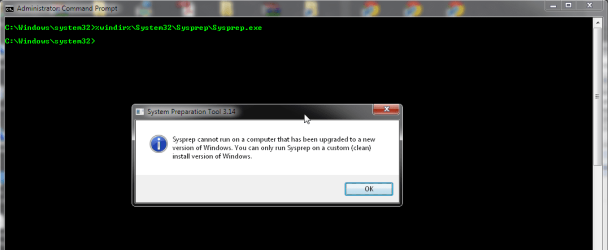
I am getting the following error:

sysprep_.png
"Sysprep cannot run on a computer that has been upgraded to a new version of windows. You can only run sysprep on a custom (clean) install version of windows."

First i thought it was because of service pack 1 - so i uninstalled that.
But after successfull uninstall, i still get the above error.

The version is Windows 7 Ultimate x64 OEM - and it was installed originally as a clean install - not an update. (i was using XP before)

So im kinda stuck here, as the OS won't allow me to run the sysprep...and the new machine is laughing away right next to me. :confused:

EDIT - a few hours later:

Remove this key:
hkey_local_machine\system\setup\ dword: upgrade
...and then give sysprep another go.

Will be interesting if it works - but i will update this thread later on, when i know more.

(Why the heck an "upgrade"-dword-value has been set, when it was a clean install...beats me!)

:picnic:

EDIT - the day after:
Ran into the mediaplayer networkservice-problem (stop WMPNetworkSvc to get sysprep to work) - and then again, no - the generalization exited with yet another fault. And now, when i try to start sysprep, i get the dreaded "either the machine is in an invalid state or we couldn't update the recorded state, dwRet = 31" - which should point to the fact, that the system should have had Sysprep run (successfully?) three times on this image (google "slrearm" +sysprep).
You can check how many rearms you have left in win7 with cmd->slmgr /dlv
Mine says three remaining(!) - so i am totally out of ideas now *sigh* :cry:
 
Last edited:

My Computer My Computer

Computer Manufacturer/Model Number
Own build
OS
Windows 7 Ultimate x64
CPU
i5-2500k
Motherboard
Gigabyte GA-Z68XP-UD3
Memory
16 GB Kingston ddr3 @ 1333
Graphics Card(s)
Radeon HD 6870 x2
Sound Card
Creative X-Fi XtremeGamer Fatal1ty Pro
Monitor(s) Displays
24" HP and LG's
Screen Resolution
1920x1200
Hard Drives
Intel SSD 320 Series
Intel X25-M G1
Various Seagate and WD's
PSU
Corsair HX850W
Case
Nexus Prominent 9
Cooling
Zalman CNPS9900 LED
Keyboard
Logitech
Mouse
Logitech
Internet Speed
ADSL2 @ 20Mbps
Method Two

Well since I couldnt get method 1 to work I opted today to try method two, the back up to paragon was done after following the steps provided. i took the HDs and boot disk to the new machine and it booted, read the files off cd and then the screen went black.

reboot, and same thing. guess not having any luck with this method either.
 

My Computer My Computer

Computer Manufacturer/Model Number
Self built
OS
W764 & W764
CPU
AMD Phenom II X4 810 2.6ghz & AMD|PH II X6 1055T 2.8G AM3 RT
Motherboard
Asus M4A79T Deluxe & ASUS| M4A88TD-V EVO/USB3 880G
Memory
6.0 gb & 16.0 gb (64bit)
Graphics Card(s)
GForce 9800 GTX 512gb & Sapphire HD6870
Sound Card
Integrated
Monitor(s) Displays
1 32" LG 1080 TV
Screen Resolution
1920x1080
Hard Drives
(Phenom X4)
WD 10K 74 GB 3.0gb/s
WD 320 GB
2 X WD 7200 1TB 3.0gb/s
-External HDs-
3 X WD 1 TB 3.0gb/s

(Phenom X6)
WD 10K 300 GB 3.0gb/s
WD 1TB 6.0 gbs
-External HDs-
WD 1 TB 6.0gb/s thru eSATA
WD 1 TB 6.0gb/s thre USB 3.0
PSU
Corsair 750 W & CoolerMaster 700W
Case
CM690 & CM690
Cooling
Both CM690 have 7 120mm Fans
Keyboard
stock USB
Mouse
logitech wireless
Internet Speed
cable
Other Info
I do alot of Video and DVD burning
ok I was able to record some video with my camera of what what coming up prior to going black, its states:

Ancient bootloader
Probing EDD (edd=off to disable)........ok

then the screen goes black and nothing happens

not sure why it states Ancient bootloader when I just burned a cd of it.

any ideas?
 

My Computer My Computer

Computer Manufacturer/Model Number
Self built
OS
W764 & W764
CPU
AMD Phenom II X4 810 2.6ghz & AMD|PH II X6 1055T 2.8G AM3 RT
Motherboard
Asus M4A79T Deluxe & ASUS| M4A88TD-V EVO/USB3 880G
Memory
6.0 gb & 16.0 gb (64bit)
Graphics Card(s)
GForce 9800 GTX 512gb & Sapphire HD6870
Sound Card
Integrated
Monitor(s) Displays
1 32" LG 1080 TV
Screen Resolution
1920x1080
Hard Drives
(Phenom X4)
WD 10K 74 GB 3.0gb/s
WD 320 GB
2 X WD 7200 1TB 3.0gb/s
-External HDs-
3 X WD 1 TB 3.0gb/s

(Phenom X6)
WD 10K 300 GB 3.0gb/s
WD 1TB 6.0 gbs
-External HDs-
WD 1 TB 6.0gb/s thru eSATA
WD 1 TB 6.0gb/s thre USB 3.0
PSU
Corsair 750 W & CoolerMaster 700W
Case
CM690 & CM690
Cooling
Both CM690 have 7 120mm Fans
Keyboard
stock USB
Mouse
logitech wireless
Internet Speed
cable
Other Info
I do alot of Video and DVD burning
well I installed 7 againm forget about the sysprep just not working with me. anyways install is all good, but when going back to the pc that i was backing up, doesnt wantto boot, wantingto go thru a set up instead, but fails to do that and burps saying to rebootto finish setup huh. so trying to restore with PM but while looking at drive letters they are reversed, C is the 100mb reserve and D is the boot. not sure how that came about but how do I change it back? cant figure that out, the back up wants to restore in that way also. getting fed up again. it must be Saturday....
 

My Computer My Computer

Computer Manufacturer/Model Number
Self built
OS
W764 & W764
CPU
AMD Phenom II X4 810 2.6ghz & AMD|PH II X6 1055T 2.8G AM3 RT
Motherboard
Asus M4A79T Deluxe & ASUS| M4A88TD-V EVO/USB3 880G
Memory
6.0 gb & 16.0 gb (64bit)
Graphics Card(s)
GForce 9800 GTX 512gb & Sapphire HD6870
Sound Card
Integrated
Monitor(s) Displays
1 32" LG 1080 TV
Screen Resolution
1920x1080
Hard Drives
(Phenom X4)
WD 10K 74 GB 3.0gb/s
WD 320 GB
2 X WD 7200 1TB 3.0gb/s
-External HDs-
3 X WD 1 TB 3.0gb/s

(Phenom X6)
WD 10K 300 GB 3.0gb/s
WD 1TB 6.0 gbs
-External HDs-
WD 1 TB 6.0gb/s thru eSATA
WD 1 TB 6.0gb/s thre USB 3.0
PSU
Corsair 750 W & CoolerMaster 700W
Case
CM690 & CM690
Cooling
Both CM690 have 7 120mm Fans
Keyboard
stock USB
Mouse
logitech wireless
Internet Speed
cable
Other Info
I do alot of Video and DVD burning
Sorry to hear you have had some much trouble with this. I have been quite busy lately, only saw your posts now. I'll check in to this in next couple of days and post my findings here.

Kari
 

My Computer My Computer

Computer type
Laptop
Computer Manufacturer/Model Number
HP ENVY 17-1150eg
OS
Windows 10 Pro x64 EN-GB
CPU
1.6 GHz Intel Core i7-720QM Processor
Memory
6 GB
Graphics Card(s)
ATI Mobility Radeon HD 5850 Graphics
Sound Card
Beats sound system with integrated subwoofer
Monitor(s) Displays
17" laptop display, 22" LED and 32" Full HD TV through HDMI
Screen Resolution
1600*900 (1), 1920*1080 (2&3)
Hard Drives
Internal: 2 x 500 GB SATA Hard Disk Drive 7200 rpm
External: 2TB for backups, 3TB USB3 network drive for media
Cooling
As Envy runs a bit warm, I have it on a Cooler Master pad
Keyboard
Logitech diNovo Media Desktop Laser (bluetooth)
Mouse
Logitech Performance Mouse MX
Internet Speed
50/10 Mbps VDSL
Antivirus
Windows Defender 4.3.9431.0
Browser
Maxthon 3.5.2., IE11
Sorry to hear you have had some much trouble with this. I have been quite busy lately, only saw your posts now. I'll check in to this in next couple of days and post my findings here.

Kari
Tjena Kari,

I gave up on moving my installation, and am in the process of installing a fresh Windows 7 x64 on my new machine. After that has finished, i will start on the long and winding road, of re-installing apps and moving important data.

It's a shame it still has to be so hard and time-consuming, moving to new hardware...in 2011! :(
 

My Computer My Computer

Computer Manufacturer/Model Number
Own build
OS
Windows 7 Ultimate x64
CPU
i5-2500k
Motherboard
Gigabyte GA-Z68XP-UD3
Memory
16 GB Kingston ddr3 @ 1333
Graphics Card(s)
Radeon HD 6870 x2
Sound Card
Creative X-Fi XtremeGamer Fatal1ty Pro
Monitor(s) Displays
24" HP and LG's
Screen Resolution
1920x1200
Hard Drives
Intel SSD 320 Series
Intel X25-M G1
Various Seagate and WD's
PSU
Corsair HX850W
Case
Nexus Prominent 9
Cooling
Zalman CNPS9900 LED
Keyboard
Logitech
Mouse
Logitech
Internet Speed
ADSL2 @ 20Mbps
Sorry to hear you have had some much trouble with this. I have been quite busy lately, only saw your posts now. I'll check in to this in next couple of days and post my findings here.

Kari

Thats just lovely...is there anyone else available who can help? I have one Computer down (main PC), one trying to install a backup (failed twice, going on third), and down to my laptop.....

My only question is now....how to undo the sysprep on Main had drive, the one i was trying to move to new PC. Problem i am having is that the main drive will not return to state, as it keeps attempting to go thru setup, which is supposed to on the new machine. In fact i did try it on new machine but after the splash screen I got a BSOD, so fast unreadable. I gave up there.

I did though after creating an image backup thru Paragon, back the same image to another HD, and thats what I am trying to do now with the new machine but it threw me an error saying an archive is invalid!

So needless to say I am stuck...

Unless someone can tell me how to transfer files from that main hard drive to the new PC, including the WLM messages, accounts, etc?? as i tried to look but cant find them..

Thanks whoever answers, today is the start of Football and I'm stuck at my PC...
 

My Computer My Computer

Computer Manufacturer/Model Number
Self built
OS
W764 & W764
CPU
AMD Phenom II X4 810 2.6ghz & AMD|PH II X6 1055T 2.8G AM3 RT
Motherboard
Asus M4A79T Deluxe & ASUS| M4A88TD-V EVO/USB3 880G
Memory
6.0 gb & 16.0 gb (64bit)
Graphics Card(s)
GForce 9800 GTX 512gb & Sapphire HD6870
Sound Card
Integrated
Monitor(s) Displays
1 32" LG 1080 TV
Screen Resolution
1920x1080
Hard Drives
(Phenom X4)
WD 10K 74 GB 3.0gb/s
WD 320 GB
2 X WD 7200 1TB 3.0gb/s
-External HDs-
3 X WD 1 TB 3.0gb/s

(Phenom X6)
WD 10K 300 GB 3.0gb/s
WD 1TB 6.0 gbs
-External HDs-
WD 1 TB 6.0gb/s thru eSATA
WD 1 TB 6.0gb/s thre USB 3.0
PSU
Corsair 750 W & CoolerMaster 700W
Case
CM690 & CM690
Cooling
Both CM690 have 7 120mm Fans
Keyboard
stock USB
Mouse
logitech wireless
Internet Speed
cable
Other Info
I do alot of Video and DVD burning

My Computer My Computer

Computer Manufacturer/Model Number
Self built
OS
W764 & W764
CPU
AMD Phenom II X4 810 2.6ghz & AMD|PH II X6 1055T 2.8G AM3 RT
Motherboard
Asus M4A79T Deluxe & ASUS| M4A88TD-V EVO/USB3 880G
Memory
6.0 gb & 16.0 gb (64bit)
Graphics Card(s)
GForce 9800 GTX 512gb & Sapphire HD6870
Sound Card
Integrated
Monitor(s) Displays
1 32" LG 1080 TV
Screen Resolution
1920x1080
Hard Drives
(Phenom X4)
WD 10K 74 GB 3.0gb/s
WD 320 GB
2 X WD 7200 1TB 3.0gb/s
-External HDs-
3 X WD 1 TB 3.0gb/s

(Phenom X6)
WD 10K 300 GB 3.0gb/s
WD 1TB 6.0 gbs
-External HDs-
WD 1 TB 6.0gb/s thru eSATA
WD 1 TB 6.0gb/s thre USB 3.0
PSU
Corsair 750 W & CoolerMaster 700W
Case
CM690 & CM690
Cooling
Both CM690 have 7 120mm Fans
Keyboard
stock USB
Mouse
logitech wireless
Internet Speed
cable
Other Info
I do alot of Video and DVD burning
Back
Top