Install Windows 7 FAST without a DVD or USB device

How to Install Windows 7 FAST without a DVD or USB Device

   Information

So far we've seen tutorials for installing Windows 7 in quite a few different ways. All of them require boot media like a DVD or USB key. All of them use the Windows 7 installer. All of them require you to upgrade or replace your existing Windows 7 installation. All of them are relatively slow. All of them are using technology designed by Microsoft for clueless end-users.

This method uses technology designed for advanced users; OEMs like Dell, big IT departments and experts like us. It doesn't require extra bootable media and it leaves your existing Windows install intact. It's fast, it's flexible and it's all command line suitable for scripting.


Let's start with the assumption that you've got a single hard disk with one big partition, it's not full, and you're already running some build of Windows 7 or Vista. If you've got more than one partition and can't figure out how to modify the steps in this tutorial to accommodate that please post a comment and I'll add the steps. The same goes for other hard disks. The only hard requirement is that you be running Windows 7 or Vista. We need to make room for the new Windows 7 install so we start by running DISKPART. Open Start, type diskpart and press Enter.

Code:
Microsoft DiskPart version 6.1.7100
Copyright (C) 1999-2008 Microsoft Corporation.
On computer: ORION7
 
DISKPART> lis vol
 
  Volume ###  Ltr  Label        Fs     Type        Size     Status     Info
  ----------  ---  -----------  -----  ----------  -------  ---------  --------
  Volume 0     F                       DVD-ROM         0 B  No Media
  Volume 1     E                       DVD-ROM         0 B  No Media
  Volume 2     C   7            NTFS   Partition     16 GB  Healthy    System
  Volume 3     D   Data         NTFS   Partition    263 GB  Healthy
  Volume 4     G                       Removable       0 B  No Media
 
DISKPART> sel vol 3
 
Volume 3 is the selected volume.
 
DISKPART> shr minimum=10240 desired=16384
 
DiskPart successfully shrunk the volume by:   16 GB
 
DISKPART> cre par pri
 
DiskPart succeeded in creating the specified partition.
 
DISKPART> for fs=ntfs quick label="7new"
 
  100 percent completed
 
DiskPart successfully formatted the volume.
 
DISKPART> ass
 
DiskPart successfully assigned the drive letter or mount point.
 
DISKPART> act
 
DiskPart marked the current partition as active.
 
DISKPART> lis vol
 
  Volume ###  Ltr  Label        Fs     Type        Size     Status     Info
  ----------  ---  -----------  -----  ----------  -------  ---------  --------
  Volume 0     F                       DVD-ROM         0 B  No Media
  Volume 1     E                       DVD-ROM         0 B  No Media
  Volume 2     C   7            NTFS   Partition     16 GB  Healthy    System
  Volume 3     D   Data         NTFS   Partition    247 GB  Healthy
  Volume 4     G                       Removable       0 B  No Media
* Volume 5     H   7new         NTFS   Partition     15 GB  Healthy
 
DISKPART> exi

  • Select the volume to shrink from the list with "sel vol"
  • Specify the minimum and desired volume size in megabytes with "shr"
  • Specify your own label for the new volume with "for"
  • Make note of the drive letter of the starred volume after "ass"
Now crack open a Windows 7 ISO and extract the file \sources\install.wim. I just mount the file directly with CloneDrive: elby Free Software but your favorite ISO or archive program should be able to do this as well. Download View attachment imagex.zip, extract and open an elevated command prompt there.
Code:
D:\Mike\Desktop\work>imagex /apply e:\sources\install.wim 5 h:\
 
ImageX Tool for Windows
Copyright (C) Microsoft Corp. All rights reserved.
 
[ 100% ] Applying progress
 
Successfully applied image.
 
Total elapsed time: 7 min 8 sec
 
 
D:\Mike\Desktop\work>h:\windows\system32\bcdboot h:\windows
 
Boot files successfully created.

Now reboot and a few minutes (less than 5 on my box) later you'll be prompted for locale info and to create a user. Welcome to your new Windows 7 installation.

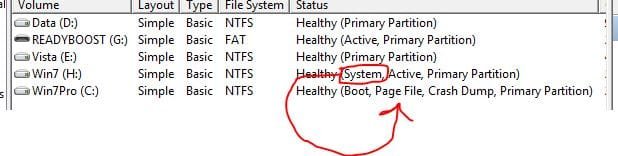
To toggle back and forth between this new installation and the original one use diskpart.
Code:
Microsoft DiskPart version 6.1.7100
Copyright (C) 1999-2008 Microsoft Corporation.
On computer: ORION7
 
DISKPART> lis vol
 
  Volume ###  Ltr  Label        Fs     Type        Size     Status     Info
  ----------  ---  -----------  -----  ----------  -------  ---------  --------
  Volume 0     F                       DVD-ROM         0 B  No Media
  Volume 1     E   GRC1CULFRER  UDF    DVD-ROM     2413 MB  Healthy
  Volume 2     C   7            NTFS   Partition     16 GB  Healthy    System
  Volume 3     D   Data         NTFS   Partition    247 GB  Healthy
  Volume 4     H                NTFS   Partition     15 GB  Healthy
  Volume 5     G                       Removable       0 B  No Media
 
DISKPART> sel vol 2
 
Volume 2 is the selected volume.
 
DISKPART> act
 
DiskPart marked the current partition as active.


DISKPART> exi
  • Select the volume containing the Windows installation you want to start from the list with "sel vol"
Please post issues, questions or other feedback here.


Last edited by a moderator:

My Computer My Computer

At a glance

El Capitan / Windows 10i7-4980HQ16GBIris 5200
Computer type
Laptop
Computer Manufacturer/Model Number
Apple
OS
El Capitan / Windows 10
CPU
i7-4980HQ
Memory
16GB
Graphics Card(s)
Iris 5200
imagex not working for me :S
just blinks a black screen once and then nothing happens..:( :S
help urgently
 

My Computer My Computer

At a glance

Windows 7 ultimate 7260 x32
OS
Windows 7 ultimate 7260 x32
imagex not working for me :S
just blinks a black screen once and then nothing happens..:( :S
help urgently

start an elevated command prompt and then navigate to the directory that imagex.exe is in. Remember, this tutorial was not intended for novices (no offense).
 

My Computer My Computer

At a glance

XP, Seven, 2008R2AMD, Intel, VIACorsair, Kingston, etc.ATI, NVIDIA
Computer Manufacturer/Model Number
Too many to list.
OS
XP, Seven, 2008R2
CPU
AMD, Intel, VIA
Motherboard
Various
Memory
Corsair, Kingston, etc.
Graphics Card(s)
ATI, NVIDIA
Monitor(s) Displays
Samsung
Hard Drives
Maxtor, Western Digital
Keyboard
qwerty
Internet Speed
22 Mb/s @ home, 1 Gb/s @ server
Other Info
All of my systems still run fastest on XP 32-bit for the most part. Win7 is fun to play with, but I still prefer XP for raw speed, security, and functionality.
start an elevated command prompt and then navigate to the directory that imagex.exe is in. Remember, this tutorial was not intended for novices (no offense).

Thanks!
 

My Computer My Computer

At a glance

El Capitan / Windows 10i7-4980HQ16GBIris 5200
Computer type
Laptop
Computer Manufacturer/Model Number
Apple
OS
El Capitan / Windows 10
CPU
i7-4980HQ
Memory
16GB
Graphics Card(s)
Iris 5200

My Computer My Computer

At a glance

XP, Seven, 2008R2AMD, Intel, VIACorsair, Kingston, etc.ATI, NVIDIA
Computer Manufacturer/Model Number
Too many to list.
OS
XP, Seven, 2008R2
CPU
AMD, Intel, VIA
Motherboard
Various
Memory
Corsair, Kingston, etc.
Graphics Card(s)
ATI, NVIDIA
Monitor(s) Displays
Samsung
Hard Drives
Maxtor, Western Digital
Keyboard
qwerty
Internet Speed
22 Mb/s @ home, 1 Gb/s @ server
Other Info
All of my systems still run fastest on XP 32-bit for the most part. Win7 is fun to play with, but I still prefer XP for raw speed, security, and functionality.
AHH!!!!

I tried doing this with the win 7 professional upgrade I download

when I rebooted I got bootmgr is missing press ctrl+alt+del to restart

it worked fine when I followed these instructions with the enterprise demo download

what can I do now I don't have another computer

looks like I'm hosed :(
 

My Computer My Computer

At a glance

Windows 7 Professional 32 Bit2 GBnVidia GeForce Go 7600
Computer Manufacturer/Model Number
HP DV9033CL
OS
Windows 7 Professional 32 Bit
Memory
2 GB
Graphics Card(s)
nVidia GeForce Go 7600
Sound Card
Conexant HD Audio Board
Screen Resolution
1440x900
Internet Speed
aDSL 1.5Mbps / 256 Kbps
After spending hours putting the vista recovery iso on my usb drive so that it was bootable, I'm back up.

it turns out image #1 is the starter edition, so I'm guessing the professional is maybe #4?
 

My Computer My Computer

At a glance

Windows 7 Professional 32 Bit2 GBnVidia GeForce Go 7600
Computer Manufacturer/Model Number
HP DV9033CL
OS
Windows 7 Professional 32 Bit
Memory
2 GB
Graphics Card(s)
nVidia GeForce Go 7600
Sound Card
Conexant HD Audio Board
Screen Resolution
1440x900
Internet Speed
aDSL 1.5Mbps / 256 Kbps
Alright every time I set my new win7 partition as the active one when I reboot I get the bootmgr is missing.

How do I get the bootmgr to my new partition so I can clean up my old one.

I already edited msconfig so that my new win7 part is the only os listed

Please help thanks
Code:
Windows Boot Manager
--------------------
identifier              {bootmgr}
device                  partition=H:
description             Windows Boot Manager
locale                  en-us
inherit                 {globalsettings}
default                 {current}
resumeobject            {9e7349cd-abc0-11de-8460-b63e22d03d77}
displayorder            {9e7349ce-abc0-11de-8460-b63e22d03d77}
                        {current}
toolsdisplayorder       {memdiag}
timeout                 10

Windows Boot Loader
-------------------
identifier              {9e7349ce-abc0-11de-8460-b63e22d03d77}
device                  partition=H:
path                    \windows\system32\winload.exe
description             Windows 7
locale                  en-us
inherit                 {bootloadersettings}
osdevice                partition=H:
systemroot              \windows
resumeobject            {9e7349cd-abc0-11de-8460-b63e22d03d77}
nx                      OptIn
numproc                 2
detecthal               Yes
usefirmwarepcisettings  No

Windows Boot Loader
-------------------
identifier              {current}
device                  partition=C:
path                    \windows\system32\winload.exe
description             Windows 7
locale                  en-US
inherit                 {bootloadersettings}
recoverysequence        {9e7349cb-abc0-11de-8460-b63e22d03d77}
recoveryenabled         Yes
osdevice                partition=C:
systemroot              \windows
resumeobject            {9e7349c9-abc0-11de-8460-b63e22d03d77}
nx                      OptIn
numproc                 2
usefirmwarepcisettings  No
see there the bootmgr remains on my first partion, so if I try to make new partion active the bootmgr is missing
 

Attachments

  • boot.JPG
    boot.JPG
    25.3 KB · Views: 448
Last edited:

My Computer My Computer

At a glance

Windows 7 Professional 32 Bit2 GBnVidia GeForce Go 7600
Computer Manufacturer/Model Number
HP DV9033CL
OS
Windows 7 Professional 32 Bit
Memory
2 GB
Graphics Card(s)
nVidia GeForce Go 7600
Sound Card
Conexant HD Audio Board
Screen Resolution
1440x900
Internet Speed
aDSL 1.5Mbps / 256 Kbps
Alright every time I set my new win7 partition as the active one when I reboot I get the bootmgr is missing.

How do I get the bootmgr to my new partition so I can clean up my old one.

I already edited msconfig so that my new win7 part is the only os listed

Please help thanks

see there the bootmgr remains on my first partion, so if I try to make new partion active the bootmgr is missing
BFG;

I don't see the 100MB partition 7 creates during installation? When that small partition is active, the computer boots to it, shows you the OS menu, and allows you to select which OS to run. If you were to make another partition active, it would also have to have the Bootmgr installed in the partition or you would get the bootmgr missing because it is not there. After the first OS has been installed, you only need to tell the BOOTMANAGER where to find additional OSs and include them in the Bootmanager menu, you do not need to make the other partitions active. Doing so only confuses your computer.

Cheers!
Robert
 

My Computer My Computer

At a glance

...
OS
...

My Computer My Computer

At a glance

Win7 Pro; Linux Mint 7E8500 @ 3.8GHzCorsair XMS2 2GB @800MHzNvidia 9800GT
Computer Manufacturer/Model Number
Self-built
OS
Win7 Pro; Linux Mint 7
CPU
E8500 @ 3.8GHz
Motherboard
Asus P5QL PRO
Memory
Corsair XMS2 2GB @800MHz
Graphics Card(s)
Nvidia 9800GT
Sound Card
onboard
Hard Drives
Western Digital Caviar 500GB x2
thanx a lotttt.
 

My Computer My Computer

At a glance

Windows 7
OS
Windows 7
Right after I did a fresh install of my copy of Windows 7, I activated it then I immediately created a Backup Disk Image and saved it on my Backup Drive. Wouldn't this be like the same thing except maybe take a little longer?
 

My Computer My Computer

At a glance

Microsoft Windows 7 Ultimate 64-bit Edition w...Intel Core i7-6950X Extreme Edition OC 4.20GH...Corsair Dominator Platinum 128GB (8×16GB) DDR...EVGA GTX 980 Ti Classified Video Cards in 2-W...
Computer type
PC/Desktop
Computer Manufacturer/Model Number
X-Class MKII
OS
Microsoft Windows 7 Ultimate 64-bit Edition w/ SP1 RTM build 7601.17514
CPU
Intel Core i7-6950X Extreme Edition OC 4.20GHz 10-Core CPU
Motherboard
EVGA X99 Classified E-ATX Motherboard
Memory
Corsair Dominator Platinum 128GB (8×16GB) DDR4 Memory Kit
Graphics Card(s)
EVGA GTX 980 Ti Classified Video Cards in 2-Way SLI
Sound Card
Creative Sound Core3D On-Board Audio Processor
Monitor(s) Displays
Sony KDL32EX400 Bravia EX400 32" Full HD 1080p LCD TV
Screen Resolution
1920×1200
Hard Drives
×1 Samsung 950 PRO M.2 512GB SSD
×2 Intel 540s Series 240GB SSD in RAID0
×1 WD Black 2TB Storage HDD
×1 WD Black 4TB Storage HDD
PSU
Corsair Pro Series AX1500i Digital Power Supply
Case
Corsair Obsidian Series 800D Black Full-Tower with Window
Cooling
Full Custom Liquid Cooling Loop
Keyboard
Logitech G19 Gaming Keyboard
Mouse
Logitech G502 Laser Gaming Mouse
How about file in there, when Volume 3 Data get shrunk to be new partition (volume 5)? is there any file or Vol 3 already empty before we shrunk?
 

My Computer My Computer

At a glance

xp
OS
xp
Can I use a partition manager program to create a primary 16GB partition and make it active and then go with the Imagex and bcdboot part? Not that I don't know how to use diskpart but in these cases I always prefer having a graphic view of what I'm doing so I'm sure no mistakes are made.

Another question is : I actually have a Windows 7 x64 running on a AHCI drive but it's giving me a lot of troubles and I want to do a clean install but setting my boot partition back to native IDE. Now, if I create this windows installation currently running AHCI, reboot, change to native IDE, will I have problems with the Windows Installation I created or it doesn't matter?

Thanks :)
 

My Computer My Computer

At a glance

Windows 7 Home Premium x64Intel(R) Core(TM) i5 CPU 660 @ 3.33GHz, 2 cor...Corsair CMT8GX3M2A1866C9 Dominator GT 8GB 186...ASUS GeForce GTX 770 DIrectCU II (GTX770-DC2O...
Computer type
PC/Desktop
Computer Manufacturer/Model Number
Custom Build
OS
Windows 7 Home Premium x64
CPU
Intel(R) Core(TM) i5 CPU 660 @ 3.33GHz, 2 cores, 4 l.p.
Motherboard
Asus P7P55D-E
Memory
Corsair CMT8GX3M2A1866C9 Dominator GT 8GB 1866MHz C9 DDR3
Graphics Card(s)
ASUS GeForce GTX 770 DIrectCU II (GTX770-DC2OC-2GD5)
Sound Card
NVIDIA High Definition Audio
Monitor(s) Displays
LG 23EA93-P UltraWide IPS Monitor 21:9
Screen Resolution
2560x1080 HDMI(60hz)
Hard Drives
- Primary(Boot) : Samsung SSD 840 EVO (120GB)
- WDC WD10EADS-00L5B1 ATA Device (931 GB, IDE)
- oxSATA OEM Ext Hard Disk (5YD2D1AQ) [UPT] (2 TB, USB 3.0)
PSU
LC Power ATX 750W V2.2 Prophecy 2 Active PFC
Case
Cooler Master HAF XM RC-922XM-KKN1
Keyboard
Logitech Compact Keyboard K300
Mouse
Logitech Laser Mouse
Internet Speed
Fiber Optic 100/10 Mbps
I've revisited this tutorial for a project I was doing prepping several hard drives for quick W7 installations. One of them would not boot; no way, no how. Spent most of today on that one.

Turns out I needed to rebuild the MBR, which Partition Wizard did in a couple seconds. Then everything worked perfect.

So, I thought I would throw that tidbit on here, in case someone else runs into a similar no-boot problem.

During my experiments, I was able to do this procedure and create the 100MB System Reserved Partition. That was for a case where I will need BitLocker. I first created the 100MB partition and used the remainder of the HDD for the OS. bcdboot would not copy the appropriate files doing it from my bench computer but it did by running the command from the install disc with the HDD in the target computer.
Tom
 

My Computer My Computer

At a glance

W8 Pro, W7 Ultimate, XP Pro x64, Vista x64, U...Q6600, Q6700, T7500, T7500, N270, N2708GB, 8GB, 4GB, 4GB, 2GB, 2GBATI, nVidia, nVidia, nVidia, Intel, Intel
Computer type
PC/Desktop
Computer Manufacturer/Model Number
Dell: XPS 420 (2), XPS M1330 (several), XPS 14z, Mini 9, Mini 10v
OS
W8 Pro, W7 Ultimate, XP Pro x64, Vista x64, Ubuntu
CPU
Q6600, Q6700, T7500, T7500, N270, N270
Motherboard
Dell
Memory
8GB, 8GB, 4GB, 4GB, 2GB, 2GB
Graphics Card(s)
ATI, nVidia, nVidia, nVidia, Intel, Intel
Monitor(s) Displays
Dell 2408WFP
Hard Drives
A drawer full. OCZ Vertex's in RAID 0. Vertex 3's, Vertex 4, Samsung 830's, Samsung 840's, Intel 330. Don't use dino drives any more except for servers.
Keyboard
Logitech Wave
Internet Speed
29 Mbps DL / .95 Mbps UL
Other Info
New project(2013)...Another low power server. Zotac H67ITX, i3-2100T, Windows Server 2012 Essentials on Samsung SSD.
Previous project...Low power (38-40 watts using Kill-a-Watt) Windows Home Server. Zotac ION (Atom 330, GeForce9400), 4GB RAM, 2x2TB WD Green, IN WIM miniITX Case. Fits on a shelf in laundry closet, practically silent.
Win 7 Clean install on a XP machine

Can I do a clean install on an XP machine. I have an OEM disk that will boot but stops just before the text message that says "loading Temp files". I can go into the DVD with explorer and click on "setup" and the installation begins. Will this method be OK?

I also have another internal HD that I can put the installation files on (in a folder) and do the same thing. It appears that this will work. Aty least I can click on the "setup" file and the installion begins. I don't wantto go throufg the entire setup until I purchase license key. Is that OK?

I will be installing Win 7 Pro to a machine that has WXP SP3 on it.
 

My Computer My Computer

At a glance

W7 Ultimate2.2 bh Intel Core i3-2330M4MBOn Board
Computer type
Laptop
Computer Manufacturer/Model Number
Asus
OS
W7 Ultimate
CPU
2.2 bh Intel Core i3-2330M
Motherboard
Asustek Computer Inc. P53E 1.0
Memory
4MB
Graphics Card(s)
On Board
Sound Card
On Board
Monitor(s) Displays
On Board
Screen Resolution
1366 X 768
Hard Drives
ST9500423AS
ST2000DM USB Backup Drive External
I need some help

Hi everyone, I tried this one (on a Virtual PC with 256 MB RAM), it worked until ImageX, it "installed" Windows 7 to an other drive (G:\) but I can't boot it up, bcdboot didn't work, I made boot files with EasyBCD but always just XP starts and the boot manager doesn't change. If I set Windows 7 to default, just XP starts.

Please help me!
 

My Computer My Computer

At a glance

Windows XP1.83 GhZ512 MB
OS
Windows XP
CPU
1.83 GhZ
Memory
512 MB
Hi everyone, I tried this one (on a Virtual PC with 256 MB RAM), it worked until ImageX, it "installed" Windows 7 to an other drive (G:\) but I can't boot it up, bcdboot didn't work, I made boot files with EasyBCD but always just XP starts and the boot manager doesn't change. If I set Windows 7 to default, just XP starts.

Please help me!

Did you put the boot files (bootmgr and \Boot\ folder) in the Windows 7 partition and is that partition marked active?
 

My Computer My Computer

At a glance

W8 Pro, W7 Ultimate, XP Pro x64, Vista x64, U...Q6600, Q6700, T7500, T7500, N270, N2708GB, 8GB, 4GB, 4GB, 2GB, 2GBATI, nVidia, nVidia, nVidia, Intel, Intel
Computer type
PC/Desktop
Computer Manufacturer/Model Number
Dell: XPS 420 (2), XPS M1330 (several), XPS 14z, Mini 9, Mini 10v
OS
W8 Pro, W7 Ultimate, XP Pro x64, Vista x64, Ubuntu
CPU
Q6600, Q6700, T7500, T7500, N270, N270
Motherboard
Dell
Memory
8GB, 8GB, 4GB, 4GB, 2GB, 2GB
Graphics Card(s)
ATI, nVidia, nVidia, nVidia, Intel, Intel
Monitor(s) Displays
Dell 2408WFP
Hard Drives
A drawer full. OCZ Vertex's in RAID 0. Vertex 3's, Vertex 4, Samsung 830's, Samsung 840's, Intel 330. Don't use dino drives any more except for servers.
Keyboard
Logitech Wave
Internet Speed
29 Mbps DL / .95 Mbps UL
Other Info
New project(2013)...Another low power server. Zotac H67ITX, i3-2100T, Windows Server 2012 Essentials on Samsung SSD.
Previous project...Low power (38-40 watts using Kill-a-Watt) Windows Home Server. Zotac ION (Atom 330, GeForce9400), 4GB RAM, 2x2TB WD Green, IN WIM miniITX Case. Fits on a shelf in laundry closet, practically silent.
Hi everyone, I tried this one (on a Virtual PC with 256 MB RAM), it worked until ImageX, it "installed" Windows 7 to an other drive (G:\) but I can't boot it up, bcdboot didn't work, I made boot files with EasyBCD but always just XP starts and the boot manager doesn't change. If I set Windows 7 to default, just XP starts.

Please help me!

Did you put the boot files (bootmgr and \Boot\ folder) in the Windows 7 partition and is that partition marked active?
There is a boot folder in the "G:\WINDOWS" folder (G:\Windows\Boot) but there isn't any "G:\Boot" folder.

How can I solve this problem?
I'm going to mark that partition as active.

EDIT: Okay, I marked that partition as active!

Additional information: If I change the First Boot Device to the second hard drive, when it starts I get this error:

Code:
NTLDR is missing
Press Ctrl+Alt+Del to restart

EDIT #2: Ok, Windows 7's recovery tools solved the problem, anyway, thank you :)
 
Last edited:

My Computer My Computer

At a glance

Windows XP1.83 GhZ512 MB
OS
Windows XP
CPU
1.83 GhZ
Memory
512 MB
Back
Top