NSM
New member
- Local time
- 7:31 PM
- Messages
- 8
Trying to solve a complex and frustrating problem with home folder mappings for my school district and am stumped. Any help is appreciated.
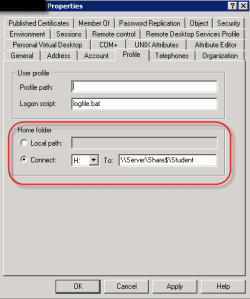
I am doing basic home folder mapping in an Active Directory domain for users on the profile tab of their user account. We are mapping H to \\Server\Share$\User. Server is Windows Server 2008 R2 in a VMWare High Availability Cluster. Very vanilla method of doing this.
Our wireless users (HP laptops (staff) or Lenovo netbooks (students)) are booting up from their machine being off. Many times the home folder (H) is not mapped when the user logs in. Sometimes it does map and there is no pattern.
The staff and students map to two different shares on the same (virtual) server (and SAN). This happens during non peak hours too such as a Sunday afternoon when just a small handful of staff members are on the network so there is not a capacity or overload problem.
Usually if the user logs out and then right back in the drive will map fine. Sometimes it does not however.
The same students can login all day long to media center or lab computers (with an Ethernet connection) and never have an issue with a missing home folder. Staff members assigned a desktop never have a problem either.
The same image build of Windows 7 was deployed to both staff laptops and desktops and a similar image build of Windows 7 was deployed on both student laptops and desktops.
While staff have assigned machines and could be logging in with a cached profile, students roam between machines and usually do not have a cached profile.
Additionally, a simple batch script called on the same profile tab works flawlessly every time. (The batch file is a simple echo statement appending the date, time, user, and computer name to a text file located on a domain controller. It is an easy way to track a user rather than digging through security logs.)
Also a group policy user preference mapping two drives for staff or one drive for students works fine every time. Very frustrating...
The wireless network is a large infrastructure across the entire district and is new this year. While the laptops are new this year too, it would seems to point to a wireless issue. The vendor has suggested that UDP packets are being sent for the mapping and that they are being lost but I cannot see anyway to force TCP only as they are suggesting.
I think it would be helpful if I could do verbose logging of the logon process on the client laptops but my Winlogon event log is always empty. The old tried and true method (How to enable user environment debug logging in retail builds of Windows) was depreciated in Windows 7.
Any suggestions on how to enable verbose debugging during the login process on Windows 7?
Sorry for the complex and long winded problem. It is a rather frustrating issue in an environment of several thousand users where nobody has any idea and everyone is looking for me to resolve the issue. My days have been very long for the past three weeks.
I am doing basic home folder mapping in an Active Directory domain for users on the profile tab of their user account. We are mapping H to \\Server\Share$\User. Server is Windows Server 2008 R2 in a VMWare High Availability Cluster. Very vanilla method of doing this.
Our wireless users (HP laptops (staff) or Lenovo netbooks (students)) are booting up from their machine being off. Many times the home folder (H) is not mapped when the user logs in. Sometimes it does map and there is no pattern.
The staff and students map to two different shares on the same (virtual) server (and SAN). This happens during non peak hours too such as a Sunday afternoon when just a small handful of staff members are on the network so there is not a capacity or overload problem.
Usually if the user logs out and then right back in the drive will map fine. Sometimes it does not however.
The same students can login all day long to media center or lab computers (with an Ethernet connection) and never have an issue with a missing home folder. Staff members assigned a desktop never have a problem either.
The same image build of Windows 7 was deployed to both staff laptops and desktops and a similar image build of Windows 7 was deployed on both student laptops and desktops.
While staff have assigned machines and could be logging in with a cached profile, students roam between machines and usually do not have a cached profile.
Additionally, a simple batch script called on the same profile tab works flawlessly every time. (The batch file is a simple echo statement appending the date, time, user, and computer name to a text file located on a domain controller. It is an easy way to track a user rather than digging through security logs.)
Also a group policy user preference mapping two drives for staff or one drive for students works fine every time. Very frustrating...
The wireless network is a large infrastructure across the entire district and is new this year. While the laptops are new this year too, it would seems to point to a wireless issue. The vendor has suggested that UDP packets are being sent for the mapping and that they are being lost but I cannot see anyway to force TCP only as they are suggesting.
I think it would be helpful if I could do verbose logging of the logon process on the client laptops but my Winlogon event log is always empty. The old tried and true method (How to enable user environment debug logging in retail builds of Windows) was depreciated in Windows 7.
Any suggestions on how to enable verbose debugging during the login process on Windows 7?
Sorry for the complex and long winded problem. It is a rather frustrating issue in an environment of several thousand users where nobody has any idea and everyone is looking for me to resolve the issue. My days have been very long for the past three weeks.
My Computer
- OS
- Windows 7 Professional, Windows Server 2008 R2, VMWare 4.1, HP Servers
- Internet Speed
- 25 MB Ethernet Fiber