Stop saving files to the root of the C: drive, there I said.
We are not tyros here; so we are not talking about saving a letter we wrote to Aunt Matilda. I like to write a short note on the root of every partition (I have about 16 of them, with various OS's on them) saying what partition it is - you know, like "SATA 3 80Gb drive, 3rd Primary". This is because Windows in particular tries to confuse us by inconsistent drive lettering depending which version I boot.
There are a few ways to make this task easier. You can create a shortcut to notepad (or your favorite editor). Modify that shortcut to run as admin. When you want to add/edit files in the root (or other protected areas), open the editor with that shortcut.
I keep several text files in the root of lots of computers. Things like batch files that set static IPs to the computer or restart the computer or disconnect an RDP session while leaving the remote computer unlocked. I have to edit those from time to time. It is easy to edit them from a different computer that is connected via the admin share. That way, my text editor (or script) does not have to run as admin on my local computer.
Do you think you have access to the system directories on Unix/Linux even with an Admin account? No you do not! That is were the "root" account comes into play.
I am not convinced you know what you are talking about. You can always name an account in Linux as "Admin" but there will be nothing special about it. The Linux equivalent of the Windows "Administrator" is "root". If you log in to the Linux "root" account you can write, delete and edit whatever you want, including writing to the root directory (equivalent to the Windows C:\) which in my case is in its own partition. Perhaps you have only experienced a dumbed-down version of Linux, like Zorin or Ubuntu? I just tried it, successfully, in Debian, as you sounded so convincing.
In fact one solution to the problem of writing to the Windows C:\ would be to boot Linux (maybe from a live disk) and do it from there.
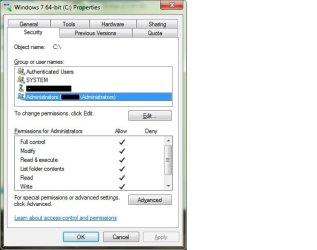
In Windows 7, by default, members* of the group named
Administrators normally start apps as if they are not an administrator [e.g. the apps are not using an admin security token]. A user logged on with an account* that is in the group named
Administrators will still need to tell the operating system to start an app with admin rights.
*except the built in user account named
Administrator.
By default, the built in user account named
Administrator is disabled. If you enable and log on to that account**, then most apps that you start (and most infections) can write to protected file areas like the root, program files, windows and other folders without taking the extra step to elevate the editor to the admin level.
You can rename the built in user account named
Administrator to any name that you wish. If you rename it before using it, then the user profile folder name will agree with the new name.
**I would not recommend enabling and using that account. You are better off learning why things work the way that they do and leaving the various Windows security models in place.



 )
)