
Solved Downgrade Windows 7 x86 to x64/x32?

martin4085

New member
Local time
6:41 PM
Messages
2
Hi,

I have an Asus N61Jv Intel Core i5 M430 @ 2.27GHz - Nvidia GeForce GT 325M 1GB (also integrated? Intel HD Graphics) - 8GB RAM

Im having troubles with a couple of games, where I believe they arent chosing the better GPU (325M).
Example;

I scan my PC on CanYouRunIt and this is what I get on Dead Island,
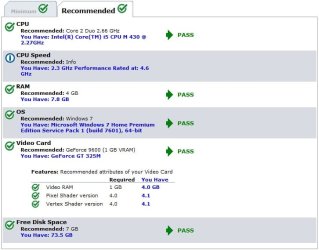
canyourunit.jpg

When I go in-game though, it's kinda choppy, lag-like, slower than it should run.

I cant figure out how I force/chose prefered GPU, i've been on Nvidia control panel but im not sure if it's showing every option on there. (strange)
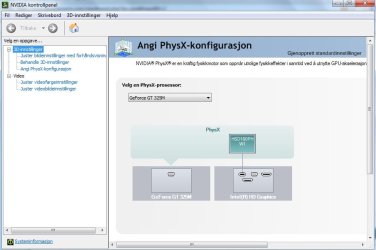
gpu.jpg

It seems like I have Windows x86.
I read at some post I found through google that someone else had Windows x86 and had same kind of problems (on a different system though).
He wrote:

"I solved the problem by installing windows 7 x64. I had windows 7 x86, and now after installing this windows it works perfect,i can use both them when i want by right-click on a game and select run with graphics processor->nvidia or intel. So at me the problem was solved after installing windows 7 ultimate x64, and x64 drivers from msi.com (my laptop is MSI). Thank you, hope my solution would help others in the future."

So I guess my question is how do I go from Windows 7 to x64?
Or, if anyone has a different solution to my problem?

Im sorry if theres an obvious answer to this, and my question is silly!

Thanks,
Martin
 

My Computer My Computer

At a glance

Windows 7 x86
OS
Windows 7 x86
You have some wrong info...
It seems like I have Windows x86.

So I guess my question is how do I go from Windows 7 to x64?
Or, if anyone has a different solution to my problem?

Im sorry if theres an obvious answer to this, and my question is silly!

Thanks,
Martin
Windows 7 is Operating System. Now, that x64 means 64 bits. So that's 64 bit version of Windows 7 OS.
(32 bit version is also known as x86,so that's same with x32 when you see that somewhere ;) )
For 32 and 64 bit version of OS's you can read more at
http://www.sevenforums.com/general-discussion/86886-32-bit-vs-64-bit-comparison.html

To see what version you have I suggest you to follow this tutorial http://www.sevenforums.com/tutorials/180324-system-info-see-your-system-specs.html and download that tool.
In tell us what is in OS part.
StalkeR.
 

My Computer My Computer

At a glance

Windows 10 Pro x64Intel Core i5 4440 @Stock4 x 4GB HyperX Fury DDR3Gigabyte GTX 1050Ti O4G
Computer type
PC/Desktop
Computer Manufacturer/Model Number
Custom Build
OS
Windows 10 Pro x64
CPU
Intel Core i5 4440 @Stock
Motherboard
Gigabyte Z97 D3H
Memory
4 x 4GB HyperX Fury DDR3
Graphics Card(s)
Gigabyte GTX 1050Ti O4G
Sound Card
Integrated
Monitor(s) Displays
Dell P2417H
Screen Resolution
1920 x 1080
Hard Drives
Samsung EVO 850 120GB / Toshiba DT01ACA050 1TB 7200prm 32MB
PSU
Riotoro Onyx 750W
Case
NZXT H500 Black-Red
Cooling
Stock CPU + NZXT 120mm + 2x120mm red fans
Keyboard
Modecom Volcano Lanparty
Mouse
Asus ROG Gladius / DeepCool E-Pad Plus
Internet Speed
DOCSIS 50/3 Mbit
Browser
Google Chrome
Other Info
Asus K55VJ(i5 3210M, GT635M / 2GB, 8GB DDR3, 500GB HDD)
CanYouRunIt appears to already indicate that you have Win7 X64. (X86 is the formal designation for the 32 bit version. It X86 refers to the Intel processor architecture going back to the old 286, while X64 refers to 64 bit instructions.)

You have a notebook with onboard Intel graphics, plus nVidia graphics. I'm not sure how to force the use of the nVidia graphics for games.
 

My Computer My Computer

At a glance

Windows 7 Pro X64 SP1Intel Core I7-3930k16 GB Gskill DDR3-2133eVGA GTX680
Computer Manufacturer/Model Number
homegrown
OS
Windows 7 Pro X64 SP1
CPU
Intel Core I7-3930k
Motherboard
Asus P9X79 Pro
Memory
16 GB Gskill DDR3-2133
Graphics Card(s)
eVGA GTX680
Sound Card
Creative X-Fi Titanium
Monitor(s) Displays
As PA246Q
Screen Resolution
1920 X 1200
Hard Drives
Corsair Force GT, 120 GB
WDC 1.5TB Caviar Black
PSU
PCP&C Silencer 750 Crossfire
Case
Silverstone FT02
Cooling
Noctua NH-D14
Keyboard
cheap Logitech USB
Mouse
Microsoft Intellimouse Explorer (old optical) USB
Internet Speed
6Mb cable
Other Info
Pioneer BDR-205
Samsung SH-203B
Monsoon 5.1 speakers
Alright, thanks for the quick replies!
System Info it tells me I have;
Microsoft Windows 7 Home Premium 64-bit 7601 Multiprocessor Free Service Pack 1.

Funny thing, straight after I made this post I rightclicked a random game and found run with graphics processor>
where I also found change standard GPU>, I located Dead Island.exe and I could chose which GPU I wanted to use (Nvidia processor with high performance).
Started up Dead Island, runs like it should, alot smoother!

Thanks for your replies guys, appreciate it!
 

My Computer My Computer

At a glance

Windows 7 x86
OS
Windows 7 x86
My pleasure . ;)
 

My Computer My Computer

At a glance

Windows 10 Pro x64Intel Core i5 4440 @Stock4 x 4GB HyperX Fury DDR3Gigabyte GTX 1050Ti O4G
Computer type
PC/Desktop
Computer Manufacturer/Model Number
Custom Build
OS
Windows 10 Pro x64
CPU
Intel Core i5 4440 @Stock
Motherboard
Gigabyte Z97 D3H
Memory
4 x 4GB HyperX Fury DDR3
Graphics Card(s)
Gigabyte GTX 1050Ti O4G
Sound Card
Integrated
Monitor(s) Displays
Dell P2417H
Screen Resolution
1920 x 1080
Hard Drives
Samsung EVO 850 120GB / Toshiba DT01ACA050 1TB 7200prm 32MB
PSU
Riotoro Onyx 750W
Case
NZXT H500 Black-Red
Cooling
Stock CPU + NZXT 120mm + 2x120mm red fans
Keyboard
Modecom Volcano Lanparty
Mouse
Asus ROG Gladius / DeepCool E-Pad Plus
Internet Speed
DOCSIS 50/3 Mbit
Browser
Google Chrome
Other Info
Asus K55VJ(i5 3210M, GT635M / 2GB, 8GB DDR3, 500GB HDD)
Back
Top