RAM - Test with Memtest86+

How to Test and Diagnose RAM Issues with Memtest86+

Contents


Part 1: Preparing the Media
Method 1: With a USB Memory Stick


1. Download the latest version of the "Auto-installer for USB Key (Win 9x/2k/xp/7)" from this link: Memtest86+ - Advanced Memory Diagnostic Tool


2. Plug in an empty USB key drive. Size is no concern, as the actual files take up 180 KB of space.​

3. Go into the .zip folder you downloaded, and double-click on the .exe file inside.​

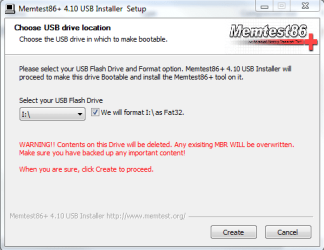
4. Follow the setup utility. To reduce the risk of problems, it is advised to format the drive.​

installer.PNG


Method 2: With a CD

1. Download the latest version of the "Precompiled Boot ISO (.zip) from this link: Memtest86+ - Advanced Memory Diagnostic Tool

You want the "Precompiled Boot ISO (.zip)".​

2. Open the .zip file you downloaded, and then drag the .ISO file inside onto the Desktop.​


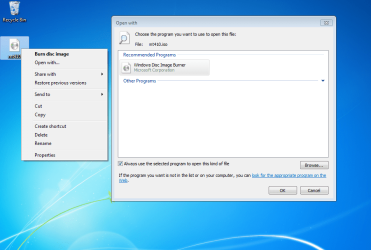
3. Right-click on the ISO, and select Open with>Windows Disc Image Burner.open with.PNG
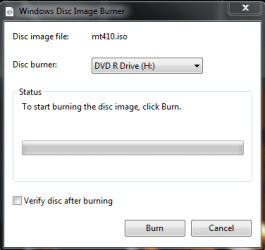
4. Insert a blank CD into the CD drive, and make sure the correct Disc burner is selected.abt2burn.PNG
5. Click on "Burn".

Now the CD is ready to use.


Part 2: Testing

1. With the CD in the drive, or the USB key inserted, reboot your computer. If Memtest does not automatically boot, go into the BIOS and change the CD drive or USB drive to be the first to boot.​

2. Memtest will immediately start testing as soon as it boots. No attendance is needed.​


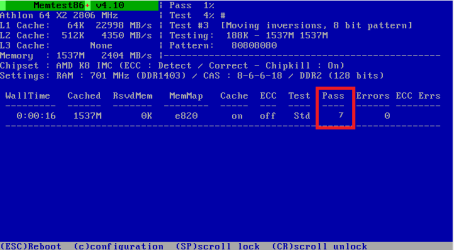
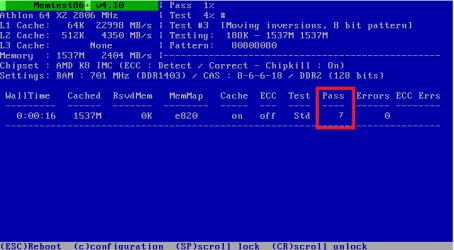
3. Let it run until at least 8 passes are completed, or errors are found (whichever comes first). The longer you run it, the better.Capture.PNG
Seven passes will take several hours, depending on your amount of RAM. It is advised to leave it running overnight.


Part 3: If You Have Errors:


The goal is to test all the RAM sticks and all the motherboard slots.​


Check your motherboard manual to ensure the RAM sticks are in the recommended motherboard slots. Some motherboards have very specific slots required for the number of RAM sticks installed.​


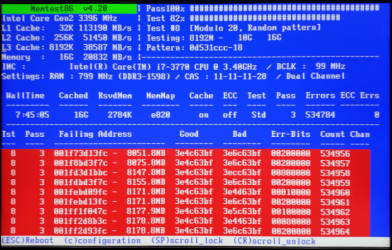
If you get errors, stop the test and continue with the next step.​


user108345_pic7120_1390783159.png


1. Remove all but one stick of RAM from your computer (this will be RAM stick #1), and run Memtest86 again, for 7 passes.​
Be sure to note the RAM stick, use a piece of tape with a number, and note the motherboard slot.
If this stick passes the test then go to step #3.


2. If RAM stick #1 has errors, repeat the test with RAM stick #2 in the same motherboard slot.​
If RAM stick #2 passes, this indicates that RAM stick #1 may be bad. If you want to be absolutely sure, re-test RAM stick #1 in another known good slot.
If RAM stick #2 has errors, this indicates another possible bad RAM stick, a possible motherboard slot failure or inadequate settings.
3. Test the next stick of RAM (stick #2) in the next motherboard slot.If this RAM stick has errors repeat step #2 using a known good stick if possible, or another stick.
If this RAM stick has no errors and both sticks failed in slot#1, test RAM stick #1 in this slot.
4. If you find a stick that passes the test, test it in all the other motherboard slots.


If Part 2 testing shows errors, and all tests in Part 3 show errors, you will need to test the RAM sticks in another computer and/or test other RAM in your computer to identify the problem.​


In this way, you can identify whether it is a bad stick of RAM, a bad motherboard, or incompatibility between the sticks.​


Thanks to Dave76 for his assistance in this part.​


   Note
While the same concept is completely valid for other operating systems, a different image burner will be needed. A good free program is ImgBurn.


Last edited by a moderator:
omg... i'm in my 26 hour running and i'm only at pass number 8 :S

Like
*****Pass complete, no errors,perss Esc to exit***** ? :D
 
Last edited by a moderator:

My Computer

OS
Windows 7 Ultimate x64
CPU
Intel i7-960 3,2ghz
Motherboard
ASUS P6T WS PRO, X58,
Memory
Corsair Dominator DHX DDR3 1333MHz 16GB
Graphics Card(s)
XFX GeForce 9800GX2 680M 1GB XXX PCI-E
Sound Card
Creative SB X-Fi Xtreme Gamer Fatal1ty
Monitor(s) Displays
2x 24" lcd
Hard Drives
1x WD 2tb
4x WD 1tb
1x Intel 120gb ssd(can't find it yet)
Case
Antec Twelve Hundred
You can stop the test after 7 passes are complete.

Memtest86+ with 7 passes.PNG
 

My Computer

Computer type
PC/Desktop
Computer Manufacturer/Model Number
76~2.0
OS
Windows 7 Ult x64 - SP1/ Windows 8 Pro x64
CPU
Intel Core i5-3570K 4.6GHz
Motherboard
Gigabyte GA-Z77X UD3H, f18
Memory
8GB (2X4GB) DDR3 1600 Corsair Vengeance CL8 1.5v
Graphics Card(s)
Sapphire HD 7770 Vapor-X OC 1GB DDR5
Sound Card
Onboard VIA VT2021
Monitor(s) Displays
22" LCD Dell
Screen Resolution
1680x1050
Hard Drives
Samsung 840Pro 128GB SSD,
Seagate Barracuda 500GB SATA2 7200rpm 32MB cache, Seagate Barracuda 1TB SATA2 7200rpm 32MB cache,
PSU
Corsair HX650W
Case
Cooler Master Storm Scout
Cooling
Corsair H80 2x12cm Noctua NF P12 , 2x14cm case fans
Keyboard
Logitech Wave
Mouse
CM Sentinel
Internet Speed
Dismal
Antivirus
Avast
Browser
Opera Next
Other Info
Haswell laptop: HP Envy 17t-j, i7-4700MQ, GeForce 740M 2GB DDR3, 17.3" Full HD 1920x1080, 16GB RAM, Samsung 840 Pro 128GB, 1TB Hitachi 7200 HDD,
Desktop: eSATA ports,
External eSATA Seagate 500GB SATA2 7200rpm,
External WD USB 500GB
omg... i'm in my 26 hour running and i'm only at pass number 8 :S

Like
*****Pass complete, no errors,perss Esc to exit***** ? :D
You're done. Waaayy done. Coulda stopped after pass 0 (one complete). :o

Congratulations, you have really well-tested, good memory! :D
 

My Computer

Computer type
Laptop
Computer Manufacturer/Model Number
Dell Latitude E6540 Laptop
OS
Windows 7 Professional 64bit
CPU
Intel Core i7 4600M @ 2.90GHz
Motherboard
Dell Inc. 0CYT5F (SOCKET 0)
Memory
16.0GB Dual-Channel DDR3 @ 797MHz (11-11-11-28)
Graphics Card(s)
Intel HD Graphics 4600 (Dell) 2048MB ATI AMD Radeon HD 8790M
Sound Card
Realtek High Definition Audio
Monitor(s) Displays
HP ZR30w (2560x1600@60Hz)
Hard Drives
256GB LITEONIT LMT-256M6M-41 mm SATA (SSD)
1TB Samsung SSD 860 EVO mSATA SATA (SSD)
2TB USB 3.0 USB Device
115GB SanDisk Ultra Fit USB
Other Info
Multiple Dell E-Port Plus II Port Replicator/Docking Stations 0Y72NH USB 3.0 + 130W AC Adapters
It's recommended to run a full 7 passes, see the first page.
The same is recommended on many sites, the errors can come on the later passes.

RAM can pass a few full 7 passes of memtest86+, only to have errors on the next pass. This means there is a problem with the RAM.

This is just the way electronics are, fickle at the best of times.
 

My Computer

Computer type
PC/Desktop
Computer Manufacturer/Model Number
76~2.0
OS
Windows 7 Ult x64 - SP1/ Windows 8 Pro x64
CPU
Intel Core i5-3570K 4.6GHz
Motherboard
Gigabyte GA-Z77X UD3H, f18
Memory
8GB (2X4GB) DDR3 1600 Corsair Vengeance CL8 1.5v
Graphics Card(s)
Sapphire HD 7770 Vapor-X OC 1GB DDR5
Sound Card
Onboard VIA VT2021
Monitor(s) Displays
22" LCD Dell
Screen Resolution
1680x1050
Hard Drives
Samsung 840Pro 128GB SSD,
Seagate Barracuda 500GB SATA2 7200rpm 32MB cache, Seagate Barracuda 1TB SATA2 7200rpm 32MB cache,
PSU
Corsair HX650W
Case
Cooler Master Storm Scout
Cooling
Corsair H80 2x12cm Noctua NF P12 , 2x14cm case fans
Keyboard
Logitech Wave
Mouse
CM Sentinel
Internet Speed
Dismal
Antivirus
Avast
Browser
Opera Next
Other Info
Haswell laptop: HP Envy 17t-j, i7-4700MQ, GeForce 740M 2GB DDR3, 17.3" Full HD 1920x1080, 16GB RAM, Samsung 840 Pro 128GB, 1TB Hitachi 7200 HDD,
Desktop: eSATA ports,
External eSATA Seagate 500GB SATA2 7200rpm,
External WD USB 500GB
Well I dunno where the "7 passes minimum" comes from; the memtest86.com help info says

Memtest86 executes indefinitely. The pass counter increments each time that all of the selected tests have been run. Generally a single pass is sufficient to catch all but the most obscure errors. However, for complete confidence when intermittent errors are suspected testing for a longer period is advised.

So how long you wanna run is up to the discretion of the tester and IMO while "overnight" is prudent if you have a questionable build or "used" memory or something, a single good pass for a brand-new set of DIMMs when you're time-constrained is not imprudent.
 

My Computer

Computer type
Laptop
Computer Manufacturer/Model Number
Dell Latitude E6540 Laptop
OS
Windows 7 Professional 64bit
CPU
Intel Core i7 4600M @ 2.90GHz
Motherboard
Dell Inc. 0CYT5F (SOCKET 0)
Memory
16.0GB Dual-Channel DDR3 @ 797MHz (11-11-11-28)
Graphics Card(s)
Intel HD Graphics 4600 (Dell) 2048MB ATI AMD Radeon HD 8790M
Sound Card
Realtek High Definition Audio
Monitor(s) Displays
HP ZR30w (2560x1600@60Hz)
Hard Drives
256GB LITEONIT LMT-256M6M-41 mm SATA (SSD)
1TB Samsung SSD 860 EVO mSATA SATA (SSD)
2TB USB 3.0 USB Device
115GB SanDisk Ultra Fit USB
Other Info
Multiple Dell E-Port Plus II Port Replicator/Docking Stations 0Y72NH USB 3.0 + 130W AC Adapters
Well I dunno where the "7 passes minimum" comes from; the memtest86.com help info says

Memtest86 executes indefinitely. The pass counter increments each time that all of the selected tests have been run. Generally a single pass is sufficient to catch all but the most obscure errors. However, for complete confidence when intermittent errors are suspected testing for a longer period is advised.
So how long you wanna run is up to the discretion of the tester and IMO while "overnight" is prudent if you have a questionable build or "used" memory or something, a single good pass for a brand-new set of DIMMs when you're time-constrained is not imprudent.
Our own personal experiences here on the forums show that it would be imprudent to recommend anything LESS than 7 or 8 passes. When RAM problems are suspected, we should plan on running Memtest for a good long time.

Otherwise, the first pass shows no errors and then the RAM is assumed to be good.
 

My Computer

Computer Manufacturer/Model Number
Custom
OS
Windows 7 Professional x64
CPU
Intel i7 2600K OC'd @ 4620 MHz
Motherboard
Asus P8Z68-V Pro
Memory
16GB GSkill Sniper 2133 Mhz (4x4GB)
Graphics Card(s)
EVGA GeForce GTX 480 SuperClocked+
Sound Card
Realtek High Definition Audio
Monitor(s) Displays
2x Acer S273HLbmii 27"
Screen Resolution
2 x 1920x1080
Hard Drives
64GB Crucial M4 SSD

Storage: Hitachi 1TB 5400RPM, Samsung 1.5TB 5400RPM
PSU
Corsair HW Series 750w (modular)
Case
Cooler Master HAF 932 Advanced Blue Edition
Cooling
CM Hyper 212+ CPU cooler, 3x 230mm + 1x 140mm case fans
Keyboard
Logitech MK320 (wireless)
Mouse
Logitech MK320 (wireless)
Internet Speed
30 Mb/s : 2 Mb/s
I would agree 1 pass is usually enough, and you should always let it complete at least 1.

But, I always recommend just setting it up, and let it go overnight.
The only reason is that I have seen some wierd things happen where it would complete 1 pass successfully, yet 1 stick was actually bad.

Its times like this where that bad stick may show up on the 3rd, or maybe even the 4th time time through.

This is however rare to happen in my experience, and 1 pass is usually enough 99% of the time.
 

My Computer

Computer Manufacturer/Model Number
Custom (Self Build)
OS
Windows 7 Home Premium 64bit
CPU
Intel Core i7 2700k
Motherboard
eVGA P67 SLI
Memory
8GB Mushkin Redline Ridgebacks @1866
Graphics Card(s)
EVGA GTX570 SC
Sound Card
XiFi Titanium HD
Monitor(s) Displays
LG W2453V
Screen Resolution
1920x1080
Hard Drives
Intel 320 80GB -- Intel X25-V 40GB --WD Black 1TB x2 -- WD Blue 640GB
PSU
Seasonic x750
Case
Corsair 600T SE White
Cooling
eVGA Superclocked CPU Cooler
Keyboard
Saitek Cyborg
Antivirus
Kaspersky
Browser
IE
Other Info
LG BD/DVD
I have no problem with 7 passes (for sevenforums?), or 17 passes, if one has had problems or if there is any reason whatsoever to suspect the RAM. I suppose if one is savvy enough to be running Memtest86+ in the first place, having had some reason to suspect the PC hardware, then they should know to leave it run overnight, which for most PCs will be far greater than 7 passes.
 

My Computer

Computer type
Laptop
Computer Manufacturer/Model Number
Dell Latitude E6540 Laptop
OS
Windows 7 Professional 64bit
CPU
Intel Core i7 4600M @ 2.90GHz
Motherboard
Dell Inc. 0CYT5F (SOCKET 0)
Memory
16.0GB Dual-Channel DDR3 @ 797MHz (11-11-11-28)
Graphics Card(s)
Intel HD Graphics 4600 (Dell) 2048MB ATI AMD Radeon HD 8790M
Sound Card
Realtek High Definition Audio
Monitor(s) Displays
HP ZR30w (2560x1600@60Hz)
Hard Drives
256GB LITEONIT LMT-256M6M-41 mm SATA (SSD)
1TB Samsung SSD 860 EVO mSATA SATA (SSD)
2TB USB 3.0 USB Device
115GB SanDisk Ultra Fit USB
Other Info
Multiple Dell E-Port Plus II Port Replicator/Docking Stations 0Y72NH USB 3.0 + 130W AC Adapters
Just to see if your RAM is ok, of coarse it's up to the individual, if you're having crashes, freezes, and are testing hardware then a more thorough test is needed.

I have seen memtest86+ have no errors for a 'couple' of 7 pass runs, then on another test show many errors.

If you are troubleshooting hardware, be systematic, I have seen RAM issue come up again after many other hardware tests have been run.
The phrase 'but I ran the memory test before and it passed' has been mentioned a lot, many sites including motherboard, RAM, OC'ing, say RAM is the biggest cause of hardware issues.
 
Last edited:

My Computer

Computer type
PC/Desktop
Computer Manufacturer/Model Number
76~2.0
OS
Windows 7 Ult x64 - SP1/ Windows 8 Pro x64
CPU
Intel Core i5-3570K 4.6GHz
Motherboard
Gigabyte GA-Z77X UD3H, f18
Memory
8GB (2X4GB) DDR3 1600 Corsair Vengeance CL8 1.5v
Graphics Card(s)
Sapphire HD 7770 Vapor-X OC 1GB DDR5
Sound Card
Onboard VIA VT2021
Monitor(s) Displays
22" LCD Dell
Screen Resolution
1680x1050
Hard Drives
Samsung 840Pro 128GB SSD,
Seagate Barracuda 500GB SATA2 7200rpm 32MB cache, Seagate Barracuda 1TB SATA2 7200rpm 32MB cache,
PSU
Corsair HX650W
Case
Cooler Master Storm Scout
Cooling
Corsair H80 2x12cm Noctua NF P12 , 2x14cm case fans
Keyboard
Logitech Wave
Mouse
CM Sentinel
Internet Speed
Dismal
Antivirus
Avast
Browser
Opera Next
Other Info
Haswell laptop: HP Envy 17t-j, i7-4700MQ, GeForce 740M 2GB DDR3, 17.3" Full HD 1920x1080, 16GB RAM, Samsung 840 Pro 128GB, 1TB Hitachi 7200 HDD,
Desktop: eSATA ports,
External eSATA Seagate 500GB SATA2 7200rpm,
External WD USB 500GB
I have a strange problem...(stick 1 in slot 1 ok, stick 2 in slot 2 ok, stick 3 in slot 3 bad...one error in 2 passes, stick 4 in slot 4 ok, stick 4 in slot 3 ok, stick 3 in slot 4 OK?) and then so i put them all in (with stick 3 in slot 4 and tested all 4 at same time for 17 passes(went to work) and no errors. So could it be that moving the stick "fixed" the problem from occurring? is my 3rd stick bad or could it just be tolerances are so close that just the combo of stick 3 and slot 3 causes errors. Ordered parts a month ago from tiger and dont know if they will take them back?? Thank you for your time
 

My Computer

OS
win7
Welcome to Seven Forums surfmore72.

What is the reason you are running memtest86+?
Any crashes?
Testing new RAM?

Sometimes a RAM stick is not fully seated, it may need setting adjustments due to using four RAM cards.

Some system info would help us to offer better suggestions.
Fill in your system specs in the lower left corner of any of your posts, this will help everyone trying to help you.
These links will help with the specs.
SIW - System Information for Windows
System Info - See Your System Specs
 

My Computer

Computer type
PC/Desktop
Computer Manufacturer/Model Number
76~2.0
OS
Windows 7 Ult x64 - SP1/ Windows 8 Pro x64
CPU
Intel Core i5-3570K 4.6GHz
Motherboard
Gigabyte GA-Z77X UD3H, f18
Memory
8GB (2X4GB) DDR3 1600 Corsair Vengeance CL8 1.5v
Graphics Card(s)
Sapphire HD 7770 Vapor-X OC 1GB DDR5
Sound Card
Onboard VIA VT2021
Monitor(s) Displays
22" LCD Dell
Screen Resolution
1680x1050
Hard Drives
Samsung 840Pro 128GB SSD,
Seagate Barracuda 500GB SATA2 7200rpm 32MB cache, Seagate Barracuda 1TB SATA2 7200rpm 32MB cache,
PSU
Corsair HX650W
Case
Cooler Master Storm Scout
Cooling
Corsair H80 2x12cm Noctua NF P12 , 2x14cm case fans
Keyboard
Logitech Wave
Mouse
CM Sentinel
Internet Speed
Dismal
Antivirus
Avast
Browser
Opera Next
Other Info
Haswell laptop: HP Envy 17t-j, i7-4700MQ, GeForce 740M 2GB DDR3, 17.3" Full HD 1920x1080, 16GB RAM, Samsung 840 Pro 128GB, 1TB Hitachi 7200 HDD,
Desktop: eSATA ports,
External eSATA Seagate 500GB SATA2 7200rpm,
External WD USB 500GB
Can I use USB for normal stuff after done with memtest? What would i need to do? Just a format?
 

My Computer

Computer Manufacturer/Model Number
Acer 5750g laptop
OS
Windows 7 Professional 64 bit
CPU
Intel i5 2410
Memory
4 gb
Graphics Card(s)
540m
Sound Card
Realtek
Monitor(s) Displays
generic
You shouldn't even need to format it, just delete all the files and stick what you want on. You could even leave the files on there, as they take up very little space. That way, if you ever had to use Memtest86 again, you'd already have it all ready to go.

Your call of course. :)
 

My Computer

Computer Manufacturer/Model Number
Custom
OS
Windows 7 Professional x64
CPU
Intel i7 2600K OC'd @ 4620 MHz
Motherboard
Asus P8Z68-V Pro
Memory
16GB GSkill Sniper 2133 Mhz (4x4GB)
Graphics Card(s)
EVGA GeForce GTX 480 SuperClocked+
Sound Card
Realtek High Definition Audio
Monitor(s) Displays
2x Acer S273HLbmii 27"
Screen Resolution
2 x 1920x1080
Hard Drives
64GB Crucial M4 SSD

Storage: Hitachi 1TB 5400RPM, Samsung 1.5TB 5400RPM
PSU
Corsair HW Series 750w (modular)
Case
Cooler Master HAF 932 Advanced Blue Edition
Cooling
CM Hyper 212+ CPU cooler, 3x 230mm + 1x 140mm case fans
Keyboard
Logitech MK320 (wireless)
Mouse
Logitech MK320 (wireless)
Internet Speed
30 Mb/s : 2 Mb/s
I can't seem to boot from teh CD, when I open it, it has a folder, I open the folder and then there's a BOOT folder and a ReadMe file, ReadMe files says nothing really just says boot the CD, so I go to the BOOT folder, click it and it opens to two otehr files, 1 is a MEM something Dicsc Image file, the other a BOOT file with a security Catelog type, when I double click that file it just says "The file is invalid for the reason: Security Catelog", may not be the xact words, but I've been trying for over as hour, I tried using a DVD-R which is the only dics type I have available, and I tried DEAMON Tools to mount the disc image and both have teh same results, I even downloaded Active something ISO Burner, that didn't yield any results eitehr...
 

My Computer

Computer Manufacturer/Model Number
HP Pavilion Slimline s5120f
OS
Windows 7 Ultimate x64
Graphics Card(s)
NVIDIA GeForce 8200
Sound Card
NVIDIA High Definition Audio
Monitor(s) Displays
AOC 917Wx
Hard Drives
500Gb
Case
Original
I can't seem to boot from teh CD, when I open it, it has a folder, I open the folder and then there's a BOOT folder and a ReadMe file, ReadMe files says nothing really just says boot the CD, so I go to the BOOT folder, click it and it opens to two otehr files, 1 is a MEM something Dicsc Image file, the other a BOOT file with a security Catelog type, when I double click that file it just says "The file is invalid for the reason: Security Catelog", may not be the xact words, but I've been trying for over as hour, I tried using a DVD-R which is the only dics type I have available, and I tried DEAMON Tools to mount the disc image and both have teh same results, I even downloaded Active something ISO Burner, that didn't yield any results eitehr...

The disc image file is what you want to burn to a CD or DVD in your case,


http://www.sevenforums.com/tutorials/548-burn-disc-image-iso-img-file.html
(Windows 7 built-in ISO burn to CD/DVD feature)


OR


http://www.sevenforums.com/tutorials/548-burn-disc-image-iso-img-file.html

Then you should be able to boot from it, is your optical drive set to boot first?
 
Last edited by a moderator:

My Computer

Computer type
PC/Desktop
Computer Manufacturer/Model Number
Self Built
OS
Win 10 Pro x64
CPU
Intel I5-2500K @3.3GHz
Motherboard
Asrock P67 Extreme4
Memory
16GB G.Skill Ripjaws X (4x4GB)
Graphics Card(s)
EVGA GeForce 750 Ti SC 2GB
Sound Card
ASUS Xonar DG 5.1 Channels 24-bit 96KHz PCI Interface Sound
Monitor(s) Displays
auria eq2367
Screen Resolution
1920 x 1080
Hard Drives
250GB Samsung 850 EVO SSD
1TB WD Blue
1TB Hitachi
PSU
SeaSonic X 650W 80 Plus Gold
Case
Corsair Obsidian 750D
Cooling
Corsair H60, Three 140mm case fans
Keyboard
Logitech Wireless Keyboard K520
Mouse
Logitech Wireless Mouse M310
Internet Speed
Wave Broadband ~ 100 dn 5 up
Antivirus
Windows Defender, Malwarebytes Premium
Browser
Edge, IE11, Chrome
Other Info
Laptop specs: HP g7-1365dx /
CPU: AMD A6-3420M APU with Radeon(tm) HD Graphics /
RAM: Crucial 8Gb (2x4Gb) /
SSD: Crucial M4-CT128M4SSD2 ATA Device/ FW 000F /
GFX: AMD Radeon HD 6520G /
OS: Windows 10 Pro x64
Doing pre handover testing in an IT Diploma
at the moment. Last subject for this year
thank the Lord.

The teacher mentioned this tool for use
and now I have a detailed heads up of
how to methodically use for testing. All
assessments are meant to be my own
work but a little help never hurt right.
I wont let on I'm a member of a great forum!

Excellent tutorial - cheers JK :)
 

My Computer

OS
Windows 7 Home Premium 64 Bit OS
Thank you AllOnTheBus.

Be careful not to cheat; it might get you through this assignment, but it won't help you any in life! You'll do yourself a bigger favor if it's all your own work.
 

My Computer

Computer Manufacturer/Model Number
Custom
OS
Windows 7 Professional x64
CPU
Intel i7 2600K OC'd @ 4620 MHz
Motherboard
Asus P8Z68-V Pro
Memory
16GB GSkill Sniper 2133 Mhz (4x4GB)
Graphics Card(s)
EVGA GeForce GTX 480 SuperClocked+
Sound Card
Realtek High Definition Audio
Monitor(s) Displays
2x Acer S273HLbmii 27"
Screen Resolution
2 x 1920x1080
Hard Drives
64GB Crucial M4 SSD

Storage: Hitachi 1TB 5400RPM, Samsung 1.5TB 5400RPM
PSU
Corsair HW Series 750w (modular)
Case
Cooler Master HAF 932 Advanced Blue Edition
Cooling
CM Hyper 212+ CPU cooler, 3x 230mm + 1x 140mm case fans
Keyboard
Logitech MK320 (wireless)
Mouse
Logitech MK320 (wireless)
Internet Speed
30 Mb/s : 2 Mb/s
Be careful not to cheat; it might get you through this assignment, but it won't help you any in life! You'll do yourself a bigger favor if it's all your own work.
Good advice JK.

This corollary is one of my personal favorites, which goes something like: the best learning occurs when you solve a problem that is meaningful to you.
 

My Computer

Computer type
Laptop
Computer Manufacturer/Model Number
Dell Latitude E6540 Laptop
OS
Windows 7 Professional 64bit
CPU
Intel Core i7 4600M @ 2.90GHz
Motherboard
Dell Inc. 0CYT5F (SOCKET 0)
Memory
16.0GB Dual-Channel DDR3 @ 797MHz (11-11-11-28)
Graphics Card(s)
Intel HD Graphics 4600 (Dell) 2048MB ATI AMD Radeon HD 8790M
Sound Card
Realtek High Definition Audio
Monitor(s) Displays
HP ZR30w (2560x1600@60Hz)
Hard Drives
256GB LITEONIT LMT-256M6M-41 mm SATA (SSD)
1TB Samsung SSD 860 EVO mSATA SATA (SSD)
2TB USB 3.0 USB Device
115GB SanDisk Ultra Fit USB
Other Info
Multiple Dell E-Port Plus II Port Replicator/Docking Stations 0Y72NH USB 3.0 + 130W AC Adapters
Very true

We both know you are correct on this one :)
Anyways- I wont copy

I had done some previous research on the program
itself and knew that I had to burn iso to disk,
change boot priority etc.

However I wont have to test each piece of RAM in
each slot as you mentioned here. I just like the methodoligy,
and although this would seem simple to most it
probably would have taken me half a day to come up
with the process of elimination as you have.


Thanks again
 

My Computer

OS
Windows 7 Home Premium 64 Bit OS
This is so perfect

It took me forever to figure out my memtest wasn't working lol..this explained it all.
 

My Computer

Computer Manufacturer/Model Number
Self
OS
Windows 7 Professional x64 bit
CPU
Intel Core i5-2500k
Motherboard
Gigabyte Z68X-UD3H-B3
Memory
16gb Corsair Vengeance
Graphics Card(s)
NVIDIA GeForce GTX 560 Ti
Sound Card
(Realtek High Definition Audio)
Monitor(s) Displays
Samsung Syncmaster SA350
Hard Drives
Seagate 1TB Serial ATA HD 7200/64MB/SATA-6G
PSU
Corsair Enthusiast Series TX650 V2 650W 80+ Bronze
Case
Black widow Thermaltech
Cooling
Corsair Air Series A50 Performance CPU Cooler
Back
Top