How to make Windows 7 x64 use ALL your Memory!

aero2008

New member
Local time
10:02 AM
Messages
8
Location
North Carolina, USA
Okay, so recently I had a problem with Windows 7 x64 only using 5Gb out of my 6Gb or RAM. I figured it out, and I'll show you what to do if you're having problems.

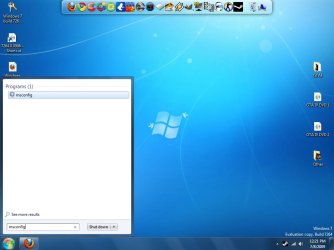
The first screenshot is what it looked like initially.

How to fix:

1) Go to start menu and search for "msconfig" and hit enter.

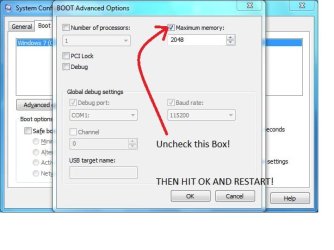
2) Go to the "Boot" tab and click on "Advanced Options".

3) Another menu should pop up. From there, you want to uncheck the box that says "Maximum memory"

4) It will ask you to restart your system. Restart it, and when it boots back up, it will use all your memory.

Look at the attachments for more help! ;)
 

Attachments

  • Ram.jpg
    Ram.jpg
    64.6 KB · Views: 2,761
  • Step1.jpg
    Step1.jpg
    52.5 KB · Views: 1,134
  • Step2.JPG
    Step2.JPG
    38.3 KB · Views: 1,204
  • Step3.jpg
    Step3.jpg
    32.1 KB · Views: 1,838
Last edited:

My Computer My Computer

Computer Manufacturer/Model Number
Me
OS
Windows 7 Ultimate x64 Build 7264
CPU
Intel Core i7-920 (c0/c1) @ 3.8Ghz (190*20)
Motherboard
ASRock x58 Deluxe
Memory
6Gb OCZ Platinum 1600Mhz @ 7-7-7-20
Graphics Card(s)
EVGA GTX 275 SuperClocked
Sound Card
Integrated 7 Channel HD Audio
Monitor(s) Displays
21.5 Inch Acer HD Monitor @ 1920*1080 resolution (16:9)
Hard Drives
Western Digital 640Gb 7200RPM
PSU
xClio GREATPOWER 750W PSU
Case
xClio Windtunnel Super Tower with Mods
Cooling
TRUE 120 Extreme w/ 3k rpm Scythe + many other fans
It would be interesting to understand the significance of both options. I'm very fuzzy on what the ramifications of either option are. Maybe somebody else has some insight?
 

My Computer My Computer

Computer Manufacturer/Model Number
Custom workstation /// Lenovo X61t tablet notebook
OS
Windows 7 RTM x64
CPU
Core i7 980X @ 4.04GHz OC /// Core Duo L7500 @ 1.6GHz
Motherboard
Asus P6T6 WS Revolution ///
Memory
12GB G. Skill @ DDR-1600 OC /// 4GB
Graphics Card(s)
Saphire HD4870 Toxic 1GB /// Intel Mobile GMA X3100
Monitor(s) Displays
Dual Eizo 24" SX2461W /// 12"
Screen Resolution
1920x1200 /// 1400x1050
Hard Drives
Workstation:
5x 750GB Barracuda-11 on Areca ARC-1220;
4x 1.5TB Barracuda-11 on Intel ICH10R;
Volumes:
300GB RAID 0, 2.7TB RAID 10 on Intel;
100GB RAID 0, 1.4TB RAID 10 on Areca ///
Notebook: G.Skill Titan 256GB SSD
PSU
Tagan ITZ 1100
Case
GHS-1500 ///
Cooling
Thermalright IFX-14 + a slew of stealth fans ///
Keyboard
Logitech Edge ///
Mouse
Logitech Wireless Optical Trackball
Internet Speed
5Mbps down / 820Kbps up
Other Info
Main use: photography;
DVD Drive: L.G GGW-H20L Blu-Ray / DVD;
OC: QPI/DRAM @ 1.33v, CPU @ 1.293v, DRAM Bus @ 1.65v, CPU PLL @ 1.88v, CPU mult = 25x, BCLK = 160, DDR3-1604 @ 7-8-7-24
Thanks, Antman. It's a good explanation of the boot memory parameters. I was wondering more from a performance / capacity perspective what the impact was, if there is any advantage on having all memory available at boot time which apparently allows it to reserve 1GB to the hardware.

That's how I'm currently configured. Maybe I'll have to bite the bullet one of these days and play around ...
 

My Computer My Computer

Computer Manufacturer/Model Number
Custom workstation /// Lenovo X61t tablet notebook
OS
Windows 7 RTM x64
CPU
Core i7 980X @ 4.04GHz OC /// Core Duo L7500 @ 1.6GHz
Motherboard
Asus P6T6 WS Revolution ///
Memory
12GB G. Skill @ DDR-1600 OC /// 4GB
Graphics Card(s)
Saphire HD4870 Toxic 1GB /// Intel Mobile GMA X3100
Monitor(s) Displays
Dual Eizo 24" SX2461W /// 12"
Screen Resolution
1920x1200 /// 1400x1050
Hard Drives
Workstation:
5x 750GB Barracuda-11 on Areca ARC-1220;
4x 1.5TB Barracuda-11 on Intel ICH10R;
Volumes:
300GB RAID 0, 2.7TB RAID 10 on Intel;
100GB RAID 0, 1.4TB RAID 10 on Areca ///
Notebook: G.Skill Titan 256GB SSD
PSU
Tagan ITZ 1100
Case
GHS-1500 ///
Cooling
Thermalright IFX-14 + a slew of stealth fans ///
Keyboard
Logitech Edge ///
Mouse
Logitech Wireless Optical Trackball
Internet Speed
5Mbps down / 820Kbps up
Other Info
Main use: photography;
DVD Drive: L.G GGW-H20L Blu-Ray / DVD;
OC: QPI/DRAM @ 1.33v, CPU @ 1.293v, DRAM Bus @ 1.65v, CPU PLL @ 1.88v, CPU mult = 25x, BCLK = 160, DDR3-1604 @ 7-8-7-24
Thanks, Antman. It's a good explanation of the boot memory parameters. I was wondering more from a performance / capacity perspective what the impact was, if there is any advantage on having all memory available at boot time which apparently allows it to reserve 1GB to the hardware.

That's how I'm currently configured. Maybe I'll have to bite the bullet one of these days and play around ...


I say go for it. It's an extremely easy tweak and only takes a second.
 
Last edited:

My Computer My Computer

Computer Manufacturer/Model Number
Me
OS
Windows 7 Ultimate x64 Build 7264
CPU
Intel Core i7-920 (c0/c1) @ 3.8Ghz (190*20)
Motherboard
ASRock x58 Deluxe
Memory
6Gb OCZ Platinum 1600Mhz @ 7-7-7-20
Graphics Card(s)
EVGA GTX 275 SuperClocked
Sound Card
Integrated 7 Channel HD Audio
Monitor(s) Displays
21.5 Inch Acer HD Monitor @ 1920*1080 resolution (16:9)
Hard Drives
Western Digital 640Gb 7200RPM
PSU
xClio GREATPOWER 750W PSU
Case
xClio Windtunnel Super Tower with Mods
Cooling
TRUE 120 Extreme w/ 3k rpm Scythe + many other fans
...It's a good explanation of the boot memory parameters. I was wondering more from a performance / capacity perspective what the impact was, if there is any advantage on having all memory available at boot time...
You misunderstand the function. This setting is applied at boot time, but is in effect for the current session (all subsequent sessions if unchanged).

Any impact on boot timing relative to this setting, measured by stopwatch or any other process, can only be related to allocation or virtual memory tabulation. Windows will not boot any faster or slower in the mean once the system has its unique minimum memory configuration satisfied. In other words, if a machine is perfectly configured with 4 GB RAM (unique minimum memory configuration satisfied), increasing the physical RAM to 8 GB will not reduce boot time.*

*Given that no other hardware changes are deployed.
 
Last edited:
It would be interesting to understand the significance of both options. I'm very fuzzy on what the ramifications of either option are. Maybe somebody else has some insight?

RAMifications, i like it!
 

My Computer My Computer

OS
Windows 7 Ultimate 64Bit
CPU
AMD Athlon x4 650 3Ghz
Motherboard
ASUS
Memory
4gb
Graphics Card(s)
ATI Radeon 3000 series Onboard

My Computer My Computer

Computer Manufacturer/Model Number
Custom workstation /// Lenovo X61t tablet notebook
OS
Windows 7 RTM x64
CPU
Core i7 980X @ 4.04GHz OC /// Core Duo L7500 @ 1.6GHz
Motherboard
Asus P6T6 WS Revolution ///
Memory
12GB G. Skill @ DDR-1600 OC /// 4GB
Graphics Card(s)
Saphire HD4870 Toxic 1GB /// Intel Mobile GMA X3100
Monitor(s) Displays
Dual Eizo 24" SX2461W /// 12"
Screen Resolution
1920x1200 /// 1400x1050
Hard Drives
Workstation:
5x 750GB Barracuda-11 on Areca ARC-1220;
4x 1.5TB Barracuda-11 on Intel ICH10R;
Volumes:
300GB RAID 0, 2.7TB RAID 10 on Intel;
100GB RAID 0, 1.4TB RAID 10 on Areca ///
Notebook: G.Skill Titan 256GB SSD
PSU
Tagan ITZ 1100
Case
GHS-1500 ///
Cooling
Thermalright IFX-14 + a slew of stealth fans ///
Keyboard
Logitech Edge ///
Mouse
Logitech Wireless Optical Trackball
Internet Speed
5Mbps down / 820Kbps up
Other Info
Main use: photography;
DVD Drive: L.G GGW-H20L Blu-Ray / DVD;
OC: QPI/DRAM @ 1.33v, CPU @ 1.293v, DRAM Bus @ 1.65v, CPU PLL @ 1.88v, CPU mult = 25x, BCLK = 160, DDR3-1604 @ 7-8-7-24
Okay, so recently I had a problem with Windows 7 x64 only using 5Gb out of my 6Gb or RAM. I figured it out, and I'll show you what to do if you're having problems.

I am more curious as to how your memory usage became restricted to begin with. :confused:
 
Last edited by a moderator:

My Computer My Computer

OS
XP Pro & Vista Home Premium (x86); Windows Ultimate 7600 x64 Retail
Interesting... My installation of Win 7 x64 RC 7100 already had the Maximum memory box unchecked. Which makes sense actually, since the MSDN article seems to indicate that this box would only be checked to force the OS to use less RAM for testing purposes.
 

My Computer My Computer

Computer Manufacturer/Model Number
Dell E520
OS
Windows 7 Enterprise x64 SP1, Ubuntu 11.04 x64
CPU
Core2Quad Q6700 - 2.66 GHz
Motherboard
Whatever the heck Dell put in there...
Memory
8 Gig Mushkin DDR2 800 MHz
Graphics Card(s)
EVGA NVIDIA 9800GT - 512MB DDR3
Monitor(s) Displays
2 x 19" ViewSonic LCD
Screen Resolution
2560x1024
Hard Drives
1 Intel X25-M 120G SSD, 1 300G VelociRaptor, 1 WD Caviar Black 1TB
PSU
PCPower & Cooling Silencer 500 Watt
Internet Speed
15/2 Roadrunner Cable
Other Info
NOD32 AV - Malwarebytes
I also wanted to add that it wouldn't let me specify my max ram and read as so in Windows...it always read the RAM as less than my max which supports the post about stating that this setting limits RAM and shouldn't be used unless you need to test a low memory scenario. My question is (and please provide a link to the MSDN article for it, I am sure there is one) exactly how is the number of processor setting used? for limiting or does it make the OS use both processors during boot and more during the OS?
 

My Computer My Computer

Computer Manufacturer/Model Number
Compal JFT02 (Custom Build Laptop)
OS
Windows 7 Home Premium x64 - Mac OS X 10.6.4 x64
CPU
Intel Core 2 Duo T9300 2.5 GHz
Motherboard
JFT02
Memory
4GB Kingston DDR2-800
Graphics Card(s)
NVIDIA Geforce 8600M GT (512MB Model)
Sound Card
Realtek HD Audio
Monitor(s) Displays
WUXGA Standard Laptop Display
Screen Resolution
1680*1050
Hard Drives
Toshiba 320GB 5400RPM Laptop HD
PSU
Standard Laptop Power Supply
Case
Standard Laptop Case
Cooling
Standard Laptop Cooling
Keyboard
Standard Laptop 105 Key-Keyboard
Mouse
Synaptics Touchpad
Internet Speed
Verizion Online DSL 3360/864 kbs (dl/up)
...My question is (and please provide a link to the MSDN article for it, I am sure there is one) exactly how is the number of processor setting used?
See this, but he is not completely correct. One reason is: On a computer that has a multicore processor, if the ratio of logical processors to physical sockets is not a power of 2, you cannot install SQL Server 2005.

Also, regarding maximum memory shown...
From MS Support: Note When the physical RAM that is installed on a computer equals the address space that is supported by the chipset, the total system memory that is available to the operating system is always less than the physical RAM that is installed. For example, consider a computer that has an Intel 975X chipset that supports 8 GB of address space. If you install 8 GB of RAM, the system memory that is available to the operating system will be reduced by the PCI configuration requirements. In this scenario, PCI configuration requirements reduce the memory that is available to the operating system by an amount that is between approximately 200 MB and approximately 1 GB. The reduction depends on the configuration.
 
I am more curious as to how your memory usage became restricted to begin with. :confused:

See this, but he is not completely correct. One reason is: On a computer that has a multicore processor, if the ratio of logical processors to physical sockets is not a power of 2, you cannot install SQL Server 2005.

Also, regarding maximum memory shown...
From MS Support: Note When the physical RAM that is installed on a computer equals the address space that is supported by the chipset, the total system memory that is available to the operating system is always less than the physical RAM that is installed. For example, consider a computer that has an Intel 975X chipset that supports 8 GB of address space. If you install 8 GB of RAM, the system memory that is available to the operating system will be reduced by the PCI configuration requirements. In this scenario, PCI configuration requirements reduce the memory that is available to the operating system by an amount that is between approximately 200 MB and approximately 1 GB. The reduction depends on the configuration.

But the MSCONFIG Advanced options appear to be for limiting resources for testing purposes and, also, appear to be settings that are made manually. So my question remains, how was it set initially?
 

My Computer My Computer

OS
XP Pro & Vista Home Premium (x86); Windows Ultimate 7600 x64 Retail
But the MSCONFIG Advanced options appear to be for limiting resources for testing purposes and, also, appear to be settings that are made manually. So my question remains, how was it set initially?
Because he clicked on the check box??? :D

If you mean the original setting, then it would be unchecked, out of the box.
 

My Computer My Computer

Computer Manufacturer/Model Number
Custom workstation /// Lenovo X61t tablet notebook
OS
Windows 7 RTM x64
CPU
Core i7 980X @ 4.04GHz OC /// Core Duo L7500 @ 1.6GHz
Motherboard
Asus P6T6 WS Revolution ///
Memory
12GB G. Skill @ DDR-1600 OC /// 4GB
Graphics Card(s)
Saphire HD4870 Toxic 1GB /// Intel Mobile GMA X3100
Monitor(s) Displays
Dual Eizo 24" SX2461W /// 12"
Screen Resolution
1920x1200 /// 1400x1050
Hard Drives
Workstation:
5x 750GB Barracuda-11 on Areca ARC-1220;
4x 1.5TB Barracuda-11 on Intel ICH10R;
Volumes:
300GB RAID 0, 2.7TB RAID 10 on Intel;
100GB RAID 0, 1.4TB RAID 10 on Areca ///
Notebook: G.Skill Titan 256GB SSD
PSU
Tagan ITZ 1100
Case
GHS-1500 ///
Cooling
Thermalright IFX-14 + a slew of stealth fans ///
Keyboard
Logitech Edge ///
Mouse
Logitech Wireless Optical Trackball
Internet Speed
5Mbps down / 820Kbps up
Other Info
Main use: photography;
DVD Drive: L.G GGW-H20L Blu-Ray / DVD;
OC: QPI/DRAM @ 1.33v, CPU @ 1.293v, DRAM Bus @ 1.65v, CPU PLL @ 1.88v, CPU mult = 25x, BCLK = 160, DDR3-1604 @ 7-8-7-24
This link is placed here for a temporary purpose. It is somewhat related. Earlier today, I stumbled across a possible answer to Muad Dib's question and I am looking for it. I am not at my primary machine and have no link to it right now.
 
Because he clicked on the check box??? :D

If you mean the original setting, then it would be unchecked, out of the box.

Yeah, that is the point I am driving at. I don't think Windows would limit memory usage but if it does I want to know under what circumstances.
 

My Computer My Computer

OS
XP Pro & Vista Home Premium (x86); Windows Ultimate 7600 x64 Retail
See this, but he is not completely correct. One reason is: On a computer that has a multicore processor, if the ratio of logical processors to physical sockets is not a power of 2, you cannot install SQL Server 2005.

Also, regarding maximum memory shown...
From MS Support: Note When the physical RAM that is installed on a computer equals the address space that is supported by the chipset, the total system memory that is available to the operating system is always less than the physical RAM that is installed. For example, consider a computer that has an Intel 975X chipset that supports 8 GB of address space. If you install 8 GB of RAM, the system memory that is available to the operating system will be reduced by the PCI configuration requirements. In this scenario, PCI configuration requirements reduce the memory that is available to the operating system by an amount that is between approximately 200 MB and approximately 1 GB. The reduction depends on the configuration.
Thanks for the info Antman...Windows has always read my memory at the 4GB...thank goodness for that
 

My Computer My Computer

Computer Manufacturer/Model Number
Compal JFT02 (Custom Build Laptop)
OS
Windows 7 Home Premium x64 - Mac OS X 10.6.4 x64
CPU
Intel Core 2 Duo T9300 2.5 GHz
Motherboard
JFT02
Memory
4GB Kingston DDR2-800
Graphics Card(s)
NVIDIA Geforce 8600M GT (512MB Model)
Sound Card
Realtek HD Audio
Monitor(s) Displays
WUXGA Standard Laptop Display
Screen Resolution
1680*1050
Hard Drives
Toshiba 320GB 5400RPM Laptop HD
PSU
Standard Laptop Power Supply
Case
Standard Laptop Case
Cooling
Standard Laptop Cooling
Keyboard
Standard Laptop 105 Key-Keyboard
Mouse
Synaptics Touchpad
Internet Speed
Verizion Online DSL 3360/864 kbs (dl/up)
Thanks for the info, it really helped.

P.S.:

You now, you could have used other Orbit Versions to remove watermark from Desktop..

Lol, sry, it was just that I saw it while you were using it...

(Yes, Orbit plus patch 1.0.4 is released!!!)
 

My Computer My Computer

Computer Manufacturer/Model Number
Dell XPS M1530 - Lenovo Y510p
OS
Windows 8.1 (Update 1) Both Machines
CPU
Intel Core 2 Duo T8300 - 2.4GHZ & Intel Core i7 4700MQ
Memory
4GB @ 800 MHz DDR2 & 16GB @ 1600 MHz DDR3
Graphics Card(s)
Nvidia Geforce 8600m GT & 750m SLI
Sound Card
Sigmatel High Definition Audio 5.1
Monitor(s) Displays
Samsung SyncMaster 2494
Screen Resolution
1680 x 1050 (Laptop) && 1920 x 1080
Hard Drives
Hitachi 320 GB, @7200 RPM
Internet Speed
480/100 KB/s DL/UP
Browser
Opera, Palemoon, Chrome, Internet Explorer 11
Okay,I figured it out, and I'll show you what to do if you're having problems.
3) Another menu should pop up. From there, you want to uncheck the box that says "Maximum memory"

After reading and reading everything on this subject, this FINALLY fix my being able to utilize the full 4 gigs of memory that I have instead of it using only 3 gigs. I had that box "Checked" and I only had 3 gigs available. After unchecking that box I now have My full 4 gigs showing. I must say there is an awful lot of good info in this forum as long as you have the time to read many of these posts.
Thanks much folks.

FyrmnJ in philly
 

My Computer My Computer

Computer Manufacturer/Model Number
White Box
OS
Dual Booting Windows Vista32 bit And Windows 7 Home premium (x64) (build 7600)
CPU
ntel(R) Core(TM)2 Quad CPU Q6700 @ 2.66GHz (4 CPUs),
Motherboard
Board: ASUSTeK Computer INC. P5B-Premium Rev 1.xx Bus Clock:
Memory
3072MB RAM Available OS Memory: 2816MB RAM
Graphics Card(s)
MSI RX1600Pro (MS-V040);VisionTek RADEON X1300 PCI SFF
Sound Card
SoundMAX Integrated Digital HD Audio
Monitor(s) Displays
Envision SP2107W [Monitor] (22.0"vis, s/n B7976JA007061, Jun
Screen Resolution
1680x1050
Hard Drives
PLEXTOR DVDR PX-712A ATA Device [CD-ROM drive]
3.5" format removeable media [Floppy drive]

INTEL SSDSA2MH080G1GC [Hard drive] (80.03 GB) -- drive 2, s/n CVEM926000FK080DGN, rev 045C8820, SMART Status: Healthy
IOMEGA ZIP 100 SCSI Disk Device -- d
PSU
Have 2 PSU's Installed
Case
Coolmaster
Keyboard
Microsoft Internet Keyboard Pro Hot Keys
Mouse
Logitec MX500
Internet Speed
DSL
Other Info
Rollback Rx system repair software by Horizon Data Systems
Texas Instruments 1394 OHCI Compliant Host Controller
Acronis True Image Backup Archive Explorer
HID-compliant device
Microsoft PS/2 Mouse
General Purpose USB Hub
Microsoft Internet Keyboard Pro Composite Device
USB Mass Storage Device
USB Root Hub (7x)
B:\
FyrmnJ

See that search and you did find. Im always impressed by ppl who research their problem and figure it out. Nice going. Its an old trick. Max mem, max cpu, and legacy floppy support kill lots of installs.

Ken
 

My Computer My Computer

Computer Manufacturer/Model Number
HP Pavillion dv-7 1005 Tx
OS
Win 8 Release candidate 8400
CPU
[email protected]
Memory
4 gigs
Graphics Card(s)
Nvidia 9600M
Sound Card
HD built-in
Monitor(s) Displays
17" Wxga
Screen Resolution
1440x900
Cooling
none
Internet Speed
45Mb down 5Mb up
Back
Top