where can I find AMD Away Driver``

Zephryus

New member
Local time
3:31 AM
Messages
4
Location
Houston
I've searchede several forums with no luck so hopefully some one here fdcan irect me to a ownloa site for the win 7 AM Away driver
thanks in advance for any help
Zephryus
 

My Computer My Computer

At a glance

Windows 7 Ultimate x64AMD Phenom 2 X6 1100T 3.32 GOCZ AMB Black Edition DDR3 8 GigSaphire ATI Radeon HD 6970
Computer Manufacturer/Model Number
custom
OS
Windows 7 Ultimate x64
CPU
AMD Phenom 2 X6 1100T 3.32 G
Motherboard
Gigabyte GA-790FXTA-UD5
Memory
OCZ AMB Black Edition DDR3 8 Gig
Graphics Card(s)
Saphire ATI Radeon HD 6970
Sound Card
Creative X-FI Titanium Fatality Pro
Monitor(s) Displays
LG W2753 HDMI
Hard Drives
Several by Seagate and Maxtor
PSU
Antec 1000 watt Truepower Quatro
Case
Antec Performance TX1050B
Cooling
six case fans
Hi Zephryus, Welcome to the forum

You are trying to find a driver that does not exist (at least not from Gigabyte nor Windows 7x64 )

You can however use this to get rid of the exclamation mark that is being displayed in Device Manager;


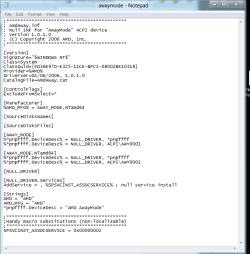
Copy the following and paste in a new text document. Name the document awaymode.inf, and save it to your desktop then go to Device Manager and update the driver, pointing it to the inf file on your desktop

;*******************************************
; AmdAway.inf
; Null INF for "AwayMode" ACPI device
; Version 1.0.1.0
; (C) Copyright 2006 AMD, Inc.
;*******************************************
[Version]
Signature="$WINDOWS NT$"
Class=System
ClassGuid={4D36E97D-E325-11CE-BFC1-08002BE10318}
Provider=%AMD%
DriverVer=04/06/2006, 1.0.1.0
CatalogFile=AmdAway.cat
[ControlFlags]
ExcludeFromSelect=*
[Manufacturer]
%AMD_MFG% = AWAY_MODE,NTamd64
[SourceDisksNames]
[SourceDisksFiles]
[AWAY_MODE]
%*pnpffff.DeviceDesc% = NULL_DRIVER, *pnpffff
%*pnpffff.DeviceDesc% = NULL_DRIVER, ACPI\AWY0001
[AWAY_MODE.NTamd64]
%*pnpffff.DeviceDesc% = NULL_DRIVER, *pnpffff
%*pnpffff.DeviceDesc% = NULL_DRIVER, ACPI\AWY0001
[NULL_DRIVER]
[NULL_DRIVER.Services]
AddService = , %SPSVCINST_ASSOCSERVICE% ; null service install
[Strings]
AMD = "AMD"
AMD_MFG = "AMD"
*pnpffff.DeviceDesc = "AMD AwayMode"
;*******************************************
;Handy macro substitutions (non-localizable)
;*******************************************
SPSVCINST_ASSOCSERVICE = 0x00000002

Capture.PNG Capture1.PNG Capture2.PNG

I copied this from here; Inspiron 531 AMD away mode drivers for windows 7 64 bit? - Microsoft OS Forum - Software & Operating Systems - Dell Community

 

My Computer My Computer

At a glance

Windows 7 Ultimate x64Intel Core i7-2600K16 GB G Skill F3-10666 CL9D-4GBRLATI Radeon HD 6870
Computer Manufacturer/Model Number
Something I threw together
OS
Windows 7 Ultimate x64
CPU
Intel Core i7-2600K
Motherboard
Asus P8P67
Memory
16 GB G Skill F3-10666 CL9D-4GBRL
Graphics Card(s)
ATI Radeon HD 6870
Sound Card
ATI Radeon HDMI / Realtek ALC892
Monitor(s) Displays
2 x 22" standard monitors / LG32LC56v TV to watch films
Screen Resolution
1920 x1080
Hard Drives
2 x OCZ Vertex2 111.79GB
3 x Samsung103SJ
1 x Samsung103UJ
1 x WD3200BEVT
1 x Hitachi5K320-160
PSU
Thermaltake Toughpower Cable Management 750W
Case
Antec 300
Cooling
Noctua NH-U12P SE2 and 5 120mm Case fans
Keyboard
Microsoft Comfort Curve Keyboard 2000
Mouse
Hama M3110 / Logitech M305
Internet Speed
16000
Other Info
I have also used Fedora, Suse, Ubuntu Linux
And all other Windows from 95 to date except ME
thank you Pooch for thr info, but i seem to have a slight problem. the amd away mode line in system devices says there is no driver loaded. Now i installed a older version for xp or something a week or so ago and the away mode went to where it belongs. my issue is now it won't let me install the one the is seen here. Can i uninstall the AMD away mode line from device manager, and hopefully after a reboot it will ask me for a driver then. Is that possible?
Thanks
Zephryus
 

My Computer My Computer

At a glance

Windows 7 Ultimate x64AMD Phenom 2 X6 1100T 3.32 GOCZ AMB Black Edition DDR3 8 GigSaphire ATI Radeon HD 6970
Computer Manufacturer/Model Number
custom
OS
Windows 7 Ultimate x64
CPU
AMD Phenom 2 X6 1100T 3.32 G
Motherboard
Gigabyte GA-790FXTA-UD5
Memory
OCZ AMB Black Edition DDR3 8 Gig
Graphics Card(s)
Saphire ATI Radeon HD 6970
Sound Card
Creative X-FI Titanium Fatality Pro
Monitor(s) Displays
LG W2753 HDMI
Hard Drives
Several by Seagate and Maxtor
PSU
Antec 1000 watt Truepower Quatro
Case
Antec Performance TX1050B
Cooling
six case fans
Hello,

I have an old gigabyte gam59sli-s5 motherboard that had an amd away mode driver i believe on the motherboard dvd. When I upgraded to win7 x64 professional i found that a driver was not being installed and i couldn't figure out what it was. I know you have an ati video card, but I was being helped by nvidia tech support and they somehow gave me a driver that corrected the problem that when installed was something to do with amd away mode, i believe, my board is amd processor based and nvidia chipset, sli graphics supported. I am not at this computer now, but if you want I can look to see if that is the driver you need and where to find it maybe a later version as well.
 

My Computer My Computer

At a glance

Windows 10 x64 ProfessionalAMD FX 6300 Black EditionPatriot Viper 8gbx2 DDR3EVGA Nvidia GeForce GTX 680
Computer type
PC/Desktop
Computer Manufacturer/Model Number
Custom
OS
Windows 10 x64 Professional
CPU
AMD FX 6300 Black Edition
Motherboard
MSI 970a SLI Krait Edition
Memory
Patriot Viper 8gbx2 DDR3
Graphics Card(s)
EVGA Nvidia GeForce GTX 680
Sound Card
Realtek onboard
Monitor(s) Displays
LG, Dynex 24" LCD TV
Screen Resolution
2560x1400 1920x1080
Hard Drives
Western Digital Velociraptor 500 GB WD5000HHTZ
PSU
Corsair CX850M
Case
Azza Solano 1000
Cooling
Extra intake antec 120mm blue led fan, thermaltake frio sile
Keyboard
Thermaltake
Mouse
Saitek Desktop Gaming Mouse
Other Info
ATi TV Wonder Pro PCI tv tuner video capture card,
Roxio Game Capture HD Pro
OK my bad I should've provided this info in my 1rst post \MoBo is a gigabyte GA-790FXTA-UD5 running an AMD Phenom 2 x6 3.3 gig along w/ the ATI Radeon HD 6970 vid card. The chips on the MoBo are by AMD.
I hope this helps
TY
Zephryus
 

My Computer My Computer

At a glance

Windows 7 Ultimate x64AMD Phenom 2 X6 1100T 3.32 GOCZ AMB Black Edition DDR3 8 GigSaphire ATI Radeon HD 6970
Computer Manufacturer/Model Number
custom
OS
Windows 7 Ultimate x64
CPU
AMD Phenom 2 X6 1100T 3.32 G
Motherboard
Gigabyte GA-790FXTA-UD5
Memory
OCZ AMB Black Edition DDR3 8 Gig
Graphics Card(s)
Saphire ATI Radeon HD 6970
Sound Card
Creative X-FI Titanium Fatality Pro
Monitor(s) Displays
LG W2753 HDMI
Hard Drives
Several by Seagate and Maxtor
PSU
Antec 1000 watt Truepower Quatro
Case
Antec Performance TX1050B
Cooling
six case fans
thank you Pooch for thr info, but i seem to have a slight problem. the amd away mode line in system devices says there is no driver loaded. Now i installed a older version for xp or something a week or so ago and the away mode went to where it belongs. my issue is now it won't let me install the one the is seen here. Can i uninstall the AMD away mode line from device manager, and hopefully after a reboot it will ask me for a driver then. Is that possible?
Thanks
Zephryus
If you have an XP driver installed and it is working I would leave it as it is.
I have posted here a null driver, the only thing that it will do is make it look like a driver is loaded so that you do not get an unknown device symbol in Device Manager.

Explanation as I understand it :)

AMD away mode is a power saving measure implemented to some AMD processors. This is a not very well known measure and for good reason as the PC is slowly put into an off like state a device at a time leaving a running PC that looks like it is switched off. Not a very good idea!!
The drivers were provided by some motherboard manufacturers and they were also built into Vista, but are not provided with Windows 7x64 or as I have previously mentioned Gigabyte.
Not having this driver does not affect performance of the PC

If you are experiencing problems with the XP driver you should be able to uninstall it and put a tick in the box to remove the Device driver from the PC when asked during the uninstall. This should then enable you to install the null driver.
 

My Computer My Computer

At a glance

Windows 7 Ultimate x64Intel Core i7-2600K16 GB G Skill F3-10666 CL9D-4GBRLATI Radeon HD 6870
Computer Manufacturer/Model Number
Something I threw together
OS
Windows 7 Ultimate x64
CPU
Intel Core i7-2600K
Motherboard
Asus P8P67
Memory
16 GB G Skill F3-10666 CL9D-4GBRL
Graphics Card(s)
ATI Radeon HD 6870
Sound Card
ATI Radeon HDMI / Realtek ALC892
Monitor(s) Displays
2 x 22" standard monitors / LG32LC56v TV to watch films
Screen Resolution
1920 x1080
Hard Drives
2 x OCZ Vertex2 111.79GB
3 x Samsung103SJ
1 x Samsung103UJ
1 x WD3200BEVT
1 x Hitachi5K320-160
PSU
Thermaltake Toughpower Cable Management 750W
Case
Antec 300
Cooling
Noctua NH-U12P SE2 and 5 120mm Case fans
Keyboard
Microsoft Comfort Curve Keyboard 2000
Mouse
Hama M3110 / Logitech M305
Internet Speed
16000
Other Info
I have also used Fedora, Suse, Ubuntu Linux
And all other Windows from 95 to date except ME
Hello,

Not sure if this will work with your system, since it is provided by nvidia, but you could try it anyways I don't believe it will do harm, either it will install, or not, and if it does install I think it doesn't provide real functionality at all. Please read the the readme.txt file in the folder on description and how to install.
 

Attachments

My Computer My Computer

At a glance

Windows 10 x64 ProfessionalAMD FX 6300 Black EditionPatriot Viper 8gbx2 DDR3EVGA Nvidia GeForce GTX 680
Computer type
PC/Desktop
Computer Manufacturer/Model Number
Custom
OS
Windows 10 x64 Professional
CPU
AMD FX 6300 Black Edition
Motherboard
MSI 970a SLI Krait Edition
Memory
Patriot Viper 8gbx2 DDR3
Graphics Card(s)
EVGA Nvidia GeForce GTX 680
Sound Card
Realtek onboard
Monitor(s) Displays
LG, Dynex 24" LCD TV
Screen Resolution
2560x1400 1920x1080
Hard Drives
Western Digital Velociraptor 500 GB WD5000HHTZ
PSU
Corsair CX850M
Case
Azza Solano 1000
Cooling
Extra intake antec 120mm blue led fan, thermaltake frio sile
Keyboard
Thermaltake
Mouse
Saitek Desktop Gaming Mouse
Other Info
ATi TV Wonder Pro PCI tv tuner video capture card,
Roxio Game Capture HD Pro
Hello,

Not sure if this will work with your system, since it is provided by nvidia, but you could try it anyways I don't believe it will do harm, either it will install, or not, and if it does install I think it doesn't provide real functionality at all. Please read the the readme.txt file in the folder on description and how to install.
This is the null driver that has already been posted but the read me is interesting, thank you for posting :)
 

My Computer My Computer

At a glance

Windows 7 Ultimate x64Intel Core i7-2600K16 GB G Skill F3-10666 CL9D-4GBRLATI Radeon HD 6870
Computer Manufacturer/Model Number
Something I threw together
OS
Windows 7 Ultimate x64
CPU
Intel Core i7-2600K
Motherboard
Asus P8P67
Memory
16 GB G Skill F3-10666 CL9D-4GBRL
Graphics Card(s)
ATI Radeon HD 6870
Sound Card
ATI Radeon HDMI / Realtek ALC892
Monitor(s) Displays
2 x 22" standard monitors / LG32LC56v TV to watch films
Screen Resolution
1920 x1080
Hard Drives
2 x OCZ Vertex2 111.79GB
3 x Samsung103SJ
1 x Samsung103UJ
1 x WD3200BEVT
1 x Hitachi5K320-160
PSU
Thermaltake Toughpower Cable Management 750W
Case
Antec 300
Cooling
Noctua NH-U12P SE2 and 5 120mm Case fans
Keyboard
Microsoft Comfort Curve Keyboard 2000
Mouse
Hama M3110 / Logitech M305
Internet Speed
16000
Other Info
I have also used Fedora, Suse, Ubuntu Linux
And all other Windows from 95 to date except ME
Thanks guys for all the info the only reason I am being persistent is because since I installed an unknown driver for the away mode"device" when ever i restart my computer it goes into "Check-disk" mode.
I don't think that's a normal parameter to be happening.
Any comments?
TY Zephryus
 

My Computer My Computer

At a glance

Windows 7 Ultimate x64AMD Phenom 2 X6 1100T 3.32 GOCZ AMB Black Edition DDR3 8 GigSaphire ATI Radeon HD 6970
Computer Manufacturer/Model Number
custom
OS
Windows 7 Ultimate x64
CPU
AMD Phenom 2 X6 1100T 3.32 G
Motherboard
Gigabyte GA-790FXTA-UD5
Memory
OCZ AMB Black Edition DDR3 8 Gig
Graphics Card(s)
Saphire ATI Radeon HD 6970
Sound Card
Creative X-FI Titanium Fatality Pro
Monitor(s) Displays
LG W2753 HDMI
Hard Drives
Several by Seagate and Maxtor
PSU
Antec 1000 watt Truepower Quatro
Case
Antec Performance TX1050B
Cooling
six case fans
I had this issue, (not the chkdsk part), in the early Beta days with win7 on an old system - my solution was to disable the away mode in the BIOS - not available in all BIOSs but may be worth a look
 

My Computers My Computers

  • At a glance

    Windows 11 Pro x64 [Latest Release and Releas...Ryzen 9 5950X, 3.8 - 5.2 MHz64GB [2 x 32GB] DDR4 3200MHz4GB NVIDIA GEFORCE GTX 1650 Ti
    Computer type
    PC/Desktop
    Computer Manufacturer/Model Number
    ChillBlast - Custom to my design
    OS
    Windows 11 Pro x64 [Latest Release and Release Preview]
    CPU
    Ryzen 9 5950X, 3.8 - 5.2 MHz
    Motherboard
    Asus Prime X570-Pro
    Memory
    64GB [2 x 32GB] DDR4 3200MHz
    Graphics Card(s)
    4GB NVIDIA GEFORCE GTX 1650 Ti
    Sound Card
    On-board SPDIF to 5.1 System + HDMI [5.1 system]
    Monitor(s) Displays
    32" UHD 32 Bit HDR Monitor + 43" UHD 4K 32Bit HDR TV
    Screen Resolution
    2 x 3840 x 2160 @60Hz
    Hard Drives
    1TB M2 SSD OS, 500GB Fast Access SSD, 2 x 8TB Data + Various Externals from 1TB to 4TB, 10TB NAS
    PSU
    NZXT C750 80 PLUS Gold 750W Modular PSU
    Case
    Workstation Case [Matt Black]
    Cooling
    NZXT Kraken X63 280mm CPU Cooler +2x Quiet Case fans
    Keyboard
    Logitech Wireless MX Keys & K400 + others
    Mouse
    Logitech Wireless MX Master 3S
    Internet Speed
    920 MB Down 50 MB Up
    Antivirus
    BitDefender Total Security Pro
    Browser
    Chrome (always run latest Non-Beta)
    Other Info
    Also run ...
    Laptop - Quad 8GB - Windows 10 Pro x64
    Nexus 7 Android tablet x2
    Samsung 10.2" tablet
    Blackview TAB 8 4G Android Tablet c/w Keyboard
    Wacom Intuos Pro Medium Pen Pad
    Wacom Intuos Pro Small Pen Pad
    Wacom Expresskeys Remote
    Loopdeck+ Graphics Controller
    Shuttle Pro v2 Control
  • At a glance

    Windows 11 Pro x64 Latest RPIntel I7 10750H 5.0GHz32GB [2x16GB] DDR4 2933 MHznVidia GTX1650Ti 4 GB GDDR6
    Computer type
    Laptop
    System Manufacturer/Model Number
    Dell XPS 17 10750H
    OS
    Windows 11 Pro x64 Latest RP
    CPU
    Intel I7 10750H 5.0GHz
    Motherboard
    Dell XPS
    Memory
    32GB [2x16GB] DDR4 2933 MHz
    Graphics Card(s)
    nVidia GTX1650Ti 4 GB GDDR6
    Sound Card
    Stock [Realtek] 4 Speaker
    Monitor(s) Displays
    17" IPS UHD+ Infinity Edge Touchscreen
    Screen Resolution
    3840 x 2400
    Hard Drives
    2TB M2 NVMe, 4TB External + various 500GB & 1TB External NVMe (also have access to spinner HDD from
    PSU
    Stock
    Case
    Stock XPS Aluminium & Carbon Fibre
    Cooling
    Stock - Active Fan Control
    Keyboard
    Backlit + Various Logitech
    Mouse
    Stock Track Pad + Logitech MX Trackball
    Internet Speed
    72 MB Down 18MB Up
    Browser
    Chrome
    Other Info
    Also run ...
    Laptop - Quad 8GB - Windows 10 Pro x64
    Nexus 7 Android tablet x2
    10.2" tablet
    Sony Z3 Android Smartphone
    Wacom Intuos Pro Medium Pen Pad
    Wacom Intuos Pro Small Pen Pad
    Wacom Expresskeys Remote
    Loopdeck+ Graphics Controller
    Shuttle Pro v2 Control Pad
    10TB NAS
Pretty sure that that driver is only used on Nvidia chipset based motherboards, and is part of the chipset driver package,


  • Ethernet Driver (v73.30) WHQL
  • Network Management Tools (v73.25)
  • SATAIDE Driver (v11.1.0.43) WHQL
  • SATARAID Driver (v11.1.0.43) WHQL
  • RAIDTOOL Application (v11.1.0.43) WHQL
  • SMBUS Driver (v4.79) WHQL
  • SMU Driver (v2.08) WHQL
  • GPU Driver (v197.13) WHQL
  • PhysX (v9.10.0129)
  • Away Mode Driver (v6.0.6000.115) WHQL
  • Installer (v8.36)
NVIDIA DRIVERS 15.56 WHQL

I'm on my second AMD based motherboard now (780G and 970), and never seen anything in any of the AMD chipset drivers or Device Manager relating to an Away Mode driver. You sure that that is even what you need? Maybe go here,

PCI Vendor and Device Lists

and check the vendor and device ID's and see what it really is.
 

My Computer My Computer

At a glance

Win 7 Ultimate x64FX-8350 @ 4.6 GHz so farADATA XPG V1 Series Black 8GB DDR3 1600Sapphire R9 270x Dual-X
Computer type
PC/Desktop
Computer Manufacturer/Model Number
Me
OS
Win 7 Ultimate x64
CPU
FX-8350 @ 4.6 GHz so far
Motherboard
Asus M5A97 EVO
Memory
ADATA XPG V1 Series Black 8GB DDR3 1600
Graphics Card(s)
Sapphire R9 270x Dual-X
Sound Card
Xonar DGX w/ Corsair Vengence 1300
Monitor(s) Displays
Acer S232HL Abid
Screen Resolution
1920x1080
Hard Drives
120 GB OCZ Vertex 3
500 GB Seagate 7200.12
PSU
Antec Earthwatts 650W Green
Case
Antec Three Hundred
Cooling
Cooler Master 212 EVO
Keyboard
Logitech G510
Mouse
Logitech G500s
Internet Speed
35000/3000
Thanks guys for all the info the only reason I am being persistent is because since I installed an unknown driver for the away mode"device" when ever i restart my computer it goes into "Check-disk" mode.
I don't think that's a normal parameter to be happening.
Any comments?
TY Zephryus
Yes, you never mentioned if you uninstalled the old driver, and if you have does it still do chkdsk? You may possibly have two different problems here.
 

My Computer My Computer

At a glance

Windows 7 Ultimate x64Intel Core i7-2600K16 GB G Skill F3-10666 CL9D-4GBRLATI Radeon HD 6870
Computer Manufacturer/Model Number
Something I threw together
OS
Windows 7 Ultimate x64
CPU
Intel Core i7-2600K
Motherboard
Asus P8P67
Memory
16 GB G Skill F3-10666 CL9D-4GBRL
Graphics Card(s)
ATI Radeon HD 6870
Sound Card
ATI Radeon HDMI / Realtek ALC892
Monitor(s) Displays
2 x 22" standard monitors / LG32LC56v TV to watch films
Screen Resolution
1920 x1080
Hard Drives
2 x OCZ Vertex2 111.79GB
3 x Samsung103SJ
1 x Samsung103UJ
1 x WD3200BEVT
1 x Hitachi5K320-160
PSU
Thermaltake Toughpower Cable Management 750W
Case
Antec 300
Cooling
Noctua NH-U12P SE2 and 5 120mm Case fans
Keyboard
Microsoft Comfort Curve Keyboard 2000
Mouse
Hama M3110 / Logitech M305
Internet Speed
16000
Other Info
I have also used Fedora, Suse, Ubuntu Linux
And all other Windows from 95 to date except ME
Hello,

Not sure if this will work with your system, since it is provided by nvidia, but you could try it anyways I don't believe it will do harm, either it will install, or not, and if it does install I think it doesn't provide real functionality at all. Please read the the readme.txt file in the folder on description and how to install.

Thanks fixed missing driver on win 10 :)
 

My Computer My Computer

At a glance

Windows 7 Professional x64Intel® 4200H @ 2.80Ghz8GB DDR3Intel 4600
Computer Manufacturer/Model Number
ASUS N551JX
OS
Windows 7 Professional x64
CPU
Intel® 4200H @ 2.80Ghz
Motherboard
ASUS
Memory
8GB DDR3
Graphics Card(s)
Intel 4600
Sound Card
Realtek HD Audio
Screen Resolution
1920X1080
Hard Drives
HGST HTS721010A9E630
KINGSTONSMSM151S3128GD
Hello,

Not sure if this will work with your system, since it is provided by nvidia, but you could try it anyways I don't believe it will do harm, either it will install, or not, and if it does install I think it doesn't provide real functionality at all. Please read the the readme.txt file in the folder on description and how to install.

Thank you this worked perfectly under Windows 10 x64!
 

My Computer My Computer

At a glance

Windows 10 x64
Computer type
PC/Desktop
OS
Windows 10 x64
Back
Top